LeadRocks Pros and Cons (2026): An Honest Review for B2B Teams
LeadRocks costs little per credit and sits right inside LinkedIn. But cheap lookups only pay off if the emails get delivered. Here are the pros, the cons and the cases where a different tool fits better.
- LeadRocks is a low-cost B2B contact database and email finder with a Chrome extension that pulls contacts from LinkedIn and Sales Navigator. Its paid plans have been listed from about $29/mo, and it has sold lifetime deals on AppSumo.
- The biggest pros: a low price per credit, a small learning curve, bulk extraction from Sales Navigator, and a built-in email verifier.
- The biggest cons: data quality that varies a lot by region and seniority, credits charged when you look someone up (not when you get a verified result), and a smaller set of integrations than enterprise tools.
- Best fit: solo founders, agencies and small SDR teams who verify every list before sending. It is a poor fit for teams that need guaranteed deliverability or deep CRM automation.
- Rule of thumb: divide the price by the number of deliverable emails you actually get, not by the credit count.
What is LeadRocks?#
LeadRocks is a B2B lead-generation tool. It combines a searchable database of professional contacts with an email finder and a verifier. You can search it in the web app by job title, industry, company size and location. You can also use the Chrome extension on LinkedIn or Sales Navigator to pull names, emails and sometimes phone numbers straight from the profiles you are looking at.
LeadRocks sells itself on price. Where larger platforms push you toward annual contracts, LeadRocks offers a free tier and cheap monthly plans. It has also run lifetime deals, which is why many freelancers and small agencies have an account.
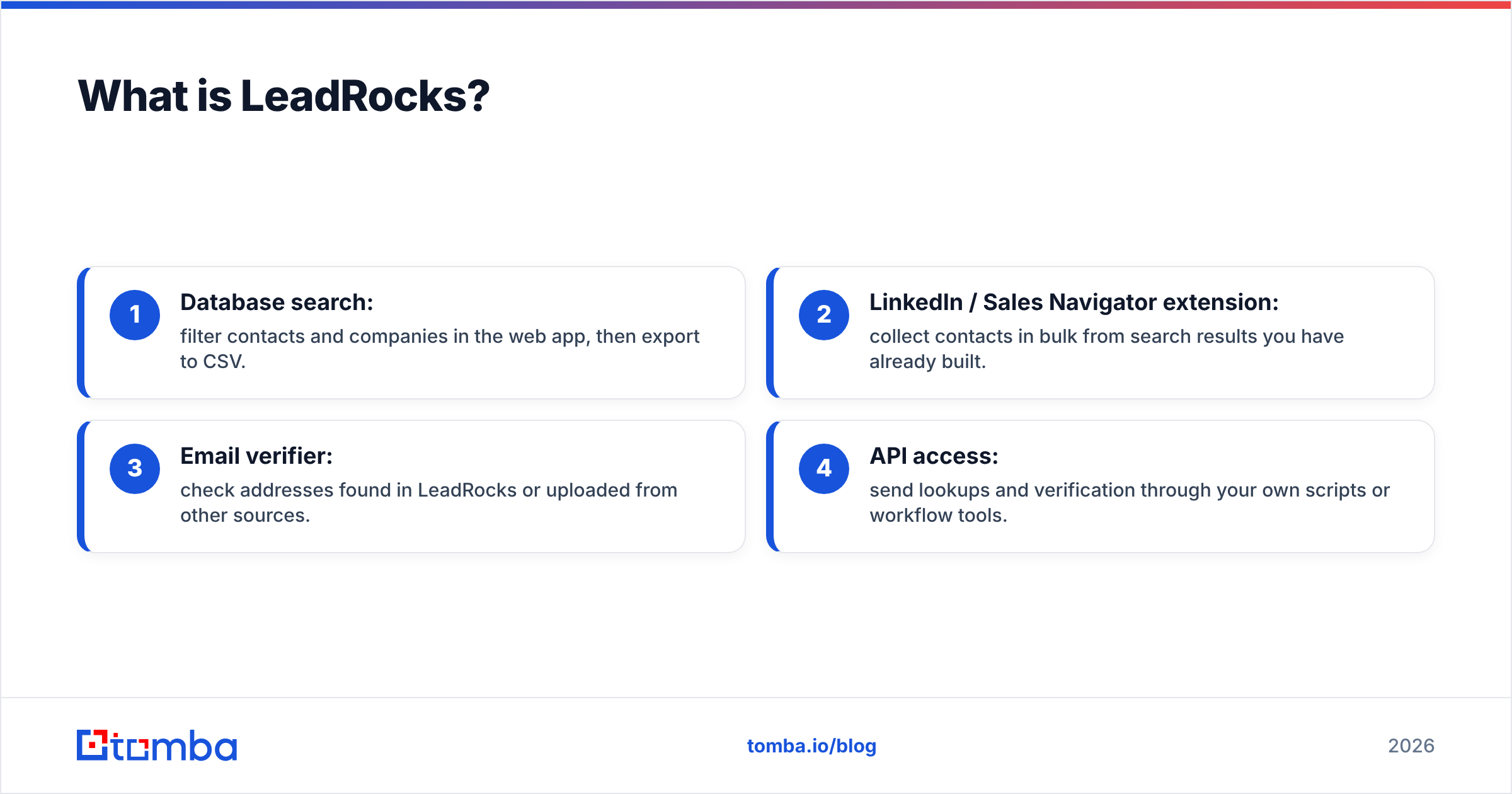
The product has four main parts:
- Database search: filter contacts and companies in the web app, then export to CSV.
- LinkedIn / Sales Navigator extension: collect contacts in bulk from search results you have already built.
- Email verifier: check addresses found in LeadRocks or uploaded from other sources.
- API access: send lookups and verification through your own scripts or workflow tools.
You can see the current feature set on the official LeadRocks website. Treat any feature list in a review, this one included, as a snapshot. Small vendors change their product quickly.
How much does LeadRocks cost in 2026?#
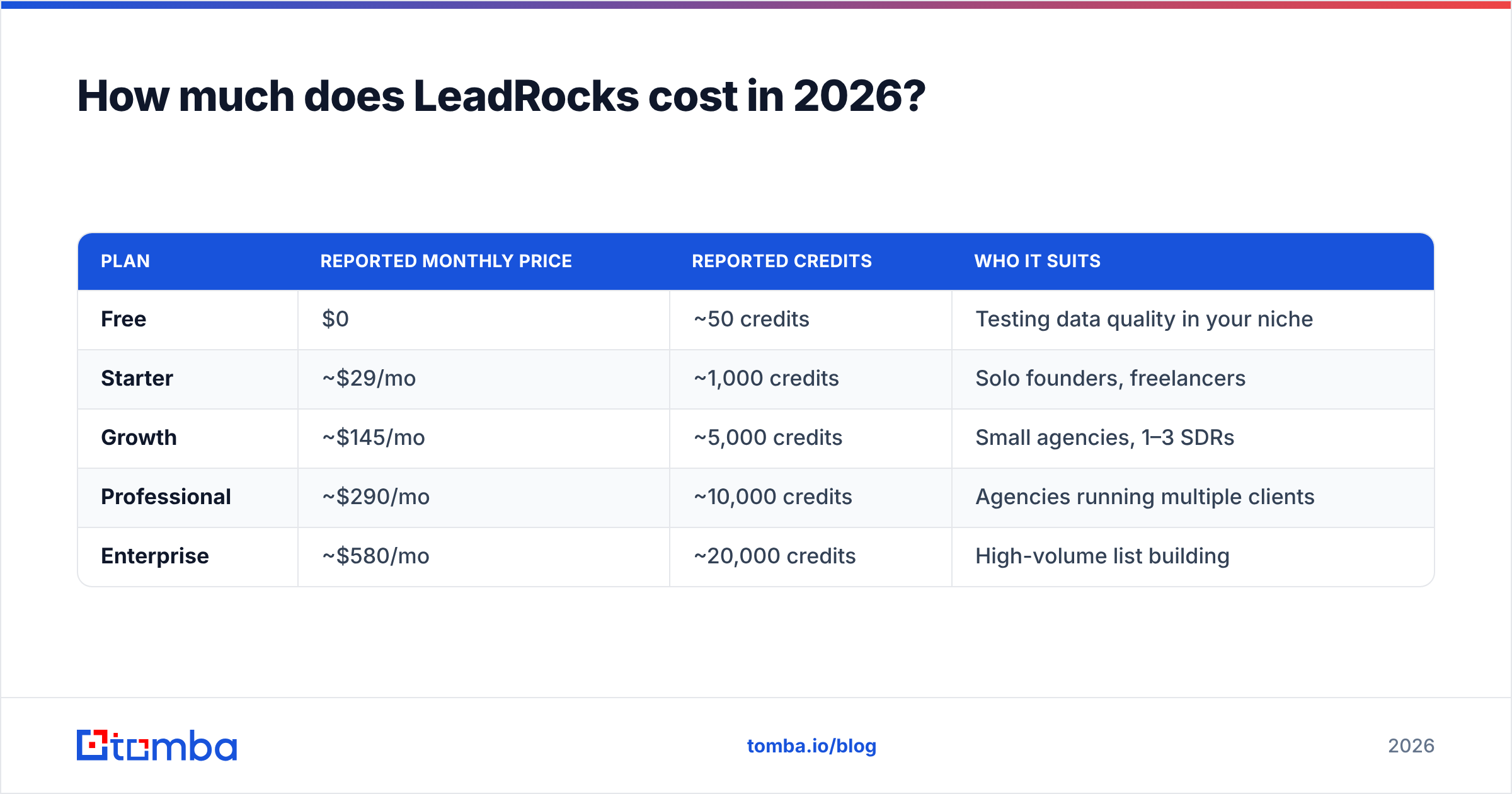
LeadRocks uses credits, and its tiers have changed more than once. The breakdown below is the most recently reported public pricing. Check the vendor's pricing page before you buy.
| Plan | Reported monthly price | Reported credits | Who it suits |
|---|---|---|---|
| Free | $0 | ~50 credits | Testing data quality in your niche |
| Starter | ~$29/mo | ~1,000 credits | Solo founders, freelancers |
| Growth | ~$145/mo | ~5,000 credits | Small agencies, 1–3 SDRs |
| Professional | ~$290/mo | ~10,000 credits | Agencies running multiple clients |
| Enterprise | ~$580/mo | ~20,000 credits | High-volume list building |
On paper, that works out to about 3 cents per contact on the Starter plan, which is cheap. The catch is in how credits are used. Several reviewers point out that LeadRocks charges a credit when you look up a contact, whether or not the email turns out to be valid. If only half of what you pull passes verification, your real cost per usable email doubles.
Here is a simple way to see it. A cheap credit is like a cheap lottery ticket. The price per ticket matters less than how many tickets win.
What are the main pros of LeadRocks?#
LeadRocks does several things well, especially if you are on a tight budget.
1. Low entry price. A free tier plus a Starter plan around $29/mo lets you try it without a contract. For a founder doing their own outbound, that is a real advantage over tools that start at several hundred dollars a month.
2. Fast Sales Navigator extraction. If you already build lead lists in Sales Navigator, the extension lets you pull a whole search page of contacts in a few clicks. Emails and phones come back in the same step. For LinkedIn outreach workflows, this is the feature people praise most.
3. Easy to learn. The interface is simple. Most users can run a search and export a CSV in the first session without onboarding calls or training.
4. Verifier included. You don't need a separate verification subscription to clean a basic list, and you can verify emails from outside LeadRocks too.
5. Lifetime deal economics. If you bought a lifetime deal, your cost per month drops close to zero over time. Keep in mind that lifetime deals usually come with monthly credit limits and may not include newer features.
6. API available. Technical teams can connect LeadRocks lookups to their own enrichment scripts instead of exporting CSVs by hand.

What are the main cons of LeadRocks?#
Most of the weaknesses come from one tradeoff: a low price usually means less money spent on data collection and quality control.
1. Accuracy varies. LeadRocks advertises high accuracy, but reviewers who ran exported lists through an outside verifier report much lower valid-email rates. Results depend heavily on region, industry and seniority. North American tech contacts tend to perform better than mid-market manufacturing contacts in Europe, for example. Your results will depend on your niche, so run your own test.
2. You pay for lookups, not results. Because credits are used whether or not an email is valid, bad matches cost you twice. You lose the credit, and you then pay again to find the contact somewhere else.
3. Data freshness. People change jobs often, so any B2B database goes out of date quickly. LeadRocks does not publish detailed refresh schedules. Expect some stale titles and people who have already left their company.
4. Few native integrations. Enterprise platforms offer two-way CRM sync, sequencing and intent data. LeadRocks mostly works through CSV export and its API. If you rely on HubSpot or Salesforce automation, you will need middleware or manual imports.
5. Catch-all handling. Many B2B domains accept every address, so a standard SMTP check can't confirm whether a mailbox exists. Tools that don't clearly label catch-all results leave you guessing. Sending to unconfirmed catch-all addresses is a common way to damage your sender reputation.
6. Mixed support reviews. Reviews on G2 and Capterra describe a range of support experiences. That is common for small vendors, but it matters if you have a campaign deadline.
How does LeadRocks accuracy compare to other email finders?#
Accuracy is the number that matters most, and vendors' own claims are the least reliable source for it. The only fair test is the same list of real contacts, run through each tool, and then checked by an independent verifier.

Keep three points in mind when you read any accuracy benchmark, including the one above:
- "Found" and "deliverable" are different numbers. A tool can return an email for 90% of contacts while only 60% of those emails are deliverable.
- Catch-all results should be reported separately. Counting catch-all addresses as "valid" makes the numbers look better than they are.
- Test in your own market. A tool that performs well on US SaaS contacts may perform poorly on DACH logistics companies.
A high bounce rate does more than waste credits. Mailbox providers track your bounces, and a rising hard-bounce rate is one of the fastest ways to hurt your email deliverability. Background on how bounce messages work is available on Wikipedia.
Is LeadRocks better than Tomba?#
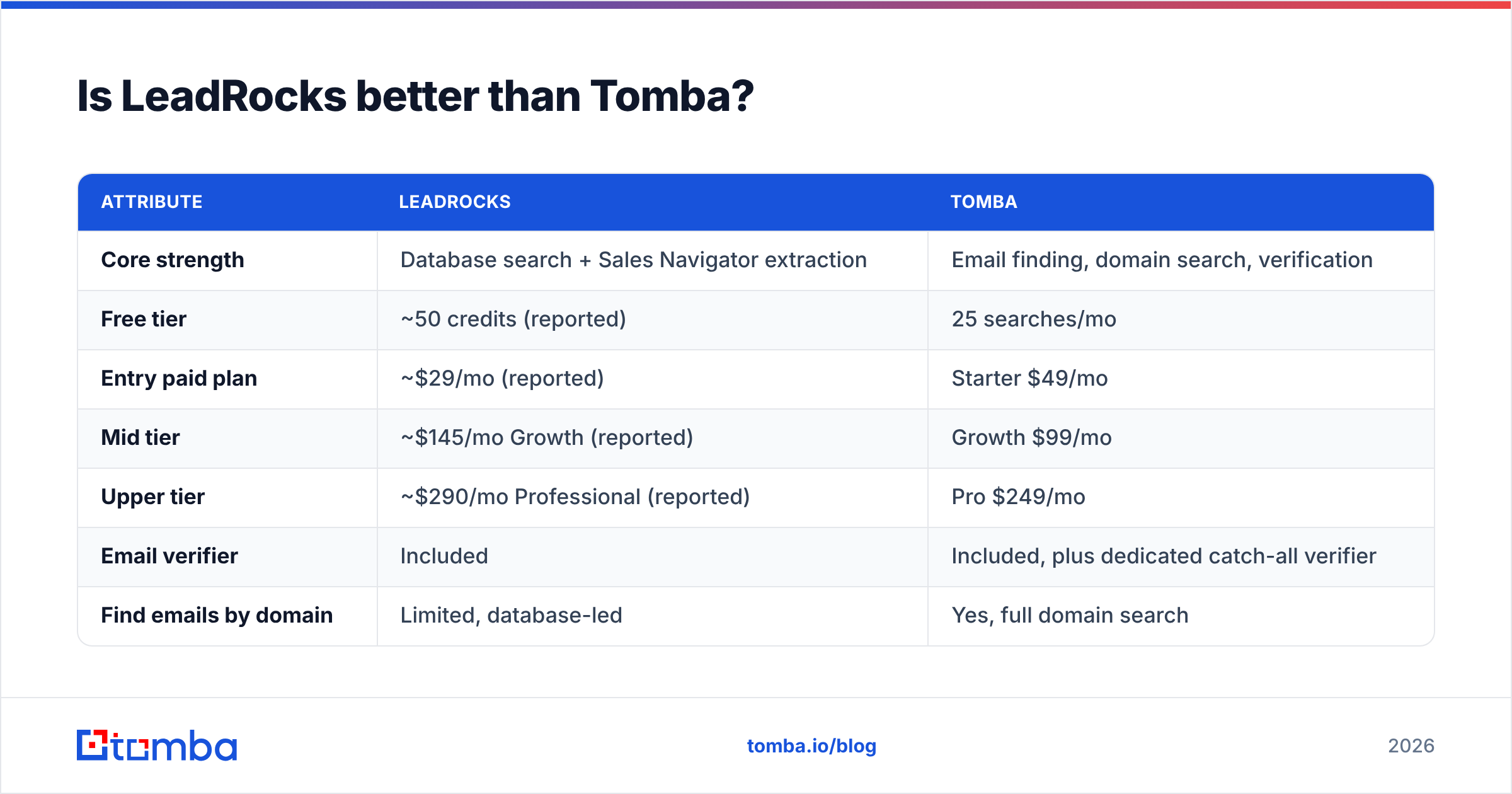
They are built for different jobs. LeadRocks focuses on prospect-list building, meaning search plus LinkedIn extraction. Tomba focuses on finding and verifying emails, with domain search, catch-all handling and enrichment tools around that core.

| Attribute | LeadRocks | Tomba |
|---|---|---|
| Core strength | Database search + Sales Navigator extraction | Email finding, domain search, verification |
| Free tier | ~50 credits (reported) | 25 searches/mo |
| Entry paid plan | ~$29/mo (reported) | Starter $49/mo |
| Mid tier | ~$145/mo Growth (reported) | Growth $99/mo |
| Upper tier | ~$290/mo Professional (reported) | Pro $249/mo |
| Email verifier | Included | Included, plus dedicated catch-all verifier |
| Find emails by domain | Limited, database-led | Yes, full domain search |
| Phone data | Some, via extension | Separate phone finder and validator |
| Integrations | CSV, API | API, CLI, Sheets, Excel, HubSpot, Salesforce, Zapier, more |
| Lifetime deal | Has been offered | No |
| Best for | Budget list building from LinkedIn | Accuracy-sensitive outbound and enrichment |
LeadRocks usually wins on price per credit at the entry level and on the speed of Sales Navigator extraction. Tomba is usually the better choice when you already know the company and person and need a deliverable address: domain search, a dedicated email verifier, and catch-all checks. It also matters if you want lookups running inside your existing tools rather than as CSV exports. Full tier details are on the Tomba pricing page.
Many teams use both. They build rough lists in whatever database is cheapest, then run every row through a stronger finder and verifier before anything goes into a sequence.
Who should use LeadRocks?#
LeadRocks makes sense for a specific group of buyers:
- Solo founders and freelancers doing a few hundred lookups a month, where cost matters more than a few extra bounces.
- Agencies with a lifetime deal, since the marginal cost per lookup is close to zero.
- Sales Navigator users who have already built their filtered lists and only need contact details attached.
- Teams that verify every list anyway, which reduces the accuracy risk.
It is a weaker choice for:
- Teams sending high volume from a primary domain, where one bad batch can damage deliverability for weeks.
- RevOps teams that need CRM sync, field mapping and automatic enrichment on new records.
- Regulated industries, where you need clear documentation of where data comes from and how it is handled under GDPR.
- Buyers targeting niche regions, where database coverage tends to be thin.

How should you test LeadRocks before paying?#
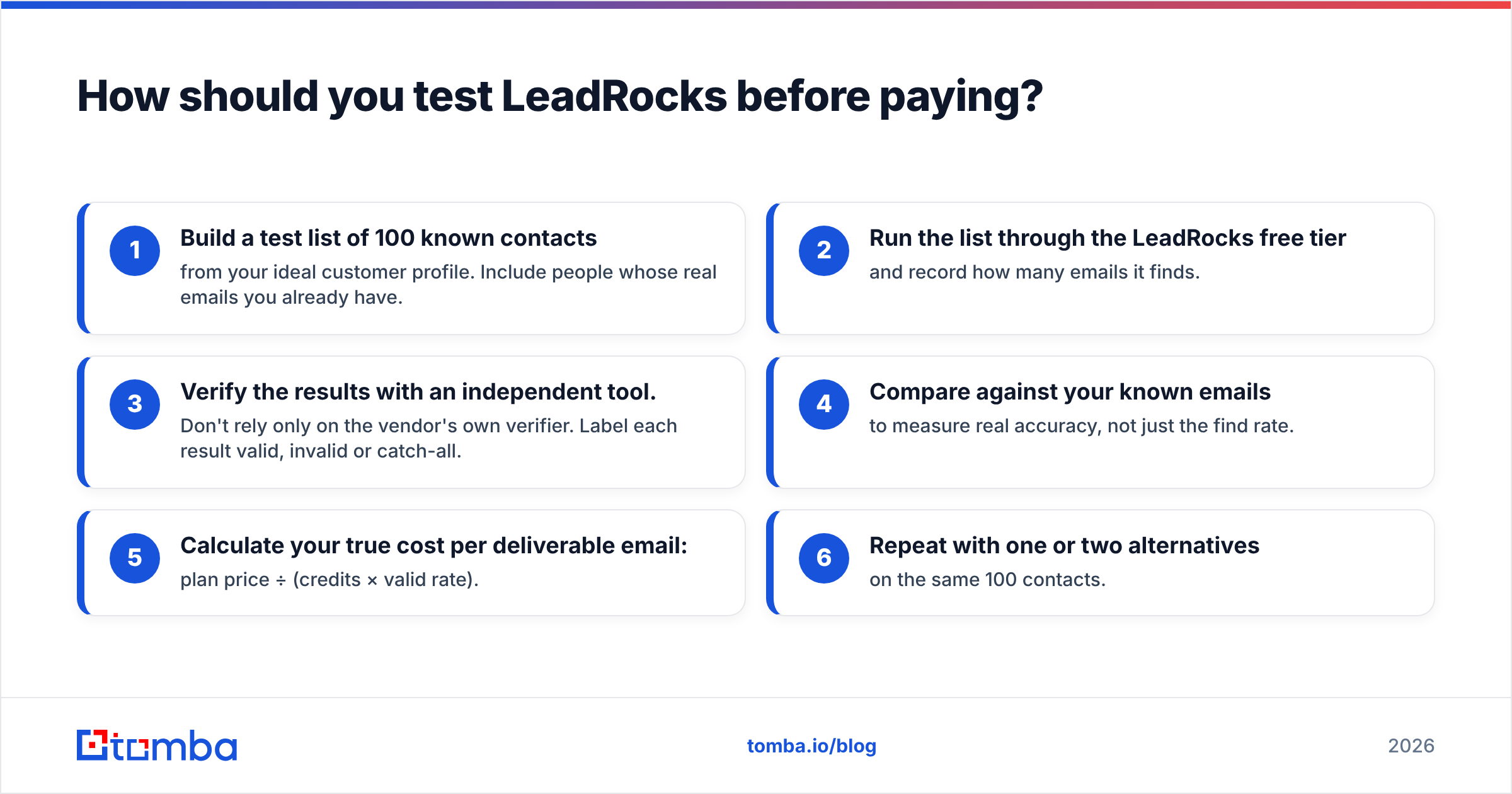
Don't decide from reviews alone. Test it directly with this process:
- Build a test list of 100 known contacts from your ideal customer profile. Include people whose real emails you already have.
- Run the list through the LeadRocks free tier and record how many emails it finds.
- Verify the results with an independent tool. Don't rely only on the vendor's own verifier. Label each result valid, invalid or catch-all.
- Compare against your known emails to measure real accuracy, not just the find rate.
- Calculate your true cost per deliverable email: plan price ÷ (credits × valid rate).
- Repeat with one or two alternatives on the same 100 contacts.
This takes about an hour. It is the most reliable way to choose, because it measures data quality in your market instead of an average across markets you don't sell to.
What are the best LeadRocks alternatives?#
If your test shows weak coverage in your niche, these options are worth a look, depending on what you need most:
- For accuracy-first email finding: Tomba's email finder, domain search and verifier, especially if you already know which companies you are targeting.
- For all-in-one prospecting plus sequencing: Apollo-style platforms that combine a database with an outreach engine. Pricing climbs as you add seats.
- For LinkedIn-first workflows: extension-based tools like Wiza or ContactOut, which, like LeadRocks, are built around Sales Navigator.
- For verification only: dedicated verifiers if you already have a data source and just need to clean lists.
Tomba also offers a LinkedIn-side workflow. Its LinkedIn finder returns emails from profile URLs, and bulk email finder uploads cover larger lists.
What is the verdict on LeadRocks pros and cons?#
LeadRocks is a fair deal if you know its limits. You get cheap credits, a fast Sales Navigator extension and a basic verifier at a price few competitors match. In return, accuracy varies by market, credits are used on lookups that fail, and integrations are thin.
If your outbound volume is small and you verify every row, LeadRocks can be a good budget choice. If your pipeline depends on a clean sending domain and high deliverability, look at cost per deliverable email instead of cost per credit. On that measure, the cheapest tool is often not the cheapest option.
If you want to see how many of your prospects' addresses you can actually reach, try the Tomba Email Finder. Search by name and company domain or across a whole domain, verify each result as you go, and start with 25 free searches a month before you pay for anything.
Related guides#
// get started
Find, verify and enrich your first contacts today
Start on the free plan with 25 searches a month, then scale when your team is ready.
Free plan · No credit card required · GDPR & CCPA
// about the author