LeadRocks Reviews 2026: Pricing, Accuracy, Pros, Cons and Verdict
LeadRocks costs less than almost any B2B contact database. Before you buy, here's what reviews say about its data quality, how its credits really work, and when an alternative is the better choice.
- LeadRocks is a low-cost B2B contact database. It has a LinkedIn Chrome extension, a search dashboard with filters, built-in email verification and basic email campaigns.
- The price is the main draw. Third-party listings show a free tier with 50 credits a month and a Starter plan around $29/mo for 1,000 credits. There are also AppSumo lifetime deals.
- Reviews are mixed on accuracy. Chrome Web Store ratings are high. Independent testers and some buyers report more bounces and blank results than the vendor's "98%+" accuracy claim would suggest.
- Credits can go further or burn faster than you expect. Lookups that return a weak or unusable email can still cost you, so your real cost per usable lead can be well above the list price.
- Verdict: LeadRocks works for budget teams building lists from LinkedIn if they verify every email before sending. If deliverability or catch-all handling matters, pair it with a dedicated verifier or use a specialist email finder.
What is LeadRocks?#
LeadRocks is a B2B contact data platform. It says its database holds more than 100 million records, including work emails, phone numbers and LinkedIn profiles. You can reach that data in two main ways:
- The web dashboard. You filter by job title, location, company name, industry and headcount, then export matching contacts to CSV.
- The Chrome extension. "LeadRocks for LinkedIn" adds a panel to LinkedIn and Sales Navigator pages. It shows emails and phone numbers for the profile or search results you're looking at.
On top of the data, LeadRocks includes an email verification module (upload a list, validate it, download the results) and a lightweight campaign tool with scheduled follow-ups. This makes it more of a small all-in-one than a pure email finder. It isn't trying to be a full sales engagement platform like Outreach or Apollo, though.
Most people first heard of LeadRocks through its AppSumo listing. Lifetime deals there brought in a large group of solo founders, agencies and small SDR teams. That history shapes the reviews, and you should keep it in mind as you read them.
How do LeadRocks reviews break down?#
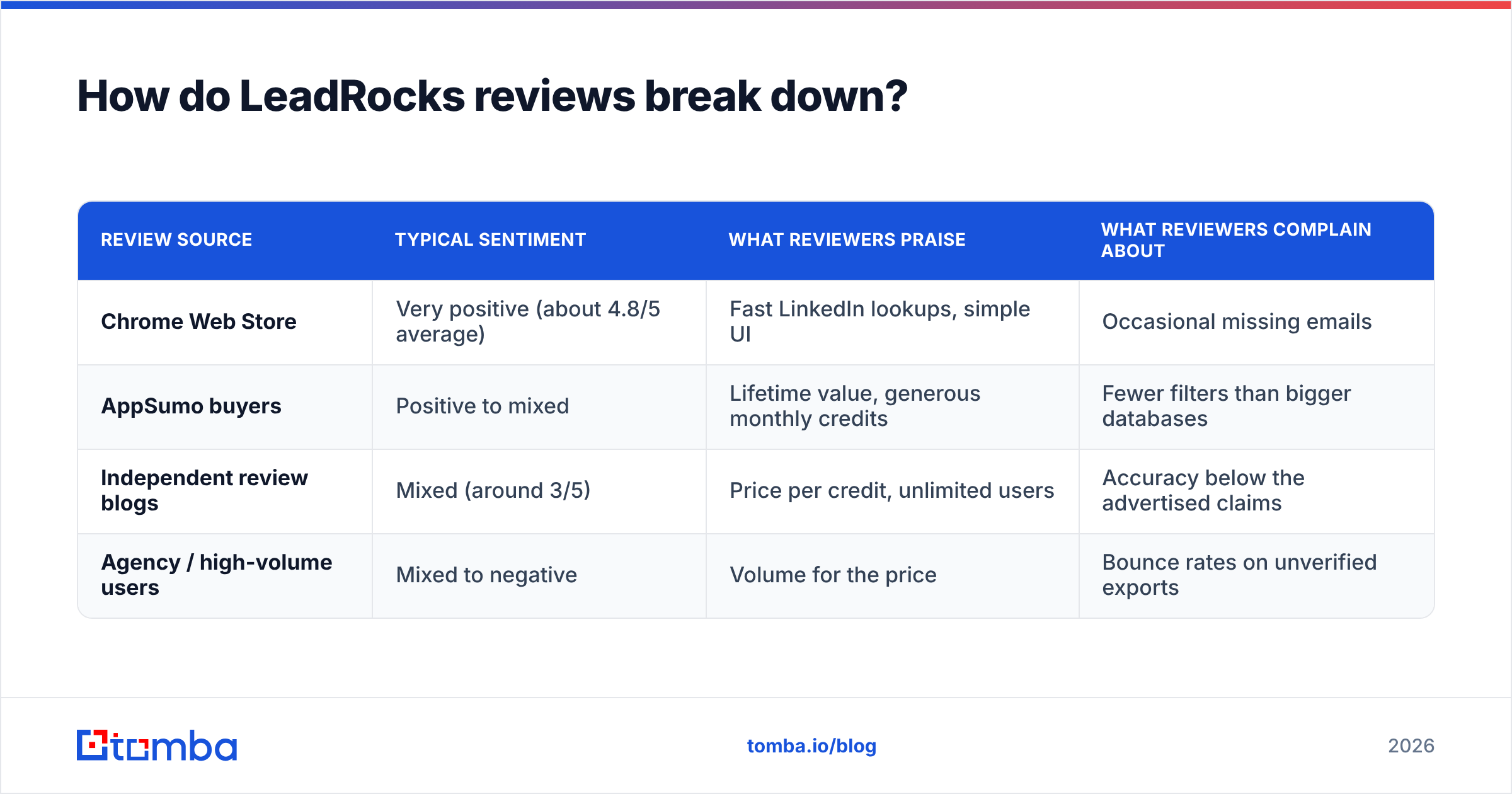
When you read LeadRocks reviews across the Chrome Web Store, AppSumo and independent blogs, they follow a clear pattern. The more money and deliverability risk the reviewer has at stake, the lower the score.
| Review source | Typical sentiment | What reviewers praise | What reviewers complain about |
|---|---|---|---|
| Chrome Web Store | Very positive (about 4.8/5 average) | Fast LinkedIn lookups, simple UI | Occasional missing emails |
| AppSumo buyers | Positive to mixed | Lifetime value, generous monthly credits | Fewer filters than bigger databases |
| Independent review blogs | Mixed (around 3/5) | Price per credit, unlimited users | Accuracy below the advertised claims |
| Agency / high-volume users | Mixed to negative | Volume for the price | Bounce rates on unverified exports |
Why the gap? Chrome extension reviewers are mostly rating the experience: click a profile, see an email. That part works well. Reviewers who sent campaigns to large exports are rating the outcome, meaning how many of those emails actually delivered. Your experience will depend on which kind of user you are.
What features does LeadRocks actually include?#
These are the parts of the product that matter when you're deciding whether to buy:
- LinkedIn extension. This is the main feature and the one most reviewers like. It works on standard LinkedIn and Sales Navigator, and scanning a search results page is quick.
- Database search. You get the standard firmographic and role filters. It covers most SMB prospecting, but a few reviewers say they missed technographic, intent or funding filters that heavier platforms offer.
- Email verification. Having a verifier in the same place is useful. How many verification credits you get depends on your plan.
- Campaigns. You can send basic sequences with follow-ups. It's fine for low volume. Anyone running serious outbound will still want a dedicated sending tool with warmup, inbox rotation and deliverability monitoring.
- Unlimited users. Paid tiers, and even the free tier in some listings, don't charge per seat. That's rare and useful for agencies.
How much does LeadRocks cost in 2026?#
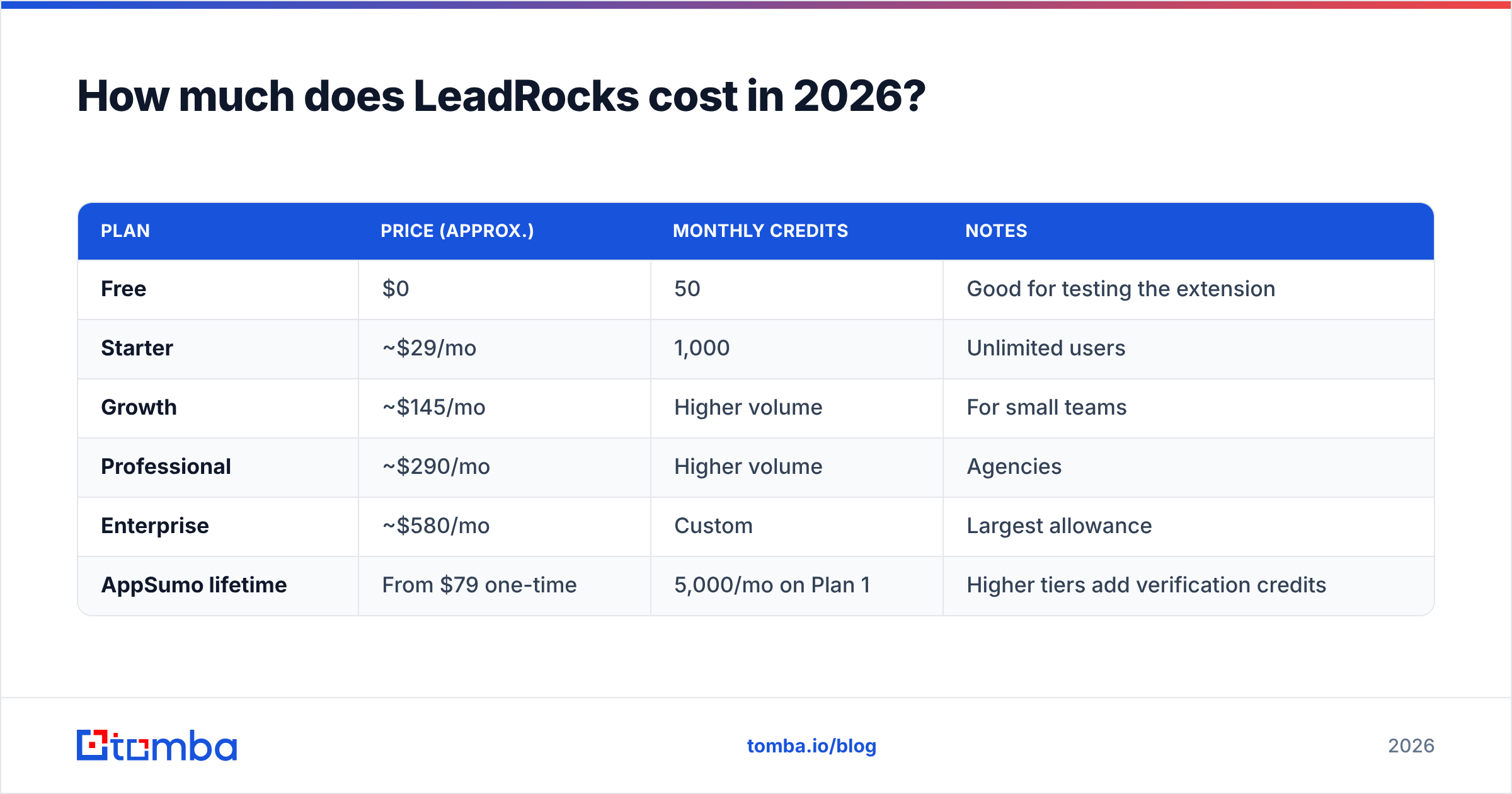
LeadRocks pricing is simple and inexpensive. The figures below come from third-party pricing listings at the time of writing. Check them on the LeadRocks site before you buy, because plans and credit amounts change.
| Plan | Price (approx.) | Monthly credits | Notes |
|---|---|---|---|
| Free | $0 | 50 | Good for testing the extension |
| Starter | ~$29/mo | 1,000 | Unlimited users |
| Growth | ~$145/mo | Higher volume | For small teams |
| Professional | ~$290/mo | Higher volume | Agencies |
| Enterprise | ~$580/mo | Custom | Largest allowance |
| AppSumo lifetime | From $79 one-time | 5,000/mo on Plan 1 | Higher tiers add verification credits |
At about $29 for 1,000 credits, LeadRocks is one of the cheapest ways to get contact data per record. The catch is in how credits are spent.
What's the hidden cost in LeadRocks credits?#
Several reviewers report that credits get used on lookups that return an invalid email, a catch-all guess or no email at all. One credit therefore doesn't equal one usable lead. Independent reviewers estimate the effective cost per usable, deliverable contact at roughly 2–5x the list price, depending on your industry and region.
Here's what that means in practice. Say you export 1,000 contacts and 30% of them bounce or come back blank. Your "$0.029 per lead" is really about $0.041. If you also send to the bad addresses before verifying them, the bounces hurt your sender reputation, and that costs far more than the data did.
How accurate is LeadRocks data?#
Accuracy is where LeadRocks reviews disagree most. The vendor advertises accuracy above 98%. Independent testers have reported much lower hit rates in their own samples. Those tests are small and some come from competing vendors, so don't read any single number as definitive.
Three things decide how accurate LeadRocks will be for you:
- Region and company size. Most B2B databases have better coverage of US tech and SaaS companies than of EMEA mid-market or non-tech SMBs. LeadRocks is no exception.
- Catch-all domains. Many companies accept mail for any address on their domain. A database can mark those emails "valid" even though nobody reads them. If your market has a lot of catch-all domains, accuracy claims tend to be inflated.
- Data freshness. People change jobs constantly. A database that doesn't refresh records often will slowly fill with emails for people who have left.

Whatever tool you use, the fix is the same: verify before you send. Run every export through the LeadRocks built-in verifier or a dedicated email verifier that handles catch-all domains and gives you a confidence score, not only a valid/invalid flag.
What are LeadRocks' pros and cons?#
Pros
- Very low cost per credit, especially on AppSumo lifetime plans
- Unlimited users, which suits agencies and small teams
- Fast, easy LinkedIn and Sales Navigator extension
- Verification and basic campaigns in the same tool
- Free tier generous enough for a real test
Cons
- Accuracy reports vary a lot and fall short of the advertised claim in some independent tests
- Credits can be spent on lookups that don't produce a usable email
- Fewer filters than enterprise databases (limited intent and technographic data)
- The campaign module isn't a replacement for a real outbound platform
- Heavy reliance on LinkedIn workflows, which matters if your ICP isn't active there
Is LeadRocks better than Tomba, Apollo, or other alternatives?#
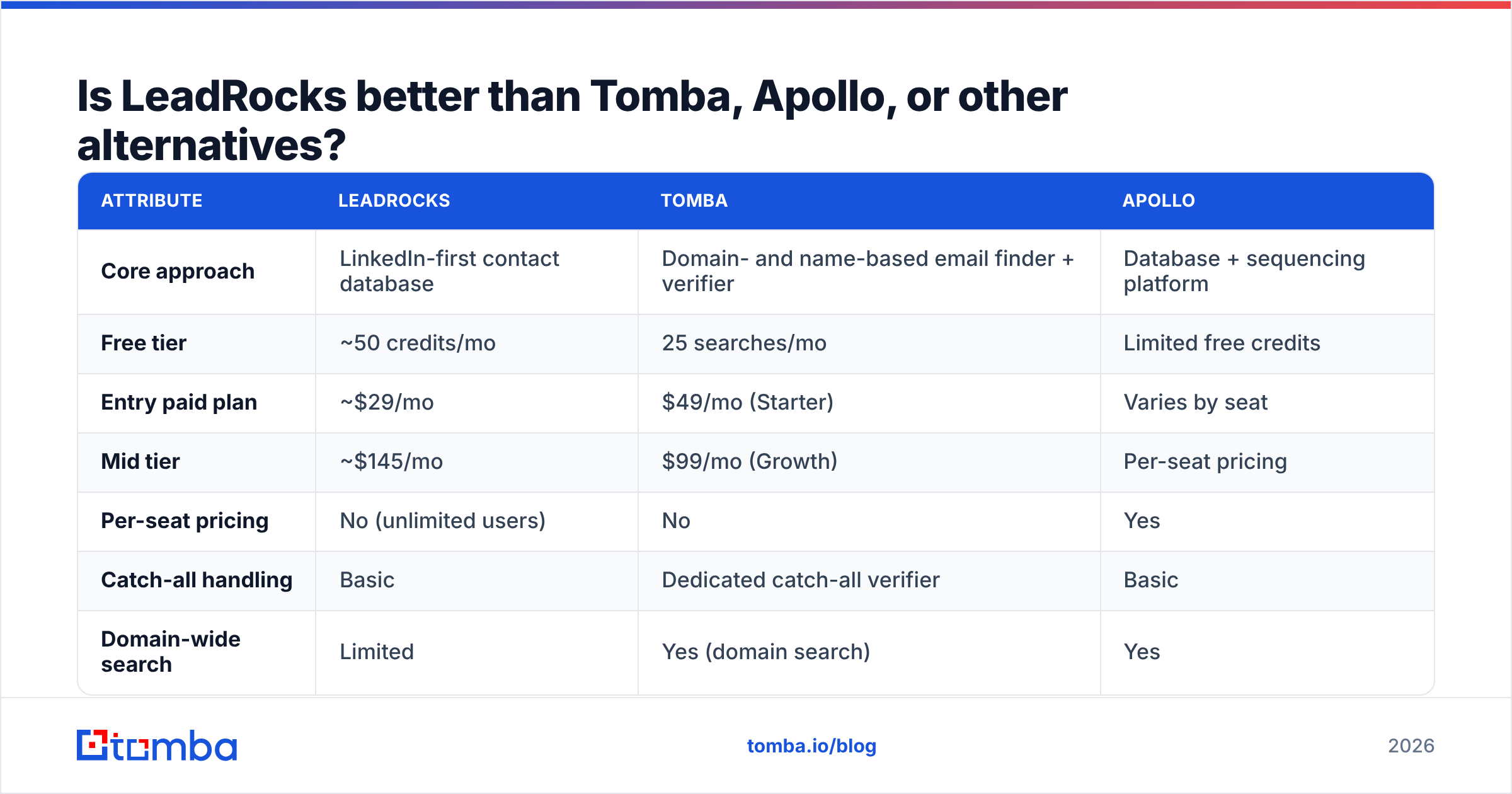
It depends on what you're buying. LeadRocks is a cheap, LinkedIn-first database. Tomba is a domain-first email finder and verifier. Apollo is a full database plus engagement platform. Here's how they compare for list building:
| Attribute | LeadRocks | Tomba | Apollo |
|---|---|---|---|
| Core approach | LinkedIn-first contact database | Domain- and name-based email finder + verifier | Database + sequencing platform |
| Free tier | ~50 credits/mo | 25 searches/mo | Limited free credits |
| Entry paid plan | ~$29/mo | $49/mo (Starter) | Varies by seat |
| Mid tier | ~$145/mo | $99/mo (Growth) | Per-seat pricing |
| Per-seat pricing | No (unlimited users) | No | Yes |
| Catch-all handling | Basic | Dedicated catch-all verifier | Basic |
| Domain-wide search | Limited | Yes (domain search) | Yes |
| Built-in sequencing | Basic campaigns | No (integrates with senders) | Yes, advanced |
| Best for | Budget LinkedIn prospecting | Accurate email discovery + verification | All-in-one outbound teams |

A few honest notes on the other options:
- Apollo wins if you want database, sequencing and dialer in one place and you have the budget for per-seat pricing.
- BookYourData is a strong choice if you want to buy pre-built, verified lists with a pay-as-you-go model. Many teams like its accuracy-refund approach.
- Tomba fits best when your workflow starts from a company domain or a name + company pair and you care about verifying each address before it goes into a sequence. Its catch-all verifier addresses one of the most common complaints in LeadRocks reviews.
LeadRocks is still the cheapest of the group per credit. If your team lives in Sales Navigator and verifies everything anyway, that price advantage is real.
Who should use LeadRocks?#
LeadRocks is a good fit if you:
- Build prospect lists mostly from LinkedIn or Sales Navigator
- Run on a tight budget, or already own an AppSumo lifetime plan
- Have several people or clients who need access without per-seat fees
- Already run a verification step before every send
LeadRocks is a weaker fit if you:
- Send high volume from domains where bounce rates hurt deliverability
- Sell into markets full of catch-all domains, such as enterprise, finance or government
- Need intent data, technographics or deep account filters
- Start from company domains rather than LinkedIn profiles
How do you get the most out of LeadRocks if you buy it?#
If you decide LeadRocks is right for you, this workflow gets the most usable leads out of each credit:
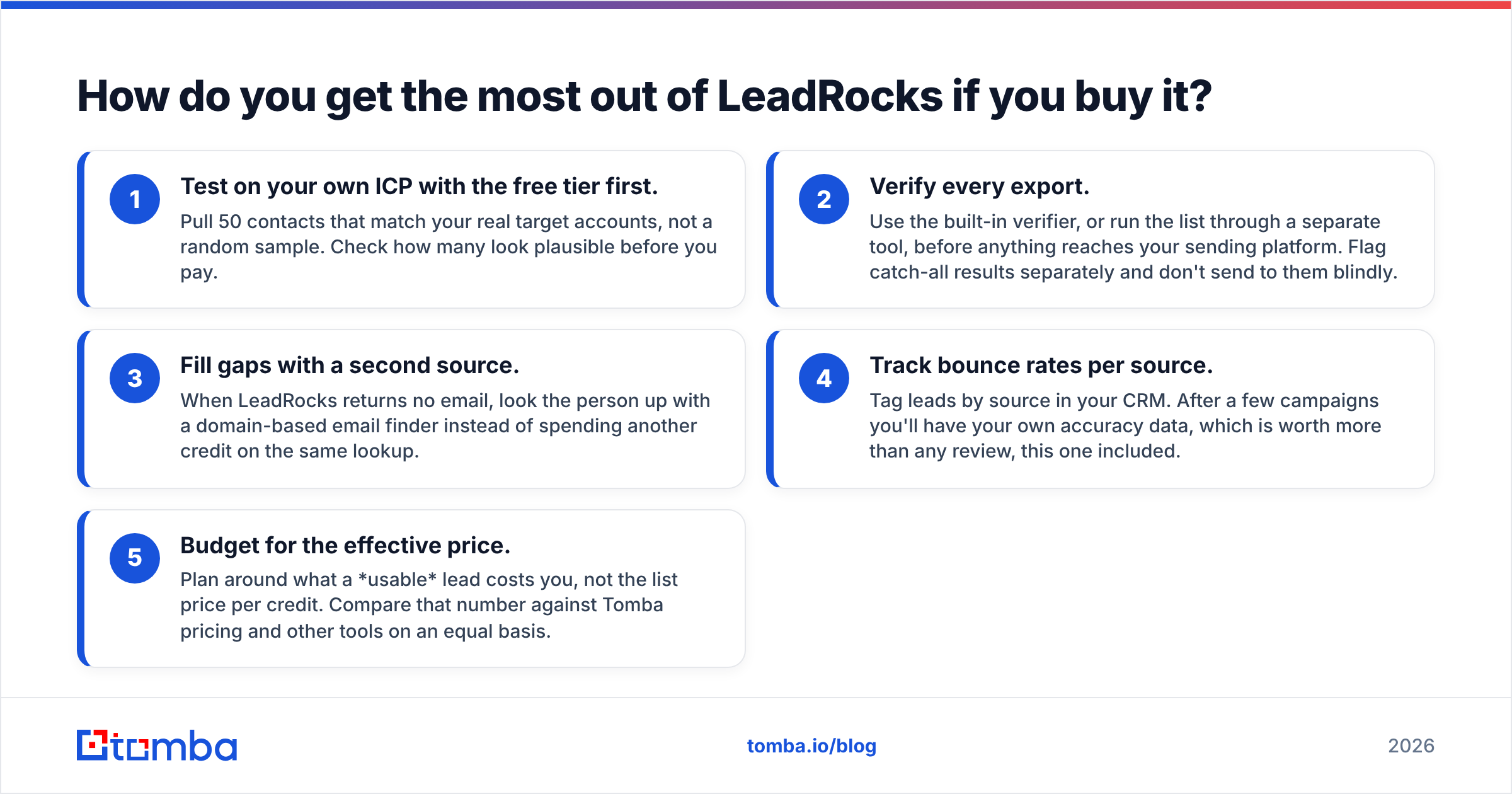
- Test on your own ICP with the free tier first. Pull 50 contacts that match your real target accounts, not a random sample. Check how many look plausible before you pay.
- Verify every export. Use the built-in verifier, or run the list through a separate tool, before anything reaches your sending platform. Flag catch-all results separately and don't send to them blindly.
- Fill gaps with a second source. When LeadRocks returns no email, look the person up with a domain-based email finder instead of spending another credit on the same lookup.
- Track bounce rates per source. Tag leads by source in your CRM. After a few campaigns you'll have your own accuracy data, which is worth more than any review, this one included.
- Budget for the effective price. Plan around what a usable lead costs you, not the list price per credit. Compare that number against Tomba pricing and other tools on an equal basis.
What's the final verdict on LeadRocks?#
LeadRocks does what it says at the low end of the market. The LinkedIn extension is quick, the lack of per-seat pricing is unusual, and the lifetime deals are some of the best value in B2B data. Those strengths explain the high extension ratings.
The problems are also consistent: advertised accuracy that some independent testers couldn't reproduce, credits spent on unusable results, and a filter set that's thin for complex targeting. None of these is a dealbreaker if you treat LeadRocks as a first-pass source and put verification after it. They become a real problem if you export and send without checking.
Rating summary: strong on value, fair on data quality, fine on features. It suits scrappy teams and is harder to justify for deliverability-sensitive outbound at scale.
Where does Tomba fit if LeadRocks isn't enough?#
If you've read the LeadRocks reviews and bounce rates are your main worry, consider a tool built around finding and verifying each email one at a time. Tomba Email Finder finds professional addresses from a domain, a name, or a company. It gives you confidence scores and source data, and verification and catch-all checking are built into the same workflow. You can start free with 25 searches a month and test it on the same accounts you'd pull from LeadRocks. That way you compare real results on your own ICP before you spend anything.
Related guides#
// get started
Find, verify and enrich your first contacts today
Start on the free plan with 25 searches a month, then scale when your team is ready.
Free plan · No credit card required · GDPR & CCPA
// about the author