Leadrocks vs Minelead: Which Email Finder Fits Your Team in 2026?
Leadrocks is a searchable B2B contact database. Minelead finds emails from a company's domain. They are built for different workflows, and picking the wrong one wastes credits. This guide shows which one fits your outbound motion.
TL;DR
- Leadrocks is a searchable B2B contact database with a LinkedIn Chrome extension. Use it when you need to build lists by job title, industry, and location.
- Minelead is a domain-first email finder. Use it when you already know your target companies and just need the right addresses.
- Both have free entry points, but they count usage differently: Leadrocks counts exported contacts, while Minelead counts searches or credits. Compare on cost per verified email, not the plan's sticker price.
- Neither replaces a dedicated verification step. Run exported lists through an email verifier before you send, especially on catch-all domains.
- If you want database search, domain search, LinkedIn lookup, and verification in one account, Tomba covers all of it, starting with a free tier and paid plans from $49/mo.
What are Leadrocks and Minelead, in one sentence each?#
Leadrocks (leadrocks.io) is a B2B lead database. You filter contacts by role, seniority, company size, industry, and geography, then export names, business emails, and company data. It also has a Chrome extension that pulls contact details while you browse LinkedIn profiles and search results.
Minelead (minelead.io) is an email finder built around the company domain. You type in acme.com and it returns the email addresses and email pattern it has found for that organization. It also offers a name + domain lookup, a verifier, a lead generator by keyword, and a browser extension.
This is the key difference, and it shapes everything else in this comparison. One tool helps you find out who to contact. The other helps you find out how to reach people at companies you've already picked.
Think of it like groceries. Leadrocks is walking the supermarket aisles with a list of categories ("VP Sales, SaaS, 50-200 employees, US"). Minelead is going to one specific shop because you already know what you need from it.
How do Leadrocks and Minelead compare feature by feature?#
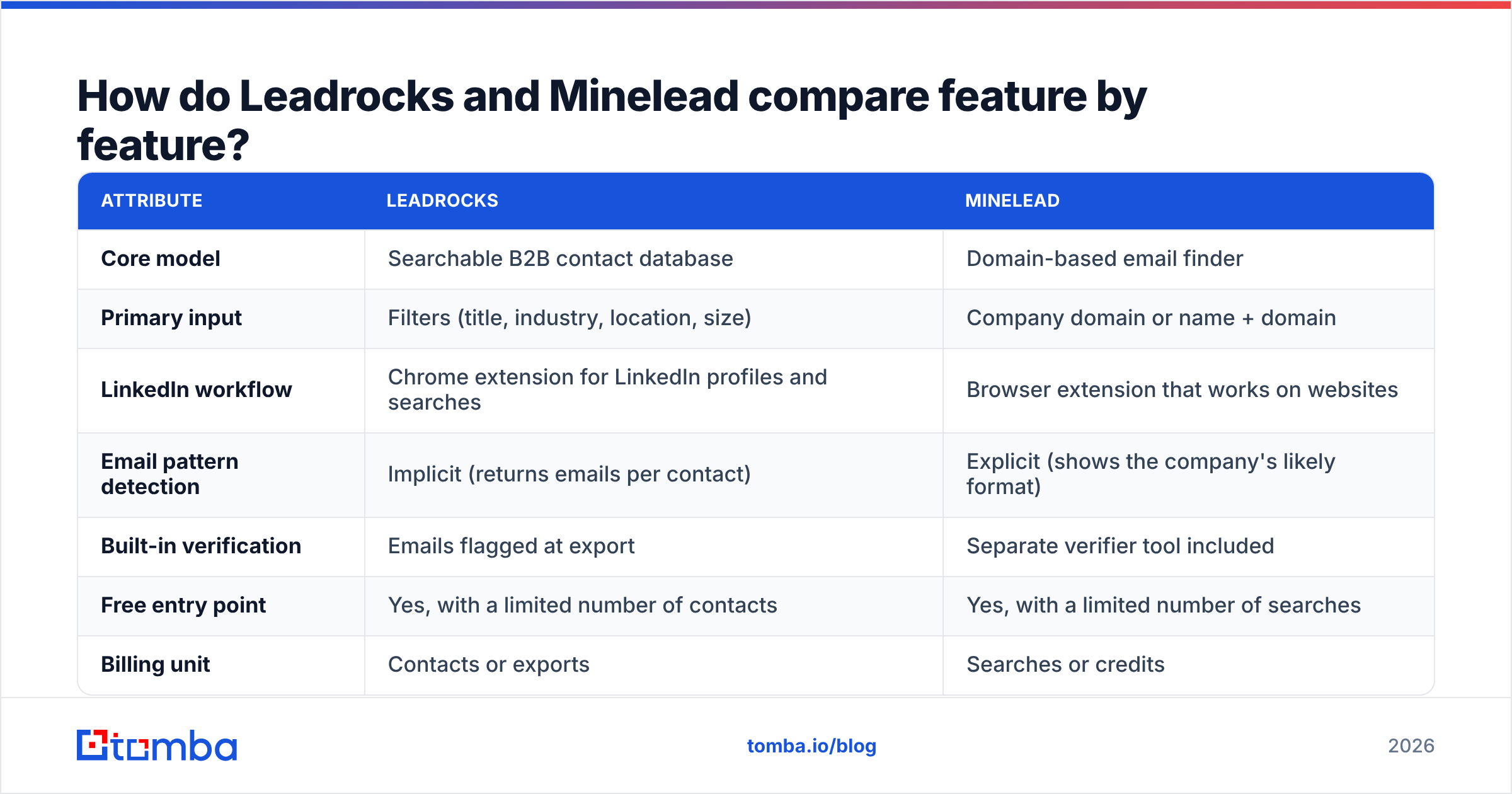
Here's a side-by-side view of the attributes that matter for outbound. Plan names and credit allowances change often, so treat pricing as directional and check each vendor's pricing page before you buy.
| Attribute | Leadrocks | Minelead |
|---|---|---|
| Core model | Searchable B2B contact database | Domain-based email finder |
| Primary input | Filters (title, industry, location, size) | Company domain or name + domain |
| LinkedIn workflow | Chrome extension for LinkedIn profiles and searches | Browser extension that works on websites |
| Email pattern detection | Implicit (returns emails per contact) | Explicit (shows the company's likely format) |
| Built-in verification | Emails flagged at export | Separate verifier tool included |
| Free entry point | Yes, with a limited number of contacts | Yes, with a limited number of searches |
| Billing unit | Contacts or exports | Searches or credits |
| Bulk processing | List export (CSV) | Bulk domain and bulk verification uploads |
| API | Available on higher tiers | Available |
| Best for | Building net-new prospect lists | Enriching a known account list |
The table points to a practical rule. If your SDRs start each week with a blank spreadsheet, Leadrocks fits how they work. If they start with a target account list from RevOps or an ABM platform, Minelead fits better.

How does each tool actually find emails?#
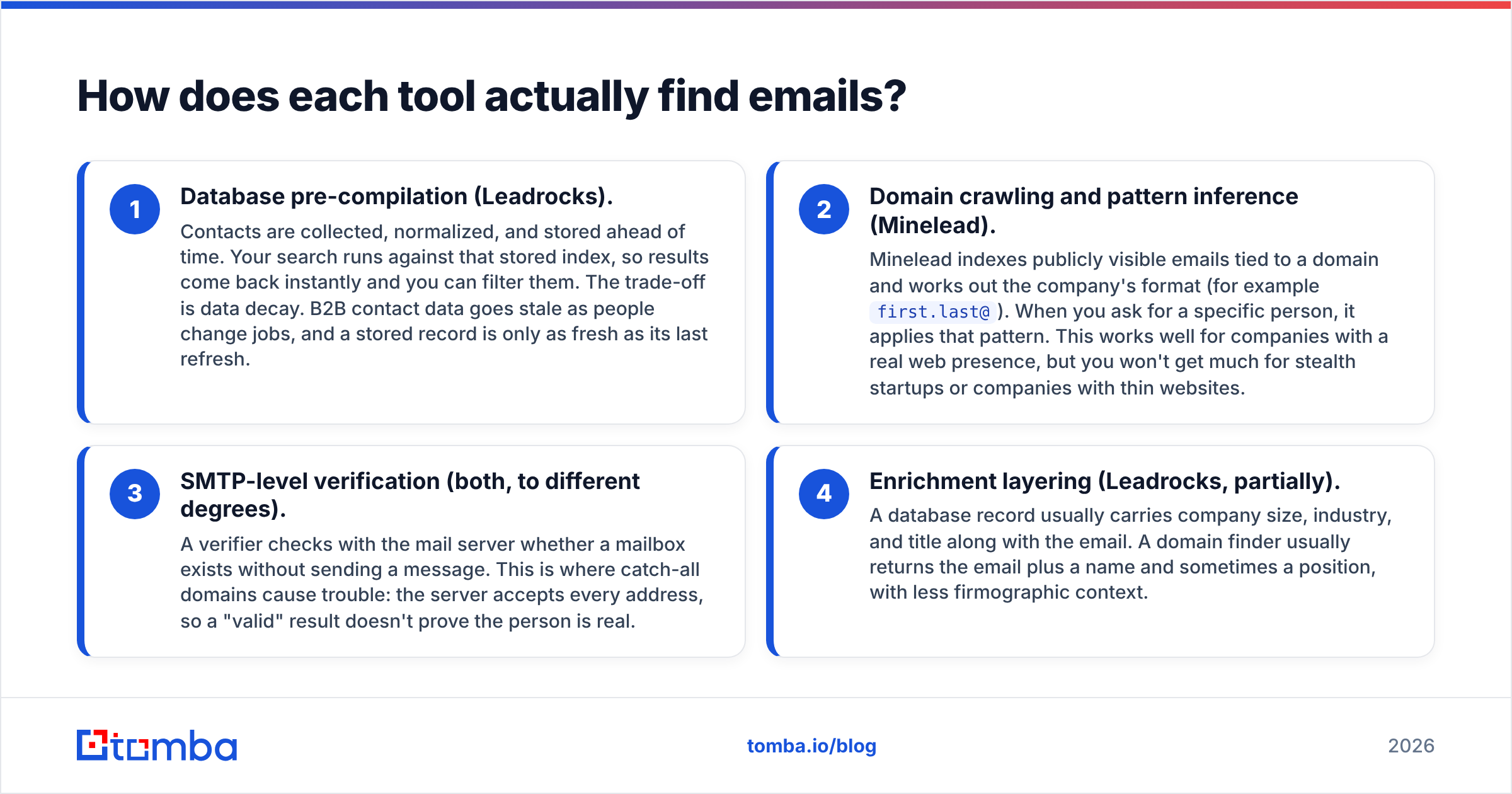
Knowing how each tool gets its data tells you where it will be strong and where it will struggle.
- Database pre-compilation (Leadrocks). Contacts are collected, normalized, and stored ahead of time. Your search runs against that stored index, so results come back instantly and you can filter them. The trade-off is data decay. B2B contact data goes stale as people change jobs, and a stored record is only as fresh as its last refresh.
- Domain crawling and pattern inference (Minelead). Minelead indexes publicly visible emails tied to a domain and works out the company's format (for example
first.last@). When you ask for a specific person, it applies that pattern. This works well for companies with a real web presence, but you won't get much for stealth startups or companies with thin websites. - SMTP-level verification (both, to different degrees). A verifier checks with the mail server whether a mailbox exists without sending a message. This is where catch-all domains cause trouble: the server accepts every address, so a "valid" result doesn't prove the person is real.
- Enrichment layering (Leadrocks, partially). A database record usually carries company size, industry, and title along with the email. A domain finder usually returns the email plus a name and sometimes a position, with less firmographic context.
If you want to understand the domain-first approach in more detail, the Tomba glossary explains what domain search is and why email pattern accuracy varies so much by company size.

Which is more accurate: Leadrocks or Minelead?#
Anyone who gives you a single accuracy percentage for either tool without describing the test set is guessing. Accuracy depends heavily on the sample you test.
Here is where each tool tends to do better or worse in practice:
- Mid-market and enterprise, US and Western Europe: both do reasonably well. Large companies have consistent email formats and plenty of public footprint, which helps Minelead's pattern inference, and they are well covered in databases like Leadrocks.
- SMBs under 20 employees: domain finders often struggle because there are fewer public emails to infer a pattern from. Database tools may have the contact but with an older email.
- Recently changed roles: this is where databases are weakest. If your prospect moved companies three months ago, a stored record may still show the old employer.
- Catch-all domains: both tools will return addresses they can't confirm. Treat these as "risky", not "valid".

The most reliable way to settle Leadrocks vs Minelead for your market is a 100-contact bake-off:
- Pull 100 real target contacts from your ICP, including their known-good emails if your CRM has them.
- Run the same 100 through both tools.
- Run every returned address through an independent email verifier.
- Score each tool on: found rate, verified-valid rate, and bounce rate on a small live send.
That takes an afternoon and will tell you more than any review site, including this one. For broader user sentiment, the category pages on G2 are useful for spotting recurring complaints (stale data, credit burn, support response times) but less useful for raw accuracy numbers.
How does Leadrocks vs Minelead pricing compare?#
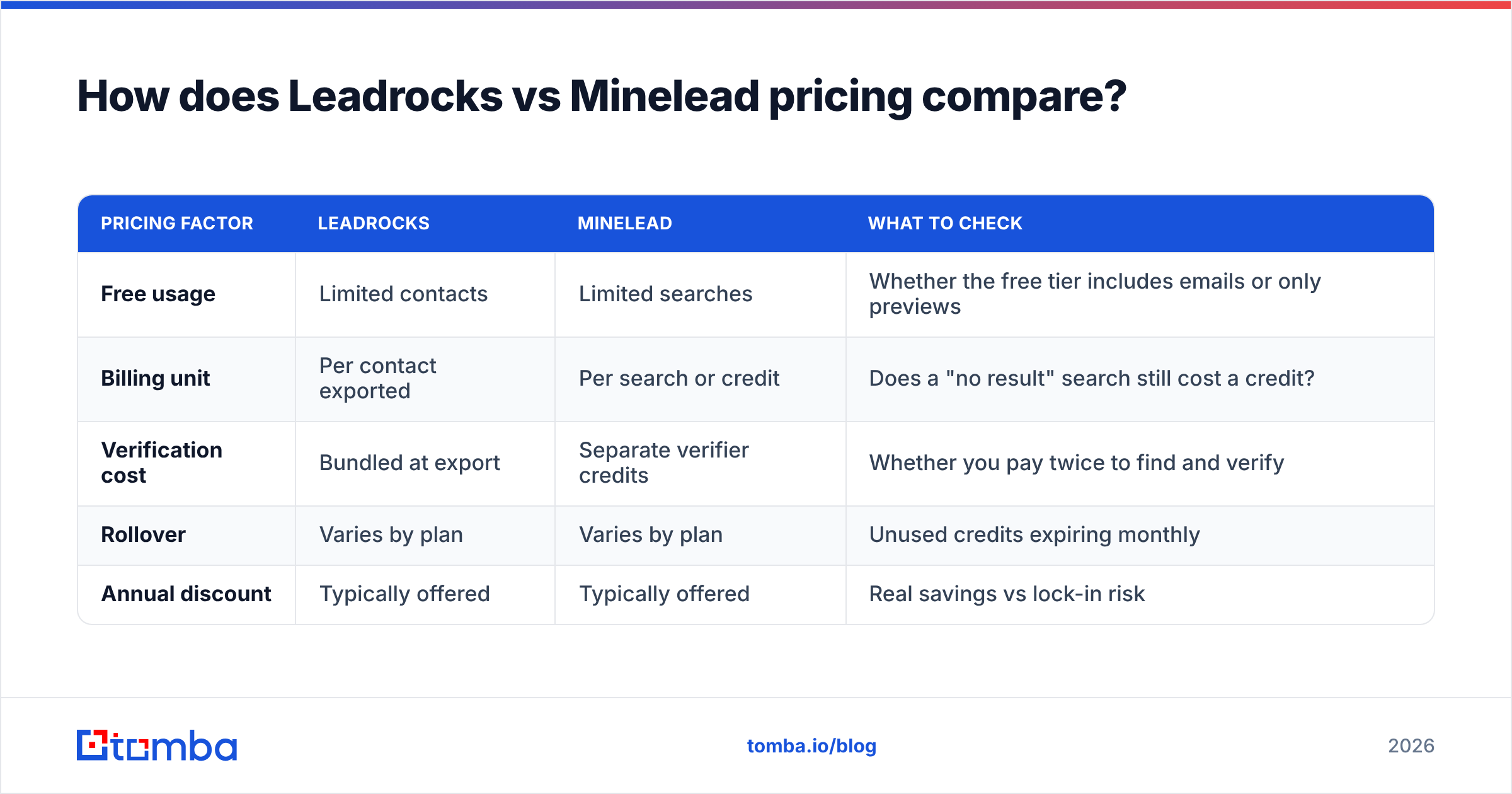
Both vendors use tiered subscriptions with a free entry point, and both have changed plan structures over time. Rather than repeat numbers that could be out of date by the time you read this, here's how to compare them fairly.
| Pricing factor | Leadrocks | Minelead | What to check |
|---|---|---|---|
| Free usage | Limited contacts | Limited searches | Whether the free tier includes emails or only previews |
| Billing unit | Per contact exported | Per search or credit | Does a "no result" search still cost a credit? |
| Verification cost | Bundled at export | Separate verifier credits | Whether you pay twice to find and verify |
| Rollover | Varies by plan | Varies by plan | Unused credits expiring monthly |
| Annual discount | Typically offered | Typically offered | Real savings vs lock-in risk |
The number that matters is cost per verified, deliverable email. For example:
- A plan that costs more per month but charges only for found, verified contacts can end up cheaper than a low-priced plan that charges for every search, including the ones that return nothing.
- If you have to buy a separate verifier to clean a tool's output, add that cost to the tool's cost.
As a reference point, Tomba pricing starts with a free tier of 25 searches per month, then Starter at $49/mo, Growth at $99/mo, Pro at $249/mo, and custom Enterprise plans. Finding and verifying are available in the same account, so the second cost disappears.
What is Leadrocks better at?#
List building from scratch. If your ICP is defined by attributes rather than named accounts, Leadrocks is the more natural fit. You set filters for title, seniority, industry, headcount, and country, and you get a list.
LinkedIn-native prospecting. Reps who spend their day in LinkedIn will like having contact details available right on the profile or search page. This is where the extension earns its keep.
Firmographic context. Database records usually include company size and industry alongside the contact, so you can segment sequences without a separate enrichment pass.
Where it's weaker: data freshness on people who recently changed jobs, and coverage of very small or very new companies. Verify before you send.
What is Minelead better at?#
Account-based workflows. If marketing gives you 300 target domains, Minelead's domain-first design handles that directly: upload the domains and pull emails in bulk.
Seeing the email pattern. Knowing that a company uses f.lastname@ lets you build addresses for people the tool didn't return, then verify them. Reps who do targeted, high-value outreach find this very useful.
Lightweight, website-based discovery. The extension works on company websites, which suits researchers, link builders, PR teams, and recruiters as much as SDRs.
Where it's weaker: you need to know which companies to target first, filtering by persona is limited compared with a full database, and results thin out on companies with little web presence.

Which tool should you pick for your use case?#
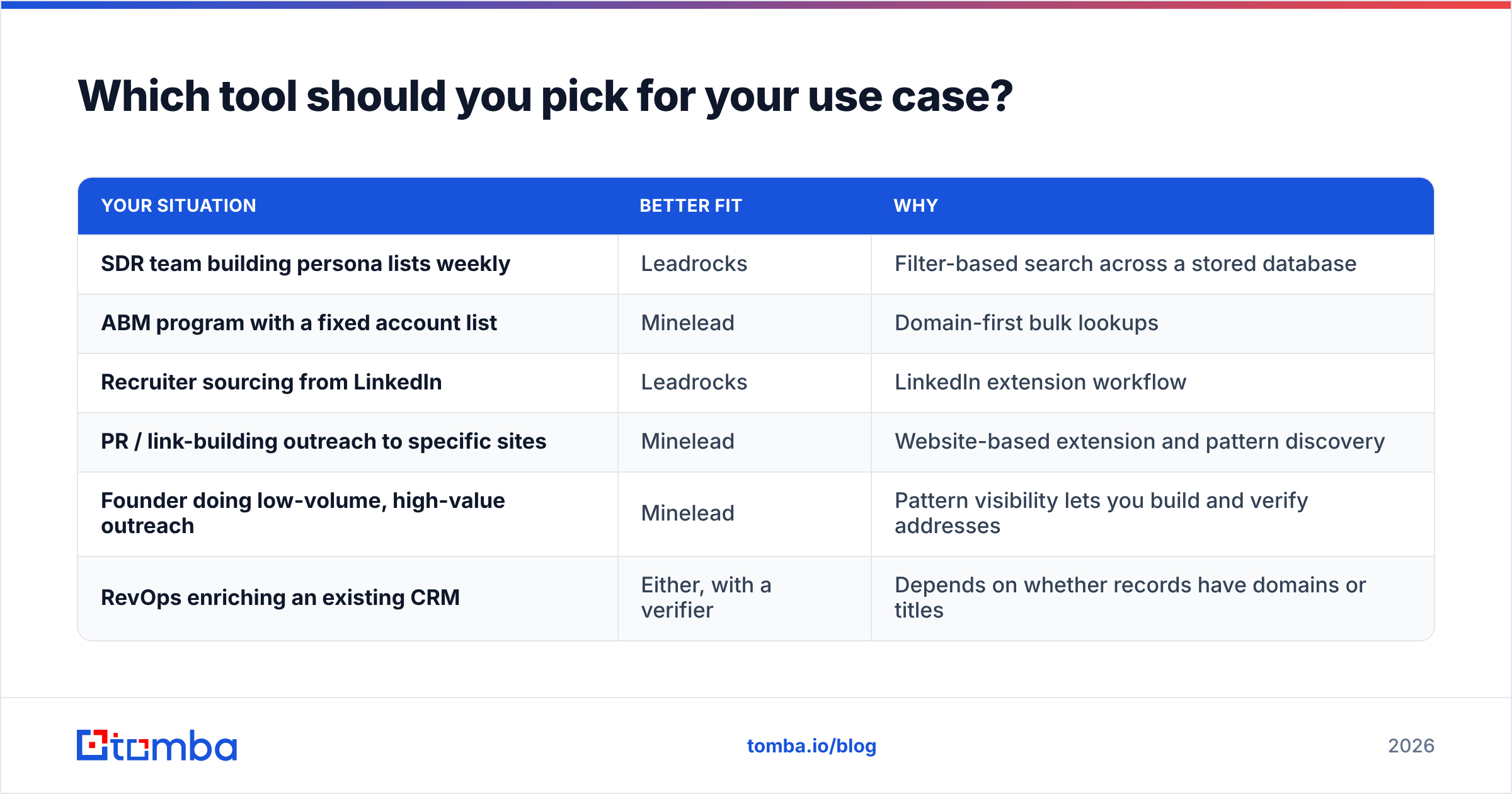
Go by how your team works today, not by feature counts:
| Your situation | Better fit | Why |
|---|---|---|
| SDR team building persona lists weekly | Leadrocks | Filter-based search across a stored database |
| ABM program with a fixed account list | Minelead | Domain-first bulk lookups |
| Recruiter sourcing from LinkedIn | Leadrocks | LinkedIn extension workflow |
| PR / link-building outreach to specific sites | Minelead | Website-based extension and pattern discovery |
| Founder doing low-volume, high-value outreach | Minelead | Pattern visibility lets you build and verify addresses |
| RevOps enriching an existing CRM | Either, with a verifier | Depends on whether records have domains or titles |
If your team does both, building persona lists some weeks and working named accounts in others, you'll end up paying for two tools, or relying on one tool for a workflow it doesn't handle well.
Is there a tool that covers both workflows?#
Yes, and this is where Tomba fits into the Leadrocks vs Minelead decision. Tomba was built as a domain-first finder, like Minelead. Around that core it offers a domain search for pulling every public email at a company, a LinkedIn finder extension for profile-based lookups like Leadrocks, a B2B database for filter-based list building, and a built-in verifier and catch-all verifier.
In practice, that means:
- One billing unit for finding and verifying, so you avoid paying twice.
- Pattern visibility for domain lookups, plus person-level results.
- Integrations with HubSpot, Salesforce, Pipedrive, Google Sheets, Zapier, and an API and CLI for technical teams.
- Catch-all handling as its own step, so "accept-all" results get flagged instead of silently passed as valid.
It's not the right answer for everyone. If your whole motion is filter-based LinkedIn prospecting and you're happy with Leadrocks' coverage in your region, switching doesn't gain you much. If you're a small team doing a handful of account lookups a month, Minelead's free tier may be all you need. Tomba makes the most sense when you want one account to handle both workflows plus verification.
What mistakes should you avoid when choosing?#
- Comparing plan price instead of cost per deliverable email. A cheap plan with a high bounce rate costs you more once sender reputation damage is counted.
- Skipping verification because the tool says "valid". Every finder's confidence score is an estimate. Verify independently, and treat catch-all results as a separate risk group.
- Testing on famous companies. Every tool finds
@salesforce.comemails. Test on your actual ICP, including smaller companies. - Ignoring compliance. Both tools work with business contact data, but you are still responsible for how you use it under GDPR, CAN-SPAM, and local rules. HubSpot's CAN-SPAM overview is a practical starting point if you send to US contacts.
- Buying annual before a bake-off. Run the 100-contact test on the free tiers first. It costs nothing and removes most of the guesswork.
What's the final verdict on Leadrocks vs Minelead?#
Choose Leadrocks if your team builds prospect lists from job titles and filters, works mostly inside LinkedIn, and wants firmographic context attached to each contact.
Choose Minelead if you already know your target companies, value seeing each company's email pattern, and want a lightweight, domain-first tool with a verifier included.
Choose neither on its own if you regularly do both kinds of work. In that case a single platform that covers database search, domain lookups, LinkedIn extraction, and verification will be simpler to run and usually cheaper per verified email.
If that last description fits your team, try Tomba Email Finder. Start on the free tier (25 searches per month) and run the same 100-contact bake-off described above against Leadrocks and Minelead. Compare found rate, verified rate, and bounce rate on your own ICP. If Tomba wins on your data, Starter is $49/mo. If it doesn't, you've lost nothing, and you'll know which tool fits your pipeline.
Related guides#
// get started
Find, verify and enrich your first contacts today
Start on the free plan with 25 searches a month, then scale when your team is ready.
Free plan · No credit card required · GDPR & CCPA
// about the author