LeadRocks vs NeverBounce: Email Finder or Verifier in 2026?
LeadRocks finds B2B contacts. NeverBounce checks whether an email address will bounce. Here is how they differ, when you need one or both, and what the combined workflow costs in 2026.
TL;DR
- LeadRocks is a B2B contact database and email finder. You use it to build lists of decision-makers, filtered by title, company, industry and location.
- NeverBounce is an email verification service. It doesn't find anyone. It checks whether addresses you already have will deliver, bounce, or land on a catch-all domain.
- Most outbound teams asking "LeadRocks vs NeverBounce" actually need both jobs done: find the contact, then verify the address before it goes into a sequence.
- Pick LeadRocks if your problem is an empty pipeline. Pick NeverBounce if you already have a large list (CRM export, event leads, old campaigns) and your bounce rate is climbing.
- If you want finding and verification in one step, an all-in-one tool keeps you from paying for two subscriptions and juggling CSVs between them.
What is the real difference between LeadRocks and NeverBounce?#
Most "vs" posts compare two tools that do the same job. This one doesn't. LeadRocks and NeverBounce sit at opposite ends of the same workflow, and that matters more than any feature checklist.
LeadRocks is a prospecting tool. It gives you a searchable database of business contacts, mostly sourced from professional profiles, plus a Chrome extension for pulling emails while you browse. You come to it with an ideal customer profile ("VP of Finance, SaaS, 200-1,000 employees, DACH region") and leave with a list of names and email addresses.
NeverBounce is a hygiene tool. You bring it a list of email addresses, and it tells you which ones are valid, invalid, disposable, unknown, or catch-all. It has no people search and no company database. Its job is to protect your sender reputation by keeping bad addresses out of your sends. NeverBounce is now part of ZoomInfo, but it is still sold and used as a standalone verification product.
A simple way to hold the distinction:
- LeadRocks answers "who should I email?"
- NeverBounce answers "will this email actually arrive?"
So "which is better" is the wrong question. The useful question is which problem is costing you more right now: no leads, or bad data.
How do LeadRocks and NeverBounce compare feature by feature?#
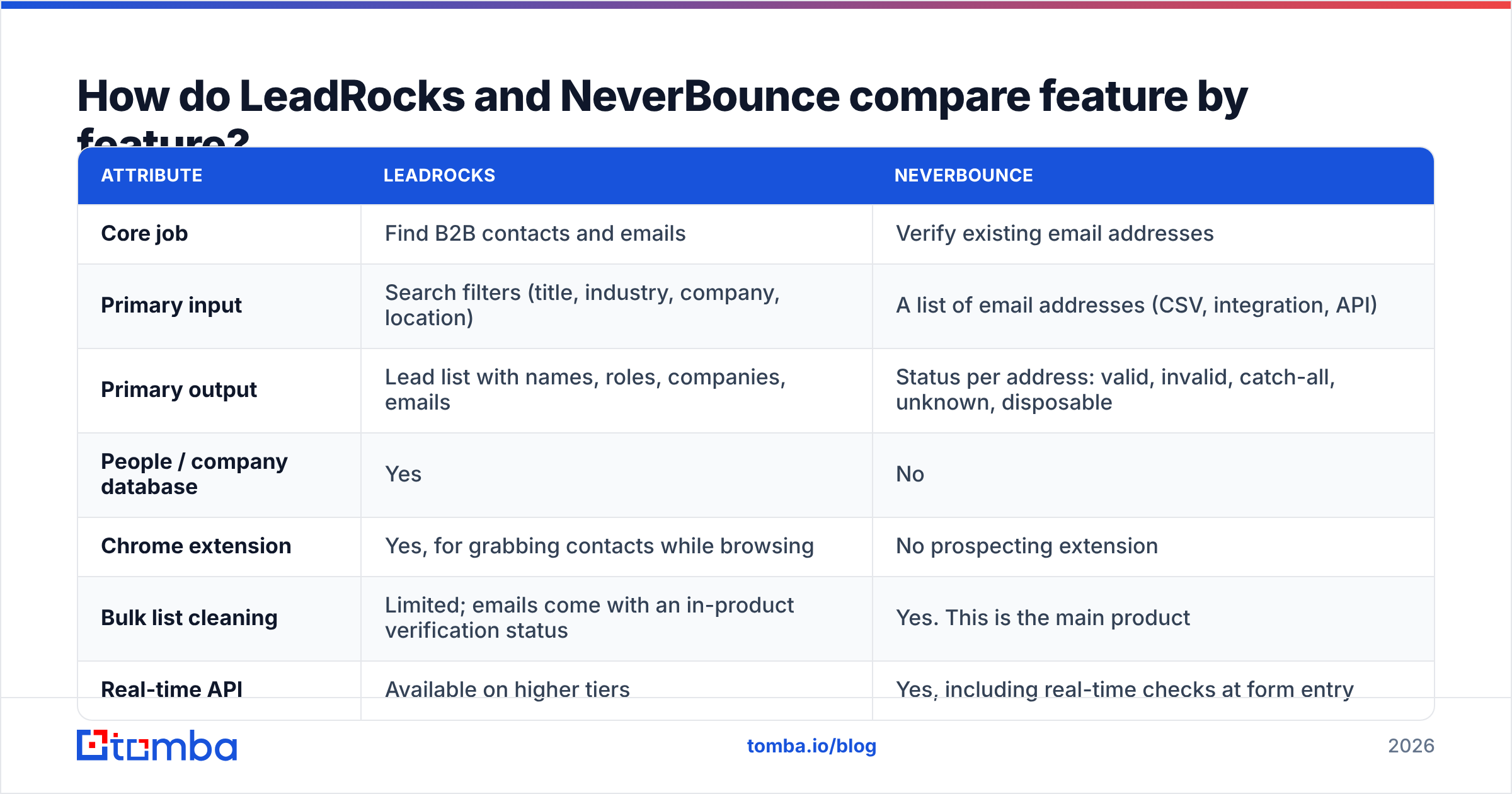
The table below puts the two side by side on the attributes buyers usually ask about. Pricing changes often, so check each vendor's current pricing page before you commit budget.
| Attribute | LeadRocks | NeverBounce |
|---|---|---|
| Core job | Find B2B contacts and emails | Verify existing email addresses |
| Primary input | Search filters (title, industry, company, location) | A list of email addresses (CSV, integration, API) |
| Primary output | Lead list with names, roles, companies, emails | Status per address: valid, invalid, catch-all, unknown, disposable |
| People / company database | Yes | No |
| Chrome extension | Yes, for grabbing contacts while browsing | No prospecting extension |
| Bulk list cleaning | Limited; emails come with an in-product verification status | Yes. This is the main product |
| Real-time API | Available on higher tiers | Yes, including real-time checks at form entry |
| Pricing model | Subscription with monthly contact/export allowances | Pay-as-you-go credits plus recurring plans for automated list syncing |
| Free option | Limited free access to try the database | Free trial credits on signup |
| Best for | SDRs, founders and agencies building net-new lists | Marketing ops, RevOps and anyone sitting on an aging list |
| Main weakness | You still need to independently verify before large sends | Useless if you don't already have contacts |
User reviews on G2 reflect the split. LeadRocks reviewers mostly talk about coverage, filter quality and price per contact. NeverBounce reviewers mostly talk about speed, integration convenience and whether bounce rates actually dropped after cleaning.
Is LeadRocks good for finding B2B emails?#
For most mid-market prospecting, yes. LeadRocks is priced below the big enterprise databases, and teams that feel priced out of ZoomInfo-tier contracts often consider it for that reason.
Where LeadRocks is strong:
- Filter-driven list building. Search by job title, seniority, industry, headcount and geography, then export in bulk. For a solo founder or small SDR team, that removes most of the manual LinkedIn-to-spreadsheet work.
- Browser workflow. The extension lets you grab contact data while you're looking at a profile or company page, which suits account-based prospecting where you research one account at a time.
- Cost per contact. For teams that need a few hundred to a few thousand contacts a month, the unit economics tend to be friendlier than enterprise platforms that sell annual seat contracts.
Where you need to be careful:
- Data freshness varies by segment. Every contact database decays. People change jobs, companies rebrand domains, and mailboxes get shut down. Coverage in North America and Western Europe is usually deeper than in niche regions or very small companies.
- In-product verification isn't the same as a dedicated verification pass. A "verified" flag at export time reflects the last check, not today. If a list sits in a spreadsheet for three weeks before you send, run it through a verifier again.
- It's a database, not an engagement tool. There's no sequencing or deliverability tooling. You still need a sending platform.
Is NeverBounce accurate enough to trust for list cleaning?#
NeverBounce is one of the longest-running names in email verification. Its main selling points are speed on large lists and a long list of native integrations with ESPs and CRMs. The company advertises very high accuracy on its deliverable/undeliverable verdicts. Treat any vendor's accuracy number as a marketing claim until you've tested it on your own data, but NeverBounce does reliably handle the core job of stripping hard bounces out of a list.
Where NeverBounce is strong:
- Bulk cleaning at scale. Upload a CSV of 50,000 addresses and get back a segmented file. For a marketing team about to re-engage an old newsletter list, this is exactly the job to be done.
- Integrations and automated syncing. You can connect it to your ESP or CRM and have lists cleaned on a schedule instead of exporting and re-importing by hand.
- Real-time verification. The API and form widget can reject bad addresses at signup, before they ever reach your database.
Where you need to be careful:
- Catch-all domains stay a grey zone. When a company's mail server accepts every address, a standard SMTP check can't confirm that a specific mailbox exists. NeverBounce will flag these as catch-all or unknown, and you have to decide whether to risk sending. For B2B lists, catch-alls can make up a meaningful share of addresses at larger companies. A dedicated catch-all verifier that uses extra signals beyond SMTP can resolve more of them.
- It can't help with an empty pipeline. If your problem is too few leads, NeverBounce does nothing for you.
- Credits add up on repeated cleaning. Pay-as-you-go is great for one-off jobs. If you verify the same records monthly, look closely at the recurring plans.

Which should you choose: LeadRocks or NeverBounce?#
Base the decision on where your outbound workflow is actually breaking. Here are the most common scenarios we see:
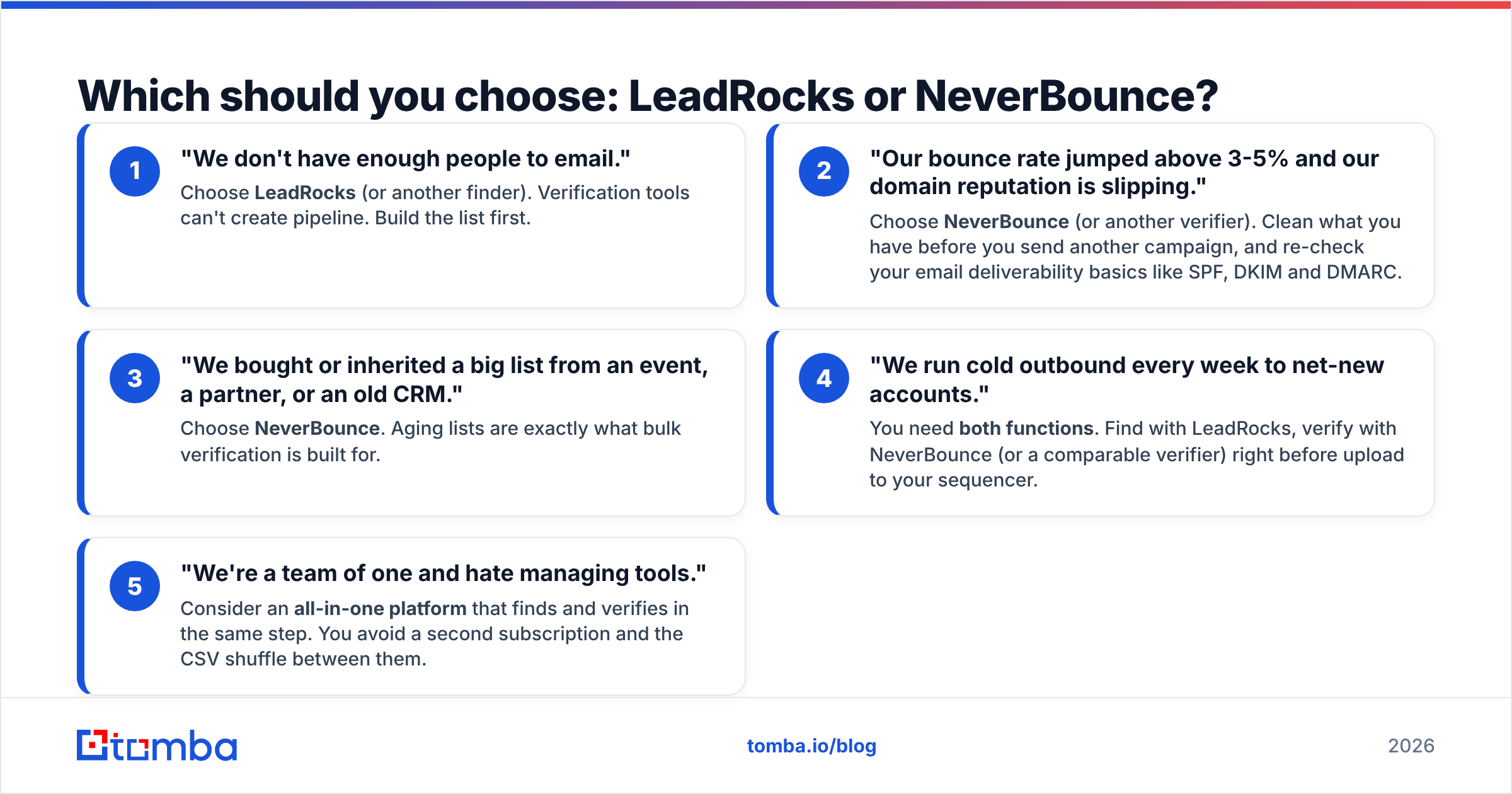
- "We don't have enough people to email." Choose LeadRocks (or another finder). Verification tools can't create pipeline. Build the list first.
- "Our bounce rate jumped above 3-5% and our domain reputation is slipping." Choose NeverBounce (or another verifier). Clean what you have before you send another campaign, and re-check your email deliverability basics like SPF, DKIM and DMARC.
- "We bought or inherited a big list from an event, a partner, or an old CRM." Choose NeverBounce. Aging lists are exactly what bulk verification is built for.
- "We run cold outbound every week to net-new accounts." You need both functions. Find with LeadRocks, verify with NeverBounce (or a comparable verifier) right before upload to your sequencer.
- "We're a team of one and hate managing tools." Consider an all-in-one platform that finds and verifies in the same step. You avoid a second subscription and the CSV shuffle between them.
The fourth scenario is where most B2B teams end up, and it's also where a two-tool stack starts to hurt.
What does it cost to run LeadRocks and NeverBounce together?#
Running both is a perfectly valid stack. Just be clear about the overhead, because it's more than two invoices.
- Two subscriptions. You pay LeadRocks for contacts and NeverBounce for verification credits. Even at modest volumes, that often lands in the same range as a single mid-tier all-in-one plan.
- Double handling. Export from LeadRocks, import into NeverBounce, download results, filter, re-import into your sequencer or CRM. Every hop is a chance to lose columns, mangle encodings or upload the wrong file.
- Paying twice for bad records. If a LeadRocks contact turns out invalid, you've paid once to find it and again to discover it's dead.
- Timing gaps. Verification is only accurate close to send time. If your workflow has a lag between steps, you end up re-verifying.
None of these kill the stack. They're just worth pricing in honestly when you compare it with alternatives.
How does an all-in-one finder and verifier compare?#
Platforms that combine search and verification remove the handoff. Tomba is one example: its email verifier runs on the same account and credit pool as its finder, and results carry a confidence score and verification status by default. Other combined options exist too, including Hunter, Apollo, and database vendors like BookYourData, which pairs pre-built B2B lists with verification and is a solid pick if you'd rather buy a segmented list than build one search at a time.
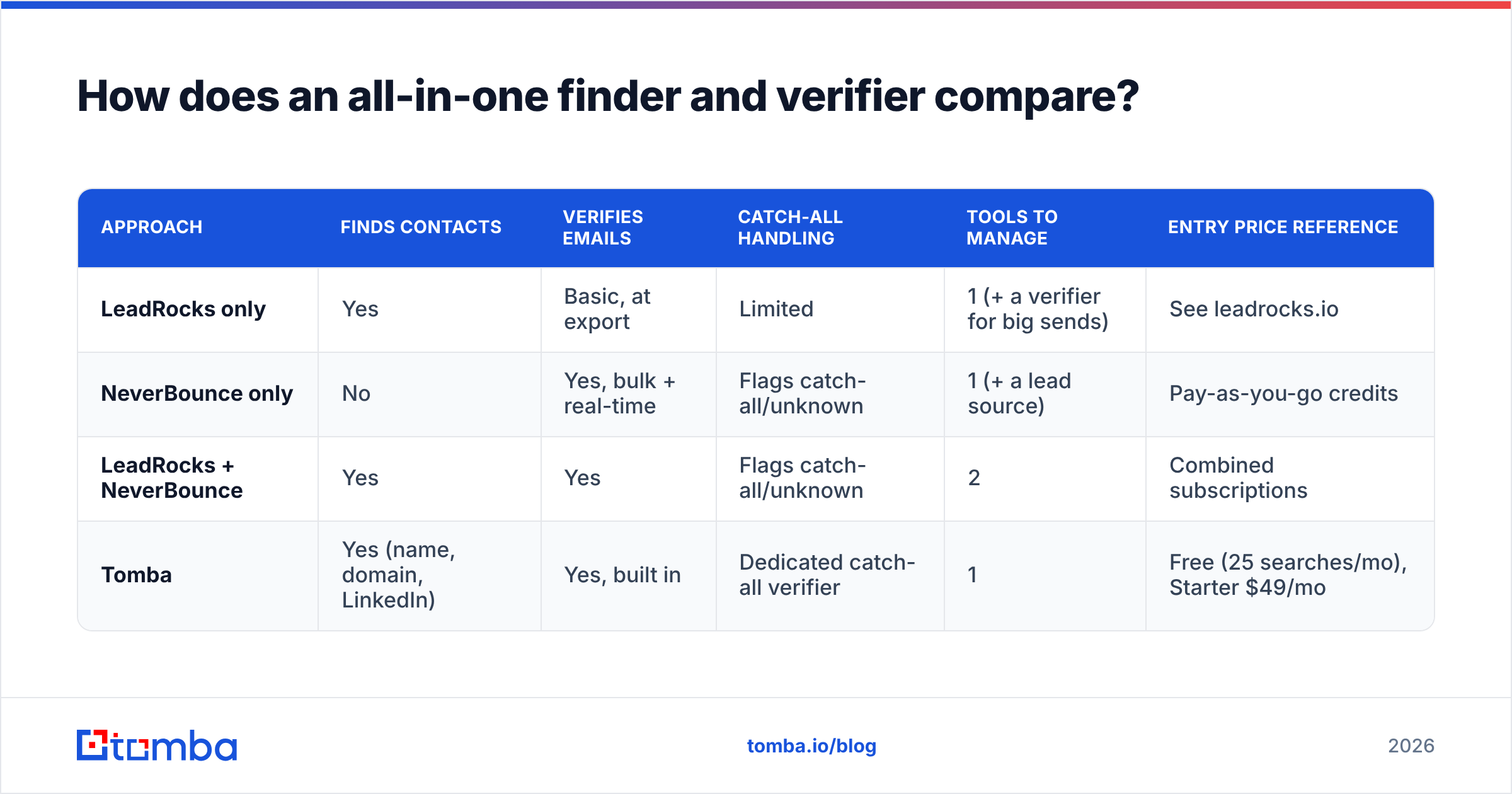
Here's how the three approaches stack up:
| Approach | Finds contacts | Verifies emails | Catch-all handling | Tools to manage | Entry price reference |
|---|---|---|---|---|---|
| LeadRocks only | Yes | Basic, at export | Limited | 1 (+ a verifier for big sends) | See leadrocks.io |
| NeverBounce only | No | Yes, bulk + real-time | Flags catch-all/unknown | 1 (+ a lead source) | Pay-as-you-go credits |
| LeadRocks + NeverBounce | Yes | Yes | Flags catch-all/unknown | 2 | Combined subscriptions |
| Tomba | Yes (name, domain, LinkedIn) | Yes, built in | Dedicated catch-all verifier | 1 | Free (25 searches/mo), Starter $49/mo |
To be fair to both vendors: if you already have a huge legacy list and a CRM integration requirement, a mature dedicated verifier like NeverBounce is a sensible choice. And if you want a filterable people database, LeadRocks-style search is a different experience from domain-first finders. An all-in-one tool wins mainly on workflow simplicity and on skipping the double payment for each contact.

What workflow should you actually run?#
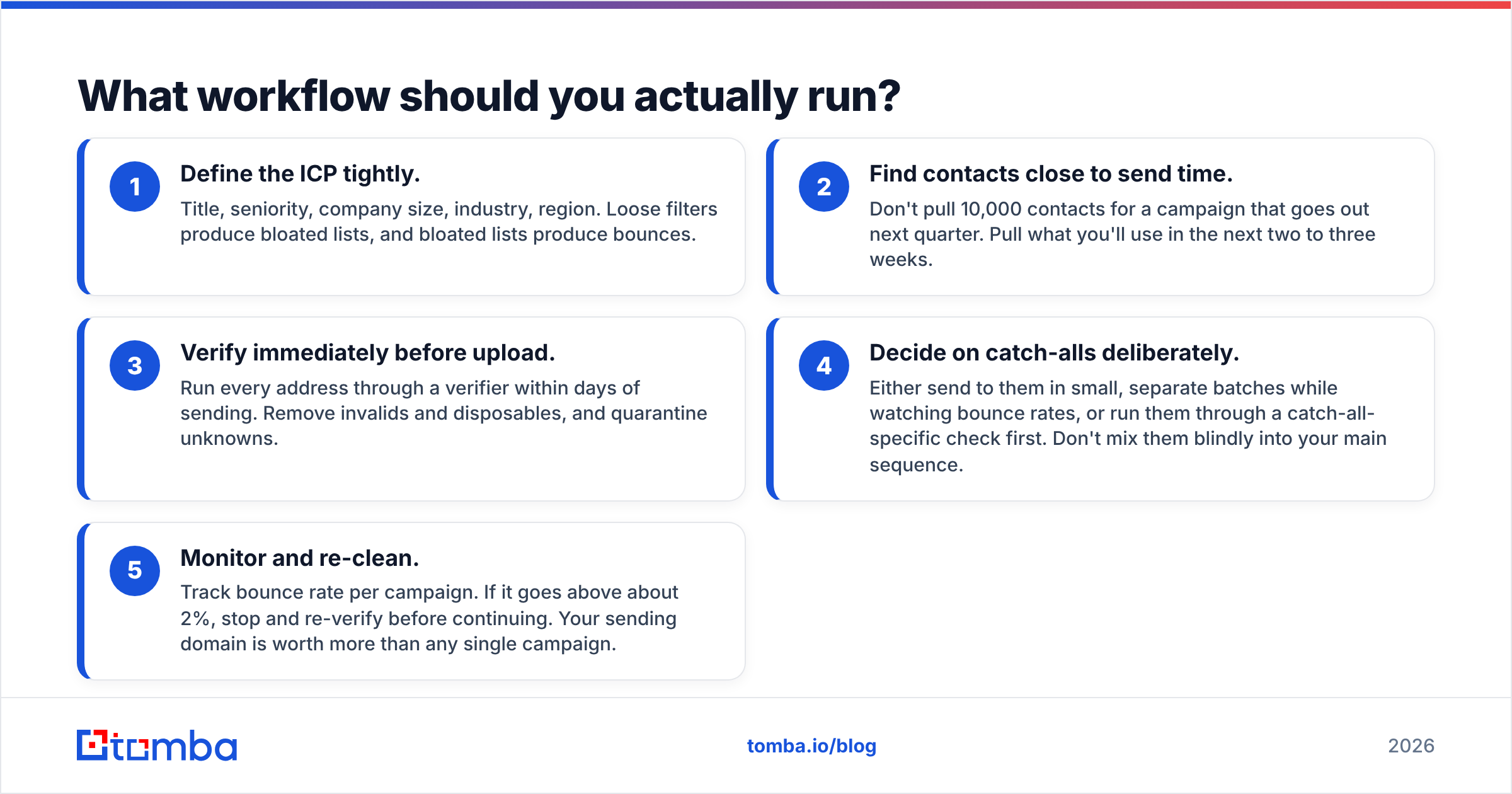
Whichever tools you pick, the order of operations matters more than the brand names. A clean outbound workflow looks like this:
- Define the ICP tightly. Title, seniority, company size, industry, region. Loose filters produce bloated lists, and bloated lists produce bounces.
- Find contacts close to send time. Don't pull 10,000 contacts for a campaign that goes out next quarter. Pull what you'll use in the next two to three weeks.
- Verify immediately before upload. Run every address through a verifier within days of sending. Remove invalids and disposables, and quarantine unknowns.
- Decide on catch-alls deliberately. Either send to them in small, separate batches while watching bounce rates, or run them through a catch-all-specific check first. Don't mix them blindly into your main sequence.
- Monitor and re-clean. Track bounce rate per campaign. If it goes above about 2%, stop and re-verify before continuing. Your sending domain is worth more than any single campaign.
This workflow works with LeadRocks + NeverBounce, with an all-in-one platform, or with any other combination. The tools are just how you carry it out.
Frequently asked questions#
Can NeverBounce find email addresses?#
No. NeverBounce only verifies addresses you already have. To discover new contacts, you need a finder or a B2B database such as LeadRocks, Tomba, Apollo or a list provider.
Does LeadRocks verify emails?#
LeadRocks shows a verification status on contacts at export, which helps. For large sends, or lists that have aged, a separate verification pass right before sending is still best practice.
Is LeadRocks cheaper than NeverBounce?#
They aren't priced for the same thing, so a direct comparison is misleading. LeadRocks charges for access to contacts, and NeverBounce charges per verification. Work out your cost per deliverable contact, meaning finding plus verifying, and compare that across stacks.
What bounce rate is acceptable for cold email?#
Aim to stay under 2%. Above 3-5%, mailbox providers start to treat your domain with suspicion, and inbox placement drops for every campaign you send, not just the bad one.
Do I need a verifier if my email finder already verifies?#
For small, fresh lists, a finder's built-in verification is usually enough. For large lists, lists older than a few weeks, or domains with lots of catch-all servers, an extra verification pass is cheap insurance.
The bottom line on LeadRocks vs NeverBounce#
LeadRocks and NeverBounce aren't rivals. They're two stages of the same pipeline. LeadRocks fills the top of the funnel with contacts, and NeverBounce makes sure those contacts don't damage your sender reputation. If you have only one of those problems, buy the tool that solves it. If you have both, which is true of almost every team running regular cold outbound, decide whether you'd rather manage two specialised tools or one combined workflow.
If you'd rather find and verify in a single step, try the Tomba Email Finder. Search by name, domain or company, and every result comes back with a verification status and confidence score, so you don't have to export anything to a second tool before sending. You can start free with 25 searches a month and move to paid plans from $49/mo once your volume grows. Compare tiers on the Tomba pricing page.
Related guides#
// get started
Find, verify and enrich your first contacts today
Start on the free plan with 25 searches a month, then scale when your team is ready.
Free plan · No credit card required · GDPR & CCPA
// about the author