LeadRocks vs NullBounce: Email Finder or Verifier in 2026?
LeadRocks finds B2B contacts. NullBounce checks whether an email address will bounce. We compare what each one does, how you pay, and where each one falls short, so you know which to buy first.
TL;DR
- LeadRocks and NullBounce do different jobs. LeadRocks is a B2B contact database and email finder. NullBounce is an email verifier. You aren't choosing between two versions of the same product.
- LeadRocks charges a monthly subscription with credits. Third-party reviews in 2026 list a free tier with about 50 credits and paid tiers from roughly $29/mo. Reviewers also say credits get used up even when a lookup returns nothing useful.
- NullBounce is pay-as-you-go. Its site says you only pay for emails it validates successfully, "unknown" results are free, and credits never expire.
- Most outbound teams need both jobs done: first find the contact, then verify it before you send. You can use two tools, or one platform that does both.
- Our pick: get LeadRocks if you don't have contacts yet. Get NullBounce if you already have a list and want to cut bounces cheaply. Get a combined finder plus verifier if you'd rather not manage two bills and two CSV exports.
What is the real difference between LeadRocks and NullBounce?#
People searching "LeadRocks vs NullBounce" are usually comparing two tools that don't compete directly. The first thing to settle is where each one sits in your prospecting workflow.
LeadRocks comes at the start of the workflow. You search a database of B2B profiles by title, company, industry, or location. You can also use its Chrome extension on LinkedIn. It returns names, job titles, and work emails. You end up with a list of people to contact.
NullBounce comes at the end. You upload a list you already have, or call its API. It checks each address and labels it valid, invalid, catch-all, or unknown. You end up with a cleaner version of the list you started with.
Here is an analogy. LeadRocks is the recruiter who finds candidates. NullBounce is the background check that confirms those candidates are real before you call them. Hiring a better background checker won't help if you have no candidates, and a big candidate pool isn't worth much if half the phone numbers are wrong.
That's why "which is better" is usually the wrong question. The useful question is which part of your workflow is currently failing.
How do LeadRocks and NullBounce compare side by side?#
This table covers what matters for a buying decision. Pricing comes from each vendor's public messaging and 2026 third-party reviews. Vendors change plans often, so confirm current numbers on their sites before you pay.
| Attribute | LeadRocks | NullBounce |
|---|---|---|
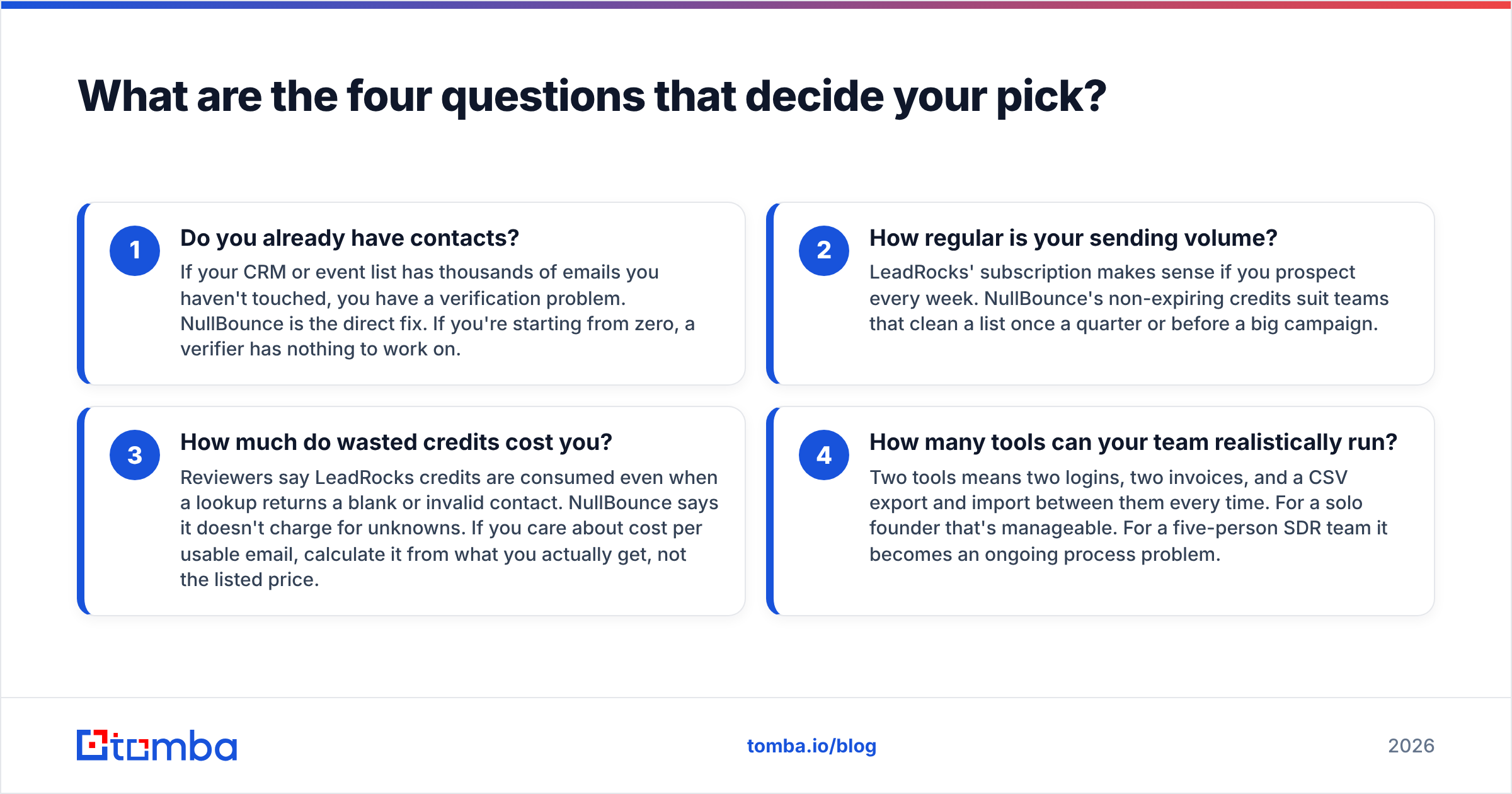
| Primary job | Find B2B contacts and emails | Verify existing email addresses |
| Input you need | Search filters or a LinkedIn profile | A list of emails (CSV or API) |
| Output you get | New leads with name, title, company, email | Status per email: valid / invalid / catch-all / unknown |
| Pricing model | Monthly subscription with credits | Pay-as-you-go, credits never expire |
| Entry price | Free (about 50 credits/mo), paid from about $29/mo | No monthly fee; buy credit packs as needed |
| What you pay for | Each contact reveal, including some that come back empty or invalid | Only successfully validated emails; unknowns are free |
| LinkedIn workflow | Yes, via Chrome extension | No |
| Catch-all handling | Not its core job | Flags catch-all domains |
| Best for | Building net-new prospect lists | Cleaning lists before a campaign |
| Main weakness | Credits used up on low-quality results | Can't find anyone; only checks what you already have |
The last two rows matter most. Each tool's weakness is exactly what the other tool does well. That's why the two usually end up in the same stack, not competing for the same budget.
What are the four questions that decide your pick?#
Answer these before you look at pricing pages. They'll narrow the choice faster than a feature checklist.
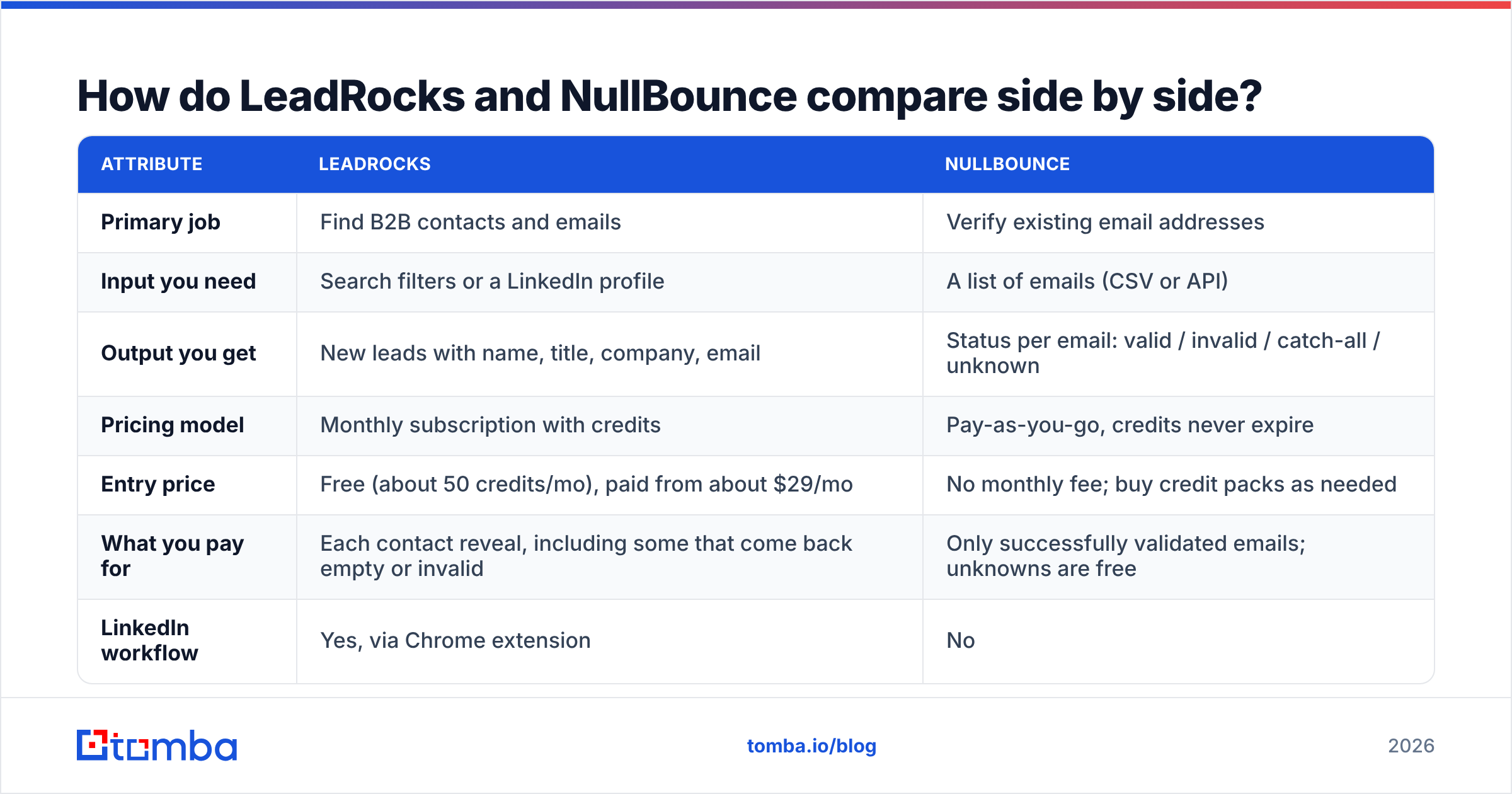
- Do you already have contacts? If your CRM or event list has thousands of emails you haven't touched, you have a verification problem. NullBounce is the direct fix. If you're starting from zero, a verifier has nothing to work on.
- How regular is your sending volume? LeadRocks' subscription makes sense if you prospect every week. NullBounce's non-expiring credits suit teams that clean a list once a quarter or before a big campaign.
- How much do wasted credits cost you? Reviewers say LeadRocks credits are consumed even when a lookup returns a blank or invalid contact. NullBounce says it doesn't charge for unknowns. If you care about cost per usable email, calculate it from what you actually get, not the listed price.
- How many tools can your team realistically run? Two tools means two logins, two invoices, and a CSV export and import between them every time. For a solo founder that's manageable. For a five-person SDR team it becomes an ongoing process problem.

Is LeadRocks good for finding B2B emails?#
LeadRocks works well as an entry-level contact database. It works best for small teams and freelancers who want LinkedIn-based prospecting without enterprise pricing.
What works:
- Low cost to start. A free tier plus paid plans starting under $30/mo lets you test whether its data fits your ICP before you commit.
- LinkedIn extension. You can pull a contact while looking at a profile, which fits how most SDRs already prospect.
- Simple credit math. One credit reveals one contact, so it's easy to forecast spend on paper.
What to watch:
- Effective cost per valid email. If a real share of your reveals come back empty or bounce, your actual cost per usable contact can be well above the listed price. Track it for a month.
- Coverage varies by market. Like every database, LeadRocks is stronger in some regions and industries than others. Test it on 50 contacts from your actual target list, not a demo query.
- Verification is not its main job. Finders usually do some checking, but a dedicated verification pass before sending is still standard practice.
A lifetime deal for LeadRocks has also circulated on SaaS deal sites. If you find one, it can change the cost comparison a lot. Check what credit allowance and support terms actually come with it.
Is NullBounce good for email verification?#
NullBounce is a narrow, focused verifier. Its pricing rules are unusually friendly to buyers, and that's the main reason to pick it.
What works:
- You pay for results, not attempts. NullBounce says it charges only for successfully validated emails and doesn't charge for unknowns. Most verifiers charge per check whatever the result, so on messy lists this can make a real difference.
- No subscription. Credits don't expire, so you don't pay monthly for capacity you don't use.
- Catch-all flagging. Catch-all domains accept mail for any address, so a basic SMTP check can't confirm a mailbox exists. NullBounce labels those addresses separately so you can choose how to treat them.
What to watch:
- It can't find anyone. If your pipeline problem is "not enough contacts," NullBounce does nothing for you.
- Catch-all addresses stay uncertain. Flagging a catch-all is not the same as confirming the mailbox. You still have to decide whether to send to those addresses, drop them, or run them through a dedicated catch-all verifier.
- You have to wire it in. Getting it into your outbound flow means a CSV round-trip or an API integration you build and maintain.
If you're new to how verification works, bounce messages are what you're trying to avoid. Each hard bounce tells mailbox providers you're sending to addresses you never validated, and too many of them hurt your sender reputation.
How much does each tool actually cost per usable email?#
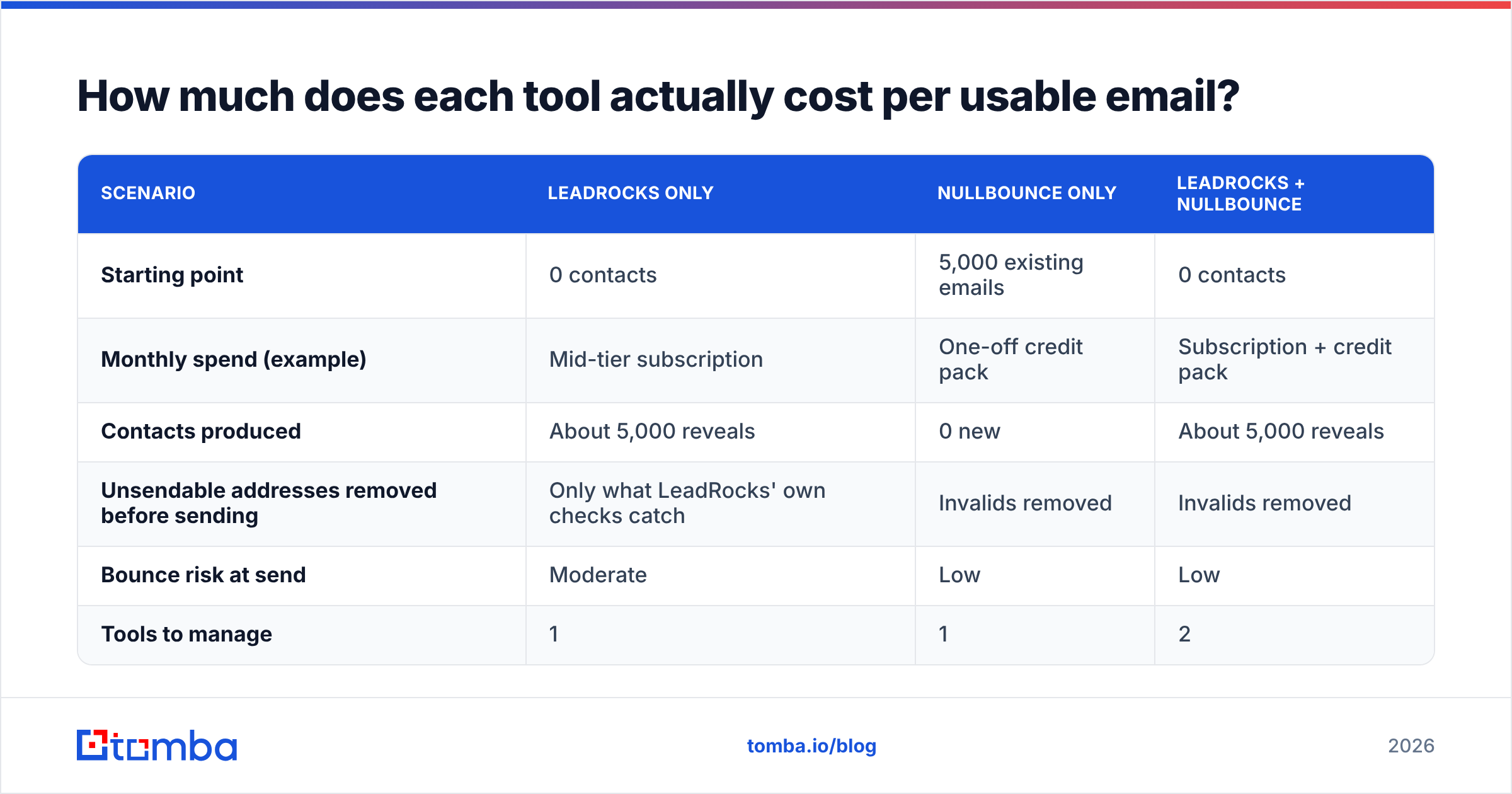
Listed prices don't answer the question that matters: how much you pay for each email that ends up in a real inbox. Here is a worked example using round numbers so you can see how the math works. Replace them with your own results.
| Scenario | LeadRocks only | NullBounce only | LeadRocks + NullBounce |
|---|---|---|---|
| Starting point | 0 contacts | 5,000 existing emails | 0 contacts |
| Monthly spend (example) | Mid-tier subscription | One-off credit pack | Subscription + credit pack |
| Contacts produced | About 5,000 reveals | 0 new | About 5,000 reveals |
| Unsendable addresses removed before sending | Only what LeadRocks' own checks catch | Invalids removed | Invalids removed |
| Bounce risk at send | Moderate | Low | Low |
| Tools to manage | 1 | 1 | 2 |
The pattern is simple. Each tool on its own solves half the problem. Together they solve all of it, but you manage two vendors. That trade-off, not any single feature, should drive your decision.
A few practical rules for keeping costs down:
- Verify right before sending, not when you first collect the contact. Email addresses go stale as people change jobs. A list verified three months ago needs checking again.
- Deduplicate before verifying. Paying to verify the same address twice is money wasted. Deduplicate first, then verify.
- Split catch-alls into their own segment. Send to them at lower volume from a separate mailbox, or skip them. Don't mix them into your main sequence.
When should you pick LeadRocks over NullBounce?#
Pick LeadRocks if:
- You're starting outbound in a new market and have no list.
- Your team prospects every day on LinkedIn and wants one-click contact reveals.
- Your budget is small and you want a free tier to test data quality first.
Pick NullBounce if:
- You have an existing list from a CRM, events, or an old tool, and bounce rates are rising.
- You send in bursts and don't want a monthly subscription.
- You want to pay only for results and not be charged for "unknown" verdicts.
Pick both if you're doing serious outbound volume and are comfortable running a two-step find-then-verify process. That setup is common and it works. The main cost is the manual handoff between the two tools.

Is there a single tool that finds and verifies emails?#
Yes. This is where the LeadRocks vs NullBounce question becomes a broader question about your stack. Several platforms combine finding and verification, so every contact you pull is checked before it reaches your sequencer.
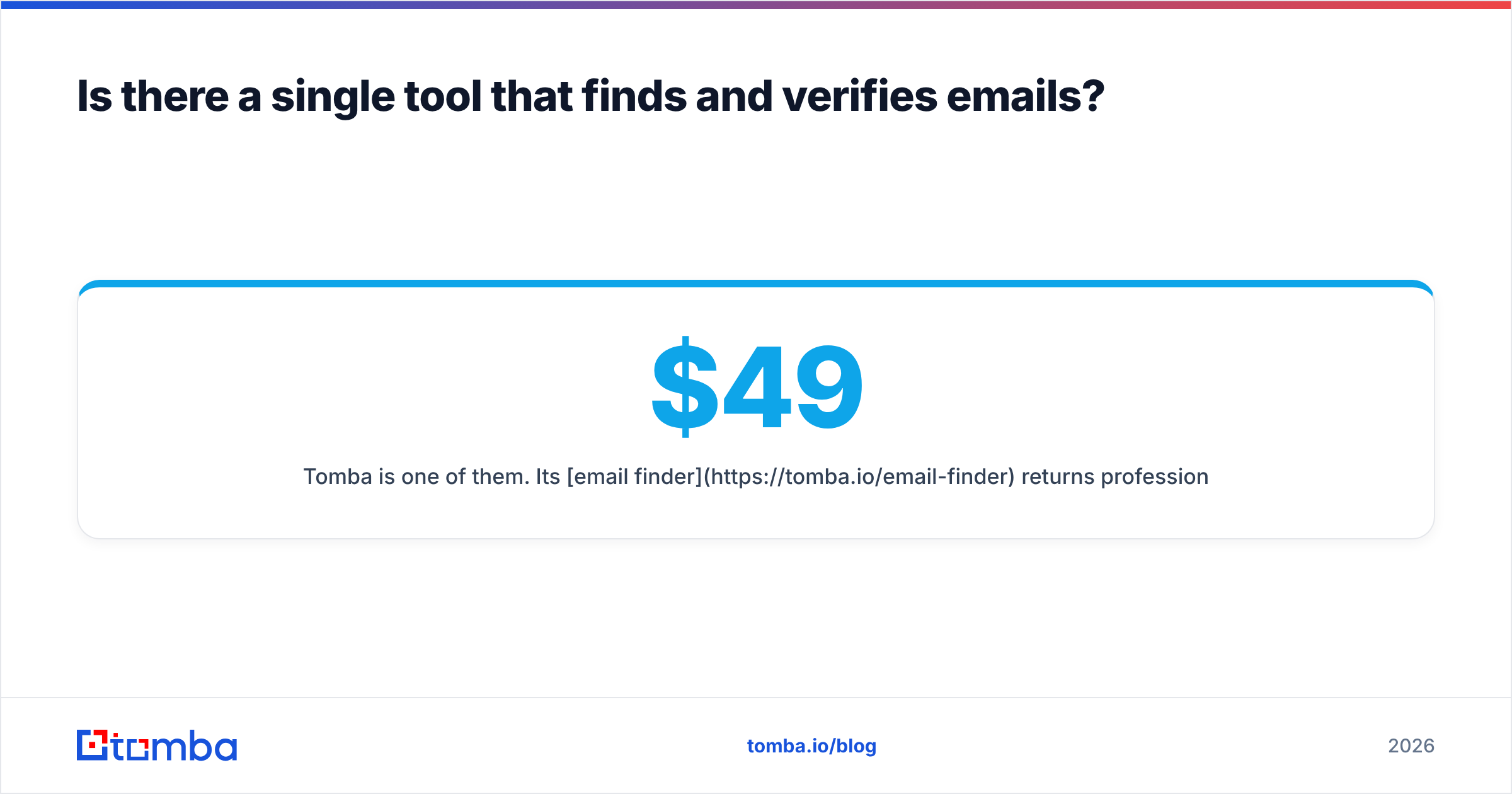
Tomba is one of them. Its email finder returns professional addresses from a domain, a name, or a company. It sits next to a built-in email verifier and the catch-all verifier mentioned above, so you don't need the CSV export and import step. Plans start with a free tier (25 searches/mo), then Starter at $49/mo, Growth at $99/mo, and Pro at $249/mo. Full pricing details are public.
Be honest with yourself about the trade-off. If all you need is an occasional cleanup of a list you already own, NullBounce's no-subscription model may be cheaper than any bundled platform. If all you want is a cheap LinkedIn reveal tool, LeadRocks' entry tier is hard to beat on price. Combined platforms make the most sense when you're finding and verifying every week and the time spent on handoffs has become a real cost.
For broader context before you decide, independent review sites such as G2 collect user ratings for both the email-finder and email-verification categories. Read the recent reviews there, because vendors change their data quality over time.
What is our verdict on LeadRocks vs NullBounce?#
Neither tool wins overall, because they don't do the same job.
- LeadRocks wins if you need contacts. It's affordable, it works with LinkedIn, and it's easy to test on the free tier. Before you scale, measure your cost per valid email.
- NullBounce wins if you need clean data. Pay-per-valid pricing, free unknowns, and credits that never expire make it one of the more buyer-friendly verifiers on the market.
- A combined platform wins if you need both every week. One workflow, one invoice, and no copying data between tools.
Run a simple test before you commit. Take 100 contacts from your real ICP. Look them up in whatever finder you're considering, verify the results, and send a small batch. Count the replies and the bounces. That result will tell you more than any comparison article, this one included.
Ready to find and verify in one step?#
If you're prospecting every week and tired of moving CSVs between a finder and a verifier, try the Tomba Email Finder. Search by domain, name, or company, get professional email addresses back, and check them with Tomba's built-in verifier before they reach your sequence. You can start on the free tier with 25 searches a month, test it against your own ICP, and upgrade only if the data holds up.
Related guides#
// get started
Find, verify and enrich your first contacts today
Start on the free plan with 25 searches a month, then scale when your team is ready.
Free plan · No credit card required · GDPR & CCPA
// about the author