LeadRocks vs QuickEnrich (2026): Features, Pricing and Verdict
LeadRocks is a searchable B2B database. QuickEnrich is a LinkedIn-first enrichment extension. We compare coverage, mobile numbers, cost per contact and workflow fit so you can choose the right one.
TL;DR
- LeadRocks is a searchable B2B contact database. You filter by title, industry, location and company size, then reveal emails in bulk. It's a good fit if you build lists from scratch.
- QuickEnrich is a LinkedIn-first enrichment tool (Chrome extension plus API). It returns emails and mobile numbers for people you've already found. It's a good fit if your workflow runs through LinkedIn or Sales Navigator.
- Both charge by credit, and both have cheap entry plans that start around $24–$29/mo according to third-party listings in 2026. Where they differ is what one credit gets you. QuickEnrich bundles phone numbers into the credit. LeadRocks spends its credits on reveals at database scale.
- Our pick: QuickEnrich for SDRs working from LinkedIn who need mobile numbers. LeadRocks for founders and agencies building large, filtered lists on a budget.
- If you need domain search, verification and catch-all handling in the same tool, neither one covers all of it. That's where a full-stack finder like Tomba fits.
What is LeadRocks?#
LeadRocks is a B2B lead database with a prospecting interface on top. You don't start from a LinkedIn profile or a domain. You start from filters: job title, seniority, industry, headcount, country. LeadRocks returns matching contacts, and you spend credits to reveal their business emails, then export to CSV or push them to your outreach tool.
Its Chrome extension also works on LinkedIn profiles, but the database is the main product. Think of it as a lighter, cheaper version of the list-building half of Apollo or ZoomInfo.
Where LeadRocks is strong:
- Building lists from zero. You can go from "VP Marketing, SaaS, 50–200 employees, Germany" to a few hundred contacts without opening LinkedIn.
- Cost at volume. Third-party pricing listings in 2026 show a Starter plan around $29/mo for 1,000 credits, and the per-credit price drops on the Growth and Professional tiers. There has also been an AppSumo lifetime deal, which is why a lot of agencies use it.
- Simple workflow. Filter, reveal, export. There isn't much to learn.
Where it's weaker:
- Phone data is not its focus. If mobile numbers matter for your cold calling motion, test coverage in your market before you commit.
- Credits are spent on lookups whether or not they return data. Independent reviews point out that a reveal can come back blank or invalid and still cost you. Run your exports through a separate email verifier before you send.
What is QuickEnrich?#
QuickEnrich is a contact-enrichment tool built around LinkedIn. You install the Chrome extension, open a LinkedIn or Sales Navigator profile or list, and it returns a verified work email, a direct or mobile phone number, or both. There's also an API if you want to enrich records in bulk or inside a CRM workflow.
QuickEnrich says it has 130M+ contacts including mobile numbers, and it positions itself on coverage. One detail matters here: one credit covers one contact, with email and/or phone. Many competitors charge phone reveals separately, often at several times the email price, so this is a real pricing advantage for teams that call.
Where QuickEnrich is strong:
- LinkedIn-native workflow. SDRs who already live in Sales Navigator don't have to change how they work.
- Mobile numbers in the same credit. For call-heavy teams this can cut the effective cost per usable contact roughly in half compared with tools that charge phones separately.
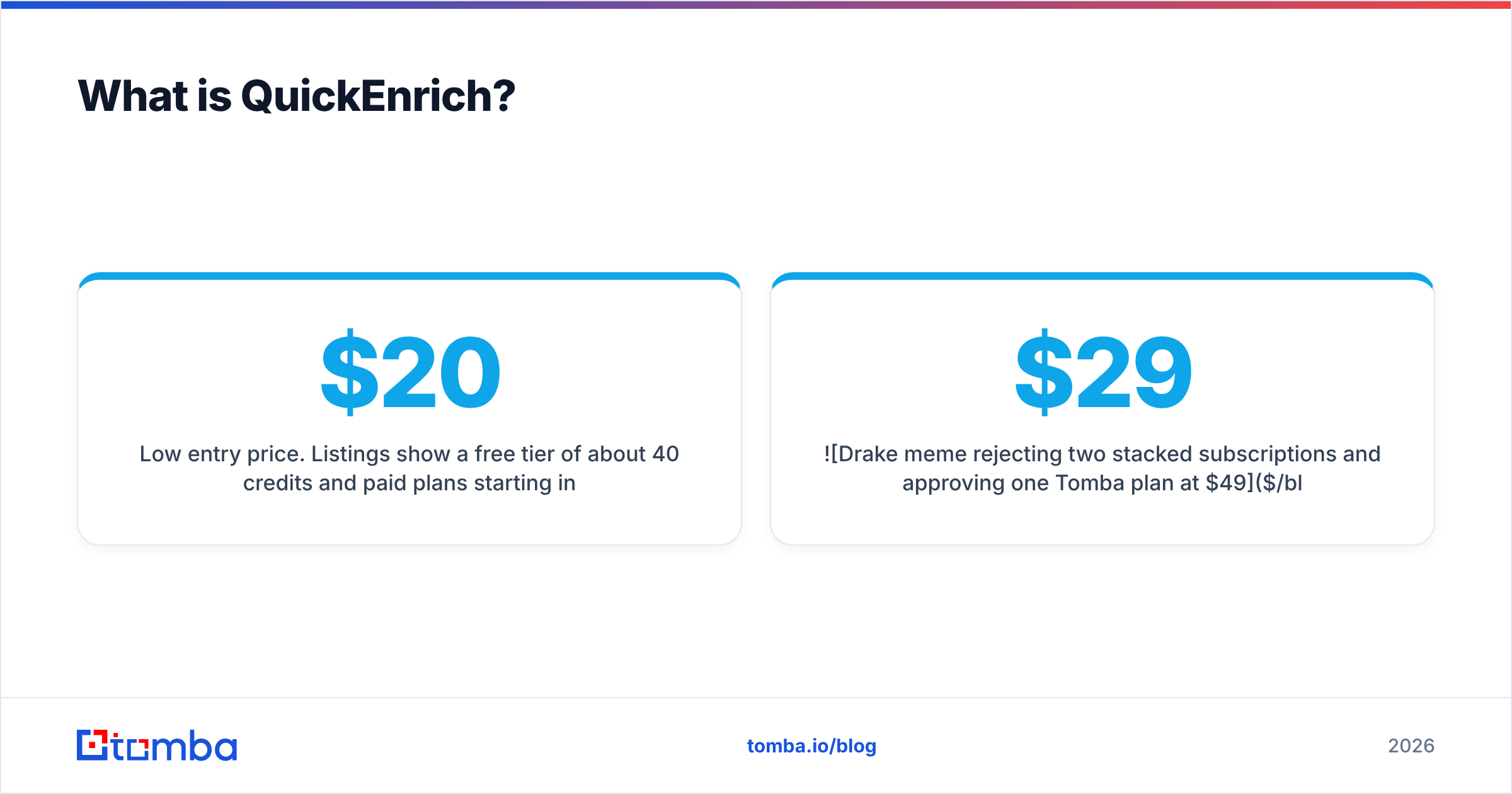
- Low entry price. Listings show a free tier of about 40 credits/month and paid plans starting in the mid-$20s.
Where it's weaker:
- No real list-building database. It enriches people you've already identified. It doesn't help you find who to target.
- Credit counts are small at the entry tier. A few hundred credits a month is enough for an individual SDR, not for an agency running campaigns for several clients.
- Dependent on LinkedIn. If your ICP isn't active on LinkedIn (some trades, SMB owners, parts of EMEA and APAC), coverage drops.

How do LeadRocks and QuickEnrich compare feature by feature?#
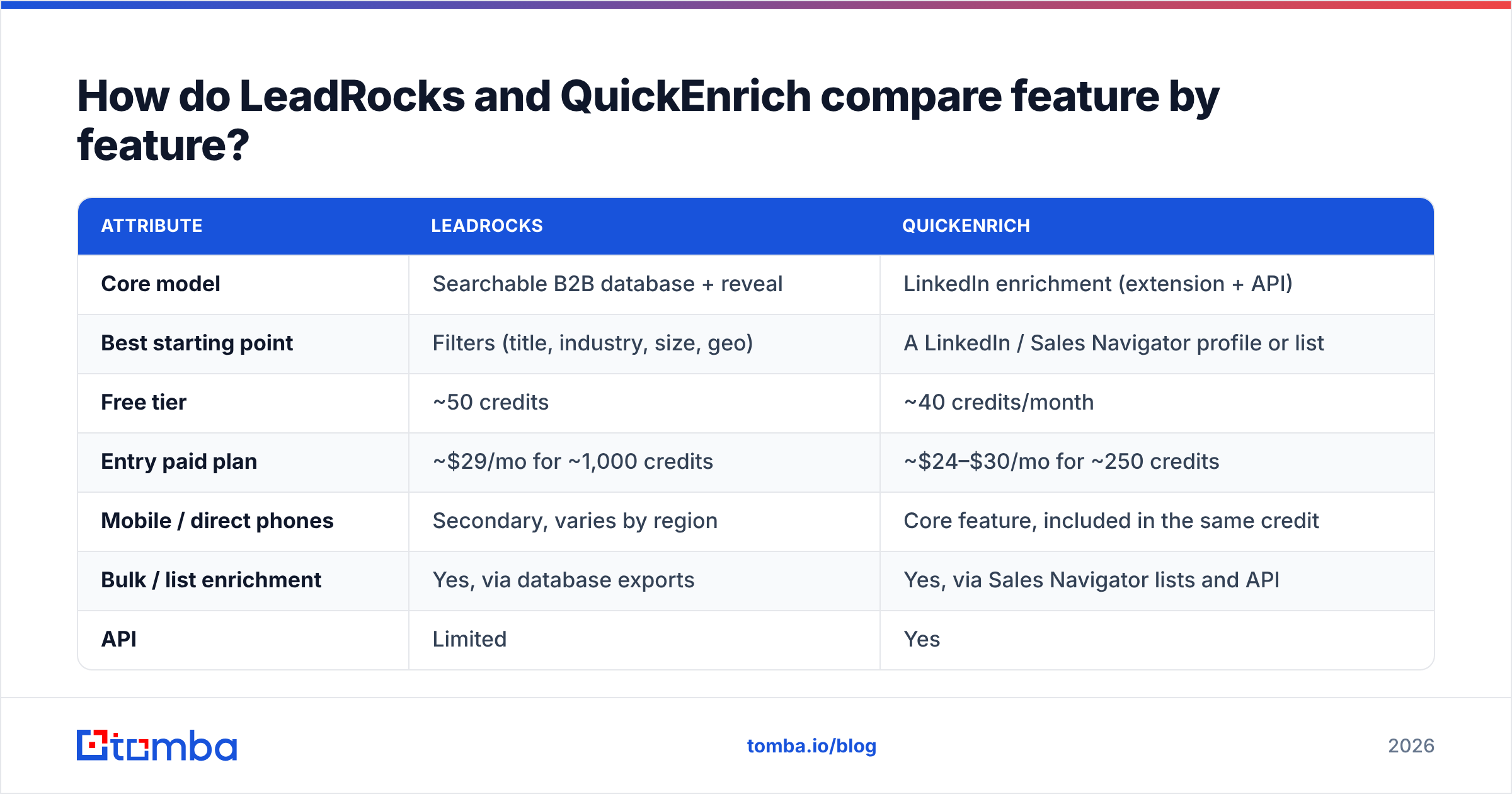
Here's how the two tools compare side by side. Pricing below comes from public and third-party listings in 2026. Check each vendor's current page before you buy, because entry tiers change often.
| Attribute | LeadRocks | QuickEnrich |
|---|---|---|
| Core model | Searchable B2B database + reveal | LinkedIn enrichment (extension + API) |
| Best starting point | Filters (title, industry, size, geo) | A LinkedIn / Sales Navigator profile or list |
| Free tier | ~50 credits | ~40 credits/month |
| Entry paid plan | ~$29/mo for ~1,000 credits | ~$24–$30/mo for ~250 credits |
| Mobile / direct phones | Secondary, varies by region | Core feature, included in the same credit |
| Bulk / list enrichment | Yes, via database exports | Yes, via Sales Navigator lists and API |
| API | Limited | Yes |
| Built-in email verification | Basic | Verified emails returned |
| Catch-all domain handling | Not a focus | Not a focus |
| Ideal user | Founders, agencies, list builders | SDRs, recruiters, call-heavy teams |

What the table shows: these tools aren't really substitutes. LeadRocks answers "who should I contact?" and QuickEnrich answers "how do I reach this specific person?" Many teams that compare them end up paying for both, which is the problem the first meme above is joking about.
Which is more accurate: LeadRocks or QuickEnrich?#
Neither vendor publishes an independent, reproducible accuracy benchmark, so be skeptical of any single percentage you see quoted, including in vendor blogs. Accuracy for any email finder depends on three things:
- Your ICP's geography and company size. US mid-market SaaS is easy for everyone. Small European manufacturers and APAC SMBs are where tools start to differ.
- How much of your list sits on catch-all domains. A catch-all server accepts every address, so a basic SMTP check can't confirm the mailbox exists. A tool that labels these "valid" is inflating its accuracy.
- How fresh the data is. Roughly a quarter to a third of B2B contact data goes stale every year as people change jobs. A reveal from a record last updated 14 months ago is a guess.

In practice, QuickEnrich tends to do better on freshness for LinkedIn-active contacts, because its lookups start from a live profile, so the current employer is usually correct. LeadRocks draws from a static database, so it's more exposed to job-change decay. It makes up for that with volume and price per credit.
How to test it yourself:
- Pull the same 100 contacts from your real ICP. Don't use a vendor-supplied sample.
- Run them through both tools' free tiers.
- Verify every returned address with an independent checker. Tomba's free email checker works for spot checks.
- Count deliverable emails per dollar, not "emails found." A tool that finds 80 emails with 20 bounces does worse than one that finds 65 with 2 bounces.
Is LeadRocks cheaper than QuickEnrich?#
Per credit, yes. Per usable contact, it depends on whether you need phone numbers.
- Email-only outbound: LeadRocks' entry plan gives you about four times as many credits as QuickEnrich's for roughly the same monthly price. If you verify afterward and throw out the bounces, LeadRocks still usually comes out cheaper per deliverable email for high-volume list building.
- Email + phone: QuickEnrich bundles the mobile number into the same credit, so the gap closes quickly. With tools that charge 5–10 credits per phone reveal, QuickEnrich's bundled model can end up cheaper per dialable contact.
- Hidden costs: Budget for verification either way. Sending unverified exports hurts your sender reputation, and one burned domain costs more than a year of either tool.
Here's a rule of thumb. If your reps send emails, compare cost per verified email. If your reps make calls, compare cost per connected dial.
Which tool fits your workflow?#
Choose based on where prospecting starts on your team, not on the feature list.
- You build lists from scratch every week → LeadRocks. Filter-based search is the main feature, and the credit volume suits agencies and founders doing their own outbound.
- Your SDRs work in Sales Navigator all day → QuickEnrich. The extension fits into how they already work, and mobile numbers come with the same credit.
- You run a call-first motion → QuickEnrich. Bundled phone data is the main reason to pick it.
- You're an agency managing several clients → LeadRocks, with a separate verifier in your stack. The per-credit price matters more than LinkedIn convenience.
- You need domain search, bulk verification, catch-all handling and an API in one place → neither. Look at a full-stack finder instead (see below).

What are the pros and cons of each?#
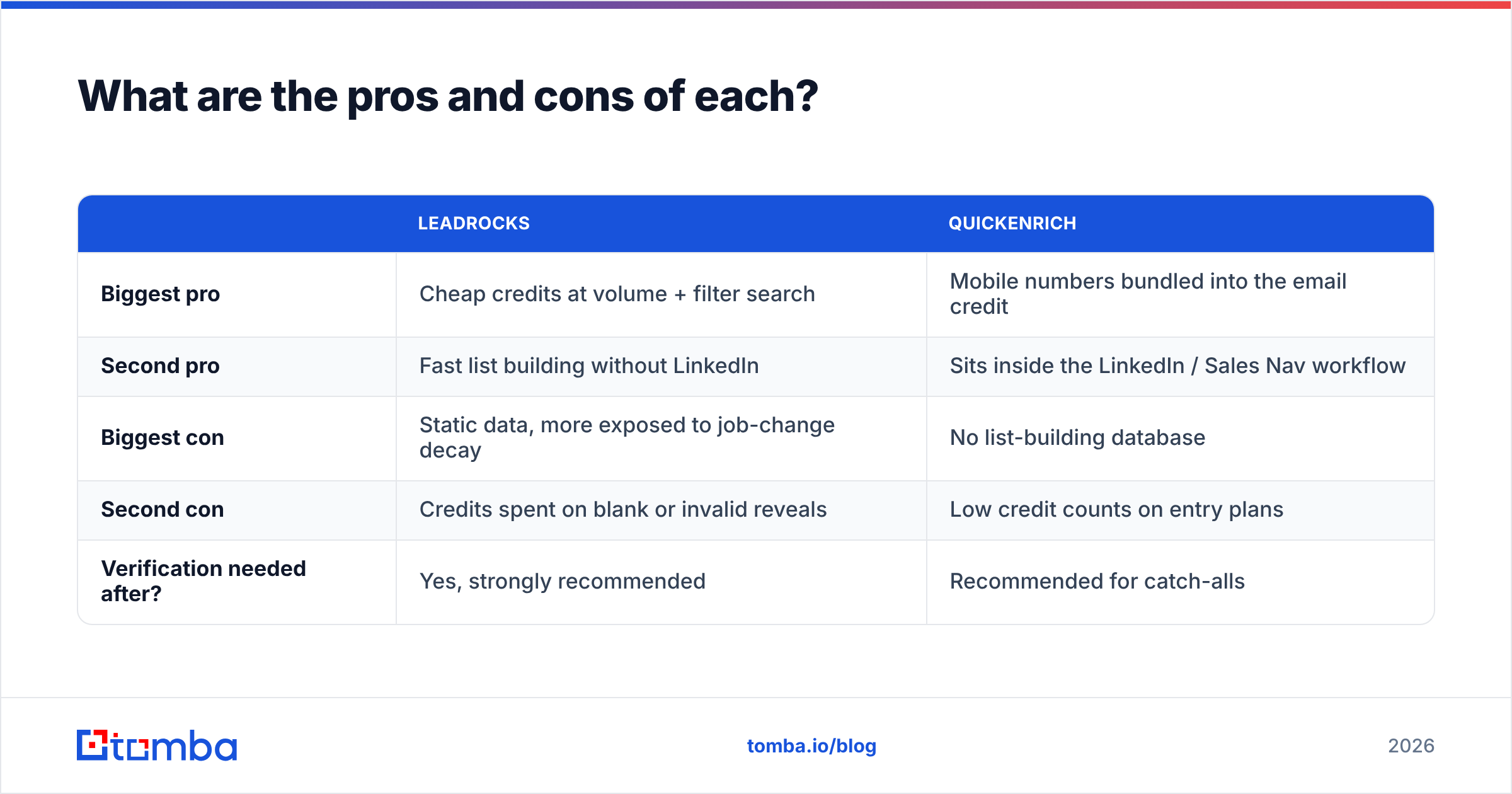
| LeadRocks | QuickEnrich | |
|---|---|---|
| Biggest pro | Cheap credits at volume + filter search | Mobile numbers bundled into the email credit |
| Second pro | Fast list building without LinkedIn | Sits inside the LinkedIn / Sales Nav workflow |
| Biggest con | Static data, more exposed to job-change decay | No list-building database |
| Second con | Credits spent on blank or invalid reveals | Low credit counts on entry plans |
| Verification needed after? | Yes, strongly recommended | Recommended for catch-alls |
Are there alternatives worth considering?#
If you're comparing LeadRocks and QuickEnrich, you probably want one tool that finds, enriches and verifies. Neither fully does that. A few options to shortlist:
- Tomba combines an email finder, domain search, an email verifier, a catch-all verifier, a phone finder and enrichment. Pricing goes from a free tier (25 searches/mo) to Starter at $49/mo, Growth at $99/mo and Pro at $249/mo, with Enterprise on custom terms. It also has an API, a Chrome extension and Google Sheets and CRM integrations.
- Apollo has a large database plus sequencing. It's a strong all-in-one, though data freshness varies by segment.
- Lusha and ContactOut are LinkedIn-first like QuickEnrich, with stronger phone coverage in some regions and higher prices per seat.
G2 and Capterra review pages for each tool are useful for a sense of support quality and billing complaints. Read the 2- and 3-star reviews, not the 5-star ones.
What's the final verdict on LeadRocks vs QuickEnrich?#
QuickEnrich wins for LinkedIn-driven SDR teams that need mobile numbers. The bundled credit and the native Sales Navigator workflow are hard to beat at that price.
LeadRocks wins for budget-conscious list builders, meaning founders, agencies and growth teams who need thousands of filtered contacts a month and will verify them before sending.
If you're about to pay for both, one to find prospects and one to reach them, plus a third tool to verify, add up the total first. Three subscriptions at $25–$30 each, plus CSV shuffling between them, is often more expensive and slower than one platform that does all three.
Where does Tomba fit?#
If you want finding, verifying and enriching in one place, try the Tomba Email Finder. You can look up a professional email by name and company, pull every public address on a domain, verify the results (including catch-all domains), and enrich contacts with phone and company data, all from the web app, the Chrome extension, Google Sheets or the API. Start on the free plan with 25 searches a month, run the same 100-contact test described above, and compare deliverable emails per dollar against LeadRocks and QuickEnrich. When you're ready to scale, see Tomba pricing for Starter ($49/mo), Growth ($99/mo) and Pro ($249/mo).
Related guides#
// get started
Find, verify and enrich your first contacts today
Start on the free plan with 25 searches a month, then scale when your team is ready.
Free plan · No credit card required · GDPR & CCPA
// about the author