LeadRocks vs Sales Automation Systems: Data or Delivery in 2026?
LeadRocks finds the people. Sales automation systems send the emails. Most teams compare the two when they really need to decide which to buy first and how to connect them.
TL;DR
- LeadRocks is a B2B contact data tool. It finds names, job titles, and email addresses, mostly through a searchable database and a LinkedIn browser extension. Sales automation systems like Outreach, Salesloft, Apollo, Reply.io, and Instantly are execution tools. They send sequences, schedule tasks, and track replies.
- Most teams don't have to pick one. The real question is which gap costs you more right now: not enough good contacts, or not enough capacity to follow up.
- If your pipeline problem is "we don't know who to email," start with a data tool. If it's "our reps forget to follow up," start with automation.
- The strongest setups use both: find contacts, verify them, enrich them, then push them into a sequencer. Automating bad data only gets you bounces faster.
- Some all-in-one platforms (Apollo, for example) bundle data and sequencing. That's convenient, but you give up depth on at least one side.
What is LeadRocks, and what problem does it solve?#
LeadRocks is a B2B lead database and email finder. You search for prospects by job title, industry, company size, and location, or you use its Chrome extension on LinkedIn profiles to pull contact details. You get a list of people, usually with a business email, and you can export it to CSV or your CRM.
So LeadRocks answers one question: who should I contact, and how do I reach them?
It doesn't:
- Send multi-step email sequences
- Schedule call tasks or LinkedIn touches for your reps
- Rotate sending inboxes or manage warmup
- Track replies, pause sequences on response, or report on meetings booked
That isn't a flaw. It's a scope decision. LeadRocks belongs to the prospecting-data category, next to tools like Tomba, RocketReach, and Lusha. Comparing it to Outreach is like comparing a fuel supplier to a car manufacturer. Both help you get somewhere, but they do different jobs.
What counts as a sales automation system?#
"Sales automation system" covers a lot of software. In practice, when B2B teams use the phrase they mean one of these:
- Sales engagement platforms. Outreach, Salesloft, and HubSpot Sales Hub sequences. These are built for SDR teams running multichannel cadences (email, call, LinkedIn tasks) with manager oversight and analytics. G2 tracks these under sales engagement software.
- Cold email sending tools. Instantly, Smartlead, lemlist, Saleshandy. These focus on high-volume email sending across many inboxes, with warmup, inbox rotation, and deliverability controls.
- Multichannel outreach tools. Reply.io, La Growth Machine, Waalaxy. These mix email with LinkedIn automation and sometimes calls or SMS.
- CRM-native automation. Workflows inside HubSpot, Salesforce, or Pipedrive that trigger tasks, emails, and stage changes from deal activity.
- All-in-one data plus engagement platforms. Apollo is the best-known example: a contact database and a sequencer in one subscription.
Every tool in groups 1 through 4 assumes you already have contacts. Without a data source feeding them, they have nobody to send to. That dependency matters for the rest of this comparison.
How do LeadRocks and sales automation systems compare side by side?#
Here are both categories across the attributes buyers usually weigh. Automation pricing varies a lot by vendor and seat count, so treat the ranges as directional and check each vendor's current page before you budget.
| Attribute | LeadRocks (data tool) | Sales automation systems |
|---|---|---|
| Core job | Find and export contact data | Send, schedule, and track outreach |
| Main output | Lists of prospects with emails | Sequences, tasks, replies, meetings |
| Typical user | SDR, founder, recruiter, marketer | SDR team, sales manager, RevOps |
| Needs contacts supplied? | No, it's the supplier | Yes, unless it bundles a database |
| Email sending | No | Yes (core feature) |
| Deliverability controls | No (though verification helps) | Warmup, inbox rotation, throttling (varies) |
| LinkedIn workflow | Extension pulls emails from profiles | Some tools automate LinkedIn touches |
| Reporting | Credits used, exports | Open/reply rates, meetings, rep activity |
| Pricing model | Credit- or contact-based plans | Per seat (Outreach, Salesloft) or per inbox/volume (Instantly, Smartlead) |
| Enterprise price range | Low to mid | Mid to high; Outreach and Salesloft are quote-based |
| Setup time | Minutes | Hours to weeks (domains, warmup, templates, CRM sync) |
| Biggest failure mode | Stale or unverified emails | Automating sends to bad data and burning domains |
The last row matters most. Each category fails in a way the other one can't fix. A great sequencer can't save a list with a 15% bounce rate, and a clean list does nothing if nobody follows up after the first email.
Is LeadRocks better than a sales automation system?#
For finding contacts, a dedicated data tool like LeadRocks usually beats the built-in data inside most automation platforms, and it costs less. Outreach and Salesloft don't ship a native B2B contact database at all. Tools like Reply.io and Instantly have added lead databases, but those are extras on top of a sending engine, not the main product.
For actually running outbound, LeadRocks isn't a contender because it doesn't send anything. A database export sitting in a spreadsheet produces zero meetings.
So neither is "better." They sit at different stages of the same pipeline:
- Source. Find the right accounts and people (LeadRocks, Tomba, and similar tools)
- Verify. Remove invalid, risky, and catch-all addresses before sending
- Enrich. Add title, seniority, company size, tech stack, and phone numbers
- Engage. Run sequences across email, phone, and LinkedIn (automation systems)
- Record. Log activity and outcomes back into the CRM
LeadRocks mostly covers stage 1, with some stage 2. Sales automation systems cover stage 4 and part of stage 5. The question worth asking is which stage is your bottleneck.
Which should you buy first?#
Diagnose before you spend. Use the scenario that sounds most like your team this quarter.
Buy a data tool first if:
- You're a founder or first SDR and your "list" is a few dozen LinkedIn bookmarks
- You already have a sequencer (even HubSpot's built-in sequences) but keep running out of people to put in it
- Your ICP is narrow, like "Heads of Finance at 50-200 person logistics companies in DACH," and you need precise targeting more than volume
- Reps spend over an hour a day hunting for email addresses by hand
Buy an automation system first if:
- You already have a CRM full of contacts that nobody is working
- Reps send one email and never follow up (most replies come from follow-ups, not the first touch)
- You manage 3+ reps and can't see who's doing what
- You're sending from personal Gmail and hitting daily limits
Consider an all-in-one if:
- You're a solo seller or a team of 2-3 and want one login and one invoice
- You can accept average data coverage in exchange for convenience
- You don't need enterprise features like call recording, deal intelligence, or detailed governance
What does a combined LeadRocks + automation stack cost?#
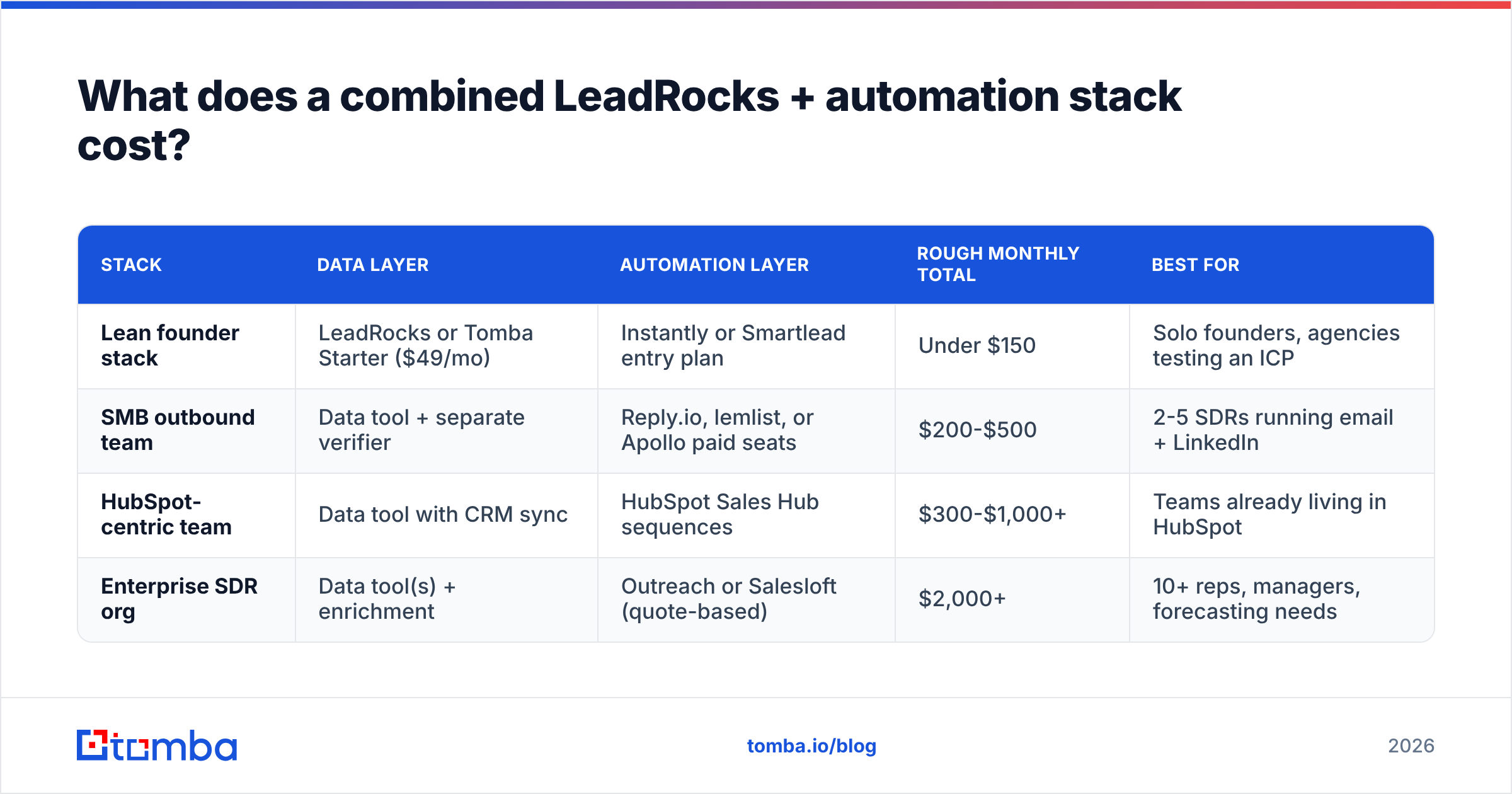
Here's roughly what a small outbound team (2 SDRs) spends on each common setup. The numbers are approximate and change often, so treat them as orders of magnitude, not quotes.
| Stack | Data layer | Automation layer | Rough monthly total | Best for |
|---|---|---|---|---|
| Lean founder stack | LeadRocks or Tomba Starter ($49/mo) | Instantly or Smartlead entry plan | Under $150 | Solo founders, agencies testing an ICP |
| SMB outbound team | Data tool + separate verifier | Reply.io, lemlist, or Apollo paid seats | $200-$500 | 2-5 SDRs running email + LinkedIn |
| HubSpot-centric team | Data tool with CRM sync | HubSpot Sales Hub sequences | $300-$1,000+ | Teams already living in HubSpot |
| Enterprise SDR org | Data tool(s) + enrichment | Outreach or Salesloft (quote-based) | $2,000+ | 10+ reps, managers, forecasting needs |
Two costs usually get left out:
- Verification. Most databases verify at some point, but addresses decay constantly as people change jobs. Re-verifying before every campaign is cheap insurance. A dedicated email verifier typically costs fractions of a cent per address.
- Sending infrastructure. Cold email tools need secondary domains, extra inboxes, and warmup time. That's often $5-$10 per inbox per month before you send a single email.
Where do teams go wrong when they connect data to automation?#
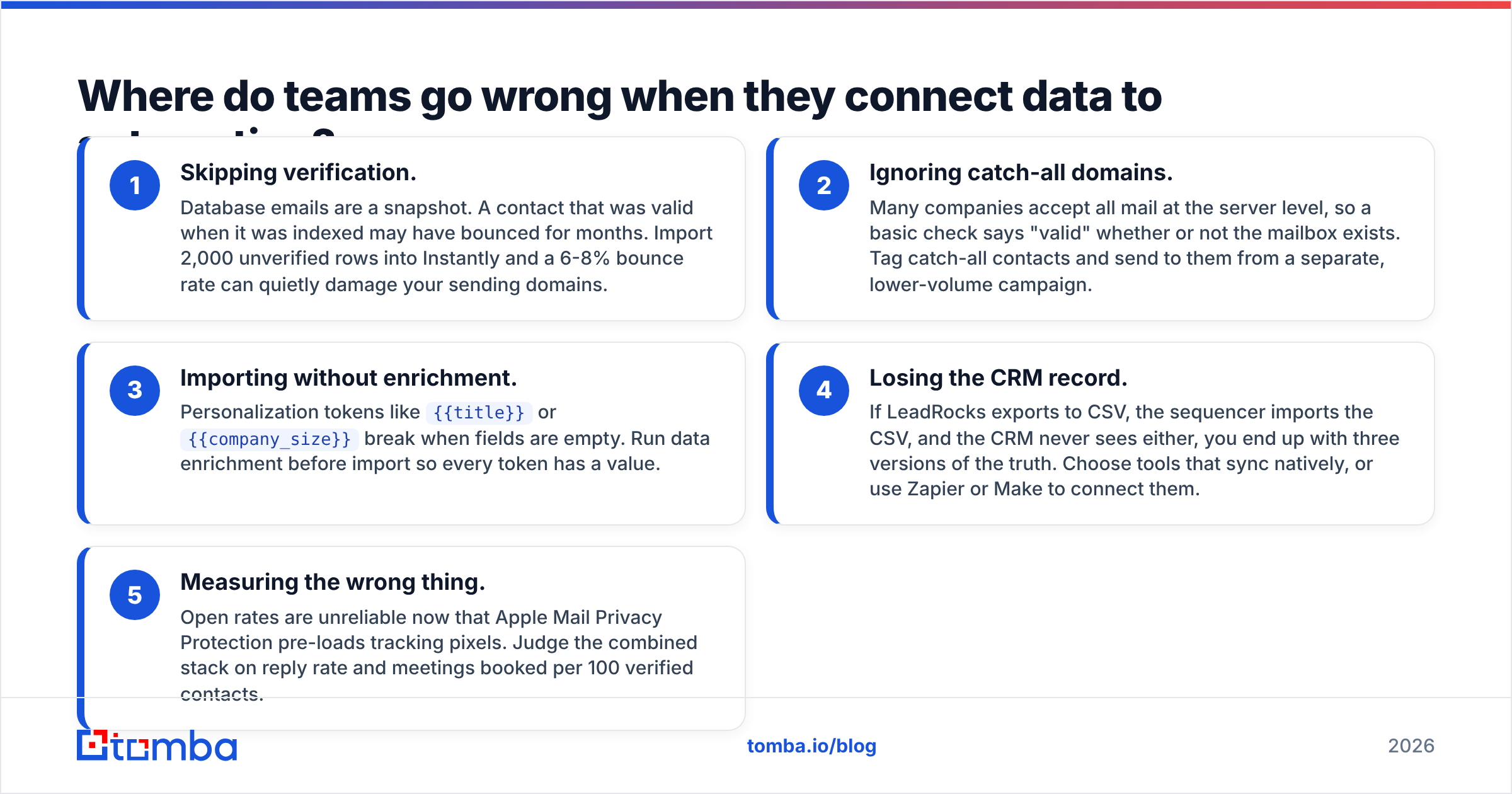
Almost every failure comes from treating the handoff between stage 1 and stage 4 as a simple CSV upload. The common mistakes:
- Skipping verification. Database emails are a snapshot. A contact that was valid when it was indexed may have bounced for months. Import 2,000 unverified rows into Instantly and a 6-8% bounce rate can quietly damage your sending domains.
- Ignoring catch-all domains. Many companies accept all mail at the server level, so a basic check says "valid" whether or not the mailbox exists. Tag catch-all contacts and send to them from a separate, lower-volume campaign.
- Importing without enrichment. Personalization tokens like
{{title}}or{{company_size}}break when fields are empty. Run data enrichment before import so every token has a value. - Losing the CRM record. If LeadRocks exports to CSV, the sequencer imports the CSV, and the CRM never sees either, you end up with three versions of the truth. Choose tools that sync natively, or use Zapier or Make to connect them.
- Measuring the wrong thing. Open rates are unreliable now that Apple Mail Privacy Protection pre-loads tracking pixels. Judge the combined stack on reply rate and meetings booked per 100 verified contacts.

How does Tomba fit next to LeadRocks and sales automation tools?#
Tomba sits on the same side of the fence as LeadRocks: it's a data layer, not a sequencer. You can use it as an alternative data source, a second source to fill LeadRocks' gaps, or the verification step between your database and your sending tool.
What it covers:
- Email finding by name + domain, by domain (all known contacts at a company), and from LinkedIn via the Chrome extension
- Verification, including a dedicated catch-all verifier for the "accept-all" domains that trip up basic checks
- Enrichment and phone finding, so sequences that include call steps have numbers to dial
- Integrations with HubSpot, Salesforce, Pipedrive, Zapier, Make, and Google Sheets, so contacts reach your CRM or sequencer without a manual CSV round trip. The HubSpot integration is the most common path for teams already using HubSpot sequences.
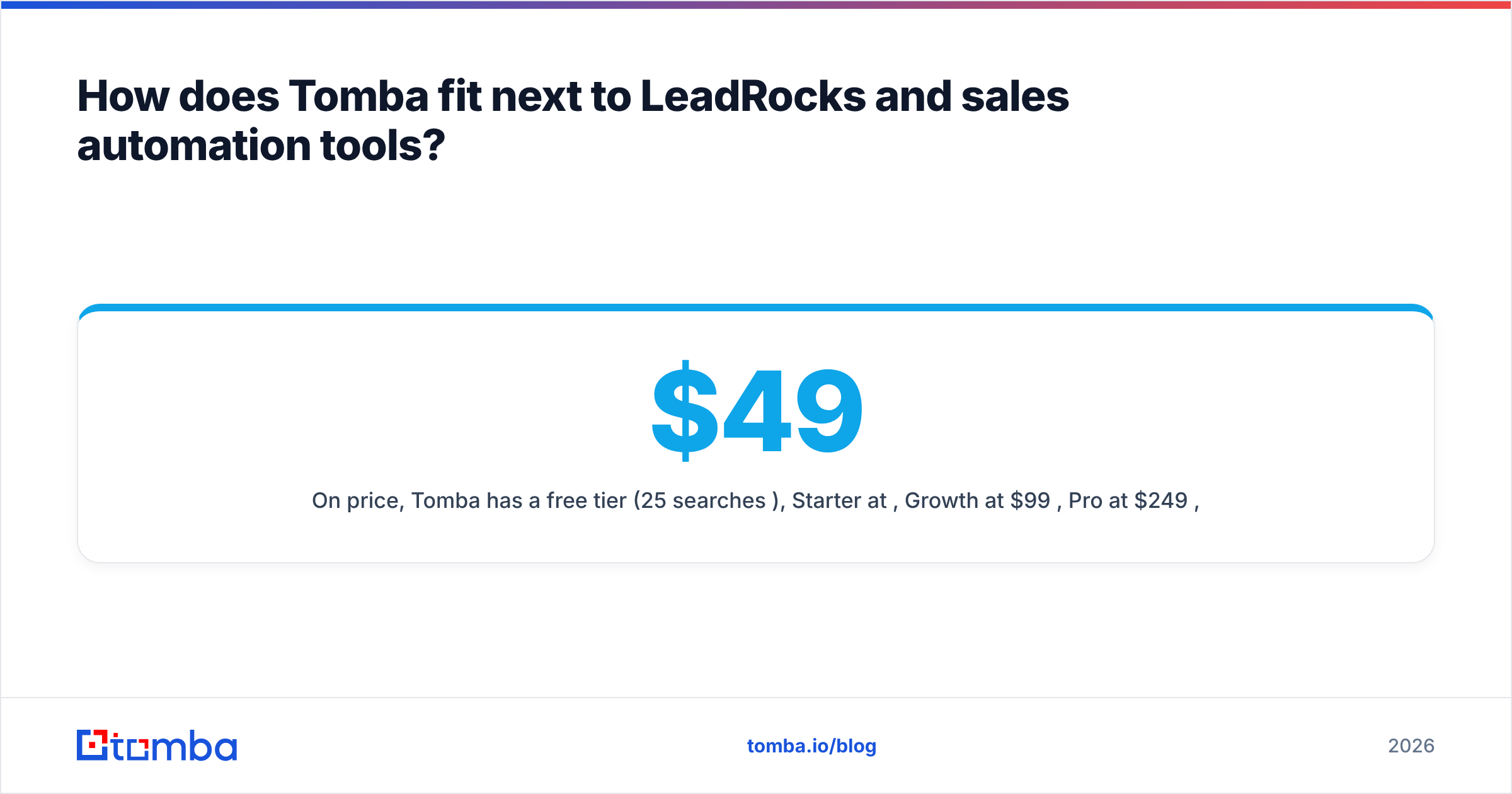
On price, Tomba has a free tier (25 searches/month), Starter at $49/mo, Growth at $99/mo, Pro at $249/mo, and custom Enterprise plans. Full details are on the Tomba pricing page. That puts it in the same bracket as most standalone data tools, and well below the per-seat cost of enterprise engagement platforms.
To be clear about what Tomba doesn't do: it won't send your sequences, warm your inboxes, or report on meetings booked. You still need an automation system for that, the same as you would with LeadRocks.
What's the verdict: LeadRocks or a sales automation system?#
Short answer: it's not either/or. Buy the layer that's currently your bottleneck, then add the other.
- Pick LeadRocks (or a comparable data tool) if you have a way to send but don't know who to send to. It's quick to set up, cheaper, and useful from the first search.
- Pick a sales automation system if you already have contacts but no consistent follow-up. Outreach and Salesloft suit larger managed teams. Instantly and Smartlead suit high-volume cold email. Reply.io and lemlist suit multichannel SMB teams.
- Pick an all-in-one like Apollo if simplicity matters more than best-in-class depth on either side.
- Whatever you pick, put a verification step between the data and the sender. It's the cheapest protection your outbound program has.
The teams that book the most meetings aren't necessarily the ones with the priciest sequencer. They're the ones that send accurate, well-targeted emails to real inboxes, then follow up consistently. Data quality sets the ceiling, and automation determines how close you get to it.
If your sequencer keeps running dry or your bounce rate keeps creeping up, fix the data layer first. Tomba Email Finder finds professional email addresses by domain, name, or company, verifies them, and syncs them to the CRM or sending tool you already use. Start on the free tier with 25 searches, run your ICP through it, and compare the results against your current source before you commit.
Related guides#
// get started
Find, verify and enrich your first contacts today
Start on the free plan with 25 searches a month, then scale when your team is ready.
Free plan · No credit card required · GDPR & CCPA
// about the author