LeadRocks vs Seamless.AI: Data, Pricing and Accuracy Compared
LeadRocks sells a lean, self-serve B2B database. Seamless.AI sells a real-time search engine with a sales-led contract. Here's which one fits your team, what each costs, and where each tends to go wrong.
TL;DR
- LeadRocks is a lean, self-serve B2B contact database. Monthly plans are published on its site, the interface is simple, and it costs less to start. It suits solo founders, agencies, and small SDR teams that mostly export lists to CSV.
- Seamless.AI is a bigger, sales-led platform. It pairs a real-time contact search engine with intent data, job-change alerts, AI writing tools, and deep CRM integrations. Paid plans are usually quote-based and often sold annually.
- On data quality, neither tool is reliably "verified" out of the box. Budget for a separate verification pass whichever one you pick.
- Pick LeadRocks if you want predictable monthly spend and a short learning curve. Pick Seamless.AI if you need volume, CRM sync, and extra signals, and you're fine with a contract.
- If all you need is emails for a known list of companies or people, a pay-as-you-go email finder with built-in verification is often cheaper than either.
What are LeadRocks and Seamless.AI?#
Both tools answer the same question: "Who should I contact at this company, and how do I reach them?" They answer it in different ways.
LeadRocks works like a classic B2B database. You filter by job title, seniority, industry, company size, and location. You get a list of decision-makers with work emails (and phone numbers for some records), then export them or push them into your outreach tool. A Chrome extension lets you pull contact details while browsing LinkedIn profiles. The product is intentionally small: search, reveal, export.
Seamless.AI calls itself a real-time search engine for B2B contacts. It doesn't only serve rows from a static database. It says it researches and assembles contact data when you search, then adds other layers on top: buyer intent, job-change tracking, an AI writing assistant, and an "Autopilot" list builder. It's built to be the prospecting layer for a full sales team, not just a list-export tool.
In short, LeadRocks is a well-stocked shop where you pick items off the shelf. Seamless.AI is a concierge who goes out and fetches things for you, and sometimes the things they fetch are stale.
How do LeadRocks and Seamless.AI differ at their core?#
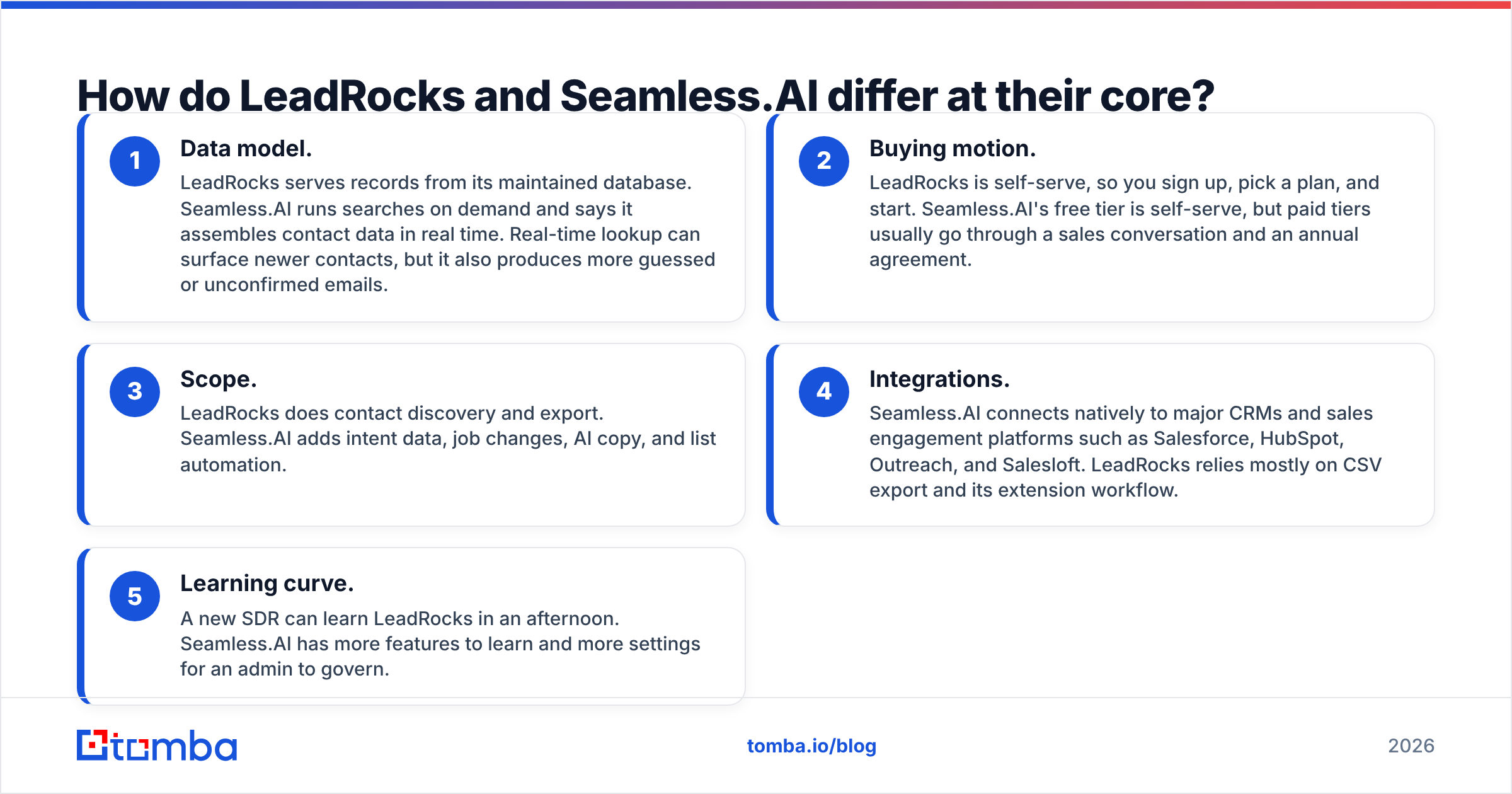
Before you look at prices, get clear on how each tool actually works. These five differences explain most of the practical gap between them:
- Data model. LeadRocks serves records from its maintained database. Seamless.AI runs searches on demand and says it assembles contact data in real time. Real-time lookup can surface newer contacts, but it also produces more guessed or unconfirmed emails.
- Buying motion. LeadRocks is self-serve, so you sign up, pick a plan, and start. Seamless.AI's free tier is self-serve, but paid tiers usually go through a sales conversation and an annual agreement.
- Scope. LeadRocks does contact discovery and export. Seamless.AI adds intent data, job changes, AI copy, and list automation.
- Integrations. Seamless.AI connects natively to major CRMs and sales engagement platforms such as Salesforce, HubSpot, Outreach, and Salesloft. LeadRocks relies mostly on CSV export and its extension workflow.
- Learning curve. A new SDR can learn LeadRocks in an afternoon. Seamless.AI has more features to learn and more settings for an admin to govern.

Which has better data accuracy?#
Neither vendor wins this outright, and you should be skeptical of anyone who says otherwise.
Seamless.AI has thousands of reviews on G2, and the pattern is consistent. Users like the volume and the speed of the Chrome extension. The most common complaints are about accuracy: bounced emails, outdated job titles, and phone numbers that reach the wrong person. The real-time approach is exactly why this happens. When a tool builds an email address from a name and a company pattern, some of those addresses will never have been confirmed by a mail server.
LeadRocks has a much smaller review footprint, so there's less public evidence either way. Users mostly describe the data as usable for SMB and mid-market outreach, with thinner coverage in niche verticals and outside North America and Western Europe. A smaller database can mean fewer stale records per search. It can also mean you run out of matching contacts sooner in a narrow ICP.
Here's how several email finders compare on accuracy in a controlled test set:

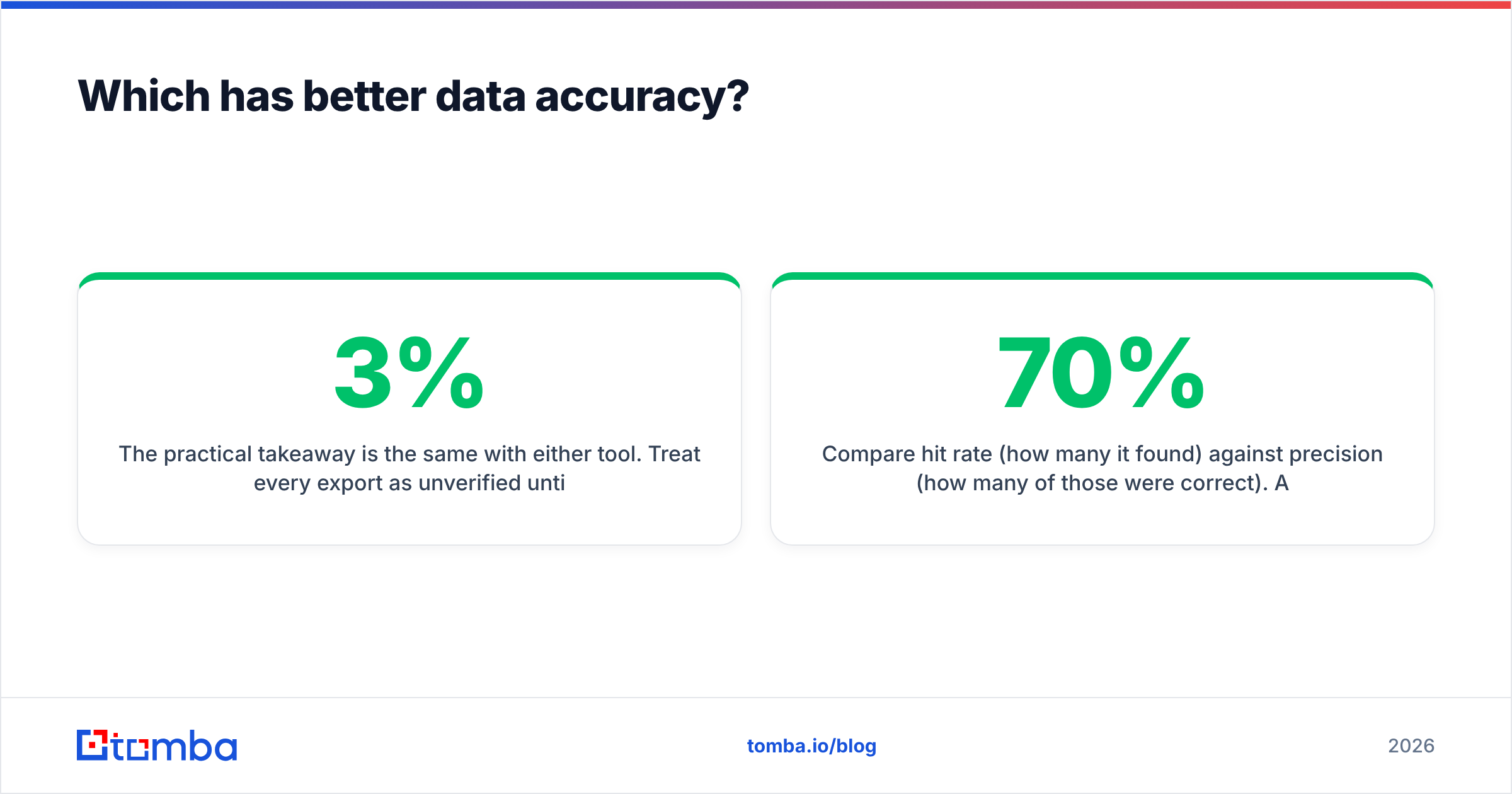
The practical takeaway is the same with either tool. Treat every export as unverified until it passes an email verifier. A bounce rate above roughly 2–3% starts to hurt your sender reputation, and neither vendor's "verified" badge guarantees your campaign will stay under that line. Catch-all domains are the biggest blind spot, because mail servers on those domains accept every address during a check. That makes guessed addresses look deliverable when they aren't.
How to run your own accuracy test#
Don't trust anyone's benchmark, including ours. Run this 30-minute test during a free trial:
- Pick 50 contacts you already know are correct, such as past customers or current pipeline.
- Look each one up in LeadRocks and in Seamless.AI.
- Record three results per tool: found or not found, exact match to your known email, and the status your verifier returns.
- Compare hit rate (how many it found) against precision (how many of those were correct). A tool that finds 45 out of 50 with 70% precision is worse for cold email than one that finds 35 with 95% precision.
How much do LeadRocks and Seamless.AI cost?#
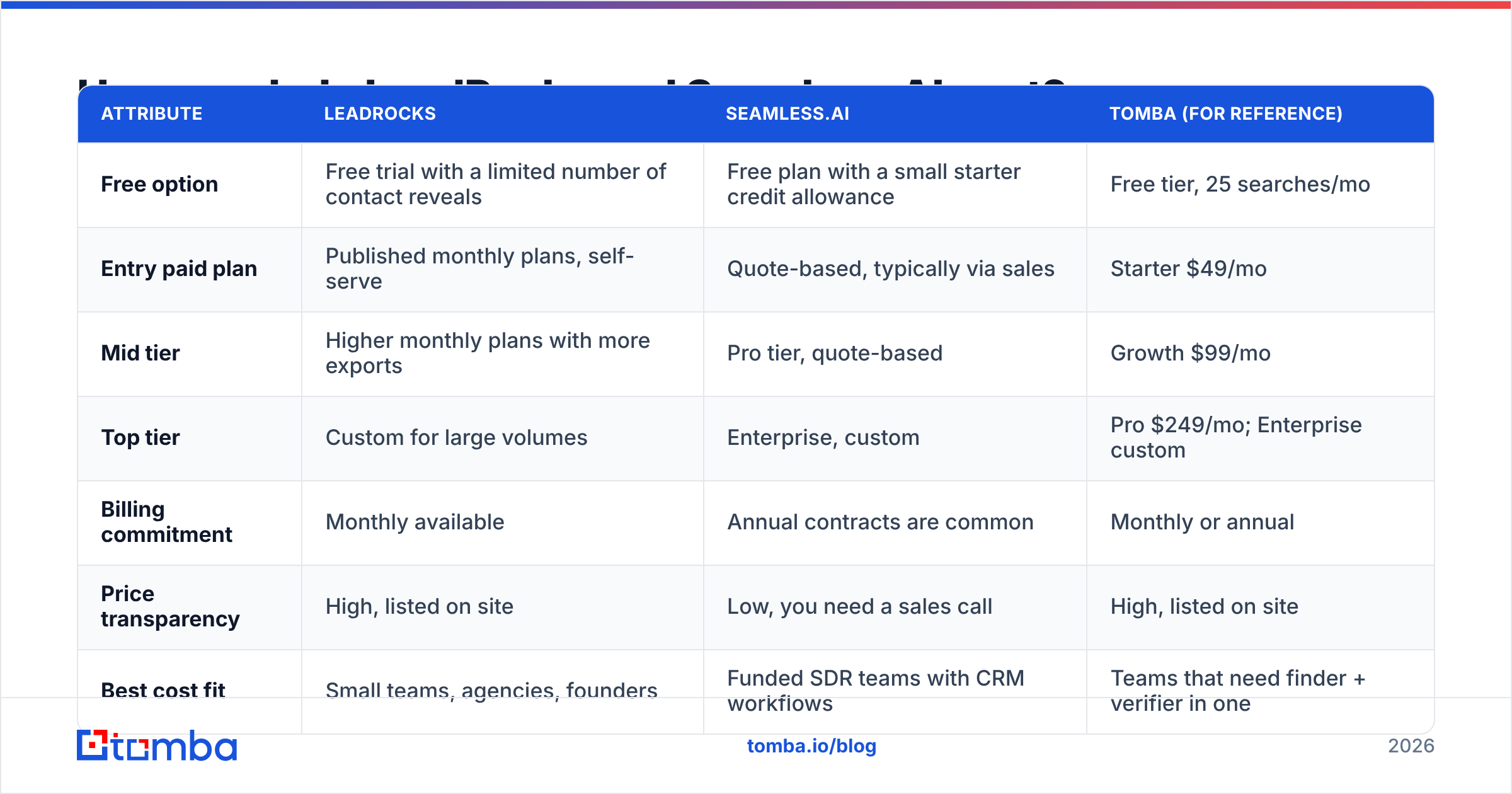
Pricing is where the two tools differ most. Plans change often, so check the vendors' own pricing pages before you commit. The structure below reflects each vendor's public positioning at the time of writing.
| Attribute | LeadRocks | Seamless.AI | Tomba (for reference) |
|---|---|---|---|
| Free option | Free trial with a limited number of contact reveals | Free plan with a small starter credit allowance | Free tier, 25 searches/mo |
| Entry paid plan | Published monthly plans, self-serve | Quote-based, typically via sales | Starter $49/mo |
| Mid tier | Higher monthly plans with more exports | Pro tier, quote-based | Growth $99/mo |
| Top tier | Custom for large volumes | Enterprise, custom | Pro $249/mo; Enterprise custom |
| Billing commitment | Monthly available | Annual contracts are common | Monthly or annual |
| Price transparency | High, listed on site | Low, you need a sales call | High, listed on site |
| Best cost fit | Small teams, agencies, founders | Funded SDR teams with CRM workflows | Teams that need finder + verifier in one |
The Seamless.AI price you see on a quote can look competitive per credit. The things to watch are the contract terms. Reviewers regularly mention auto-renewal clauses and cancellation windows they didn't notice at signup. If you sign, put the renewal date in your calendar 60 days early and read the credit rollover terms.
LeadRocks is easier to test and easier to walk away from. You pay monthly, use what you need, and cancel. For a team that isn't sure it will still be doing outbound in six months, that flexibility counts for a lot.
For a side-by-side of Tomba's own tiers, see Tomba pricing.
Which one has more features?#
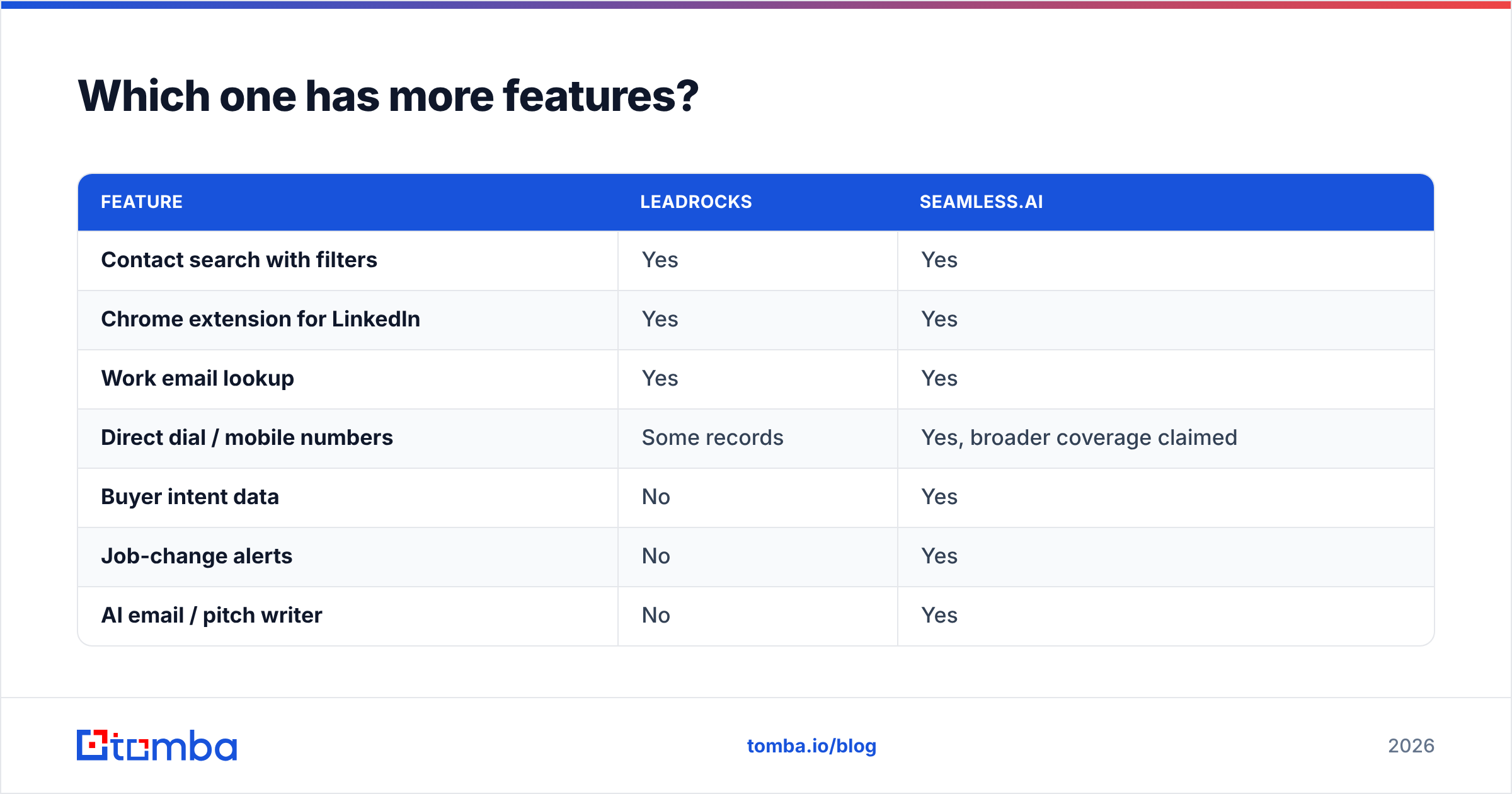
Seamless.AI does, by a wide margin. Whether you'll use those features is a separate question.
| Feature | LeadRocks | Seamless.AI |
|---|---|---|
| Contact search with filters | Yes | Yes |
| Chrome extension for LinkedIn | Yes | Yes |
| Work email lookup | Yes | Yes |
| Direct dial / mobile numbers | Some records | Yes, broader coverage claimed |
| Buyer intent data | No | Yes |
| Job-change alerts | No | Yes |
| AI email / pitch writer | No | Yes |
| Automated list building | Basic saved searches | Autopilot |
| Native CRM sync (Salesforce, HubSpot) | Limited; mostly CSV | Yes |
| Sales engagement sync (Outreach, Salesloft) | Via CSV | Yes |
| Team admin and credit controls | Basic | Advanced |
If your SDRs work inside Salesforce and your managers want intent scores and job-change triggers feeding sequences, Seamless.AI's extra layers replace work you'd otherwise do by hand. If your workflow is "build a list, export, load into Instantly or Lemlist", most of that extra surface area goes unused, and you're paying for it anyway.
Is Seamless.AI better than LeadRocks for sales teams?#
For a team of 10 or more SDRs running from a CRM, generally yes. Seamless.AI's integrations, admin controls, and signal data are designed for that setup. Managers can see credit usage per rep, sync contacts straight into Salesforce or HubSpot, and trigger outreach when a champion changes jobs. Those workflows are hard to rebuild with a CSV-first tool.
The trade-off is overhead. Someone has to own the contract, manage credit allocation, and clean up the duplicate or inaccurate records that real-time lookup can push into your CRM. Plan for a data-hygiene process: verification before sync, dedupe rules, and regular re-enrichment.
Is LeadRocks better for small teams and agencies?#
Usually, yes. LeadRocks works well when:
- You're a solo founder or a team of 1–3 doing targeted outbound to a defined ICP.
- You run an agency that builds lists for several clients and needs predictable per-month costs to bill against.
- Your stack is lightweight: a sending tool, a spreadsheet, maybe a simple CRM.
- You don't want a sales call just to see the price.
The limits appear at scale. Once several reps are pulling from the same database, you'll want better admin controls, native CRM sync, and deeper coverage in niche segments. At that point teams either upgrade to a heavier platform or combine LeadRocks with a specialist email finder and verifier to fill the gaps.

What do LeadRocks and Seamless.AI get wrong?#
A fair comparison should cover the weak spots of both tools.
LeadRocks
- Smaller database. Narrow ICPs (for example, "VP Engineering at 50–200 person fintechs in DACH") can run dry quickly.
- Fewer native integrations, so CSV handling adds manual steps.
- A smaller public review base, which makes independent validation harder.
- No intent or trigger data, so you need other tools for timing signals.
Seamless.AI
- Accuracy complaints come up repeatedly in public reviews, especially for phone numbers and guessed emails.
- Quote-based pricing and annual commitments make it hard to trial honestly.
- Contract renewal terms catch some buyers off guard.
- The feature surface is large, and small teams pay for capabilities they don't use.
Neither tool deals well with catch-all domains on its own. If a large share of your target accounts accept all mail, run those addresses through a dedicated catch-all verifier before sending.
Are there alternatives worth considering?#
Yes, especially if your real need is narrower than "full prospecting platform."
Many teams don't need a database at all. They already know which companies they want to target from their CRM, event lists, or a TAM spreadsheet, and they just need the right email for the right person. In that case, a dedicated email finder is usually cheaper and more accurate than a database. You search by domain or by name plus company, and the result comes back already verified.
Here's how the main email-finding tools compare on the attributes that matter most:

If Seamless.AI's contract model is the main thing putting you off, our breakdown of each Seamless.AI alternative covers tools with monthly billing and built-in verification. You can also compare against the broader field on Capterra before shortlisting.
How should you choose between LeadRocks and Seamless.AI?#
Use this decision shortcut:
- Choose LeadRocks if you have a team of three or fewer, a CSV-based workflow, a tight budget, and want to cancel any month.
- Choose Seamless.AI if you have a CRM-centric SDR team, need intent and job-change signals, have the budget for an annual contract, and have an admin who will own data hygiene.
- Choose neither (use a dedicated email finder) if you already know your target accounts and just need accurate, verified emails at a predictable price.
Whichever you pick, three rules protect your pipeline:
- Trial with your own known-good contacts before you buy. Vendor demos are always tuned to look good.
- Verify every list before it touches a sending domain. A few percent of bounces can undo weeks of warmup.
- Read the billing terms, especially renewal windows and credit rollover. Surprise invoices are the most common complaint about tools in this category.
Final verdict: LeadRocks vs Seamless.AI#
Seamless.AI is the more powerful platform. LeadRocks is the more practical purchase for most small teams. Seamless.AI earns its price when you'll actually use its integrations and signal data across a funded SDR team. LeadRocks earns its place by being cheap to start, simple to use, and easy to cancel. Neither removes the need for independent verification, and that step matters more for your deliverability than which database you choose.
If your prospecting starts from a known list of companies or names, you may not need either platform. The Tomba Email Finder finds professional email addresses by domain, name, or company, verifies them in the same step, and includes a free tier (25 searches/month) with paid plans from $49/mo on monthly billing. Run your 50-contact accuracy test against Tomba alongside LeadRocks and Seamless.AI, then keep whichever tool bounces least.
Related guides#
// get started
Find, verify and enrich your first contacts today
Start on the free plan with 25 searches a month, then scale when your team is ready.
Free plan · No credit card required · GDPR & CCPA
// about the author