LeadRocks vs Sendigram: Finder vs Verifier Compared for 2026
LeadRocks finds B2B contacts. Sendigram checks whether emails are real. Here's how they compare on pricing, accuracy, and workflow, and which one to buy first.
TL;DR
- LeadRocks and Sendigram do different jobs. LeadRocks is a B2B contact database and LinkedIn extension that finds emails and phone numbers. Sendigram is mainly an email verification service, with email marketing features added on.
- Pick LeadRocks if you don't have a lead list yet and need to build one cheaply from job titles, companies, and LinkedIn profiles.
- Pick Sendigram if you already have a list, from a CRM export, event, or old campaign, and need to clean it before sending.
- Many teams end up needing both, because found emails still need verifying. That means two tools, two logins, and two billing models.
- A combined finder plus verifier such as Tomba covers both steps in one workflow, which usually costs less once you're above a few thousand contacts a month.
Searches for "LeadRocks vs Sendigram" usually come from someone who has read that both tools help with email, and wants to know which to pay for. The short answer is that they sit at different stages of the outbound pipeline. This comparison covers what each tool does, how the pricing works, where each one falls short, and how to choose based on your list and workflow.
What is LeadRocks?#
LeadRocks is a low-cost B2B contact database. You search by job title, company, industry, location, and seniority, then reveal emails (and on some plans, phone numbers) for the people you want. Third-party reviews cite an index of more than 100 million records. As with every database vendor, how much of that index is fresh and deliverable matters more than the headline number.
The main features:
- Prospect search with filters for title, company, industry, and geography
- A LinkedIn Chrome extension that pulls contact data while you browse profiles or Sales Navigator lists
- Enrichment to fill gaps in contact records you already hold
- Basic email sequencing for simple outbound, though it doesn't compete with a dedicated sequencer
- Unlimited users on every plan, which is unusual in this price range and matters for small SDR teams
Pricing is credit-based. Public listings at the time of writing show a free tier of about 50 credits a month, paid plans from roughly $29/mo, and an Enterprise tier around $580/mo for 20,000 monthly credits. LeadRocks has also offered a 60-day money-back guarantee and ran an AppSumo lifetime deal in the past. Check the live pricing page before you buy, because tiers in this category change often.
What LeadRocks is best at: turning an ideal customer profile into a list of named people with contact details, for not much money.
What is Sendigram?#
Sendigram started as an email checker. You upload a list, and it tells you which addresses are valid, invalid, risky, or unknown. It now also sells itself as email marketing software for small businesses, so you can verify a list and send to it from the same account.
The main features:
- Bulk email verification with syntax, domain, MX, and mailbox-level checks
- Status categories (valid, invalid, risky, unknown) so you can decide how cautious to be
- Pay-as-you-go credits that don't expire, which suits teams that clean lists occasionally rather than every month
- No charge for "unknown" results, a buyer-friendly policy not every verifier offers
- Email marketing / sending for newsletters and simple campaigns
On pricing, public listings show 100 free credits at signup, about $9.99 per 1,000 verifications on pay-as-you-go, and monthly plans from around $18 for 2,000 verifications, with lower per-email rates at higher volumes. Reviews are collected on G2's Sendigram Email Checker page.
What Sendigram is best at: telling you, cheaply, which emails on an existing list are safe to send to.
How do LeadRocks and Sendigram compare side by side?#
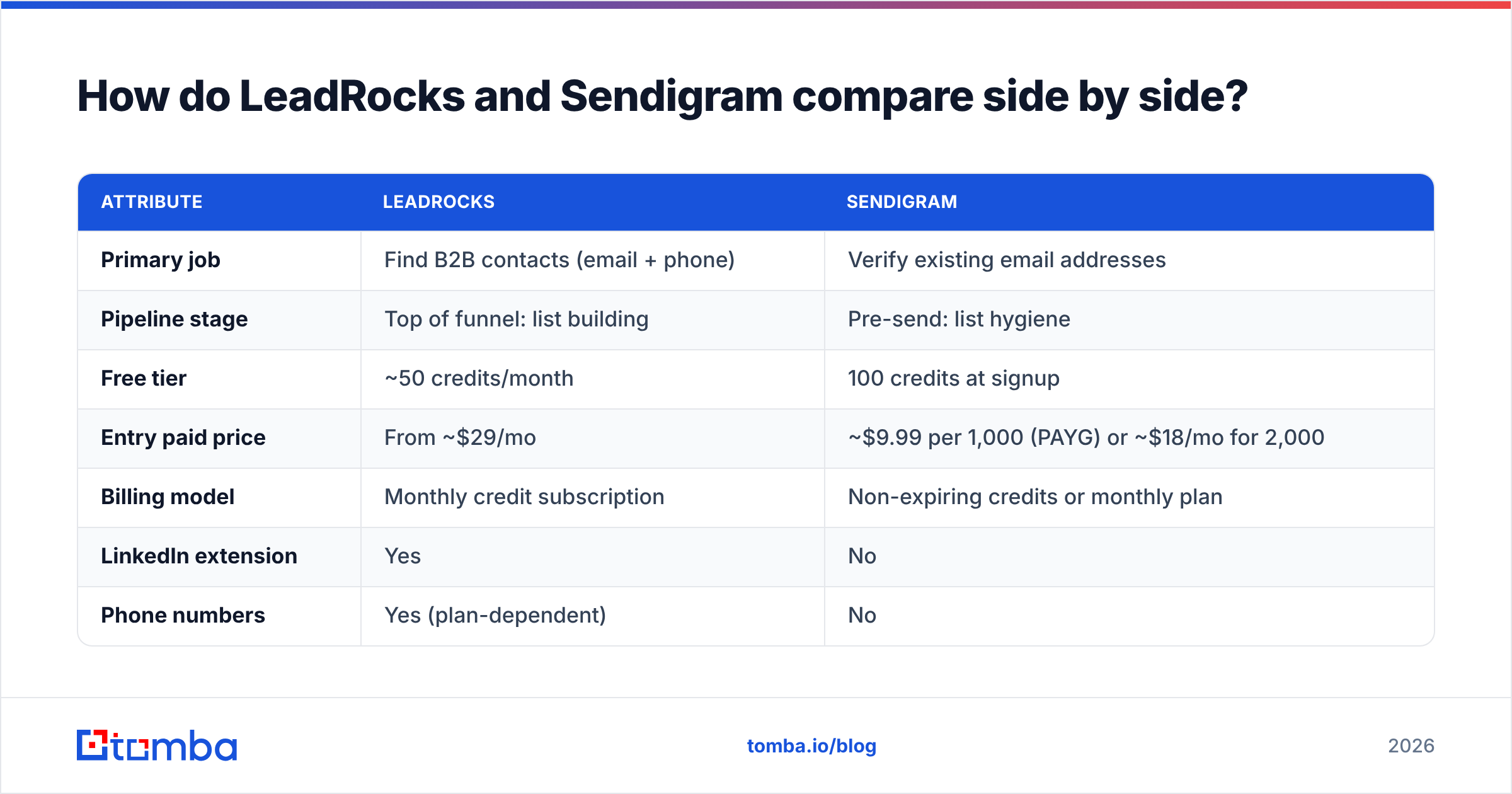
This is the core of the matchup. Read the table as "which stage of the pipeline does each tool cover" rather than "which is better," because they're answering different questions.
| Attribute | LeadRocks | Sendigram |
|---|---|---|
| Primary job | Find B2B contacts (email + phone) | Verify existing email addresses |
| Pipeline stage | Top of funnel: list building | Pre-send: list hygiene |
| Free tier | ~50 credits/month | 100 credits at signup |
| Entry paid price | From ~$29/mo | ~$9.99 per 1,000 (PAYG) or ~$18/mo for 2,000 |
| Billing model | Monthly credit subscription | Non-expiring credits or monthly plan |
| LinkedIn extension | Yes | No |
| Phone numbers | Yes (plan-dependent) | No |
| Bulk verification | Limited / not the focus | Core product |
| Email sending | Basic sequences | Email marketing campaigns |
| Seats | Unlimited users | Account-based |
| Best for | SDRs and founders building lists | Marketers cleaning old or imported lists |
Two things stand out. The first is that the pricing units aren't comparable. A LeadRocks credit reveals a contact, while a Sendigram credit checks one that already exists. At first glance Sendigram looks far cheaper per unit, but it doesn't create any leads.
The second is that the tools barely overlap. If you're choosing between them, you're really choosing which problem to solve first.

Is LeadRocks better than Sendigram for finding emails?#
Yes, clearly, because Sendigram doesn't find emails. It has no prospect database and no LinkedIn extraction. If your problem is "I need 500 VP of Finance contacts at mid-market SaaS companies in Germany," only LeadRocks helps.
The harder question is how accurate LeadRocks' emails are. The weak spot for any low-cost database is data freshness. People change jobs (B2B contact data is commonly estimated to decay by 20 to 30% a year), companies rebrand domains, and catch-all mail servers accept everything, which makes guessed addresses look valid. A cheap database with a large index will usually return more stale or unverified addresses than one that re-verifies at the moment you look up a contact.
In practice:
- Pull a small test batch of 100 to 200 contacts from LeadRocks in your exact ICP.
- Run that batch through a separate verifier (Sendigram works here, as does any email verifier).
- Measure the invalid and risky share. A single-digit invalid rate means you can send with light hygiene. Double digits mean you need to verify every export before it touches your sending domain.
That test takes an afternoon and tells you more than any vendor accuracy claim.
Is Sendigram better than LeadRocks for deliverability?#
For keeping bounces down, yes. Sendigram's whole product is about stopping bad addresses from reaching your sender. Sending to invalid mailboxes raises your bounce rate, and mailbox providers read a high bounce rate as a sign of careless list practices. That damages sender reputation for every later campaign from that domain.
Most practitioners aim to keep hard bounces under about 2%, and ideally under 1%, for cold outbound. You can't reach that reliably on an unverified list, whatever the source.
Sendigram has a few clear strengths here:
- Non-expiring credits suit irregular use. If you clean a conference list one quarter and a CRM export the next, you don't pay for months you don't use.
- Unknowns are free, so you aren't billed for results that give you no answer.
- Risky versus invalid separation lets you drop the definite failures and treat catch-alls with care, rather than throwing away half your list.
Where it falls short: verification can only confirm an address exists. It can't tell you whether that person is still the right buyer, and it can't replace the contacts you remove. After cleaning, your list is smaller, and you need a source to refill it. That source is a finder.
When should you choose LeadRocks?#
Choose LeadRocks when these apply:
- You're starting from zero. No CRM list and no event leads, just an ICP and a target account list.
- You live in LinkedIn. The Chrome extension fits a workflow where reps browse Sales Navigator and capture contacts as they go.
- You have several reps and a small budget. Unlimited users at a low starting price is a real advantage for a three to five person SDR team.
- You want phone numbers too, and a dedicated dialer-data provider is more than you want to spend right now.
Watch out for:
- Verification that's too light for strict deliverability standards. Plan to verify exports separately until your own tests show the data is clean enough.
- Credit burn. Monthly credits that don't roll over can go unused in slow months, or run out mid-campaign in busy ones.
- Basic sequencing. For multi-step, multi-inbox outbound you'll still want a proper sequencer.
When should you choose Sendigram?#
Choose Sendigram when these apply:
- You already own a list from newsletter signups, webinar registrants, trade-show scans, or a CRM that hasn't been cleaned in a year.
- You send in bursts. Pay-as-you-go credits that never expire fit teams that verify a few thousand addresses at a time, a few times a year.
- You want simple sending too. The email marketing side means a small business can verify and send from one place.
- Cost per verification is your main metric. Around a cent per check, with lower rates at volume, is competitive.
Watch out for:
- No lead generation at all. Once your list runs out, Sendigram can't refill it.
- Catch-all domains. Like most verifiers, Sendigram marks many of these as risky rather than resolving them. Enterprise targets often run catch-all servers, so a large share of a B2B list may come back risky.
- It isn't a cold-outreach sequencer. Its marketing features suit newsletters better than personalised one-to-one outbound.
Do you actually need both tools?#
For most outbound teams the honest answer is yes: you need both finding and verifying. Whether you need both of these particular tools is a different question.
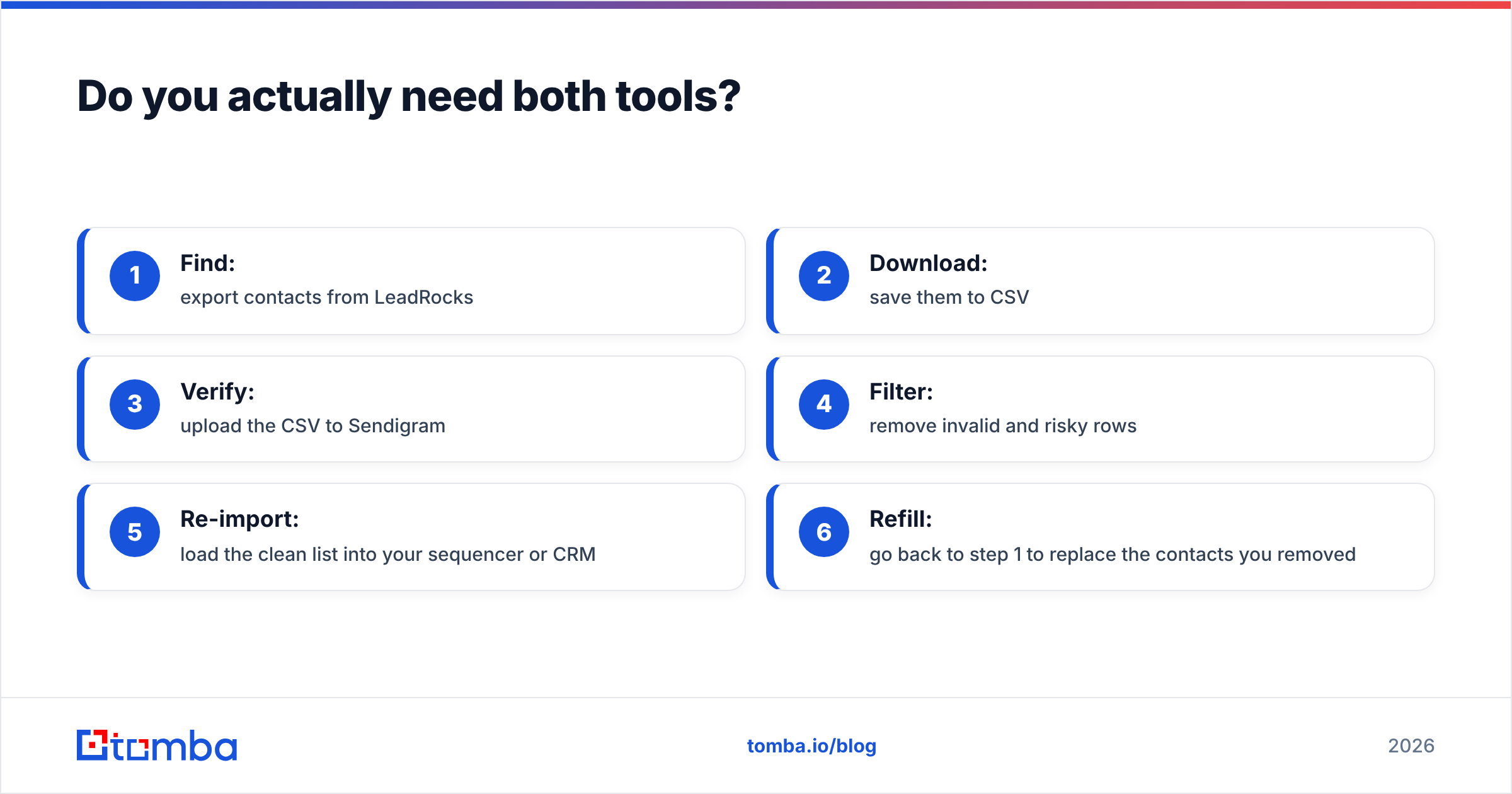
A typical two-tool stack looks like this:
- Find: export contacts from LeadRocks
- Download: save them to CSV
- Verify: upload the CSV to Sendigram
- Filter: remove invalid and risky rows
- Re-import: load the clean list into your sequencer or CRM
- Refill: go back to step 1 to replace the contacts you removed
Each step is manual, each vendor bills separately, and the CSV shuffling is where mistakes happen: duplicated rows, lost columns, a stale file uploaded by accident. For a founder doing 300 contacts a month, that's fine. For a team doing 5,000 or more, the time and the two sets of credits add up quickly.
The alternative is a tool that does both, so every found email is checked in the same lookup. That's the design behind all-in-one platforms such as Tomba, which pairs an email finder with a built-in verifier and a catch-all check. If you already have large lists, bulk email finder jobs cover that too.
How does the total cost compare at real volumes?#
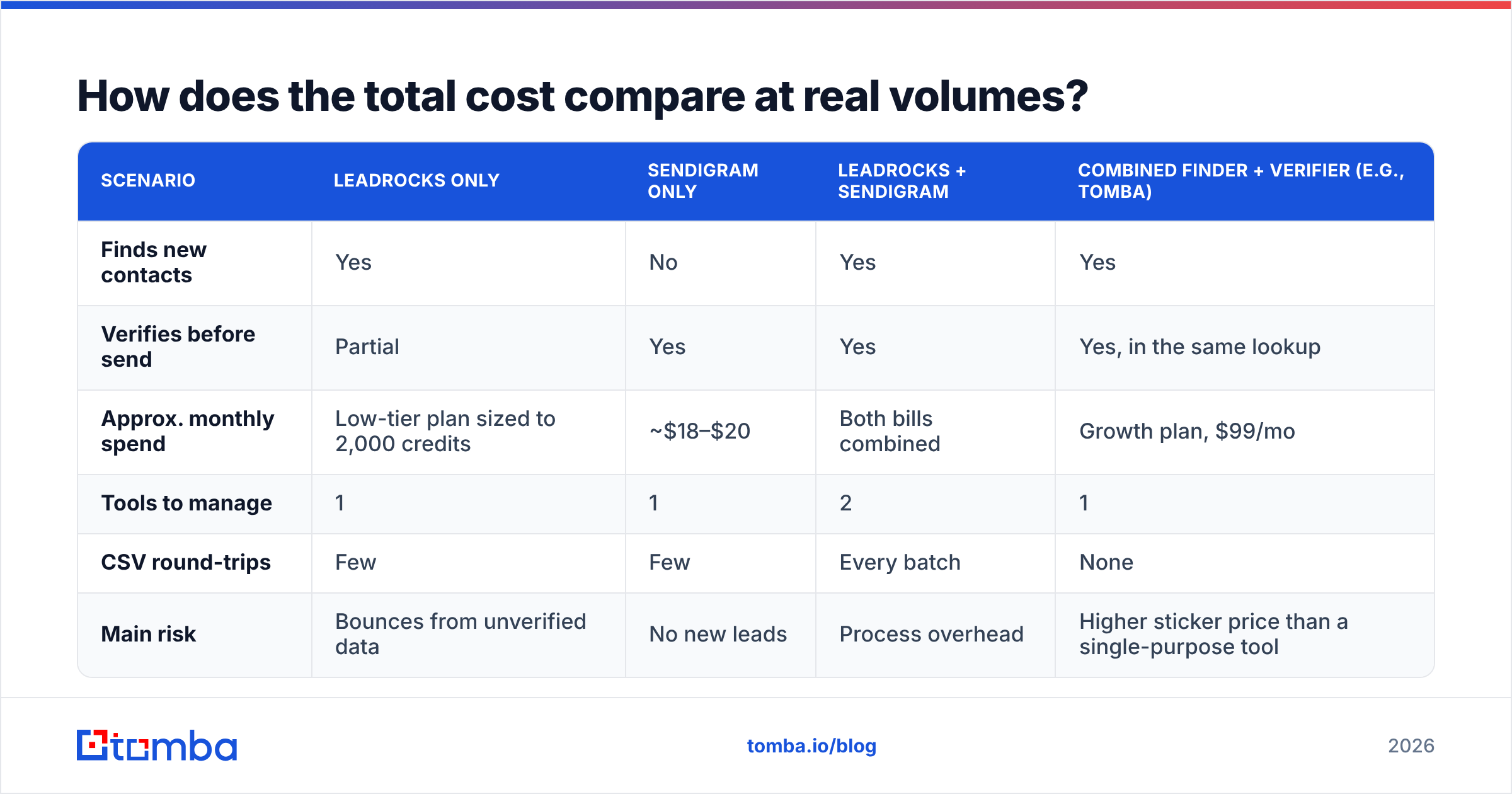
Here's a rough monthly view for a team that needs 2,000 new verified contacts a month. These figures use public list prices at the time of writing and are rounded. Check each vendor's live pricing before you decide.
| Scenario | LeadRocks only | Sendigram only | LeadRocks + Sendigram | Combined finder + verifier (e.g., Tomba) |
|---|---|---|---|---|
| Finds new contacts | Yes | No | Yes | Yes |
| Verifies before send | Partial | Yes | Yes | Yes, in the same lookup |
| Approx. monthly spend | Low-tier plan sized to 2,000 credits | ~$18–$20 | Both bills combined | Growth plan, $99/mo |
| Tools to manage | 1 | 1 | 2 | 1 |
| CSV round-trips | Few | Few | Every batch | None |
| Main risk | Bounces from unverified data | No new leads | Process overhead | Higher sticker price than a single-purpose tool |
The single-purpose tools are cheaper on sticker price, and you should say so plainly. Sendigram is very cheap for pure verification, and LeadRocks is inexpensive for pure discovery. The combined approach usually wins on total cost of ownership once you count rep time, bounce-driven reputation damage, and the admin of two vendors. For exact tiers, see Tomba pricing: Free (25 searches/mo), Starter $49/mo, Growth $99/mo, Pro $249/mo, and custom Enterprise.
What should you test before committing to either tool?#
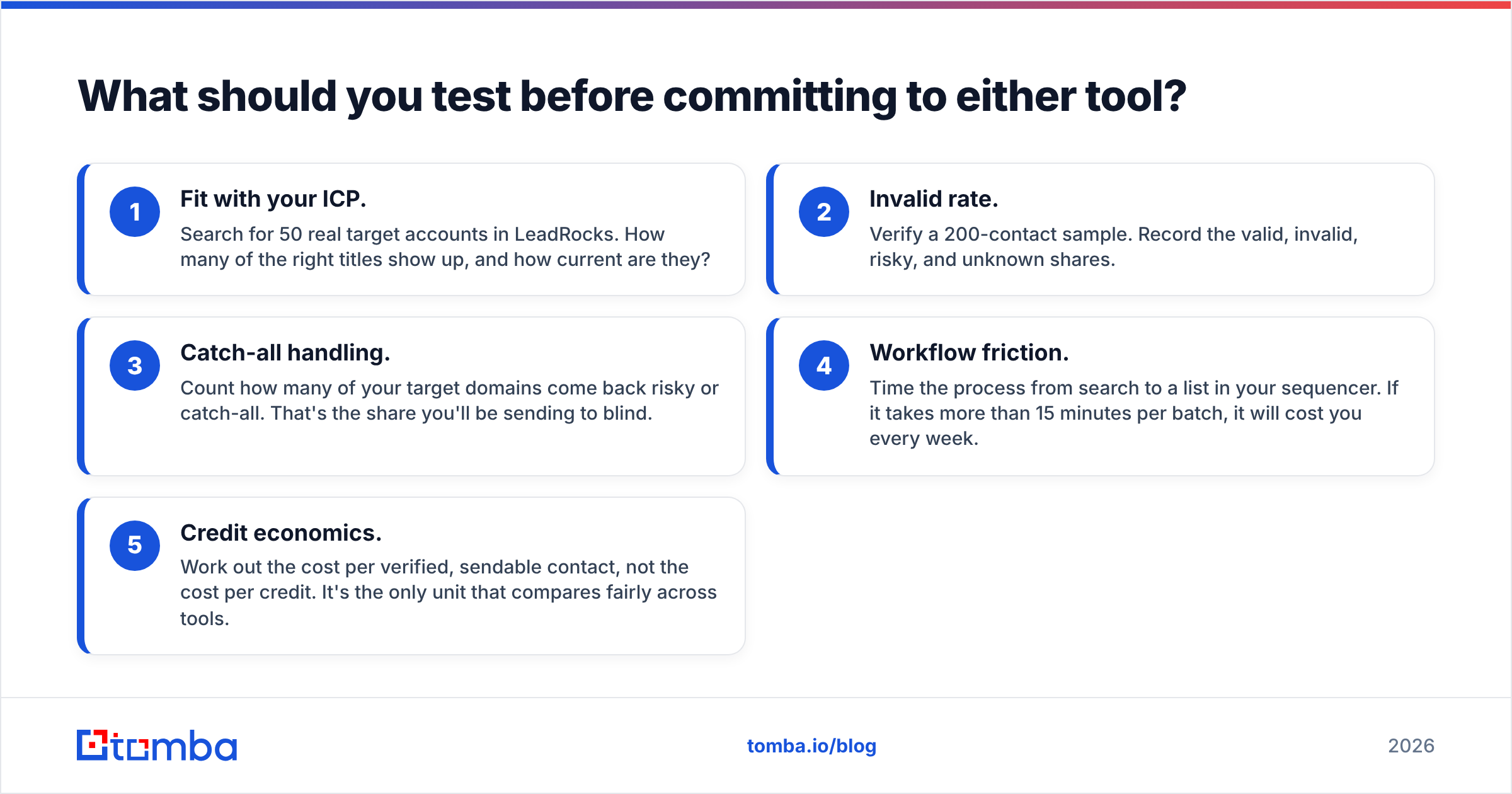
Don't choose from a feature page. Run this five-point check in your first week:
- Fit with your ICP. Search for 50 real target accounts in LeadRocks. How many of the right titles show up, and how current are they?
- Invalid rate. Verify a 200-contact sample. Record the valid, invalid, risky, and unknown shares.
- Catch-all handling. Count how many of your target domains come back risky or catch-all. That's the share you'll be sending to blind.
- Workflow friction. Time the process from search to a list in your sequencer. If it takes more than 15 minutes per batch, it will cost you every week.
- Credit economics. Work out the cost per verified, sendable contact, not the cost per credit. It's the only unit that compares fairly across tools.
Independent review sites such as G2 are useful for spotting recurring complaints (support speed, data freshness, billing surprises) before you commit to an annual plan.
So, LeadRocks vs Sendigram: which should you pick?#
Pick LeadRocks if your bottleneck is not having enough contacts. It's an affordable way to build lists, especially for multi-rep teams that work from LinkedIn.
Pick Sendigram if your bottleneck is dirty data. It's a cheap, flexible way to clean lists you already have, with credits that don't expire and a light email marketing layer on top.
Pick neither on its own if you run steady outbound at volume. You'll need finding and verifying every week, and stitching two single-purpose tools together costs more in time than it saves in credits.
Want finding and verification in one step?#
If this comparison left you thinking you need both tools, you probably need one that does both. Tomba Email Finder finds professional email addresses by name, domain, or company, and verifies each one in the same lookup. That means no CSV round-trips, no second vendor, and far fewer bounces reaching your sender. Start on the free tier with 25 searches a month, test it against your own ICP using the five-point check above, and upgrade only if the numbers hold up.
Related guides#
// get started
Find, verify and enrich your first contacts today
Start on the free plan with 25 searches a month, then scale when your team is ready.
Free plan · No credit card required · GDPR & CCPA
// about the author