Leadrocks vs Skrapp (2026): Features, Pricing and Which to Pick
Leadrocks sells access to a searchable B2B database. Skrapp is a LinkedIn-first email finder. We compare how each one works, what it costs per contact and who should buy it.
TL;DR
- Leadrocks is a searchable B2B contact database. You filter by title, industry, company size and location, and you get lists back. It suits you if you don't know yet who you want to contact.
- Skrapp is an email finder built around LinkedIn and Sales Navigator. It suits you if you already have the names and just need their verified work emails.
- Price: Leadrocks has the cheaper entry plan (about $29/mo for 1,000 credits). Skrapp's paid plans start at about $49/mo on monthly billing, and its 5K tier is a better deal per email at mid volume.
- Accuracy depends on your market segment more than on the brand. Run a 100-contact test and send every result through an independent verifier before you commit to an annual plan.
- If you need domain search, verification, enrichment and an API in one place, a general-purpose finder like Tomba handles both workflows.
People usually search "Leadrocks vs Skrapp" when they've narrowed the list to two affordable email finders and want someone to pick one. Both are good options, but they solve different problems, and most buyers who end up disappointed picked the tool built for the other job. This guide covers how each product works, what a usable email really costs on each, and which team each one fits.
Pricing below comes from the vendors' public pages and third-party listings at the time of writing (September 2026). Both companies change their tiers regularly, so check the live pricing page before you buy.
What is Leadrocks?#
Leadrocks is a B2B lead database with a Chrome extension. Its main workflow is search first, reveal second. You open the web app, set filters (job title, seniority, industry, headcount, country), browse the matching profiles, and spend a credit to reveal a person's email.
In practice it works like a lightweight prospect database. You aren't bringing a list; you're building one. The Chrome extension lets you reveal contacts while browsing LinkedIn profiles, but most of the value is in the search interface.
What Leadrocks does well:
- Low entry price. The Starter plan runs about $29/mo for 1,000 credits, and there's a free tier with 50 credits.
- List building from zero. It's useful for founders and SDRs who have an ICP defined but no named accounts yet.
- Simple credit model. One credit reveals one contact.
Where to be careful: several independent reviews say credits can be consumed on lookups that return no usable email. If that holds for your account, your real cost per valid contact is higher than the sticker price. Measure it during your trial.
What is Skrapp?#
Skrapp.io is an email finder and verifier. Its core workflow is list first, find emails second. The main surface is a Chrome extension that runs on LinkedIn and Sales Navigator. You open a profile or a search results page, click Skrapp, and it returns the person's professional email with a confidence status.
Skrapp also offers:
- Domain search. Enter a company domain and see the email addresses and patterns Skrapp has on file.
- Bulk email finder. Upload a CSV of names and companies and get emails back in batch.
- Email verifier. Verify single addresses or whole lists.
- Lead lists and CRM export. Save contacts inside Skrapp and push them to your CRM or outreach tool.
Skrapp is the more traditional "email finder" of the two. It fits reps who already live in Sales Navigator and want emails attached to the prospects they've found there.

How do Leadrocks and Skrapp compare feature by feature?#
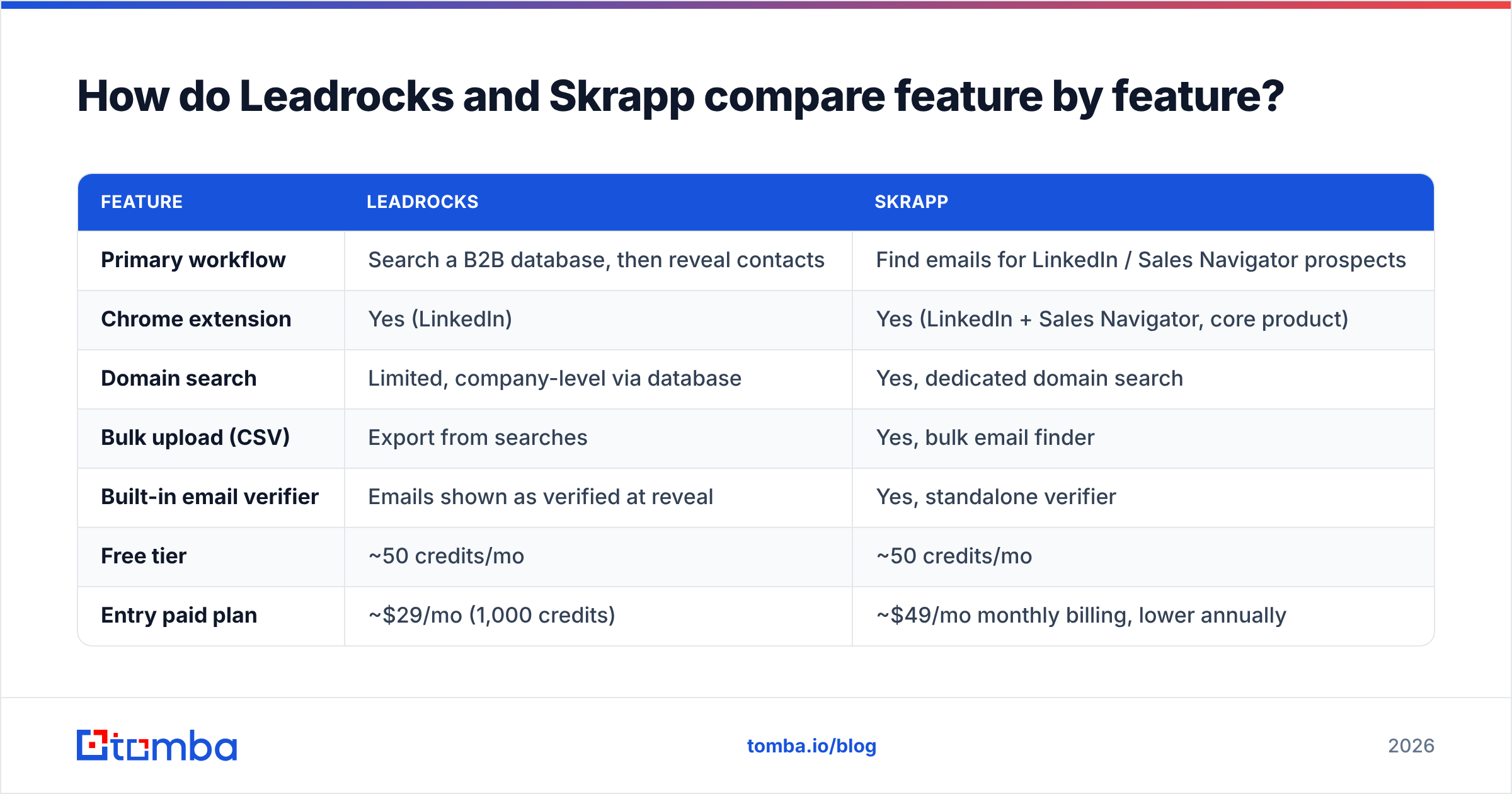
This is the core comparison. The biggest difference is the starting point: Leadrocks starts from a database, Skrapp starts from a person you've already found.
| Feature | Leadrocks | Skrapp |
|---|---|---|
| Primary workflow | Search a B2B database, then reveal contacts | Find emails for LinkedIn / Sales Navigator prospects |
| Chrome extension | Yes (LinkedIn) | Yes (LinkedIn + Sales Navigator, core product) |
| Domain search | Limited, company-level via database | Yes, dedicated domain search |
| Bulk upload (CSV) | Export from searches | Yes, bulk email finder |
| Built-in email verifier | Emails shown as verified at reveal | Yes, standalone verifier |
| Free tier | ~50 credits/mo | ~50 credits/mo |
| Entry paid plan | ~$29/mo (1,000 credits) | ~$49/mo monthly billing, lower annually |
| Mid-volume plan | ~$145/mo (5,000 credits) | ~$99/mo (5,000 credits) |
| Best for | Building lists from an ICP | Enriching lists you already have |
Two things stand out:
- At 1,000 credits, Leadrocks is cheaper. If you only need a few hundred contacts a month, the $29 plan is hard to beat.
- At 5,000 credits, Skrapp is cheaper. Its Enterprise 5K tier costs about $99/mo, compared with about $145/mo for Leadrocks Growth. The ranking flips once your volume grows.

Which is cheaper: Leadrocks or Skrapp?#
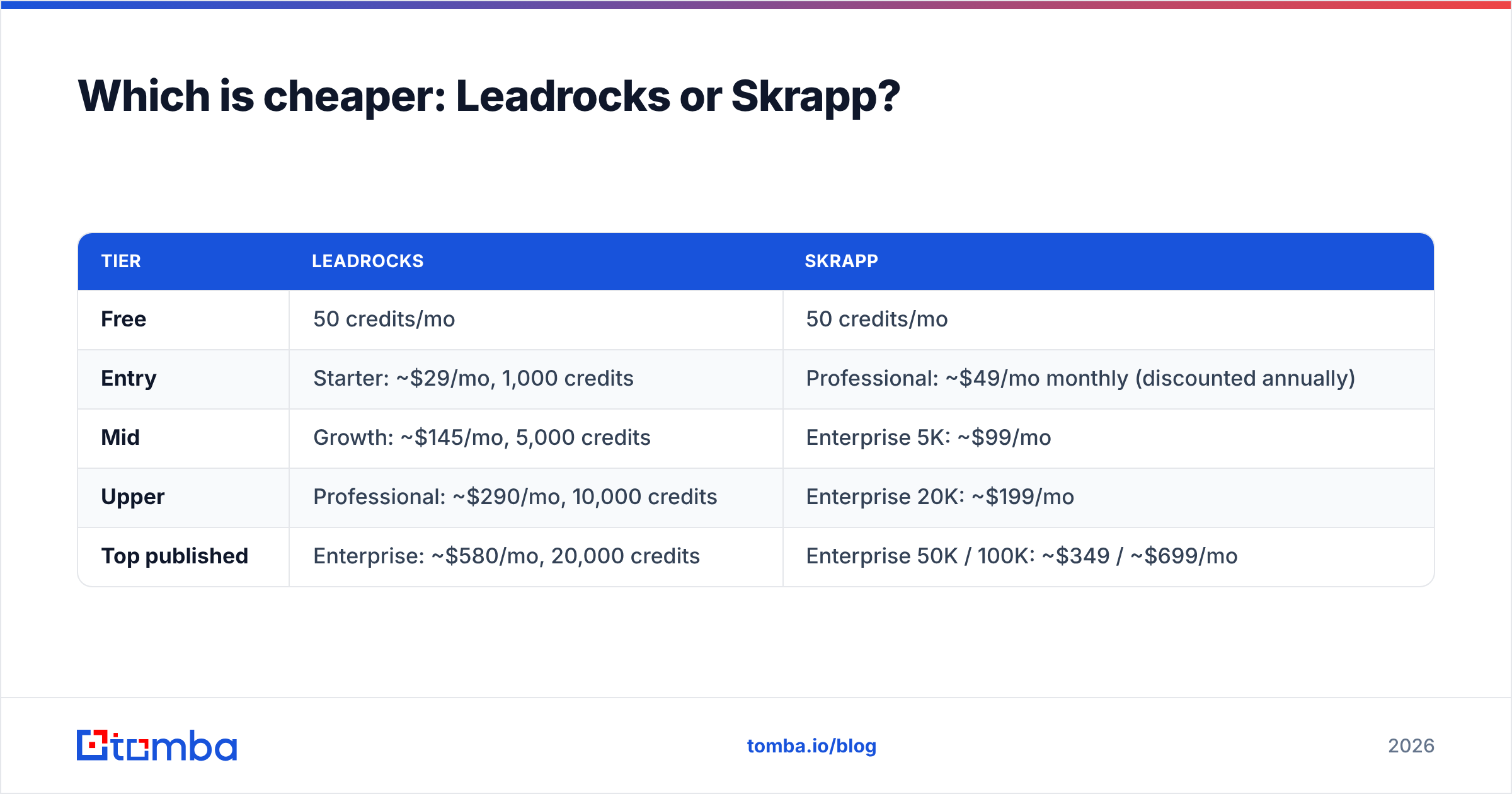
It depends on volume, so here are the published tiers side by side.
| Tier | Leadrocks | Skrapp |
|---|---|---|
| Free | 50 credits/mo | 50 credits/mo |
| Entry | Starter: ~$29/mo, 1,000 credits | Professional: ~$49/mo monthly (discounted annually) |
| Mid | Growth: ~$145/mo, 5,000 credits | Enterprise 5K: ~$99/mo |
| Upper | Professional: ~$290/mo, 10,000 credits | Enterprise 20K: ~$199/mo |
| Top published | Enterprise: ~$580/mo, 20,000 credits | Enterprise 50K / 100K: ~$349 / ~$699/mo |
Skrapp's per-credit price falls much faster as volume grows. At roughly 20,000 credits a month, Skrapp costs about $199 against Leadrocks' $580. Leadrocks has also run an AppSumo lifetime deal in the past. If you bought it, that changes the math for you, but it isn't something new buyers can plan around.
Sticker price per credit isn't the number that matters. What matters is cost per deliverable email, which you can calculate as:
Cost per usable email = monthly price ÷ (credits used × share of results that verify as valid)
If one tool gives you 1,000 lookups and 70% of them verify, you have 700 usable emails. If a pricier tool gives you 1,000 lookups and 88% verify, it can end up cheaper per email. It can also save you bounce damage to your sending domain. You only learn these numbers by testing on your own ICP.
Is Leadrocks or Skrapp more accurate?#
Neither vendor publishes an independent, reproducible accuracy benchmark. Treat any single "95% accuracy" claim, from either vendor or from anyone else, as marketing until you've tested it.
What we can say:
- Accuracy depends on the segment. A tool that works well for US SaaS companies can struggle with German manufacturers or LATAM SMBs. Coverage follows each vendor's data sources.
- Catch-all domains distort everyone's numbers. Many companies accept mail for any address, so a verifier can't confirm whether a specific mailbox exists. Tools handle this in different ways. Some mark these addresses "valid" and some mark them "risky". That labeling changes the accuracy you see on the dashboard, even though the underlying data is no better.
- Data freshness matters more than database size. People change jobs. An old email from a large database is worse than no email at all, because it bounces.

How should you run a fair accuracy test?#
- Build a 100-contact sample that matches your real ICP: same titles, regions and company sizes you'll actually target.
- Run the same list through both tools on free or trial credits, and record every hit, miss and "risky" result.
- Verify every returned email with an independent email verifier so neither vendor grades its own results.
- Count catch-all results separately. They aren't hard bounces, but they aren't guaranteed deliveries either.
- Calculate cost per valid email with the formula above and pick the winner on that number.
This takes about an hour and can save you a year on the wrong annual plan.
How does the day-to-day workflow feel?#
With Leadrocks, your day starts in the web app. You set filters such as "Head of Marketing, 50–200 employees, Fintech, UK", look through the results, reveal the promising contacts and export a CSV to your sequencer. It works well when your prospecting starts from an ICP definition. It's weaker when a rep already has 40 named accounts from an event list and just needs emails for them.
With Skrapp, your day starts in Sales Navigator. You build a lead list there, open the Skrapp extension and pull emails for the whole page. Then you save the leads into a Skrapp list or push them to your CRM. If a lead isn't on LinkedIn, you use domain search or the bulk finder with a name plus company domain. This fits teams that already pay for Sales Navigator and treat it as the source of truth.
A useful rule of thumb:
- If your bottleneck is "who should I contact?", choose Leadrocks.
- If your bottleneck is "how do I reach the people I already picked?", choose Skrapp.
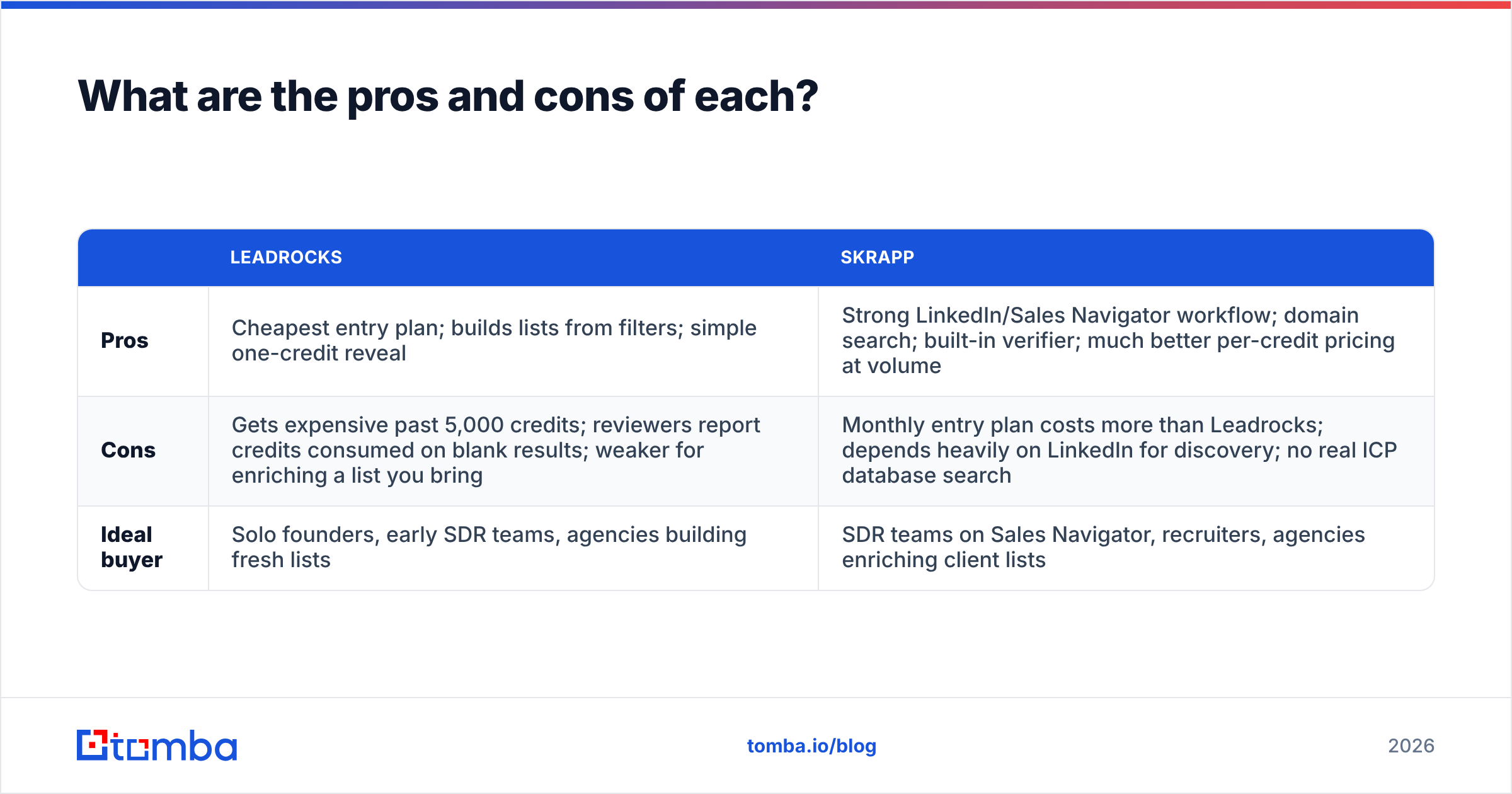
What are the pros and cons of each?#
| Leadrocks | Skrapp | |
|---|---|---|
| Pros | Cheapest entry plan; builds lists from filters; simple one-credit reveal | Strong LinkedIn/Sales Navigator workflow; domain search; built-in verifier; much better per-credit pricing at volume |
| Cons | Gets expensive past 5,000 credits; reviewers report credits consumed on blank results; weaker for enriching a list you bring | Monthly entry plan costs more than Leadrocks; depends heavily on LinkedIn for discovery; no real ICP database search |
| Ideal buyer | Solo founders, early SDR teams, agencies building fresh lists | SDR teams on Sales Navigator, recruiters, agencies enriching client lists |
For a wider view, the G2 listing for Skrapp collects user reviews and current plan details. Read the 2- and 3-star reviews in particular, because they tell you where the product gets in people's way.
Which should you choose: Leadrocks or Skrapp?#
Here's the verdict by team type.
- Choose Leadrocks if you're a founder or a one- or two-person SDR team, you prospect under ~1,000 contacts a month, and you mostly need to discover who to contact. The $29 plan makes it the lowest-risk way to start.
- Choose Skrapp if your team lives in Sales Navigator, you already have named prospects, or you expect more than 5,000 lookups a month. At that volume its pricing is clearly better, and the built-in verifier and domain search cover more of the workflow.
- Choose neither for now if you haven't defined your ICP. No email finder fixes a targeting problem.
Whichever you choose, verify before you send. Both tools include verification of some kind, but running a second, independent check before a big campaign is the cheapest protection your sender reputation has.

Where does Tomba fit in this comparison?#
Tomba isn't a straight replacement for either tool. It covers both workflows in this guide, which matters once your team outgrows a single use case.
- Named-prospect workflow (Skrapp's strength): the Tomba Email Finder returns a professional email from a name plus domain or company, with sources and a confidence score. The Chrome extension works on LinkedIn profiles.
- Account-level workflow: domain search lists the known emails and the email pattern for a company, which helps with multi-threading into an account.
- Volume and automation: the bulk email finder handles CSV uploads, and the API, Google Sheets add-on and CRM integrations cover teams that want lookups inside their existing stack.
- Verification built in: every result can be checked with Tomba's verifier and catch-all tooling before it reaches your sequencer.
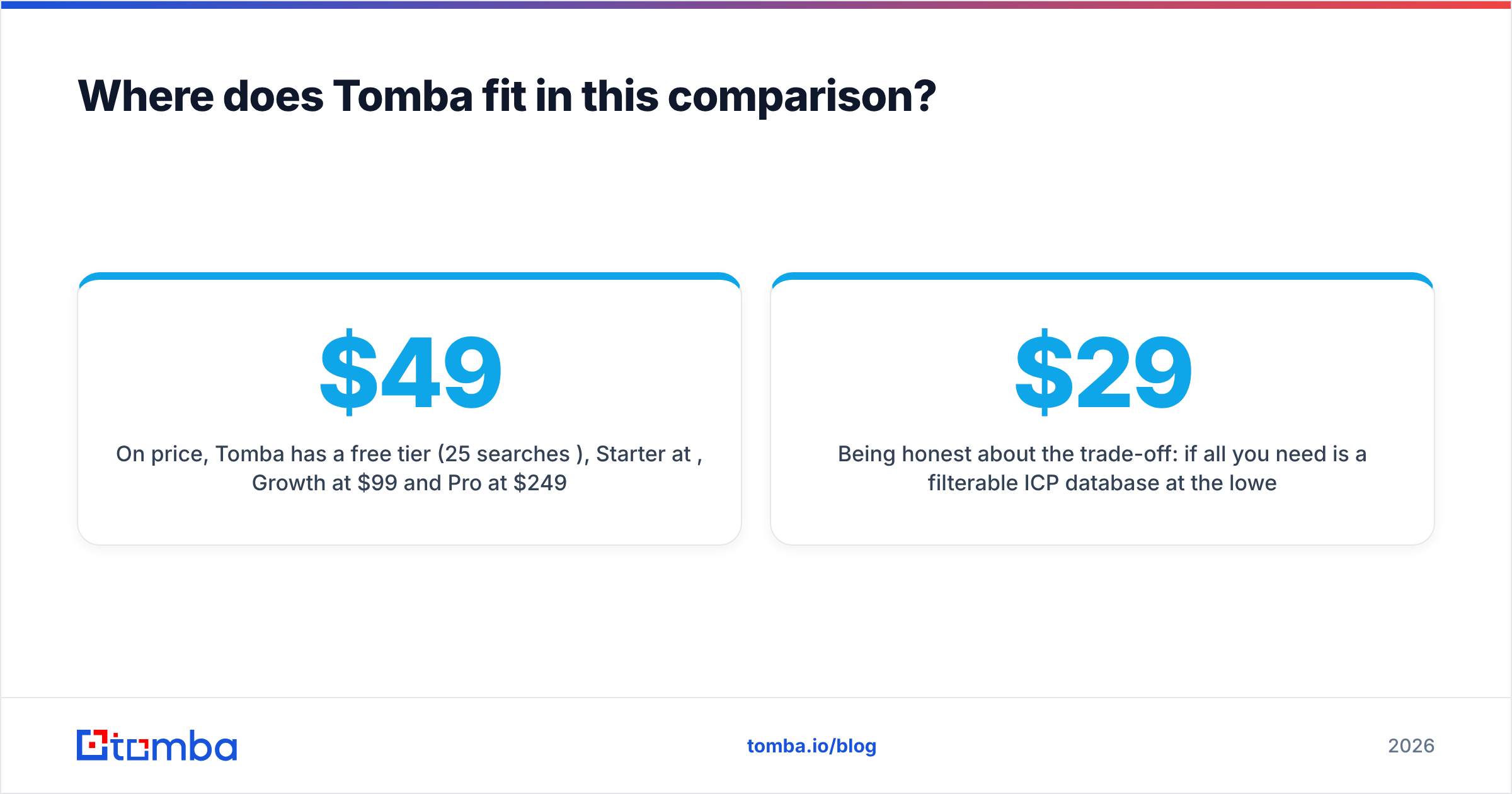
On price, Tomba has a free tier (25 searches/mo), Starter at $49/mo, Growth at $99/mo and Pro at $249/mo, plus custom Enterprise plans. See Tomba pricing for the credits included in each. That puts it in the same range as Skrapp, and it adds domain search, enrichment and phone data on the same account.
Being honest about the trade-off: if all you need is a filterable ICP database at the lowest possible entry price, Leadrocks' $29 plan is the leaner option. If you need one tool that finds, verifies and enriches for both new and existing lists, a broader platform saves you from running two subscriptions.
Frequently asked questions#
Is Leadrocks free?#
Leadrocks has a free tier with about 50 credits a month, which is enough to judge data quality for your segment. Paid plans start at about $29/mo.
Does Skrapp work without Sales Navigator?#
Yes. Skrapp's extension works on standard LinkedIn profiles, and domain search and the bulk finder don't need LinkedIn at all. Its best workflow is still inside Sales Navigator.
Do unused credits roll over?#
Rollover policies vary by plan and change over time. Confirm it on each vendor's billing page before you buy an annual plan, especially if your prospecting volume is seasonal.
Can I use both tools together?#
Yes. Some teams build lists in Leadrocks and fill email gaps with Skrapp or another finder. Just dedupe before you verify so you don't pay twice for the same contact.
Ready to find emails without choosing between workflows?#
Leadrocks and Skrapp are both good at their own job: database search for Leadrocks, LinkedIn extraction for Skrapp. If you want one account that finds emails from a name, a domain or a LinkedIn profile, verifies them and scales through bulk uploads and an API, try the Tomba Email Finder. Start on the free plan, run the same 100-contact test described above, and let the cost per valid email make the decision.
Related guides#
// get started
Find, verify and enrich your first contacts today
Start on the free plan with 25 searches a month, then scale when your team is ready.
Free plan · No credit card required · GDPR & CCPA
// about the author