LeadRocks vs Snappy Leads: Budget Contact Data Compared for 2026
LeadRocks sells credits starting at $29/mo. Snappy Leads sells unlimited lookups for £10/mo. We compare pricing, data quality, workflow and fit, and show where you still need a verification step.
TL;DR
- LeadRocks is a credit-based B2B contact database with a LinkedIn Chrome extension. It has a free tier (50 credits/month), and paid plans run from $29/mo for 1,000 credits up to $580/mo for 20,000.
- Snappy Leads is a UK-based tool that sells unlimited email, phone and LinkedIn lookups for a flat £10/month. That flat price is its whole pitch.
- On paper Snappy Leads costs less per contact. LeadRocks is the more established product, and it gives you more options for team workflows and exports.
- Both tools market their data as "verified." Neither one publishes independent bounce benchmarks. Run every export through a separate email verifier before you load it into a sequencer.
- Our pick: Snappy Leads if you're a solo founder testing outbound on a tiny budget. LeadRocks if you need a free tier to trial, team seats, and predictable credit plans. If deliverability matters more than raw volume, use a finder that verifies each address as it finds it.
What are LeadRocks and Snappy Leads?#
These two tools serve the same buyer: someone who needs B2B emails and phone numbers and doesn't want to pay ZoomInfo or Apollo prices.
LeadRocks is a B2B contact database with a search interface and a Chrome extension that pulls contact data while you browse LinkedIn profiles. It claims an index of over 100 million records. Pricing is credit-based: you spend one credit to reveal a contact, and your plan sets how many credits you get each month. It picked up a lot of early users through an AppSumo lifetime deal, so you'll see plenty of long-time users reviewing it on marketplaces.
Snappy Leads is a newer, UK-based entrant. It takes the opposite approach to pricing and charges a flat £10/month for what it calls unlimited lookups of verified emails, phone numbers and LinkedIn profiles, with a claimed pool of more than 200 million contacts. It markets itself as the low-cost disruptor in a category where most vendors charge per credit.
So the comparison is really about two models: metered credits with a mature toolset against flat-rate unlimited access from a younger vendor.
How do LeadRocks and Snappy Leads compare feature by feature?#
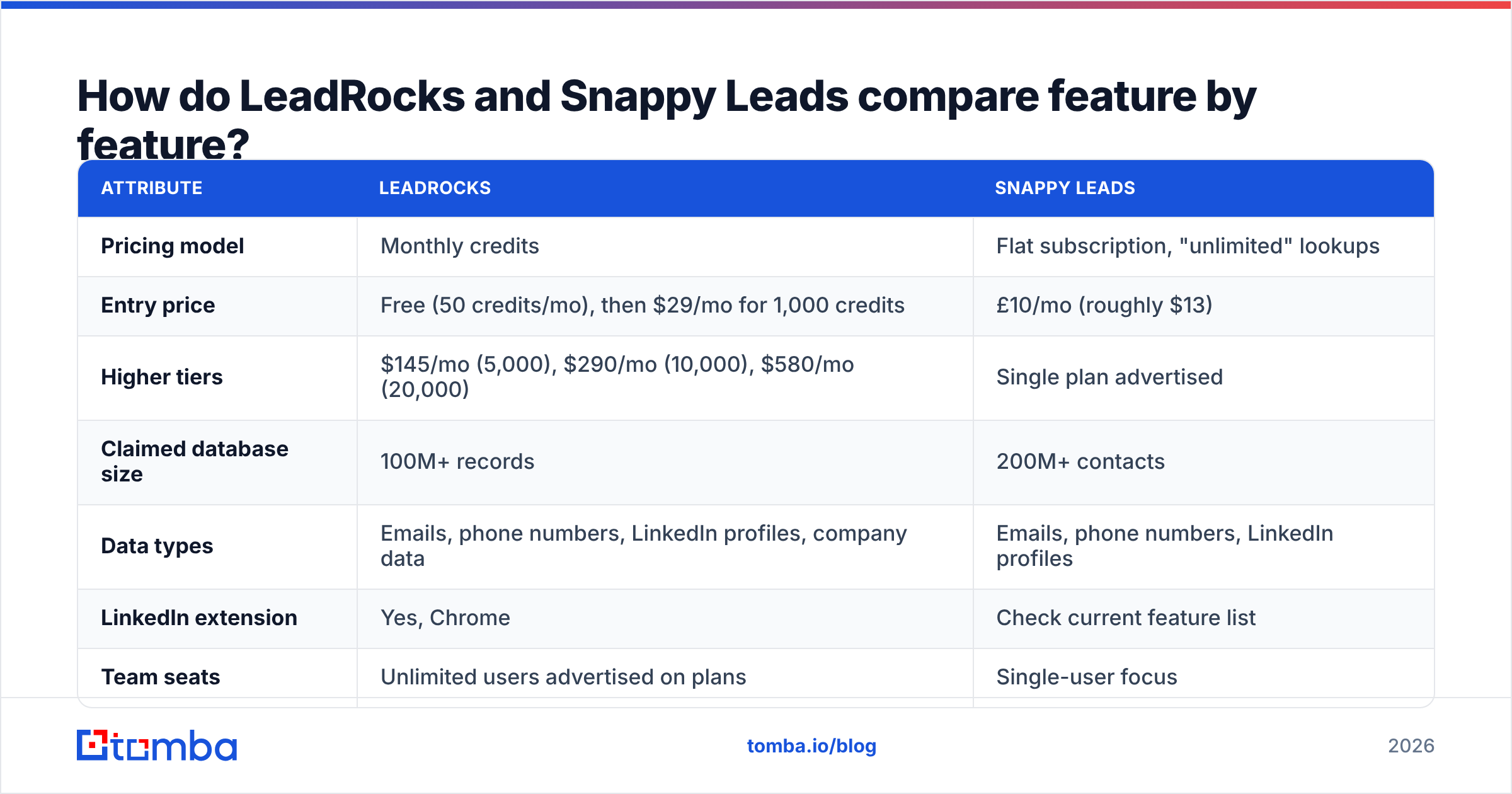
Here's how they line up on the attributes that matter for outbound teams. Pricing reflects each vendor's public pages at the time of writing. Both change often, so check before you buy.
| Attribute | LeadRocks | Snappy Leads |
|---|---|---|
| Pricing model | Monthly credits | Flat subscription, "unlimited" lookups |
| Entry price | Free (50 credits/mo), then $29/mo for 1,000 credits | £10/mo (roughly $13) |
| Higher tiers | $145/mo (5,000), $290/mo (10,000), $580/mo (20,000) | Single plan advertised |
| Claimed database size | 100M+ records | 200M+ contacts |
| Data types | Emails, phone numbers, LinkedIn profiles, company data | Emails, phone numbers, LinkedIn profiles |
| LinkedIn extension | Yes, Chrome | Check current feature list |
| Team seats | Unlimited users advertised on plans | Single-user focus |
| Export | CSV, saved lists | Check current export options |
| Built-in verification transparency | "Verified" claim, no public bounce benchmark | "Verified" claim, no public bounce benchmark |
| Best fit | Small teams wanting a free trial and scalable credits | Solo operators who want the lowest possible monthly cost |
The core trade-off is clear from the table. LeadRocks costs more per contact, and in return you get a longer track record, a free tier to test with, and a workflow built around LinkedIn prospecting. Snappy Leads removes per-contact cost almost entirely, but you're relying on a newer vendor's word about data freshness and fair-use limits.

Which is cheaper: LeadRocks or Snappy Leads?#
Snappy Leads wins on headline price, and it isn't close.
Suppose you need 1,000 contacts a month:
- LeadRocks Starter: $29/mo, or about $0.029 per contact.
- Snappy Leads: about $13/mo whether you pull 100 contacts or 5,000.
At 5,000 contacts a month the gap gets much bigger. LeadRocks Growth costs $145, and Snappy Leads still costs about $13.
Price per record is the wrong metric, though. What you actually pay for is price per contact that reaches an inbox. Suppose 30% of a cheap list bounces. You then either pay for a verification pass or burn sender reputation on your domain. Either way, the cheap list costs more than it looked.
Before trusting any "unlimited" plan, ask these three questions:
- Is there a fair-use cap? "Unlimited" plans almost always have rate limits or an acceptable-use clause. Read the terms before you plan a 10,000-contact campaign on one.
- How fresh is the data? People change jobs often, so a 200M-record database is only as good as its refresh cycle.
- What happens to catch-all domains? Many B2B domains accept every address at the SMTP level. A tool that labels those addresses "verified" is overstating what it knows.

How accurate is the data from each tool?#
Neither vendor publishes a methodology you could reproduce, so treat both accuracy claims as marketing until you've tested them yourself.
LeadRocks has been reviewed widely. User reviews on marketplaces such as G2 and deal sites range from happy with the price to frustrated with bounce rates. At least one third-party review from a competing vendor reports that a large share of exported emails failed external verification. That source has an obvious bias, but the pattern shows up often enough in user reviews that you should test the data yourself.
Snappy Leads is too new to have much independent review volume. The "verified" label is promising, but we couldn't find a public benchmark, a data-sources page, or published bounce numbers. Treat its data as unproven until your own test shows otherwise.

For context, the chart above shows how widely accuracy varies across the email-finder market in general. The gap between top and bottom performers is big enough to decide whether a campaign succeeds. Neither LeadRocks nor Snappy Leads appears in a standardized public benchmark like this, and that absence is useful information in itself.
How should you test either tool yourself?#
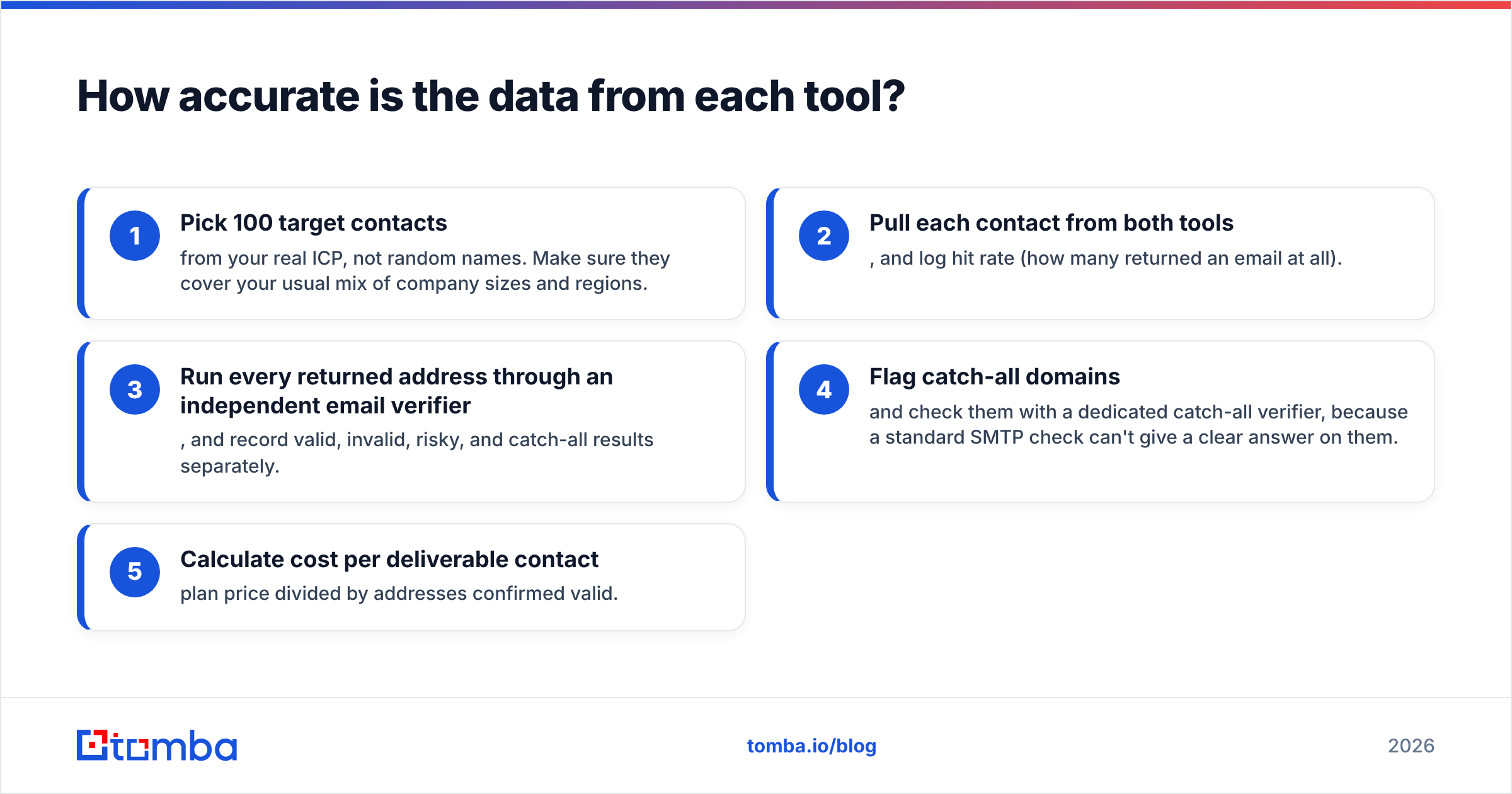
Run the same controlled test on both tools. It takes about an hour:
- Pick 100 target contacts from your real ICP, not random names. Make sure they cover your usual mix of company sizes and regions.
- Pull each contact from both tools, and log hit rate (how many returned an email at all).
- Run every returned address through an independent email verifier, and record valid, invalid, risky, and catch-all results separately.
- Flag catch-all domains and check them with a dedicated catch-all verifier, because a standard SMTP check can't give a clear answer on them.
- Calculate cost per deliverable contact: plan price divided by addresses confirmed valid.
The result is usually more informative than any vendor page. A tool that finds 90 emails with 60 valid can lose to one that finds 70 with 65 valid.
Which tool has the better prospecting workflow?#
LeadRocks is built around prospecting on LinkedIn. You browse a profile or a search results page, click the extension, and reveal contact data without leaving the tab. Saved lists and CSV export let you pass contacts to a CRM or sequencer. It also advertises basic email sequencing, which is handy if you don't want a separate tool yet, though dedicated sequencers go much further.
Snappy Leads is built around lookups: you search for a person or company and get contact details back. For a founder pulling a few dozen contacts a day, that's often enough. For a team running structured account-based campaigns, you'll want to confirm how it handles bulk jobs, list management, and CRM export before you commit.
A quick way to decide:
- Choose LeadRocks for the workflow if your team lives in LinkedIn, needs several seats, and wants a free tier to trial first.
- Choose Snappy Leads for the workflow if you work alone, pull contacts ad hoc, and cost matters more to you than tooling.
What are the pros and cons of each?#
LeadRocks pros
- A free tier (50 credits/month) lets you test before you pay.
- The LinkedIn Chrome extension fits social-selling workflows.
- Credit tiers scale predictably from 1,000 to 20,000 contacts.
- Plans advertise unlimited users, which suits small teams.
LeadRocks cons
- Per-contact cost rises quickly at volume ($580/mo for 20,000 credits).
- User reports of bounce issues mean you need a separate verification step.
- The built-in sequencing is basic next to dedicated outreach platforms.
Snappy Leads pros
- The lowest entry price in this category at £10/month.
- Unlimited lookups remove the stress of counting credits.
- Covers emails, phones and LinkedIn profiles in one place.
Snappy Leads cons
- A newer vendor with little independent review history.
- No public accuracy benchmark or data-sourcing documentation that we could find.
- Fair-use limits and export capabilities need checking before you scale.
- Pricing in GBP adds minor currency friction for US buyers.
Is LeadRocks better than Snappy Leads?#
It depends on what you're optimizing for.
LeadRocks is better if you want a known quantity: a product with years of user feedback, a free plan, team access and a LinkedIn-first workflow. You pay more per contact, and in exchange you know how the tool behaves.
Snappy Leads is better if your budget is under $20/month and you accept some uncertainty in exchange for unlimited volume. For early-stage founders checking whether outbound works for their offer at all, that's a reasonable trade.
Neither is the right choice if your main worry is deliverability. Both sell "verified" data without showing how it was verified. If you're sending from a primary domain, or you're protecting a warmed-up sender, the price of the finder matters less than whether each address really exists.

Where does a verification-first email finder fit in?#
There's a third option that many teams end up choosing after they test budget databases: an email finder that returns addresses together with a confidence score and verification status, so there's no separate cleanup step.
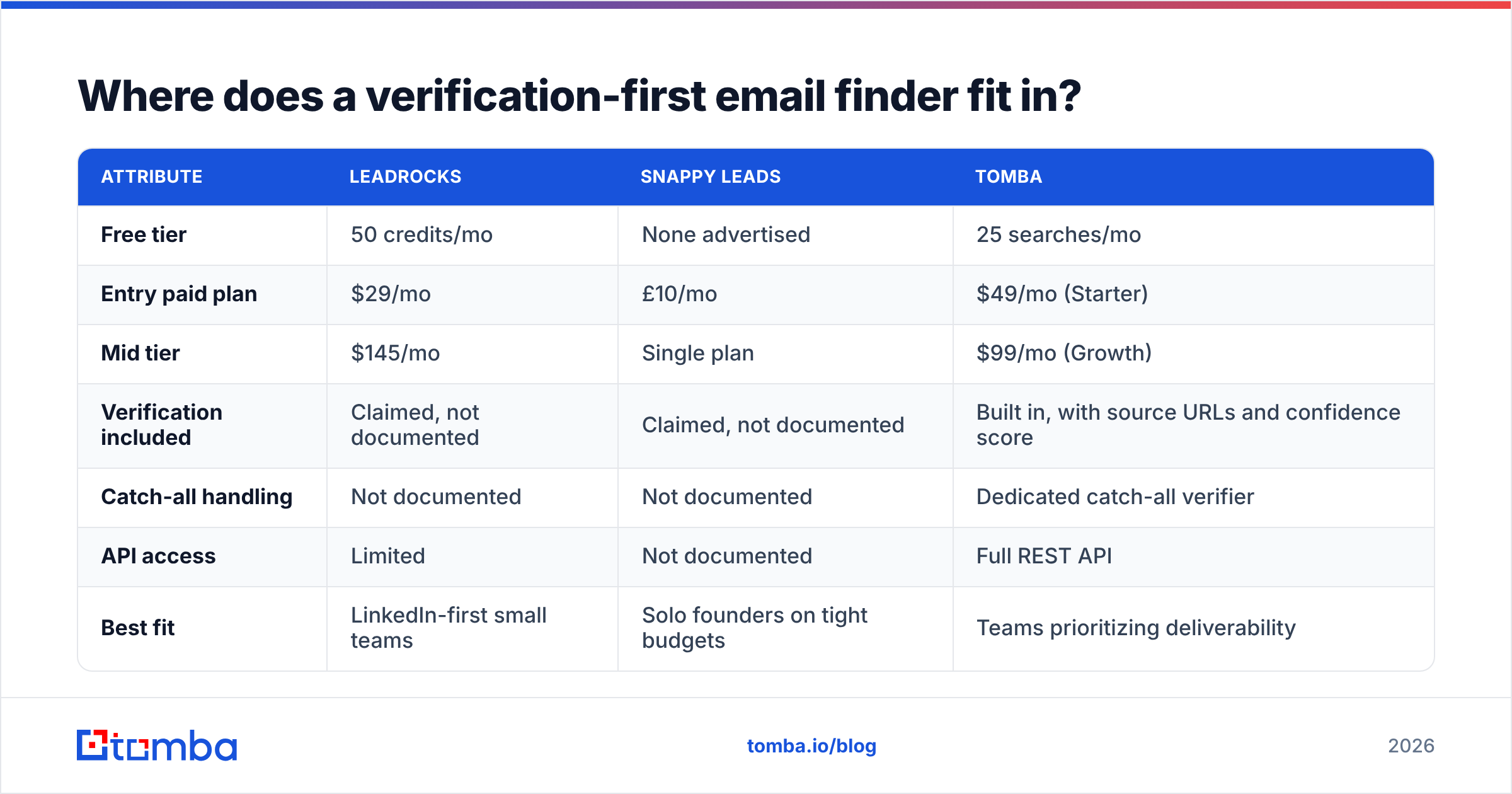
Tomba fits here. Instead of selling a large pre-scraped list, it finds emails by name, domain or company, shows the public sources where each address was seen, and runs SMTP and catch-all checks when you search. The structure compares like this:
| Attribute | LeadRocks | Snappy Leads | Tomba |
|---|---|---|---|
| Free tier | 50 credits/mo | None advertised | 25 searches/mo |
| Entry paid plan | $29/mo | £10/mo | $49/mo (Starter) |
| Mid tier | $145/mo | Single plan | $99/mo (Growth) |
| Verification included | Claimed, not documented | Claimed, not documented | Built in, with source URLs and confidence score |
| Catch-all handling | Not documented | Not documented | Dedicated catch-all verifier |
| API access | Limited | Not documented | Full REST API |
| Best fit | LinkedIn-first small teams | Solo founders on tight budgets | Teams prioritizing deliverability |
Tomba is not the cheapest tool here, and at $49/mo its Starter plan costs more than both entry plans. The argument for it is that verification is part of every search, which makes cost per deliverable contact easy to predict. Full Tomba pricing goes up to a $249/mo Pro tier and custom Enterprise contracts. For a broader view of how buyers rate tools in this category, Capterra and G2 are worth reading before you commit to any vendor.
What should you do next?#
- If your budget is under $20/month: start with Snappy Leads, but run your first 100 contacts through a verifier before sending anything.
- If you want a free trial and LinkedIn workflow: start on LeadRocks' free plan, test 50 contacts against your ICP, then decide whether Starter is worth $29.
- If you're protecting a sending domain: test a verification-first finder alongside either tool and compare cost per deliverable contact, not cost per record.
Whichever you choose, the test above gives you real numbers for your own market, which is more reliable than any vendor claim, this article included.
If bounces are what you're trying to avoid, try the Tomba Email Finder. It finds professional addresses by name, domain or company, shows where each one was sourced, and verifies it before you export. The free plan includes 25 searches a month, enough to run the same 100-contact test described above in stages and compare the results directly with LeadRocks or Snappy Leads.
Related guides#
// get started
Find, verify and enrich your first contacts today
Start on the free plan with 25 searches a month, then scale when your team is ready.
Free plan · No credit card required · GDPR & CCPA
// about the author