LeadRocks vs Sparkle (2026): Database or All-in-One Outreach?
LeadRocks sells you a big B2B contact database. Sparkle sells you finding, verifying, and sending in one tab. Here's which one fits your outbound motion in 2026, and where each one falls short.
TL;DR
- LeadRocks is mainly a B2B contact database: 100M+ records, a LinkedIn Chrome extension, a free plan with 50 monthly credits, and paid plans from about $29/mo.
- Sparkle is an outreach platform with its own email finder. Finding, verification, campaigns, and warmup share one credit pool ("Sparkles"). Starter is $29/mo and Business is $59/mo.
- Pick LeadRocks if you mostly need lists of people you haven't found yet. Pick Sparkle if you already know who to target and want finding and sending in the same tool.
- Neither tool removes the need to verify contacts on your own before a big send. Bounce rates, not feature lists, decide whether a tool pays for itself.
- If you only need accurate emails at a predictable cost per contact, a dedicated email finder like Tomba (free tier, then $49/mo) can sit alongside either one.
What are LeadRocks and Sparkle, in one sentence each?#
The two tools start from opposite ends of the outbound workflow, so the comparison gets easier once you see that.
LeadRocks is a B2B contact database. You search by title, industry, company size, and location, pull contacts with emails and phone numbers, and export them. Its Chrome extension also lets you grab contacts while you browse LinkedIn. Across the listing sites, LeadRocks reports more than 100 million records. It also offers an email verifier, a website email scraper, and an API.
Sparkle is a prospecting and sending platform. You find emails (including from LinkedIn and Sales Navigator profiles), verify them, and then send campaigns from inside the product, with warmup and deliverability monitoring included. All of these actions draw on one credit currency called "Sparkles."
So the real question isn't which one finds more emails. It's whether your bottleneck is who to contact (a database problem) or getting the email out and landing it (a workflow problem).
How do LeadRocks and Sparkle compare feature by feature?#
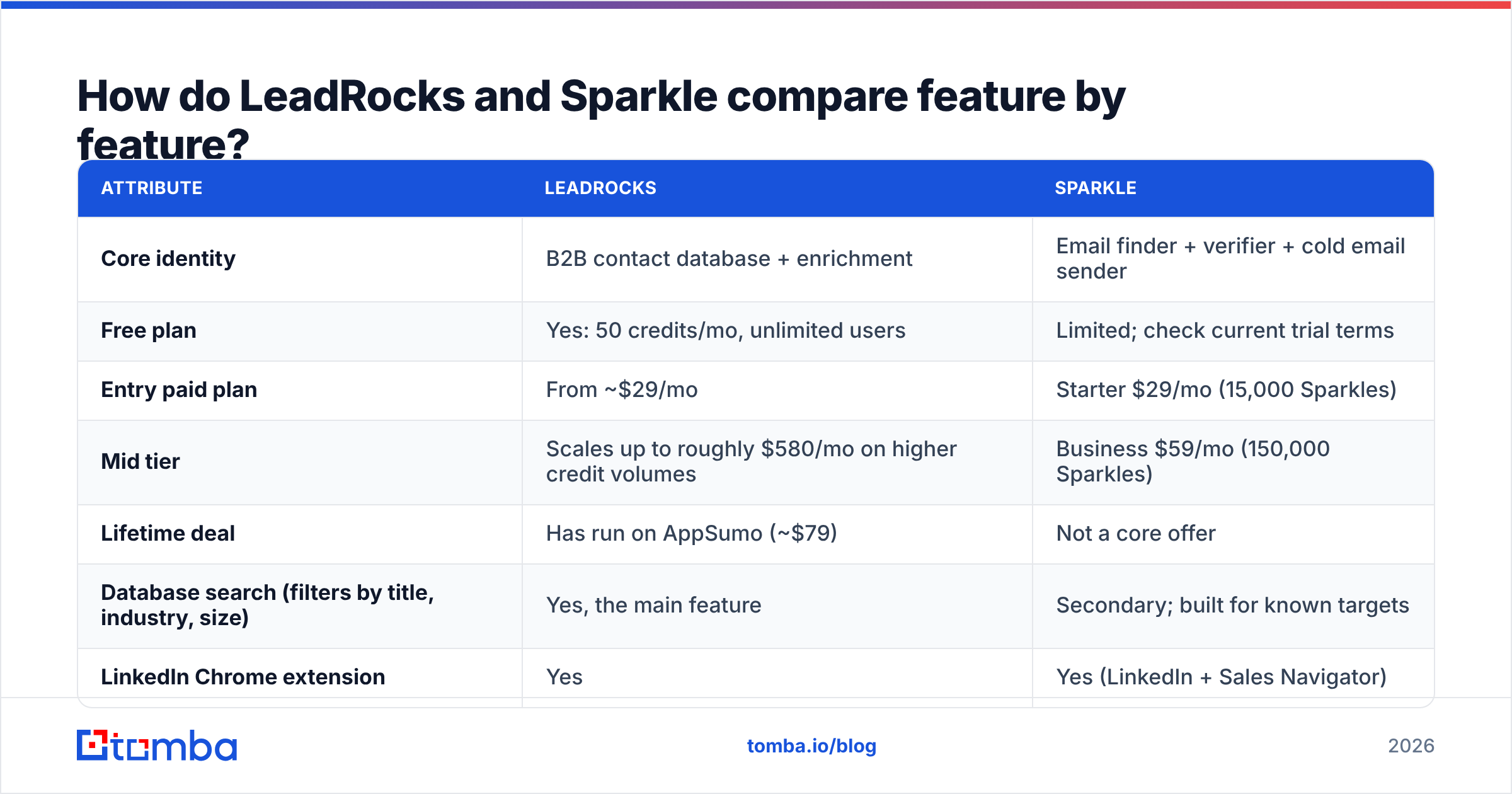
The table below reflects public pricing and feature pages at the time of writing (Q3 2026). Both vendors change credit bundles often, so check the live pages before you buy.
| Attribute | LeadRocks | Sparkle |
|---|---|---|
| Core identity | B2B contact database + enrichment | Email finder + verifier + cold email sender |
| Free plan | Yes: 50 credits/mo, unlimited users | Limited; check current trial terms |
| Entry paid plan | From ~$29/mo | Starter $29/mo (15,000 Sparkles) |
| Mid tier | Scales up to roughly $580/mo on higher credit volumes | Business $59/mo (150,000 Sparkles) |
| Lifetime deal | Has run on AppSumo (~$79) | Not a core offer |
| Database search (filters by title, industry, size) | Yes, the main feature | Secondary; built for known targets |
| LinkedIn Chrome extension | Yes | Yes (LinkedIn + Sales Navigator) |
| Phone numbers | Yes | Limited focus |
| Email verification | Yes, standalone and bulk | Yes, multiple verification modes |
| Built-in campaigns / sequences | No | Yes |
| Inbox warmup | No | Yes |
| Deliverability monitoring | No | Business plan and up |
| API | Yes | Check plan; focus is in-app workflow |
| Best for | List building, enrichment, TAM exploration | Solo founders and small SDR teams running their own sends |
Two things stand out.
First, the credit units aren't comparable. A LeadRocks credit roughly maps to a contact reveal. A Sparkle is spent across finding, verifying, and sending, so 15,000 Sparkles doesn't mean 15,000 emails found. Before you compare cost per lead, work out how many Sparkles one found-and-verified contact actually uses on your plan.
Second, the two tools barely overlap. LeadRocks has no sender. Sparkle's discovery isn't built for open-ended browsing of a whole market. Many teams that shortlist both end up needing parts of each.

Which one has more accurate email data?#
Neither vendor publishes an independent accuracy audit, so treat any claimed number (both use "verified" freely) as a marketing figure until you test it yourself.
What you can reason about is where each tool's emails come from:
- Database-first tools (LeadRocks) store contacts ahead of time and refresh them on a schedule. You get coverage and speed, but people change jobs. B2B data decays at roughly 2–3% a month by most industry estimates, so a record that was valid six months ago can bounce today.
- Lookup-first tools (Sparkle's finder) work out the email when you ask for it, usually through pattern detection plus SMTP checks. Records are fresher, but you only get results for people you already identified.
- Catch-all domains hurt both. When a company's mail server accepts every address, SMTP checks can't confirm a mailbox exists. Both tools will return "risky" or "accept-all" results for a real share of mid-market and enterprise domains, and how each one handles those results matters more than its headline accuracy.
- Verification timing matters as much as the source. An email verified at export and then sent three weeks later is effectively unverified. Re-check just before the campaign goes out.
A simple and fair way to test: take 200 contacts you already know are good (current customers, recent replies), remove the emails, run the names and domains through each tool, and score the results. Then take 200 cold targets from your ICP, run each tool's output through the same independent email verifier, and compare valid, invalid, and catch-all rates. An afternoon of this tells you more than any review page, this one included.

How does pricing really work out per contact?#
Both headline prices are $29/mo, and that's where the resemblance ends.
LeadRocks is the easier one to model. The free plan gives 50 credits a month and has no seat limit, which is unusual and useful for a small team that wants to try it without a card. Paid plans add credit volume, and the top tiers reach several hundred dollars a month for high-volume list building. If you can find the AppSumo lifetime deal it's cheap, but as with any LTD, assume future features and credit refills may not be included.
Sparkle bundles tools you'd otherwise pay for separately: a finder, a verifier, a sending tool, and a warmup service. If you'd otherwise pay for a sequencer (often $30–$100 per mailbox) on top of a data tool, the $29 or $59 plan can come out much cheaper overall. If you already run Instantly, Smartlead, Lemlist, or HubSpot sequences, you'll be paying for sending features you won't use.
A rough decision rule:
- Cost per contact matters most when you're buying data → LeadRocks is easier to forecast.
- Cost per campaign matters most when you're a one-person outbound function → Sparkle's bundle usually wins.
- Cost per delivered email is what should decide it → neither pricing page tells you this. Your own bounce test does.
Which is better for LinkedIn prospecting?#
Both have a Chrome extension that works on LinkedIn, and they're built for different jobs.
LeadRocks's extension is geared to scraping and enriching in bulk: open a search result, collect profiles, and enrich them with emails and phones from the database. It fits reps who build lists by browsing.
Sparkle is built around LinkedIn and Sales Navigator email finding feeding straight into a campaign. You find a prospect, get the email, and they go into a sequence without a CSV step in between. It fits reps who work a small number of accounts carefully.
If LinkedIn is your main source and you don't need a sequencer, a lightweight LinkedIn finder extension that does one job (profile → verified email) is often cheaper than either. Whatever tool you use, keep LinkedIn's terms in mind: aggressive automated scraping can get accounts restricted, and neither vendor carries that risk for you.
What do real users say about each tool?#
Reviews on sites like G2 and Capterra are thin for both products compared with Apollo or ZoomInfo, so read them as signals, not verdicts. The recurring themes:
LeadRocks — commonly praised
- Generous free tier and unlimited seats
- Phone numbers included, which is rare at this price
- Simple interface, quick exports
LeadRocks — commonly flagged
- Data freshness varies by region and seniority
- Less depth for niche industries than the big enterprise databases
- No outreach layer, so you still need a sender
Sparkle — commonly praised
- One tool for finding, verifying, and sending
- Warmup and deliverability monitoring built in
- Low price for what's bundled
Sparkle — commonly flagged
- The credit ("Sparkle") accounting takes some learning
- Not a replacement for a big searchable database
- Younger product, so integrations are narrower than established sequencers
When should you choose LeadRocks over Sparkle, and vice versa?#
Here's how it maps to common team setups:
- Early-stage founder, no sender yet, targets already known → Sparkle. One login, one bill, warmup included. You'll be sending within a day.
- SDR team with an established sequencer (Outreach, Salesloft, Instantly) → LeadRocks or a dedicated finder. Don't pay twice for sending.
- Agency building lists for several clients → LeadRocks for discovery. Then verify each list independently before handing it over, because clients blame the agency when emails bounce.
- Account-based motion with 50–200 named accounts → Sparkle, or a domain-level tool that finds every relevant contact at a known company.
- Cold calling is a big part of the motion → LeadRocks, since phone numbers are part of the core product.
- Tight deliverability requirements (new domains, strict ESP policies) → Sparkle's warmup helps, but verify independently anyway. Warmup doesn't rescue a list with bad data.
Is there a setup that beats choosing just one?#
For many teams, yes. Separate the jobs:
- Discovery: a database (LeadRocks or similar) or your own ICP research.
- Email finding + verification: a dedicated finder that charges per result and verifies at lookup.
- Sending: whatever sequencer your team already uses well, or Sparkle if you don't have one.
This approach costs a little more coordination, and in return you can swap out any layer that underperforms without rebuilding the whole stack. It also gives you one number to track: the verified-email rate from your finder, measured separately from the database's claims.
How does Tomba fit next to LeadRocks and Sparkle?#
For transparency: this is the Tomba blog, so weigh this section accordingly.
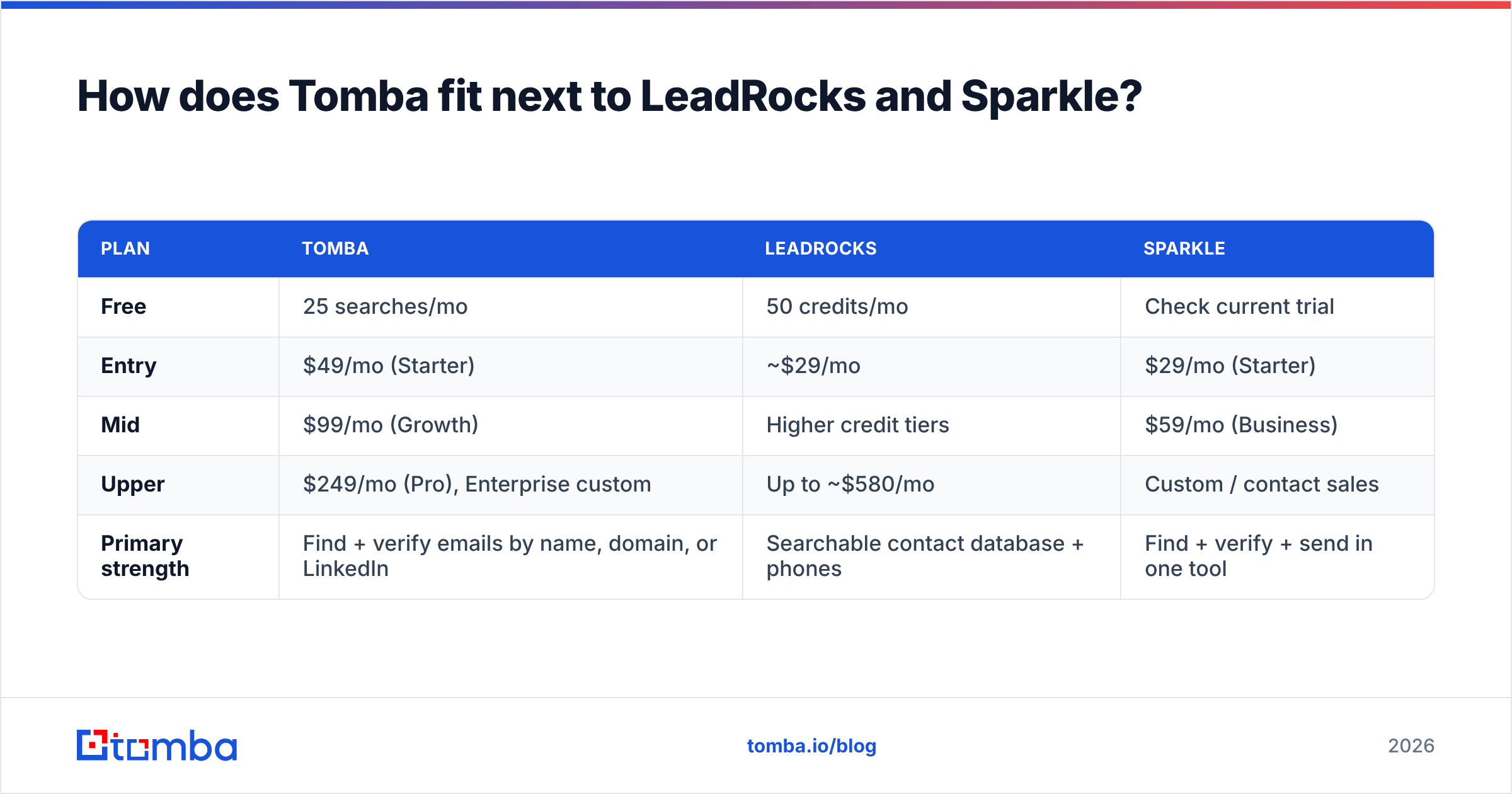
Tomba doesn't try to be a full sequencer like Sparkle, and it isn't mainly a browse-the-market database like LeadRocks. It's an email finder first, with verification, domain search, catch-all verification, phone finding, and enrichment built around it. That makes it a good fit for the finding + verification layer described above.

| Plan | Tomba | LeadRocks | Sparkle |
|---|---|---|---|
| Free | 25 searches/mo | 50 credits/mo | Check current trial |
| Entry | $49/mo (Starter) | ~$29/mo | $29/mo (Starter) |
| Mid | $99/mo (Growth) | Higher credit tiers | $59/mo (Business) |
| Upper | $249/mo (Pro), Enterprise custom | Up to ~$580/mo | Custom / contact sales |
| Primary strength | Find + verify emails by name, domain, or LinkedIn | Searchable contact database + phones | Find + verify + send in one tool |
Tomba's entry plan costs more than either competitor's. You're paying for a narrower tool that goes deep: domain-wide search, a separate catch-all verifier for accept-all servers, and an API, Sheets add-on, and CRM integrations for piping verified contacts wherever you send from. Full tier details are on the Tomba pricing page.
What's the final verdict on LeadRocks vs Sparkle?#
LeadRocks wins on discovery. If you need to build lists from scratch, want phone numbers, or want to try things on a free plan with your whole team, it's the better choice.
Sparkle wins on workflow. If you already know who you want to reach and don't have a sending stack, bundling finding, verification, warmup, and campaigns for $29–$59/mo is hard to beat.
Neither one wins on trust by default. Run the 200-contact test above, measure the bounce rate, and decide from your own data. The tool that looks cheapest on the pricing page often costs the most once bounced emails start damaging your domain reputation.
If what you need is accurate emails for people and companies you've already identified, and you want to use them with LeadRocks exports, Sparkle campaigns, or any other sequencer, try the Tomba Email Finder. The free plan gives you 25 searches a month, enough to run your own accuracy test against either tool before you spend anything.
Related guides#
// get started
Find, verify and enrich your first contacts today
Start on the free plan with 25 searches a month, then scale when your team is ready.
Free plan · No credit card required · GDPR & CCPA
// about the author