Leads Sniper Pricing Reviews Pros and Cons: 2026 Breakdown
Leads Sniper sells unlimited Google Maps scraping for a one-time $149. We look at what that license actually covers, what reviewers praise and complain about, and when a lifetime scraper beats a subscription.
This guide covers Leads Sniper pricing reviews pros and cons in one place. You'll see what the lifetime license costs, what buyers say, and where the tool falls short.
TL;DR
- Leads Sniper sells its Google Maps Scraper as a one-time lifetime license: about $149 for 1 installation, $247 for 5 and $369 for 10. There's no monthly fee and no per-lead charge.
- Reviews are mostly positive (about 4.7/5 on reviews.io). Buyers like the speed, the clean exports and the price. Most complaints are about slow support on add-on tools.
- Pros: unlimited scraping, low cost if you use it daily, and it's easy to learn. Cons: no verification, mostly generic inboxes, and it runs on your own browser.
- It's a good fit for agencies and local-business prospectors. It's a poor fit if you sell to named decision-makers at larger companies.
- Whatever scraper you use, verify emails before you send.
What is Leads Sniper?#
Leads Sniper is a set of web-scraping tools for lead generation. The main product is a Google Maps Scraper that runs as a browser extension (Chrome, with an Edge add-on also listed). You type a search like "dentists in Austin" or "HVAC contractors Ohio". The tool then pulls each business listing Google Maps returns: name, address, phone, website, category, rating and review count. Where it can, it also grabs emails from the business website.
The company also sells companion scrapers, including a Google Search Scraper, a Yellow Pages scraper and a Domain Email Scraper. You can buy them one at a time or combine them in a custom bundle, which Leads Sniper says can save up to 70%.
The pitch is simple: pay once and scrape as much as you want. For anyone who has hit a per-record meter on Outscraper, Apify or a credit-based data provider, that's the appeal.
How much does Leads Sniper cost in 2026?#
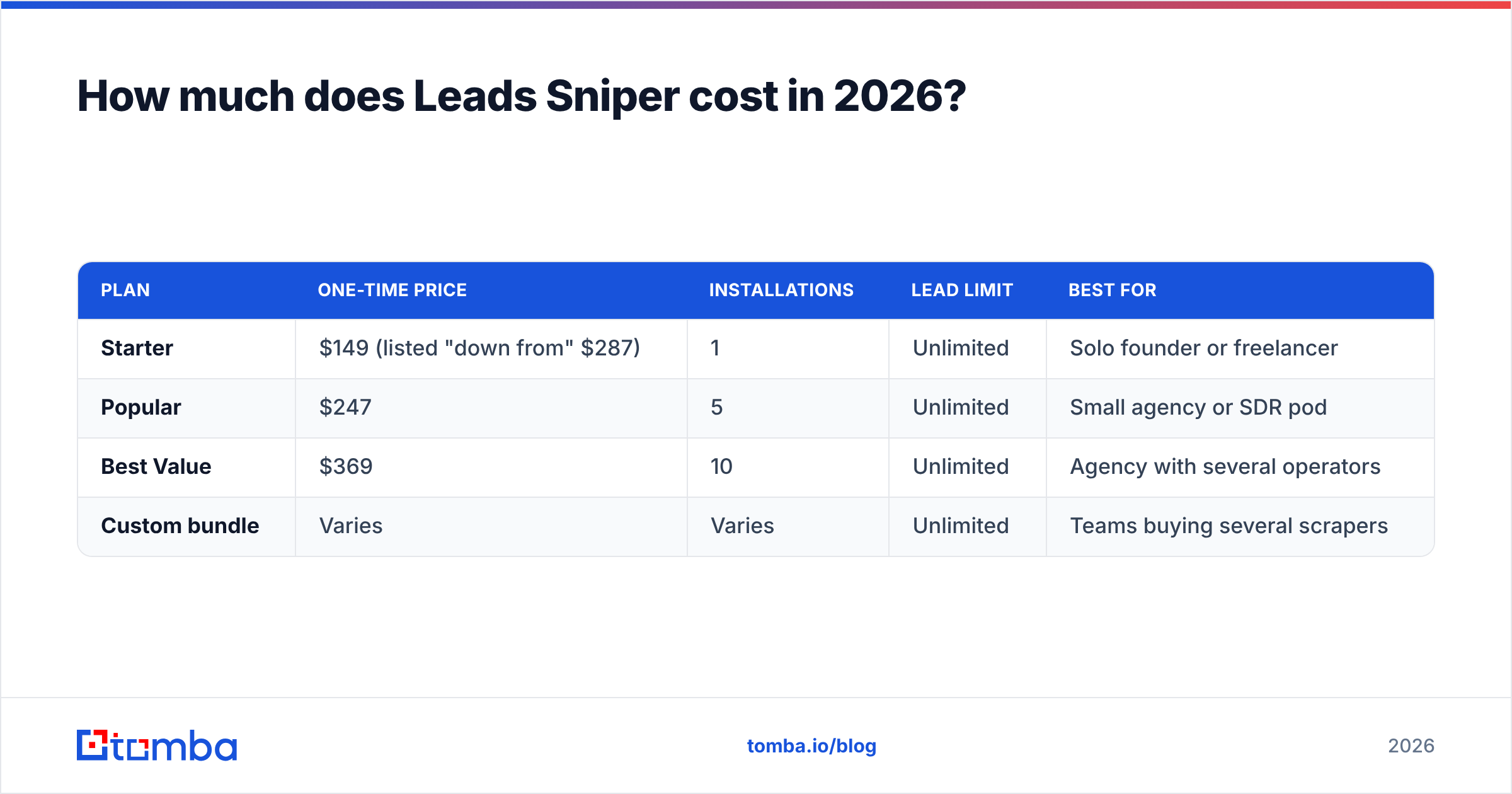
Leads Sniper doesn't sell a subscription. Every tier is a lifetime license, and the tiers differ only in how many installations (browsers or computers) you can activate. Here's the Google Maps Scraper pricing at the time of writing:
| Plan | One-time price | Installations | Lead limit | Best for |
|---|---|---|---|---|
| Starter | $149 (listed "down from" $287) | 1 | Unlimited | Solo founder or freelancer |
| Popular | $247 | 5 | Unlimited | Small agency or SDR pod |
| Best Value | $369 | 10 | Unlimited | Agency with several operators |
| Custom bundle | Varies | Varies | Unlimited | Teams buying several scrapers |
Before you check out, note these fine-print details:
- Licenses are per installation, not per user. A new laptop or a rebuilt browser profile can use up an activation. Budget for extra installs if your team changes machines often.
- Redeem the license key within 30 days of purchase. That's according to Leads Sniper's own FAQ and reseller listings. If you buy during a sale and forget about it, you can lose it.
- Each scraper is a separate product. The $149 covers Google Maps only. Google Search, Yellow Pages and domain-email scraping cost extra unless you bundle them.
- Lifetime deals also appear on third-party marketplaces such as DealFuel and Lifetimo, sometimes at other prices. Buy from the official site or a reseller the vendor links to, so support recognises your key.
Prices on lifetime-deal software change often and are usually framed as a discount off a higher "regular" price. Check the official pricing page before you budget. The structure above has been stable, but the dollar amounts may not be.
What do Leads Sniper reviews actually say?#
Overall the reviews are favourable. On reviews.io, Leads Sniper has more than 560 reviews averaging about 4.7/5. Trustpilot shows a smaller sample, around 4 stars at the time of writing. Here are the themes that come up repeatedly.
What reviewers praise
- Speed. Users say a Maps search that takes hours to copy by hand finishes in minutes.
- Clean exports. CSV and Excel files come out ready to import into a CRM or sequencer, with little cleanup needed.
- Ease of use. Non-technical buyers say they were scraping within their first session, with no proxies or scripts to configure.
- Value. Many reviewers compare the one-time price with what they used to pay per 1,000 records elsewhere.
- Support. Several reviews mention quick answers to setup questions.
What reviewers complain about
- Support is uneven across products. The most detailed negative review describes three weeks without a reply about a Domain Email Scraper issue after buying several tools.
- Email coverage depends on the business website. Reviewers who expected an email for every listing were disappointed. Many small businesses don't publish one, and the ones that do often use a contact form.
- Negative reviews are thin. Most critical reviews are short and vague, so it's hard to know whether the problem is the product or a mismatch with what the buyer expected.
Reviews like these are useful for judging product quality and support. They don't tell you whether the data will convert, because that depends on your ICP. That's the next question.
What are the real pros and cons of Leads Sniper?#

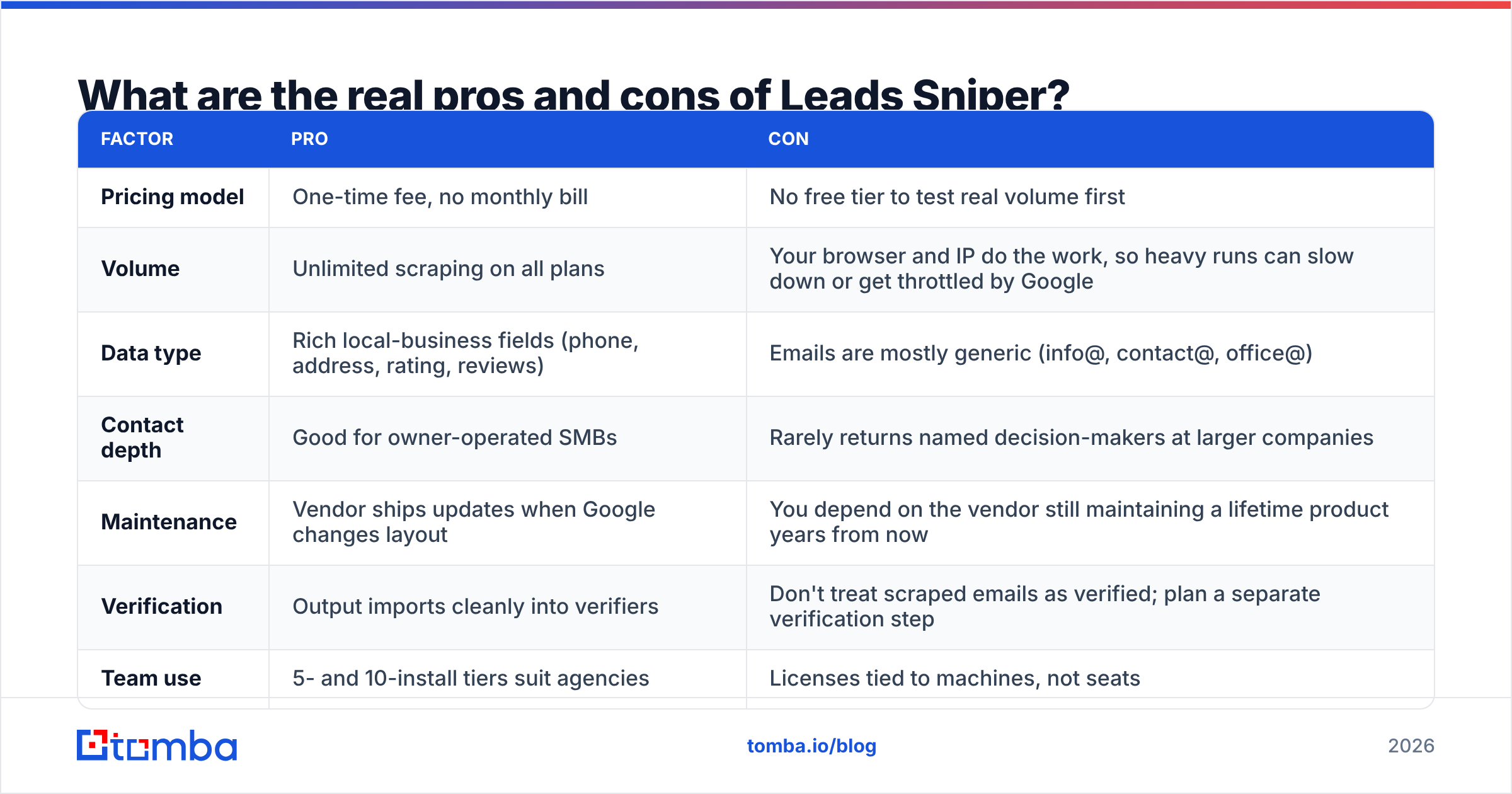
Here's a direct pros-and-cons comparison, weighted by how much each point matters in practice:
| Factor | Pro | Con |
|---|---|---|
| Pricing model | One-time fee, no monthly bill | No free tier to test real volume first |
| Volume | Unlimited scraping on all plans | Your browser and IP do the work, so heavy runs can slow down or get throttled by Google |
| Data type | Rich local-business fields (phone, address, rating, reviews) | Emails are mostly generic (info@, contact@, office@) |
| Contact depth | Good for owner-operated SMBs | Rarely returns named decision-makers at larger companies |
| Maintenance | Vendor ships updates when Google changes layout | You depend on the vendor still maintaining a lifetime product years from now |
| Verification | Output imports cleanly into verifiers | Don't treat scraped emails as verified; plan a separate verification step |
| Team use | 5- and 10-install tiers suit agencies | Licenses tied to machines, not seats |
The pattern is clear. Leads Sniper is excellent at breadth and weaker at depth. If your buyer is "any roofing company in Florida", breadth is what you need. If your buyer is "VP of Operations at 200–2,000-employee logistics firms", a Google Maps listing is the wrong place to start.
Is Leads Sniper's lifetime deal cheaper than pay-as-you-go scrapers?#
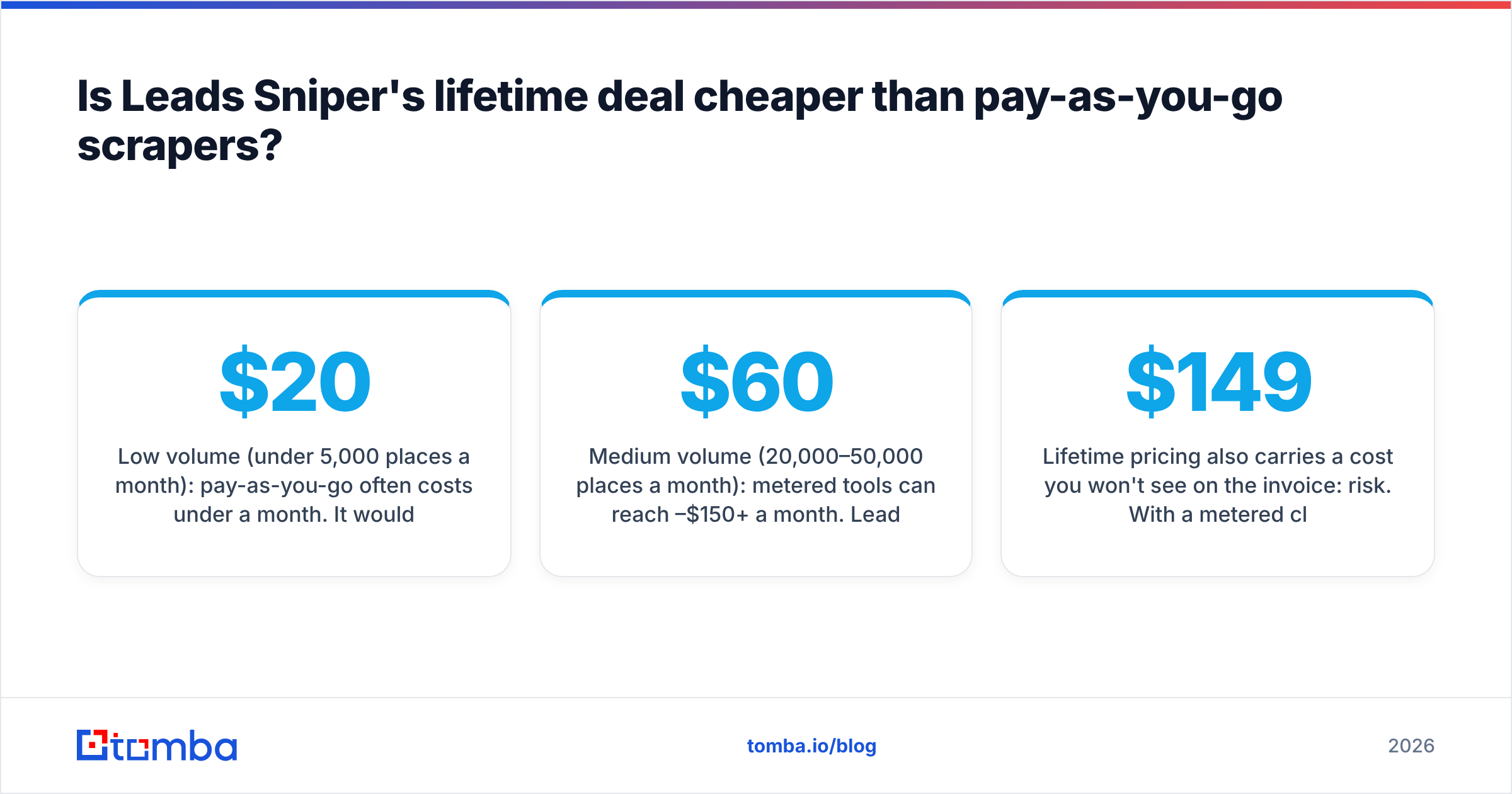
The answer depends on your volume. Pay-per-result Google Maps scrapers such as Outscraper or the Google Maps actors on Apify usually charge a few dollars per 1,000 places, and both offer a small free allowance each month. Some rough numbers:
- Low volume (under 5,000 places a month): pay-as-you-go often costs under $20 a month. It would take most of a year to spend $149.
- Medium volume (20,000–50,000 places a month): metered tools can reach $60–$150+ a month. Leads Sniper pays for itself within one to three months.
- High volume (agency scraping every day): the lifetime license is clearly cheaper on paper, as long as your machine and IP can sustain the load.
Lifetime pricing also carries a cost you won't see on the invoice: risk. With a metered cloud scraper, the vendor handles proxies, retries and Google layout changes. You only pay for results that actually arrive. With a lifetime browser tool, you depend on the vendor still shipping updates in 2027 and 2028, long after your $149 is spent. Leads Sniper has been active and publishing product updates, which is reassuring. Still, think about it before you buy a 10-install license for a whole agency.
Who should buy Leads Sniper, and who shouldn't?#
Buy it if:
- You sell to local businesses such as restaurants, clinics, trades, salons, real-estate offices or law firms.
- You run an agency that builds prospect lists for clients every week.
- Your outreach is multichannel and the phone number matters as much as the email.
- You want predictable spend and dislike credit meters.
Skip it if:
- Your ICP is defined by job title, seniority or company size rather than location and category.
- You need personal work emails (first.last@company.com) instead of shared inboxes.
- You send high-volume cold email and can't afford bounces. Scraped lists need a verification pass before any send.
- You'd rather pay per usable contact than per tool.
How does Leads Sniper compare to an email finder like Tomba?#
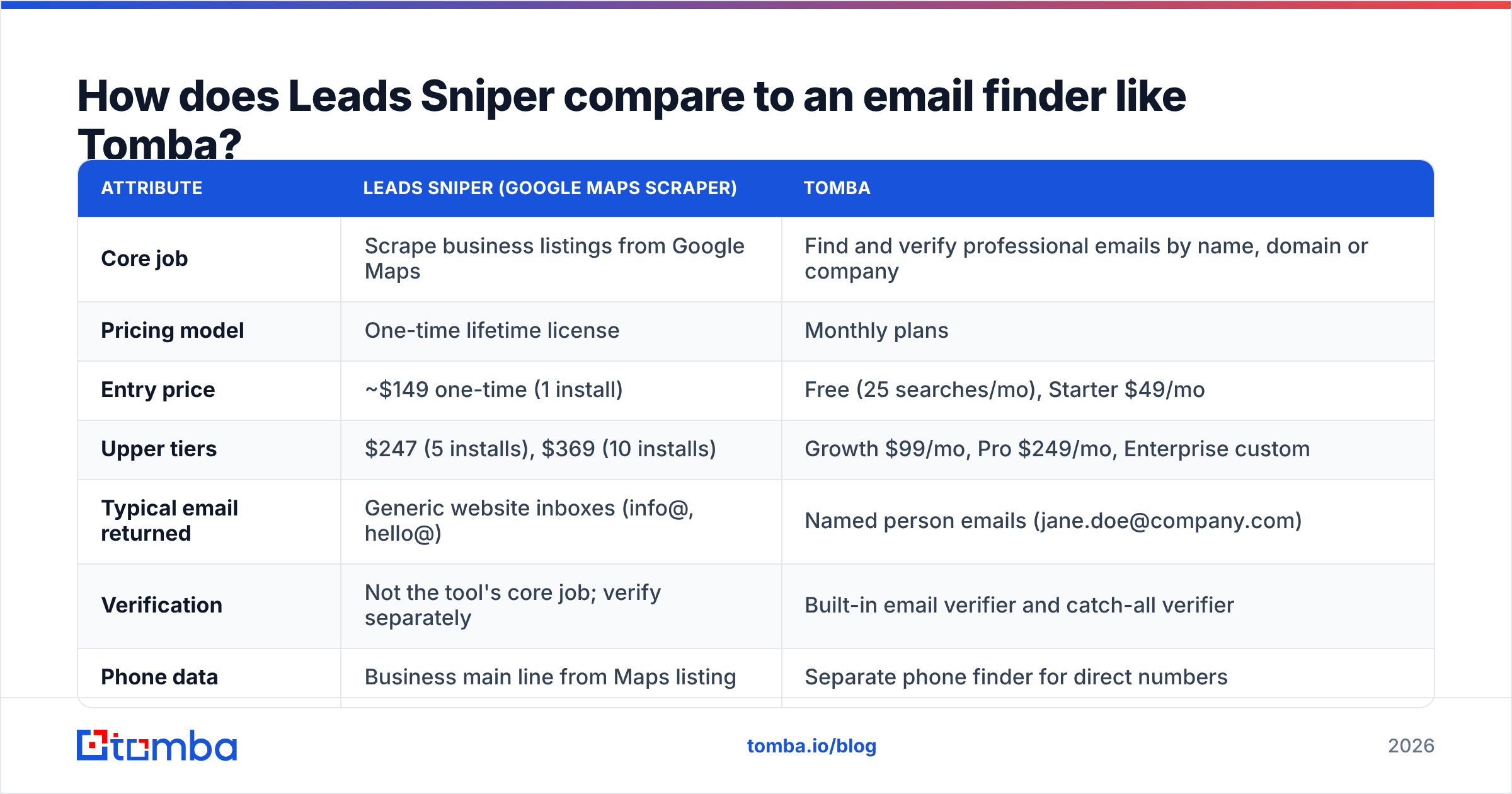
They answer different questions, so this isn't a like-for-like fight. Leads Sniper answers "which businesses exist in this category and location?" An email finder answers "what is the work email of this specific person at this company?"
| Attribute | Leads Sniper (Google Maps Scraper) | Tomba |
|---|---|---|
| Core job | Scrape business listings from Google Maps | Find and verify professional emails by name, domain or company |
| Pricing model | One-time lifetime license | Monthly plans |
| Entry price | ~$149 one-time (1 install) | Free (25 searches/mo), Starter $49/mo |
| Upper tiers | $247 (5 installs), $369 (10 installs) | Growth $99/mo, Pro $249/mo, Enterprise custom |
| Typical email returned | Generic website inboxes (info@, hello@) | Named person emails (jane.doe@company.com) |
| Verification | Not the tool's core job; verify separately | Built-in email verifier and catch-all verifier |
| Phone data | Business main line from Maps listing | Separate phone finder for direct numbers |
| Best ICP | Local SMBs, owner-operated businesses | B2B companies where the buyer is a named role |
| Runs on | Your browser / machine | Cloud, plus API, extension, Sheets and CRM integrations |
Many teams use both. Leads Sniper builds the list of target businesses. Then a domain search on each website pulls every public work email tied to that company, and verification removes the addresses that would bounce.

How do you get clean, sendable leads out of a scraper?#
Scraping is step one. The steps after it decide whether your campaign lands in the inbox or gets your domain flagged. Here's the workflow we'd use on any Leads Sniper export:
- Deduplicate by domain. Google Maps often lists several locations of one chain. Keep one row per website so you don't email the same company five times.
- Separate generic from personal addresses. Put info@, contact@ and sales@ in a lower-priority sequence. They work for tiny owner-run shops but do poorly anywhere with a front desk.
- Enrich the domain for named contacts. Look up decision-makers by role. A practice manager or a contractor's owner replies far more often than a shared inbox.
- Verify everything before you send. Run the list through an email verifier and treat catch-all domains as a separate risk tier. Scraped website emails go stale fast.
- Warm up and throttle. Even a verified list will hurt a fresh domain if you send 2,000 emails on day one. Ramp up slowly and watch bounce rates.
Skip step 4 and a "cheap" $149 list can get expensive. A burned sending domain costs far more in lost pipeline than any subscription would have.
What are the best Leads Sniper alternatives?#
The right alternative depends on why Leads Sniper doesn't fit you:
- You want cloud scraping with no local setup: Outscraper and Apify's Google Maps actors run on the vendor's servers and bill per result. Setup is quicker, but costs go up with volume.
- You want named B2B contacts instead of listings: an email finder such as Tomba, or a contact database. You search by company or person rather than by map area. Check Tomba pricing to compare credits against your monthly volume.
- You want intent or firmographic filters: larger platforms like Apollo or ZoomInfo add job-title and company-size filtering, at a much higher annual contract value.
- You want to see what buyers say before choosing: peer-review sites like G2 collect verified user ratings for most lead-gen tools, which is useful for checking claims about support and data quality.
Leads Sniper pricing reviews pros and cons: is it worth it in 2026?#
Yes, for high-volume local-business prospecting. The lifetime price is honest, the scraper does what it promises, and reviewers mostly agree it's fast and easy. If you pull tens of thousands of SMB listings a month, $149–$369 once is hard to beat.
No, if you need people rather than places. A Google Maps listing gives you a business, a phone line and often a generic inbox. It won't give you the operations director, the procurement lead or the founder's direct email. You'll also still need a verification step before any of that data goes into a sequencer.
That's the short version of Leads Sniper pricing reviews pros and cons: treat it as the top of your list-building funnel, not the whole funnel.
If your pipeline depends on reaching named decision-makers, add an email finder to your workflow. Tomba Email Finder takes the company domains from your Google Maps export. It returns the work emails of the people behind them, with built-in verification to keep bounces down. Start on the free tier with 25 searches a month. Move to Starter at $49/mo once the list-plus-finder workflow lifts your reply rates.
Related guides#
// get started
Find, verify and enrich your first contacts today
Start on the free plan with 25 searches a month, then scale when your team is ready.
Free plan · No credit card required · GDPR & CCPA
// about the author