LeadsFinder Pricing Reviews, Pros and Cons: 2026 Buyer's Guide
LeadsFinder charges one credit per delivered local lead, and several unrelated tools use nearly the same name. Here is what you actually pay, what reviewers say, and when a different tool makes more sense.
TL;DR
- "LeadsFinder" is the name of at least five products. These LeadsFinder pricing reviews cover LeadsFinder.net, a local-business lead platform, and name the others so you don't pay for the wrong one.
- LeadsFinder.net uses credits. One delivered lead costs one credit, and unused reserved credits come back automatically. You can buy a subscription or a one-off pack.
- Reviews are thin. In September 2026 we found no large, verified review base on the big B2B review sites. Test a small pack before you commit.
- Pros: you pay per delivered lead, refunds are automatic, and it's built for local niches like plumbers and dentists. Cons: few public reviews, tiers are hard to compare, and a listing isn't a verified decision-maker email.
- Need named contacts with verified work emails? An email finder with published per-search pricing is usually better value.
What is LeadsFinder, and which one are you actually looking at?#
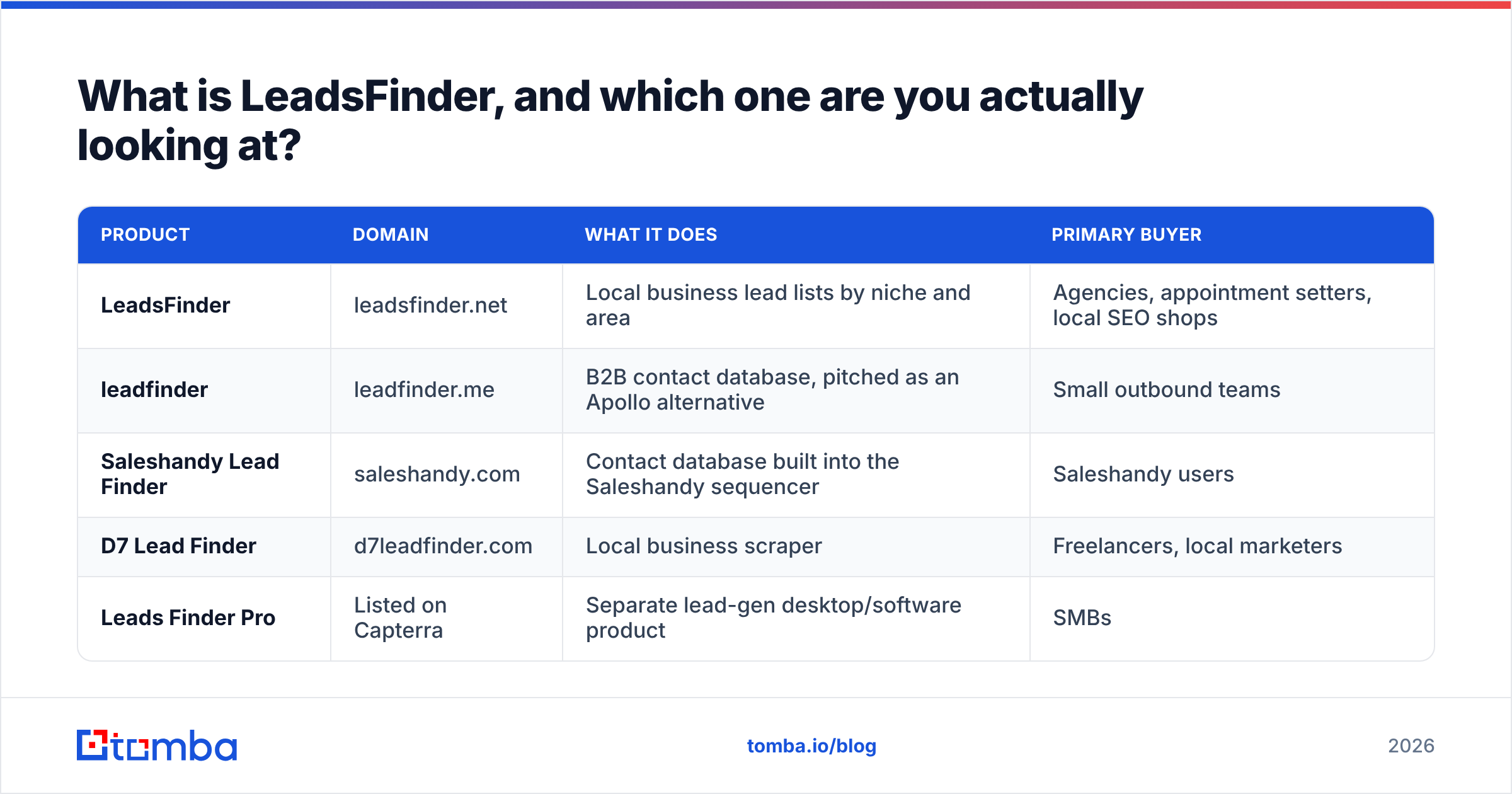
Before you compare prices, make sure you're pricing the right product. A search for "LeadsFinder" or "Lead Finder" brings up several unrelated tools:
| Product | Domain | What it does | Primary buyer |
|---|---|---|---|
| LeadsFinder | leadsfinder.net | Local business lead lists by niche and area | Agencies, appointment setters, local SEO shops |
| leadfinder | leadfinder.me | B2B contact database, pitched as an Apollo alternative | Small outbound teams |
| Saleshandy Lead Finder | saleshandy.com | Contact database built into the Saleshandy sequencer | Saleshandy users |
| D7 Lead Finder | d7leadfinder.com | Local business scraper | Freelancers, local marketers |
| Leads Finder Pro | Listed on Capterra | Separate lead-gen desktop/software product | SMBs |
This article covers LeadsFinder.net, the local lead generation platform that matches the "leadsfinder" spelling. We cover the other tools only where their pricing is a useful benchmark.
LeadsFinder.net says its product is for "agencies and outreach teams." In practice, you pick a business category (bars, roofers, HVAC contractors, dental clinics, accountants, real estate offices) and set an area. The platform then returns matching local businesses as leads. The site favors city-by-city coverage over a static list. Its argument is that pre-packaged lists go stale.
How does LeadsFinder pricing work?#
LeadsFinder.net charges in credits, and there are two ways to buy them:
- Subscriptions for recurring campaigns. You get a monthly credit allowance, which suits agencies running the same niche-and-city searches every month.
- One-time credit packs for single runs. These suit a freelancer building one list for one client.
The billing rules matter more than the headline price:
- One credit equals one delivered lead. You're charged for results, not for each search you run.
- Credits are reserved, then refunded. When a search starts, the platform holds a batch of credits. If fewer leads come back than it reserved, the difference is refunded automatically.
- "Lead" means a business record. One credit buys one local business listing. It doesn't buy a named person with a verified inbox, and that difference drives most of the value calculation below.
When we researched this in September 2026, we couldn't verify one fixed dollar figure per tier from a source we'd stand behind. Check the live pricing page before you budget. Also confirm whether credits roll over, whether pack credits expire, and whether subscription credits reset each month. Those three rules often change the real cost more than the sticker price does.
What do comparable "lead finder" tools cost?#
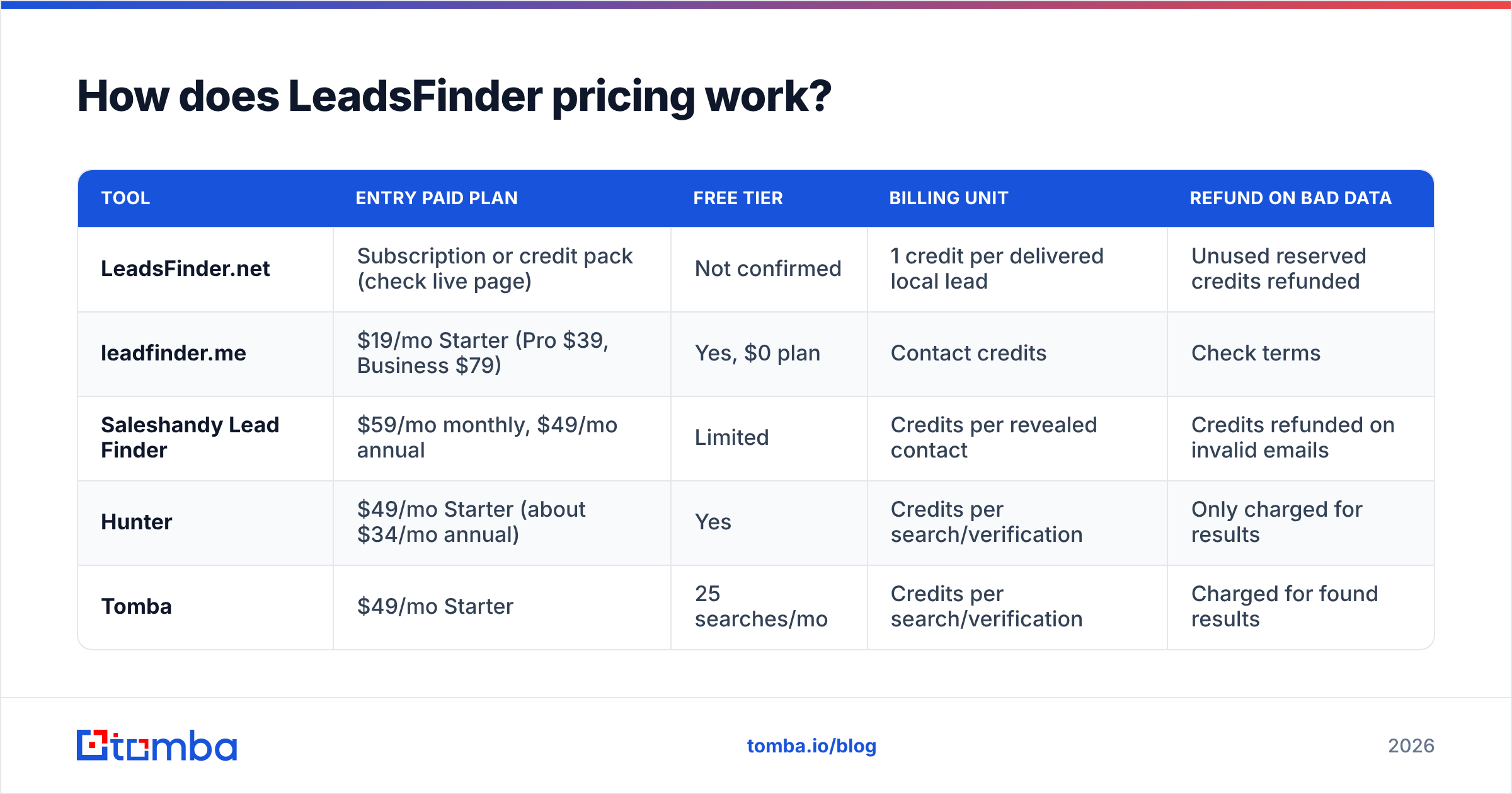
For context, here is what the neighbouring tools publish. Use these as reference points, not as LeadsFinder.net's prices.
| Tool | Entry paid plan | Free tier | Billing unit | Refund on bad data |
|---|---|---|---|---|
| LeadsFinder.net | Subscription or credit pack (check live page) | Not confirmed | 1 credit per delivered local lead | Unused reserved credits refunded |
| leadfinder.me | $19/mo Starter (Pro $39, Business $79) | Yes, $0 plan | Contact credits | Check terms |
| Saleshandy Lead Finder | $59/mo monthly, $49/mo annual | Limited | Credits per revealed contact | Credits refunded on invalid emails |
| Hunter | $49/mo Starter (about $34/mo annual) | Yes | Credits per search/verification | Only charged for results |
| Tomba | $49/mo Starter | 25 searches/mo | Credits per search/verification | Charged for found results |
The pattern is consistent. Paid entry plans for lead and email finders cluster between $19 and $59 a month. What separates them is what one credit buys you, not the monthly fee.
What do LeadsFinder pricing reviews say?#
Short answer: there isn't much to go on yet.
When we checked in September 2026, LeadsFinder.net didn't have a large, verified review base on the directories B2B buyers usually use. Capterra lists a "Leads Finder Pro," but that's a different product. Many of the "LeadsFinder pricing reviews" you'll find are really about the tools in the name-collision table above.
That doesn't make LeadsFinder.net a bad product. It means you're the reviewer. Treat your first purchase as a paid pilot:
- Buy the smallest pack or first subscription month.
- Run one niche in one city you know well, for example "roofers in Austin."
- Score 50 random rows by hand: is the business still operating, is the phone number live, does the website load, is there a reachable email?
- Work out your cost per usable lead, not your cost per delivered lead.
If 40 of 50 rows are usable, your real price is the credit price multiplied by 1.25. If only 25 are usable, it doubles.
What are the pros of LeadsFinder?#
Pay-per-result billing. You spend a credit when a lead is delivered, not when you run a search. That removes the "I searched ten times and got nothing" waste some database tools have.
Automatic refunds on unused reservations. Plenty of credit-based tools make you open a ticket to get credits back. Automatic refunds make small experiments cheaper.
Built for local niches. If you sell website redesigns to dentists, Google Ads management to HVAC firms, or bookkeeping to restaurants, a local-business search by category and geography is the right tool. General B2B databases are weak here because they skew toward funded tech companies with LinkedIn pages.
Flexible buying. Subscriptions plus one-off packs suit agencies whose volume changes with client load.
Fresher than a bought list. Pulling by city on demand avoids the classic problem of a CSV bought once in 2023 with a third of the businesses closed.
What are the cons of LeadsFinder?#
Thin public review footprint. Buying with no social proof increases your risk. Run the pilot described above.
Name confusion. Affiliate articles, YouTube reviews and comparison sites often mix LeadsFinder, leadfinder, Lead Finder and LeadFinder. Check the domain before trusting any review or coupon.
A business record isn't a decision-maker. A local listing usually gives you a company name, address, phone number and website. Sometimes it adds a generic inbox such as info@ or contact@. For cold email, a generic inbox gets far fewer replies than a named owner or office manager. It's also more likely to be a catch-all or a shared mailbox nobody reads.
Verification is on you. Unless the plan explicitly includes email verification, assume you need to run the list through an email verifier before sending. Emailing unverified local-business addresses is one of the quickest ways to damage your sending domain.
Harder to compare prices. If you can't see a clean per-tier price and credit count, comparing against Hunter, Tomba or leadfinder.me takes more work.

Is LeadsFinder worth it in 2026?#
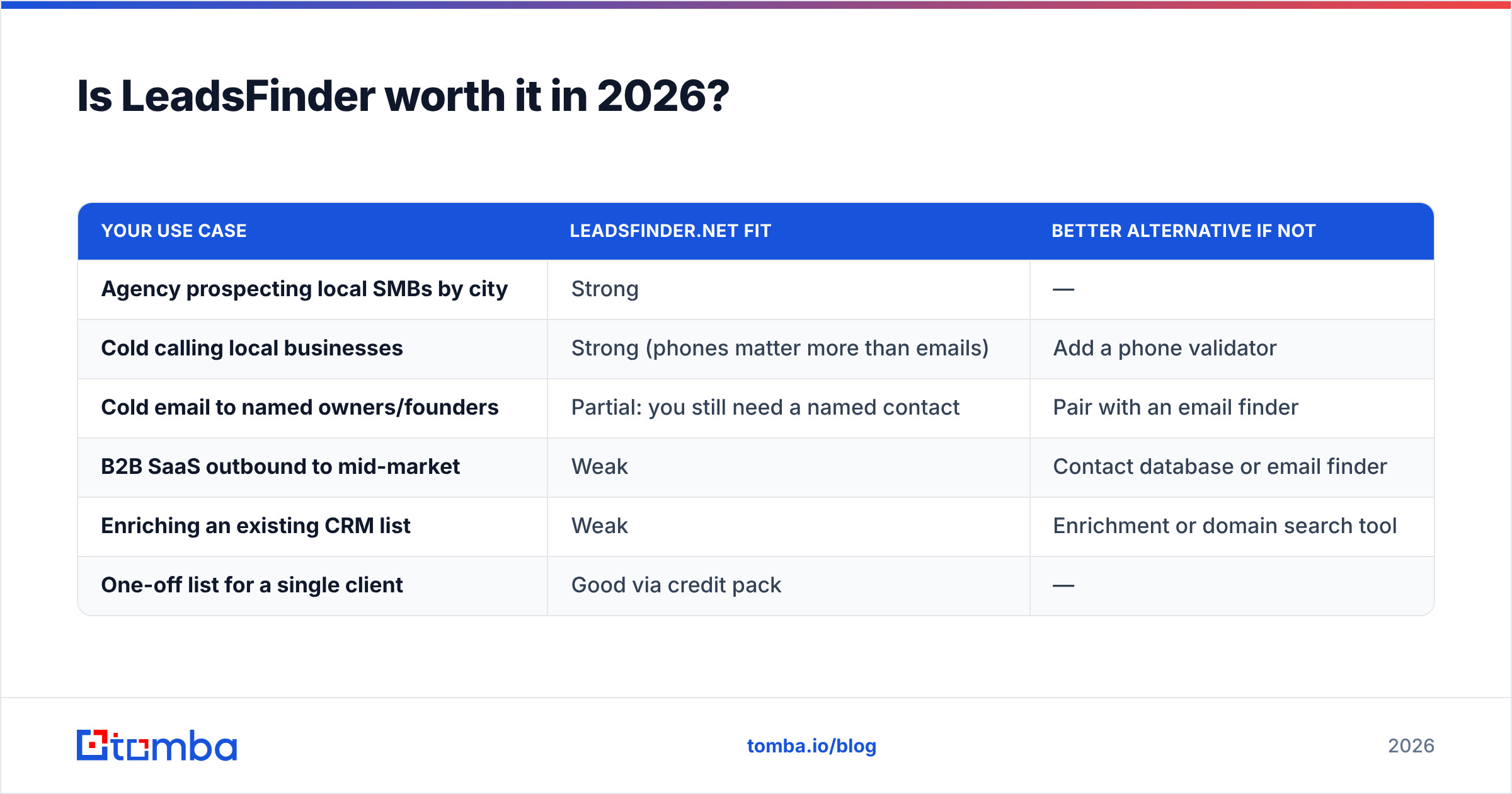
It depends on what you do with the output. Here is how we'd decide:
| Your use case | LeadsFinder.net fit | Better alternative if not |
|---|---|---|
| Agency prospecting local SMBs by city | Strong | — |
| Cold calling local businesses | Strong (phones matter more than emails) | Add a phone validator |
| Cold email to named owners/founders | Partial: you still need a named contact | Pair with an email finder |
| B2B SaaS outbound to mid-market | Weak | Contact database or email finder |
| Enriching an existing CRM list | Weak | Enrichment or domain search tool |
| One-off list for a single client | Good via credit pack | — |
Verdict: LeadsFinder.net is worth a pilot if you sell to local businesses and your first touch is a phone call, a site audit or a generic inbox. It's worth less if your motion depends on reaching a specific person by email, because every lead then needs a second step: finding and verifying the right inbox.
How do you turn LeadsFinder leads into reachable contacts?#
Most local-lead workflows break at this point. A clean pipeline looks like this:
- Pull the business list from LeadsFinder (or any local lead source) with the website column included.
- Extract the domain from each website. Drop rows with no website, or send them to a phone-only sequence.
- Run a domain search on each domain to see which named people and email patterns are publicly tied to it.
- Find the specific decision-maker. In a local business that's usually the owner, managing partner or practice manager. Use an email finder with their name and the domain.
- Verify every address and handle catch-all domains on their own. Local businesses on cheap hosting often accept all mail at the server level, which hides bounces until your reputation takes the hit.
- Load into your sequencer with the local detail (city, niche, website issue) as a personalization field.
Run this way, you only pay LeadsFinder for businesses you would target anyway, and you only pay an email finder for businesses that passed the first filter. Each step removes waste before the next one costs money.
Which alternatives should you compare before buying?#
If LeadsFinder.net doesn't fit, match the tool to the job, not the name:
- Need named B2B contacts at scale? A contact database like leadfinder.me or Apollo suits you better than a local-listing tool.
- Already use Saleshandy for sequencing? Its built-in Lead Finder avoids CSV shuffling, and it refunds credits on invalid emails.
- Already have company domains and need the right person's email? An email finder with a free tier lets you test accuracy on your own niche before paying. Tomba's free plan covers 25 searches a month, and paid plans start at $49/mo (see Tomba pricing for Growth at $99 and Pro at $249).
- Mostly cold calling? Prioritize phone coverage and phone validation over email counts.
Whatever you pick, check the same four things: what one credit buys, whether bad data is refunded, whether credits roll over, and what your cost per usable lead is after a 50-row manual check.
Frequently asked questions#
Does LeadsFinder have a free plan?#
We couldn't confirm a permanent free tier for LeadsFinder.net at the time of writing. Check the live pricing page. If there's no free option, the smallest credit pack is your trial.
Does LeadsFinder charge for leads it can't find?#
No. According to the platform, credits are charged per delivered lead, and unused reserved credits are refunded automatically.
Is LeadsFinder the same as leadfinder.me or Saleshandy Lead Finder?#
No. They're separate companies with separate products and prices. leadfinder.me lists plans from $0 to $79 a month. Saleshandy's Lead Finder runs $59 a month billed monthly or $49 a month billed annually.
Do LeadsFinder leads include verified emails?#
Treat them as business records, not verified personal emails. Before sending, verify any email you get from them and, where possible, replace generic inboxes with a named decision-maker.
Where does Tomba fit in a local-lead workflow?#
LeadsFinder helps with which businesses to target. It doesn't tell you who to email at each one or whether that inbox exists. That's what the Tomba Email Finder does. Paste in a domain or a name plus a company, and it returns professional email addresses with confidence scores, which you can then check with the built-in verifier. You can run it on 25 domains from your next LeadsFinder export on the free plan, compare the reply rate against generic info@ inboxes, and upgrade to the $49/mo Starter plan only if the named contacts perform better.
Related guides#
// get started
Find, verify and enrich your first contacts today
Start on the free plan with 25 searches a month, then scale when your team is ready.
Free plan · No credit card required · GDPR & CCPA
// about the author