Leadsforge vs Leadzenai: Pricing, Data Quality and Our Pick (2026)
Leadsforge lets you describe your ICP in plain English and get a verified list. Leadzen.ai sells seat-based access to a filterable B2B database with a LinkedIn extension. Here's how they compare on price, data and workflow, and which one fits your team.
TL;DR
- Leadsforge is a chat-first AI lead search engine. You describe your ideal customer in plain English and it builds a list with verified emails. Pricing is credit-based and starts around $49/mo for 2,000 credits, with no per-seat charge.
- Leadzen.ai is a filter-driven B2B database with a LinkedIn/Chrome extension and CRM export. It's priced per user: third-party listings put it at roughly $133/mo for 300 credits on the entry tier.
- On price per contact, Leadsforge usually comes out cheaper, especially for teams of two or more.
- Leadzen.ai is a better fit if your reps prospect from LinkedIn, or if your market is in India and wider APAC.
- Whichever you choose, verify exports before sending. Neither database replaces a dedicated verification step.
What are Leadsforge and Leadzen.ai?#
Both tools are sold as AI lead generation platforms, but they solve the problem from opposite ends.
Leadsforge is part of the Forge ecosystem, alongside Salesforge (sequencing), Mailforge and Infraforge (sending infrastructure) and Warmforge (warmup). Its main idea is conversational search. You don't set twelve filters. You type something like "Heads of RevOps at Series B SaaS companies in the UK with 50-200 employees", and the AI turns that into a query, returns matching contacts and verifies the emails before export. It also offers lookalike search: give it a customer's domain and it finds similar companies.
Leadzen.ai works more like a traditional B2B contact database with AI-assisted enrichment on top. You filter by location, industry, designation and company size, pull verified emails and phone numbers, and push the results to your CRM. Its Chrome and LinkedIn extensions matter a lot to how people use it: many teams use it mainly to enrich profiles while they browse LinkedIn. Vendor listings say it draws on 100+ data points from 500+ sources.
In short, Leadsforge is built for list building from a written ICP. Leadzen.ai is built for filter-based search and enrichment while you browse.
How do Leadsforge and Leadzen.ai compare feature by feature?#
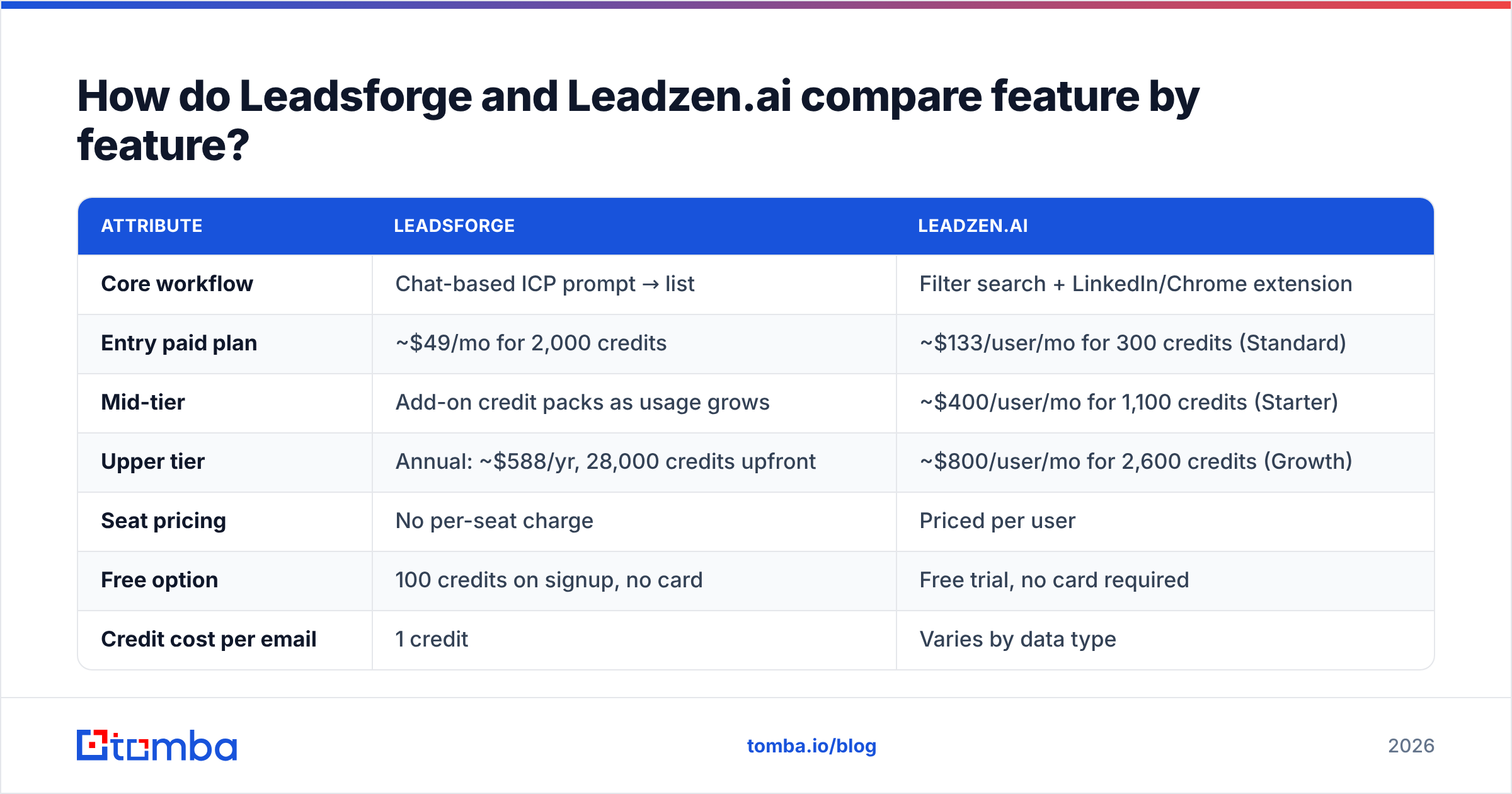
Here's a side-by-side view based on public vendor pages and review-site listings as of 2026. Pricing changes often, so confirm current tiers on each vendor's site before you buy.
| Attribute | Leadsforge | Leadzen.ai |
|---|---|---|
| Core workflow | Chat-based ICP prompt → list | Filter search + LinkedIn/Chrome extension |
| Entry paid plan | ~$49/mo for 2,000 credits | ~$133/user/mo for 300 credits (Standard) |
| Mid-tier | Add-on credit packs as usage grows | ~$400/user/mo for 1,100 credits (Starter) |
| Upper tier | Annual: ~$588/yr, 28,000 credits upfront | ~$800/user/mo for 2,600 credits (Growth) |
| Seat pricing | No per-seat charge | Priced per user |
| Free option | 100 credits on signup, no card | Free trial, no card required |
| Credit cost per email | 1 credit | Varies by data type |
| Credit cost per phone | 10 credits | Varies by data type |
| Credit rollover | Credits don't expire | Monthly allocation per user |
| Lookalike company search | Yes | Limited, filter-based |
| LinkedIn extension | Not the main workflow | Yes, central to the product |
| Native sequencing | Via Salesforge (same ecosystem) | Export to CRM / outreach tool |
| Best for | Outbound teams building fresh lists fast | Reps prospecting on LinkedIn, APAC coverage |
Leadzen.ai figures come from its TrustRadius pricing listing and Capterra profile. Leadsforge figures come from its official pricing page.
Which tool is cheaper per verified contact?#
Leadsforge wins on unit economics by a wide margin, and seat pricing is the main reason.
Some quick math on the entry tiers:
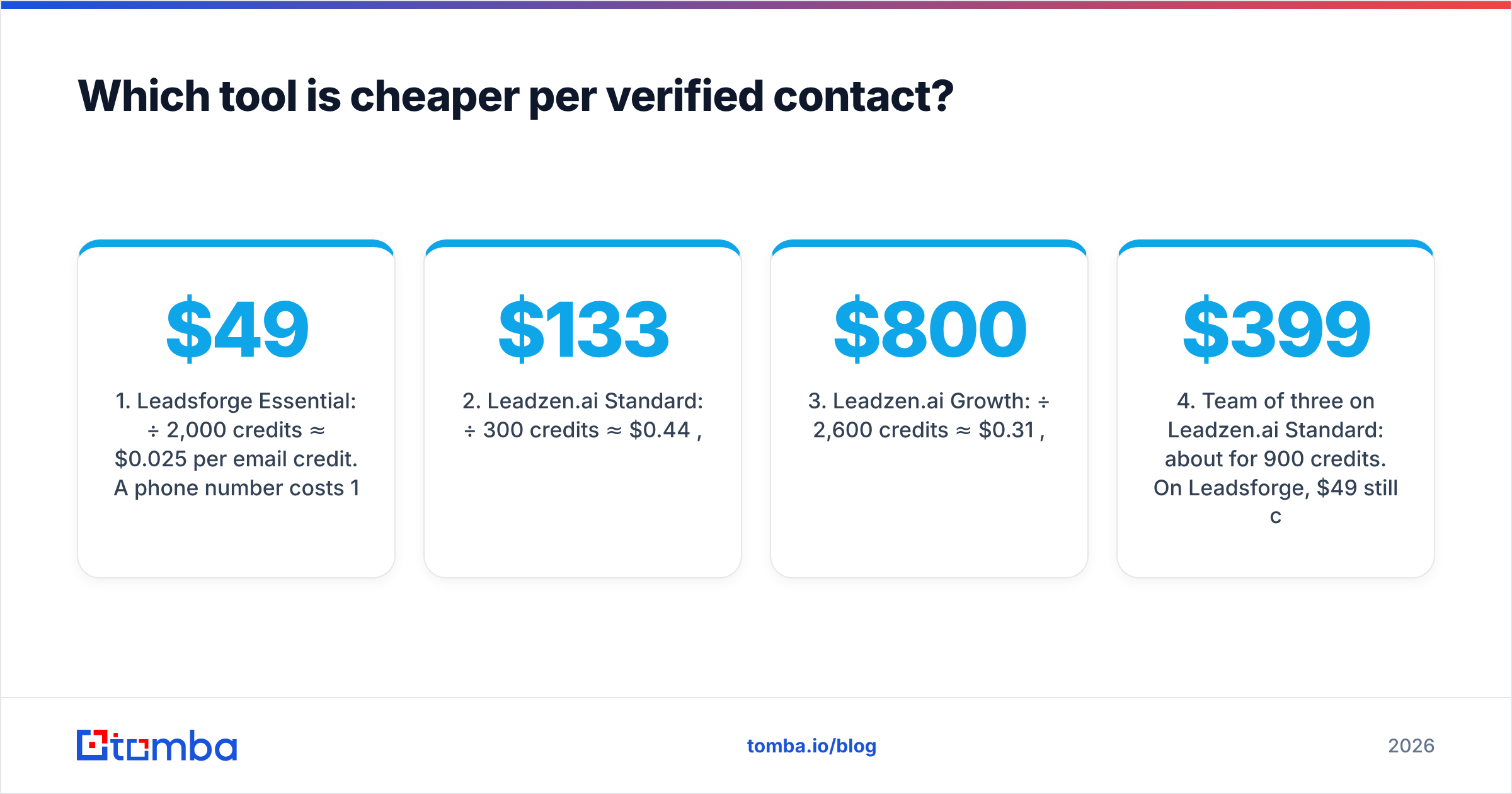
- Leadsforge Essential: $49 ÷ 2,000 credits ≈ $0.025 per email credit. A phone number costs 10 credits, so about $0.25 per phone.
- Leadzen.ai Standard: $133 ÷ 300 credits ≈ $0.44 per credit, per user.
- Leadzen.ai Growth: $800 ÷ 2,600 credits ≈ $0.31 per credit, per user.
- Team of three on Leadzen.ai Standard: about $399/mo for 900 credits. On Leadsforge, $49 still covers 2,000 shared credits, and you can buy more credits as needed.
The headline gap is roughly 10-15x on raw email credits. That comparison isn't fully like-for-like, though. A Leadzen.ai credit can include richer profile data and phone numbers, and its extension workflow saves rep time in a way that doesn't show up in cost per credit. Still, if your motion is "build 5,000 net-new contacts a month and put them into sequences", Leadsforge is the cheaper option.
Rollover matters too. Leadsforge credits don't expire, so a slow quarter doesn't waste budget. Seat-based monthly allocations usually reset, which means you pay for unused capacity.

How does the prospecting workflow differ?#
This is where the choice gets personal. The better workflow is the one that matches how your team already works.
Leadsforge: prompt, review, export. You write your ICP the way you'd brief a new SDR. The AI parses titles, headcount, geography, industry and tech signals, and returns a list you can refine in conversation ("remove agencies", "only companies hiring SDRs"). For founders and small outbound teams without a RevOps person to build complex filter logic, this saves a lot of time. Because it sits in the Forge ecosystem, the list can go straight into Salesforge sequences and send through warmed Mailforge inboxes, so you can go from list to sending in one place.
The trade-off is that conversational search can hide why a contact matched. If you need strict, auditable targeting (for example, excluding every company under a given revenue band), check what the AI inferred before you export.
Leadzen.ai: filter, browse, enrich. Leadzen.ai feels familiar if you've used any database-style prospecting tool. You apply filters, save searches and export. Its extension lets reps pull contact details directly from LinkedIn profiles and company pages, which suits account-based reps who research each target by hand before reaching out. CRM export is built in, so enriched contacts land where your pipeline lives.
The trade-off is volume. At 300 credits per user per month on the entry tier, Leadzen.ai isn't built for high-volume, spray-and-segment outbound. It's built for fewer, deeper touches.
Which has better data quality and coverage?#
No independent, apples-to-apples accuracy benchmark exists for these two tools, so treat any vendor's "95%+ accuracy" claim as marketing until you've tested it yourself. Here's what you can reasonably infer:
- Leadsforge verifies emails before export and charges credits for verified results, so you're paying for deliverable emails rather than raw records. Its coverage is strongest in North America and Western Europe, which is typical for tools built around SaaS outbound.
- Leadzen.ai started in India, and reviewers often cite its coverage of Indian and wider APAC companies as a strength. If you sell into Bengaluru, Singapore or Jakarta, run a sample there before assuming a US-first database will match it.
- Both struggle with catch-all domains, where the mail server accepts every address and so hides whether a specific inbox exists. Neither can fully solve this, and it's where most "verified" lists lose 5-15% of deliverability in practice.
The honest way to decide is a 200-contact bake-off. Pull the same ICP from both tools, run every address through an independent email verifier, then send to a small warmed segment and measure hard bounces. A week of testing tells you more than any review site.
What are the pros and cons of each?#
Leadsforge pros
- Natural-language ICP search reduces the need to learn complex filters
- Low entry price with no per-seat fees
- Credits never expire
- Lookalike company search built in
- Works with Salesforge, Mailforge and Warmforge for a full outbound stack
Leadsforge cons
- AI-inferred targeting needs a human review step
- Phone numbers cost 10x an email credit
- Getting the most out of it means using more of the Forge ecosystem
Leadzen.ai pros
- Strong LinkedIn/Chrome extension workflow
- Filter-based search is predictable and auditable
- Reportedly strong APAC and India coverage
- Built-in CRM export
Leadzen.ai cons
- Per-user pricing gets expensive fast for teams
- Low monthly credit allocation on entry tiers
- Less suited to high-volume outbound list building
Which should you choose: Leadsforge or Leadzen.ai?#
Match the tool to your motion:
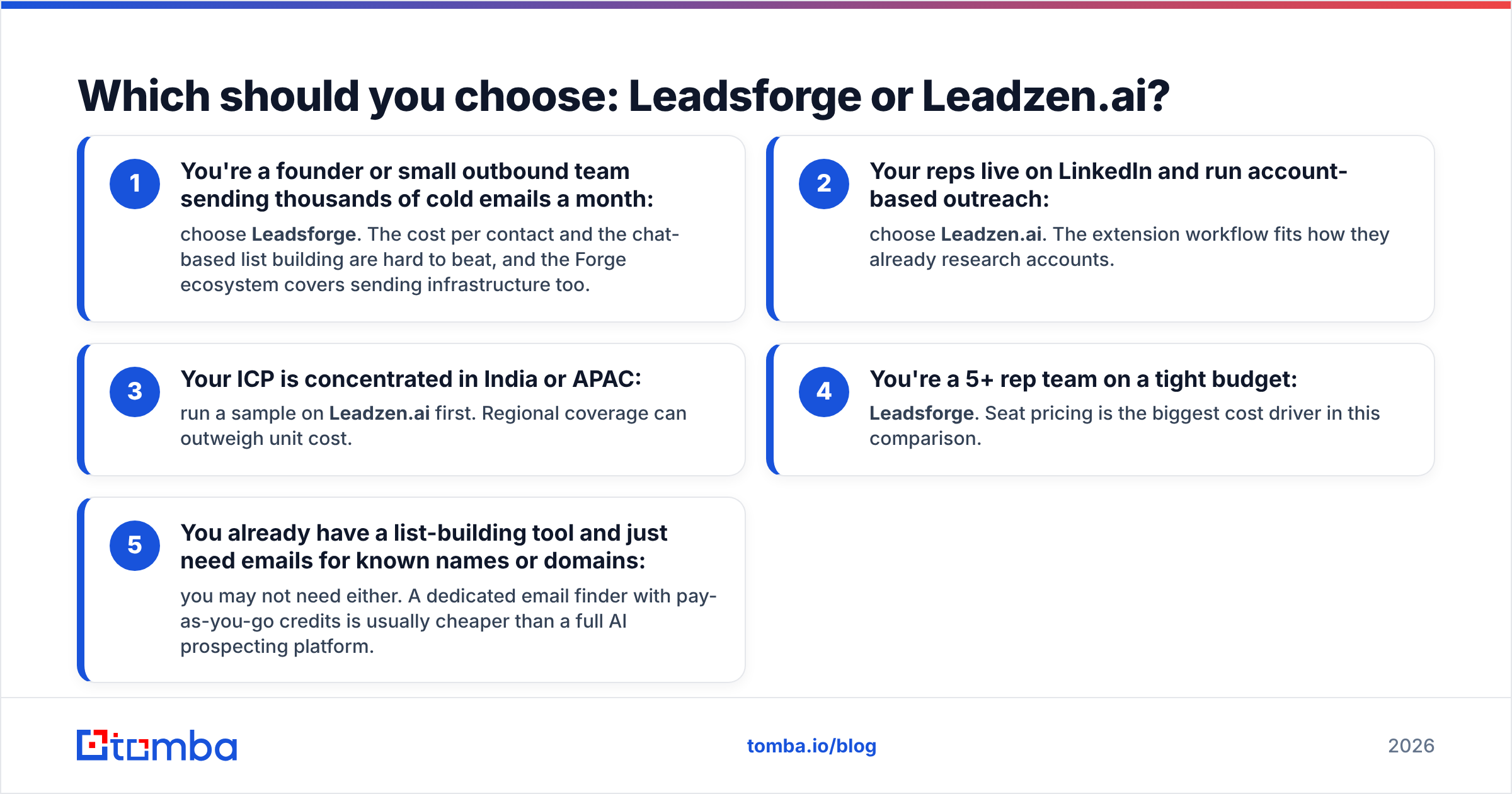
- You're a founder or small outbound team sending thousands of cold emails a month: choose Leadsforge. The cost per contact and the chat-based list building are hard to beat, and the Forge ecosystem covers sending infrastructure too.
- Your reps live on LinkedIn and run account-based outreach: choose Leadzen.ai. The extension workflow fits how they already research accounts.
- Your ICP is concentrated in India or APAC: run a sample on Leadzen.ai first. Regional coverage can outweigh unit cost.
- You're a 5+ rep team on a tight budget: Leadsforge. Seat pricing is the biggest cost driver in this comparison.
- You already have a list-building tool and just need emails for known names or domains: you may not need either. A dedicated email finder with pay-as-you-go credits is usually cheaper than a full AI prospecting platform.

Do you still need a separate email finder and verifier?#
In most cases, yes. List-building platforms are good at finding the right accounts and people. They're less reliable at the last step: confirming that a specific inbox exists today. People change jobs, domains move to catch-all configurations, and data that was verified at export can bounce by the time your sequence reaches step three.
A practical stack in 2026 has three layers:
- Discovery: Leadsforge or Leadzen.ai to build the target account and persona list.
- Enrichment and gap-filling: a dedicated finder to fill in missing emails by name and domain, plus data enrichment for firmographics your prospecting tool didn't return.
- Verification: a final pass through a verifier, including catch-all handling, right before the list enters a sequence.
This layered approach also protects your sender reputation. Hard bounce rates above about 2% are a well-known trigger for mailbox providers to start throttling you, and keeping bounces below that matters more than which database you started from. HubSpot's guide to email bounce rates is a good primer if you're setting internal thresholds.
How does Tomba fit alongside these tools?#
Tomba isn't a chat-based ICP builder like Leadsforge, and it isn't a LinkedIn-first seat product like Leadzen.ai. It fills the gap around both: finding and verifying professional emails by name, domain or company, with a Chrome extension, Sheets add-on and API for teams that want to automate enrichment.
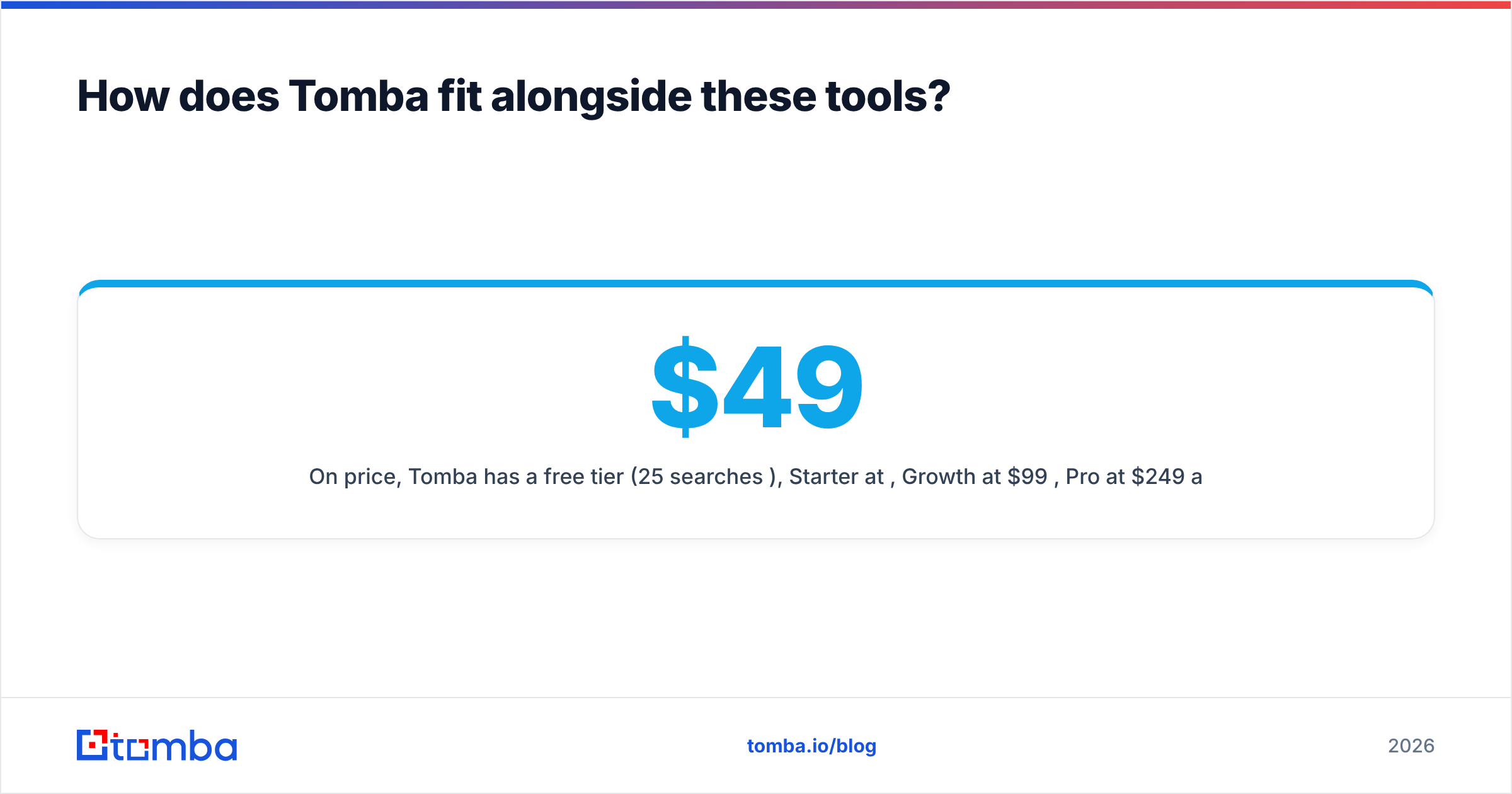
On price, Tomba has a free tier (25 searches/mo), Starter at $49/mo, Growth at $99/mo, Pro at $249/mo and custom Enterprise plans. Full details are on the Tomba pricing page. A common pattern is to build the account list in Leadsforge or Leadzen.ai, then run the output through Tomba to fill missing emails and re-verify before sending.
Frequently asked questions#
Is Leadsforge better than Leadzen.ai? For high-volume outbound on a budget, yes: it's cheaper per contact and faster to build lists with. For LinkedIn-centric, account-based prospecting or APAC-heavy markets, Leadzen.ai can be the better fit.
Does Leadsforge have a free plan? It gives 100 free credits on signup with no card required, and those credits don't expire.
Is Leadzen.ai priced per user? Yes. Review-site listings show per-user monthly plans starting at roughly $133 for 300 credits. Confirm current pricing with the vendor.
Can I use both tools together? Yes, though for most teams it's overkill. Pick one for discovery and pair it with a dedicated finder and verifier for accuracy.
Ready to fill the gaps in your lead lists?#
Whichever platform builds your target list, missing and outdated emails are what quietly damage reply rates. Tomba Email Finder finds professional email addresses by name, domain or company, verifies them in the same workflow and plugs into your existing stack through the Chrome extension, Google Sheets or the API. Start on the free tier with 25 searches a month, run your Leadsforge or Leadzen.ai export through it and compare the bounce rate before you commit to anything larger.
Related guides#
// get started
Find, verify and enrich your first contacts today
Start on the free plan with 25 searches a month, then scale when your team is ready.
Free plan · No credit card required · GDPR & CCPA
// about the author