Leadsforge vs NeverBounce: Lead Builder or Email Verifier in 2026?
Leadsforge builds prospect lists from a plain-English prompt. NeverBounce checks whether the emails on a list will bounce. Here is how each one works, what it costs, and when you need one, the other, or both.
TL;DR
- Leadsforge and NeverBounce do different jobs. Leadsforge is an AI lead-generation tool that builds prospect lists. NeverBounce is an email verification service that checks lists you already have.
- Pick Leadsforge if you don't have leads yet and want to describe your ideal customer in plain English and get a list of contacts back.
- Pick NeverBounce if you already have contacts (from a CRM, a webinar, a scraped list, or an old database) and need to know which addresses will bounce before you send.
- Many outbound teams end up paying for both, because a list builder feeds a verifier. If you'd rather do both steps in one place, you can combine an email finder and a verifier on one platform.
- Check current pricing on both vendor sites. Leadsforge charges a subscription with monthly credits. NeverBounce is mostly pay-as-you-go per verified email, with volume discounts.
What is the real difference between Leadsforge and NeverBounce?#
People search "Leadsforge vs NeverBounce" expecting two tools from the same category. They aren't. The two products cover different stages of an outbound workflow:
- Sourcing. Who should you contact? (Leadsforge)
- Hygiene. Will the email to that person actually land? (NeverBounce)
Leadsforge belongs to the Forge family of products from the team behind Salesforge, next to Mailforge, Infraforge, and Warmforge. Its main idea is a chat-style search. You type something like "Series A SaaS companies in Germany with 50-200 employees, heads of RevOps", and it returns a list of companies and contacts with emails you can export or send straight into a sequencer.
NeverBounce has been around much longer and is owned by ZoomInfo. It doesn't find anyone. You upload a CSV or connect an integration, and it sorts each address into buckets: valid, invalid, disposable, catch-all, or unknown. It also offers a real-time API so you can verify addresses at the point of capture, for example on a signup form.
In short, you'd use Leadsforge to find people and NeverBounce to confirm your emails won't bounce before a campaign damages your sender reputation.
How do Leadsforge and NeverBounce compare feature by feature?#
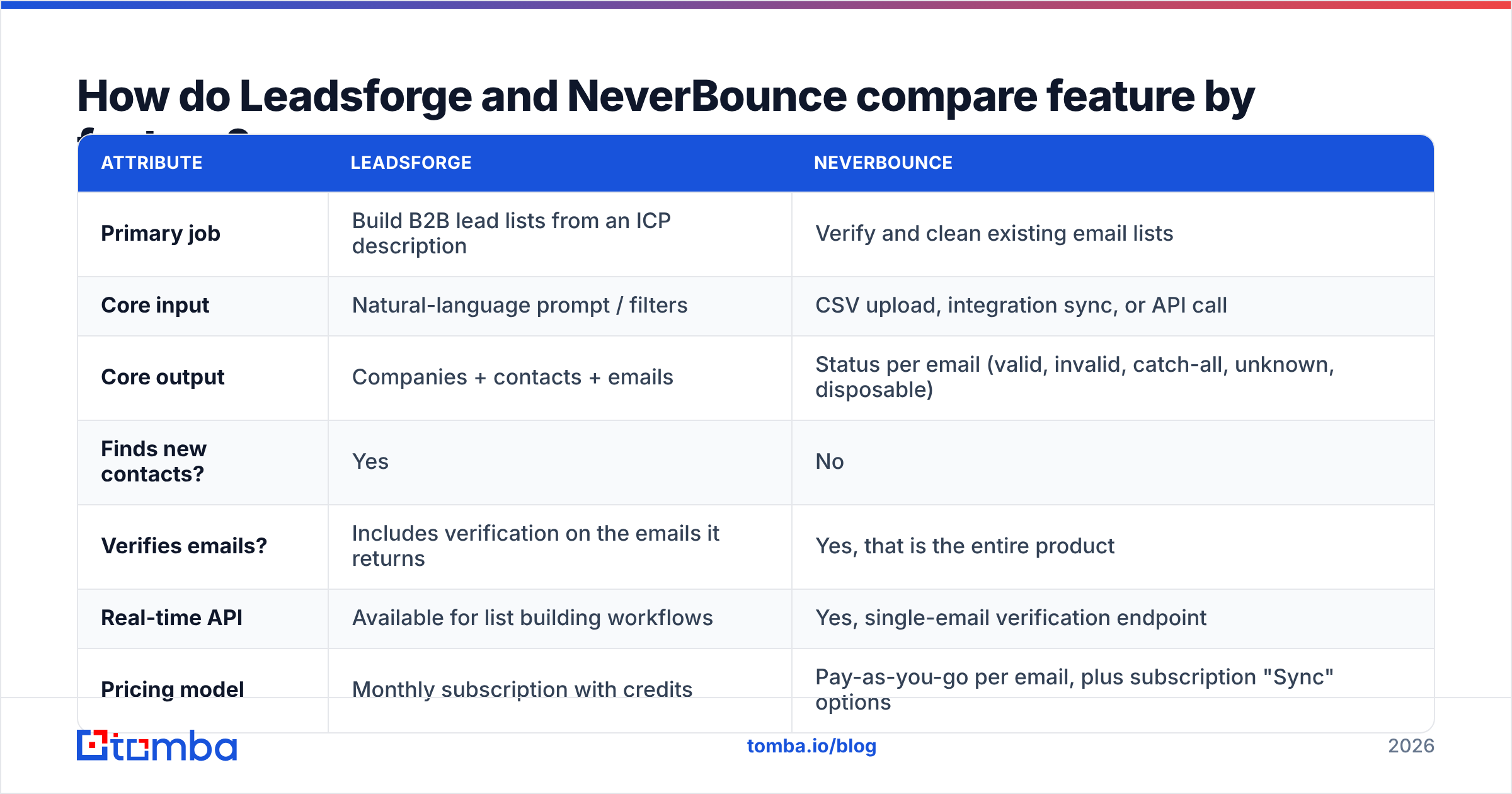
Here's the side-by-side. The columns aren't perfectly symmetrical because the products solve different problems.
| Attribute | Leadsforge | NeverBounce |
|---|---|---|
| Primary job | Build B2B lead lists from an ICP description | Verify and clean existing email lists |
| Core input | Natural-language prompt / filters | CSV upload, integration sync, or API call |
| Core output | Companies + contacts + emails | Status per email (valid, invalid, catch-all, unknown, disposable) |
| Finds new contacts? | Yes | No |
| Verifies emails? | Includes verification on the emails it returns | Yes, that is the entire product |
| Real-time API | Available for list building workflows | Yes, single-email verification endpoint |
| Pricing model | Monthly subscription with credits | Pay-as-you-go per email, plus subscription "Sync" options |
| Native ecosystem | Salesforge sequencer, Forge infrastructure stack | ZoomInfo ownership; large integration catalog (ESPs, CRMs, forms) |
| Best for | Founders and SDR teams with no list yet | Marketers and ops teams with existing data to clean |
| Weak spot | You still need your own sending and warmup setup | Cannot help if you have no contacts |
Neither tool fully replaces the other. If you're choosing between them, first figure out which part of your workflow is actually slowing you down.
How does Leadsforge work in practice?#
Leadsforge's pitch is that you shouldn't have to work through forty filter dropdowns to build a list. The workflow looks like this:
- Describe your ICP in a sentence. Industry, headcount, geography, job titles, tech signals.
- Review and refine. The tool returns matching companies and contacts. You tighten or loosen the prompt, or use lookalike-style searches based on a company you already sell to.
- Unlock contacts with credits. Each revealed contact costs a credit. Emails come back already checked for deliverability, although you should still sanity-check high-value lists.
- Export or push. CSV export, or send directly to Salesforge if you use the rest of the Forge stack.
The chat interface is fast for exploratory searches, like "what does my market look like in the Nordics?". It's less precise than a hand-built boolean filter when you need exact criteria. Experienced SDR teams sometimes find the natural-language layer adds a step. Founders who have never used a traditional B2B database tend to like it.
The trade-off: Leadsforge makes the most sense if you're buying into its ecosystem. As a standalone database it competes with Apollo, ZoomInfo, and many email finders, and data quality varies by region and industry, as it does with every provider. Read recent reviews on G2 for your specific market before committing.

How does NeverBounce work in practice?#
NeverBounce does one thing and does it well: it tells you which addresses are safe to send to.
- Bulk cleaning. Upload a list, wait a few minutes (longer for very large files), download results with a status column.
- Real-time verification. Call the API when someone types an email into a form, and reject typos and disposable domains before they reach your CRM.
- Automated list sync. Connect it to your ESP or CRM and it re-verifies contacts on a schedule, which matters because B2B data decays as people change jobs.
- Result categories. Valid, invalid, disposable, catch-all (the server accepts everything so the mailbox can't be confirmed), and unknown (the server didn't respond in a usable way).
Catch-all results are where most verifiers, NeverBounce included, run out of certainty. A catch-all domain answers "yes" to every address, so a standard SMTP check can't tell you whether jane@company.com exists. You either accept the risk, suppress those contacts, or use a dedicated catch-all verifier that uses extra signals to score them.
How much do Leadsforge and NeverBounce cost?#
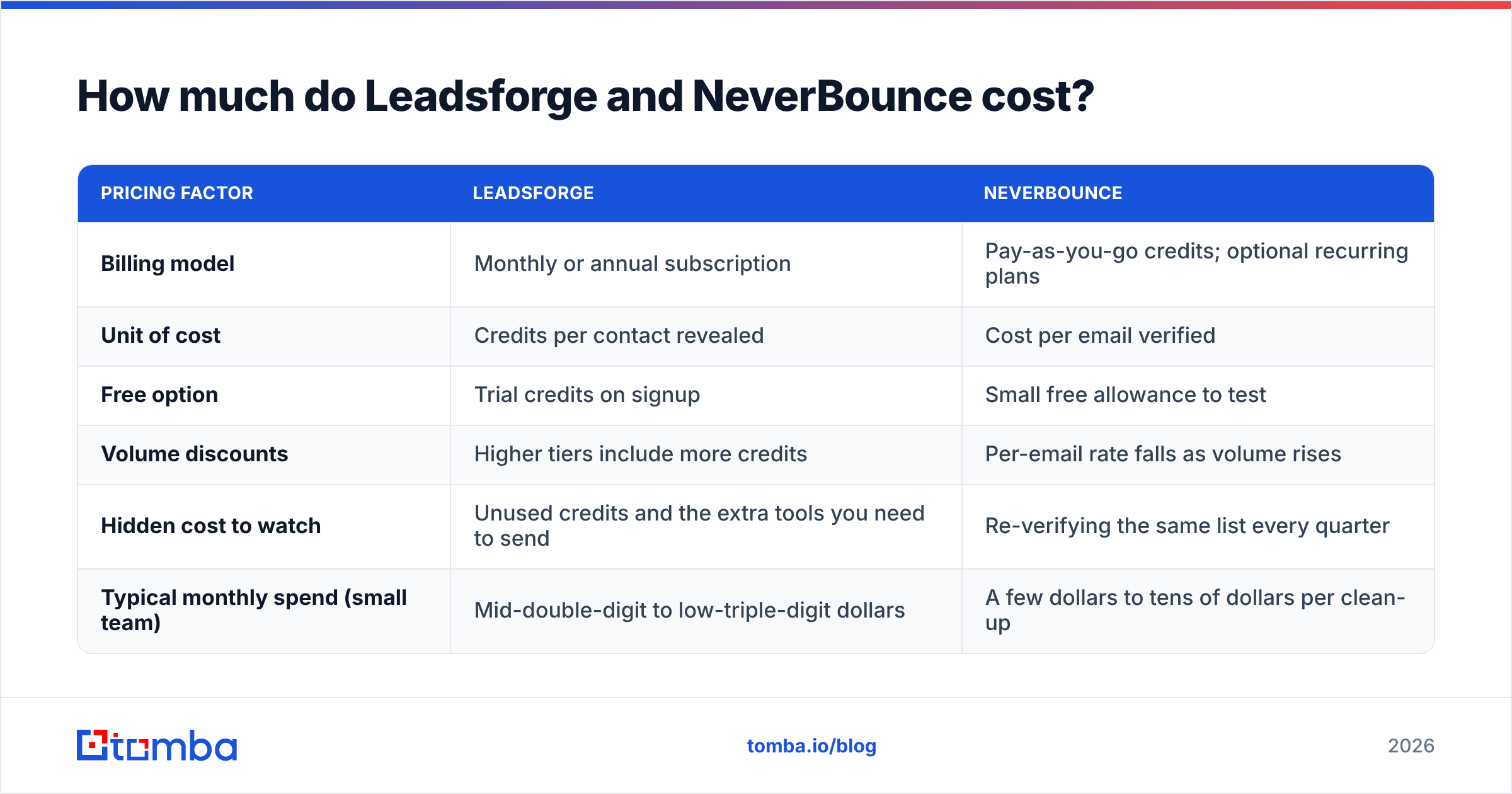
Pricing on both sides changes often, so treat this as a structural comparison and confirm current numbers on each vendor's site before you buy.
| Pricing factor | Leadsforge | NeverBounce |
|---|---|---|
| Billing model | Monthly or annual subscription | Pay-as-you-go credits; optional recurring plans |
| Unit of cost | Credits per contact revealed | Cost per email verified |
| Free option | Trial credits on signup | Small free allowance to test |
| Volume discounts | Higher tiers include more credits | Per-email rate falls as volume rises |
| Hidden cost to watch | Unused credits and the extra tools you need to send | Re-verifying the same list every quarter |
| Typical monthly spend (small team) | Mid-double-digit to low-triple-digit dollars | A few dollars to tens of dollars per clean-up |
The more useful number is cost per verified, reachable contact. If Leadsforge gives you 1,000 contacts and you then run them through NeverBounce, your real cost per usable lead is the sum of both, divided by the contacts that come back valid. Most teams skip this calculation and underestimate what their stack costs.
For comparison, Tomba pricing combines finding and verification on the same credit balance: a free tier with 25 searches per month, Starter at $49/mo, Growth at $99/mo, Pro at $249/mo, and custom Enterprise plans.
Which tool gives more accurate results?#
It's hard to compare accuracy directly because the two tools measure different things.
- Leadsforge accuracy means: is this the right person, at the right company, with the right title, and is the email real? That covers data freshness plus email correctness.
- NeverBounce accuracy means: when it says "valid," does the email actually get delivered? That's a narrower question, and dedicated verifiers answer it more reliably than any database.
In practice:
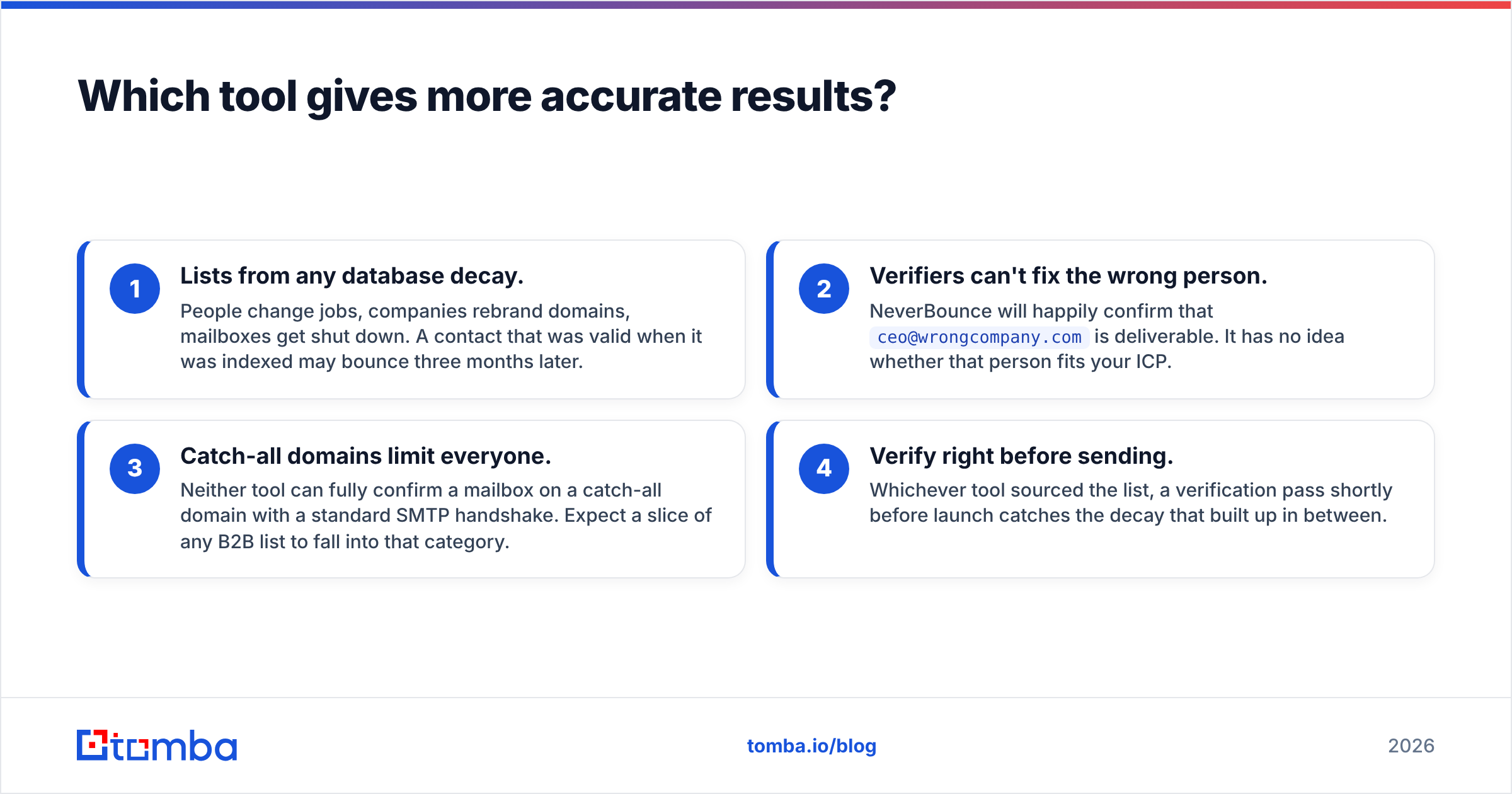
- Lists from any database decay. People change jobs, companies rebrand domains, mailboxes get shut down. A contact that was valid when it was indexed may bounce three months later.
- Verifiers can't fix the wrong person. NeverBounce will happily confirm that
ceo@wrongcompany.comis deliverable. It has no idea whether that person fits your ICP. - Catch-all domains limit everyone. Neither tool can fully confirm a mailbox on a catch-all domain with a standard SMTP handshake. Expect a slice of any B2B list to fall into that category.
- Verify right before sending. Whichever tool sourced the list, a verification pass shortly before launch catches the decay that built up in between.
If you care about your bounce rate (and with Google and Yahoo's sender requirements you should), the safe approach is to source from a reputable provider and verify close to send time, whatever tools you use.
When should you choose Leadsforge?#
Leadsforge fits if most of these apply:
- You have no list yet. You're early, entering a new market, or testing a new ICP and need contacts fast.
- You already use Salesforge or the Forge stack. The native handoff saves a real amount of CSV shuffling.
- Your team prefers prompts to filters. Non-specialists get to a usable list faster with a chat interface.
- You want a single subscription line item for data. Credits are predictable month to month.
It's a weaker fit if you need very deep filtering (technographics, intent signals, org-chart mapping), or if your market is one where its data coverage is thin. Test with trial credits against a list of accounts you already know well.
When should you choose NeverBounce?#
NeverBounce fits if most of these apply:
- You already have contacts. CRM exports, event attendee lists, inbound leads, purchased data, old newsletter lists.
- You care about deliverability first. You're protecting a primary sending domain and a bounce spike would hurt.
- You need real-time form validation. Stopping fake and mistyped signups at the source is one of the cheapest deliverability wins available.
- You want pay-per-use. Clean a list once a quarter without paying a monthly fee.
It's the wrong tool if your bottleneck is not having anyone to email. A verifier with nothing to verify doesn't help you.

Do you need both Leadsforge and NeverBounce?#
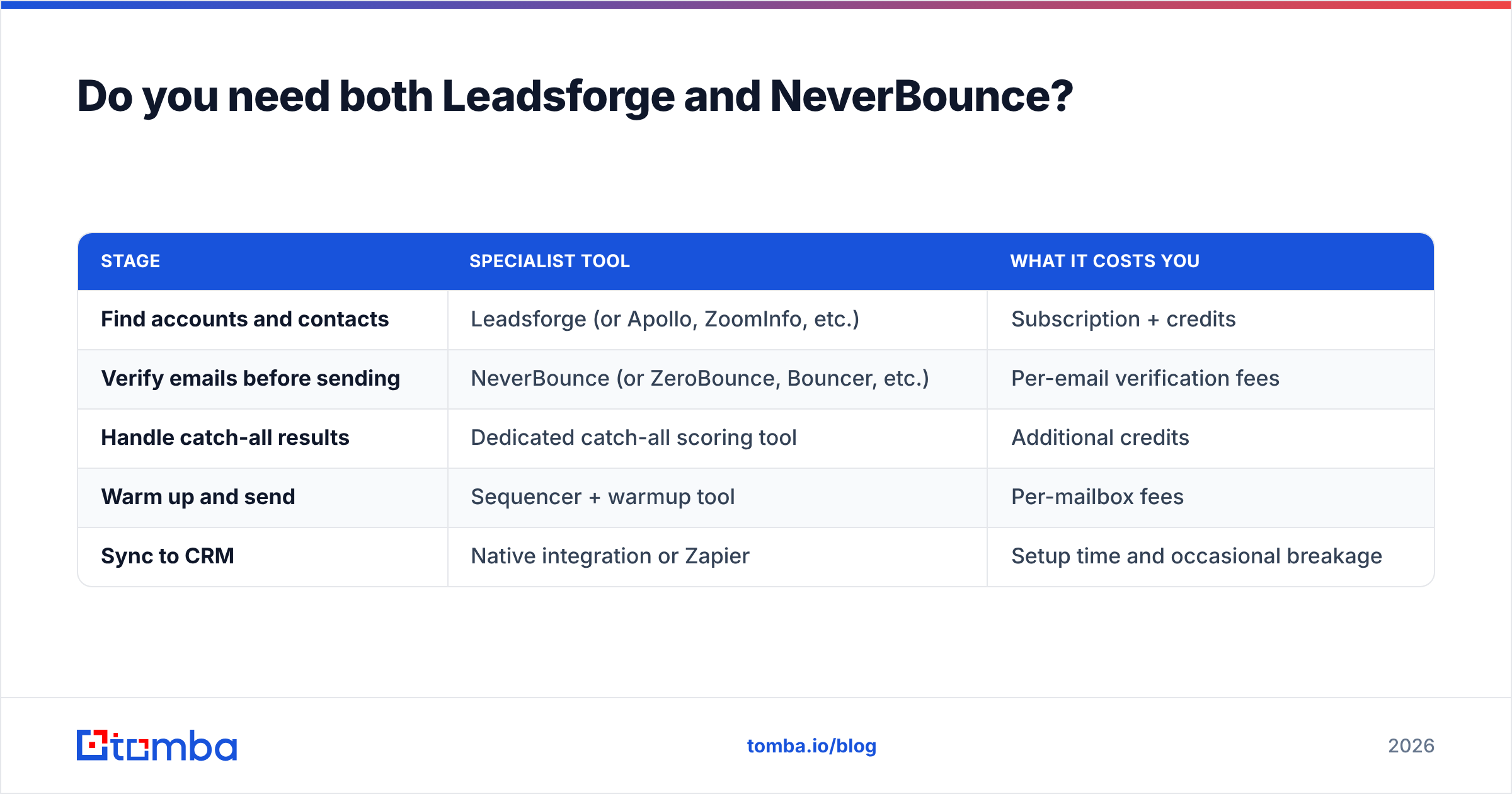
Often, yes. That's the part vendor comparison pages rarely mention. A typical outbound stack built from specialists looks like this:
| Stage | Specialist tool | What it costs you |
|---|---|---|
| Find accounts and contacts | Leadsforge (or Apollo, ZoomInfo, etc.) | Subscription + credits |
| Verify emails before sending | NeverBounce (or ZeroBounce, Bouncer, etc.) | Per-email verification fees |
| Handle catch-all results | Dedicated catch-all scoring tool | Additional credits |
| Warm up and send | Sequencer + warmup tool | Per-mailbox fees |
| Sync to CRM | Native integration or Zapier | Setup time and occasional breakage |
Every handoff between tools costs something: a CSV export, a column-mapping mistake, a duplicate record, another login, another invoice. For a five-person team that's a nuisance. For a solo founder it can use up a morning each week.
The alternative is to consolidate the first three rows. Several platforms, Tomba among them, pair an email finder with a built-in email verifier, so the address you find is checked in the same step and billed from the same credit balance. You still pick your own sequencer, but sourcing and hygiene live in one place.
What do teams usually get wrong when comparing these tools?#
A few recurring mistakes:
- Treating them as substitutes. Choosing NeverBounce "instead of" Leadsforge leaves you with no leads. Choosing Leadsforge "instead of" a verifier works until your first old list goes out.
- Skipping verification on "pre-verified" data. Any database's verification reflects when that check ran, not when you send. Re-check anything older than a few weeks.
- Ignoring catch-all volume. If 25-30% of your list comes back catch-all, your strategy for those contacts matters more than your choice of vendor.
- Comparing sticker prices only. Work out the cost per valid, ICP-matching contact across your whole stack.
- Forgetting the CRM. Check that whichever tools you pick write clean data back to HubSpot, Salesforce, or Pipedrive without creating duplicates. HubSpot's own guidance on list hygiene is a good baseline for what "clean" should mean.
So which should you pick: Leadsforge or NeverBounce?#
It depends on what's holding up your outbound right now:
- No contacts? Start with Leadsforge (or another lead source) and use its trial credits to test data quality on accounts you know.
- Contacts, but bounce anxiety? Start with NeverBounce, clean your existing data, and add real-time verification to your forms.
- Both problems, and tired of stitching tools together? Look at a platform that finds and verifies in one pass.
Neither tool is "better" overall. Leadsforge is a solid option for prompt-driven list building, especially inside the Forge ecosystem. NeverBounce is a mature, dependable verifier with a long integration list. They solve adjacent problems, and the right answer is usually determined by your workflow more than by features.
If you'd rather not run a separate finder and verifier, try Tomba Email Finder. Search by domain, name, or company, get professional email addresses with verification status attached, and export or sync them to your CRM from one credit balance. The free tier gives you 25 searches a month to test it on your own target accounts before you pay anything.
Related guides#
// get started
Find, verify and enrich your first contacts today
Start on the free plan with 25 searches a month, then scale when your team is ready.
Free plan · No credit card required · GDPR & CCPA
// about the author