Leadsforge vs Pitchbox (2026): Which Outreach Tool Fits Your Team?
Leadsforge builds AI-generated B2B lead lists. Pitchbox runs SEO and PR outreach campaigns. They look like rivals, but they solve different problems. Here's how to tell which one your team needs.
- Leadsforge is an AI lead-generation tool. You describe your ideal customer in plain English and it builds a B2B contact list with enriched, verified emails. It suits outbound sales teams.
- Pitchbox is an outreach and relationship-management platform for SEO link building, digital PR, and publisher outreach. It pulls prospects from search results and websites, not from a B2B contact database.
- They only overlap at "send emails to people you've never met." The buyer, the prospect type, and the success metric are all different.
- Pick Leadsforge if your pipeline is measured in meetings booked. Pick Pitchbox if it's measured in links, placements, or mentions.
- Either way, your results depend on contact data quality. Verify every list before you send.
What is the real difference between Leadsforge and Pitchbox?#
People search "Leadsforge vs Pitchbox" because both tools promise to find the right people and get them into your inbox. Look closer and you're comparing two tools built for different jobs.
Leadsforge comes from the Forge ecosystem, the same company behind Salesforge, Warmforge, and Infraforge. Its main feature is a chat-style search: you type something like "Series A fintech companies in Germany, 50–200 employees, targeting heads of finance" and it returns a list of matching companies and decision-makers with contact data. It's a list-building tool first. Sending happens elsewhere, usually in Salesforge or another sequencer.
Pitchbox has been a standard tool in SEO agencies for about a decade. It finds websites (blogs, publishers, resource pages, podcasts) based on keywords and search operators, then finds a contact on each site, scores prospects with SEO metrics, and runs personalized outreach with follow-ups. It's an outreach workflow and CRM tool for people who pitch content, not people who sell software.
In short: Leadsforge tells you who to sell to. Pitchbox helps you manage conversations with site owners you want something from.
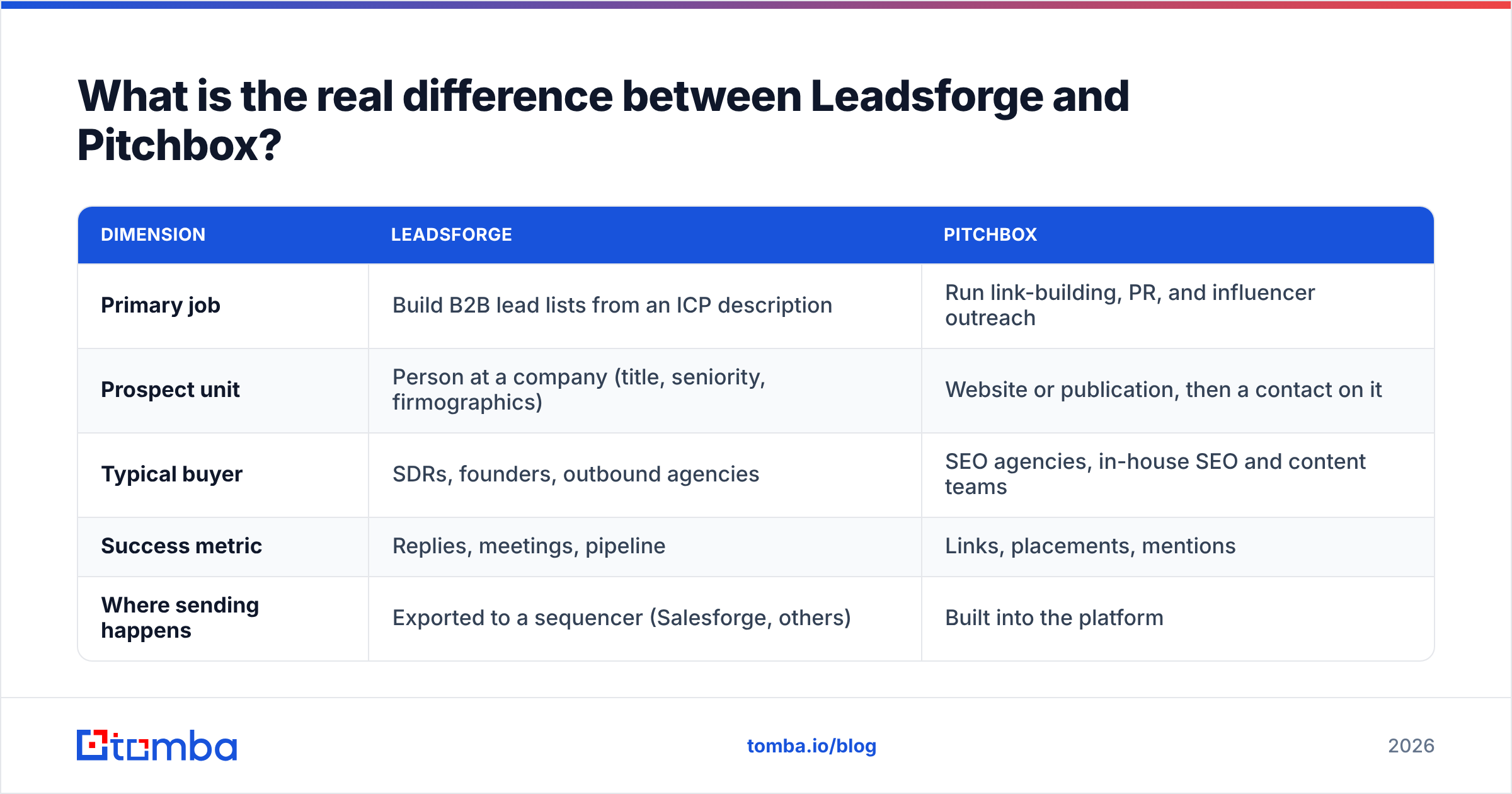
| Dimension | Leadsforge | Pitchbox |
|---|---|---|
| Primary job | Build B2B lead lists from an ICP description | Run link-building, PR, and influencer outreach |
| Prospect unit | Person at a company (title, seniority, firmographics) | Website or publication, then a contact on it |
| Typical buyer | SDRs, founders, outbound agencies | SEO agencies, in-house SEO and content teams |
| Success metric | Replies, meetings, pipeline | Links, placements, mentions |
| Where sending happens | Exported to a sequencer (Salesforge, others) | Built into the platform |
How does each tool find prospects?#
This is where the two tools differ most, so it's worth going through step by step.
Leadsforge's workflow looks roughly like this:
- Describe the ICP in natural language. You don't have to stack filter dropdowns. The AI turns your description into firmographic and role filters.
- Review and refine the list. You tighten the geography, headcount, industry, or job titles by chatting with it, or apply filters directly.
- Expand with lookalikes. Give it a company you already sell to and it finds similar accounts.
- Enrich and verify. Contacts come back with work emails and supporting data points so you can personalize.
- Export or push to sequencing. The data goes to Salesforge, a CSV, or your CRM.
Pitchbox's workflow starts from the web, not a database:
- Choose an opportunity type. Guest posts, resource pages, broken links, product reviews, blogger outreach, and so on.
- Run keyword and operator searches. Pitchbox scrapes search results and site lists that match your campaign.
- Qualify with SEO metrics. Its integrations with providers like Moz, Ahrefs, Majestic, and Semrush let you filter out low-authority domains.
- Find a contact per site. Pitchbox looks for the editor, author, or site owner's email.
- Personalize and send. Templates, merge fields, and automated follow-ups run inside the platform, with a pipeline view per prospect.
Pitchbox's contact finding is built to answer "who runs this blog?" If you need "every VP of Operations at 200–1,000-person logistics companies in Texas," it's the wrong tool. Leadsforge has the opposite gap. It won't tell you which DR-60 marketing blogs accept guest contributions.

Is Leadsforge better than Pitchbox for B2B sales prospecting?#
Yes, for classic outbound sales, and by a wide margin. Pitchbox was never built for this.
Leadsforge's natural-language search cuts the time from "we should target X" to "here are 500 contacts" down to minutes. That matters when you're testing several ICP hypotheses a month. The Forge ecosystem also means you can go from list to warmed mailbox to live sequence without much glue work, provided you're willing to use their stack.
What to watch with Leadsforge:
- Data freshness varies by segment. Any database-driven tool is strongest in well-covered markets (US/EU tech, SaaS, services) and weaker in niche verticals or regions with less public data. Spot-check before you scale.
- Credits add up. Enrichment and verification usually use credits, so a big list-building month costs more than the headline plan suggests.
- Lock-in pull. The best experience comes from staying in the Forge suite. If you already run Instantly, Smartlead, or HubSpot sequences, budget time for the export and sync workflow.
If you pair any list builder with an independent check, your bounce rate stops depending on one vendor's verification logic. Running exports through an email verifier before sending is cheap insurance for your sender reputation.
Is Pitchbox better than Leadsforge for SEO and digital PR?#
Yes, and it's not close. Pitchbox's value is less about finding an email and more about managing hundreds of parallel relationships without your team losing track.
Where Pitchbox stands out:
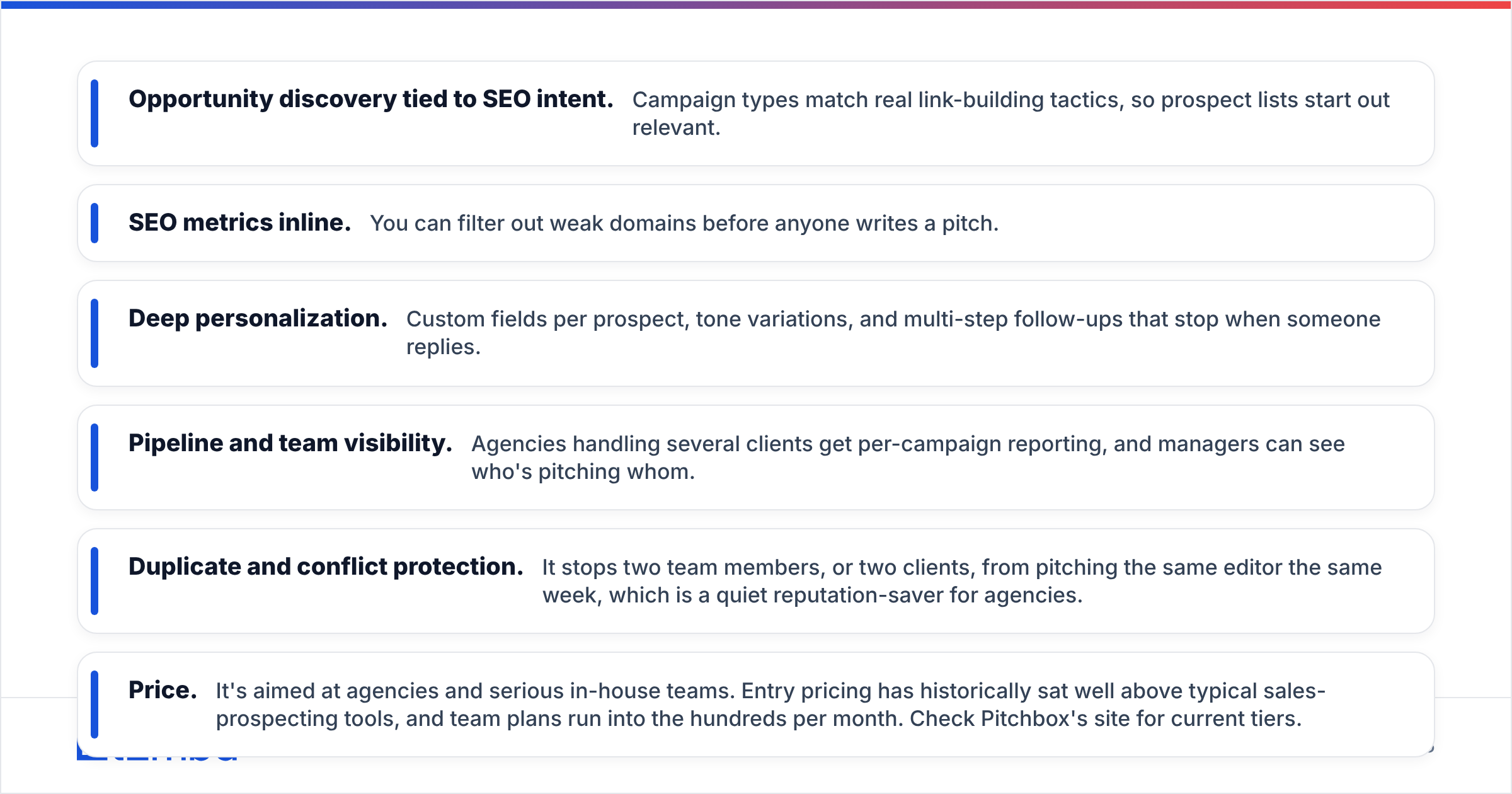
- Opportunity discovery tied to SEO intent. Campaign types match real link-building tactics, so prospect lists start out relevant.
- SEO metrics inline. You can filter out weak domains before anyone writes a pitch.
- Deep personalization. Custom fields per prospect, tone variations, and multi-step follow-ups that stop when someone replies.
- Pipeline and team visibility. Agencies handling several clients get per-campaign reporting, and managers can see who's pitching whom.
- Duplicate and conflict protection. It stops two team members, or two clients, from pitching the same editor the same week, which is a quiet reputation-saver for agencies.
Where Pitchbox falls short:
- Price. It's aimed at agencies and serious in-house teams. Entry pricing has historically sat well above typical sales-prospecting tools, and team plans run into the hundreds per month. Check Pitchbox's site for current tiers.
- Learning curve. The flexibility that agencies like makes onboarding slower for a solo marketer.
- Contact coverage is web-first. When a site hides its editorial contact, Pitchbox's finder can come up empty, and you'll need a second source.
For that last gap, many SEO teams keep a domain search tool open to pull every public address tied to a publication's domain, then pick the right editor.
How do Leadsforge and Pitchbox compare feature by feature?#
The table below reflects each product's positioning and public documentation at the time of writing. Pricing changes often, so confirm on each vendor's pricing page before you commit.
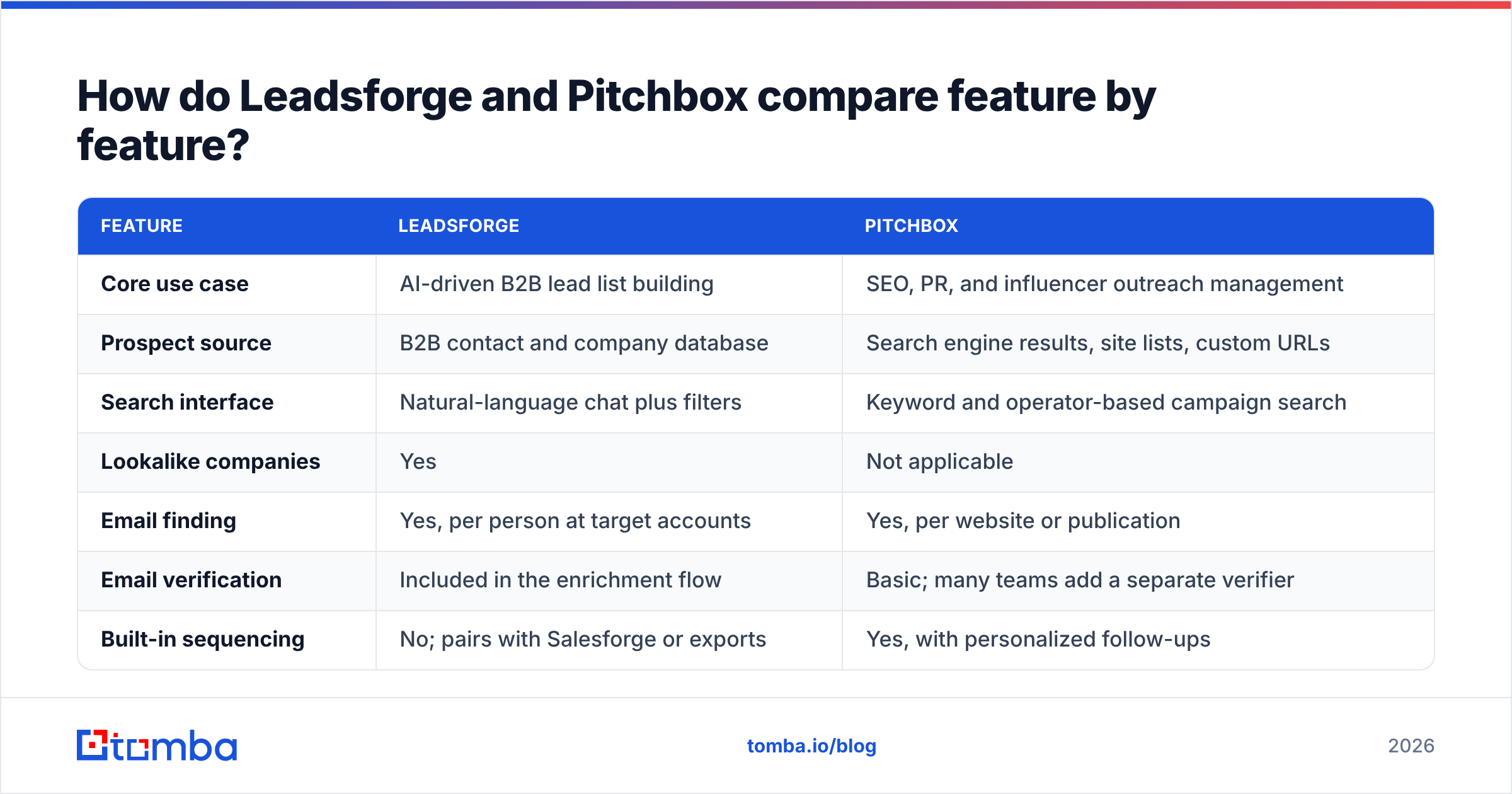
| Feature | Leadsforge | Pitchbox |
|---|---|---|
| Core use case | AI-driven B2B lead list building | SEO, PR, and influencer outreach management |
| Prospect source | B2B contact and company database | Search engine results, site lists, custom URLs |
| Search interface | Natural-language chat plus filters | Keyword and operator-based campaign search |
| Lookalike companies | Yes | Not applicable |
| Email finding | Yes, per person at target accounts | Yes, per website or publication |
| Email verification | Included in the enrichment flow | Basic; many teams add a separate verifier |
| Built-in sequencing | No; pairs with Salesforge or exports | Yes, with personalized follow-ups |
| SEO metrics integration | No | Yes (Moz, Ahrefs, Majestic, Semrush) |
| Team and agency features | Workspace-level | Strong: multi-client, permissions, reporting |
| Pricing model | Credit-based monthly plans | Seat and tier-based, agency-oriented |
| Relative cost | Lower entry point | Higher entry point |
| Best for | SDR teams, founders, outbound agencies | SEO agencies, content and PR teams |
What does each tool cost in practice?#
Headline pricing is only half the picture. Total cost of ownership depends on what else you need to buy.
Leadsforge total stack cost usually includes:
- The Leadsforge plan, sized by monthly credit volume
- A sequencer (Salesforge or your existing tool)
- Mailbox infrastructure and warmup if you're sending at volume
- Optionally, a second verification pass on large exports
Pitchbox total stack cost usually includes:
- The Pitchbox plan, which scales with users and features
- SEO metric subscriptions (Ahrefs, Semrush, Moz) if you want inline scores
- A backup email finder for sites where Pitchbox can't find a contact
- Content production, which is the real expense in link building
A two-person SDR team can often run a full outbound motion on Leadsforge plus a sequencer for less than one Pitchbox seat. An agency running link-building for eight clients will find Pitchbox's workflow features pay for themselves in saved coordination time, even at a higher price.
For another view, user reviews on G2 are useful. Filter for reviewers in your role (SDR vs SEO manager), because satisfaction scores from the wrong audience will mislead you.
Which tool should you choose for your use case?#
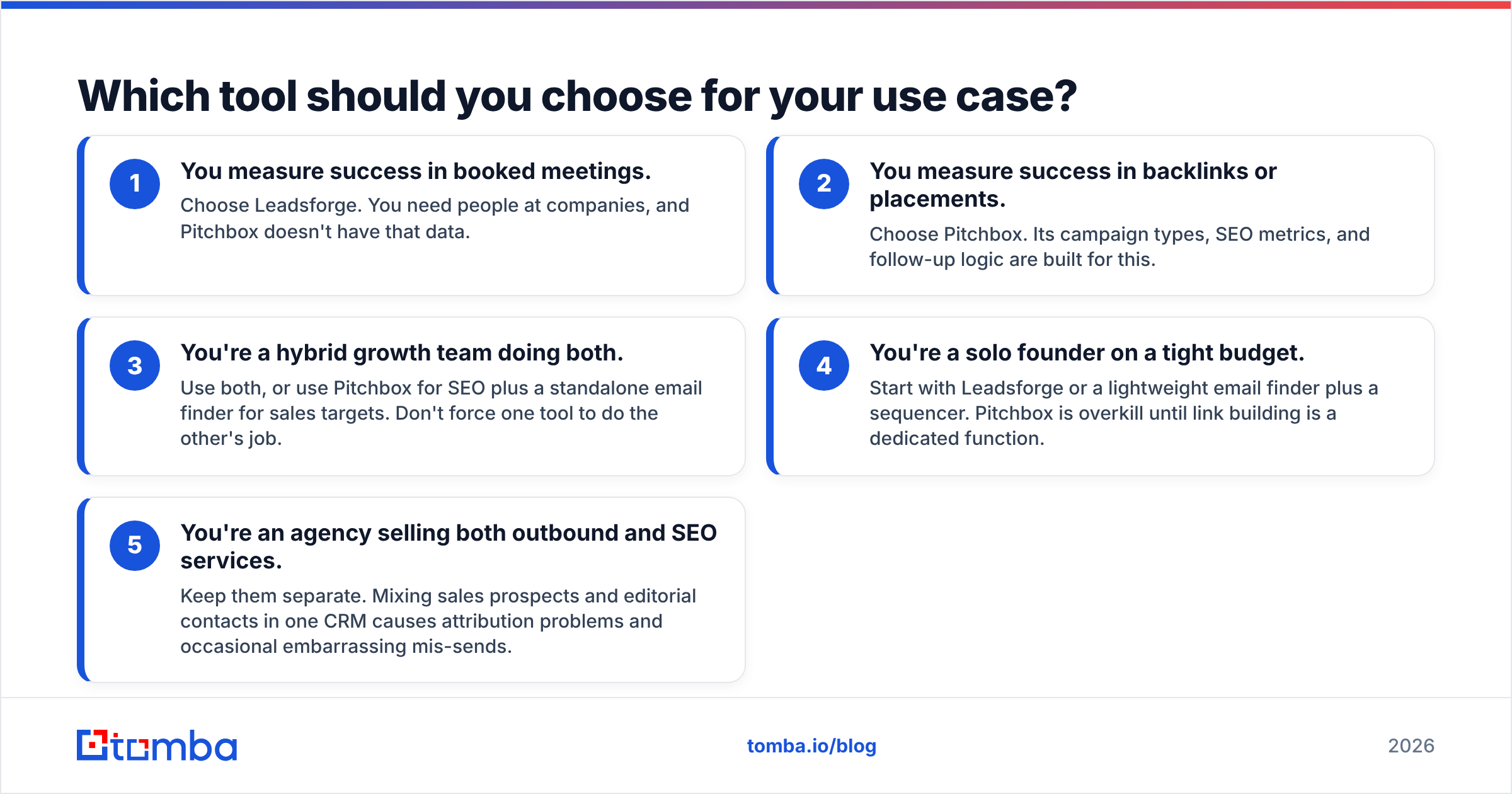
Use this decision guide. Whichever row describes your team's main KPI tells you which tool to use.
- You measure success in booked meetings. Choose Leadsforge. You need people at companies, and Pitchbox doesn't have that data.
- You measure success in backlinks or placements. Choose Pitchbox. Its campaign types, SEO metrics, and follow-up logic are built for this.
- You're a hybrid growth team doing both. Use both, or use Pitchbox for SEO plus a standalone email finder for sales targets. Don't force one tool to do the other's job.
- You're a solo founder on a tight budget. Start with Leadsforge or a lightweight email finder plus a sequencer. Pitchbox is overkill until link building is a dedicated function.
- You're an agency selling both outbound and SEO services. Keep them separate. Mixing sales prospects and editorial contacts in one CRM causes attribution problems and occasional embarrassing mis-sends.

Where does a dedicated email finder fit alongside these tools?#
Both Leadsforge and Pitchbox include email discovery, but neither is a pure email-finding engine, and both have coverage gaps:
- Leadsforge gaps: niche verticals, small private companies, and newly hired roles that haven't reached the database yet.
- Pitchbox gaps: blogs and publications that hide contacts, multi-author sites where the generic inbox is a dead end, and freelance writers whose work addresses aren't on the site.
That's why many teams keep an independent email finder in the stack. It works as a fallback when the primary tool comes up empty, and as a cross-check on high-value targets where a bounce would cost you the relationship. It helps in these situations:
- A named person at a known company. Enter a name and domain and get a verified work email.
- A publication's full contact footprint. Pull every public address on a domain, then choose the actual editor instead of
info@. - Pre-send hygiene. Bulk-verify an exported list from either tool before it reaches your sequencer.
That last point matters because deliverability problems add up. One high-bounce campaign can hurt inbox placement for every campaign after it, whether you're pitching SaaS buyers or SEO editors.
Leadsforge vs Pitchbox: what's the final verdict?#
There isn't one winner here, because the two products don't compete for the same job:
- Leadsforge wins for B2B sales prospecting. Natural-language ICP search, lookalikes, and a fast path into sequencing make it one of the quicker ways to turn a targeting idea into a working list.
- Pitchbox wins for SEO, PR, and publisher outreach. Opportunity discovery, SEO metrics, and agency-grade workflow management are what it was built for, and it does them well.
If you're choosing between them, first check whether you're actually solving a list-building problem or a relationship-management problem. Once you know that, the choice is easy.
Ready to fill the contact gaps both tools leave?#
Whichever platform you run outreach from, the weak point is usually the same: the contact you most need is the one the tool can't find. Tomba Email Finder closes that gap. Search by name and company, pull every public email on a domain, and verify before you hit send, starting on a free tier with 25 searches a month. When you're ready to scale, the paid plans start at $49/month; see full Tomba pricing to size it to your volume.
Related guides#
// get started
Find, verify and enrich your first contacts today
Start on the free plan with 25 searches a month, then scale when your team is ready.
Free plan · No credit card required · GDPR & CCPA
// about the author