Leadsforge vs SalesIntel (2026): AI Prompts or Verified Data?
Leadsforge builds lead lists from a plain-English prompt. SalesIntel sells human-verified contacts on annual contracts. Here's which one fits your outbound motion, budget, and team size.
TL;DR
- Leadsforge is an AI-first list builder. You describe your ideal customer in plain English and it returns a list of contacts with emails. It sells monthly credit plans and fits founders, agencies, and small outbound teams.
- SalesIntel is an enterprise contact and company database. It's known for human-verified contacts that get re-verified on a roughly 90-day cycle, plus intent data, technographics, and a research-on-demand service. It usually sells annual, quote-based contracts.
- Pick Leadsforge if you want speed, low commitment, and a direct handoff to a cold email sequencer.
- Pick SalesIntel if you run a bigger sales team that needs direct dials, intent signals, and CRM enrichment at scale, and you can sign an annual contract.
- Whichever you choose, run every export through an independent verification step before you send. No database stays accurate forever.
What is the real difference between Leadsforge and SalesIntel?#
These two tools sit in the same budget line but take opposite approaches to B2B data.
Leadsforge belongs to the Forge ecosystem, alongside Salesforge, Mailforge, and Warmforge. You don't work through a wall of filter dropdowns. You type something like "Heads of RevOps at Series A–C SaaS companies in the US with 50–500 employees," and the AI turns that into a search. It returns contacts with emails, and you can push them into a sequence. The product is built around one idea: get from ICP to sendable list in minutes.
SalesIntel is a classic data provider in the ZoomInfo mold. It focuses on data you can trust at the record level. Its contacts are human-verified, it layers on intent and technographic data, and its research team will source contacts you can't find in the database. The product is built for sales and marketing ops teams who need to enrich a CRM, score accounts, and route leads, not just fill a campaign.
So "which is better" is really a question about your motion. One tool is a fast list-building assistant. The other is data infrastructure.
How do Leadsforge and SalesIntel compare feature by feature?#
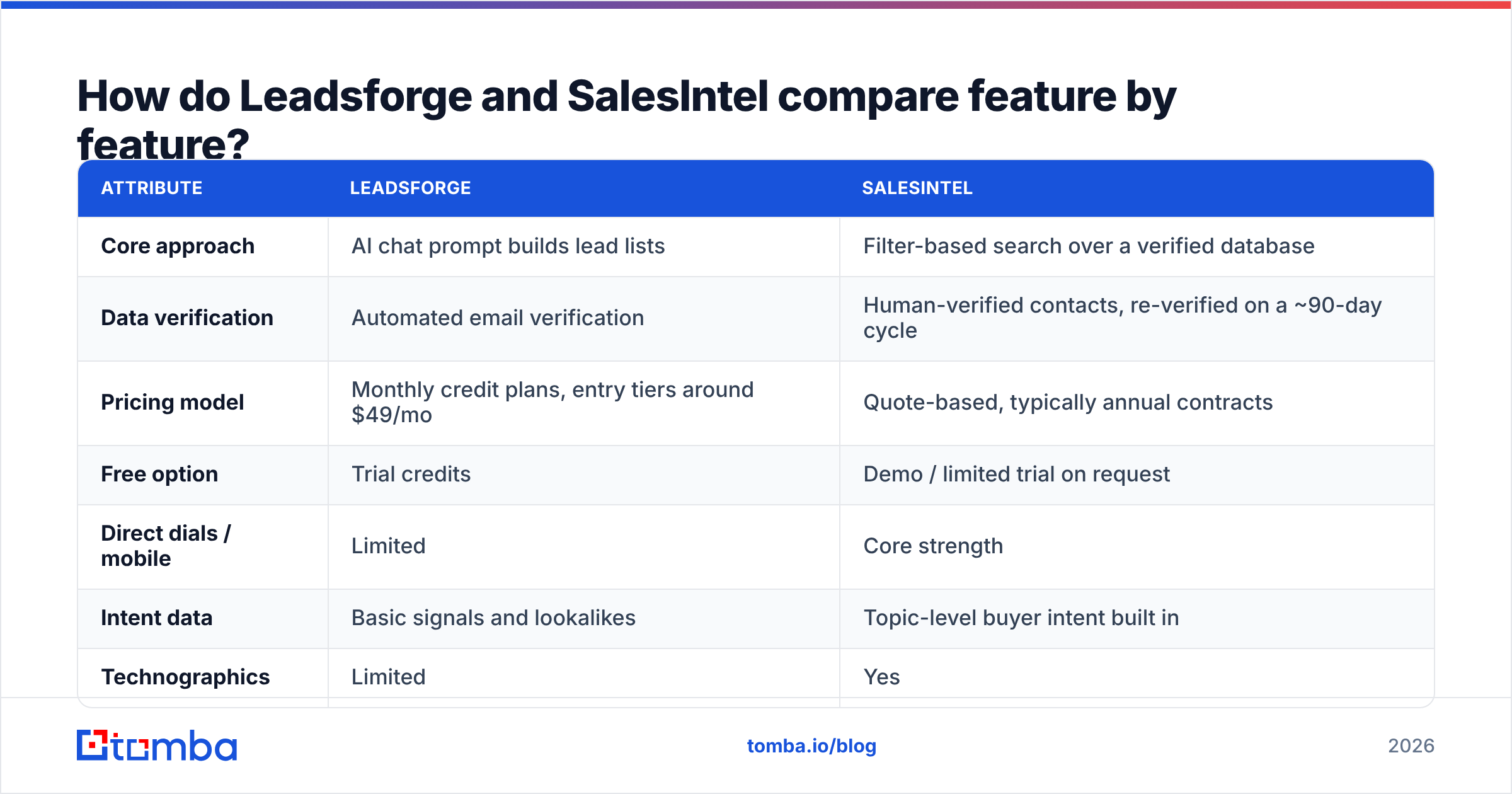
Here's the side-by-side. Pricing reflects publicly listed or commonly reported figures at the time of writing, so confirm on each vendor's site before you budget.
| Attribute | Leadsforge | SalesIntel |
|---|---|---|
| Core approach | AI chat prompt builds lead lists | Filter-based search over a verified database |
| Data verification | Automated email verification | Human-verified contacts, re-verified on a ~90-day cycle |
| Pricing model | Monthly credit plans, entry tiers around $49/mo | Quote-based, typically annual contracts |
| Free option | Trial credits | Demo / limited trial on request |
| Direct dials / mobile | Limited | Core strength |
| Intent data | Basic signals and lookalikes | Topic-level buyer intent built in |
| Technographics | Limited | Yes |
| Research on demand | No | Yes, a human research team sources missing contacts |
| CRM enrichment | Via exports and integrations | Native Salesforce and HubSpot enrichment |
| Sequencer handoff | Direct push to Salesforge | Integrates with Outreach, Salesloft, and others |
| Best for | Founders, agencies, SMB outbound | Mid-market and enterprise sales and marketing ops |
The table shows the split. Leadsforge wins on time-to-list and flexibility. SalesIntel wins on depth per record, meaning phone numbers, intent, tech stack, and verification guarantees.
How does each tool actually build a lead list?#
The workflows are different enough that you should picture your own day in each one.
Leadsforge workflow
- Describe the ICP in plain language. You write a prompt with role, industry, headcount, geography, and any other qualifiers.
- Review the AI's interpretation. Leadsforge turns the prompt into search criteria, and you can refine it by chatting ("exclude agencies," "only companies hiring SDRs").
- Expand with lookalikes. You feed in your best customers and it finds similar companies.
- Unlock contacts with credits. Emails come back verified, and each contact uses credits.
- Push to a sequence. Export as CSV or send straight to Salesforge.
SalesIntel workflow
- Build an account list with filters. You filter by industry, revenue, headcount, tech stack, and location.
- Layer on intent. You prioritize accounts actively researching topics tied to your product.
- Pull contacts by persona. You get verified emails and, often, direct dials and mobile numbers.
- Enrich the CRM. Records sync into Salesforce or HubSpot, and existing records get refreshed.
- Request research for gaps. If a key account is missing a decision-maker, the research team can source one.
If you're a two-person team sending 500 cold emails a week, the Leadsforge flow feels natural. If you're a RevOps lead maintaining 200,000 CRM records across 40 reps, SalesIntel's enrichment and refresh cycle is the whole point.
Is SalesIntel's data more accurate than Leadsforge's?#
On a per-record basis, SalesIntel has the stronger claim, because human verification plus scheduled re-verification is expensive and most AI-first tools don't do it. That matters most for phone numbers, which decay faster than emails and are hard to verify automatically.
Leadsforge relies on automated verification, and for email-first outbound that's usually enough. What matters for a cold campaign is whether the email bounces, and automated SMTP-level checks catch most of those problems.
There are two caveats you should know before you trust any vendor's accuracy claim:
- B2B data decays constantly. People change jobs, get promoted, and companies rebrand or get acquired. A record that was verified 60 days ago can still bounce today.
- Catch-all domains hide the truth. Many company mail servers accept every address, so a "valid" result on a catch-all domain is really just "unknown." Both tools have to deal with this, and neither can fully fix it at the database level.
That's why experienced outbound teams re-verify every list right before sending, whatever the source. A standalone email verifier run just before launch is cheap insurance for your sender reputation. It costs far less than burning a domain on a 12% bounce rate.
How much do Leadsforge and SalesIntel cost?#
The pricing models tell you who each product is built for.
Leadsforge uses self-serve credit plans billed monthly. Entry tiers have been listed around $49/mo, with larger bundles for agencies and heavier users. You can start with trial credits, test a few ICP prompts, and cancel if the data doesn't fit your market. Credits get used when you unlock contacts, so your real cost depends on how many contacts you pull, not how many seats you have.
SalesIntel doesn't publish full pricing. Expect a sales call, a quote, and an annual contract. Pricing depends on seats, record volume, and add-ons like intent and research. Buyers commonly report five-figure annual spend for team deployments, though smaller packages exist. User reviews on G2 regularly cite the price and contract structure as the main downside, while praising data quality and support.
Here's how the cost structure plays out in practice:
- Low volume, uncertain ICP: Leadsforge is far cheaper to test. You can find out in a week whether the data works for your niche.
- High volume, stable ICP, phone-heavy motion: SalesIntel's per-record cost can come out reasonable at scale, and the direct dials alone may justify it.
- Agencies running many client ICPs: Leadsforge's prompt model and monthly billing fit how agencies work.
- Enterprise with CRM hygiene needs: SalesIntel's enrichment and re-verification cycle replaces manual data-cleaning work.
Which tool is better for cold email specifically?#
For pure cold email, Leadsforge has the edge in workflow. It was built as the top of a cold email stack. You go from ICP to verified list to sequence without spreadsheets in between, and the Forge ecosystem also covers mailbox infrastructure and warmup.
SalesIntel works fine for cold email, but you pay for things a cold-email-only team won't use: mobile numbers, intent topics, technographics, and CRM enrichment. If your team never picks up the phone and doesn't run account-based plays, much of that value goes unused.
The opposite is also true. If your motion is multichannel, meaning email, then call, then LinkedIn, then call again, the lack of reliable direct dials in AI-first tools becomes a real gap. That's where SalesIntel pays for itself.
Which is better for intent-driven and account-based selling?#
SalesIntel, clearly. Its intent data shows which accounts are actively researching topics related to your category, and combined with technographics you can build lists like "companies using a competitor's tool that are showing intent on migration-related topics." That's the core of account-based selling, and it's hard to recreate with prompts alone.
Leadsforge offers lookalike search and some signal-based filtering, which is useful for finding more accounts like your best customers. It isn't built as an intent platform, though. If intent scoring drives your pipeline, look at SalesIntel, or pair a list builder with a dedicated intent source.
What do users like and dislike about each?#
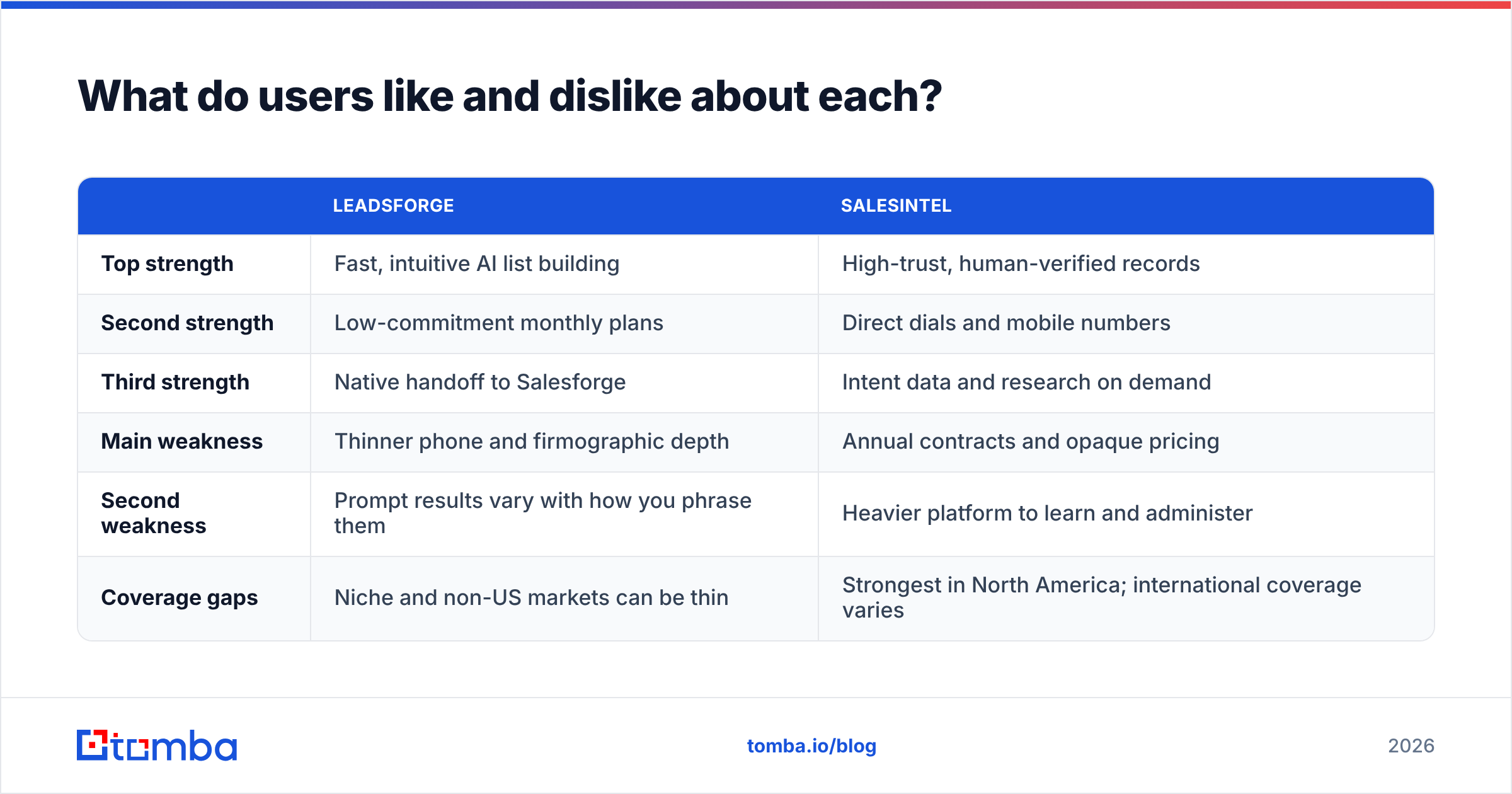
Based on patterns in public reviews and hands-on use, here's the honest summary.
| Leadsforge | SalesIntel | |
|---|---|---|
| Top strength | Fast, intuitive AI list building | High-trust, human-verified records |
| Second strength | Low-commitment monthly plans | Direct dials and mobile numbers |
| Third strength | Native handoff to Salesforge | Intent data and research on demand |
| Main weakness | Thinner phone and firmographic depth | Annual contracts and opaque pricing |
| Second weakness | Prompt results vary with how you phrase them | Heavier platform to learn and administer |
| Coverage gaps | Niche and non-US markets can be thin | Strongest in North America; international coverage varies |
The phrasing sensitivity is worth stressing for Leadsforge. Two slightly different prompts can return noticeably different lists. Treat the AI as a fast first draft, check the criteria it generated, and tighten them before you use credits.
When should you use neither and go lighter?#
Some teams don't need a lead database at all. If you already know your target accounts because they come from a conference list, a partner referral list, a set of inbound signups, or a list of companies from a Forrester or analyst report, then your problem isn't discovery. It's finding the right person's email at a company you already picked.
In that case, a lighter stack is often cheaper and more accurate:
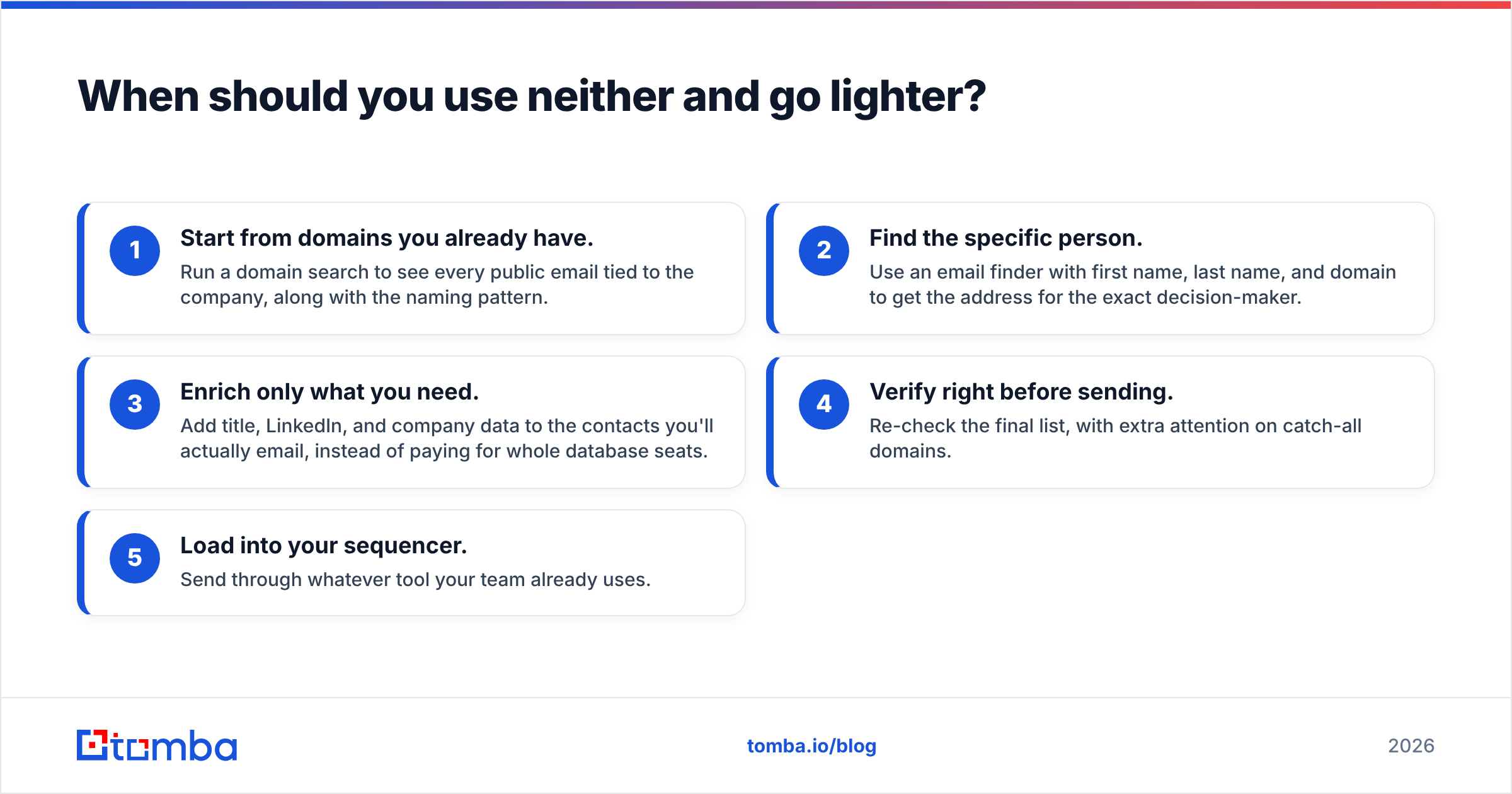
- Start from domains you already have. Run a domain search to see every public email tied to the company, along with the naming pattern.
- Find the specific person. Use an email finder with first name, last name, and domain to get the address for the exact decision-maker.
- Enrich only what you need. Add title, LinkedIn, and company data to the contacts you'll actually email, instead of paying for whole database seats.
- Verify right before sending. Re-check the final list, with extra attention on catch-all domains.
- Load into your sequencer. Send through whatever tool your team already uses.
This approach flips the model. You don't pay for access to millions of records you'll never touch. You pay per contact you actually need. For a team running 1,000 to 3,000 targeted contacts a month, that's usually much cheaper than an annual database license.

Leadsforge vs SalesIntel: which should you choose?#
Here's the decision framework, based on who you are.
Choose Leadsforge if:
- You're a founder, a small SDR team, or an agency.
- Your outbound is email-first.
- You want to test new ICPs quickly without an annual commitment.
- You already use, or are open to using, Salesforge for sequencing.
Choose SalesIntel if:
- You have 10+ reps, and phone is a real channel.
- RevOps needs ongoing CRM enrichment and record refresh.
- Intent data and technographics drive your account prioritization.
- You have the budget and procurement process for an annual data contract.
Choose a lightweight finder-plus-verifier stack if:
- You already know your target accounts.
- You care more about the accuracy of 2,000 contacts than access to 200 million.
- You want pay-as-you-go economics that match your actual sending volume.
Neither Leadsforge nor SalesIntel is objectively "better." Leadsforge is the faster, cheaper, email-first option. SalesIntel is the deeper, pricier, multichannel option. The wrong choice is the one that doesn't match your motion: paying enterprise prices for a cold email campaign, or trying to run a phone-heavy ABM program on prompt-built lists.
Where does Tomba fit into this decision?#
If you're comparing these two because you need accurate emails for specific people at specific companies, rather than a full intent platform or AI list builder, the Tomba Email Finder is worth trying first. You enter a name and a domain, or just a domain, and get the professional email address with source information and a verification status. It works in the web app, through the Chrome extension, in Google Sheets, or via API. It's also pay-as-you-grow: a free tier with 25 searches a month, then Starter at $49/mo, Growth at $99/mo, and Pro at $249/mo, with no annual lock-in (full details on Tomba pricing). Test it on the next 25 contacts you'd otherwise pull from a database, compare the bounce rates, and let the results decide.
Related guides#
// get started
Find, verify and enrich your first contacts today
Start on the free plan with 25 searches a month, then scale when your team is ready.
Free plan · No credit card required · GDPR & CCPA
// about the author