Leadsforge vs Soleadify: AI Lead Lists vs Web-Crawled Company Data
Leadsforge turns a plain-English ICP into verified contact lists. Soleadify crawls the open web to map millions of companies. Here's which one fits your outbound motion, and where each falls short.
TL;DR
- Leadsforge is built around people. You describe your ideal customer in plain English and get back contact-level lead lists with verified emails, ready to send from Salesforge or to export as CSV. Entry pricing is about $49/mo on a credit model.
- Soleadify is built around companies. It crawls the public web to build firmographic profiles of businesses, including small and local companies that most contact databases miss. Pricing is custom, and the team now operates mainly under the Veridion brand.
- If you run outbound to decision-makers at SaaS, tech, or mid-market companies, Leadsforge is usually the faster route to a sendable list.
- If you need to map a market ("every HVAC distributor in Ohio", "every company that sells X"), Soleadify's company-first data is the stronger base. You'll still need a separate step to find the person and the email.
- Neither tool removes the need to verify before you send. Budget for a verification pass on anything older than about 30 days.
What is the real difference between Leadsforge and Soleadify?#
Short answer: Leadsforge sells you people to email, and Soleadify sells you companies to understand.
An analogy helps. Leadsforge works like a recruiter's shortlist. You describe the role and they hand you names and phone numbers. Soleadify works like a city business registry that someone has enriched with website data. You learn every business that exists and what each one does, but no one tells you who to call.
That split drives almost every other difference: where the data comes from, how pricing works, who the buyer is, and what you still have to do after you export.
- Leadsforge (leadsforge.ai) belongs to the Forge ecosystem, alongside Salesforge (sequencing) and Warmforge (inbox warmup). Its main interface is a chat-style search. You type something like "Heads of RevOps at US B2B SaaS companies with 50–200 employees" and it builds a list. It also supports lookalike searches seeded from a company you already sell to.
- Soleadify is a Bucharest-founded data company that built a global database by crawling and classifying company websites. It raised a $6M round to scale that database. The same team now sells primarily under the Veridion name, aimed at enterprise use cases such as supplier discovery and market mapping. The Soleadify prospecting product sits at the SMB end of that data engine.
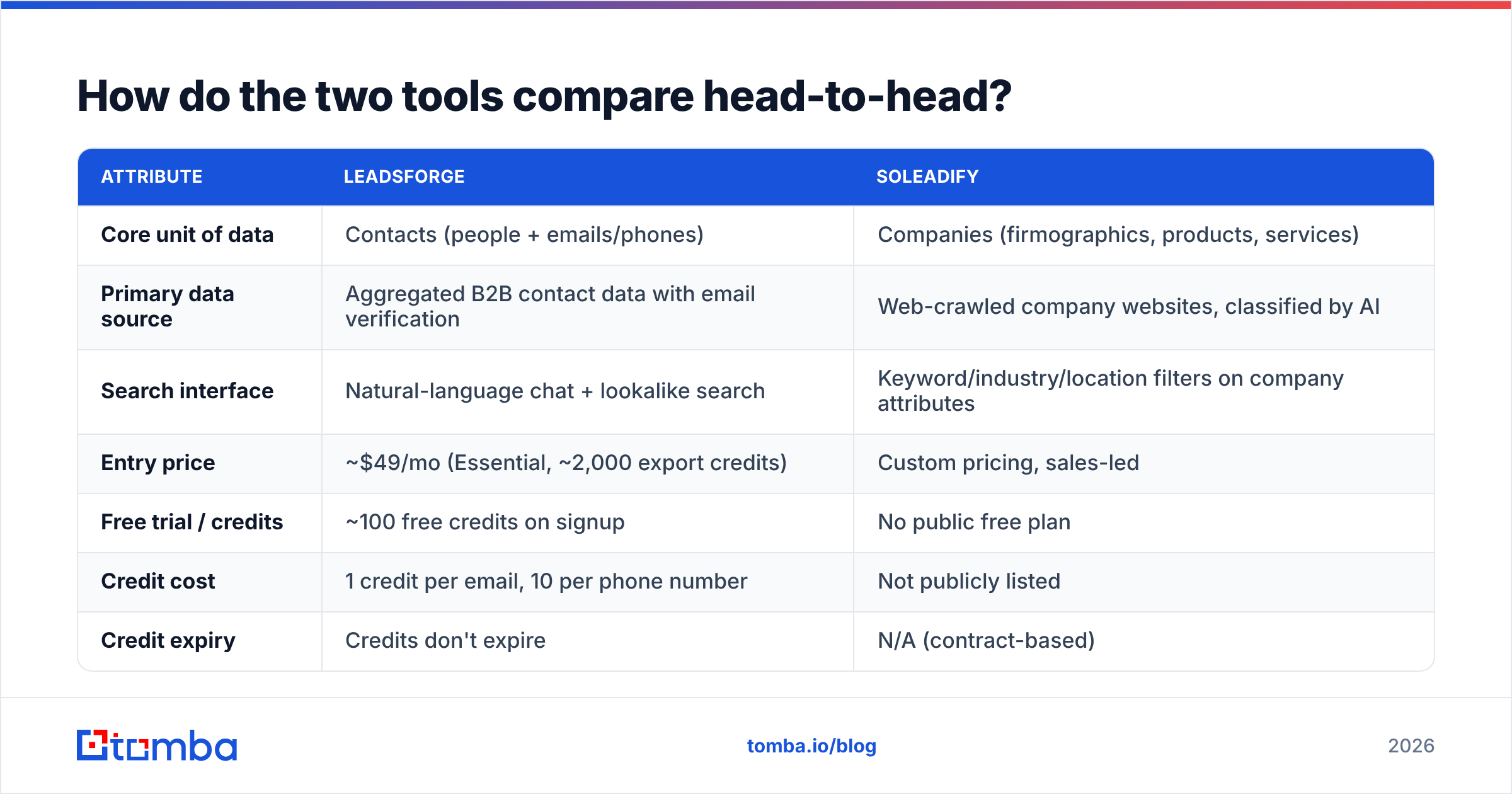
How do the two tools compare head-to-head?#
Here is the side-by-side. Pricing reflects public information at the time of writing, so confirm on each vendor's site before you buy.
| Attribute | Leadsforge | Soleadify |
|---|---|---|
| Core unit of data | Contacts (people + emails/phones) | Companies (firmographics, products, services) |
| Primary data source | Aggregated B2B contact data with email verification | Web-crawled company websites, classified by AI |
| Search interface | Natural-language chat + lookalike search | Keyword/industry/location filters on company attributes |
| Entry price | ~$49/mo (Essential, ~2,000 export credits) | Custom pricing, sales-led |
| Free trial / credits | ~100 free credits on signup | No public free plan |
| Credit cost | 1 credit per email, 10 per phone number | Not publicly listed |
| Credit expiry | Credits don't expire | N/A (contract-based) |
| SMB / local business coverage | Moderate; skews toward tech and mid-market | Strong; that's the point of web crawling |
| Direct outbound workflow | Native push to Salesforge | Export only; bring your own sequencer |
| Best fit | Outbound SDR teams, agencies, founders doing cold email | Market mapping, TAM sizing, SMB-heavy verticals |
If you only read the table, the pattern is clear. Leadsforge is shaped for sending emails soon, and Soleadify is shaped for understanding a market properly.
What do you actually get when you run a search?#
The output format matters more than any feature list, because it decides how much work is left after you export.
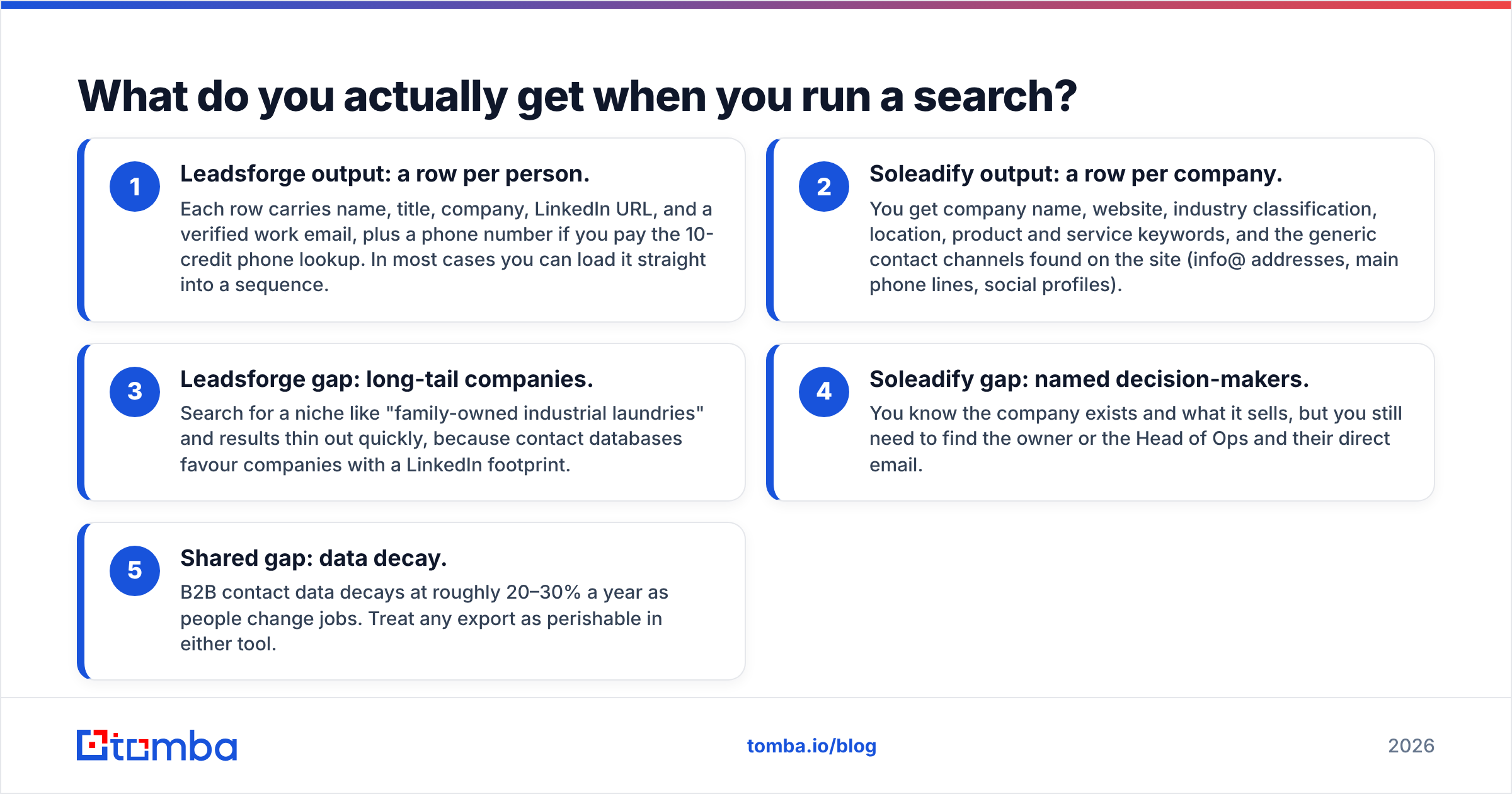
- Leadsforge output: a row per person. Each row carries name, title, company, LinkedIn URL, and a verified work email, plus a phone number if you pay the 10-credit phone lookup. In most cases you can load it straight into a sequence.
- Soleadify output: a row per company. You get company name, website, industry classification, location, product and service keywords, and the generic contact channels found on the site (info@ addresses, main phone lines, social profiles).
- Leadsforge gap: long-tail companies. Search for a niche like "family-owned industrial laundries" and results thin out quickly, because contact databases favour companies with a LinkedIn footprint.
- Soleadify gap: named decision-makers. You know the company exists and what it sells, but you still need to find the owner or the Head of Ops and their direct email.
- Shared gap: data decay. B2B contact data decays at roughly 20–30% a year as people change jobs. Treat any export as perishable in either tool.
Point 4 is where most Soleadify users add a second tool. Once you have a company domain, a domain search returns the publicly associated email addresses and the company's email pattern. That turns a firmographic list into a contactable one.
How does pricing compare in practice?#
Leadsforge publishes its pricing, and Soleadify doesn't. That shapes the buying experience as much as the numbers do.
Leadsforge uses tiered, credit-based plans. The Essential tier runs about $49/mo for around 2,000 export credits. An email lookup costs 1 credit and a phone lookup costs 10. Two details make the model more forgiving than most:
- Credits don't expire, so a slow month doesn't burn money.
- Annual plans deliver the full year's credits upfront, with a discount of roughly 14%.
The phone multiplier is the catch. If your motion is call-heavy, 2,000 credits buys only about 200 phone numbers. Model your mix before you pick a tier.
Soleadify is sales-led with custom pricing. Review sites such as Capterra's Soleadify listing note there's no free plan and no public price sheet. Expect a demo, a scoping call, and a contract sized to the geography and record volume you need. That suits a RevOps team buying a market dataset once a quarter. It's friction for a solo founder who wants to test 300 leads this afternoon.
Here is a practical cost lens. Divide what you spend by contactable decision-makers you can actually email, not by records. A company-level record from Soleadify still needs a person and an email attached. A Leadsforge row usually already has both. On cost per sendable contact, the gap between the two is often wider than the sticker prices suggest.
Which tool has better data quality?#
Both tools have solid data. They're accurate about different things.
Leadsforge accuracy is about emails. The product verifies emails before export, and that's the metric outbound teams care about most because bounces damage sender reputation. On mainstream B2B segments (SaaS, agencies, professional services, tech-enabled mid-market) the verified hit rate is competitive with other contact databases. Where it weakens:
- Catch-all domains, where the mail server accepts everything and verification can only return "risky" or "unknown"
- Very small companies with no LinkedIn presence
- Non-English markets outside major metros
Soleadify accuracy is about company identity and classification. It crawls websites directly, so it knows things a contact database doesn't: a company's product lines, the services it lists, the locations on its "contact us" page, and whether it's still operating. For questions like "which companies in Germany manufacture industrial valves", a web-derived dataset is often more complete than one derived from LinkedIn. Where it weakens:
- Personal work emails, since crawled sites mostly expose generic inboxes
- Job titles and org charts
- Companies with thin or outdated websites
Most mature teams end up combining the two. They use a company-first source to define the universe, then a people-first source to find the right contact at each account, then verify everything. If you go that route, run the final list through an email verifier before it reaches your sequencer, whichever tool produced it.
Which is better for cold email workflows?#
For cold email, Leadsforge wins on workflow, and the margin is wide.
Its native connection to Salesforge means a list can go from search to active sequence without a CSV round-trip. If you're already in the Forge stack, with Warmforge warming inboxes and Salesforge sending, Leadsforge is the obvious upstream piece. Chat-based search also lowers the skill floor. A founder who has never used a boolean filter can describe an ICP in a sentence and get a usable list.
Soleadify was never built as a cold email tool, and that's fine because it isn't trying to be one. It's a better fit for:
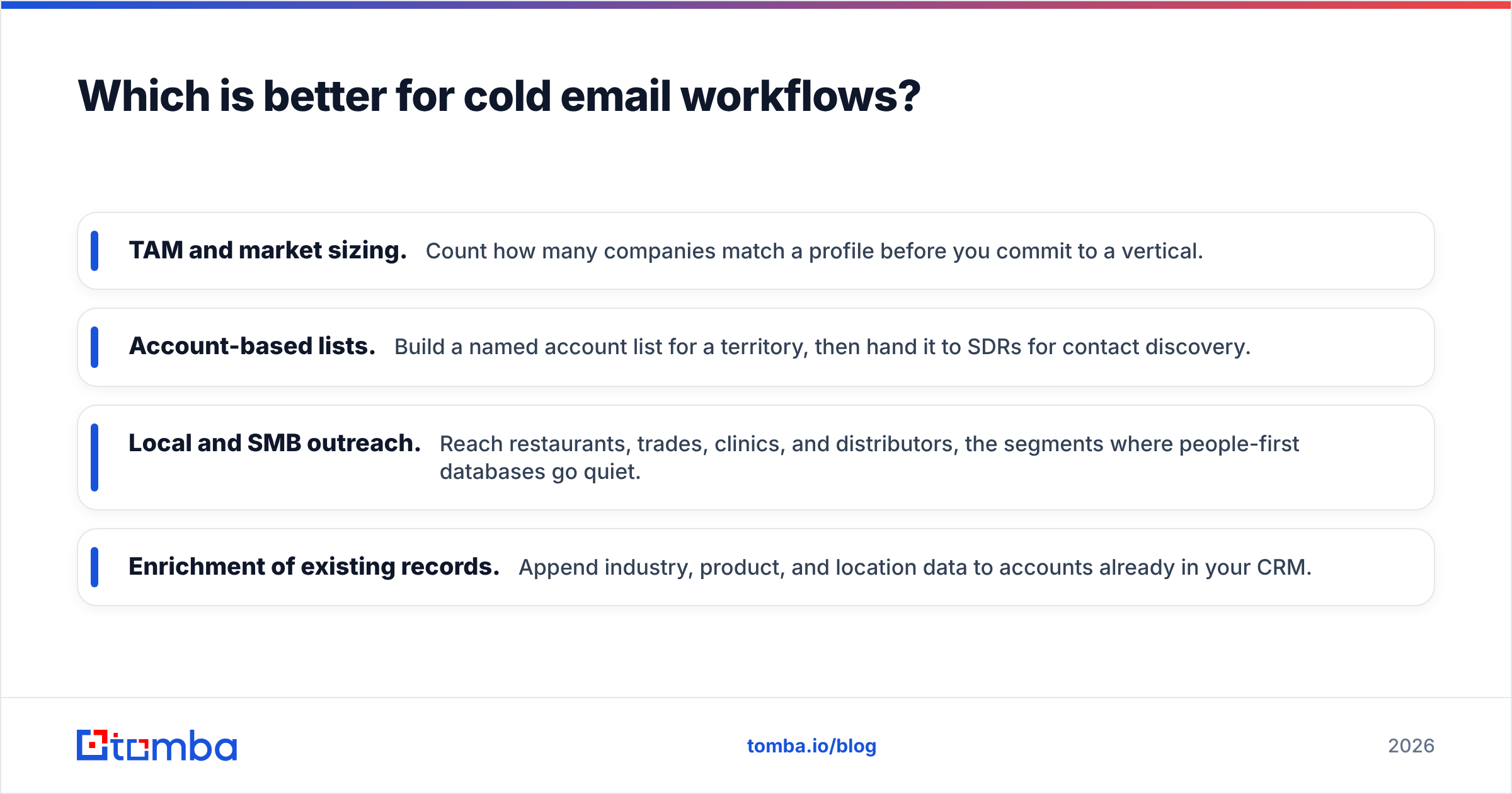
- TAM and market sizing. Count how many companies match a profile before you commit to a vertical.
- Account-based lists. Build a named account list for a territory, then hand it to SDRs for contact discovery.
- Local and SMB outreach. Reach restaurants, trades, clinics, and distributors, the segments where people-first databases go quiet.
- Enrichment of existing records. Append industry, product, and location data to accounts already in your CRM.
If your sequencer isn't Salesforge (Instantly, Smartlead, Lemlist, Apollo sequences, and so on), Leadsforge's workflow advantage shrinks to a clean CSV export. At that point you're comparing on data coverage alone.
Where does each tool fall short?#
A fair comparison needs the weaknesses as well as the strengths.
Leadsforge limitations
- Coverage thins out in niche, local, and non-tech verticals.
- The 10x phone credit multiplier makes it expensive for phone-first teams.
- The deepest value comes from staying inside the Forge ecosystem. Outside it, it's a good list builder among many.
- Natural-language search is fast, but you have less fine-grained control than with a traditional filter panel. Check that the tool interpreted your prompt the way you meant it.
Soleadify limitations
- There's no transparent self-serve pricing, so you can't quickly test on a small budget.
- The data is company-level, so you need at least one more tool to reach a named person.
- Since the business moved toward the Veridion brand and enterprise data contracts, the SMB prospecting product gets less visible attention. Check the roadmap and support commitments before signing a long contract.
- Generic inboxes (info@, sales@) convert far worse in cold outreach than direct addresses.
Leadsforge vs Soleadify: which should you choose?#
Decide based on what your team does on Monday morning.
Choose Leadsforge if:
- You run cold email, and speed from ICP to sequence matters most.
- Your targets are decision-makers at companies with a real LinkedIn footprint.
- You use Salesforge already or are open to it.
- You want predictable monthly spend starting around $49 with credits that roll over.
Choose Soleadify (Veridion) if:
- Your first job is working out which companies exist in a market, before you look for people.
- You sell into SMB, local, manufacturing, or other long-tail verticals.
- You need product- and service-level classification that contact databases don't capture.
- You have the budget and patience for a sales-led, custom contract.
Combine them (or equivalents) if:
- You build account lists from a company-first source, then need a scalable way to attach the right person and a verified email to each domain.
This last scenario is common, and it's where a standalone email finder earns its place. Rather than paying for two full databases, many teams keep one account source and add a lightweight people-and-email layer on top. That keeps costs predictable and verification consistent.
For deeper background on how vendors in this space are evaluated, independent review aggregators such as G2 publish user ratings on data coverage and support, which is useful for pressure-testing vendor claims.
What about alternatives to both?#
If neither fits, the usual shortlist is Apollo (large contact database with built-in sequencing), RocketReach and ContactOut (people-first lookups), and Clearbit/Breeze or ZoomInfo for enterprise enrichment. Compare them on the same terms used above:
- Is the unit of data a person or a company?
- What does one sendable contact actually cost?
- How are catch-all domains handled?
- Does the export plug into the sequencer you already use?
A final practical note: whichever list source you pick, the email is the part that decides whether the campaign lands. A wrong title costs you a reply. A wrong email costs you sender reputation.
Where does Tomba fit in?#
If you prefer Soleadify's company-first approach, or you already have account lists from any other source, the missing piece is almost always the same: the right person's verified email at each domain. That's what the Tomba Email Finder does. Give it a domain and a name, or just a company, and it returns professional email addresses with confidence scores and source references. Verification is built in, so the list you export is one you can safely send to. You can start on the free tier with 25 searches a month and move to Starter at $49/mo when volume grows. Full details are on the Tomba pricing page. Keep your account source, and put Tomba between it and your sequencer.
Related guides#
// get started
Find, verify and enrich your first contacts today
Start on the free plan with 25 searches a month, then scale when your team is ready.
Free plan · No credit card required · GDPR & CCPA
// about the author