Leadsforge vs Xverum (2026): AI Lead Lists or Raw B2B Data?
Leadsforge turns a plain-English ICP prompt into a list you can email. Xverum sells bulk company and people datasets to data teams. Here's which one fits your pipeline, what each really costs, and where both fall short.
TL;DR
- Leadsforge is a self-serve, AI-driven prospecting tool. You describe your ideal customer in plain English and get a list of contacts with verified emails that you can export or push into Salesforge. It's built for SDRs, founders, and agencies who want to start outreach this week.
- Xverum is a B2B data provider. It sells large company and professional-profile datasets through bulk delivery and APIs, usually on custom contracts. It's built for data, product, and RevOps teams who want raw records to build on.
- Choose Leadsforge if you want to send emails. Choose Xverum if you want to own and model the data.
- Neither one fully covers the last step, which is confirming that one specific person's email address is valid today. Most teams add a dedicated email finder and verifier to either stack.
What are Leadsforge and Xverum, in one sentence each?#
Leadsforge and Xverum both show up when people search for "B2B lead data," but they solve different problems. Comparing them is a bit like comparing a meal-kit delivery with a wholesale food distributor. One gives you a ready-to-cook box for tonight's dinner. The other sells raw ingredients by the pallet to people who run their own kitchens.
Leadsforge is part of the "Forge" family of outbound tools, next to Salesforge (sequencing), Warmforge (warmup), and Infraforge (sending infrastructure). You type a prompt like "Series A fintech companies in the UK with a Head of Finance," and it builds a lead list. You can refine the list, enrich it, and send it straight into a campaign.
Xverum is a data company. It sells firmographic company data and professional people data at scale, delivered as files, feeds, or API access. Its buyers tend to be companies building their own products, including sales-intelligence platforms, HR-tech tools, investment research teams, and AI/ML teams that need training or enrichment data.
In short, Leadsforge is an application and Xverum is an infrastructure layer. Most of the practical differences follow from that.
How do Leadsforge and Xverum differ at the core?#
Before comparing features, get clear on the five dimensions that decide which tool fits:
- Unit of purchase. Leadsforge sells credits that turn into individual leads. Xverum sells datasets and data access, often priced by record volume, refresh frequency, and fields.
- Interface. Leadsforge is a chat-style web app that anyone on a sales team can use. Xverum is mostly consumed through bulk delivery (for example, cloud storage drops or file transfers) and APIs, so you need someone who can load and query the data.
- Time to first email. With Leadsforge, you can go from sign-up to a campaign-ready list in under an hour. With Xverum, you need a sales conversation, a contract, an ingestion job, and your own filtering logic before anyone sends anything.
- Data freshness model. Leadsforge verifies emails around the time you pull a list. Xverum ships snapshots and scheduled refreshes, so freshness depends on your delivery cadence and on how often you re-ingest.
- Ownership and reuse. Leadsforge leads are meant for outreach inside its ecosystem or via CSV. Xverum data is licensed so you can build on it, subject to contract terms. That can include powering your own product.
If you only remember one thing: Leadsforge optimizes for the salesperson, and Xverum optimizes for the data engineer.
How do the features compare side by side?#
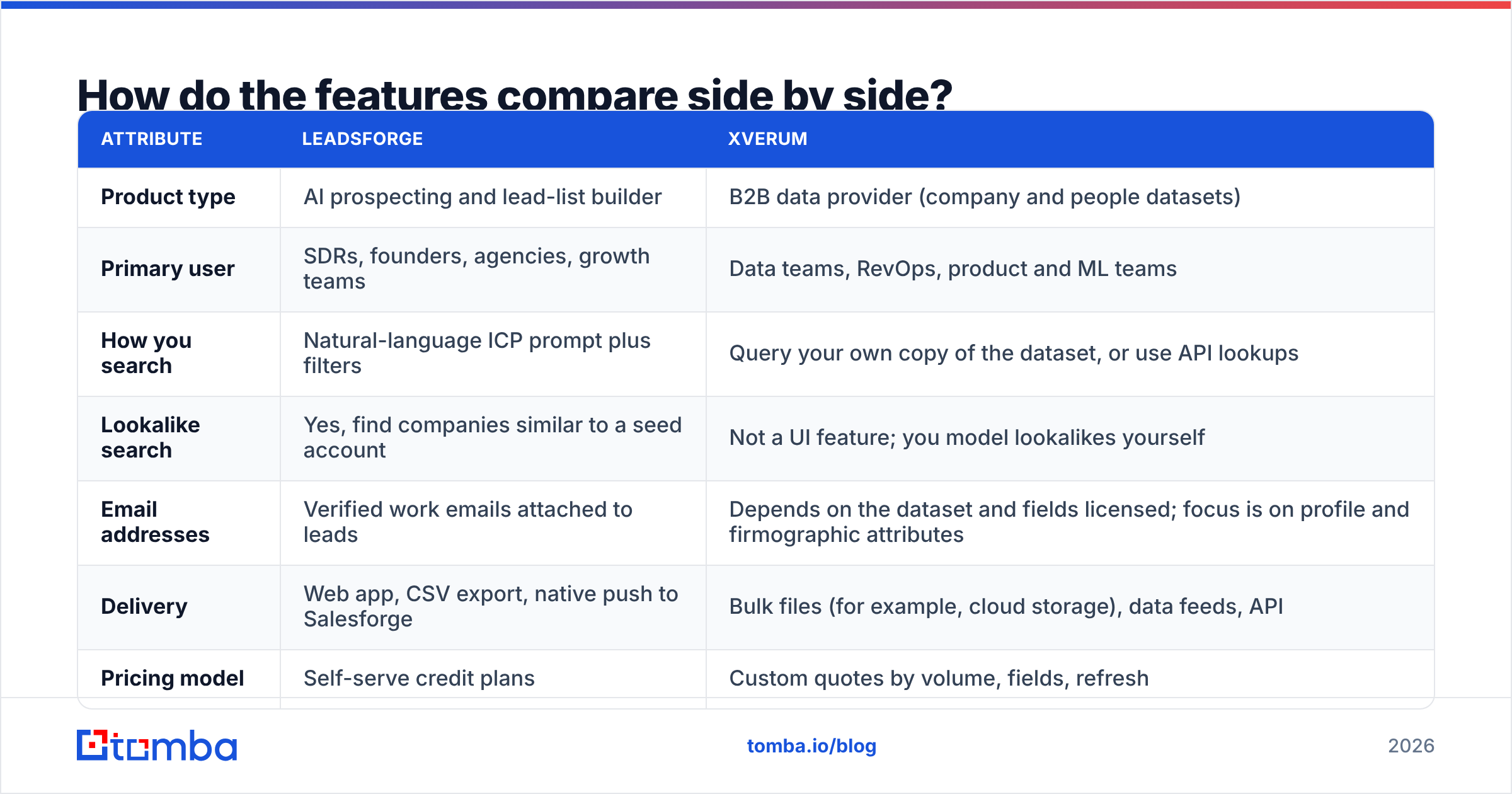
| Attribute | Leadsforge | Xverum |
|---|---|---|
| Product type | AI prospecting and lead-list builder | B2B data provider (company and people datasets) |
| Primary user | SDRs, founders, agencies, growth teams | Data teams, RevOps, product and ML teams |
| How you search | Natural-language ICP prompt plus filters | Query your own copy of the dataset, or use API lookups |
| Lookalike search | Yes, find companies similar to a seed account | Not a UI feature; you model lookalikes yourself |
| Email addresses | Verified work emails attached to leads | Depends on the dataset and fields licensed; focus is on profile and firmographic attributes |
| Delivery | Web app, CSV export, native push to Salesforge | Bulk files (for example, cloud storage), data feeds, API |
| Pricing model | Self-serve credit plans | Custom quotes by volume, fields, refresh |
| Free option | Trial credits on sign-up | Sample datasets on request |
| Setup effort | Minutes | Days to weeks (contract plus ingestion) |
| Best for | Launching outbound campaigns fast | Enriching a CRM at scale, building data products |
Two rows matter most for sales teams: Email addresses and Setup effort. If what you need is "a list of people I can email by Friday," Xverum is the wrong shape of product, whatever its data quality. If what you need is "every company in our TAM with headcount and industry codes, refreshed monthly, inside our warehouse," Leadsforge is the wrong shape of product.

What does each tool actually cost?#
This is where the two diverge the most, and where buyers get surprised.
Leadsforge uses published, self-serve plans built around monthly credits. One credit roughly equals one lead with contact data, and enrichment actions consume additional credits. Entry plans are in the range a solo founder or small SDR team can put on a credit card, and higher tiers scale with volume. Check the current plan grid on the Leadsforge site before you commit, because the Forge suite has repackaged its pricing more than once.
Xverum doesn't publish a price list for most of its data. You request a quote, and the price depends on:
- Record count (company records vs. people records)
- Which fields you license (for example, contact attributes vs. firmographics only)
- Geography coverage
- Refresh cadence (one-off snapshot vs. monthly or quarterly updates)
- Usage rights (internal use vs. powering a commercial product)
In practice, bulk B2B data contracts usually start well above what a single sales rep would spend on a prospecting tool. They make sense when you're spreading the cost across millions of records or across a product.
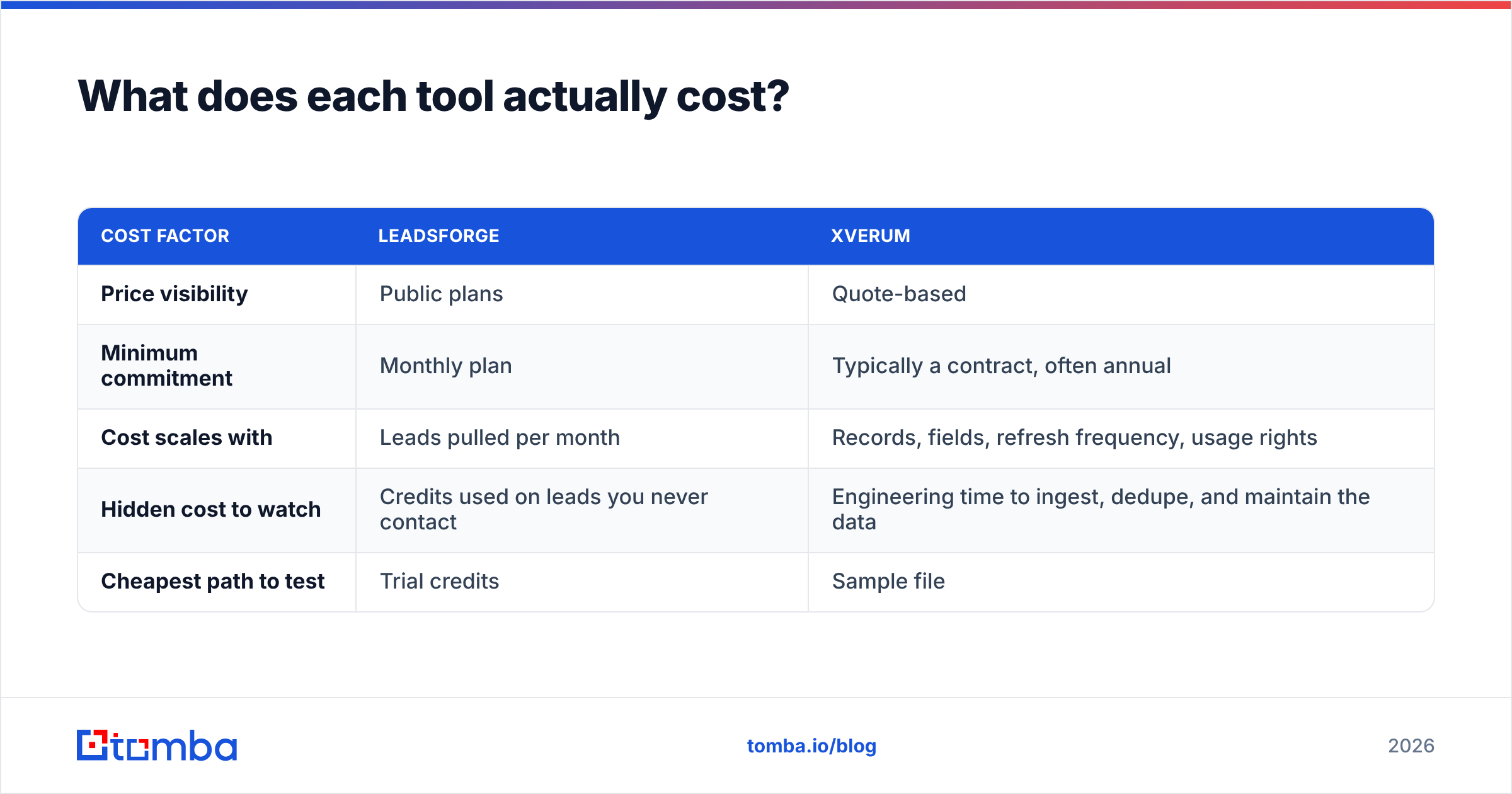
| Cost factor | Leadsforge | Xverum |
|---|---|---|
| Price visibility | Public plans | Quote-based |
| Minimum commitment | Monthly plan | Typically a contract, often annual |
| Cost scales with | Leads pulled per month | Records, fields, refresh frequency, usage rights |
| Hidden cost to watch | Credits used on leads you never contact | Engineering time to ingest, dedupe, and maintain the data |
| Cheapest path to test | Trial credits | Sample file |
The hidden-cost row matters. With Xverum, the license is often not the biggest expense. The bigger cost is the engineer who builds the pipeline, the warehouse storage, and the recurring job that keeps your CRM in sync. With Leadsforge, the waste usually comes from pulling a broad list, contacting a third of it, and paying for the rest.
Which one has better data quality?#
Neither vendor publishes a third-party accuracy audit you can rely on, so be skeptical of any blog post that gives you a precise percentage for either one. Here's what you can reason about:
- Leadsforge verifies emails close to the point of export. That's the right design for outreach, because email validity decays fast. People change jobs, domains get migrated, and catch-all servers hide bounces. The trade-off is that you're relying on its aggregated sources for coverage. Niche industries and non-English-speaking markets can come back thin.
- Xverum puts its effort into breadth and structure: large numbers of company and professional records, normalized fields, and consistent schemas that data teams can join against. The trade-off is that a snapshot starts aging the day it's delivered. A profile that was accurate at the last refresh may point to someone who left the company six weeks ago.
The practical test is the same for both. Pull 200 records that match your real ICP. Verify every email with an independent email verifier. Then spot-check 30 contacts manually on LinkedIn or company websites. That afternoon of work tells you more than any vendor's coverage claim.
Review sites like G2 help with usability and support, but read the reviews by segment. A five-star review from a data engineer tells you little about the SDR experience, and the reverse is also true.
When should you choose Leadsforge?#
Choose Leadsforge if most of these are true:
- You measure success in meetings booked, not records owned. The whole product is designed around getting a campaign out the door.
- You don't have a data engineer. A chat prompt and a filter panel are the entire learning curve.
- You already use, or are willing to use, Salesforge. The native handoff removes CSV juggling and keeps the lead list, sequence, and inbox warmup in one ecosystem.
- Your ICP is describable in a sentence. "Heads of Engineering at 50–200 person B2B SaaS companies in DACH" is exactly the kind of prompt it handles well.
- You want lookalike prospecting. Seeding a list with your five best customers and expanding from there is a real time-saver.
Where Leadsforge is weaker: very large TAM exports, strict data-residency or licensing requirements, and cases where you need the raw data to feed your own models or product.
When should you choose Xverum?#
Choose Xverum if most of these are true:
- You're enriching a CRM or warehouse at scale. Hundreds of thousands of accounts need firmographics, headcount bands, and industry codes, and one-by-one lookups would take forever.
- You're building a product on top of B2B data. For example, a recruiting platform, an intent tool, an investment screener, or an AI model that needs structured company and people records.
- You have data engineering capacity. Someone has to ingest, dedupe, map fields to your schema, and schedule refreshes.
- You need contractual clarity on usage rights. Bulk data licenses spell out what you can do with the data, which matters for compliance reviews under frameworks like GDPR.
- You think in total addressable market, not in weekly lists. Owning the full dataset lets you size segments, score accounts, and route territories on your own terms.
Where Xverum is weaker: speed to first campaign, self-serve access for individual reps, and ready-to-send, freshly verified work emails for specific people.
Can you use Leadsforge and Xverum together?#
Yes, and larger teams increasingly do. A common pattern looks like this:
- Xverum powers the account layer. You load company-level data into your warehouse or CRM to define and score your TAM.
- You pick target accounts. Scoring, intent signals, or territory rules narrow the list to the accounts reps should work this quarter.
- A prospecting tool fills in the people. Leadsforge, or a dedicated email finder, finds the decision-makers at those accounts and returns contactable emails.
- Verification happens right before sending. Every address gets re-checked at send time, not at purchase time.
This splits the job cleanly. Bulk data answers "which companies," and a prospecting or email-finding tool answers "which person, at which address, right now." Paying bulk-data prices for contact-level freshness, or prospecting-tool prices for firmographic breadth, is how teams overspend.

Where does a dedicated email finder fit in?#
Both tools leave a gap at the contact level, for different reasons. Leadsforge's email coverage is tied to its lead database and credit model. Xverum is designed for structured records at scale, not for "find me Jane Doe's email at acme.com right now."
That gap is what email finders are built for. A tool like Tomba takes a name plus a domain, or just a domain, and returns the most likely professional address with a confidence score and the public sources it was found on. It then verifies deliverability, including on catch-all domains, where many bulk datasets simply mark the address as "unknown."
For teams running the combined workflow above, that usually looks like:
- Running a domain search on target accounts to see who's publicly listed and which email pattern the company uses
- Using name + domain lookups to fill gaps a lead list missed
- Re-verifying older records before a campaign so bounce rates stay low and your sender reputation stays healthy
- Using data enrichment to add roles, social profiles, and company attributes to contacts you already have
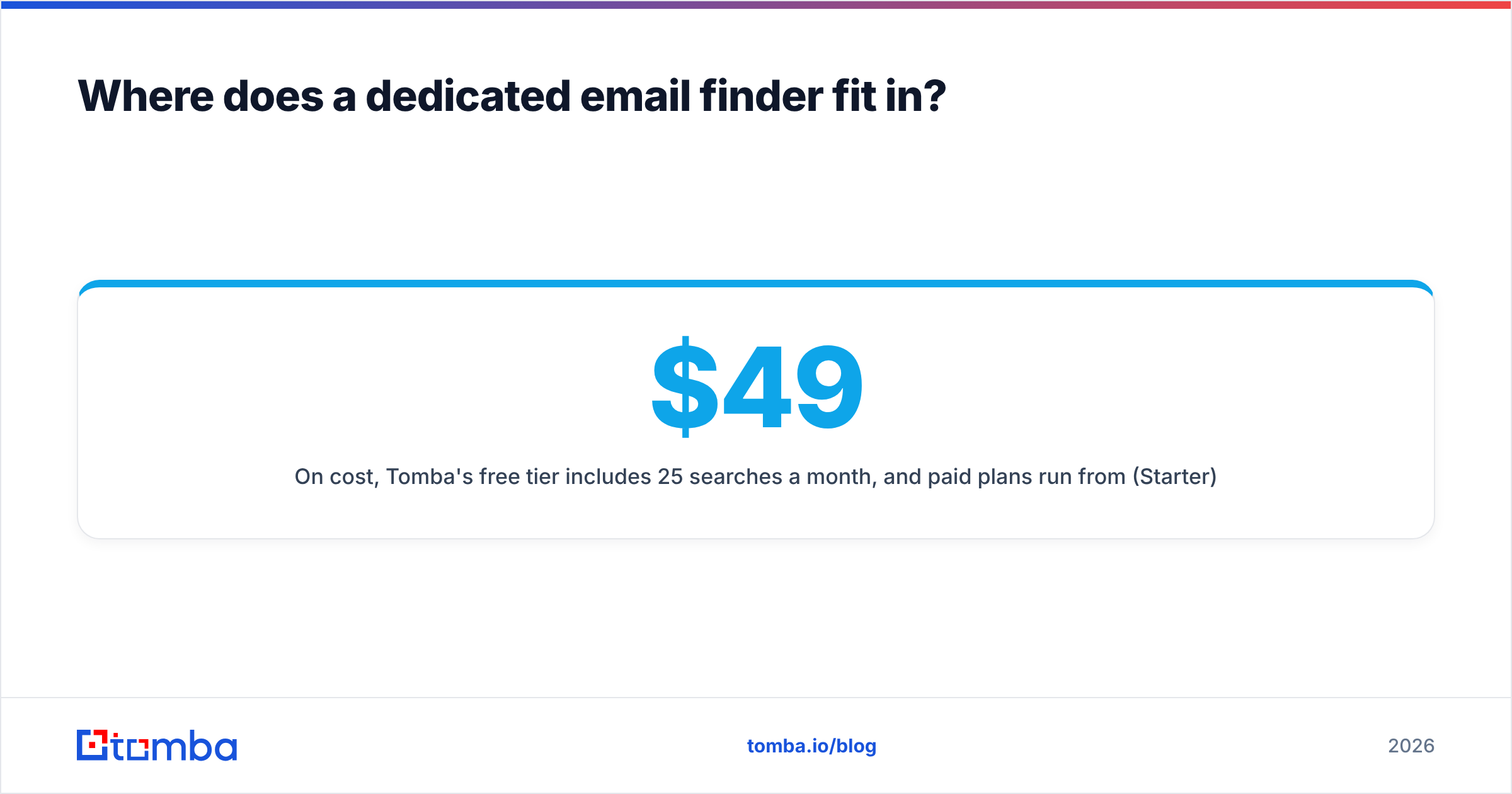
On cost, Tomba's free tier includes 25 searches a month, and paid plans run from $49/mo (Starter) through $99/mo (Growth) and $249/mo (Pro), with custom Enterprise pricing. The full breakdown is on the Tomba pricing page. That makes it a cheap addition to either a Leadsforge-first or an Xverum-first stack, not a replacement for them.
Leadsforge vs Xverum: which should you pick?#
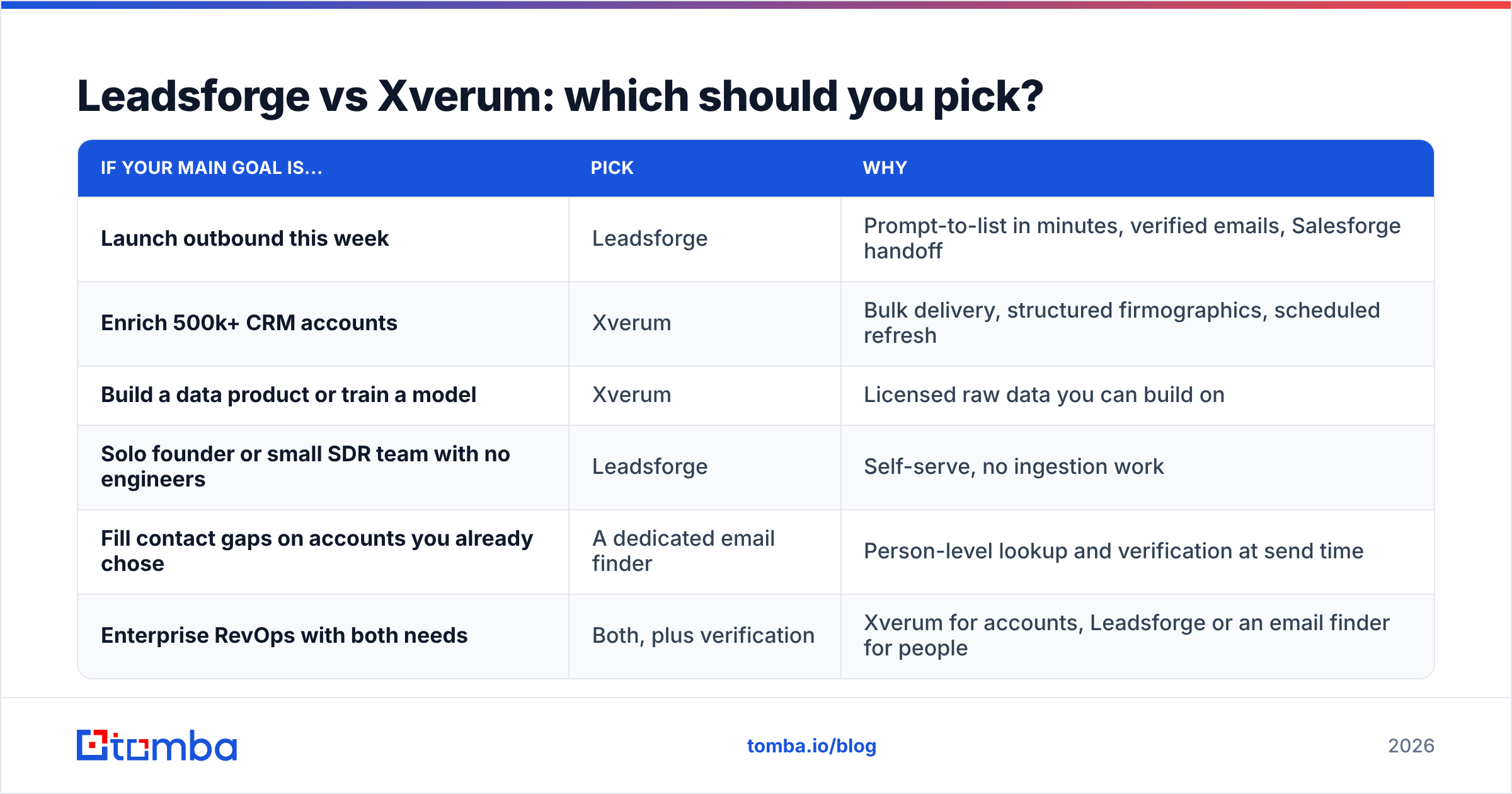
Here's the decision in one table:
| If your main goal is... | Pick | Why |
|---|---|---|
| Launch outbound this week | Leadsforge | Prompt-to-list in minutes, verified emails, Salesforge handoff |
| Enrich 500k+ CRM accounts | Xverum | Bulk delivery, structured firmographics, scheduled refresh |
| Build a data product or train a model | Xverum | Licensed raw data you can build on |
| Solo founder or small SDR team with no engineers | Leadsforge | Self-serve, no ingestion work |
| Fill contact gaps on accounts you already chose | A dedicated email finder | Person-level lookup and verification at send time |
| Enterprise RevOps with both needs | Both, plus verification | Xverum for accounts, Leadsforge or an email finder for people |
Our verdict: For most sales teams reading this, Leadsforge is the more practical choice, because it's built around the job you actually do: finding people and emailing them. Xverum wins when data is the product or the platform, meaning you have engineers, a warehouse, and a use case bigger than one outbound campaign. The mistake to avoid is buying a bulk data license when what you really need is a steady flow of verified contacts, or expecting a prospecting app to act as your system of record.
Frequently asked questions#
Is Xverum a direct Leadsforge alternative?#
Not really. Xverum is a data supplier, not a prospecting app. If you want a Leadsforge alternative with a similar self-serve workflow, look at other prospecting and email-finding tools. Consider Xverum when you need the underlying data at scale.
Does Leadsforge sell bulk datasets?#
Leadsforge is built around credit-based list building for outreach, not full-database licensing. If you need millions of records delivered to your warehouse, a data provider like Xverum fits better.
Which is better for GDPR compliance?#
Both claim compliant data practices, but compliance depends on how you process and contact the data. Document your lawful basis, honor opt-outs, and review each vendor's data processing terms with your legal team before buying.
Do I still need email verification with either tool?#
Yes. Emails decay continuously, so verify close to send time no matter where the contact came from, especially for records more than a few weeks old or on catch-all domains.
Ready to fill the contact gap?#
Whichever side of this comparison you land on, the last step is the same: getting a valid, deliverable address for the right person before you hit send. Tomba Email Finder finds professional emails by name, domain, or company, shows the sources behind each result, and verifies them in the same workflow. You can start free with 25 searches a month, test it against the leads you already have from Leadsforge or Xverum, and upgrade only once you've seen the hit rate on your own ICP.
Related guides#
// get started
Find, verify and enrich your first contacts today
Start on the free plan with 25 searches a month, then scale when your team is ready.
Free plan · No credit card required · GDPR & CCPA
// about the author