LeadsFriday Pricing Reviews Pros and Cons: Real Costs in 2026
LeadsFriday charges $3 per 1,000 scraped leads and has no subscription. That headline rate is only the first line of the bill. Here is what a usable, verified list actually costs, and who the model suits.
This guide covers LeadsFriday pricing reviews pros and cons in one place. You'll see the real rates, what a verified list costs, and who the model suits.
TL;DR
- LeadsFriday runs on pay-as-you-go credits (1 credit = $1). Credits don't expire, there are no seats, and new accounts get 1,000 free leads at signup.
- Scraping is cheap. Apollo, Sales Navigator and Company Followers exports cost $3.00 per 1,000 leads, and Google Maps costs $1.50 per 1,000.
- Most of your spend goes to enrichment, not scraping. Email finding costs $1.20 per 100 hits, and phone numbers cost $70 per 1,000.
- The biggest pros are no commitment, billing only for delivered rows, and a wide range of sources. The biggest cons are batch CSV delivery (not real-time), platform terms-of-service risk on LinkedIn-based scraping, and few independent reviews.
- If you're after specific people at specific companies rather than bulk exports, a live email finder with verification built in is usually the better fit.
What is LeadsFriday?#
LeadsFriday is a done-for-you lead scraping and enrichment service. You paste a search URL from Apollo, LinkedIn Sales Navigator, Crunchbase, Google Maps, Clutch and similar sources, or you upload a CSV. The team runs the job on their servers and sends back a CSV. Most orders arrive within a few hours, and large orders within 24 hours.
It isn't a database you search in real time, and it isn't a sales engagement platform. Think of it as an export-and-enrich bureau. Its footer calls it "one lead platform for Apollo, Sales Navigator, LinkedIn, Crunchbase, StoreLeads and BuiltWith, plus email and phone enrichment at scale."
That positioning matters for pricing. You're paying per job, so the right way to judge LeadsFriday is cost per usable contact, not the monthly fee (there isn't one).
How does LeadsFriday pricing work?#
The model is simple. You buy credits by card in any amount, with no minimum. One credit equals one dollar, and a single balance covers every scraper and enrichment tool. According to the official LeadsFriday pricing page, four rules govern billing:
- 1 credit = $1. Every price is quoted in dollars, so there's no conversion to work out.
- One wallet. The same balance pays for scrapers, enrichment, verification and the instant databases.
- Charged on delivery. Enrichment only bills verified hits, and rows the team couldn't find are refunded to your balance.
- No expiry. Unused credits stay on the account indefinitely and nothing resets monthly.
Before you confirm an order, the app shows an estimated cost. For high-volume jobs (hundreds of thousands or millions of rows), LeadsFriday offers custom quotes by email.
What does each LeadsFriday service cost?#
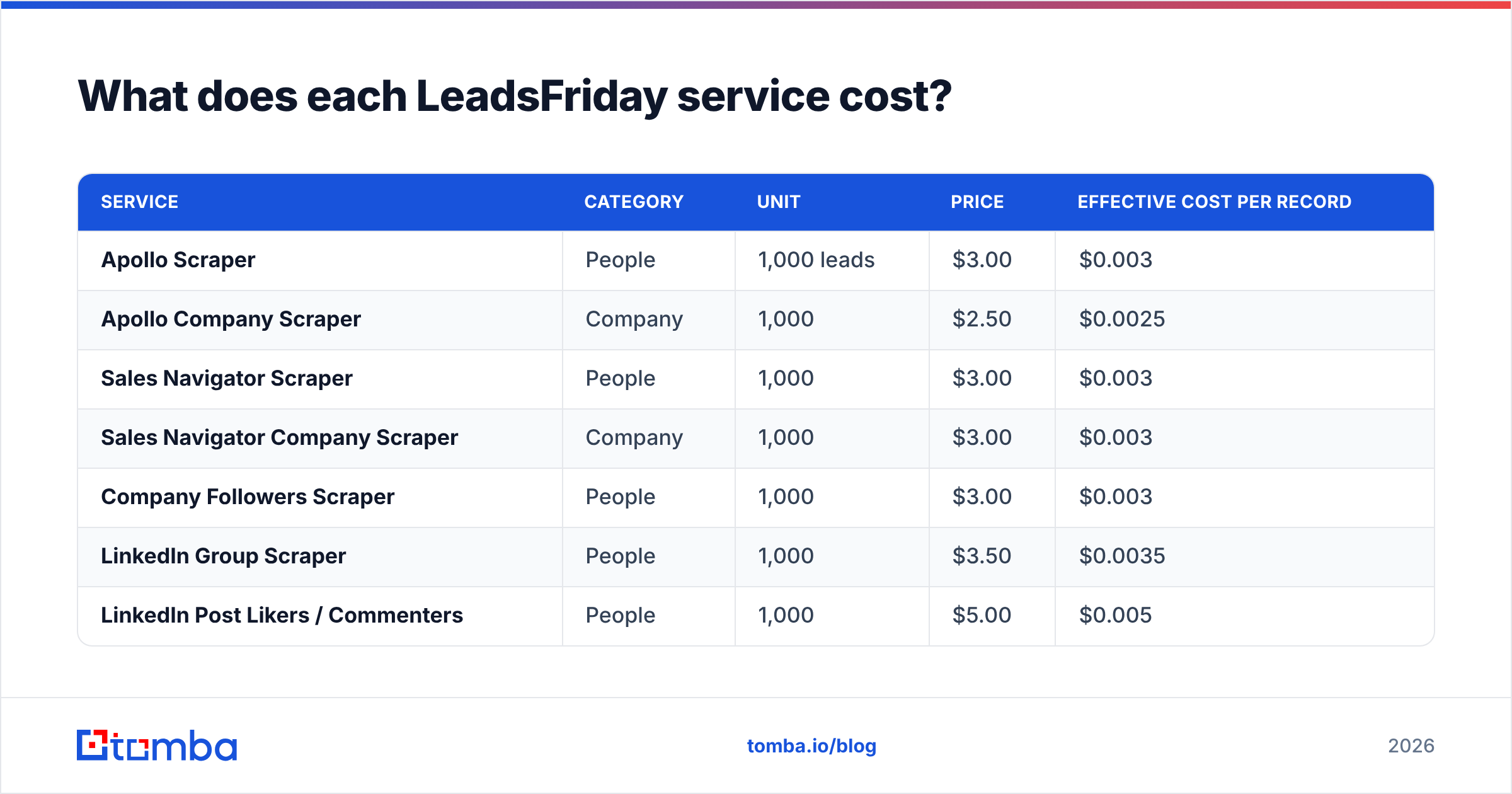
Here are the published rates as of September 2026, grouped by what you'd actually use them for:
| Service | Category | Unit | Price | Effective cost per record |
|---|---|---|---|---|
| Apollo Scraper | People | 1,000 leads | $3.00 | $0.003 |
| Apollo Company Scraper | Company | 1,000 | $2.50 | $0.0025 |
| Sales Navigator Scraper | People | 1,000 | $3.00 | $0.003 |
| Sales Navigator Company Scraper | Company | 1,000 | $3.00 | $0.003 |
| Company Followers Scraper | People | 1,000 | $3.00 | $0.003 |
| LinkedIn Group Scraper | People | 1,000 | $3.50 | $0.0035 |
| LinkedIn Post Likers / Commenters | People | 1,000 | $5.00 | $0.005 |
| Crunchbase Scraper | Company | 1,000 | $3.50 | $0.0035 |
| Google Maps Scraper | Company | 1,000 | $1.50 | $0.0015 |
| Clutch Scraper | Company | 1,000 | $3.00 | $0.003 |
| StoreLeads / BuiltWith report | Company | per CSV | $79 / $99 | flat |
| Company Website Finder | Company | 1,000 | $6.00 | $0.006 |
| Website Email Finder | Enrichment | 100 | $0.50 | $0.005 |
| Email Finder (work email) | Enrichment | 100 | $1.20 | $0.012 |
| Personal Email Finder | Enrichment | 100 | $4.00 | $0.04 |
| Email Verifier (MillionVerifier) | Enrichment | 10,000 | $6.00 | $0.0006 |
| Catch-All Email Verifier | Enrichment | 1,000 | $2.00 | $0.002 |
| Apollo Phone Number Scraper | Phones | 100 | $4.90 | $0.049 |
| Sales Navigator Phone Scraper | Phones | 100 | $6.50 | $0.065 |
| Phone Numbers Finder | Phones | 1,000 | $70.00 | $0.07 |
Two things stand out. Scraping is almost free at a fraction of a cent per row. Enrichment is where the money goes. A work email costs four times as much as the row it's attached to, and a phone number costs more than 20 times as much.
Also note that bulk email verification is resold from MillionVerifier, which the pricing table names directly. That's a fair choice, since MillionVerifier is a known bulk verifier. But it means you aren't paying for in-house verification logic.

What does a real campaign cost on LeadsFriday?#
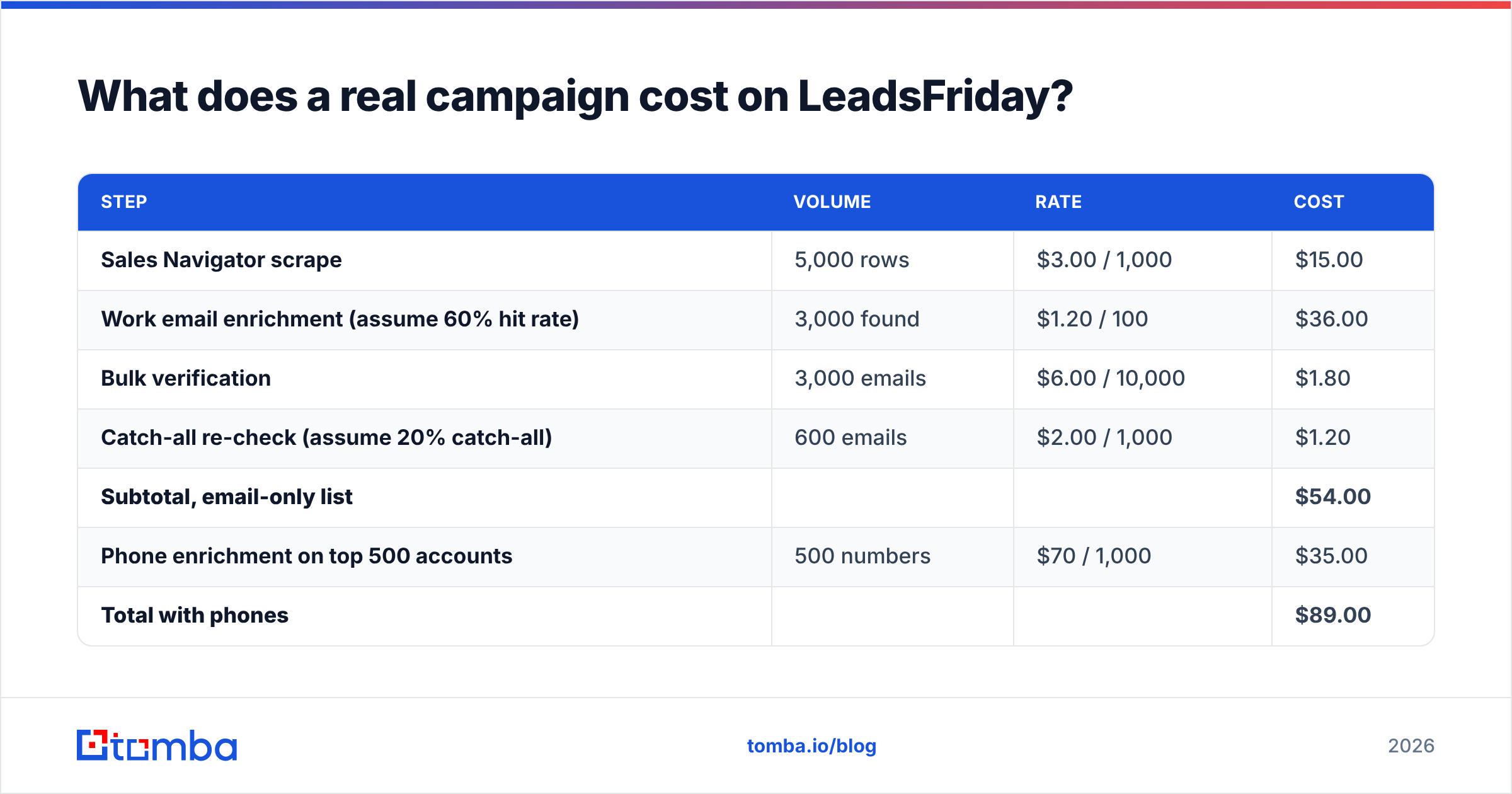
Headline rates are misleading if you stop at the scraper line. Here's a realistic outbound build: 5,000 VP-level contacts from a Sales Navigator search, enriched and verified before they go into a sequencer.
| Step | Volume | Rate | Cost |
|---|---|---|---|
| Sales Navigator scrape | 5,000 rows | $3.00 / 1,000 | $15.00 |
| Work email enrichment (assume 60% hit rate) | 3,000 found | $1.20 / 100 | $36.00 |
| Bulk verification | 3,000 emails | $6.00 / 10,000 | $1.80 |
| Catch-all re-check (assume 20% catch-all) | 600 emails | $2.00 / 1,000 | $1.20 |
| Subtotal, email-only list | $54.00 | ||
| Phone enrichment on top 500 accounts | 500 numbers | $70 / 1,000 | $35.00 |
| Total with phones | $89.00 |
The 60% hit rate and 20% catch-all share are planning assumptions, not LeadsFriday figures. Your numbers will vary by industry and seniority. Because enrichment only bills found rows, a lower hit rate cuts the enrichment line proportionally. The scrape line doesn't change.
The takeaway is that scraping made up 17% of the email-only bill. If a vendor sells you on "$3 per 1,000 leads," the real planning number is closer to $18 per 1,000 raw rows once emails are attached and checked, or about $0.018 per verified, sendable email. That's still inexpensive. It just isn't $0.003.
What do LeadsFriday reviews say?#
Most published LeadsFriday reviews live on the vendor's own reviews page. The recurring themes there are clean CSV exports, fast turnaround and accurate lists. That fits a service business. A job queue run by people tends to produce tidy files.
In September 2026, we found few independent reviews on the usual software sites. Treat on-site testimonials as a starting point, not a verdict. Need independent proof for your buying team? Use the 1,000 free signup leads as your own review. Run a scrape on a segment you already know well and score the output yourself.
What to check in that free test:
- Title and company freshness. Compare 50 rows against LinkedIn profiles you can see.
- Email hit rate on your ICP. Hit rates on SMB founders and on enterprise directors can differ a lot.
- Catch-all share. A high share means more rows sit in "risky" limbo even after verification.
- Turnaround on your volume. "A few hours" is the typical figure, and big orders can take up to 24 hours.
What are the pros of LeadsFriday pricing?#
No subscription and no expiry. Many agencies and founders prospect in bursts: a campaign one month, nothing the next. For them, credits that never expire beat a monthly plan that resets.
You only pay for delivered rows. Refunds for rows that weren't found go straight back to your balance. Many per-lookup tools charge you for a miss. LeadsFriday doesn't.
Very low scraping costs. At $1.50 to $3.50 per 1,000 rows, list building is effectively a rounding error. That opens up tactics like scraping post likers or competitors' company followers for intent-style targeting, which would be expensive on seat-based platforms.
Source breadth in one wallet. Apollo, Sales Navigator, LinkedIn groups and posts, Crunchbase, Google Maps, Clutch, StoreLeads and BuiltWith all draw on one balance. There's no need to juggle five scraper subscriptions.
Transparent pre-order estimates. You see the cost before you confirm, which suits finance teams that want spend approved per job.
What are the cons of LeadsFriday pricing?#
It's batch, not real-time. You submit a job and wait hours. That's fine for list building, but it doesn't help an SDR who needs one decision-maker's email during a call-prep block. There's no instant lookup-as-you-browse workflow in the core offer.
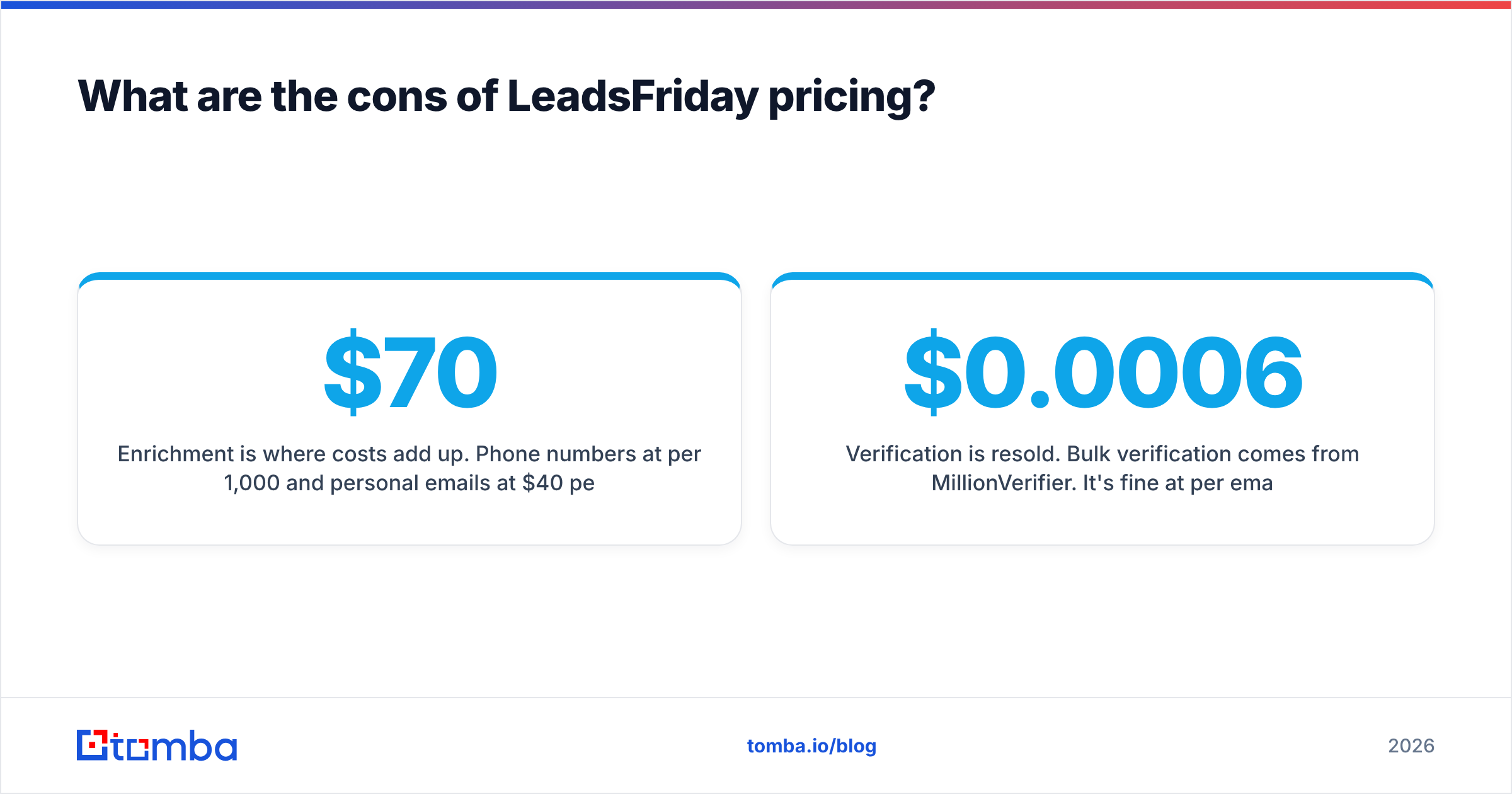
Enrichment is where costs add up. Phone numbers at $70 per 1,000 and personal emails at $40 per 1,000 quickly outweigh the cheap scrape. Budget around enrichment, not scraping.
Platform terms-of-service exposure. Several scrapers pull from LinkedIn-based surfaces (Sales Navigator, groups, post likers and commenters, company followers). The LinkedIn User Agreement prohibits scraping and automated data collection. The scraping runs on LeadsFriday's side, but you should know where the data originates, especially if your legal team reviews data provenance for GDPR or similar regimes.
Verification is resold. Bulk verification comes from MillionVerifier. It's fine at $0.0006 per email. But if your deliverability depends on deeper checks, test the catch-all handling with care. You may want your own email verifier as a second pass on high-value segments.
Thin independent review footprint. As covered above, you'll mostly be relying on your own trial data.
No native CRM sync in the pricing story. The output is a CSV. There's an API and webhooks listed on the site, but if your team lives in HubSpot or Salesforce, expect an import step or some integration work.
Is LeadsFriday cheaper than a subscription email finder?#
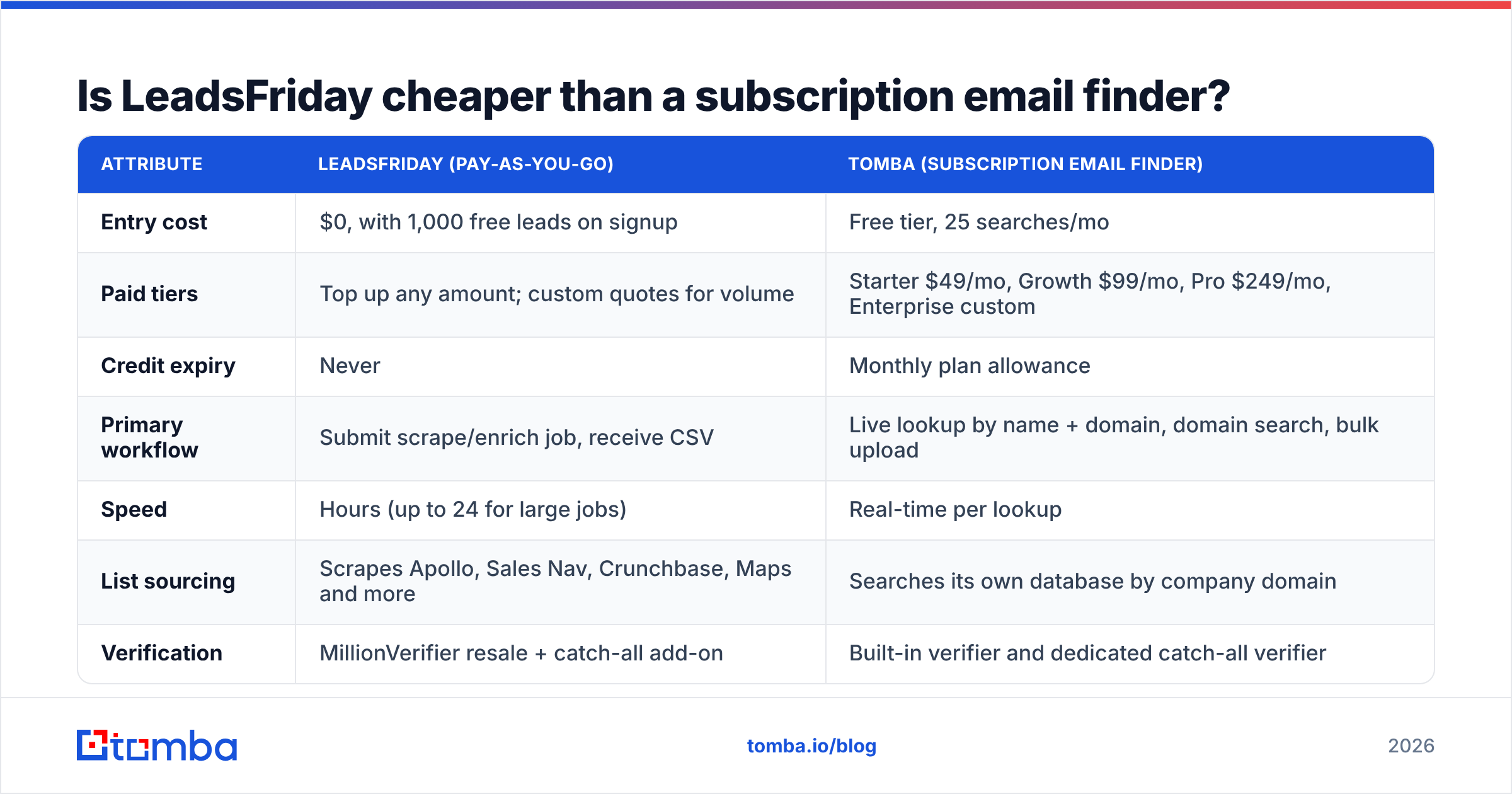
It depends on your usage pattern more than on the rate card. Here's how the two pricing models compare across the attributes that actually change your bill:
| Attribute | LeadsFriday (pay-as-you-go) | Tomba (subscription email finder) |
|---|---|---|
| Entry cost | $0, with 1,000 free leads on signup | Free tier, 25 searches/mo |
| Paid tiers | Top up any amount; custom quotes for volume | Starter $49/mo, Growth $99/mo, Pro $249/mo, Enterprise custom |
| Credit expiry | Never | Monthly plan allowance |
| Primary workflow | Submit scrape/enrich job, receive CSV | Live lookup by name + domain, domain search, bulk upload |
| Speed | Hours (up to 24 for large jobs) | Real-time per lookup |
| List sourcing | Scrapes Apollo, Sales Nav, Crunchbase, Maps and more | Searches its own database by company domain |
| Verification | MillionVerifier resale + catch-all add-on | Built-in verifier and dedicated catch-all verifier |
| Phone data | $70 per 1,000 numbers | Phone finder available alongside email |
| Best fit | Bursty, high-volume list building | Ongoing, targeted prospecting by named accounts |
A rough rule of thumb:
- LeadsFriday is cheaper if you build a few big lists per quarter from a source you already filter well (for example, a tight Sales Navigator search), and you're comfortable with CSVs and batch turnaround.
- A subscription email finder is cheaper in practice if reps look up contacts every day, work account-by-account, or need verification and catch-all handling inside the same lookup. The per-email rate matters less than not waiting 6 hours and not re-importing files.
Plenty of teams use both. They scrape a broad list cheaply, then run named-account enrichment and spot-checks through a live tool. You can compare the tiers on Tomba pricing against your monthly lookup volume.
Who should use LeadsFriday, and who shouldn't?#
Good fit:
- Lead-gen agencies building lists for several clients, where non-expiring credits and one wallet simplify billing.
- Founders running seasonal outbound who don't want a monthly tool sitting idle between campaigns.
- Local and SMB prospecting through the Google Maps scraper at $1.50 per 1,000 businesses.
- Ecommerce and tech-stack targeting with StoreLeads and BuiltWith report exports, if a flat $79 or $99 per report beats subscribing to those tools directly.
Weaker fit:
- SDR teams doing daily, named-account research, who need an answer in seconds, not hours.
- Compliance-sensitive orgs that need clear data provenance and can't accept LinkedIn-derived scrapes.
- Phone-heavy teams, where $0.07 per number adds up fast. Compare dial-ready coverage against dedicated phone data vendors before committing.
- Teams that want CRM-native workflows without handling CSVs.
How do you keep LeadsFriday costs under control?#
- Filter hard at the source. Every row you scrape and don't need also gets enriched. Tighten the Sales Navigator or Apollo search before you export, because it's the cheapest place to cut.
- Enrich in stages. Scrape everything, but run email enrichment only on your tier-1 titles first, then expand if replies justify it.
- Verify before every send. At $6 per 10,000, there's no excuse to skip it. Bounces cost far more in sender reputation than verification costs in credits.
- Handle catch-alls separately. Put catch-all addresses in a lower-volume sending lane rather than your main sequence.
- Reserve phones for top accounts. Buy numbers only for accounts that have already opened or replied.
- Use the free 1,000 leads as an audit. Score them before your first top-up so you know your real hit rate.
LeadsFriday pricing reviews pros and cons: is it worth it in 2026?#
For its intended job, yes. LeadsFriday is an honest, clear way to turn a filtered search into a CSV at very low cost. Credits never expire, and you pay only on delivery. That's friendlier than many subscription tools. The published rate card doesn't hide anything, as long as you read past the $3 headline to the enrichment lines.
The trade-offs are structural, not about price. It's batch, not real-time. A lot of the sourcing leans on LinkedIn surfaces, which carry platform-terms risk. Its independent reputation is still thin. Budget roughly $18 per 1,000 raw rows for a verified email list, more if you add phones. That sums up LeadsFriday pricing reviews pros and cons: cheap to scrape, pricier to enrich, and worth a trial before you trust the testimonials.
If your prospecting is ongoing and account-based rather than bulk, and you need a verified work email for a specific person at a specific company right now, Tomba Email Finder is the better-matched tool. Enter a name and a domain, get a verified address in real time, and check risky domains with the built-in catch-all verifier. You can start with 25 free searches a month and move to the $49/mo Starter plan once it earns its place in your stack.
Related guides#
// get started
Find, verify and enrich your first contacts today
Start on the free plan with 25 searches a month, then scale when your team is ready.
Free plan · No credit card required · GDPR & CCPA
// about the author