LeadsGorilla Pricing Reviews Pros and Cons: 2026 Honest Verdict
LeadsGorilla sells local-business leads with an entry price of about $37 a month. Here is what it actually costs once tiers, add-ons and Google Maps API fees are included, what users say about it, and who should skip it.
Looking for LeadsGorilla pricing reviews pros and cons in one place? Here's the short version.
- LeadsGorilla is a local-business lead tool. It is built for agencies and freelancers who sell websites, SEO, reviews or ads to small local businesses. It is not built for B2B sales teams prospecting into companies.
- The advertised entry price is about $37/month. Third-party reviews describe Standard, Premium and Advanced tiers, agency and AI add-ons, and Google Maps API usage that Google bills to you separately. Your real monthly cost is usually higher than the headline number.
- User reviews are mixed. Buyers like the "find local businesses with obvious marketing gaps" workflow. Complaints focus on refunds, billing and support.
- There's no real free tier. You get a 30-day money-back guarantee instead of a trial, so test it hard in the first few weeks.
- If you prospect into companies rather than local shops, a dedicated email finder like Tomba (free tier, then $49/mo) is the better fit.
What is LeadsGorilla?#
LeadsGorilla is lead-generation software for marketers who sell services to local businesses. Think dentists, plumbers, restaurants, gyms and law offices. You enter a niche and a location. The tool pulls matching businesses, mostly from Google Maps. Then it flags "opportunities": no website, a poor mobile site, few or bad reviews, weak SEO, or no social presence.
The pitch is simple. Don't cold-call every plumber in town. Find the plumber with a 2.9-star rating and no mobile site, then send an audit that points at that exact problem. For a freelance web designer or a small local-SEO agency, that is a real workflow advantage.
Keep the scope in mind. LeadsGorilla finds local businesses and their public contact details. It does not find decision-makers inside mid-market or enterprise companies, and it isn't a verified B2B contact database. That distinction drives most of the pricing verdict below.
How much does LeadsGorilla cost in 2026?#
The short answer is that it starts at roughly $37/month, but you should budget for more.
According to the LeadsGorilla listing on Capterra and independent 2026 reviews, pricing works like a sales funnel rather than a flat SaaS plan page:
- Entry tier (about $37/mo advertised). This covers core local-lead search and opportunity flags. It's what the sales page leads with.
- Premium and Advanced tiers. These raise usage limits and unlock more features. Monthly, quarterly and yearly billing are offered, and longer terms lower the effective monthly rate.
- Agency add-ons. White-label reports, client-facing features and extra seats sit behind upsells, which is the familiar launch-funnel "OTO" pattern.
- AI add-ons. AI-written outreach and audit copy is sold as an extra layer in some bundles.
- Google Maps API usage, billed by Google. This is the cost most buyers miss. Data pulls run through your own Google Cloud key. Heavy searching means a separate Google bill on top of your plan. See Google Maps Platform pricing for current per-request rates and monthly credits.
Tier names and exact prices change between launches and promotions, so check the live checkout page before you buy. Also read what your specific tier includes. Ask the vendor whether the agency features you're paying for depend on a higher base tier.
What will you realistically pay?#
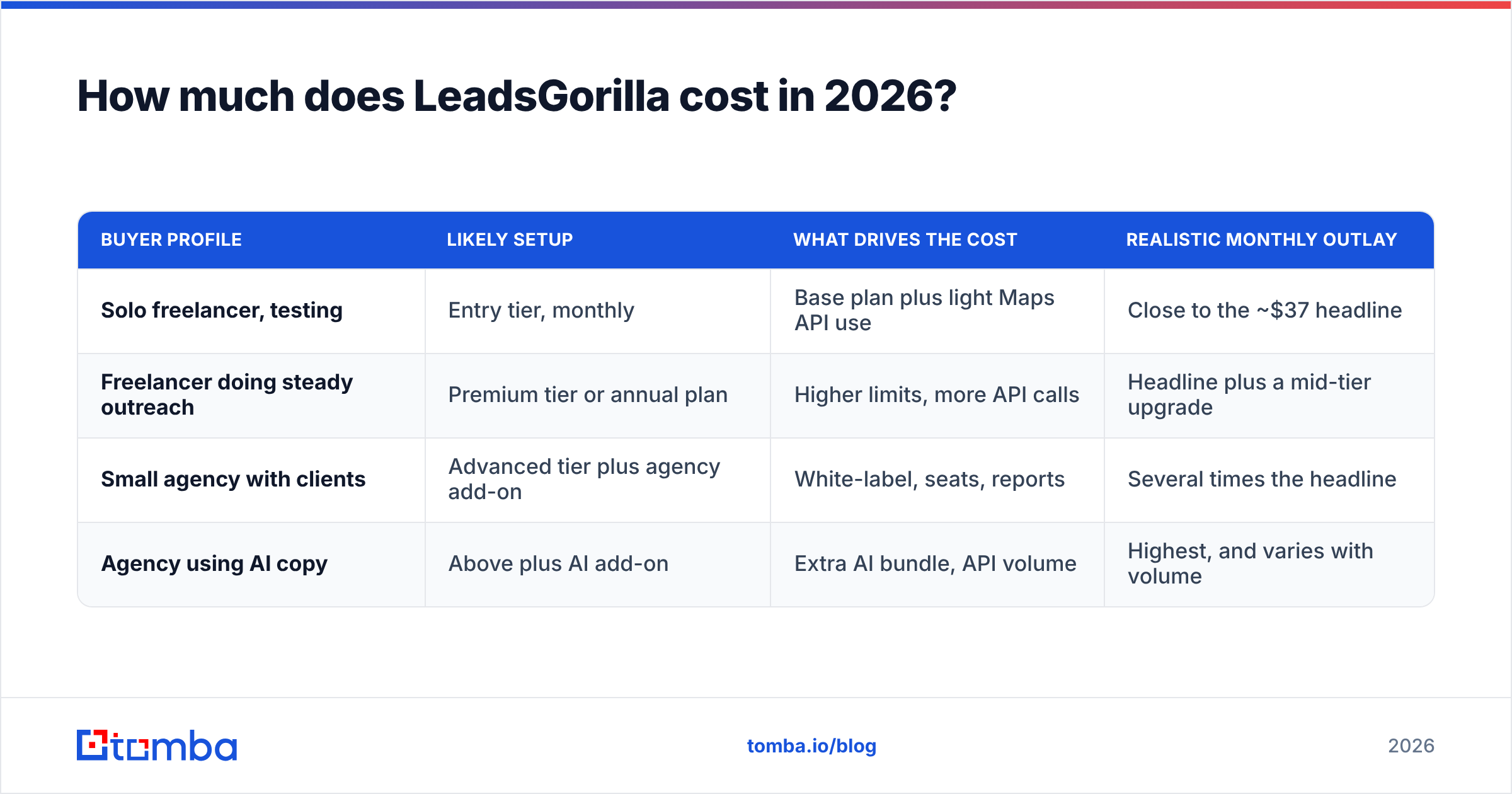
Here is a rough breakdown by buyer type. The figures are ranges, not quotes:
| Buyer profile | Likely setup | What drives the cost | Realistic monthly outlay |
|---|---|---|---|
| Solo freelancer, testing | Entry tier, monthly | Base plan plus light Maps API use | Close to the ~$37 headline |
| Freelancer doing steady outreach | Premium tier or annual plan | Higher limits, more API calls | Headline plus a mid-tier upgrade |
| Small agency with clients | Advanced tier plus agency add-on | White-label, seats, reports | Several times the headline |
| Agency using AI copy | Above plus AI add-on | Extra AI bundle, API volume | Highest, and varies with volume |
The pattern is the same at every level. The more you use LeadsGorilla, the more the API bill and upsells count. A tool that looks like $37 on the sales page can cost two or three times that once it runs every day.
What do LeadsGorilla reviews actually say?#
Reviews are split, and the split is fairly predictable.
On Capterra the product sits around the low-3s out of 5, from a small number of reviews. The Trustpilot page for app.leadsgorilla.net shows the same mixed picture. With so few reviews, a handful of buyers can swing the average. Read the review text, not just the stars.
What satisfied users praise:
- Speed to a lead list. Enter "roofers in Austin" and get a usable list in minutes.
- The opportunity angle. Seeing why a business needs help (no site, bad reviews) makes the first email more specific than a generic pitch.
- Value at the entry tier. Solo users who stay on the base plan and search lightly feel they got their money's worth.
What unhappy users report:
- Refund friction. Some reviewers say refunds were denied because of usage limits, even though there's a 30-day guarantee.
- Billing problems. A few reports mention duplicate or unexpected charges.
- Support responsiveness. Slow or unhelpful replies come up repeatedly.
- Data freshness and depth. Contact details come from public listings. You often get a generic info@ inbox or a front-desk phone number, not the owner's direct email.
That last point matters most for outreach results. A lead list only helps if your email reaches the person who makes the decision.
LeadsGorilla pricing reviews pros and cons at a glance#
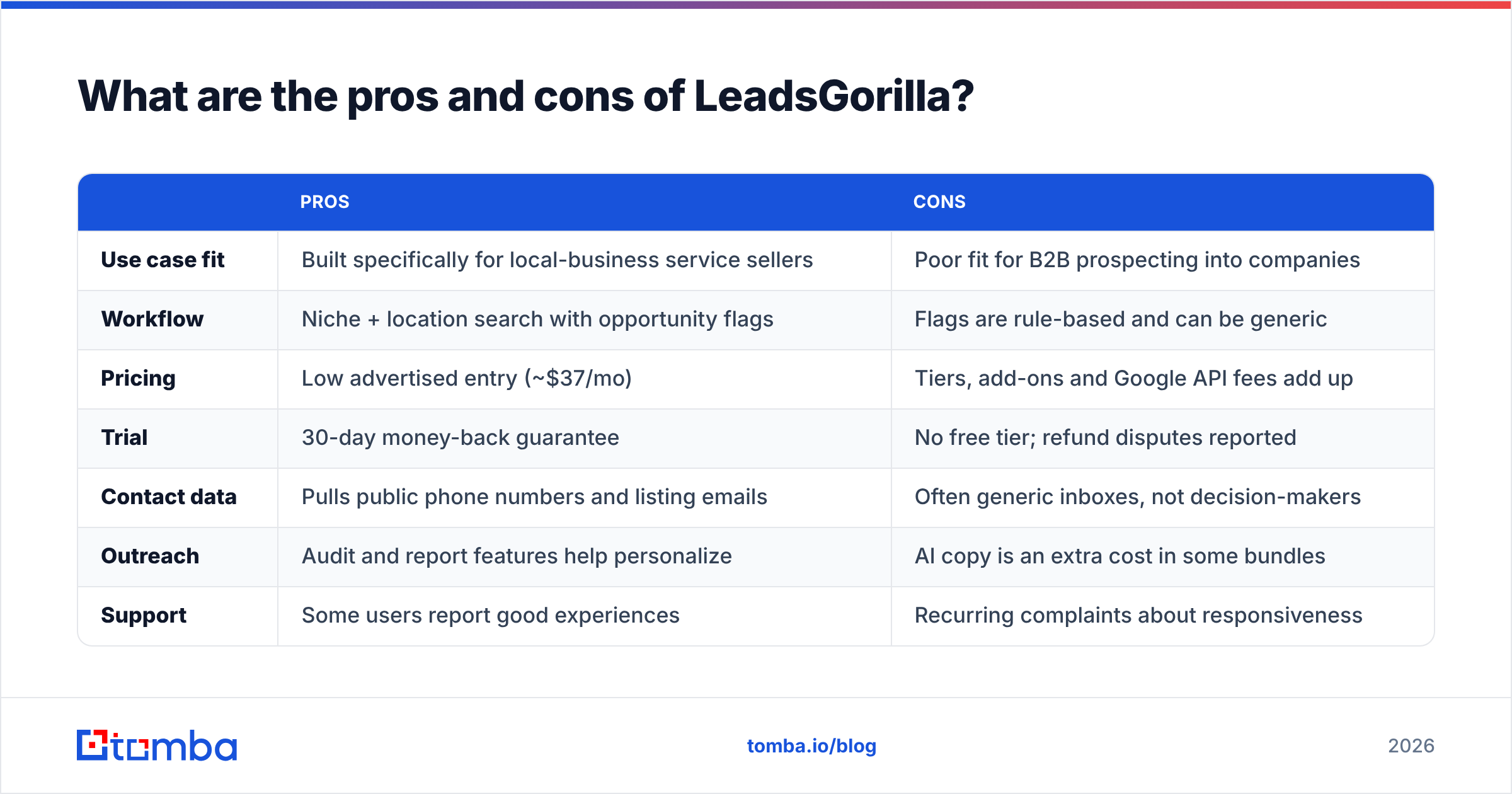
Here's the balanced view, based on what the product does well and where buyers get frustrated:
| Pros | Cons | |
|---|---|---|
| Use case fit | Built specifically for local-business service sellers | Poor fit for B2B prospecting into companies |
| Workflow | Niche + location search with opportunity flags | Flags are rule-based and can be generic |
| Pricing | Low advertised entry (~$37/mo) | Tiers, add-ons and Google API fees add up |
| Trial | 30-day money-back guarantee | No free tier; refund disputes reported |
| Contact data | Pulls public phone numbers and listing emails | Often generic inboxes, not decision-makers |
| Outreach | Audit and report features help personalize | AI copy is an extra cost in some bundles |
| Support | Some users report good experiences | Recurring complaints about responsiveness |
Is LeadsGorilla worth it?#
It depends on who you sell to.
It can be worth it if:
- You sell websites, local SEO, review management or ads to small local businesses.
- You're a solo operator or small agency who will stay on the entry or mid tier.
- You're comfortable setting up a Google Cloud API key and watching that bill.
- You'll test it seriously inside the 30-day window, save your usage records and cancel if it doesn't pay back.
It's probably not worth it if:
- You sell to companies, not storefronts. Examples are SaaS, IT services, B2B consulting and recruiting.
- You need verified, named decision-maker emails rather than listing inboxes.
- You want predictable monthly costs with no third-party API bill.
- You need CRM-grade integrations and reliable support.
Most bad reviews come from a mismatch. The buyer needed one thing, and the product is built for another. A web designer who wants "every dentist in Denver with a bad website" gets what they paid for. A B2B SDR who wants "the VP of Finance at every 200-person logistics company" does not.
How does LeadsGorilla compare to a B2B email finder like Tomba?#
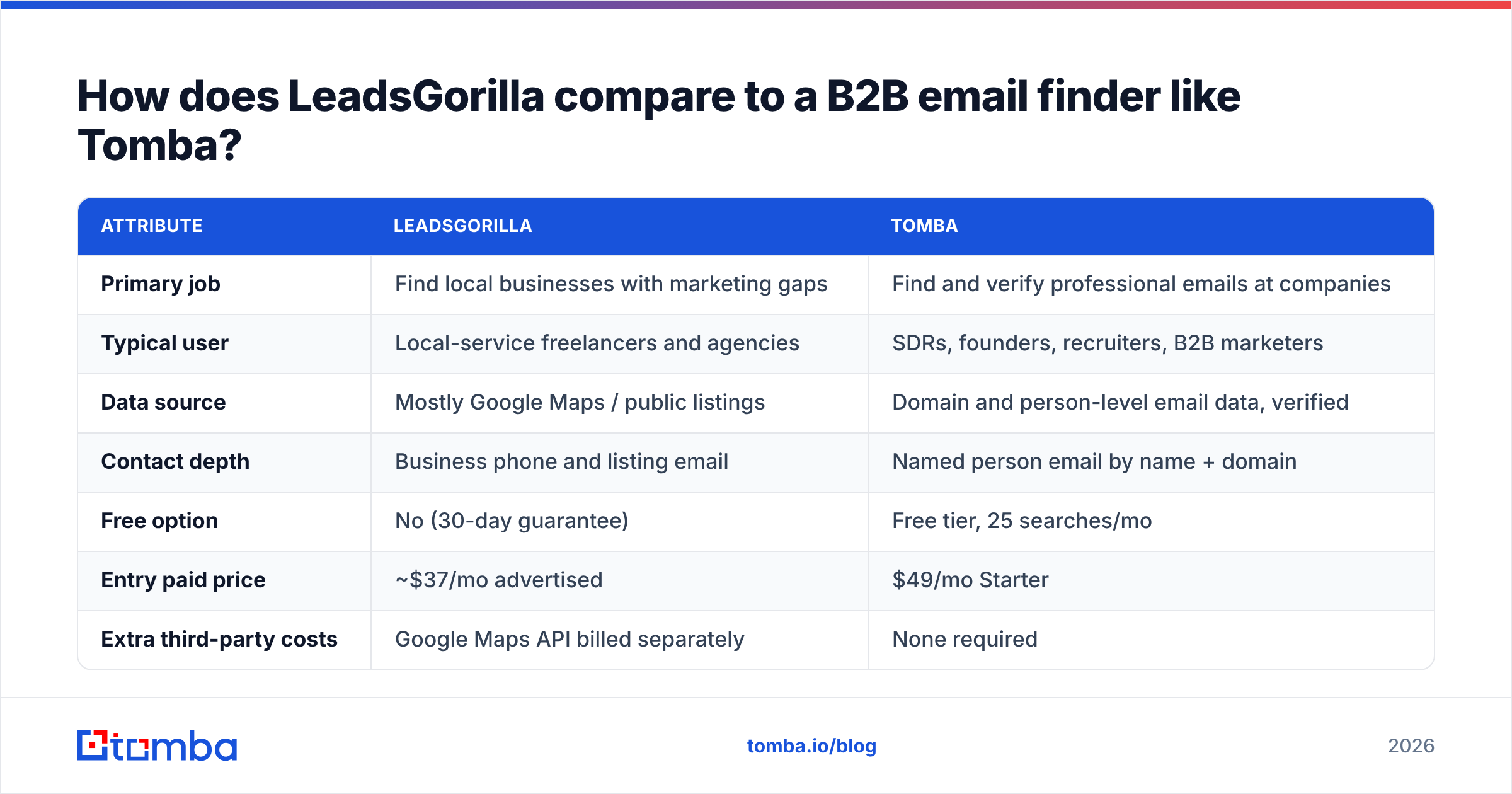
These tools solve different problems, but buyers compare them because both promise "leads." Here's how they differ:
| Attribute | LeadsGorilla | Tomba |
|---|---|---|
| Primary job | Find local businesses with marketing gaps | Find and verify professional emails at companies |
| Typical user | Local-service freelancers and agencies | SDRs, founders, recruiters, B2B marketers |
| Data source | Mostly Google Maps / public listings | Domain and person-level email data, verified |
| Contact depth | Business phone and listing email | Named person email by name + domain |
| Free option | No (30-day guarantee) | Free tier, 25 searches/mo |
| Entry paid price | ~$37/mo advertised | $49/mo Starter |
| Extra third-party costs | Google Maps API billed separately | None required |
| Upgrade path | Tiers + agency/AI add-ons | Growth $99/mo, Pro $249/mo, Enterprise custom |
| Verification | Not the core focus | Built-in email verifier and catch-all checks |
Tomba's paid plan starts $12 higher, but the price you see is the price you pay, with no Google Cloud bill. You also get something LeadsGorilla doesn't try to deliver: the named person's email. With Tomba you can run a domain search to see everyone at a company, or use the email finder to get one person's address from their name and domain. Then you run it through an email verifier before it goes into a sequence.
The two can also work together. Some local agencies use LeadsGorilla to find businesses with a problem worth pitching. Then they use an email finder on the business's domain to reach the owner directly instead of info@. You're combining a targeting tool with a contact tool. Whether that's worth paying for twice depends on your deal size.

What hidden costs should you check before buying LeadsGorilla?#
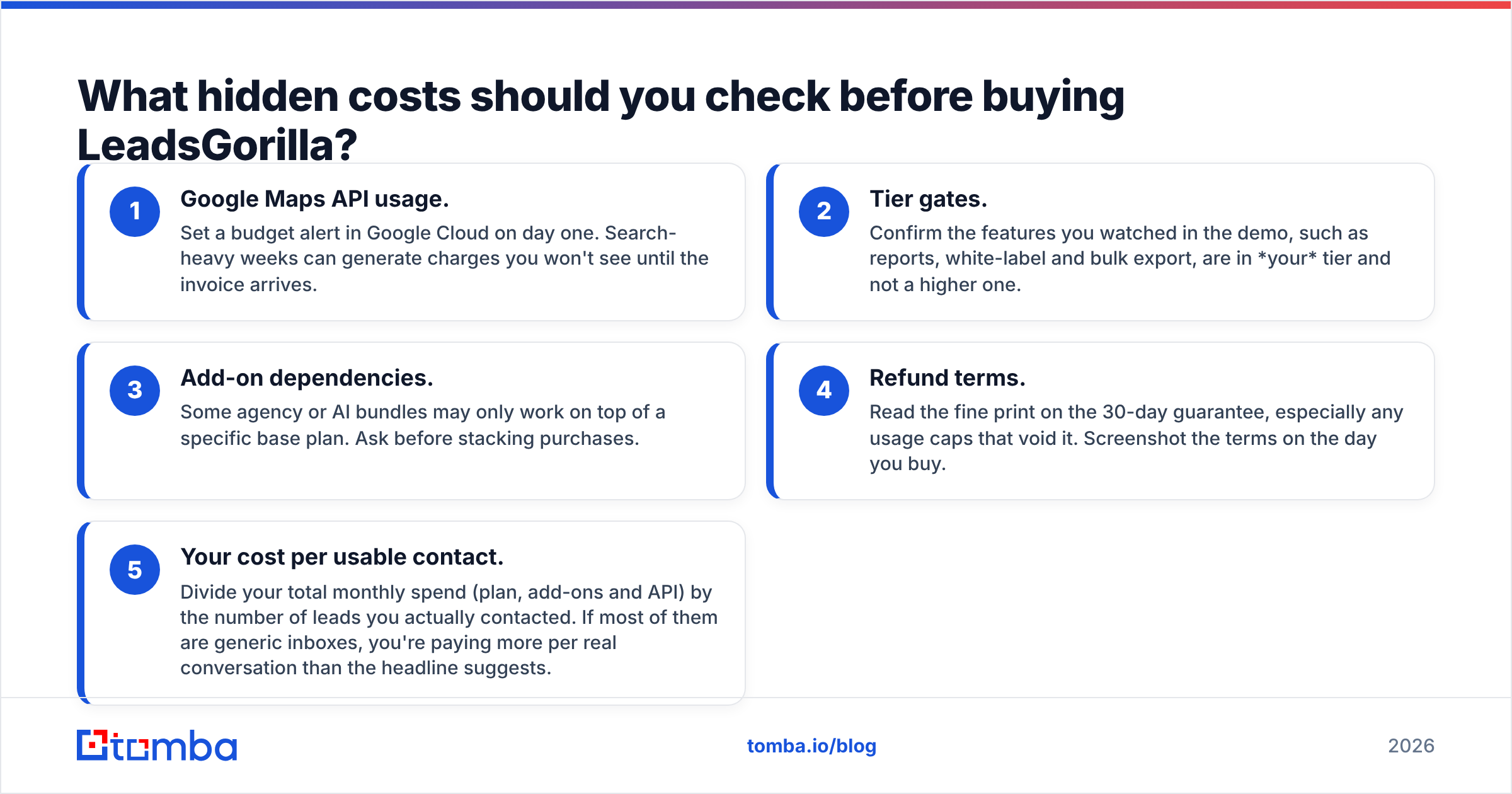
Go through these five before you pay:
- Google Maps API usage. Set a budget alert in Google Cloud on day one. Search-heavy weeks can generate charges you won't see until the invoice arrives.
- Tier gates. Confirm the features you watched in the demo, such as reports, white-label and bulk export, are in your tier and not a higher one.
- Add-on dependencies. Some agency or AI bundles may only work on top of a specific base plan. Ask before stacking purchases.
- Refund terms. Read the fine print on the 30-day guarantee, especially any usage caps that void it. Screenshot the terms on the day you buy.
- Your cost per usable contact. Divide your total monthly spend (plan, add-ons and API) by the number of leads you actually contacted. If most are generic inboxes, each real conversation costs more than the headline suggests.
Which LeadsGorilla alternatives should you consider?#
Match the alternative to your market:
- Selling to local businesses: Other Google Maps–based extractors and local-audit tools work similarly. Compare them on data freshness, export limits and whether they need your own API key.
- Selling to companies (B2B): A dedicated email finder with verification built in. Tomba covers finding, domain search and verification in one account. The free tier lets you check data quality before paying, and the full Tomba pricing is published up front.
- Needing an all-in-one sales platform: Larger B2B databases with built-in sequencing exist. They cost more per seat and are overkill if all you need is accurate emails.
Before you pick, ask one question: do you need to know which business has a problem, or which person to email? LeadsGorilla answers the first. An email finder answers the second.
What's the final verdict on LeadsGorilla pricing?#
Taken together, the LeadsGorilla pricing reviews pros and cons point to a fair-value tool for a narrow buyer. Say you're a freelancer or small agency selling to local businesses. Stay on a lower tier and you get a solid lead list with pitch angles, close to the advertised price. The risk comes from the funnel. Upsells, add-ons and a separate Google Maps API bill can take you well past the $37 headline. Reviews also point to billing and refund problems worth taking seriously.
If your prospects are companies rather than storefronts, don't make LeadsGorilla work for a job it wasn't built for. What you need is a named, verified email for the right person.
That's what the Tomba Email Finder does. Enter a name and company domain and you get the professional email address, checked before you send. Your outreach reaches the decision-maker instead of a shared inbox. Start with 25 free searches a month to test the data on your own target accounts. Upgrade to Starter at $49/mo only when the results justify it, with no third-party API bill on top.
Related guides#
// get started
Find, verify and enrich your first contacts today
Start on the free plan with 25 searches a month, then scale when your team is ready.
Free plan · No credit card required · GDPR & CCPA
// about the author