LeadsRain Pricing Reviews Pros and Cons: 2026 Buyer's Guide
LeadsRain charges about $0.02 a minute and nothing per seat. Here's what that works out to for real teams, what reviewers praise and criticise, and when a per-seat dialer costs less.
This guide covers LeadsRain pricing reviews pros and cons in plain numbers. You'll see what you pay, what users say, and when it's worth it.
TL;DR
- LeadsRain is a cloud dialer and voice-broadcasting platform, not a data tool. It bills per minute (about $0.02/min base) with no per-seat fees, and its published base plan is $200 for 10,000 minutes.
- Add caller-ID costs on top: roughly $10/month plus 1¢/min for a local number, or $40/month plus 2.5¢/min for toll-free, based on LeadsRain's own pricing pages.
- Reviews are positive but thin. Capterra shows around 4.5/5 from a handful of reviews, G2 shows about 3/5 from two. The complaints that keep coming up are answering-machine detection (AMD) charges, uneven support, and a dated interface.
- Pay-per-minute makes sense for bursty, high-volume campaigns and teams that change size a lot. Steady, full-time calling teams can end up paying more than they would with a per-seat dialer.
- The dialer is only as good as the list you load into it. Budget for number and email data quality before you budget for minutes.
What is LeadsRain and who is it built for?#
LeadsRain is a cloud-based outbound communication suite. Its main products are a predictive dialer, voice broadcasting, ringless voicemail, SMS broadcasting, and IVR/inbound call routing. You don't install anything. Agents log into a browser, you upload a contact list, and the system dials.
The typical buyer is a small to mid-sized outbound team. Think insurance agencies, solar installers, real-estate teams, debt collectors, political campaigns, or agencies running campaigns for several clients. These teams care about minutes, connect rates, and compliance. CRM depth and sales analytics matter much less to them.
That context shapes how you should read everything below. If you compare LeadsRain with an all-in-one sales engagement platform like Outreach or Salesloft, it will look thin. If you compare it with other minute-based dialers and broadcasters, it looks like a fairly standard, fairly cheap option.
How does LeadsRain pricing actually work?#
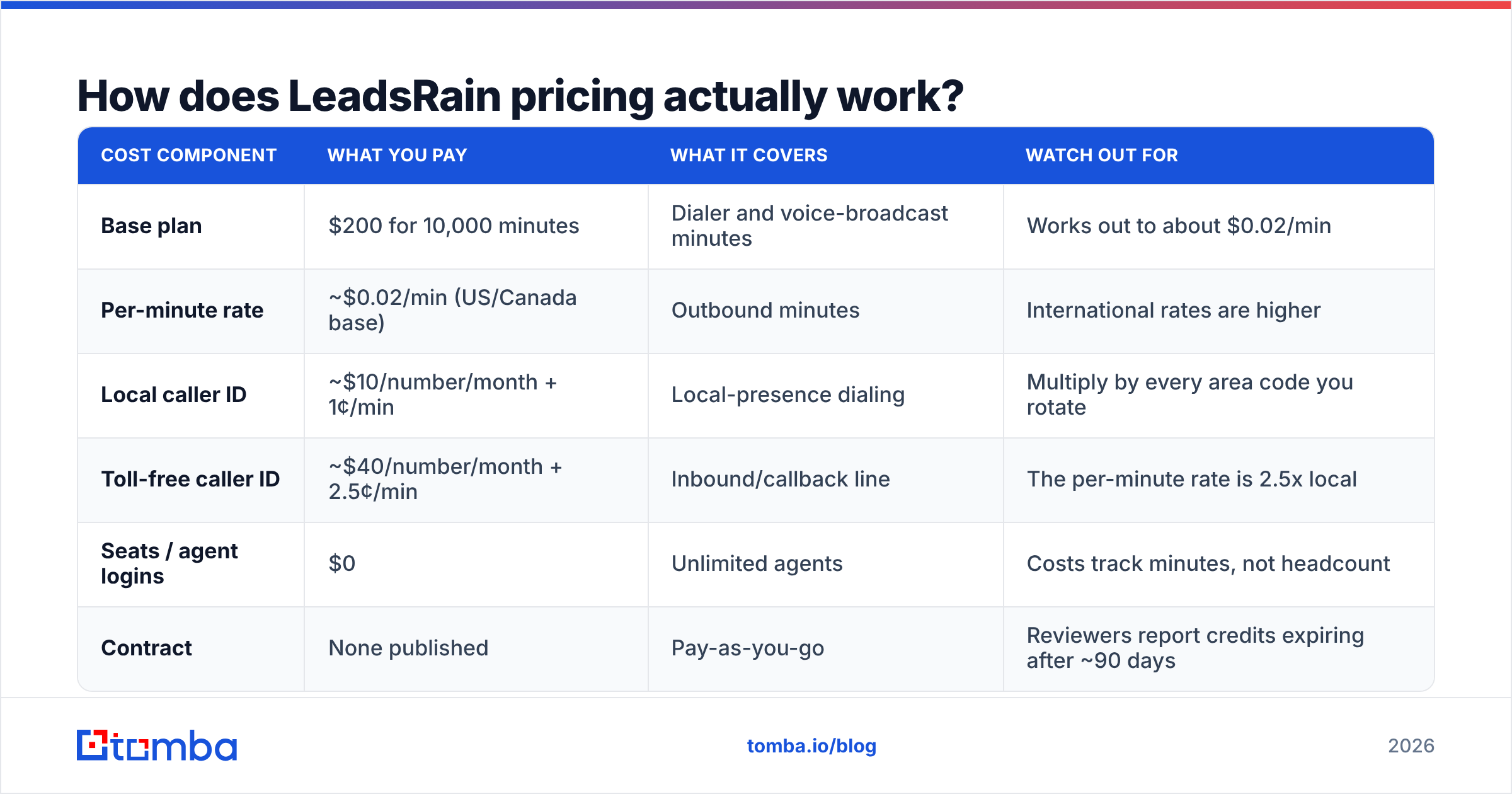
LeadsRain uses a usage-based, per-minute model. You pre-buy minutes, spend them across dialer and broadcast campaigns, and pay nothing per agent login. Here is how the published pricing breaks down as of 2026, taken from LeadsRain's predictive dialer pricing page and its main price page.
| Cost component | What you pay | What it covers | Watch out for |
|---|---|---|---|
| Base plan | $200 for 10,000 minutes | Dialer and voice-broadcast minutes | Works out to about $0.02/min |
| Per-minute rate | ~$0.02/min (US/Canada base) | Outbound minutes | International rates are higher |
| Local caller ID | ~$10/number/month + 1¢/min | Local-presence dialing | Multiply by every area code you rotate |
| Toll-free caller ID | ~$40/number/month + 2.5¢/min | Inbound/callback line | The per-minute rate is 2.5x local |
| Seats / agent logins | $0 | Unlimited agents | Costs track minutes, not headcount |
| Contract | None published | Pay-as-you-go | Reviewers report credits expiring after ~90 days |
Two things stand out. First, headcount doesn't show up in the price. Adding ten temporary agents for a two-week campaign changes nothing on your invoice except the minutes they burn. Most seat-based dialers can't match that.
Second, the base rate isn't the whole bill. Caller IDs are a monthly charge with their own per-minute rate. Teams that use local presence often rent a pool of numbers to rotate area codes and protect answer rates. Five local numbers add about $50/month before a single call goes out.
Pricing changes often in this category. Confirm current numbers on LeadsRain's pricing page before you commit, and ask sales directly whether prepaid minutes expire.
What does LeadsRain really cost for a typical team?#
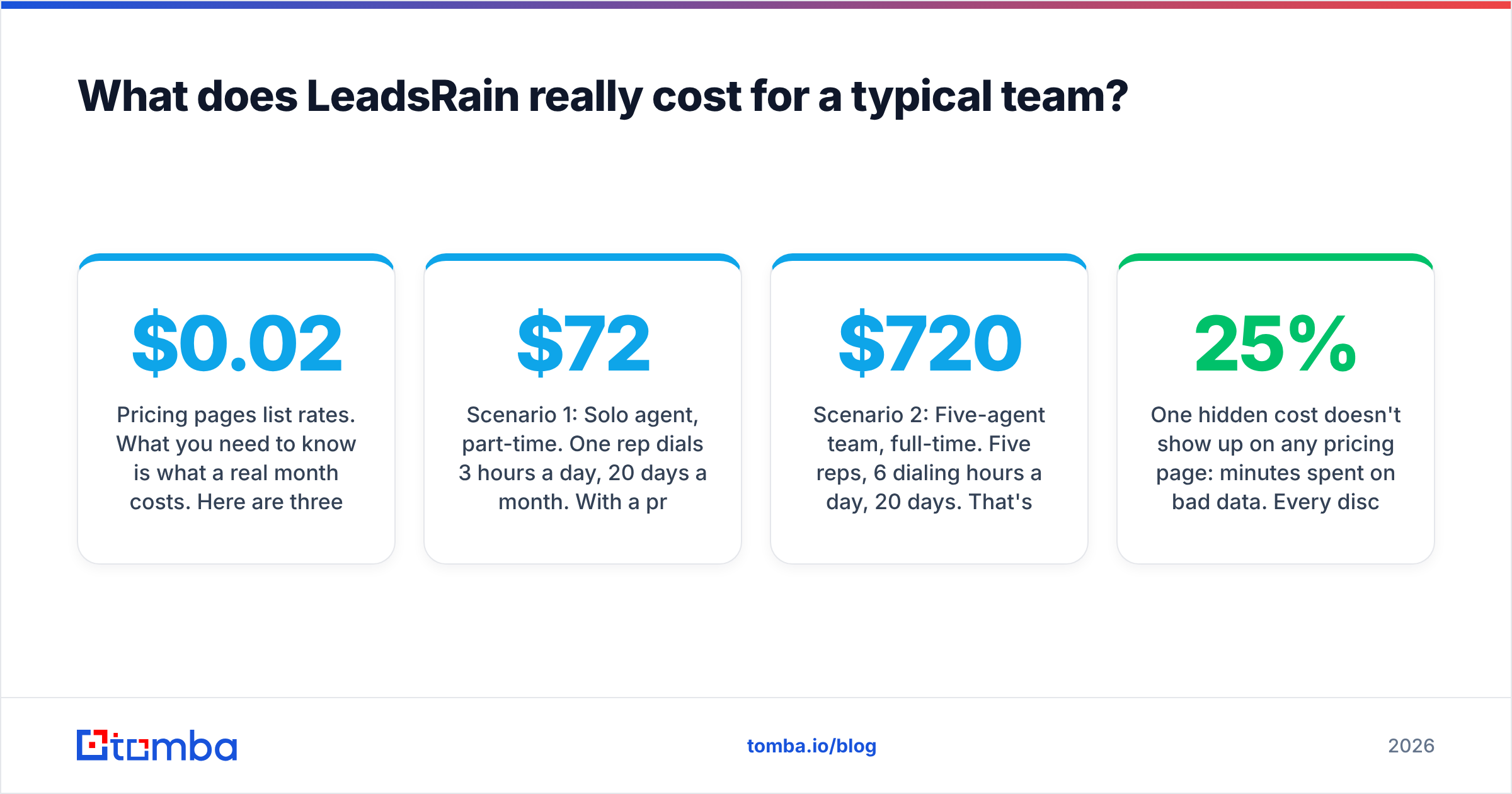
Pricing pages list rates. What you need to know is what a real month costs. Here are three illustrative scenarios based on the published ~$0.02/min rate. They are estimates, not quotes.
Scenario 1: Solo agent, part-time. One rep dials 3 hours a day, 20 days a month. With a predictive dialer, billable line time can come close to wall-clock time, so call it roughly 3,600 minutes. That's about $72 in minutes plus $10 for one local number, so around $82/month. This is where LeadsRain looks cheapest.
Scenario 2: Five-agent team, full-time. Five reps, 6 dialing hours a day, 20 days. That's about 36,000 minutes, or around $720, plus five local numbers ($50), for about $770/month. A per-seat dialer at a hypothetical $150/seat would be $750 for the same team. That's roughly a tie, and the seat-based tool wins once your reps dial longer.
Scenario 3: Voice broadcast burst. A 50,000-contact broadcast with a 30-second message. Billing depends on connected minutes and increments, but it's plausibly in the low hundreds of dollars for the campaign. A per-seat tool can't do this economically at all, because nobody is sitting in a seat.
The pattern is clear. LeadsRain is cheapest when usage is spiky or when agents are part-time. It gets more expensive than seat pricing as your team's daily dialing hours go up.

One hidden cost doesn't show up on any pricing page: minutes spent on bad data. Every disconnected number, wrong person, and gatekeeper loop burns billable time. If 25% of a list is stale, a quarter of your minute budget goes to calls that can never convert. A per-minute model penalizes dirty lists harder than a per-seat model does.
What do LeadsRain reviews say?#
The review base is small, and you should weigh it that way. As of 2026, LeadsRain has about 4.5/5 on Capterra from under ten reviews and around 3/5 on G2 from two. That's too few for strong conclusions, but the same themes keep appearing.
What reviewers like:
- Speed and simplicity. Several users describe it as one of the fastest, easiest dialers they've used. Campaign setup is quick and agents need very little training.
- No seat fees. Agencies and seasonal teams like being able to scale headcount without renegotiating a contract.
- Support, sometimes. Some reviewers praise individual support reps by name and give support top marks.
- Breadth of channels. Dialer, voice broadcast, ringless voicemail, and SMS all in one account, drawing on one minute balance.
What reviewers criticize:
- Answering-machine detection. This is the most serious recurring complaint. Users report being charged for calls that hit voicemail even with AMD switched on. On a per-minute plan, AMD accuracy directly affects cost.
- Inconsistent support. The same reviews that praise support also include reports of slow or unresponsive tickets. Your experience may depend on timing and account size.
- Dated interface. The UI works but looks older than modern sales tools, and reporting is fairly basic.
- No free trial. You commit money before you can test connect rates on your own lists.
- Credit expiry. Third-party reviewers report that prepaid credits expire after about 90 days. That hurts teams that only run campaigns now and then.
LeadsRain pricing reviews pros and cons at a glance#
| Pros | Cons |
|---|---|
| No per-seat pricing, so agents are effectively unlimited | AMD accuracy complaints mean you may pay for voicemail hits |
| Low base rate (~$0.02/min) | Caller IDs add recurring monthly fees |
| Dialer, broadcast, RVM, SMS, and IVR in one account | Interface and reporting feel dated |
| Fast campaign setup with minimal training | No free trial published |
| No long-term contract | Credits reportedly expire after ~90 days |
| Good fit for bursty or seasonal campaigns | Thin review base, so hard to benchmark reliability |
Is LeadsRain better than a per-seat dialer?#
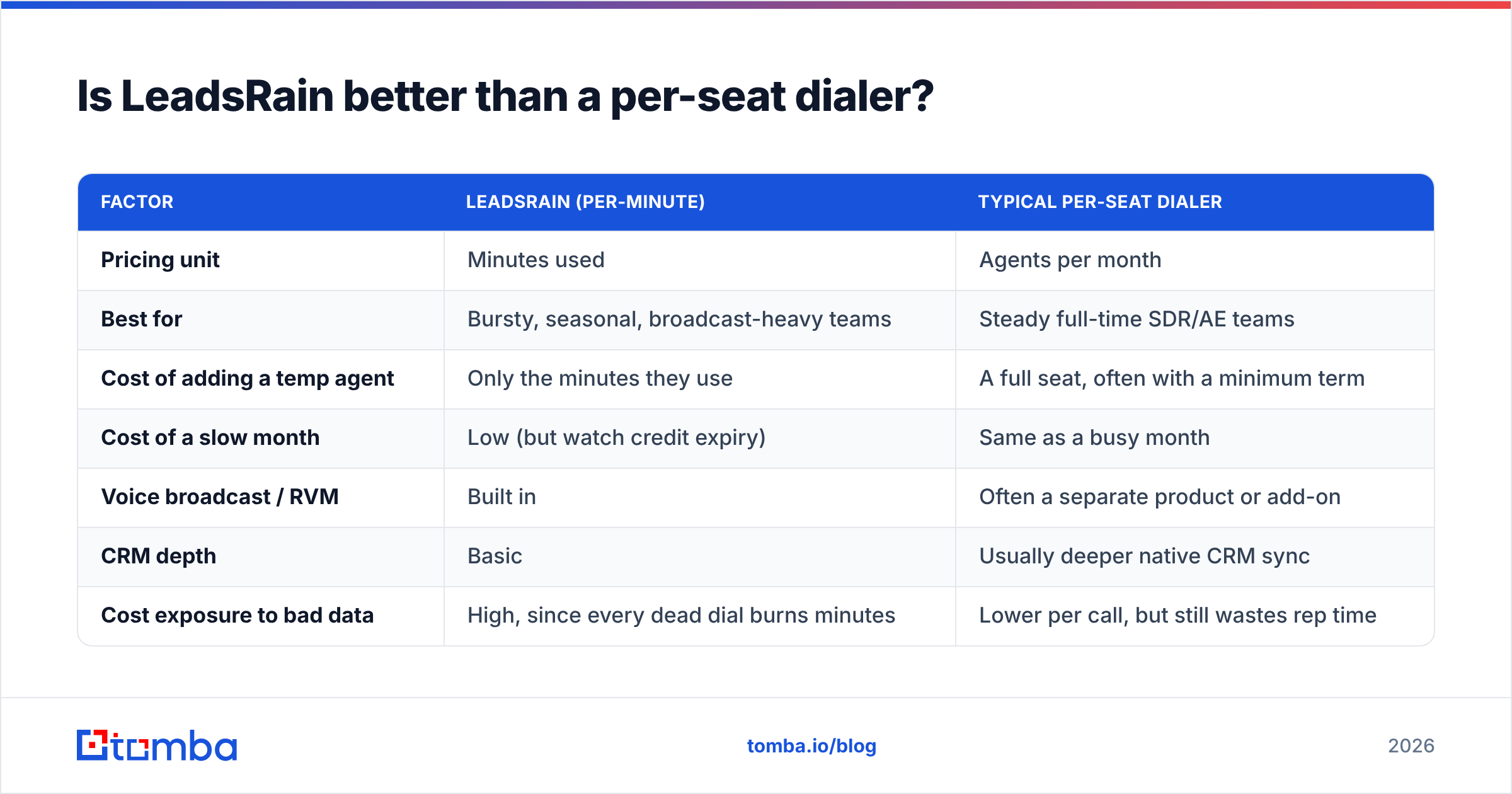
It depends on how your team works, not on which tool has more features. Here's how LeadsRain's model compares with the per-seat model used by dialers such as PhoneBurner, Kixie, and Aircall:
| Factor | LeadsRain (per-minute) | Typical per-seat dialer |
|---|---|---|
| Pricing unit | Minutes used | Agents per month |
| Best for | Bursty, seasonal, broadcast-heavy teams | Steady full-time SDR/AE teams |
| Cost of adding a temp agent | Only the minutes they use | A full seat, often with a minimum term |
| Cost of a slow month | Low (but watch credit expiry) | Same as a busy month |
| Voice broadcast / RVM | Built in | Often a separate product or add-on |
| CRM depth | Basic | Usually deeper native CRM sync |
| Cost exposure to bad data | High, since every dead dial burns minutes | Lower per call, but still wastes rep time |
Choose LeadsRain if you run campaigns in waves, rely on voice broadcasting or ringless voicemail, use part-time or contract agents, or run an agency that needs to spin client campaigns up and down.
Choose a per-seat dialer if you have a stable team dialing six or more hours a day, need tight CRM logging for pipeline reporting, or care more about predictable monthly spend than about the lowest possible floor.
Whichever model you pick, check the compliance side yourself. Predictive dialing, voice broadcasting, and ringless voicemail all fall under TCPA and similar rules that vary by country. The software gives you the tools, but you are responsible for how you use them.
How do you keep LeadsRain costs under control?#
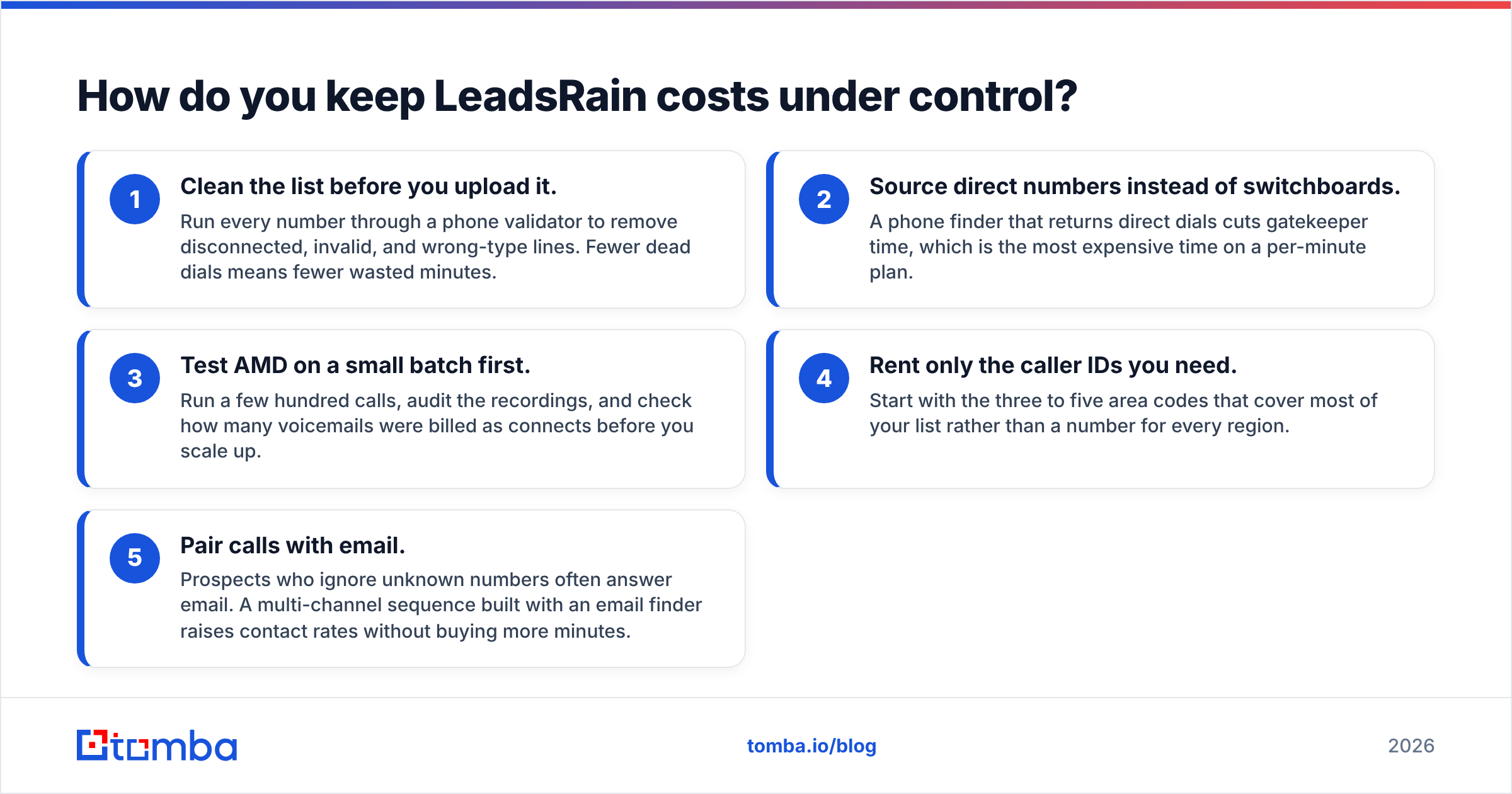
If you go with LeadsRain, these five habits have the biggest effect on your per-minute bill:
- Clean the list before you upload it. Run every number through a phone validator to remove disconnected, invalid, and wrong-type lines. Fewer dead dials means fewer wasted minutes.
- Source direct numbers instead of switchboards. A phone finder that returns direct dials cuts gatekeeper time, which is the most expensive time on a per-minute plan.
- Test AMD on a small batch first. Run a few hundred calls, audit the recordings, and check how many voicemails were billed as connects before you scale up.
- Rent only the caller IDs you need. Start with the three to five area codes that cover most of your list rather than a number for every region.
- Pair calls with email. Prospects who ignore unknown numbers often answer email. A multi-channel sequence built with an email finder raises contact rates without buying more minutes.
Where do data quality and the dialer meet?#
A dialer is a delivery mechanism. LeadsRain can place thousands of calls an hour. But it can't tell whether the person on the other end is the VP of Operations you wanted or a number that was reassigned last year.
That's why teams that get the most out of minute-based dialers treat data as a separate line item. They enrich contacts before a campaign and verify numbers and emails in bulk. They also remove duplicates so the same prospect isn't dialed three times from three lists. If you already pay per minute, a small spend on data accuracy is usually the best-ROI line in your outbound budget. You can compare data costs on the Tomba pricing page against the minutes you'd otherwise waste. Tomba starts with a free tier of 25 searches a month, and paid plans run from $49/month (Starter) to $249/month (Pro).
So is LeadsRain worth it in 2026?#
That's the bottom line on LeadsRain pricing reviews pros and cons: for the right team, yes. LeadsRain is a low-cost, no-seat-fee dialer and broadcaster that suits agencies, seasonal campaigns, and broadcast-heavy outbound. The $200 entry point for 10,000 minutes is easy to test, and paying nothing per agent is a real structural advantage.
It's a weaker choice if you need polished analytics, deep CRM workflows, or a heavily reviewed vendor with a long reliability track record. The AMD billing complaints deserve a real test before you commit a large budget. Ask about credit expiry in writing, too.
Before you pick a dialer, make sure the list you load into it is worth the minutes. Tomba Email Finder finds verified professional email addresses by name, domain, or company, so you can build clean multi-channel lists, reach prospects who never pick up, and spend your LeadsRain minutes on people who can actually buy. Start on the free tier and see how much of your current list holds up.
Related guides#
// get started
Find, verify and enrich your first contacts today
Start on the free plan with 25 searches a month, then scale when your team is ready.
Free plan · No credit card required · GDPR & CCPA
// about the author