LeadSwift Pricing 2026: Plans, Real Costs and Who It Fits
LeadSwift's plans go from $24.99 to $99.99 a month, and every tier gets the same features. What changes is how many searches you can run per day. Here is what each search costs and when a different tool makes more sense.
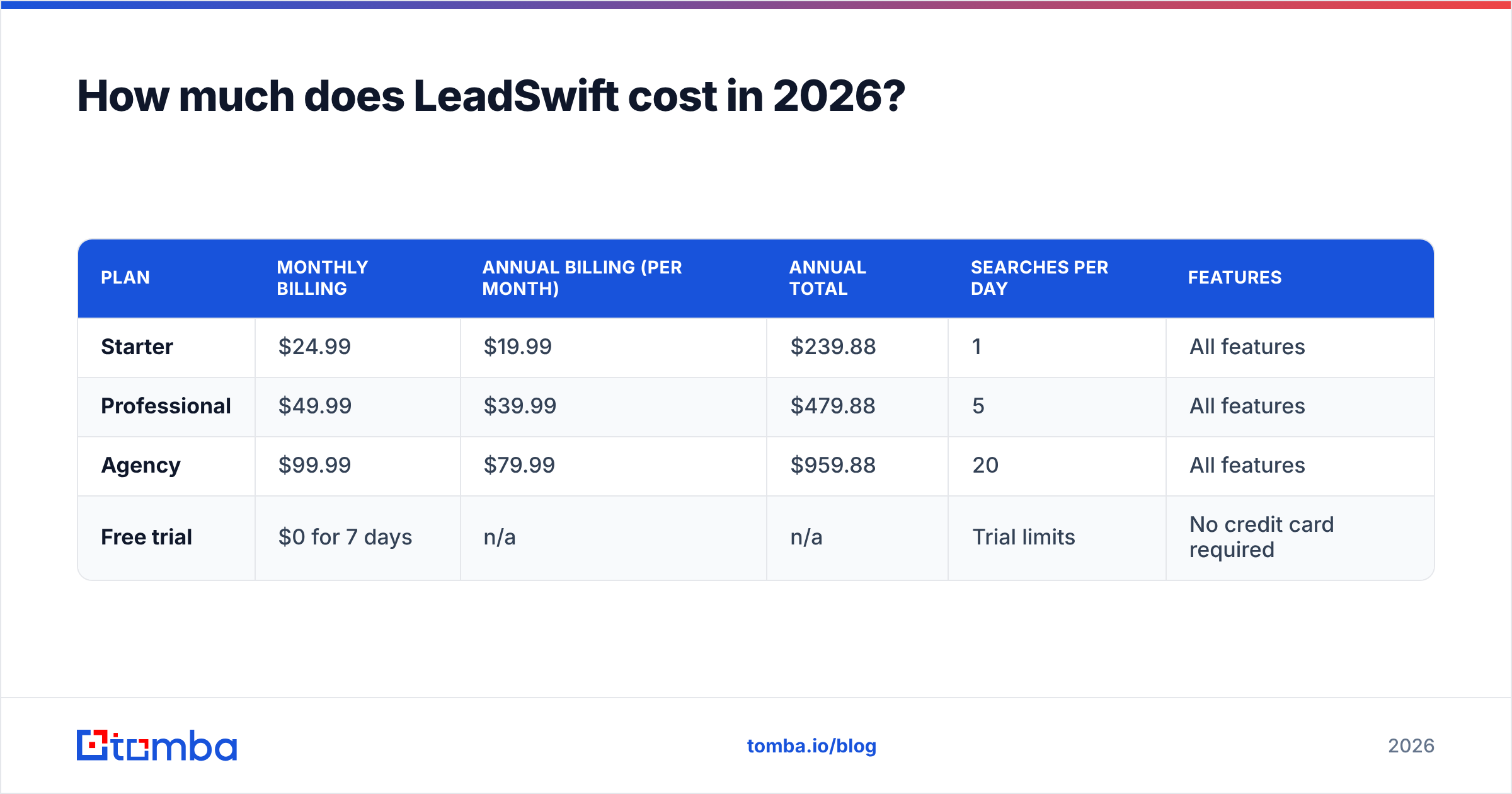
- LeadSwift has three paid plans: Starter at $24.99/mo, Professional at $49.99/mo and Agency at $99.99/mo on monthly billing. Annual billing cuts that to about $19.99, $39.99 and $79.99 per month.
- Every plan has the same features. The only difference between tiers is the number of searches you can run per day: 1, 5 or 20.
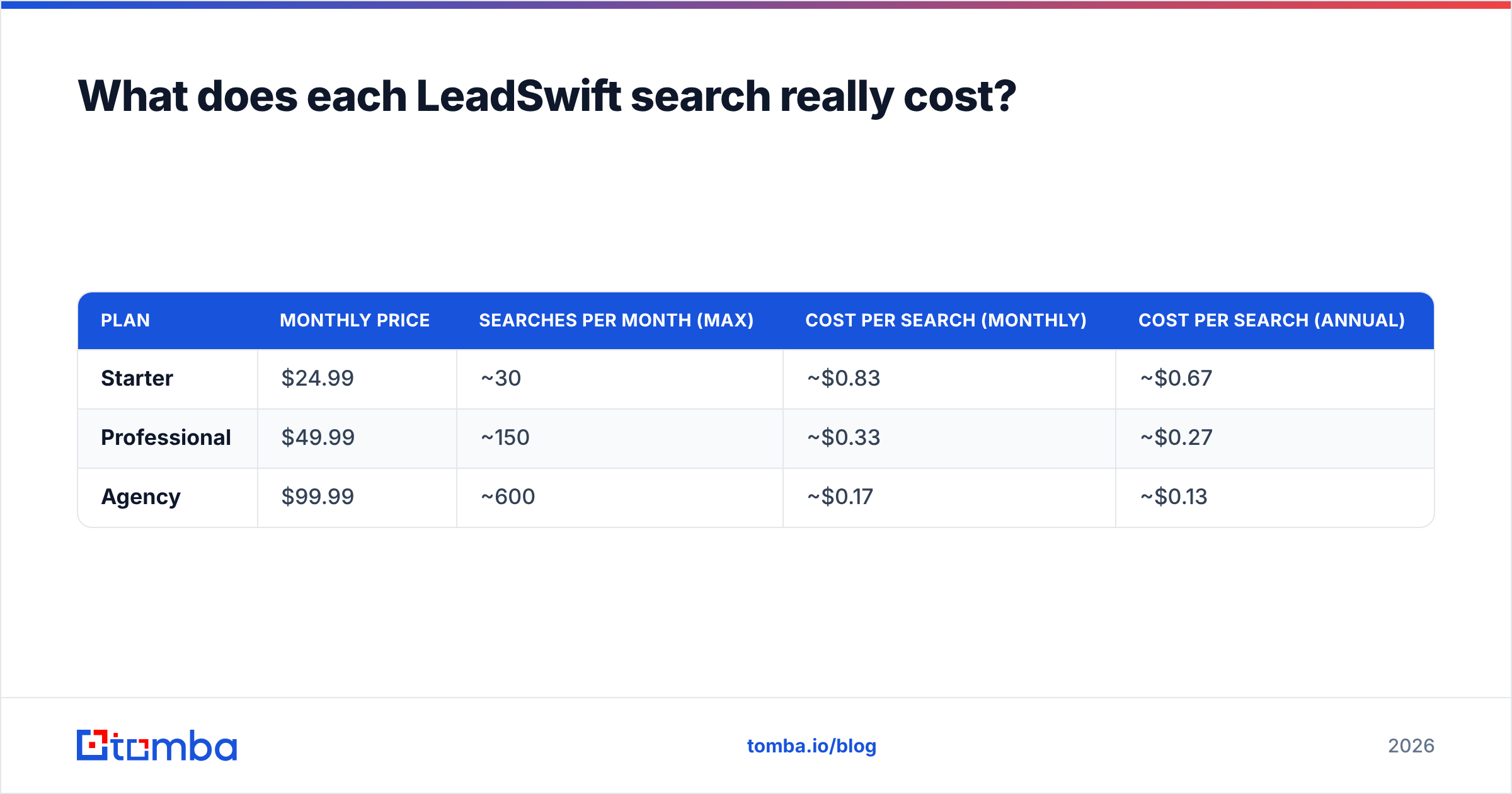
- The real cost depends on search volume. One Starter search works out to about $0.83. One Agency search costs about $0.17.
- LeadSwift is built for local-business prospecting (Google Maps-style searches, website audits, built-in outreach). If you sell to named decision-makers at B2B companies, a dedicated email finder usually fits better.
- Try before you commit. There is a 7-day free trial with no credit card. LeadSwift calls its published prices early-adopter rates, so confirm what your renewal price will be before you pay for a year.
What is LeadSwift, and what are you actually paying for?#
LeadSwift is a lead-generation tool for agencies, freelancers and service businesses that sell to local companies. You search by business type and location, for example "dentists in Austin". LeadSwift returns businesses along with their contact details, social profiles and a snapshot of their website's health: SSL, mobile-friendliness, tracking pixels and similar signals.
That website audit is the reason agencies buy it. If you sell web design, SEO or paid ads, a list of plumbers whose sites fail on mobile is a warm pitch. You aren't sending a generic cold email.
LeadSwift also includes outreach. According to its official pricing page and third-party listings, every plan comes with email sending, sender rotation, throttling controls, follow-up sequences and a unified reply inbox. So you're paying for three things in one subscription:
- Discovery. Finding local businesses by category and geography.
- Qualification. Website audit data you can use to find a pain point.
- Outreach. Sequencing and sending from inside the same tool.
This matters for pricing because you aren't buying data credits the way you would with most contact databases. You're buying access to searches, and each search can return many leads. That makes LeadSwift's pricing model unusual, and it's why comparing sticker prices alone will mislead you.
How much does LeadSwift cost in 2026?#
Here are the published tiers at the time of writing (September 2026). Prices come from LeadSwift's pricing page and its Capterra listing. LeadSwift labels them early-adopter rates, so check the live page before you buy.
| Plan | Monthly billing | Annual billing (per month) | Annual total | Searches per day | Features |
|---|---|---|---|---|---|
| Starter | $24.99 | $19.99 | $239.88 | 1 | All features |
| Professional | $49.99 | $39.99 | $479.88 | 5 | All features |
| Agency | $99.99 | $79.99 | $959.88 | 20 | All features |
| Free trial | $0 for 7 days | n/a | n/a | Trial limits | No credit card required |
A few things stand out:
- No feature gating. Unlike most SaaS tools, LeadSwift doesn't keep exports, integrations or outreach for the higher tiers. Every plan includes unlimited leads, contacts, exports and data points.
- Annual billing saves about 20%. On the Agency plan that's $240 a year ($1,199.88 monthly vs. $959.88 annual).
- Annual plans can be paused. Several review sites report you can pause an annual plan for up to three months. That helps seasonal agencies, but confirm the current terms with support.
At first glance, even the top tier costs less than a single seat on many enterprise prospecting platforms. The more useful question is how many searches you'll actually use.
What does each LeadSwift search really cost?#
Since tiers only differ by daily searches, cost per search is the number to look at. Here's the math assuming you use every search in a 30-day month:
| Plan | Monthly price | Searches per month (max) | Cost per search (monthly) | Cost per search (annual) |
|---|---|---|---|---|
| Starter | $24.99 | ~30 | ~$0.83 | ~$0.67 |
| Professional | $49.99 | ~150 | ~$0.33 | ~$0.27 |
| Agency | $99.99 | ~600 | ~$0.17 | ~$0.13 |
Those numbers only hold if you use every search every day. Most people don't. If you prospect twice a week on Starter, you use about 8 searches a month, and your real cost per search goes above $3.
The daily cap is the constraint you'll hit first. You can't bank unused searches and spend 30 of them on Monday when a new campaign starts. One search per day on Starter works for testing a niche, but it's slow for building a pipeline.
Leads per search also varies a lot. A search for "roofers in Dallas" can return hundreds of businesses. A search for "veterinary orthopedic surgeons in Boise" might return a dozen. Your cost per lead depends on how dense your niche is, so run your actual target searches during the trial and count the results.
What hidden costs and limits should you watch?#
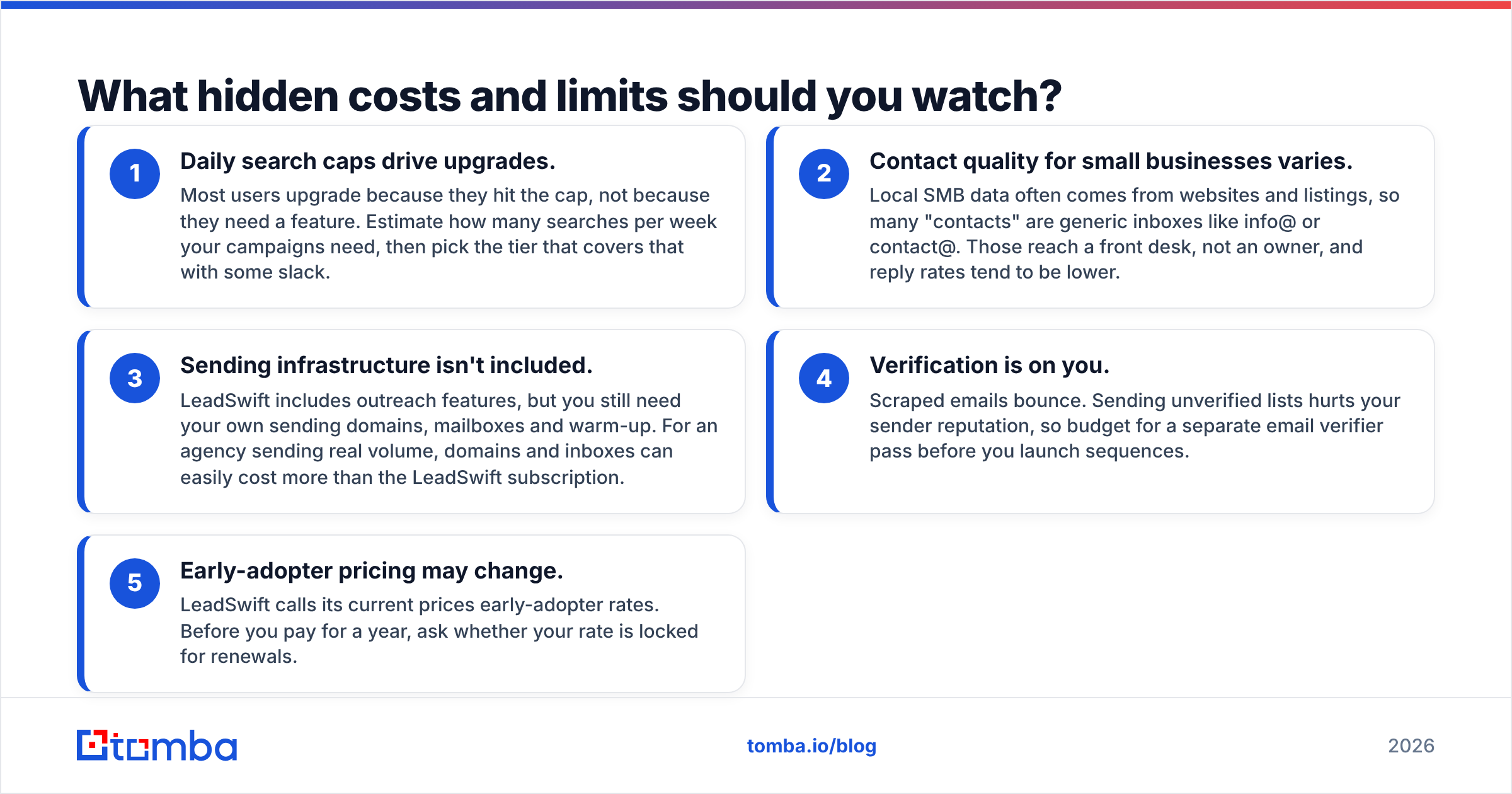
The subscription price is only part of what you'll pay. Before you commit, check these five things:
- Daily search caps drive upgrades. Most users upgrade because they hit the cap, not because they need a feature. Estimate how many searches per week your campaigns need, then pick the tier that covers that with some slack.
- Contact quality for small businesses varies. Local SMB data often comes from websites and listings, so many "contacts" are generic inboxes like info@ or contact@. Those reach a front desk, not an owner, and reply rates tend to be lower.
- Sending infrastructure isn't included. LeadSwift includes outreach features, but you still need your own sending domains, mailboxes and warm-up. For an agency sending real volume, domains and inboxes can easily cost more than the LeadSwift subscription.
- Verification is on you. Scraped emails bounce. Sending unverified lists hurts your sender reputation, so budget for a separate email verifier pass before you launch sequences.
- Early-adopter pricing may change. LeadSwift calls its current prices early-adopter rates. Before you pay for a year, ask whether your rate is locked for renewals.
None of these are unique to LeadSwift, and every scraping-based tool has some version of them. But the gap between "$24.99 a month" and the total cost of running outbound is real, so plan for it.
Is LeadSwift worth it for your use case?#
The answer depends on who you sell to. Here's a direct breakdown.
LeadSwift is worth it if you:
- Run a web design, SEO, PPC or marketing agency that sells to local businesses
- Need pain-point data (a broken site, no SSL, no tracking pixel) to personalize your pitch
- Want discovery, qualification and sending in one inexpensive subscription
- Prospect in consistent daily batches, which makes good use of the daily search model
LeadSwift is probably not the right fit if you:
- Sell B2B software or services to mid-market and enterprise companies
- Need to reach named decision-makers (VP of Sales, Head of Marketing) instead of the business in general
- Already run outreach in Instantly, Lemlist, HubSpot or another sequencer and only need data
- Need an API or bulk enrichment to process CRM records at scale
The second group isn't criticism of LeadSwift. It's a different product category. LeadSwift answers "which local businesses in this area need what I sell?" A B2B email finder answers "what is the direct email address of this specific person at this specific company?" Those are different jobs.
How does LeadSwift compare to Tomba and other lead tools?#
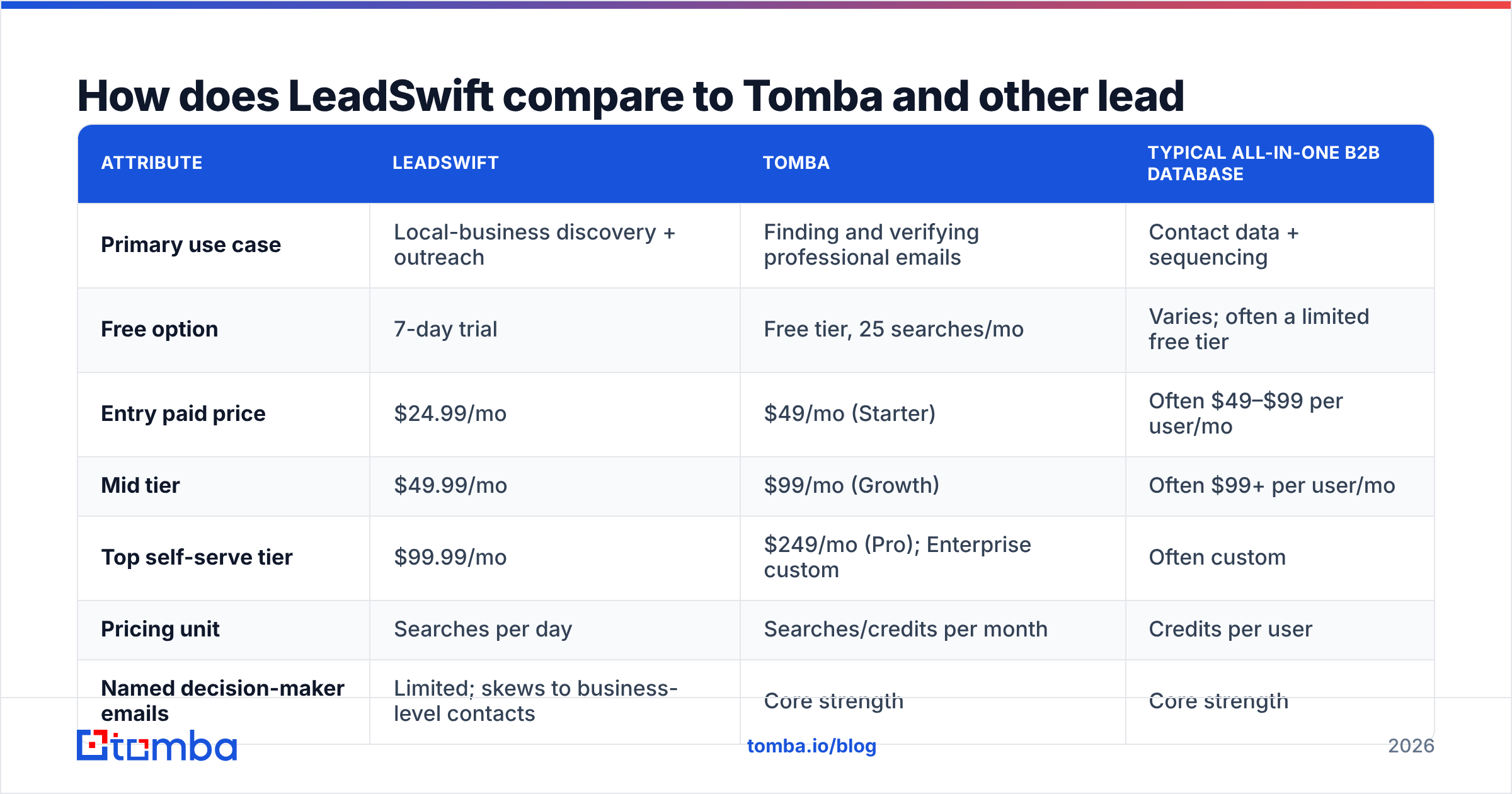
If you're looking up LeadSwift pricing, you're probably comparing it against at least one alternative. The table below shows how the main models differ. Tomba's prices come from its own pricing page. LeadSwift's prices come from the sources cited above.
| Attribute | LeadSwift | Tomba | Typical all-in-one B2B database |
|---|---|---|---|
| Primary use case | Local-business discovery + outreach | Finding and verifying professional emails | Contact data + sequencing |
| Free option | 7-day trial | Free tier, 25 searches/mo | Varies; often a limited free tier |
| Entry paid price | $24.99/mo | $49/mo (Starter) | Often $49–$99 per user/mo |
| Mid tier | $49.99/mo | $99/mo (Growth) | Often $99+ per user/mo |
| Top self-serve tier | $99.99/mo | $249/mo (Pro); Enterprise custom | Often custom |
| Pricing unit | Searches per day | Searches/credits per month | Credits per user |
| Named decision-maker emails | Limited; skews to business-level contacts | Core strength | Core strength |
| Website audit data | Yes | No | Rarely |
| Built-in email sending | Yes | No (integrates with sequencers) | Often yes |
| Email verification | Not a focus | Built-in verifier + catch-all checks | Varies |
| API / bulk processing | Not a focus | Bulk email finder, API, Sheets, CRM integrations | Varies |
The takeaway: LeadSwift costs less if you need local discovery and outreach together. Tomba costs more at entry level but does a different job. It finds and verifies the email address of the person you want to reach, and it plugs into the sending tool you already use.

Many agencies use both. They run LeadSwift to find and qualify local businesses with weak websites, then take those domains into Tomba's domain search to get the owner's or marketing manager's direct address instead of info@. That combination usually lifts reply rates more than either tool on its own.
When is a cheaper or different tool the better pick?#
LeadSwift is already at the low end of the market on price, so "cheaper" usually means a different pricing model rather than a lower number. Consider something else in these cases:
- Your prospecting is bursty. If you build lists once a month in a big batch, a daily cap works against you. Monthly credit pools, like most email finders use, let you spend your whole budget in one afternoon.
- You only need emails for a list you already have. If you have 500 company domains from a trade-show list, you don't need a discovery tool. Upload them to a bulk finder and pay only for the contacts you need.
- You already pay for a sequencer. If Instantly, Smartlead or HubSpot handles your sending, you're paying for LeadSwift outreach features you won't use. A pure data tool avoids the overlap.
- You sell above the SMB market. Company size, job title and seniority targeting matter more than website audits at that level. Business-level contacts won't get you far.
You can check a tool's value per contact on the Tomba pricing page and compare it with the cost-per-search numbers above.
How do you get the most out of a LeadSwift trial?#
Seven days goes quickly. To get a real signal instead of a vague impression:
- Pick three actual target niches before you start. Don't test with "restaurants in New York". Use the niches you'll really sell to.
- Count leads per search. Log how many businesses each search returns. That number turns cost per search into cost per lead.
- Check contact depth. For 20 random results, note whether the email is generic (info@) or personal (jane@). This is the biggest predictor of reply rate.
- Verify a sample. Run 50 emails through a verifier and see how many bounce. A high invalid rate means you need a cleanup step in your budget.
- Send one small campaign. Use the built-in outreach on a warmed mailbox to 30–50 prospects so you know whether the full workflow holds up.
- Ask about renewal pricing. Get the early-adopter rate question answered in writing before the trial ends.
When the trial ends, you'll have your own cost per qualified lead. That's the only number that tells you whether LeadSwift's pricing works for you.
Frequently asked questions about LeadSwift pricing#
Does LeadSwift have a free plan?#
No. There's no permanent free plan, only a 7-day free trial with no credit card required. After that you pick Starter, Professional or Agency.
Do higher LeadSwift plans unlock more features?#
No. All three tiers have the same features, including unlimited leads, exports and outreach. Higher plans only raise your daily search limit from 1 to 5 to 20.
Is LeadSwift cheaper than Tomba?#
On sticker price, yes: LeadSwift starts at $24.99/mo and Tomba Starter is $49/mo. But they do different jobs. LeadSwift finds local businesses. Tomba finds and verifies named professional emails. Tomba also has a free tier with 25 searches per month, so you can test it without paying.
Can I pause or cancel a LeadSwift subscription?#
Monthly plans can be cancelled. Review sites report that annual plans can be paused for up to three months. Confirm current terms with LeadSwift before you buy annual.
Which tool should you choose?#
LeadSwift's pricing is simple and inexpensive: the same features on every plan, with tiers set by daily searches. That's a good deal for agencies that pitch local businesses every day. It's a weaker fit if you need named decision-makers, prospect in bursts or already pay for a sequencer. If what you really need is the direct email of a specific person at a specific company, the Tomba Email Finder is the better choice. Enter a name and a domain and you get a verified professional address back, in bulk or through the API, ready for the outreach tool you already use. Start with the free 25 monthly searches and see how many real decision-makers you reach.
Related guides#
// get started
Find, verify and enrich your first contacts today
Start on the free plan with 25 searches a month, then scale when your team is ready.
Free plan · No credit card required · GDPR & CCPA
// about the author