Leadworx Pricing Reviews Pros and Cons: 2026 Honest Breakdown
Leadworx tells you which companies visited your site, but not always who to email. Here is what it costs in 2026, what users praise and complain about, and when a cheaper stack makes more sense.
Looking for honest Leadworx pricing reviews pros and cons before you buy? This guide covers what the tool costs, what users say, and when a cheaper stack makes more sense.
TL;DR
Leadworx is a B2B website visitor ID tool. It shows which companies visit your site and turns that traffic into account-level leads. It adds alerts, lead scoring, and CRM sync.
Software directories list paid plans from about $119–$149/month. A team tier with unlimited users is about $559/month. Enterprise pricing is by quote. A free trial is available. Check current prices with the vendor before you budget.
Reviews are positive overall (about 4.4–4.5 out of 5 on G2 and Capterra). Users like the clean UI and useful visitor data. The main complaints are thin contact data for people and a high price for low-traffic sites.
It fits B2B teams with steady inbound traffic that want account signals. It's a poor fit if you mostly need verified emails for specific people. For that, you'll still need an email finder.
Most teams end up with two tools: visitor ID for "which company" and an email finder plus verifier for "which person, at which address".
What is Leadworx and what problem does it solve?#
Leadworx is inbound lead generation software for B2B companies. It tracks the anonymous visitors on your website, matches their IP and firmographic signals to a company, and puts the result in a dashboard and daily email digests. You see the company name, industry, size, location, which pages they viewed, and how often they came back.
Most B2B sites convert only a small share of visitors through forms. Everyone else reads the pricing page, leaves, and never fills anything in. Visitor identification tools like Leadworx try to recover part of that lost intent. Your sales team gets a list like "a 200-person logistics company in Ohio viewed your pricing page three times this week" and can act on it.
According to its listings on Capterra and other directories, the main capabilities are:
- Visitor identification: company-level matching of anonymous web traffic
- Lead scoring and segmentation: ranking accounts by engagement and fit
- Scheduled alerts: daily or real-time notifications when target accounts show up
- Lead source tracking: which campaign or channel brought the visit
- Workflow automation: routing, follow-up reminders, and reporting
- CRM integrations: pushing identified accounts into your sales system
This puts Leadworx in the same category as website visitor reveal tools, not in the email-finder category. That difference matters a lot for how you judge its price.
How much does Leadworx cost in 2026?#
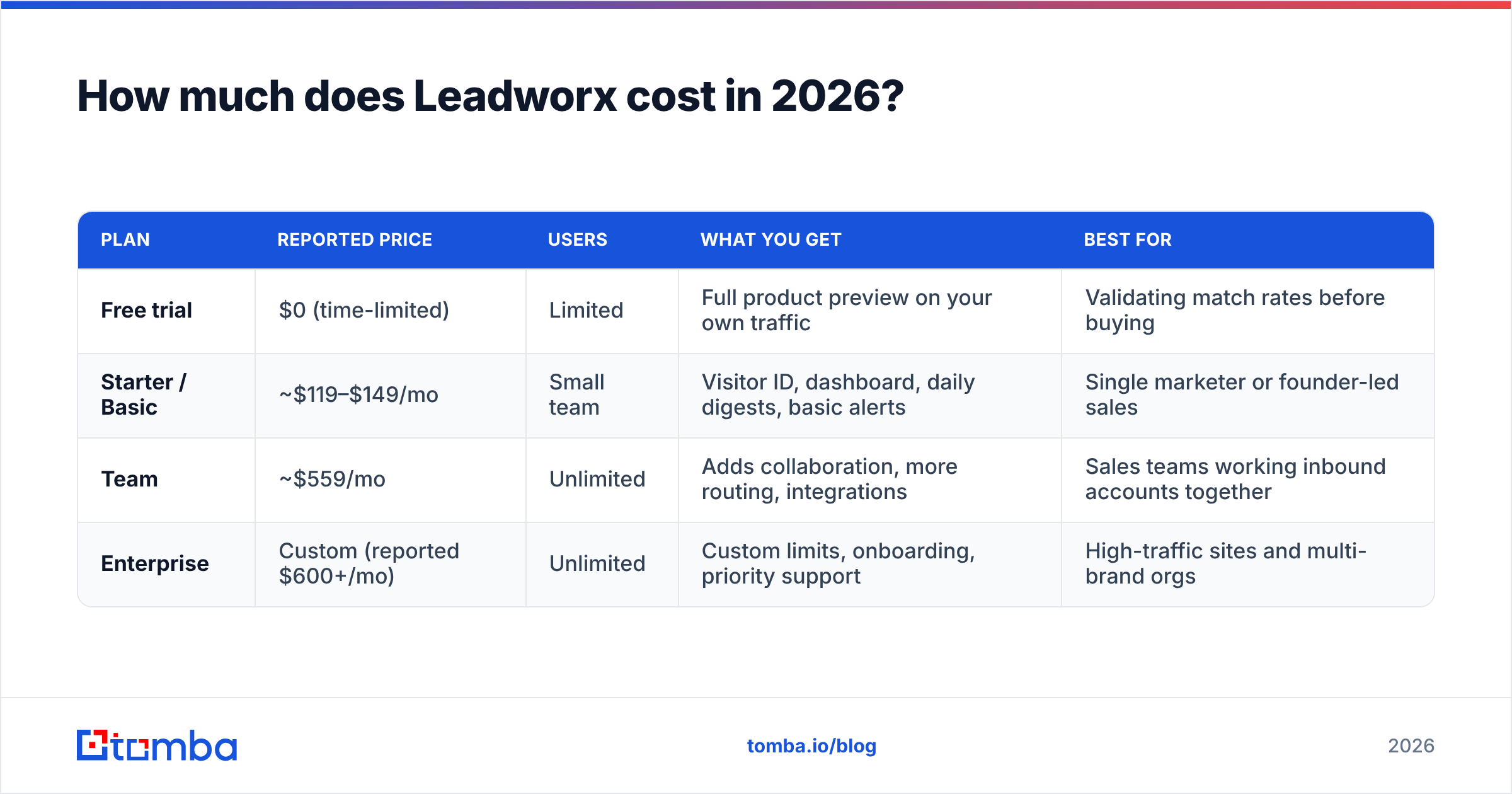
Leadworx doesn't give much pricing detail up front, and the third-party listings don't all agree. Here's what the major directories report as of 2026:
| Plan | Reported price | Users | What you get | Best for |
|---|---|---|---|---|
| Free trial | $0 (time-limited) | Limited | Full product preview on your own traffic | Validating match rates before buying |
| Starter / Basic | ~$119–$149/mo | Small team | Visitor ID, dashboard, daily digests, basic alerts | Single marketer or founder-led sales |
| Team | ~$559/mo | Unlimited | Adds collaboration, more routing, integrations | Sales teams working inbound accounts together |
| Enterprise | Custom (reported $600+/mo) | Unlimited | Custom limits, onboarding, priority support | High-traffic sites and multi-brand orgs |
Some directories list different starting prices ($119 vs $149). That usually means monthly versus annual billing, or a price change the listing hasn't caught up with. Treat these figures as a range to plan around, not a quote.
What are the hidden costs of Leadworx?#
The subscription is only part of what you'll spend. Budget for these too:
Contact data for the people behind the accounts. Leadworx is strongest at the company level. If your SDRs need the VP of Operations' email at that Ohio logistics firm, you'll usually need a separate email finder or database.
Email verification. Any address you get from visitor-ID tools, scraping, or guessing should be verified before a sequence goes out. Otherwise you risk bounces that hurt your sender reputation.
Traffic volume. Visitor ID is only as useful as the traffic behind it. A site with 2,000 monthly B2B visitors gives you a thin list, and the per-lead cost goes up fast.
RevOps time. Someone has to set up scoring rules, CRM field mapping, and alert routing. Without that, the dashboard turns into a report nobody opens.
A simple way to decide whether Leadworx is worth it: take your monthly subscription, add your contact-data and verification spend, and divide by the number of qualified accounts you actually work each month. If that cost per worked account is higher than what you pay per lead from outbound, the tool isn't paying for itself yet.
What do Leadworx reviews say?#
Reviews on G2 and Capterra lean positive. Scores sit around 4.4 on G2 and about 4.5 on Capterra. The review volume is small compared with category leaders, so any single strong opinion carries more weight than it would on a product with thousands of reviews.
What do users praise?#
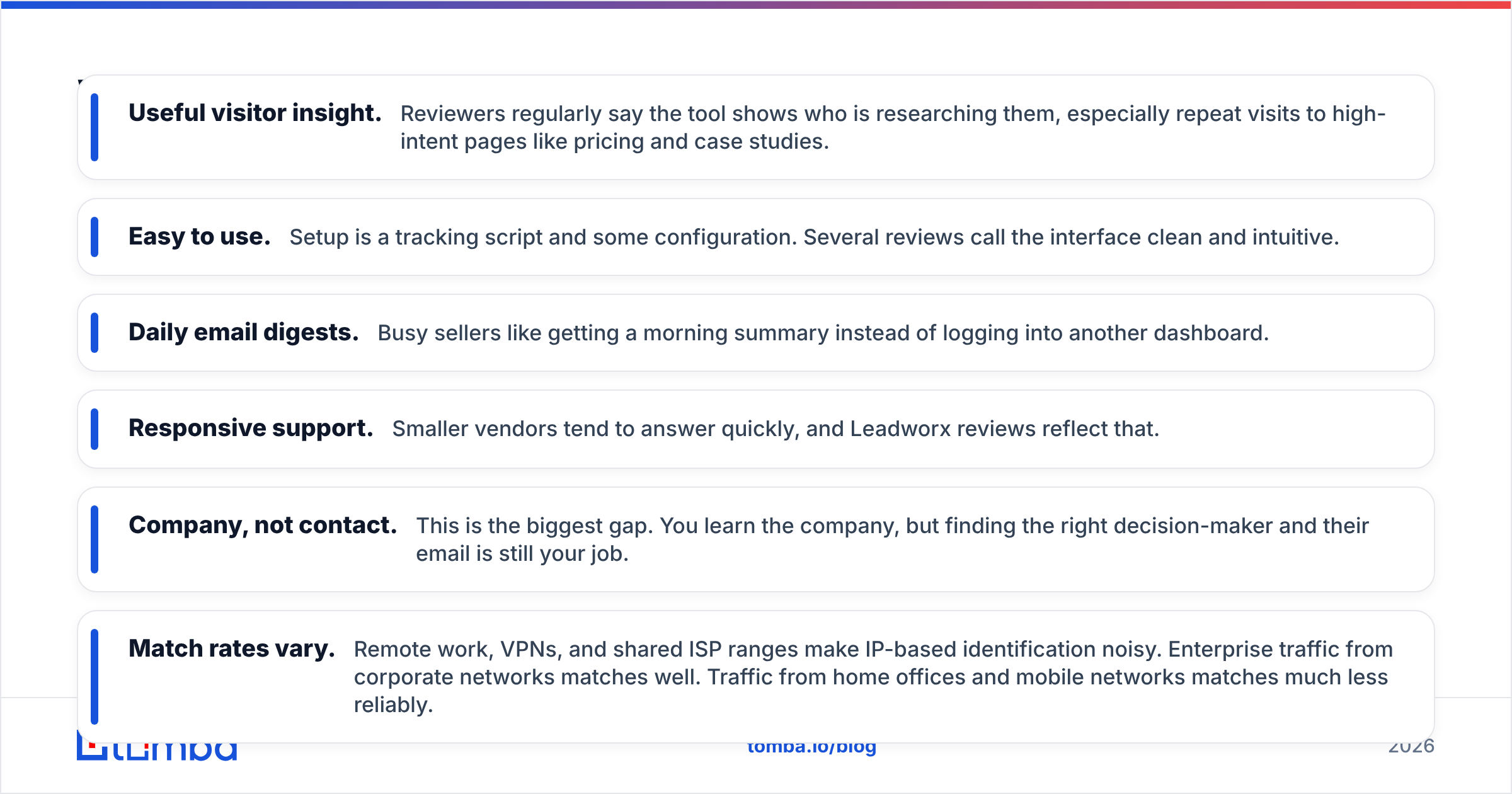
- Useful visitor insight. Reviewers regularly say the tool shows who is researching them, especially repeat visits to high-intent pages like pricing and case studies.
- Easy to use. Setup is a tracking script and some configuration. Several reviews call the interface clean and intuitive.
- Daily email digests. Busy sellers like getting a morning summary instead of logging into another dashboard.
- Responsive support. Smaller vendors tend to answer quickly, and Leadworx reviews reflect that.
What do users complain about?#
- Company, not contact. This is the biggest gap. You learn the company, but finding the right decision-maker and their email is still your job.
- Match rates vary. Remote work, VPNs, and shared ISP ranges make IP-based identification noisy. Enterprise traffic from corporate networks matches well. Traffic from home offices and mobile networks matches much less reliably.
- Price relative to traffic. Low-traffic sites often find the $100+ entry point hard to justify.
- Smaller ecosystem. It has fewer native integrations and a less active community than bigger ABM platforms.

Leadworx pricing reviews pros and cons at a glance#
Here's the short version of the Leadworx pricing reviews pros and cons in one table.
| Pros | Cons |
|---|---|
| Shows which companies visit your site, including high-intent pages | Mostly company-level. Person-level emails usually need another tool |
| Clean, easy UI with fast setup | Pricing isn't clearly listed and directories disagree |
| Daily digests and scheduled alerts fit into your team's routine | Match rates drop on remote and mobile traffic |
| Lead scoring and segmentation help you prioritize accounts | Hard to justify on low-traffic websites |
| CRM integration keeps account signals in your pipeline | Smaller integration ecosystem than enterprise ABM suites |
| Free trial lets you test match quality on your own traffic | Team plan (~$559/mo) is a big jump from Starter |
Is Leadworx better than other visitor identification tools?#
It depends on what you do after you know the company. Visitor ID tools generally fall into three groups:
- Account-level identification tools (Leadworx and similar). They're light, relatively affordable, and focused on "which company visited". They work well for small and mid-sized B2B teams.
- Enterprise ABM and intent platforms (6sense, Demandbase). They combine visitor ID with third-party intent data, advertising, and predictive scoring. Budgets usually start in the tens of thousands per year. If you're looking at that tier and find it too heavy, see our 6sense alternative breakdown.
- Visitor reveal plus contact data in one workflow. These tools pair company identification with email finding and verification, so you go straight from "this company visited" to "here is the verified email of the person who owns this problem".
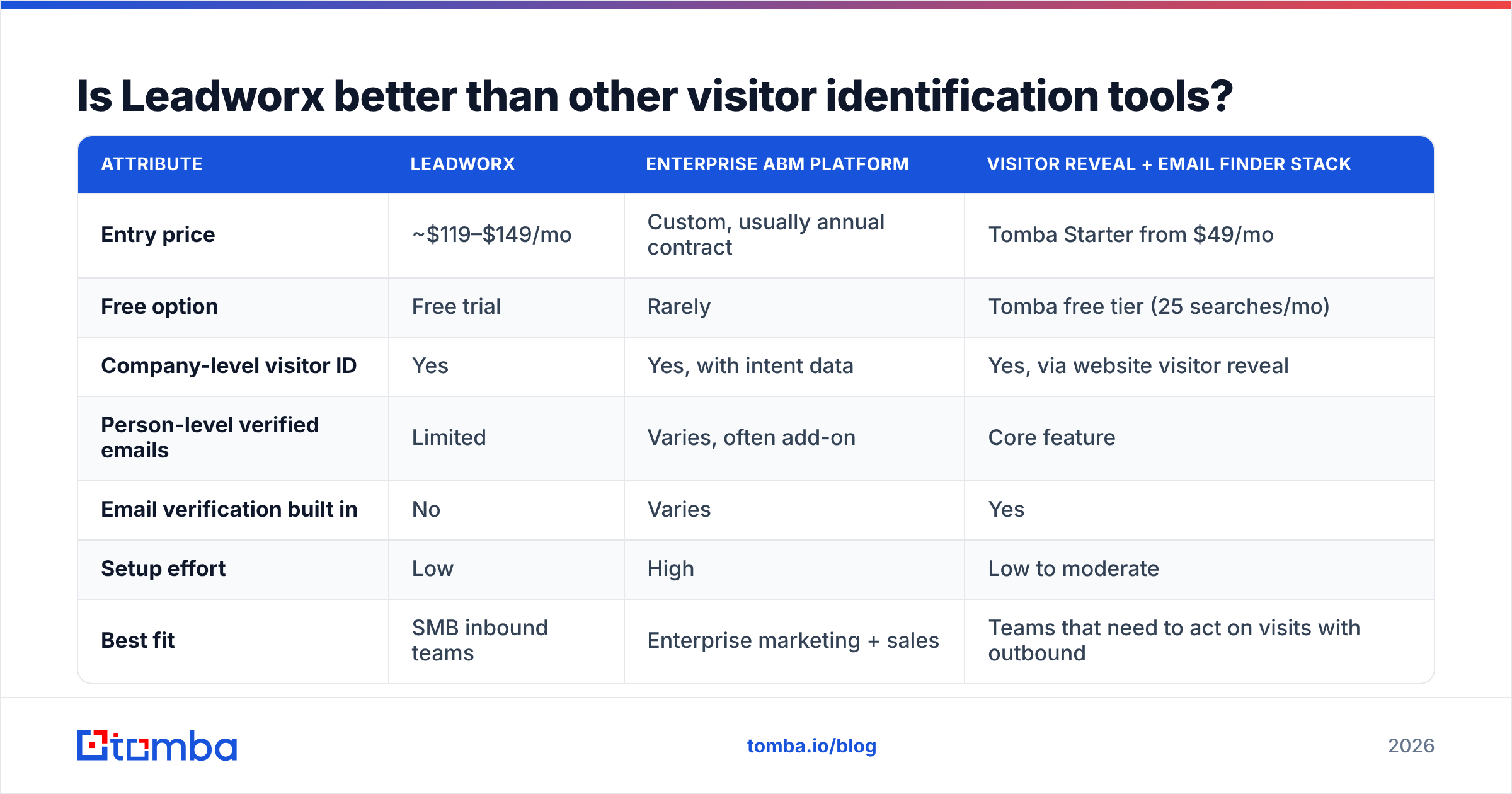
Here's how Leadworx compares with building your own stack:
| Attribute | Leadworx | Enterprise ABM platform | Visitor reveal + email finder stack |
|---|---|---|---|
| Entry price | ~$119–$149/mo | Custom, usually annual contract | Tomba Starter from $49/mo |
| Free option | Free trial | Rarely | Tomba free tier (25 searches/mo) |
| Company-level visitor ID | Yes | Yes, with intent data | Yes, via website visitor reveal |
| Person-level verified emails | Limited | Varies, often add-on | Core feature |
| Email verification built in | No | Varies | Yes |
| Setup effort | Low | High | Low to moderate |
| Best fit | SMB inbound teams | Enterprise marketing + sales | Teams that need to act on visits with outbound |
The pattern is clear. Leadworx is priced as an account-signal tool. If you already have a contact-data provider you like, it slots in cleanly. If you don't, you'll be paying for signals you can only half act on.
How do you turn a Leadworx company match into a real conversation?#
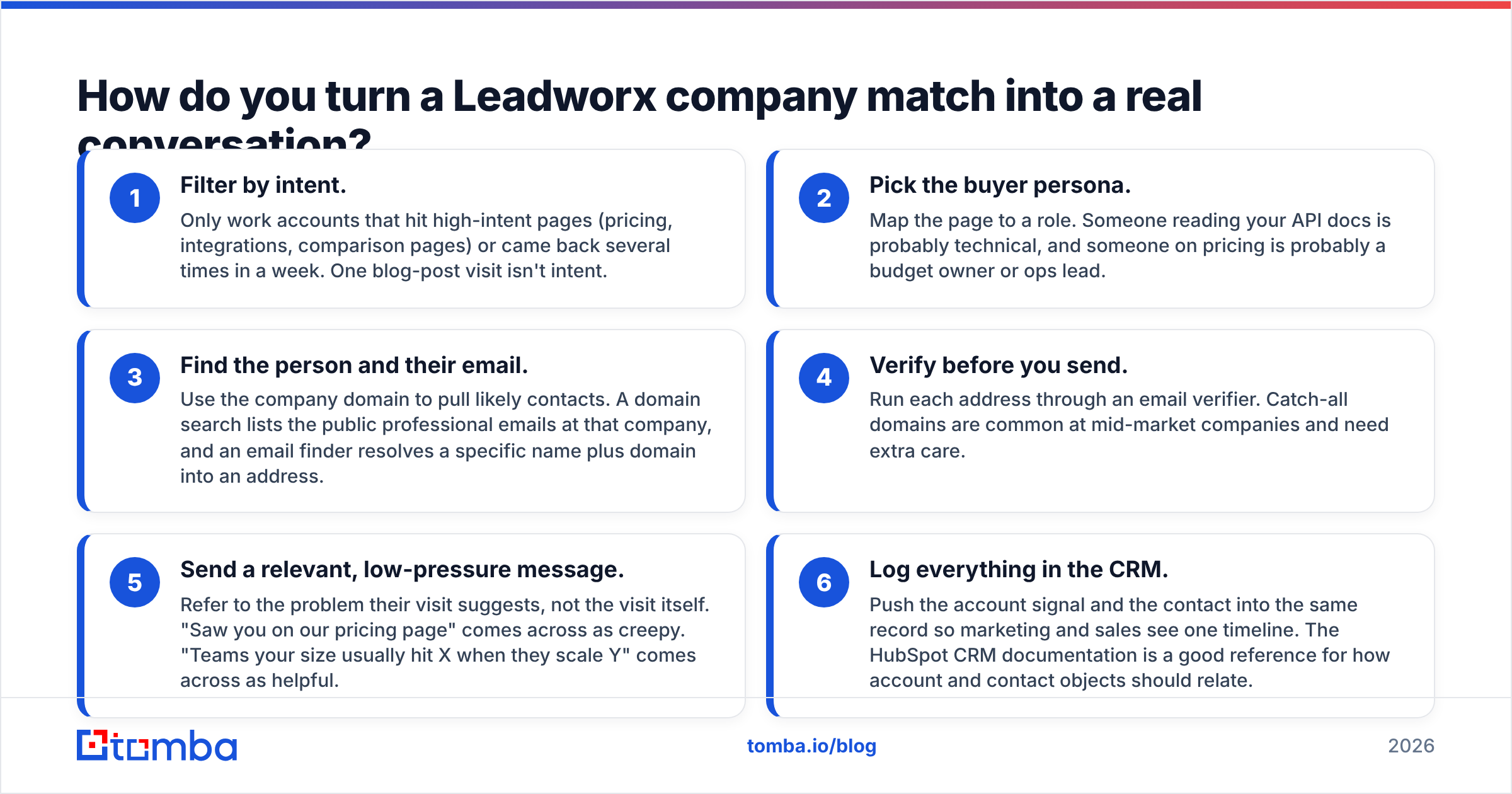
A visitor match is a starting point, not a lead you can email. The workflow that actually produces meetings looks like this:
Filter by intent. Only work accounts that hit high-intent pages (pricing, integrations, comparison pages) or came back several times in a week. One blog-post visit isn't intent.
Pick the buyer persona. Map the page to a role. Someone reading your API docs is probably technical. Someone on pricing is probably a budget owner or ops lead.
Find the person and their email. Use the company domain to pull likely contacts. A domain search lists the public work emails at that company. An email finder turns a name plus domain into an address.
Verify before you send. Run each address through an email verifier. Catch-all domains are common at mid-market companies and need extra care.
Send a relevant, low-pressure message. Refer to the problem their visit suggests, not the visit itself. "Saw you on our pricing page" comes across as creepy. "Teams your size usually hit X when they scale Y" comes across as helpful.
Log everything in the CRM. Push the account signal and the contact into the same record so marketing and sales see one timeline. The HubSpot CRM documentation is a good reference for how account and contact objects should relate.
Steps 3 and 4 are where teams using only Leadworx get stuck. They have 40 promising accounts a week and no efficient way to reach anyone inside them.

Who should buy Leadworx, and who should skip it?#
Leadworx makes sense if:
- You get meaningful B2B traffic, several thousand visits a month or more from business networks.
- Your team already has a contact-data and verification workflow and mainly lacks account signals.
- You want something lighter and cheaper than an enterprise ABM suite.
- Sellers will actually act on daily digests. Someone owns the follow-up.
Skip it, or pair it with something else, if:
- Your traffic is low or mostly from consumers, students, or job seekers.
- Your real bottleneck is finding and verifying the right person's email, not knowing which company visited.
- You can't give the tool a RevOps owner to configure scoring and routing.
- You're on a tight budget where $119–$559/month is a large share of your go-to-market spend.
Is Leadworx worth the price in 2026?#
For the right team, yes, with conditions. Leadworx is honest about what it does. It reliably turns anonymous B2B traffic into a ranked list of accounts, and reviewers consistently call it easy to use. The price is fair for a mid-traffic B2B site whose sales team follows up quickly.
It isn't a complete lead generation system on its own. Company-level data is half the job. The other half is getting from a company name to a verified inbox, and that's where most of the pipeline value actually shows up. Before you commit to an annual plan, use the free trial to answer three questions with your own data:
- What percentage of my B2B traffic does it actually identify?
- How many of those accounts match my ICP?
- How many hours does my team spend turning each match into a contactable person?
If the answer to question 3 is "too many", the fix is a better contact-data layer, not a more expensive visitor-ID tier. That's the real takeaway from the Leadworx pricing reviews pros and cons above.
What is a cheaper way to reach the people behind your web traffic?#
If your goal is conversations and not dashboards, start with the contact layer. It helps every lead source you have: visitor ID, events, LinkedIn, referrals, and cold outbound.
That's where the Tomba Email Finder fits. Enter a name and company domain and it returns a professional email address with a confidence score. Domain search, verification, and catch-all checks are in the same workspace, so you don't need to piece together three vendors. You can start on the free tier with 25 searches a month and test it on the accounts your visitor-ID tool surfaced this week. Paid Tomba plans begin at $49/month once you're ready to scale. Whether or not you keep Leadworx, you'll be able to reach the people behind those company names.
Related guides#
// get started
Find, verify and enrich your first contacts today
Start on the free plan with 25 searches a month, then scale when your team is ready.
Free plan · No credit card required · GDPR & CCPA
// about the author