LeadzenAI vs Kitt AI: Which B2B Contact Tool Fits You in 2026?
LeadzenAI is an India-focused lead database with phones, filters and a light CRM. Kitt AI is a free, email-only finder and verifier. We compare coverage, pricing, accuracy and workflow fit so you can pick the right one.
TL;DR
- LeadzenAI is a B2B lead database and prospecting platform built mainly for Indian SDR teams. It gives you emails and phone numbers, MCA/GST company filters, a LinkedIn Chrome extension and a basic CRM pipeline.
- Kitt AI (trykitt.ai) does two jobs: it finds emails and verifies them. It's free for individual users, includes API access, and checks catch-all addresses against enterprise identity servers instead of relying only on SMTP pings.
- Choose LeadzenAI if you sell into India and need phone numbers and firmographic filters. Choose Kitt AI if you already have a lead list and need cheap, accurate emails at volume.
- Neither one covers everything. LeadzenAI is weaker on Western data, and Kitt AI has no database, no phones and no search filters.
- If you want a global email finder with verification, domain search and phone data on one predictable plan, Tomba starts free (25 searches/mo) and paid plans begin at $49/mo.
What are LeadzenAI and Kitt AI?#
You'll see these two tools in the same "email finder" roundups, but they solve different problems. It's a bit like comparing a phone directory with a mail carrier. One helps you figure out who to contact. The other makes sure your message reaches them.
LeadzenAI (leadzen.ai) describes itself as an AI lead generation platform. You search a B2B database by industry, geography, company size and role, then unlock verified emails and phone numbers with credits. Its main selling point is Indian company data. You can filter on Ministry of Corporate Affairs (MCA) and GST registration details, which most Western tools don't offer. There's also a Chrome extension called Sidekick that opens as a sidebar on LinkedIn profiles, plus a lightweight CRM pipeline for moving leads through outreach.
Kitt AI (trykitt.ai) is much narrower. You give it a name and a company domain and it returns an email address, or you give it an address and it verifies it. The vendor claims a bounce rate under 0.1%. Its differentiator is verification: besides standard SMTP checks, Kitt checks addresses against enterprise identity servers to catch job changes and to resolve catch-all domains. Individual users get it free and unlimited. Higher-volume teams pay for guaranteed capacity.
So the real question is which gap you're filling in your stack.
How do LeadzenAI and Kitt AI compare feature by feature?#
Here's the side-by-side view, based on public product pages and review listings as of 2026:
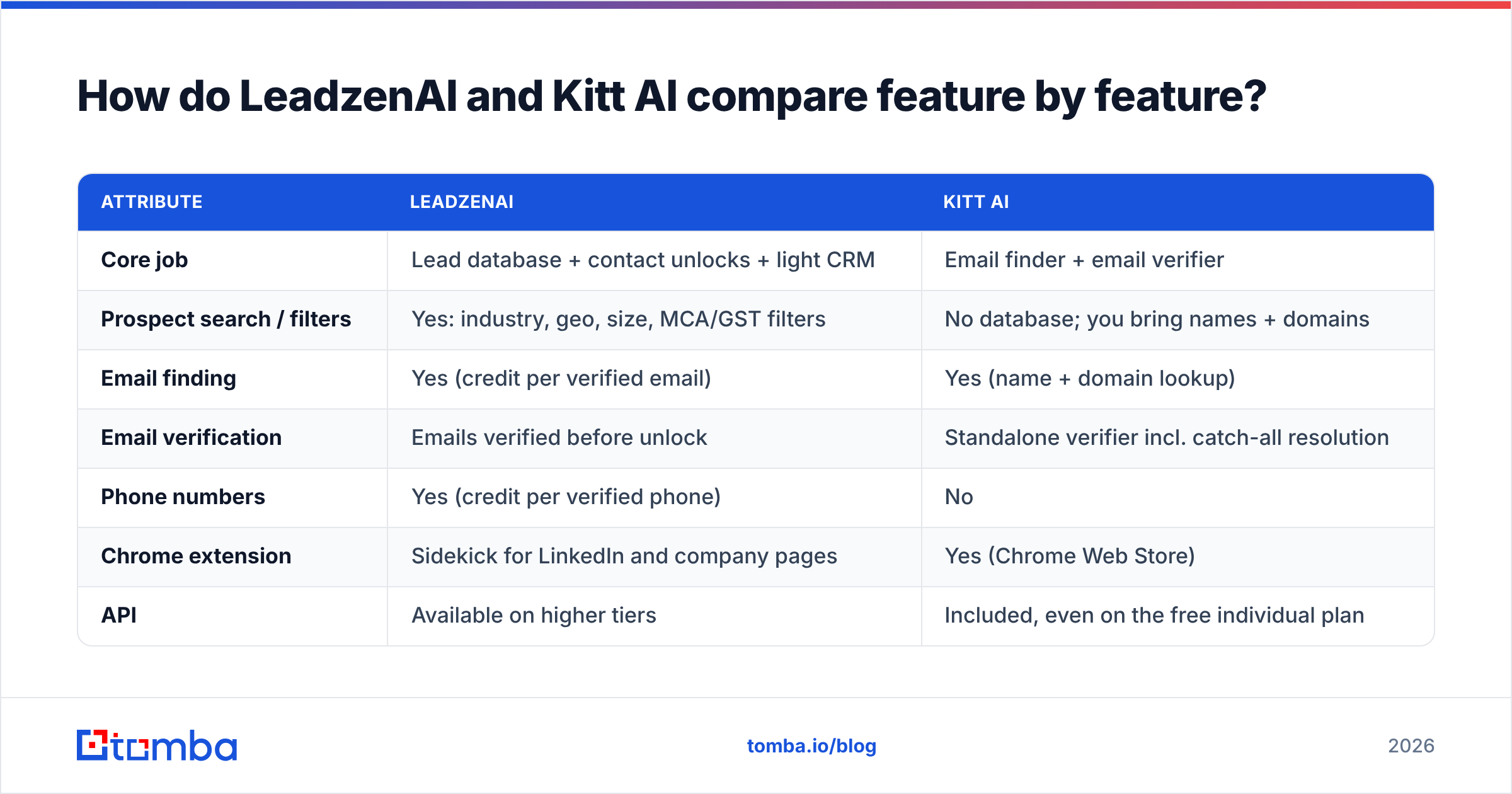
| Attribute | LeadzenAI | Kitt AI |
|---|---|---|
| Core job | Lead database + contact unlocks + light CRM | Email finder + email verifier |
| Prospect search / filters | Yes: industry, geo, size, MCA/GST filters | No database; you bring names + domains |
| Email finding | Yes (credit per verified email) | Yes (name + domain lookup) |
| Email verification | Emails verified before unlock | Standalone verifier incl. catch-all resolution |
| Phone numbers | Yes (credit per verified phone) | No |
| Chrome extension | Sidekick for LinkedIn and company pages | Yes (Chrome Web Store) |
| API | Available on higher tiers | Included, even on the free individual plan |
| Integrations | CRM export, outreach channels (email, LinkedIn, WhatsApp, calling) | Salesforce, HubSpot, Clay, MCP clients |
| Free option | ~50 free credits via extension / trial | Free, unlimited for individuals |
| Paid entry point | Quoted in INR (from ~₹2,500/mo); third-party listings show ~$133/mo tiers | Custom volume pricing, positioned as ~75% below competitors |
| Strongest region | India | Global (wherever the domain resolves) |
The table makes the split clear. LeadzenAI handles list building. Kitt AI handles contact accuracy. Few teams would put them head to head for the same slot.

Which tool has better data accuracy?#
For the email itself, Kitt AI has the stronger verification story, but you have to take into account how each tool gets its numbers.
Kitt's under-0.1% bounce claim is a vendor figure. The method behind it is sound, though. Catch-all domains are the biggest source of "valid but actually bounces" results in cold email, because the server accepts every address during an SMTP handshake. Querying identity infrastructure instead of trusting the handshake is a real improvement. It explains why Kitt integrates well as a verification step in Clay waterfalls.
LeadzenAI verifies emails and phones before you spend a credit on them, and its Indian company records come from government filings. That's a solid base for firmographics. Individual contact accuracy is harder to judge from the outside. The public review sample on Capterra is small, and the most common complaints are about extension bugs and a flaky geolocation feature, not bad data. Treat that as "not proven either way" and run your own test.

How to test both yourself in an afternoon:
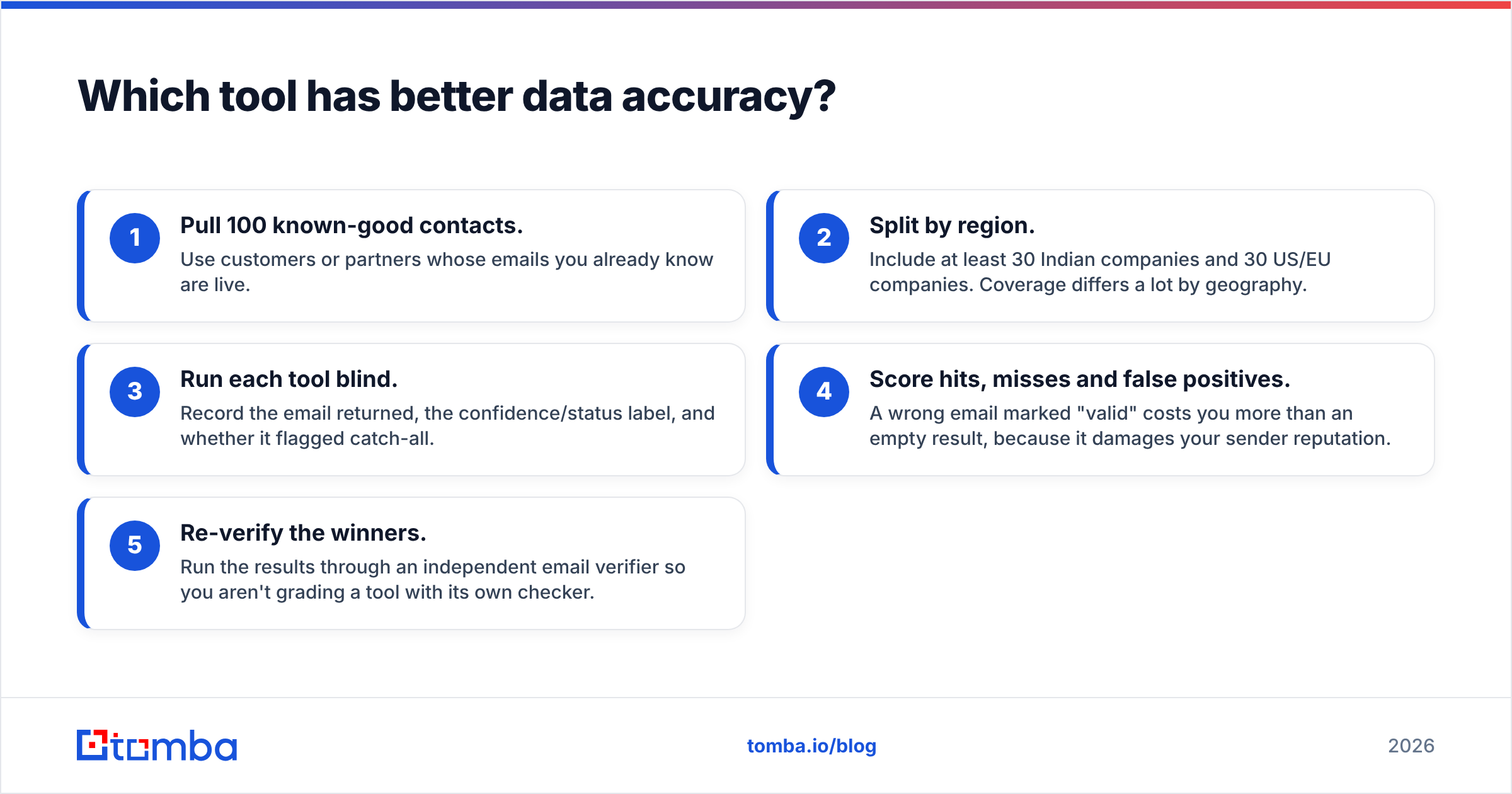
- Pull 100 known-good contacts. Use customers or partners whose emails you already know are live.
- Split by region. Include at least 30 Indian companies and 30 US/EU companies. Coverage differs a lot by geography.
- Run each tool blind. Record the email returned, the confidence/status label, and whether it flagged catch-all.
- Score hits, misses and false positives. A wrong email marked "valid" costs you more than an empty result, because it damages your sender reputation.
- Re-verify the winners. Run the results through an independent email verifier so you aren't grading a tool with its own checker.

Is LeadzenAI or Kitt AI cheaper?#
Kitt AI is cheaper if you only need emails. Once you need phone numbers or prospect search, LeadzenAI does more for the money, but only if your market is India.
Kitt AI pricing: Free and unlimited for individual users, with API access, catch-all verification and CRM integrations included. Teams running high volume pay for guaranteed throughput, and Kitt positions that as roughly 75% cheaper than competitors. The catch is that "free" means you still have to supply names and domains from somewhere else, whether that's LinkedIn, Sales Navigator, a scraped list or another database.
LeadzenAI pricing: The official pricing page is freemium-first, and paid plans are listed mostly in rupees. Directory listings show tiers such as ₹10,000 for about 300 credits per user per month and ₹30,000 for about 1,100 credits. Some USD-denominated listings put entry plans around $133/mo. A credit unlocks one verified email or one verified phone number, so phone-heavy workflows use up credits twice as fast.
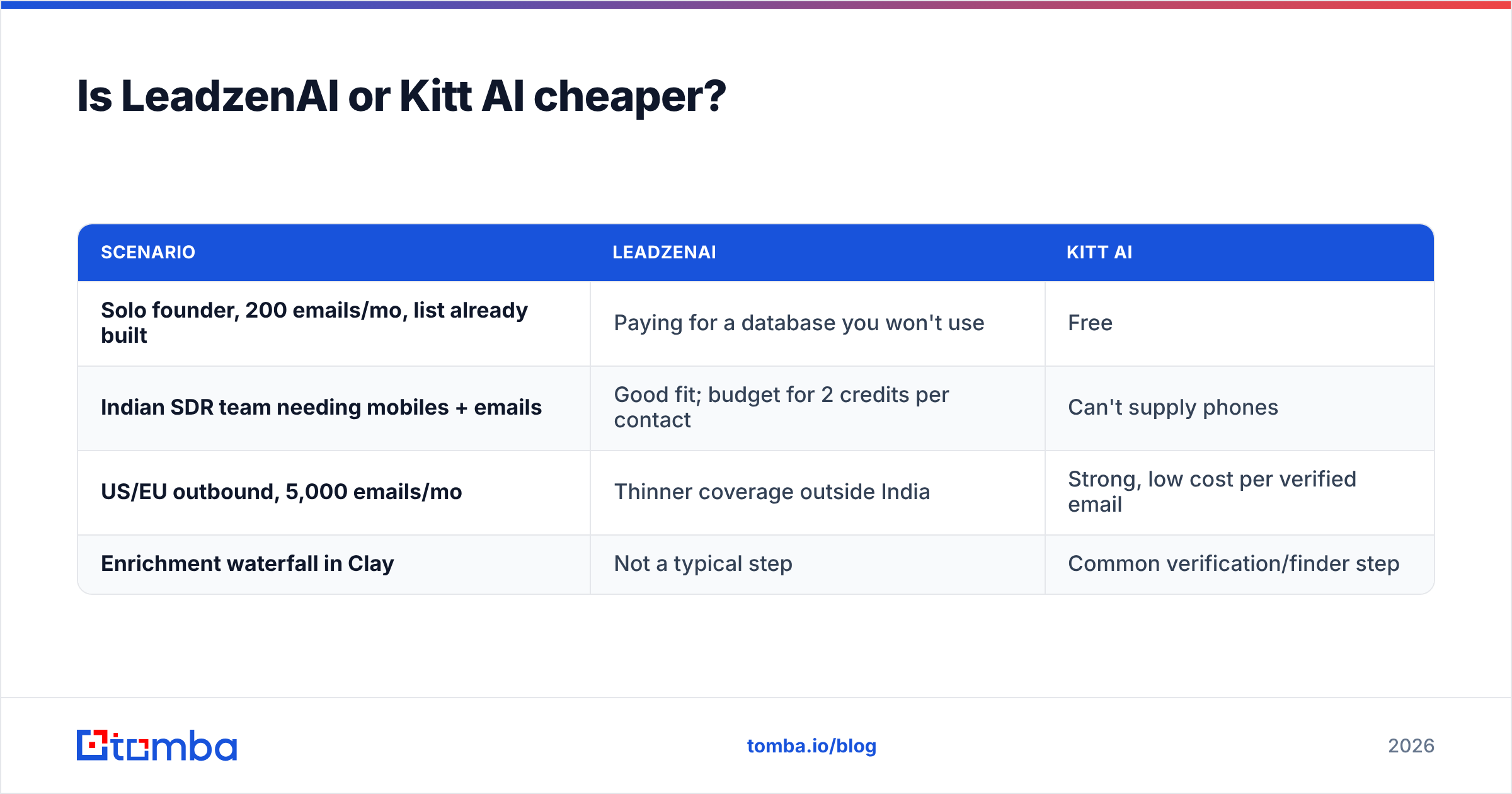
A rough way to compare cost:
| Scenario | LeadzenAI | Kitt AI |
|---|---|---|
| Solo founder, 200 emails/mo, list already built | Paying for a database you won't use | Free |
| Indian SDR team needing mobiles + emails | Good fit; budget for 2 credits per contact | Can't supply phones |
| US/EU outbound, 5,000 emails/mo | Thinner coverage outside India | Strong, low cost per verified email |
| Enrichment waterfall in Clay | Not a typical step | Common verification/finder step |
When should you choose LeadzenAI?#
Pick LeadzenAI when finding the companies is your bottleneck, more than finding the inbox.
- You sell into India. The MCA and GST filters let you target by registration status, incorporation date and company type, and that data is hard to get elsewhere.
- Phones matter. Indian B2B buying often moves through calls and WhatsApp. LeadzenAI supports calling and WhatsApp outreach, and Kitt AI has no phone data at all.
- You want one screen. Search, unlock and a simple pipeline in one tool is enough for a small team that doesn't want a separate CRM yet.
- Your reps work in LinkedIn. Sidekick lets reps unlock contacts without leaving a profile.
Where it's weaker: coverage outside India is less of a focus, reviewers mention extension bugs, and INR-first pricing can be awkward for procurement at non-Indian companies.
When should you choose Kitt AI?#
Pick Kitt AI when you already know who to contact and need correct addresses at scale.
- Your list comes from elsewhere. Sales Navigator exports, event attendee lists, Clay tables and so on. Kitt fills in the email column.
- Catch-alls are killing your deliverability. Kitt's identity-server check is designed for exactly this. If a large share of your targets sit behind catch-all domains, that alone can justify adding it.
- You're building automations or AI agents. API access on the free plan plus MCP compatibility makes it easy to wire into Claude Desktop, n8n or custom scripts.
- Budget is close to zero. Unlimited free individual use is a generous offer.
Where it's weaker: no database, no filters, no phone numbers, no intent or firmographic data. It's a component in a stack, not a full stack.
What do real outbound stacks look like with each tool?#
Most teams end up combining tools. These are three patterns that work:
- India-first SDR team: LeadzenAI for account and contact discovery, then a second verification pass before sequencing, then a dialer or WhatsApp for follow-up.
- Global founder-led sales: LinkedIn or Sales Navigator for targeting, then Kitt AI for finding and verifying emails, then a cold email tool with proper warmup.
- RevOps waterfall: Clay table, then primary email finder, then Kitt AI as the fallback or verifier, then a catch-all verifier for anything still unresolved, then CRM sync.
A general rule: one tool for discovery, one for verification. Buying two databases usually gets you duplicate records. Adding one verifier on top of a database usually lowers your bounce rate.

Is there a tool that covers both jobs?#
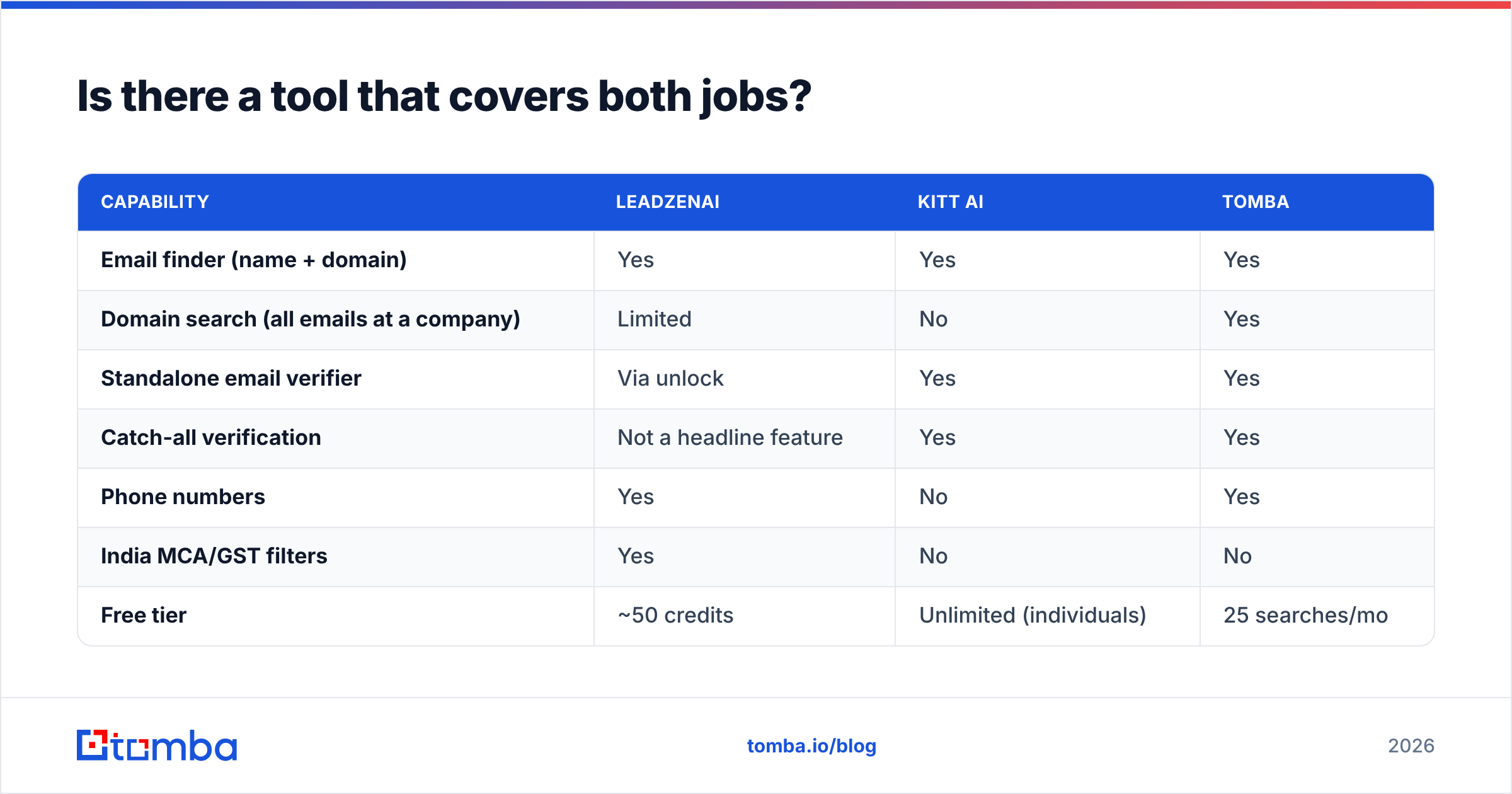
If you don't want to run two separate tools, look at a platform that combines discovery-light features and verification-grade accuracy with global coverage. That's where Tomba fits, and here's an honest comparison:
| Capability | LeadzenAI | Kitt AI | Tomba |
|---|---|---|---|
| Email finder (name + domain) | Yes | Yes | Yes |
| Domain search (all emails at a company) | Limited | No | Yes |
| Standalone email verifier | Via unlock | Yes | Yes |
| Catch-all verification | Not a headline feature | Yes | Yes |
| Phone numbers | Yes | No | Yes |
| India MCA/GST filters | Yes | No | No |
| Free tier | ~50 credits | Unlimited (individuals) | 25 searches/mo |
| Paid entry | INR tiers / ~$133/mo listings | Custom volume | $49/mo |
Tomba doesn't replace LeadzenAI's Indian government-data filters, and it won't beat Kitt AI's unlimited free plan on price. It does give you email finding, domain search, verification, catch-all checks and a phone finder in one account with USD pricing, which is simpler if your pipeline spans several regions. See Tomba pricing for the full plan breakdown (Starter $49/mo, Growth $99/mo, Pro $249/mo).
LeadzenAI vs Kitt AI: which should you pick?#
- Pick LeadzenAI if your ICP is Indian companies, you need phone numbers, and you want search and a basic pipeline in one place.
- Pick Kitt AI if you already build your lists elsewhere and want free, accurate email finding with strong catch-all handling and an API.
- Pick both if you're an India-focused team that also sends high-volume email: LeadzenAI for discovery, Kitt AI as the verification layer.
- Pick neither if you need global coverage, domain-level search and phones on one predictable USD plan. In that case, test an all-in-one finder first.
Whichever you choose, run the 100-contact blind test above before you commit to an annual contract. Real data from your own ICP will tell you more than any vendor's accuracy claim.
Ready to find verified emails without juggling tools?#
If you want one place to find a prospect's email from their name and company, check it against catch-all domains and export it straight to your CRM, try the Tomba Email Finder. The free plan gives you 25 searches a month to benchmark against LeadzenAI or Kitt AI on your own list. When the numbers hold up, Starter at $49/mo scales with you.
Related guides#
// get started
Find, verify and enrich your first contacts today
Start on the free plan with 25 searches a month, then scale when your team is ready.
Free plan · No credit card required · GDPR & CCPA
// about the author