Leadzenai vs Mailsai: Lead Data or Cold Email Sending in 2026?
Leadzenai and Mailsai get compared a lot, but they fix different problems. One finds the leads, the other sends the emails. Here is how to tell which one your outbound actually needs.
TL;DR
- Leadzenai and Mailsai don't do the same job. Leadzen.ai is an AI-assisted B2B lead and contact data platform. Mails.ai is cold email infrastructure: mailboxes, warmup, sequences, and a shared inbox.
- Pick Leadzenai if you don't have enough leads. It's especially relevant if you sell into India and South Asia, where its coverage is a big part of the pitch.
- Pick Mailsai if you already have leads but can't send at volume without hurting your domain reputation.
- Most outbound teams need both layers. You need a data source and a sending engine, plus a verification step in between so bad addresses don't burn your domains.
- Check live pricing on both vendor sites. Plans and credit allowances for these newer tools change often, so treat any number you saw on a third-party list as stale.
What are Leadzenai and Mailsai, in one sentence each?#
People search for "Leadzenai vs Mailsai" as if the two were direct rivals. They aren't, and that's the first thing to get straight.
Leadzen.ai is a B2B lead generation platform. It uses AI to help you find companies and decision-makers that match your ideal customer profile, then shows contact details (emails and phone numbers) you can export or push to your stack. It has a strong presence in the Indian market, and its own positioning leans on that regional depth.
Mails.ai is a cold email sending platform. It gives you the plumbing for outbound at scale: connecting or provisioning many sending mailboxes, automated warmup, multi-step sequences, inbox rotation, and a unified inbox for replies. It competes with tools like Instantly and Smartlead, not with lead databases.
So the real question isn't "which one is better?" It's which part of your outbound is broken right now: who you're emailing, or how you're sending.
How do Leadzenai and Mailsai compare feature by feature?#
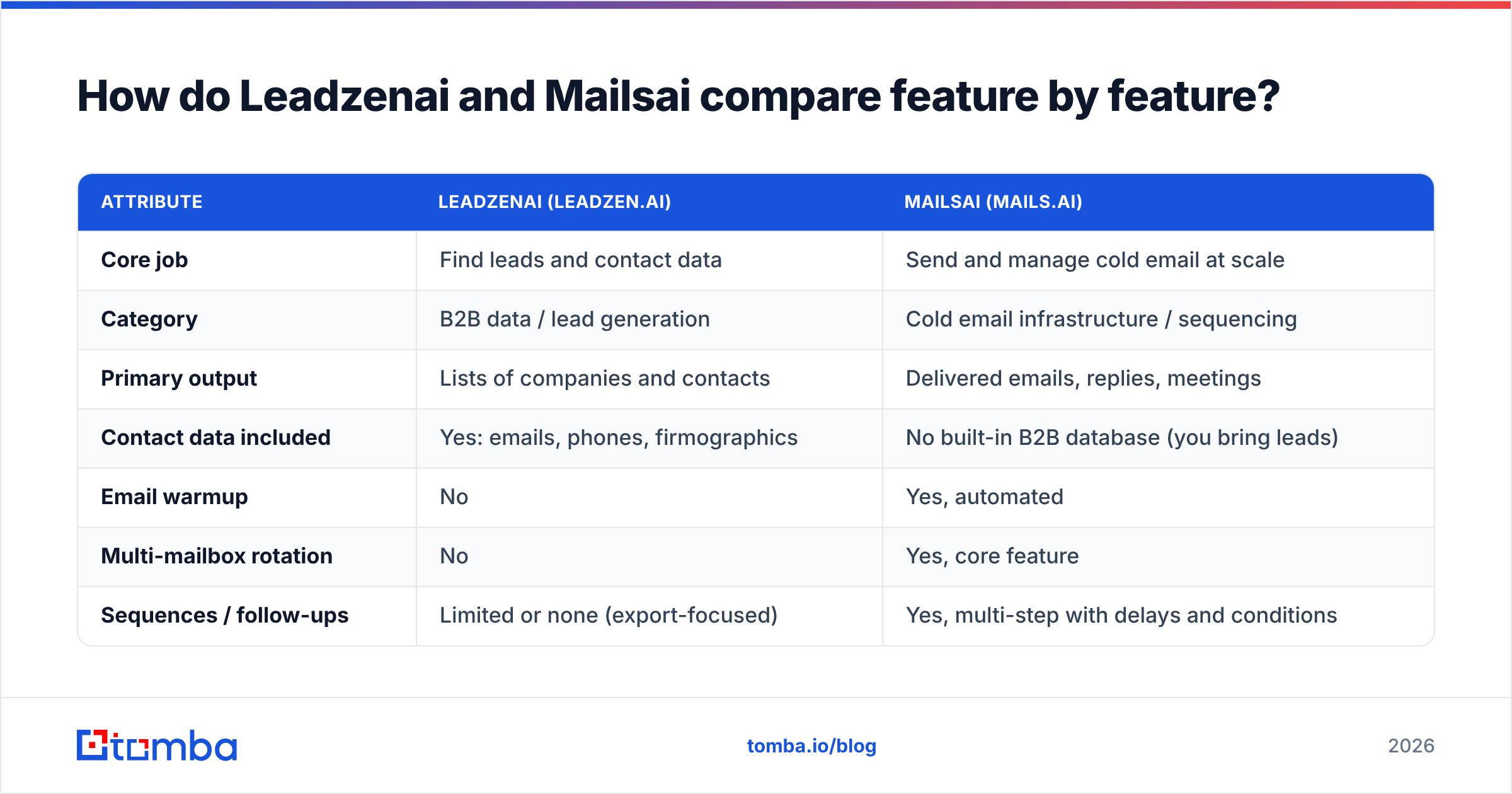
Here is the side-by-side. Rows marked "verify" are areas where these vendors revise plans and limits often. Confirm them on the vendor's pricing page before you buy.
| Attribute | Leadzenai (Leadzen.ai) | Mailsai (Mails.ai) |
|---|---|---|
| Core job | Find leads and contact data | Send and manage cold email at scale |
| Category | B2B data / lead generation | Cold email infrastructure / sequencing |
| Primary output | Lists of companies and contacts | Delivered emails, replies, meetings |
| Contact data included | Yes: emails, phones, firmographics | No built-in B2B database (you bring leads) |
| Email warmup | No | Yes, automated |
| Multi-mailbox rotation | No | Yes, core feature |
| Sequences / follow-ups | Limited or none (export-focused) | Yes, multi-step with delays and conditions |
| Unified reply inbox | No | Yes |
| Regional strength | India and South Asia coverage is a key selling point | Region-agnostic (depends on your list) |
| Pricing model | Credit-based plans (verify current tiers) | Subscription by sending volume/mailboxes (verify) |
| Best for | Teams short on qualified leads | Teams with leads but weak sending infrastructure |
| Main risk | Data freshness varies by segment | Deliverability suffers if you import unverified lists |
The pattern is simple. Leadzenai fills the top of the funnel, and Mailsai moves those contacts through it. Comparing them head to head is like comparing a fishing map to a fishing boat.
When is Leadzenai the right choice?#
Pick Leadzenai when the bottleneck is list quality or list volume. You'll see these signs:
- Your SDRs spend hours building lists by hand. They copy names from LinkedIn, guess email formats, and paste everything into spreadsheets.
- You're targeting the Indian or broader South Asian mid-market. Global databases often have thinner coverage there, and Leadzen's regional focus can close that gap.
- You need phone numbers as well as emails. If your motion mixes cold calls with email, a contact-data tool is the right first buy.
- Your ICP is specific, not broad. AI-assisted filtering by industry, company size, and role is where lead platforms earn their money.
Where Leadzenai won't help: it doesn't send your emails, warm your domains, or manage replies. If you buy it expecting a full outbound system, you'll end up with a well-built CSV and nowhere good to send it.
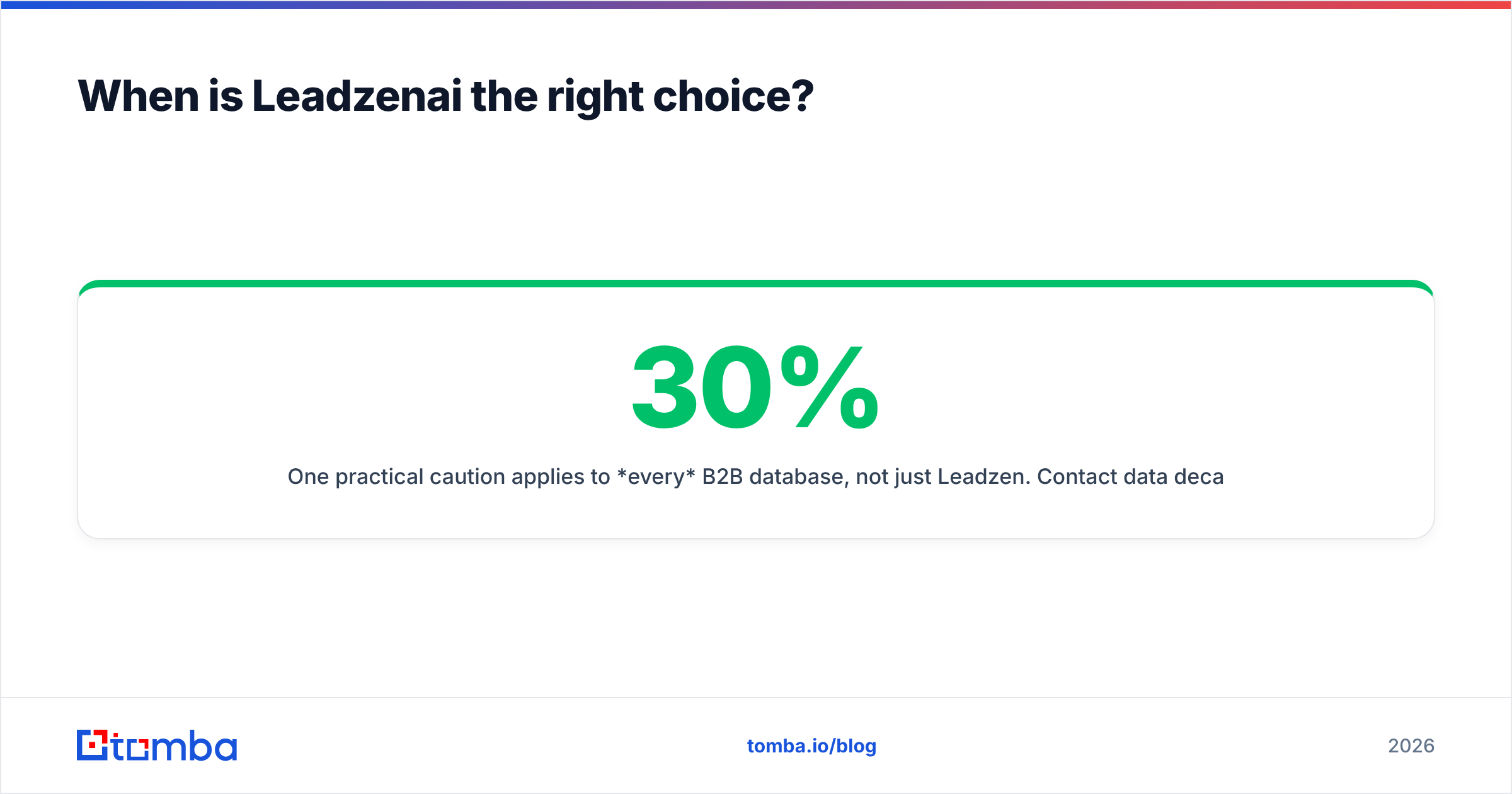
One practical caution applies to every B2B database, not just Leadzen. Contact data decays. People change jobs, companies rebrand domains, and mailboxes get shut down. Industry estimates commonly put B2B data decay at roughly 20-30% a year. Before a list exported from any database goes into a sender, run it through an email verifier. That's the difference between a 2% and a 12% bounce rate.

When is Mailsai the right choice?#
Pick Mailsai when the bottleneck is sending, not finding. You'll see these signs:
- You already have a steady lead source. That might be a CRM full of contacts, an existing database subscription, inbound signups, or event lists.
- Your volume has outgrown one or two Google Workspace inboxes. Once you're sending more than about 30-50 cold emails per mailbox per day, you need rotation across many mailboxes.
- Your open and reply rates dropped for no obvious reason. That's often a reputation problem, and automated warmup plus volume spreading is the usual fix.
- Replies are scattered across a dozen inboxes. A unified inbox stops your team from missing hot replies.
Where Mailsai won't help: it doesn't find the leads. It also can't rescue a bad list. Mailbox providers judge you on bounces, spam complaints, and engagement. If you load 5,000 unverified addresses into any sender, warmup won't save your sender reputation. Google's and Yahoo's bulk-sender requirements, in force since 2024, made this stricter. Google documents the spam-rate thresholds in its email sender guidelines.
Is Leadzenai better than Mailsai?#
Neither is "better," because they win on different scorecards. Here's how to score each against your real situation.
Score Leadzenai on:
- Match rate: the share of your target accounts where it actually returns a contact.
- Accuracy: the share of returned emails that verify as deliverable.
- Coverage in your geography and vertical: run a 50-company test sample from your real ICP, not the vendor's demo.
- Cost per verified contact: not cost per credit.
Score Mailsai on:
- Inbox placement: seed-test it. Don't trust dashboard "open rates," which privacy features distort.
- Setup time per mailbox: DNS, SPF, DKIM, DMARC, and warmup.
- Sequence flexibility: conditional steps, A/B testing, and time-zone sending.
- Cost per mailbox at your target volume: pricing that looks cheap at 5 mailboxes can scale badly at 50.
If you can only afford one tool this quarter, answer one question: "If I had 1,000 perfect leads tomorrow, could I email them safely?"
- If yes, your problem is data. Start with a lead source.
- If no, your problem is infrastructure. Start with Mailsai or a similar sender.
What does a working outbound stack look like with these tools?#
Most B2B teams that get consistent meetings from cold email run a four-layer pipeline. Leadzenai and Mailsai each cover one layer, and the gaps are where campaigns fail.
- Source. Build the account and contact list. This is where Leadzenai, a B2B database, or a domain-based search tool fits.
- Find and enrich. Fill in missing emails for people you've already identified, using name plus company domain. An email finder is useful here even if you already own a database, because no database covers everyone.
- Verify. Remove invalid, risky, and catch-all addresses before anything is sent. This is the most-skipped step and the most expensive to skip.
- Send and sequence. This is Mailsai's layer: rotation, warmup, follow-ups, and reply handling.
If you skip layer 3, layers 1 and 2 quietly wreck layer 4. You pay for data, pay for mailboxes, and then burn the mailboxes on bounces.
How do pricing and total cost compare?#
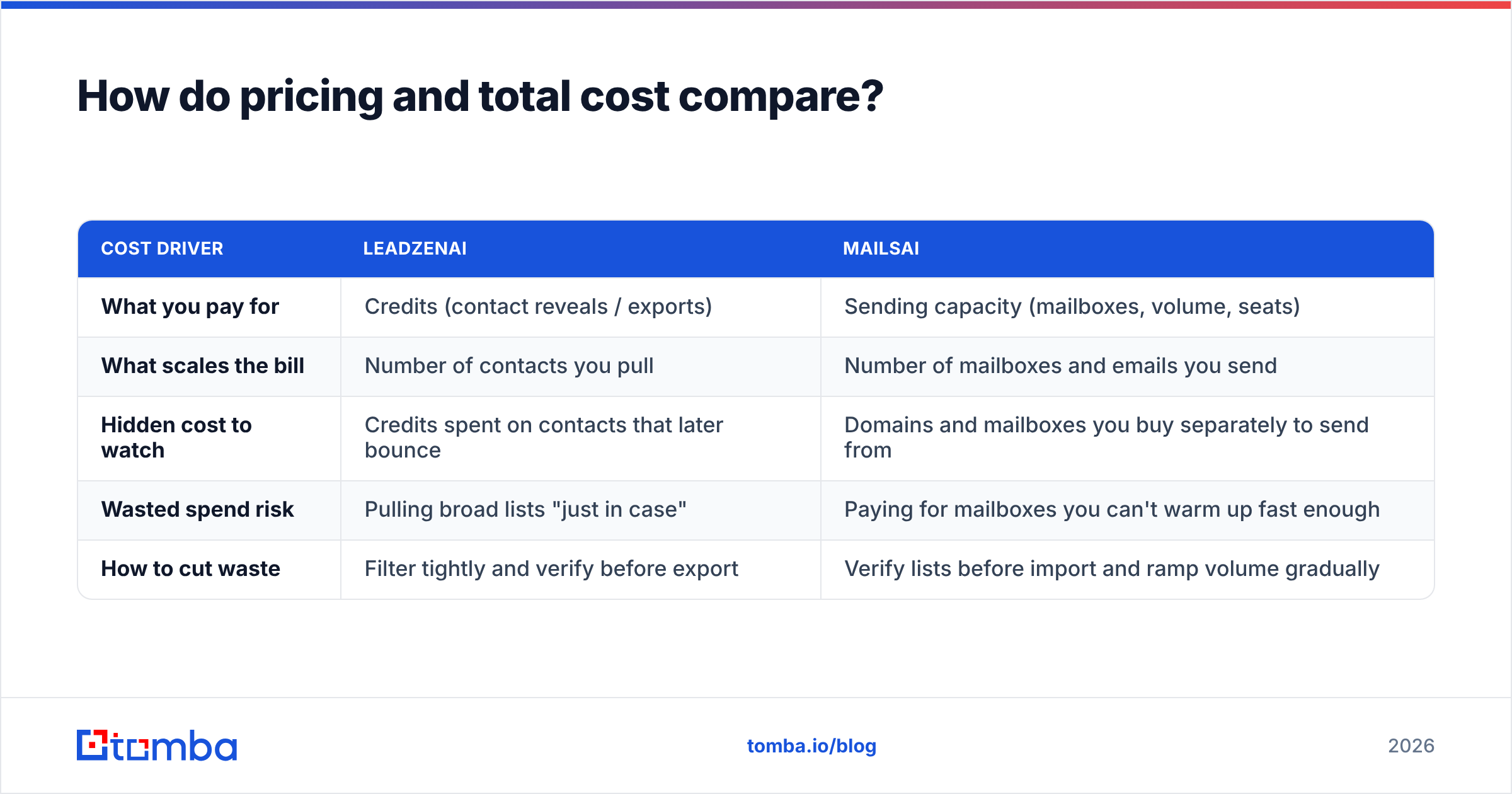
Both vendors change packaging often, so here's how to compare them structurally instead of quoting numbers that may already be out of date:
| Cost driver | Leadzenai | Mailsai |
|---|---|---|
| What you pay for | Credits (contact reveals / exports) | Sending capacity (mailboxes, volume, seats) |
| What scales the bill | Number of contacts you pull | Number of mailboxes and emails you send |
| Hidden cost to watch | Credits spent on contacts that later bounce | Domains and mailboxes you buy separately to send from |
| Wasted spend risk | Pulling broad lists "just in case" | Paying for mailboxes you can't warm up fast enough |
| How to cut waste | Filter tightly and verify before export | Verify lists before import and ramp volume gradually |
For current plan details, check each vendor's own site and cross-reference recent user reviews on G2. Reviews often reveal whether credits roll over, whether "unlimited" has a fair-use cap, and how fast support responds when a domain gets flagged.
A useful internal metric is cost per booked meeting, not cost per tool. A cheap data tool with a 15% bounce rate can cost more per meeting than a pricier one with 3%, because of the sending capacity it burns along the way.

What are the pros and cons of each?#
Leadzenai: pros
- Pros:
- Purpose-built for finding B2B leads, including phone data.
- Strong positioning in the Indian market, where many global databases are thinner.
- AI-assisted ICP filtering speeds up list building.
- Cons:
- Not a sending tool, so you still need a separate outbound platform.
- Accuracy varies by region and segment, so test it on your own ICP.
- Credit models can get expensive if you pull large, loosely filtered lists.
Mailsai: pros
- Pros:
- Built for sending cold email at scale across many mailboxes.
- Warmup and rotation protect domain reputation when you use them properly.
- A unified inbox keeps replies from getting lost.
- Cons:
- No lead data of its own, so you still need a source.
- Only as good as the list you import.
- Deliverability setup (DNS, domains, ramp-up) takes discipline, and the tool can't do it for you.
Which one should you pick in 2026?#
Use this decision shortcut:
- Early-stage team, no lead source, low volume. Start with a lead or email-finding tool and send from a few warmed inboxes by hand. Add Mailsai once you pass roughly 100-150 cold emails a day.
- Team selling into India or South Asia. Put Leadzenai on your trial list for the data layer, and pair it with any solid sender.
- Team with a CRM full of contacts and a deliverability problem. Pick Mailsai, and clean the list before the first import.
- Scaling team (5+ SDRs). You'll almost certainly run both kinds of tool. Put a verification step between them and track bounce rate per data source so you know which source actually pays for itself.
Whichever way you go, the teams that win at cold email treat data quality and sending infrastructure as two separate problems with two separate owners. Tools that blur that line tend to be mediocre at both.
How does Tomba fit alongside Leadzenai or Mailsai?#
Tomba sits in the find-and-verify layers, the part of the pipeline that neither a sender like Mailsai nor a regional database alone fully covers. If you use Mailsai, Tomba can fill the list before import. If you use Leadzenai, Tomba can fill gaps for contacts it misses and verify everything before it reaches your sender. You can also run large lists through bulk email finder jobs instead of one lookup at a time.
Plans are simple: a free tier with 25 searches a month, then Starter at $49/mo, Growth at $99/mo, Pro at $249/mo, and custom Enterprise. Full Tomba pricing is public.
If your campaigns bounce, stall, or run dry, the fix usually starts with the addresses, not the sender. Try Tomba Email Finder to find verified professional emails by name, domain, or company. Then feed clean lists into Mailsai, Leadzenai workflows, or whatever sender you already use.
Related guides#
// get started
Find, verify and enrich your first contacts today
Start on the free plan with 25 searches a month, then scale when your team is ready.
Free plan · No credit card required · GDPR & CCPA
// about the author