Leadzenai vs Mailshunt (2026): Which Email Finder Should You Use?
Leadzenai is a credit-based AI prospecting platform. Mailshunt is a lightweight free Chrome extension for finding and verifying emails. Here's which one fits your outbound workflow, and when neither is enough.
TL;DR
- Leadzenai is a paid, credit-based B2B prospecting platform. It uses AI search, pulls in LinkedIn data, reveals phone numbers, and exports to CRMs. Third-party listings put its plans at roughly $133 to $800 per month.
- Mailshunt is a lightweight, free Chrome extension that finds and verifies email addresses. It has almost no public documentation on data sources, limits, or pricing.
- Pick Leadzenai if you need phone numbers, filters, and list building in one place and your budget can absorb a premium per credit.
- Pick Mailshunt if you need a handful of emails a week and don't want to pay anything.
- If you need solid email finding plus verification at volume without enterprise pricing, a mid-tier email finder (Tomba starts at $49/mo) usually beats both on cost per verified contact.
What is the real difference between Leadzenai and Mailshunt?#
These two tools look like direct competitors in search results, but they're built for different jobs.
Leadzenai (leadzen.ai) sells itself as an AI-driven lead generation platform. You describe your ideal customer, filter by industry, location, and role, and the platform returns contacts with emails and often phone numbers. There's also a Chrome extension that pulls contact data from LinkedIn profiles. Each reveal costs credits, and the plans are sold per user.
Mailshunt (mailshunt.vercel.app) is much smaller. It's mainly a browser extension. You land on a site or profile, it looks for email addresses, and a built-in verifier checks whether an address is likely deliverable. There's no list builder, no firmographic filters, and no CRM sync to speak of.
A simple way to think about it: Leadzenai is a store where you shop for leads by criteria. Mailshunt is a magnifying glass for the page you already have open.
That difference matters more than any single feature. If you choose Mailshunt expecting a prospecting database, you'll be disappointed. If you choose Leadzenai just to find 20 emails a month, you'll overpay by a wide margin.
How do Leadzenai and Mailshunt compare feature by feature?#
Here's the side-by-side, based on each vendor's public pages and third-party listings as of September 2026. Where a vendor doesn't publish something, we say so. We don't guess.
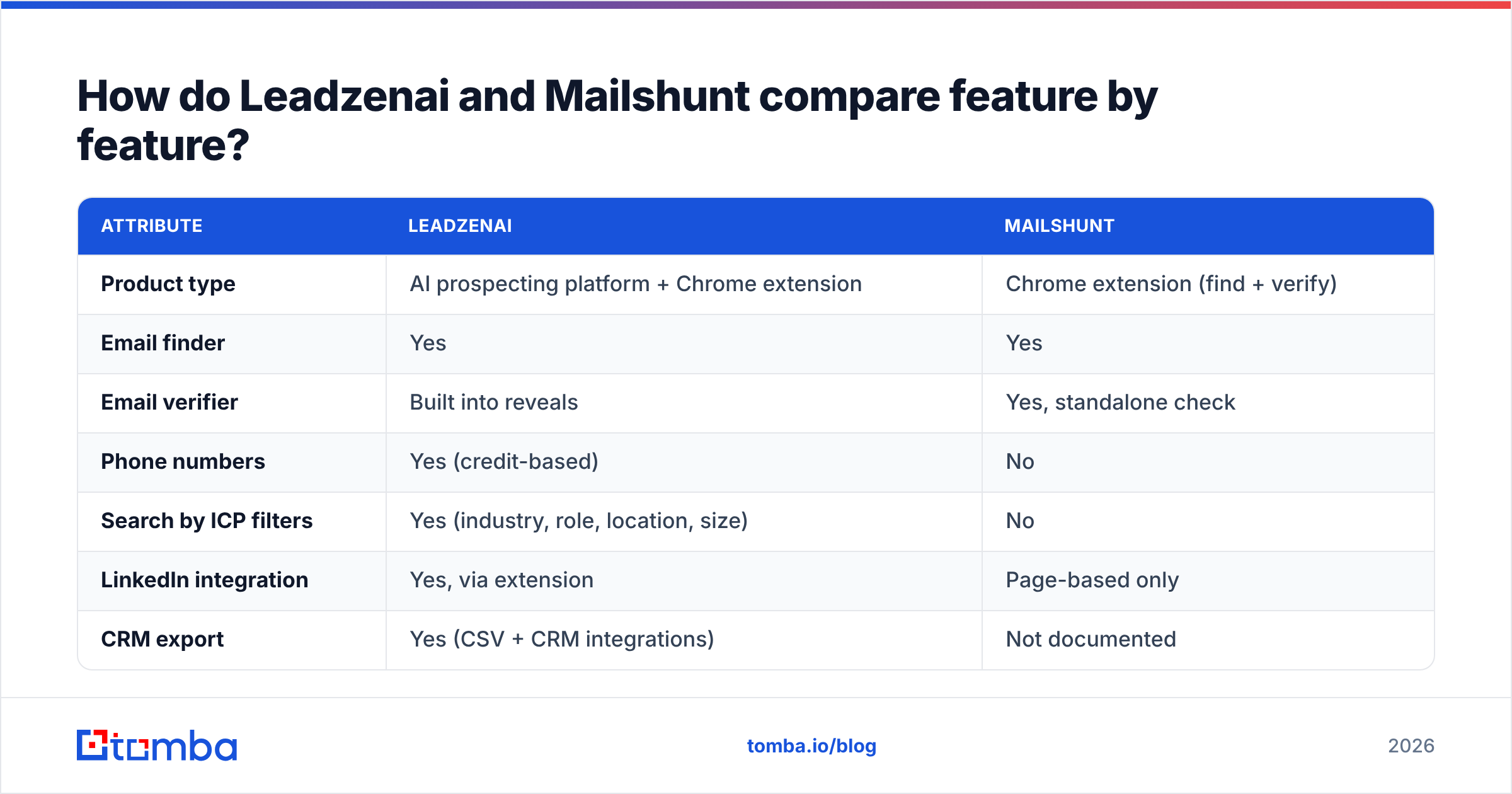
| Attribute | Leadzenai | Mailshunt |
|---|---|---|
| Product type | AI prospecting platform + Chrome extension | Chrome extension (find + verify) |
| Email finder | Yes | Yes |
| Email verifier | Built into reveals | Yes, standalone check |
| Phone numbers | Yes (credit-based) | No |
| Search by ICP filters | Yes (industry, role, location, size) | No |
| LinkedIn integration | Yes, via extension | Page-based only |
| CRM export | Yes (CSV + CRM integrations) | Not documented |
| API | Offered on higher tiers | Not documented |
| Free option | ~10 free credits at signup | Free extension |
| Paid pricing | Reported at ~$133–$800/mo per user | Not clearly published |
| Best for | SDR teams building targeted lists | Solo users doing occasional lookups |

Two things jump out.
First, Leadzenai covers far more ground: phone data, filters, and exports. Second, Mailshunt's lack of documentation is a real risk for business use. You can't plan a campaign around a tool when you don't know its credit limits, its data sources, or whether it will still exist next quarter.
How much do Leadzenai and Mailshunt actually cost?#
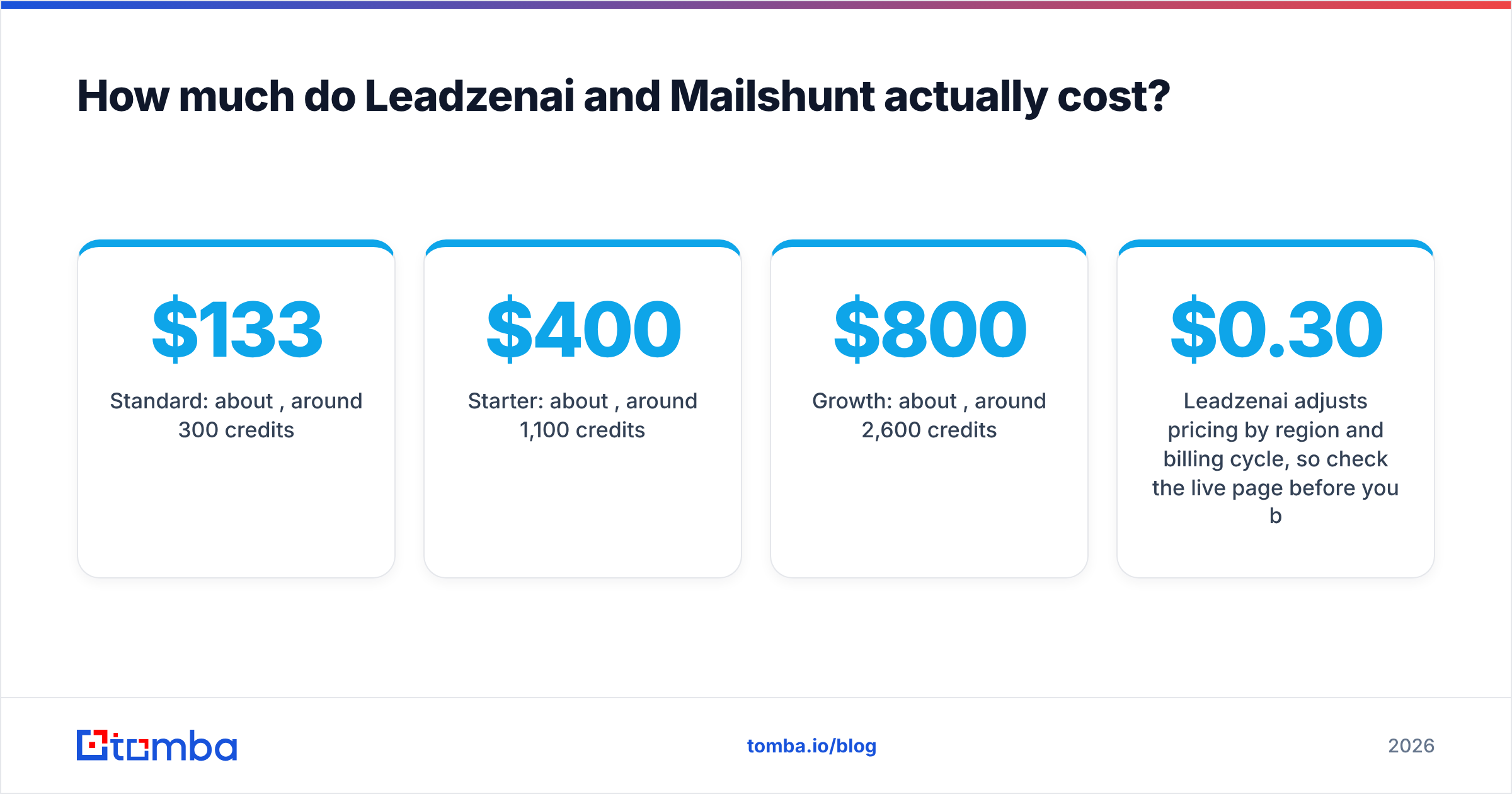
Leadzenai pricing. Leadzenai's own pricing page advertises a freemium entry point. Review sites such as G2 and TrustRadius have listed tiers along these lines:
- Standard: about $133/mo, around 300 credits per user
- Starter: about $400/mo, around 1,100 credits per user
- Growth: about $800/mo, around 2,600 credits per user
- Custom: negotiated for larger teams
Leadzenai adjusts pricing by region and billing cycle, so check the live page before you budget. The ratio is still worth working out. At those listed rates, one credit costs roughly $0.30 to $0.44. If a phone reveal uses more credits than an email reveal, which is common in this category, your real cost per fully enriched contact goes up.
Mailshunt pricing. The Chrome extension is free, and early user reviews describe it as free to use. There's a pricing page on the Mailshunt site, but it doesn't clearly list tiers, credit caps, or overage rules. For a solo founder, that's fine. For a team that needs predictable monthly volume, it's a blocker.
The bottom line on cost: Mailshunt wins on sticker price because it costs nothing. Leadzenai costs more per contact than most dedicated email finders, but you get phone numbers and list building for that price. What neither tool gives you is transparent, mid-market pricing for high-volume email finding alone.
Which tool is more accurate?#
Accuracy is the question everyone asks and the one neither vendor answers with public data.

Here's what we can say honestly:
- Leadzenai combines data from several sources and verifies emails when you reveal them. Reviews generally rate its Indian and APAC coverage as strong. North American and European coverage gets more mixed feedback, which is typical for regionally rooted databases.
- Mailshunt includes a verifier, but it doesn't publish its method. We don't know whether it runs full SMTP handshakes, handles catch-all domains separately, or just checks syntax and MX records. Without that information, treat its "valid" result as a first pass, not a guarantee.
The practical rule applies to every tool here, Tomba included: run your own test. Take 100 contacts whose emails you already know are correct. Run them through each tool and count three things:
- Hit rate: how many contacts returned any email at all
- Correct rate: how many of those emails match the known-good address
- Bounce rate: after a small, careful send, how many hard-bounced
A tool that finds 80% of emails but bounces 12% will do more damage to your sender reputation than one that finds 65% and bounces 2%. Bounces add up. Mailbox providers such as Google and Microsoft will throttle you well before you notice your reply rate dropping.
Is Leadzenai better than Mailshunt for SDR teams?#
Yes, if your team's job is to build lists from scratch.
An SDR working an account-based list needs to:
- Define the segment by industry, headcount, geography, and title
- Pull contacts in bulk instead of one page at a time
- Get multiple channels (email plus direct dial) for multi-touch sequences
- Push records to the CRM without copy-paste
- Track credit use per rep so the budget doesn't vanish in week one
Leadzenai covers all five to some degree. Mailshunt covers none of them in any structured way. It's a single-lookup tool.
Where Leadzenai struggles is teams that mostly need email only at scale. If you're running cold email at 5,000+ contacts a month and don't dial, paying for a platform built around phone reveals and AI search is like buying a van to deliver letters. A dedicated email finder with bulk upload and a proper email verifier will usually cost you a fraction of the price per usable address.
Is Mailshunt good enough for founders and freelancers?#
For low volume, often yes.
If you're a founder emailing 10 potential design partners, a freelancer pitching five agencies, or a recruiter chasing a specific engineer, Mailshunt's free extension can handle it. You open the company site, run the extension, verify the result, and send.
The limits show up quickly:
- No bulk mode. You can't upload a CSV of 500 names and domains.
- No enrichment. You get an address, but not the title, company size, or LinkedIn URL that makes personalization possible.
- Unclear longevity. The product runs on a Vercel subdomain and has little public roadmap or support documentation. For a free tool that's understandable, but it's risky if your pipeline depends on it.
- Browser permissions. Extension analysis sites note that Mailshunt asks for broad tab access. That's common for email finder extensions, but review it before you install it on a work browser that handles customer data.
If you outgrow Mailshunt, the natural next step isn't necessarily a $400/mo prospecting suite. It's usually a freemium email finder with a real free tier, bulk tools, and a documented API.
What about catch-all domains and verification depth?#
Catch-all domains separate serious tools from casual ones.
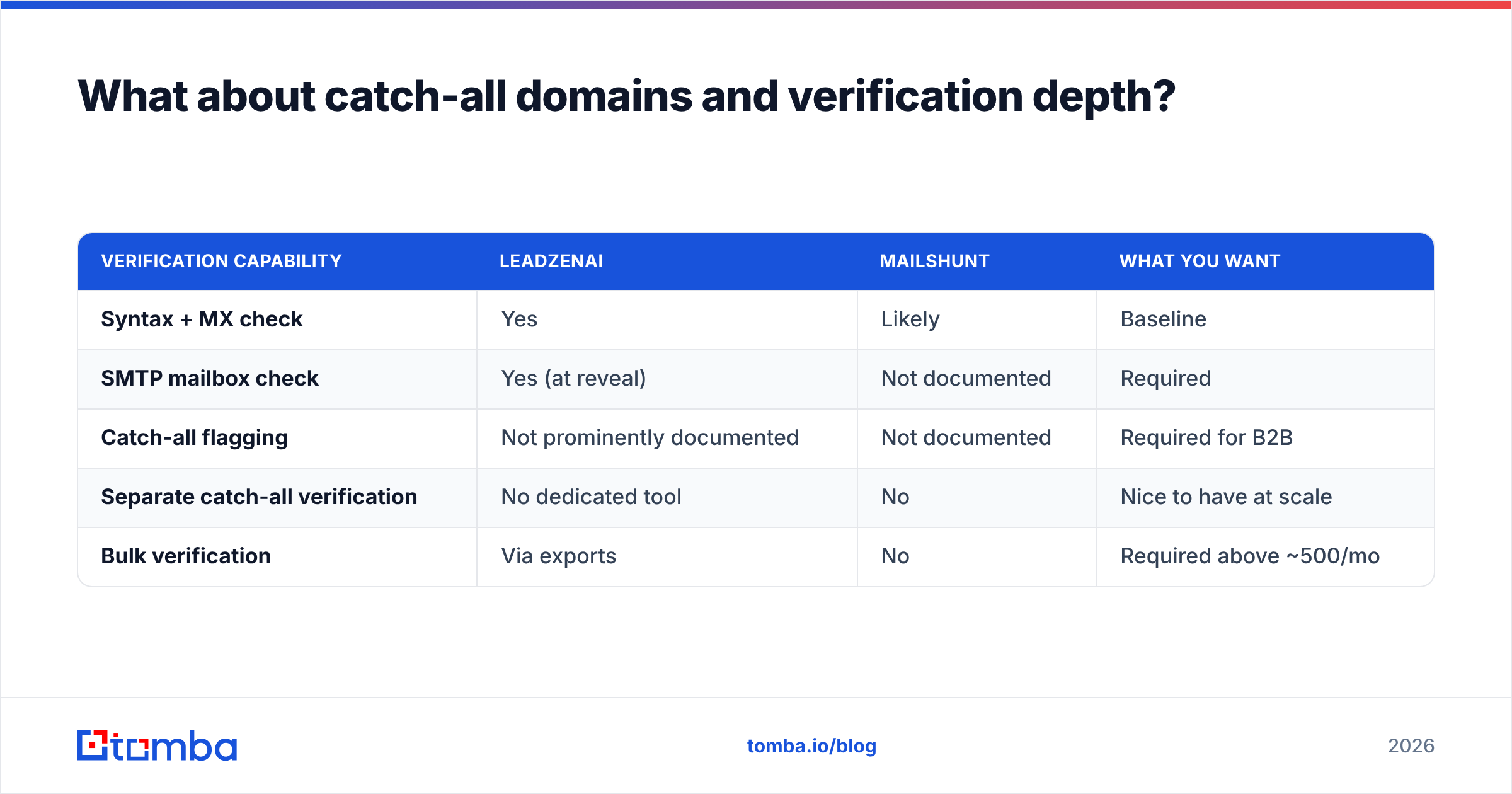
A catch-all server accepts mail for any address at the domain. That means a simple SMTP check returns "valid" for anything@company.com. If a tool doesn't flag catch-alls separately, you'll send to addresses that look verified and still bounce, or that land in a black hole nobody reads.
| Verification capability | Leadzenai | Mailshunt | What you want |
|---|---|---|---|
| Syntax + MX check | Yes | Likely | Baseline |
| SMTP mailbox check | Yes (at reveal) | Not documented | Required |
| Catch-all flagging | Not prominently documented | Not documented | Required for B2B |
| Separate catch-all verification | No dedicated tool | No | Nice to have at scale |
| Bulk verification | Via exports | No | Required above ~500/mo |
Enterprise and mid-market companies run catch-all configurations at high rates. If your ICP skews toward larger accounts, a dedicated catch-all verifier pays for itself in bounces avoided.
Which should you choose: Leadzenai, Mailshunt, or something else?#
Use this decision shortcut.
Choose Leadzenai if:
- You need phone numbers as well as emails
- Your team builds lists by firmographic filters, not from existing names
- Your target market lines up with its strongest coverage regions
- You have budget for $133+ per user per month and a process to track credit use
Choose Mailshunt if:
- You do fewer than ~50 lookups a month
- You're a solo user and cost is the top constraint
- You're fine with verification as a first pass rather than a guarantee
- You don't need exports, an API, or CRM sync
Choose a dedicated email finder if:
- Email is your main outbound channel
- You need bulk find and bulk verify from CSV, Google Sheets, or an API
- You want published pricing with a free tier you can actually test
- You care about catch-all handling and bounce rates more than phone data
Most teams comparing Leadzenai and Mailshunt land in the third group. They searched this matchup because Mailshunt felt too thin and Leadzenai felt too expensive for an email-first workflow.
How does Tomba fit between Leadzenai and Mailshunt?#
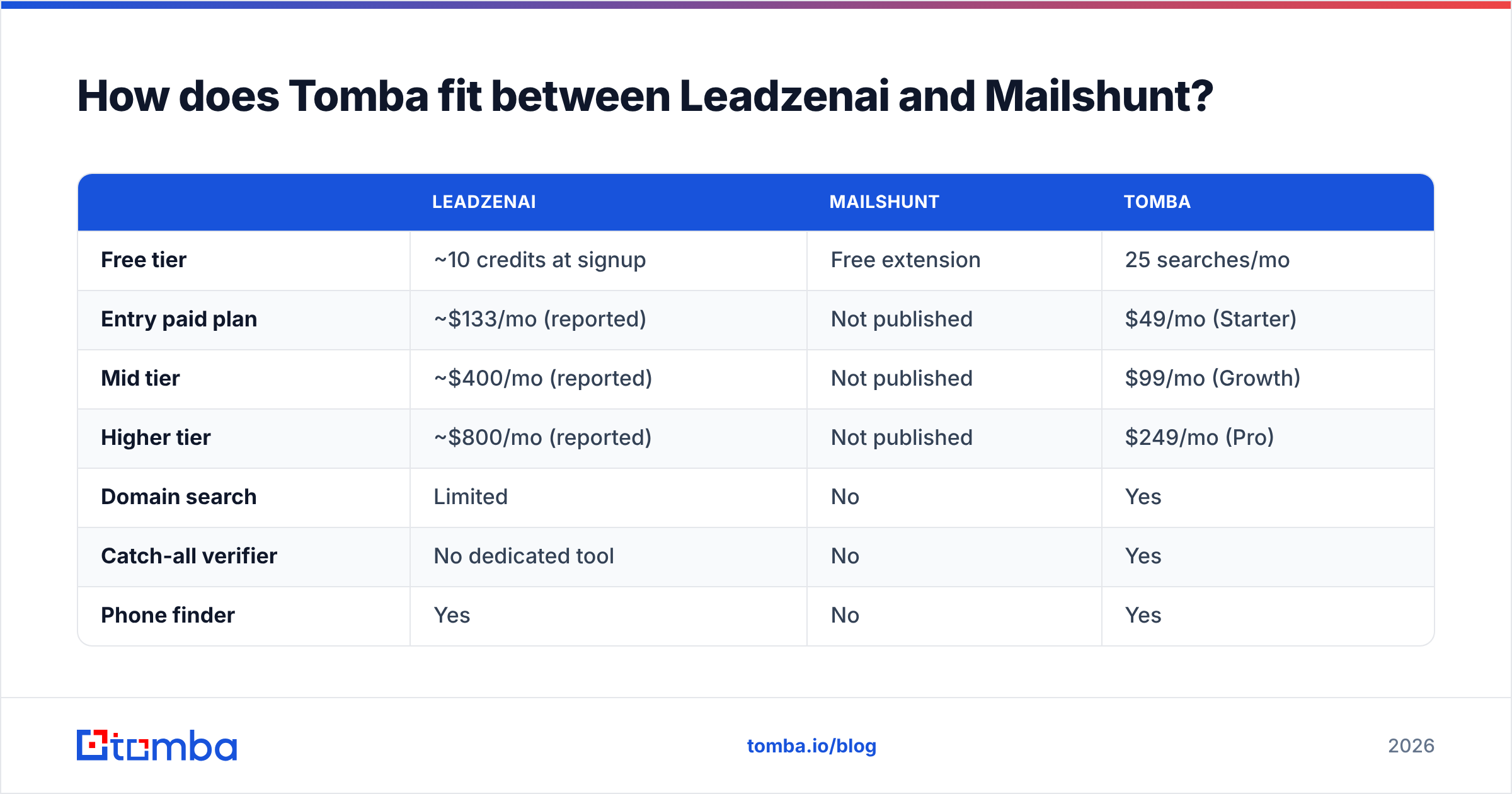
Tomba sits in the middle. It goes deeper than a free extension and has more transparent, email-focused pricing than a full prospecting suite.
| Leadzenai | Mailshunt | Tomba | |
|---|---|---|---|
| Free tier | ~10 credits at signup | Free extension | 25 searches/mo |
| Entry paid plan | ~$133/mo (reported) | Not published | $49/mo (Starter) |
| Mid tier | ~$400/mo (reported) | Not published | $99/mo (Growth) |
| Higher tier | ~$800/mo (reported) | Not published | $249/mo (Pro) |
| Domain search | Limited | No | Yes |
| Catch-all verifier | No dedicated tool | No | Yes |
| Phone finder | Yes | No | Yes |
| API / Sheets / CLI | API on higher tiers | No | Yes |
To be fair, Tomba isn't a full AI-driven ICP search engine the way Leadzenai aims to be. If your workflow starts with "show me every VP of Ops at 200–500-person logistics companies in Southeast Asia," Leadzenai's search-first approach may suit you better. Where Tomba is stronger is the email-first workflow: finding emails by domain, verifying them, and exporting clean lists at a predictable cost. See the full Tomba pricing for credit breakdowns.
Final verdict: Leadzenai vs Mailshunt#
Leadzenai is the more capable product. Mailshunt is the cheaper one, because it's free. They aren't really competing for the same buyer.
- For a team that needs multichannel data and list building, Leadzenai is the better pick of the two, as long as you test its coverage in your target regions first.
- For a solo user making occasional lookups, Mailshunt's free extension is hard to beat on price. Just verify anything important a second time.
- For anyone whose pipeline runs on cold email volume, neither is ideal. You'll want a dedicated finder and verifier with published pricing and bulk tools.
Whichever you choose, run the 100-contact test before you commit budget. Vendor claims and review-site scores don't tell you how a tool performs against your ICP.
Ready to find verified emails without the enterprise price tag?#
If you want Leadzenai-level data depth for email without paying $400/mo per seat, and more reliability than a free extension, try the Tomba Email Finder. Search by name and company or by domain, verify every result (catch-all detection included), and export straight to your sequencer or CRM. The free plan gives you 25 searches a month so you can run your own accuracy test first. Paid plans start at $49/mo when you're ready to scale.
Related guides#
// get started
Find, verify and enrich your first contacts today
Start on the free plan with 25 searches a month, then scale when your team is ready.
Free plan · No credit card required · GDPR & CCPA
// about the author