LeadzenAI vs MailTact (2026): Data Tool or Outbound Engine?
LeadzenAI sells prospect data. MailTact runs cold email and market testing for B2B SaaS. They solve different problems, so here's how to tell which one your pipeline actually needs.
TL;DR
- LeadzenAI is a prospect-data platform. It finds and enriches contacts (emails, phones, company data) through bulk search, filters, and a Chrome extension. Published plans start at about $133/month for 300 credits per user.
- MailTact is an outbound execution and market-testing platform for early-stage B2B SaaS and IT services companies. It pairs cold email automation and deliverability protection with hands-on consulting.
- They aren't direct substitutes. LeadzenAI tells you who to contact. MailTact handles how you reach them and whether the market responds.
- Pick LeadzenAI if you have a sending stack and need contact data. Pick MailTact if you need someone to design, run, and learn from your outbound. Many teams need a data layer under MailTact anyway.
- If all you need is verified emails, a dedicated email finder like Tomba starts at $49/month, well under LeadzenAI's entry tier.
What is the real difference between LeadzenAI and MailTact?#
People search "LeadzenAI vs MailTact" because both show up when you research "B2B outbound tools." The comparison can mislead you, though. These products sit at different layers of the outbound stack.
Think of outbound as a restaurant. LeadzenAI is the supplier. It delivers the ingredients: names, emails, phone numbers, firmographics. MailTact is the kitchen plus a consulting chef. It takes the ingredients, builds the menu (ICP and messaging), runs the service (sequences, deliverability), and tells you which dishes sold.
In concrete terms:
- LeadzenAI is a prospecting and data-enrichment tool. According to its Capterra listing, it offers bulk search, a geo-locator, multiple search filters, a one-click Chrome extension, and real-time enrichment. The data draws on 100+ data points from 500+ sources. Its buyers include salespeople, marketers, recruiters, and founders.
- MailTact calls itself an "Outbound Market Testing & Growth" platform for early-stage B2B SaaS and IT services companies. It covers cold email automation, ICP validation, MQL generation, and domain-reputation protection. Its main differentiator is expert consulting and full campaign execution.
So you're rarely choosing one instead of the other. More often you're deciding which gap in your pipeline to close first.
How do LeadzenAI and MailTact compare feature by feature?#
Here's a side-by-side view of what each product does. MailTact doesn't publish a fixed price list the way LeadzenAI does, so treat its pricing row as "confirm on a call."
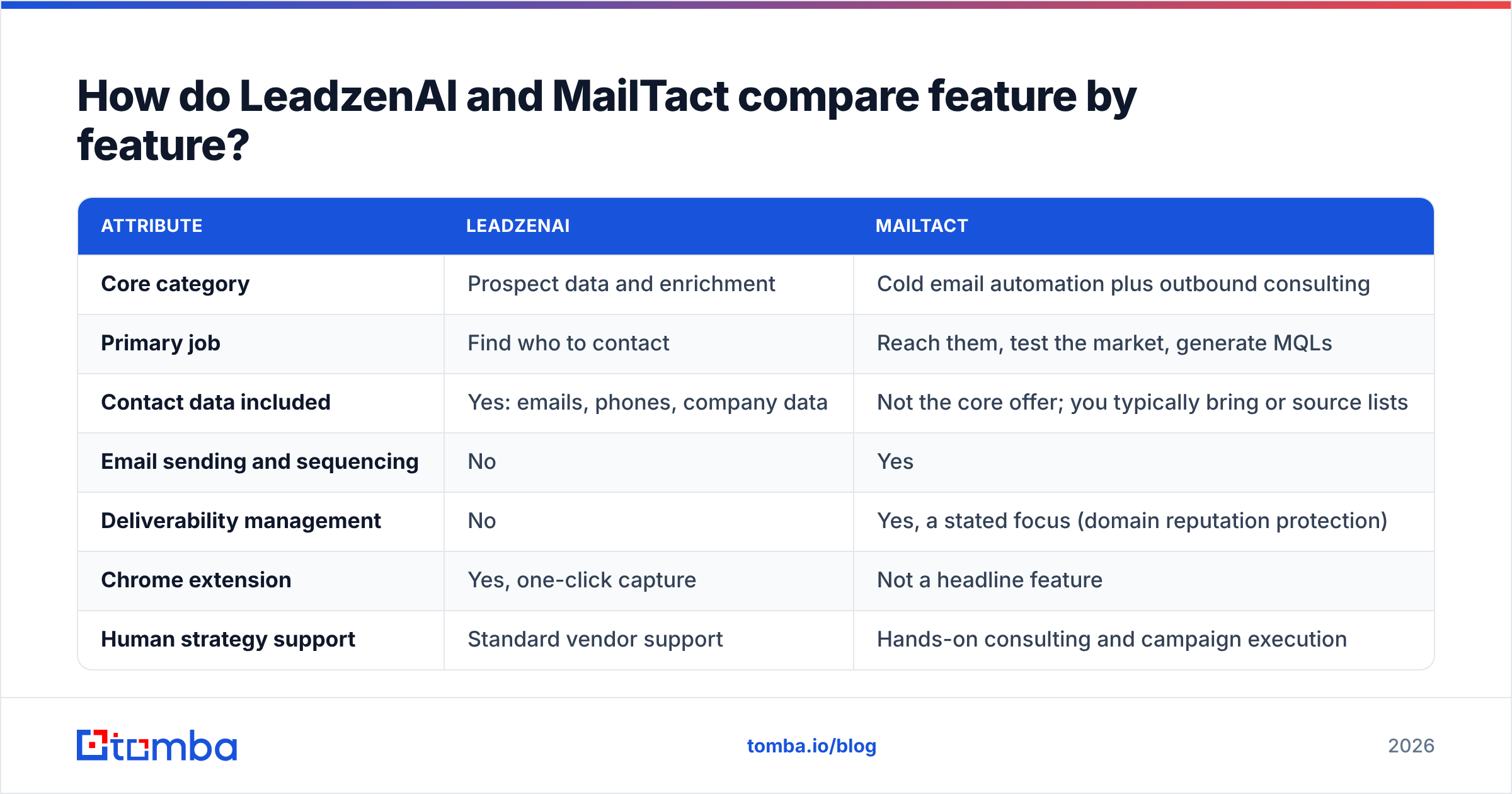
| Attribute | LeadzenAI | MailTact |
|---|---|---|
| Core category | Prospect data and enrichment | Cold email automation plus outbound consulting |
| Primary job | Find who to contact | Reach them, test the market, generate MQLs |
| Contact data included | Yes: emails, phones, company data | Not the core offer; you typically bring or source lists |
| Email sending and sequencing | No | Yes |
| Deliverability management | No | Yes, a stated focus (domain reputation protection) |
| Chrome extension | Yes, one-click capture | Not a headline feature |
| Human strategy support | Standard vendor support | Hands-on consulting and campaign execution |
| ICP / market validation | Filters help you target | Explicit service: validate ICPs and new markets |
| Ideal buyer | SDRs, recruiters, marketers, founders building lists | Early-stage B2B SaaS and IT services teams without an outbound specialist |
| Published pricing | Standard ~$133/mo (300 credits/user), Starter ~$400/mo (1,100), Growth ~$800/mo (2,600), custom | "Flexible, scalable" plans; no public rate card at time of writing |
| Pricing model | Credit-based, per user | Plan/engagement-based |
Two things stand out. First, only one of these tools gives you contacts. Second, only one sends email. If a vendor comparison page claims either tool "replaces" the other, read it skeptically.

What does LeadzenAI do well, and where does it fall short?#
LeadzenAI works best for list building at volume. Here's how it plays out in practice.
Strengths
- Broad search filters. You can slice by geography, industry, role, and company attributes, then pull results in bulk. The geo-locator is useful if you sell regionally, for example to field sales teams or local services.
- Chrome extension capture. When you're browsing LinkedIn or a company site, one click pulls available contact details. SDRs who prospect manually will use this every day.
- Emails and phones together. If you run a multichannel motion that mixes calling and emailing, a single lookup covers both.
- Recruiting use case. Recruiters are explicitly in its target audience, which suits agencies that source candidates as well as clients.
Limitations
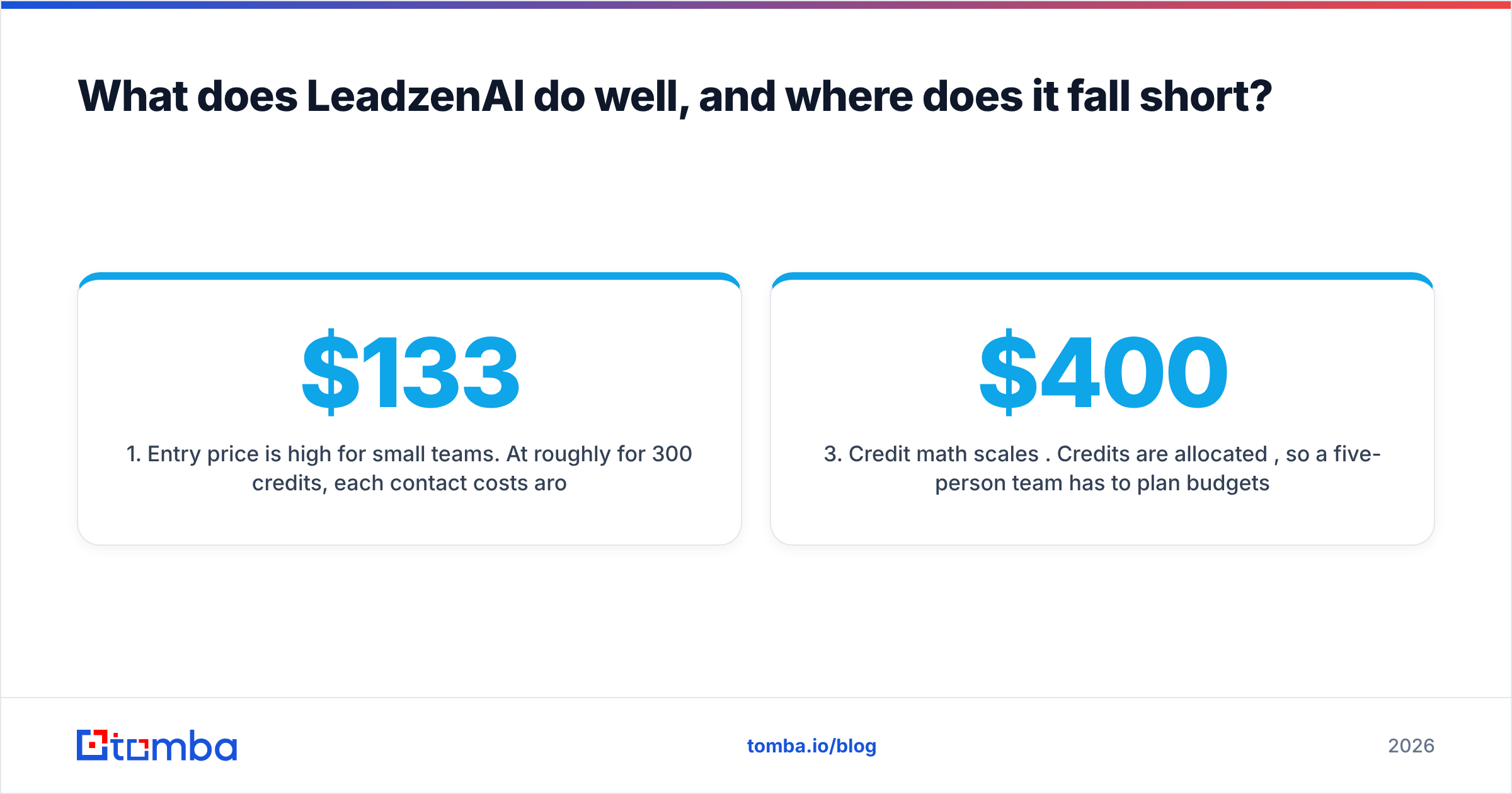
- Entry price is high for small teams. At roughly $133/month for 300 credits, each contact costs around $0.44 before you've sent a single email. A solo founder testing a market can burn through 300 credits in one afternoon.
- No execution layer. You still need a sequencer, warmed inboxes, and someone who writes copy. LeadzenAI doesn't cover any of that.
- Credit math scales per user. Credits are allocated per user, so a five-person team has to plan budgets carefully on the higher tiers ($400 and $800/month).
Verify every export before you send, whatever data vendor you choose. Even strong databases decay: people change jobs, and domains switch to catch-all configurations. Running a list through an email verifier before launch is cheap insurance for your sender reputation.
What does MailTact do well, and where does it fall short?#
MailTact is a better fit when your problem is "we don't know if outbound works for us yet" rather than "we need more contacts."
Strengths
- Market testing as a product. Most cold email tools assume you already know your ICP. MailTact treats ICP validation as part of the offer. That matters for early-stage SaaS teams whose positioning is still moving.
- Deliverability built in. Protecting domain reputation is one of its headline claims. Burned domains are the most expensive mistake new outbound teams make, and a partner who manages sending infrastructure removes much of that risk.
- Consulting plus execution. You get strategy and hands-on help, not just software. If you have no SDR, no RevOps person, and no email specialist, this closes a real gap.
- Focused audience. Because it's built for B2B SaaS and IT services, its playbooks should fit those buyers more closely than a horizontal tool would.
Limitations
- Opaque pricing. MailTact describes flexible, scalable plans but doesn't publish a public rate card. Budget for a sales conversation and ask exactly what's included: inboxes, domains, copy, list sourcing, reporting cadence.
- Narrow fit. If you're an e-commerce brand, an agency outside tech, or a recruiter, the SaaS/IT focus may not match you.
- Data is not the core offer. Confirm who provides the prospect lists. If the answer is "you do," you still need a data source like LeadzenAI or an email finder.
- Dependence on a partner. Done-with-you models are fast, but you should document what works so the knowledge stays with you if you bring outbound in-house later.
How does pricing compare in practice?#
Comparing a credit-based data tool with a service-led outbound platform is apples to oranges. It helps to model cost per qualified conversation instead of sticker price.
Here's a rough framework you can adapt:
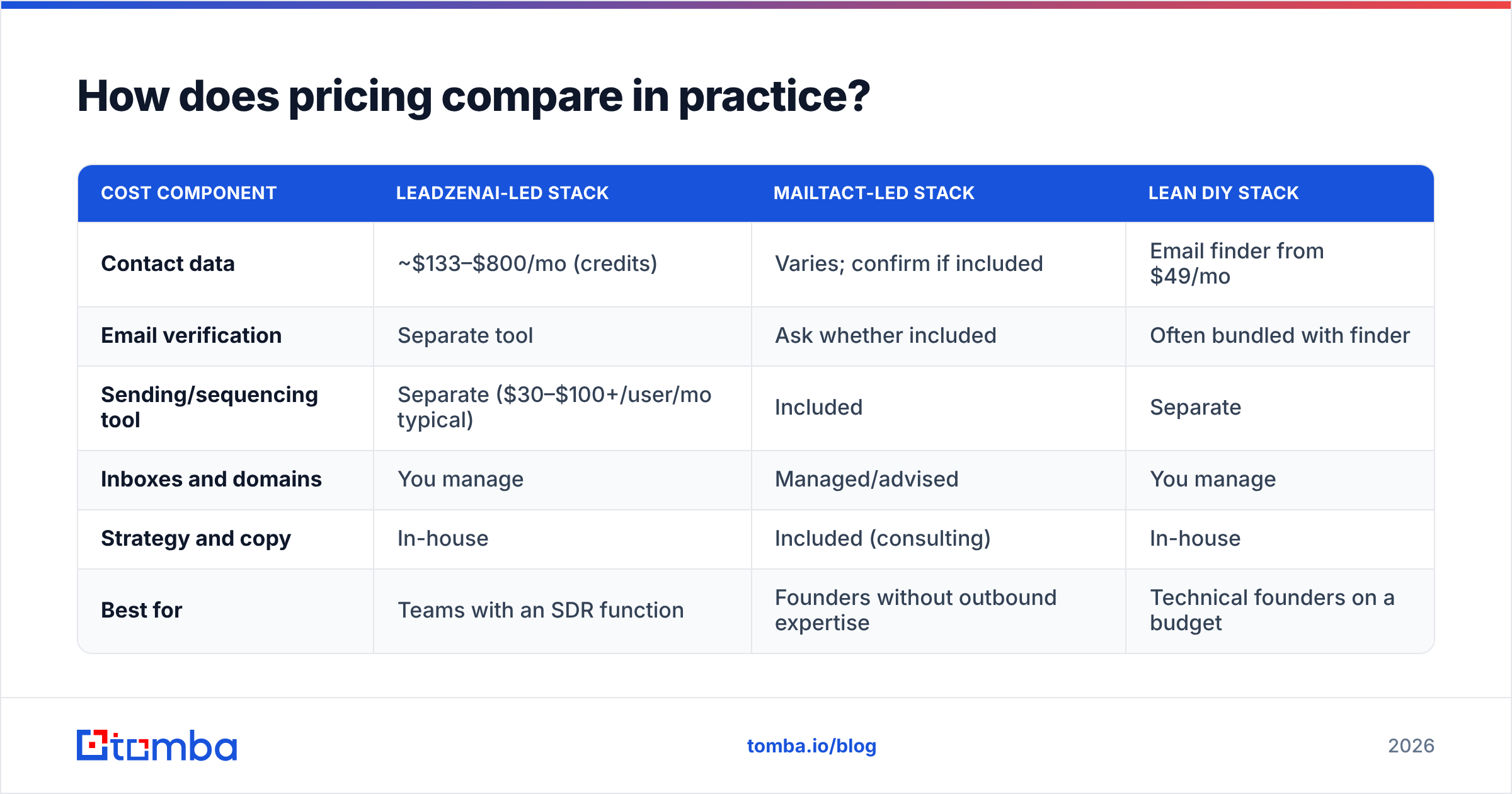
| Cost component | LeadzenAI-led stack | MailTact-led stack | Lean DIY stack |
|---|---|---|---|
| Contact data | ~$133–$800/mo (credits) | Varies; confirm if included | Email finder from $49/mo |
| Email verification | Separate tool | Ask whether included | Often bundled with finder |
| Sending/sequencing tool | Separate ($30–$100+/user/mo typical) | Included | Separate |
| Inboxes and domains | You manage | Managed/advised | You manage |
| Strategy and copy | In-house | Included (consulting) | In-house |
| Best for | Teams with an SDR function | Founders without outbound expertise | Technical founders on a budget |
The pattern is clear. LeadzenAI replaces one line item (data). MailTact replaces several (sending, deliverability, strategy) but not always data. Before you sign with either, make sure every row in the table above has an owner.
For benchmarks on reply and conversion expectations by channel, HubSpot's sales statistics roundup is a useful sanity check before you forecast pipeline from any outbound program.
Which one should you choose?#
Answer these four questions honestly.
- Do you already have a sequencer and warmed inboxes? If yes, your bottleneck is probably data, so lean toward LeadzenAI or a dedicated email finder. If no, MailTact's execution layer is worth more to you than a database.
- Is your ICP proven? If you've closed 10+ customers from a clear segment, you need volume, which means a data tool. If you're still guessing, MailTact's market-testing angle fits better.
- Who writes and monitors campaigns? If nobody on the team owns outbound, a data subscription will sit unused. That's the most common way LeadzenAI-style credits go to waste.
- Do you need phone numbers? If calling is part of your motion, LeadzenAI's combined email-plus-phone lookups matter. MailTact is email-first.
Our pick:
- Choose LeadzenAI if you're a sales team, recruiter, or agency with an established sending process that needs more contacts, including phones, and has the budget for a $133+/month floor.
- Choose MailTact if you're an early-stage B2B SaaS or IT services company that wants outbound designed, run, and validated for you, and deliverability risk worries you more than list size.
- Choose neither, yet, if your real need is simply "find and verify the right emails." A focused email finder gets you there for less, and it can feed either a MailTact engagement or your own sequencer.

What if you only need accurate emails?#
This is where most teams end up after comparing the two. The outbound agency (or your own sequencer) is ready to go, and someone asks: "Great, where's the list?"
A dedicated email finder covers that one job without per-user credit floors or a service contract:
- Find emails by name and company. An email finder returns the most likely professional address for a specific person, with a confidence signal.
- Pull every public address at a company. Domain search lists known emails and the company's email pattern, which is useful for account-based plays where you need several stakeholders.
- Verify before sending. Built-in verification flags invalid and catch-all addresses so they don't hurt a sending domain that you (or MailTact) spent weeks warming.
On cost, Tomba's plans run from a free tier (25 searches/month) to Starter at $49/month, Growth at $99/month, and Pro at $249/month, with custom Enterprise pricing. See Tomba pricing for current credit allocations. That's a lower entry point than LeadzenAI's $133 Standard plan. It suits founders running a MailTact-style market test, who need a few hundred well-targeted, verified contacts rather than a large database.
To be fair about the trade-off: LeadzenAI's strength in geo-filtering, recruiter workflows, and bundled phone data is real. If those matter to you, its higher entry price may be justified. For comparison, G2's lead intelligence category is a good place to cross-check user reviews across data vendors before you commit.
How do you combine these tools without wasting budget?#
If you decide you need both a data layer and an execution layer, this sequence avoids paying twice:
- Define the test segment first. Pick one ICP slice, one geography, and one pain point. MailTact-style validation works best with a narrow hypothesis.
- Source 200–500 contacts, not 5,000. A market test doesn't need a huge list. Use an email finder or a small LeadzenAI plan to build a tight list.
- Verify everything. Remove invalid addresses and treat catch-all domains cautiously. High bounce rates are the fastest way to lose inbox placement.
- Run the campaign through one execution layer. Use either MailTact or your own sequencer, not both. Split tooling muddies attribution.
- Measure replies by segment, then scale the winner. Buy volume (larger data plans) only after a segment proves it responds.
This order keeps your largest cost, data at scale, locked until you have evidence it will pay back.
Frequently asked questions#
Is LeadzenAI an alternative to MailTact? Not really. LeadzenAI provides contact data and enrichment. MailTact provides cold email execution, deliverability protection, and outbound consulting. They cover different stages of the same workflow.
Does MailTact include contact data? MailTact's public positioning centers on automation, strategy, and market validation, not on a proprietary contact database. Ask directly during your sales call whether list sourcing is included in your plan.
How much does LeadzenAI cost in 2026? Published plans are about $133/month (Standard, 300 credits per user), $400/month (Starter, 1,100 credits), and $800/month (Growth, 2,600 credits), plus custom pricing. Confirm current numbers on the vendor site, because credit allocations change.
What's the cheapest way to get verified B2B emails for a cold email test? A dedicated email finder with built-in verification is usually cheapest for small, targeted lists. Tomba's free tier covers 25 searches a month, and paid plans start at $49/month.
Ready to build the list your outbound actually needs?#
Whether you hand campaigns to MailTact, run your own sequencer, or pair it with a larger database later, every outbound motion starts with the right addresses. Tomba Email Finder lets you find professional emails by name, domain, or company, and verify them before they reach your sending domain. Start with the free tier's 25 monthly searches, build your first test segment, and upgrade only once a market proves it replies.
Related guides#
// get started
Find, verify and enrich your first contacts today
Start on the free plan with 25 searches a month, then scale when your team is ready.
Free plan · No credit card required · GDPR & CCPA
// about the author