LeadzenAI vs QuickEnrich (2026): Which Contact Data Tool Wins?
LeadzenAI sells AI-driven prospecting and, increasingly, booked meetings. QuickEnrich sells cheap, verified contact credits. Here's which one fits your pipeline, budget, and workflow in 2026.
TL;DR
- LeadzenAI and QuickEnrich are different kinds of product. LeadzenAI is an AI lead-generation platform for startups and SMEs, and its newer packages are priced around confirmed meetings. QuickEnrich is a lean, API-first email and mobile enrichment tool that you pay for per contact.
- Price is the biggest gap. QuickEnrich lists plans from $29/mo for 6,000 contacts. Reported LeadzenAI meeting packages start around $2,000 for 10 confirmed meetings, and its subscription-style pricing has been hard to pin down publicly.
- Pick QuickEnrich if you already know who you want to reach and just need verified emails and mobile numbers at volume, especially inside Clay, n8n, or your own scripts.
- Pick LeadzenAI if you don't have the SDR capacity to build lists and run outreach, and you'd rather pay for outcomes than for data.
- Consider a third option if you want domain search, email verification, and enrichment in one self-serve tool with a free tier. Tomba starts free (25 searches/mo) and $49/mo on Starter.
What is the real difference in LeadzenAI vs QuickEnrich?#
If you compare LeadzenAI and QuickEnrich feature by feature, you're comparing a restaurant with a grocery store. Both feed you, but they sell different things.
LeadzenAI (leadzen.ai) presents itself as an AI-driven B2B lead-generation platform for startups and small to mid-sized businesses. The product covers discovery: intelligent filters, bulk search, a "trending leads" feed with recently funded companies and active angel investors, and LinkedIn and Chrome extensions that pull contact details while you browse. In 2026, third-party listings also show LeadzenAI selling packages priced by the number of confirmed meetings it delivers. At that point you aren't buying software so much as an outsourced top of funnel.
QuickEnrich (quickenrich.io) is narrower and more technical. You give it a person (a name plus company, or a LinkedIn URL) and it returns a verified work email and, where it has one, a mobile number. It has a web app for one-off and bulk lookups, but most of the value is in its API and integrations: Clay, n8n, and connectors for ChatGPT and Claude.
So before you look at the tables, ask yourself one thing: do you need help deciding who to contact, or do you only need their contact details?
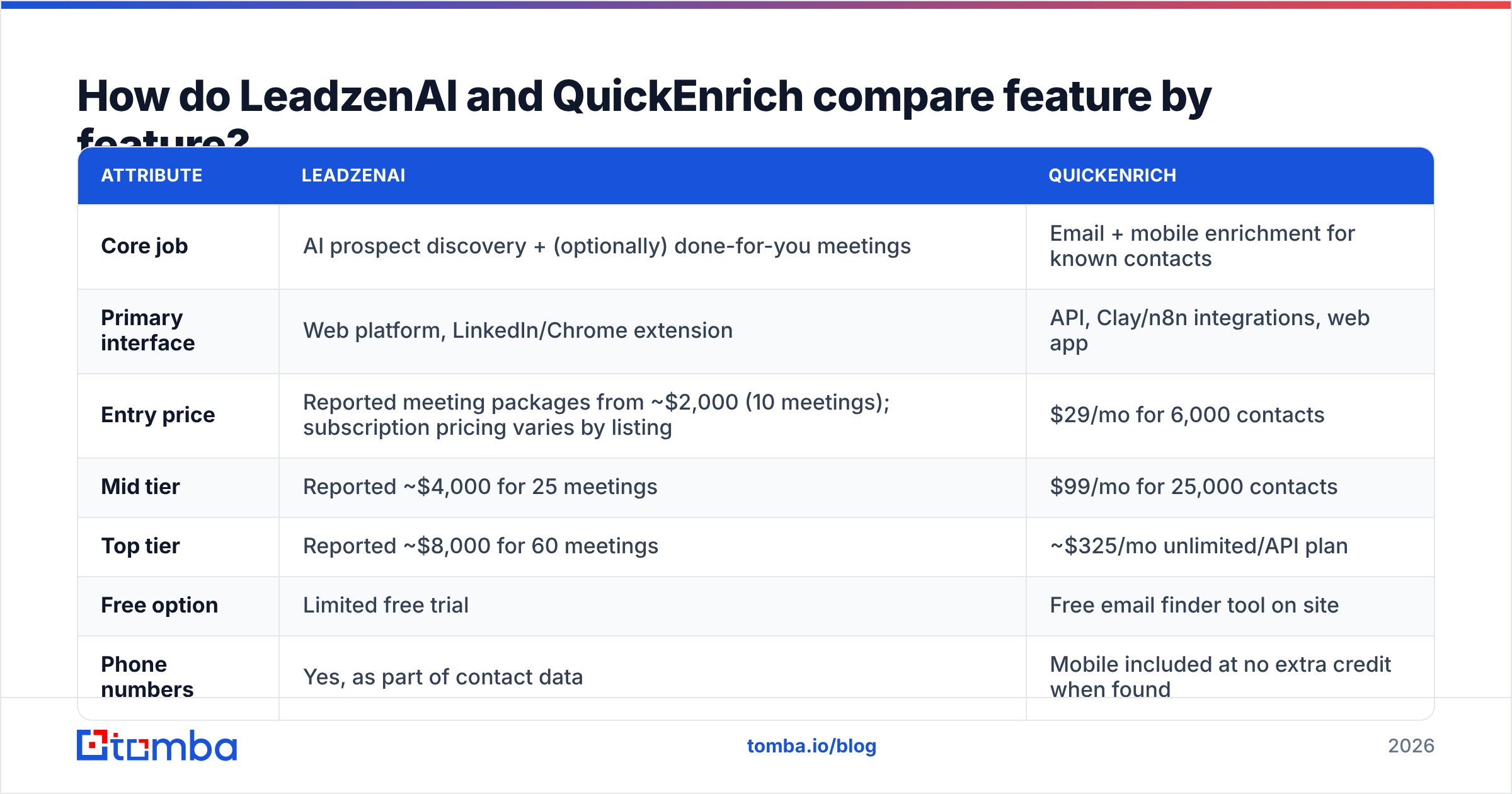
How do LeadzenAI and QuickEnrich compare feature by feature?#

| Attribute | LeadzenAI | QuickEnrich |
|---|---|---|
| Core job | AI prospect discovery + (optionally) done-for-you meetings | Email + mobile enrichment for known contacts |
| Primary interface | Web platform, LinkedIn/Chrome extension | API, Clay/n8n integrations, web app |
| Entry price | Reported meeting packages from ~$2,000 (10 meetings); subscription pricing varies by listing | $29/mo for 6,000 contacts |
| Mid tier | Reported ~$4,000 for 25 meetings | $99/mo for 25,000 contacts |
| Top tier | Reported ~$8,000 for 60 meetings | ~$325/mo unlimited/API plan |
| Free option | Limited free trial | Free email finder tool on site |
| Phone numbers | Yes, as part of contact data | Mobile included at no extra credit when found |
| Credit model | Package/plan based | 1 credit = 1 contact (email and/or phone) |
| Discovery filters | Yes: industry, funding, role, trending leads | Minimal; you bring the list |
| Best for | Founders and SMEs without an SDR team | RevOps, growth engineers, Clay power users |
Two notes on the numbers. QuickEnrich's figures come from its own pricing page and are easy to check. LeadzenAI's public pricing is inconsistent: directories quote anything from about $133/mo to several thousand per month depending on edition and date. Treat the LeadzenAI numbers above as directional and ask for a written quote.
What does each tool actually do well?#
Here's where each product earns its money.
- LeadzenAI – discovery with context. The "trending leads" feed (recently funded startups, active investors) is useful if your ICP is companies that just raised money. You get a reason to reach out, not only an address.
- LeadzenAI – outcome pricing. Paying per confirmed meeting moves execution risk onto the vendor. If you have no SDR, no domain warmup, and no sequence tooling, that can cost less than hiring.
- QuickEnrich – unit economics. At $29 for 6,000 contacts, you pay well under a cent per enriched row on the entry plan. That's hard to beat for high-volume waterfall enrichment.
- QuickEnrich – one credit, two data points. An email and a mobile number for the same credit is a real saving compared with tools that charge separately (sometimes 10x) for phone data.
- QuickEnrich – built for pipelines. Native Clay and n8n support means it drops into an existing enrichment waterfall without a custom integration.
Which is more accurate, LeadzenAI or QuickEnrich?#

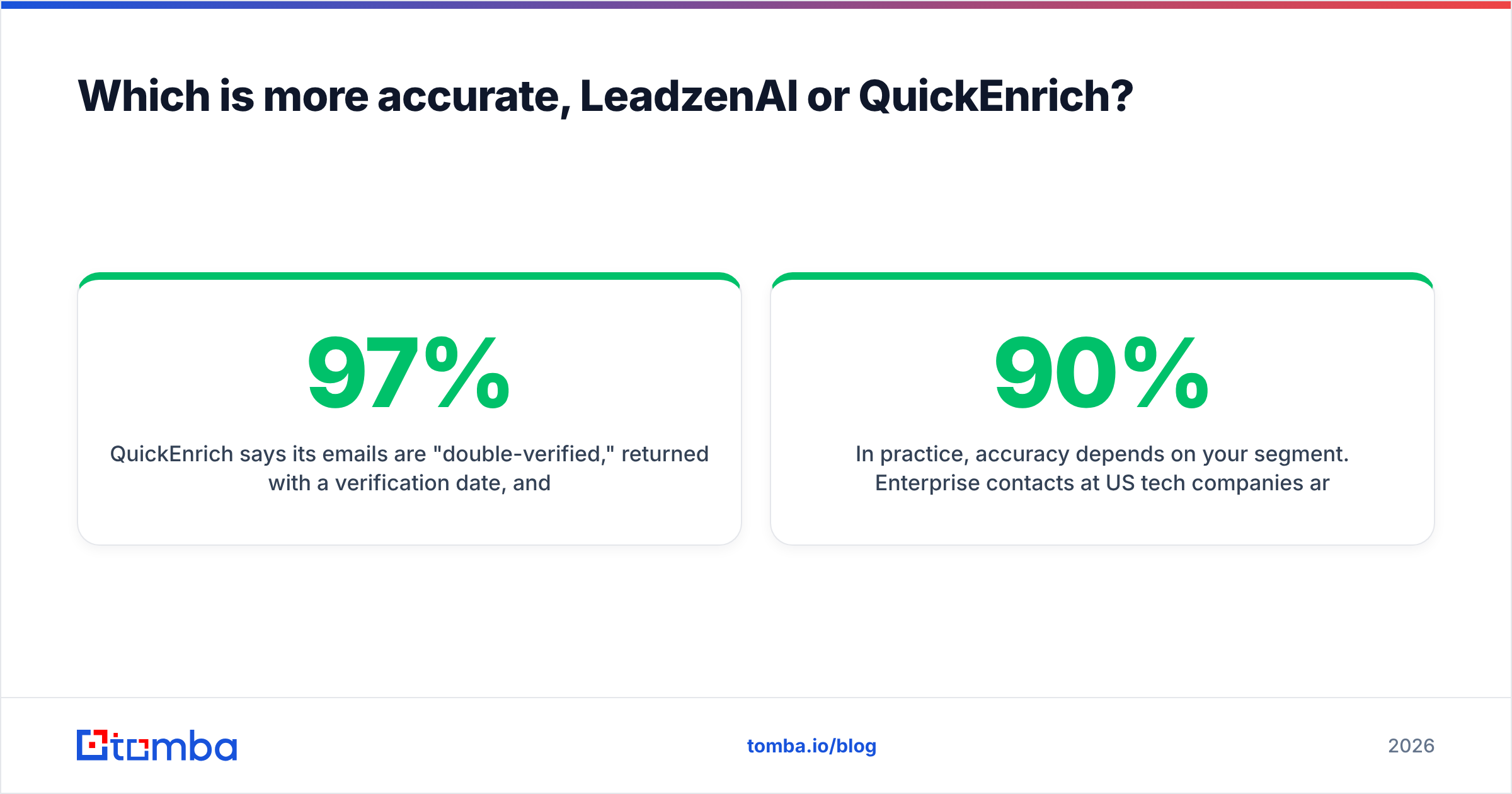
Neither vendor publishes an audited, independent accuracy benchmark, so be skeptical of marketing claims either way.
- QuickEnrich says its emails are "double-verified," returned with a verification date, and claims about 97% accuracy across a database of 130M+ contacts. The verification date is a useful signal because you can see how stale a record is.
- LeadzenAI describes its contact and company data as verified but doesn't publish a comparable accuracy figure. On meeting-based packages, accuracy matters less to you directly: bad data is the vendor's problem, since you only pay for meetings that happen.
In practice, accuracy depends on your segment. Enterprise contacts at US tech companies are easier to verify than decision-makers at 20-person manufacturing firms in Southeast Asia. Before you commit, run the same 200-contact sample through each tool and then through an independent email verifier. Count hard bounces, catch-all results, and "unknown" statuses, not only "found" rates. A tool with a 90% find rate and a 12% bounce rate is worse than one with a 70% find rate and a 2% bounce rate.
How much do LeadzenAI and QuickEnrich really cost?#
Sticker prices here can mislead, because the two tools charge for different things.
QuickEnrich cost model: subscription for a pool of contact credits.
- Starter: $29/mo → 6,000 contacts
- Growth: $99/mo → 25,000 contacts
- Unlimited/API: ~$325/mo for heavy users and data partners
If you enrich 5,000 contacts a month and roughly 60% return a usable email, you pay about a cent per usable contact on Starter. The hidden cost is everything else: you still need list building, verification of catch-alls, sending infrastructure, copy, and someone to run it.
LeadzenAI cost model: reported meeting packages.
$2,000 → 10 confirmed meetings ($200/meeting)$4,000 → 25 confirmed meetings ($160/meeting)$8,000 → 60 confirmed meetings ($133/meeting)
$133-$200 per meeting sounds steep next to $29 of data. For a fair comparison, work out your own cost per meeting with an in-house motion: SDR salary, tooling, domains, warmup, and data, divided by meetings booked. Many early-stage B2B teams land between $150 and $500 per qualified meeting once salaries are included. The real question is whether the meetings LeadzenAI books match your ICP well enough to turn into pipeline.
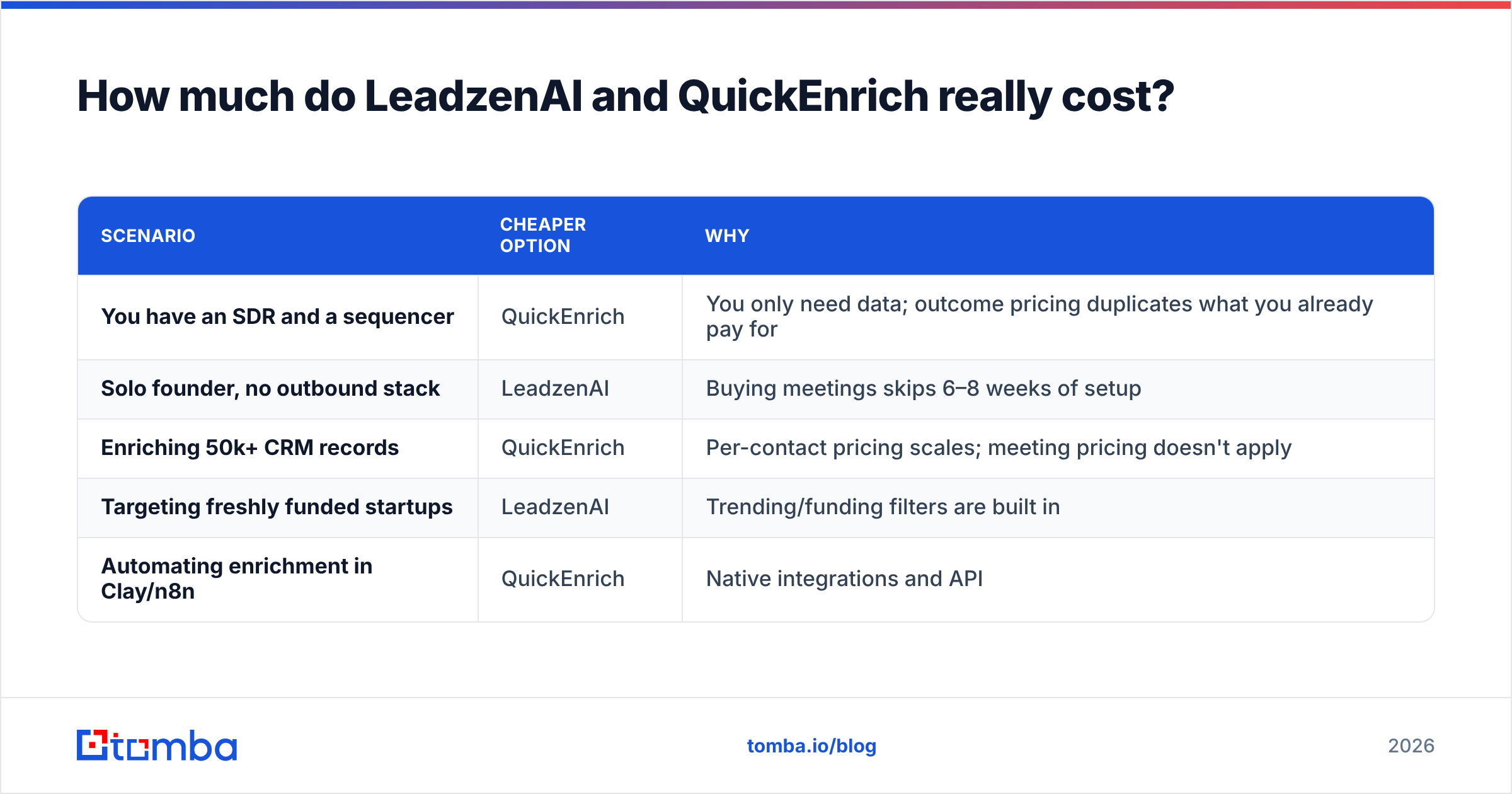
| Scenario | Cheaper option | Why |
|---|---|---|
| You have an SDR and a sequencer | QuickEnrich | You only need data; outcome pricing duplicates what you already pay for |
| Solo founder, no outbound stack | LeadzenAI | Buying meetings skips 6–8 weeks of setup |
| Enriching 50k+ CRM records | QuickEnrich | Per-contact pricing scales; meeting pricing doesn't apply |
| Targeting freshly funded startups | LeadzenAI | Trending/funding filters are built in |
| Automating enrichment in Clay/n8n | QuickEnrich | Native integrations and API |
Who should choose LeadzenAI?#
Choose LeadzenAI if most of these are true:
- You don't have outbound capacity. No SDR, no warmed domains, no sequencer, and no plans to build them this quarter.
- Your ICP is SMBs or startups. LeadzenAI's positioning and funding-based filters suit that market.
- You value predictability over unit cost. Knowing you'll get about 25 meetings for a fixed fee is easier to budget than an in-house experiment.
- You can qualify quickly. Outsourced meetings vary in quality, so you need a sharp discovery call and clear rejection criteria in the contract.
Be careful about one thing. Ask how LeadzenAI defines a "confirmed meeting." Does a no-show count? What about someone outside your ICP? Get the definition in writing. Outcome-based pricing only protects you when the outcome is clearly defined.
Who should choose QuickEnrich?#
Choose QuickEnrich if:
- You already have target lists from LinkedIn Sales Navigator, a CRM export, event attendees, or an intent tool, and you only need contact details.
- You run a waterfall in Clay. QuickEnrich is a cheap first or second step before you fall back to more expensive providers.
- Mobile numbers matter. Getting phones in the same credit is a real advantage for call-heavy teams.
- You're comfortable with APIs. The web app works, but you get the most out of QuickEnrich through the API and automation platforms.
Its main limitation is discovery. QuickEnrich won't tell you who to target. If your bottleneck is "we don't know which 500 companies to go after," cheaper enrichment won't fix it.

What are the pros and cons of each?#
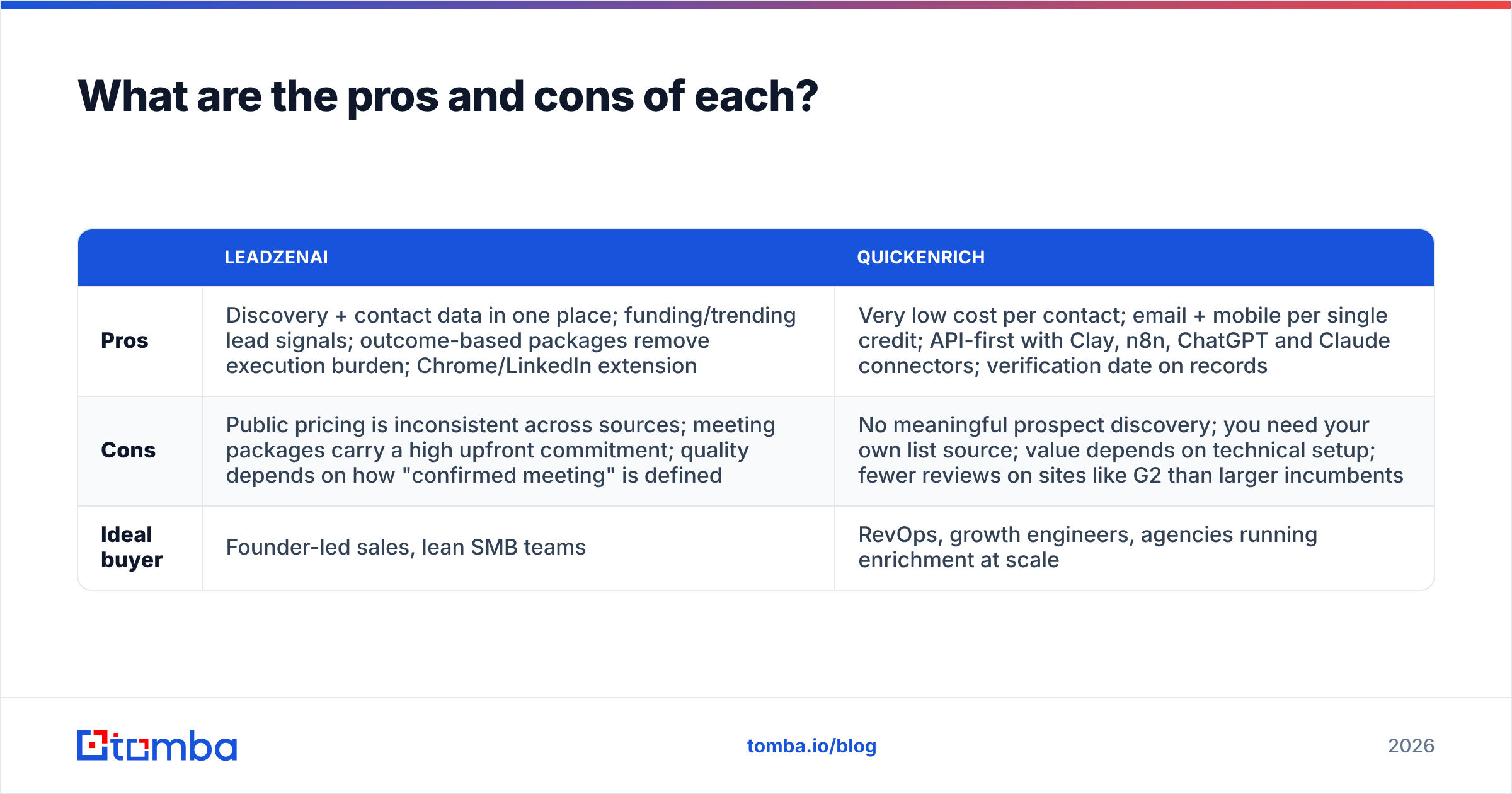
| LeadzenAI | QuickEnrich | |
|---|---|---|
| Pros | Discovery + contact data in one place; funding/trending lead signals; outcome-based packages remove execution burden; Chrome/LinkedIn extension | Very low cost per contact; email + mobile per single credit; API-first with Clay, n8n, ChatGPT and Claude connectors; verification date on records |
| Cons | Public pricing is inconsistent across sources; meeting packages carry a high upfront commitment; quality depends on how "confirmed meeting" is defined | No meaningful prospect discovery; you need your own list source; value depends on technical setup; fewer reviews on sites like G2 than larger incumbents |
| Ideal buyer | Founder-led sales, lean SMB teams | RevOps, growth engineers, agencies running enrichment at scale |
Is there a middle ground between the two?#
Many teams need something between "buy meetings" and "buy raw credits": a self-serve tool that finds emails by domain or name, verifies them, and enriches records without needing Clay.
This is where Tomba fits, and where you should judge it on its own merits:
- Domain-first search. Enter a company domain and see the email addresses and patterns found for it. That's useful when you know the account but not the person.
- Built-in verification. Tomba's email finder and verifier sit in the same product, so you don't have to pipe results into a second tool before sending.
- Enrichment beyond email. Phone finder, catch-all verification, and data enrichment for company and person records.
- Transparent pricing. Free (25 searches/mo), Starter $49/mo, Growth $99/mo, Pro $249/mo, and custom Enterprise. See Tomba pricing for credit amounts per plan.
Be honest about the trade-offs. If you run 100k-row Clay waterfalls, QuickEnrich's per-contact price is hard to beat. If you want someone else to book your meetings, Tomba won't do that, and neither will QuickEnrich. Tomba suits the large group of teams that want a clean, verified contact list and plan to run outreach themselves.
How should you run your own LeadzenAI vs QuickEnrich test?#
Don't choose based on a blog post, including this one. Run a two-week test:
- Build a 200-contact sample that reflects your real ICP: same industries, seniority, and regions.
- Enrich it in QuickEnrich and record the find rate, mobile rate, and cost.
- Ask LeadzenAI for a sample list or pilot meetings against the same ICP, with the meeting definition in writing.
- Verify every email returned by any tool with an independent verifier before you send. Track valid, invalid, catch-all, and unknown.
- Send a small sequence (50–100 contacts) from a warmed domain and measure bounces, replies, and meetings.
- Calculate cost per qualified meeting. That number decides it, not cost per contact.
Final verdict: LeadzenAI or QuickEnrich?#
QuickEnrich wins on cost and flexibility if you already run outbound and only need verified emails and mobile numbers. $29 for 6,000 contacts with free phone data is a strong offer, and its Clay and API support makes it easy to add to an existing stack.
LeadzenAI wins on convenience if you don't have the people or infrastructure for outbound and would rather pay per meeting than build a function. Get pricing and the meeting definition in writing first.
If you want reliable, verified contact data without Clay workflows or a four-figure meeting package, start with the Tomba Email Finder. Search by domain, name, or company, verify results in the same place, and test it on your own ICP with the free 25 monthly searches before you pay for a plan.
Related guides#
// get started
Find, verify and enrich your first contacts today
Start on the free plan with 25 searches a month, then scale when your team is ready.
Free plan · No credit card required · GDPR & CCPA
// about the author