LeadzenAI vs SalesQL (2026): Features, Pricing and Which to Pick
LeadzenAI sells an AI-assisted lead database and, more recently, booked meetings. SalesQL sells fast email and phone lookups from LinkedIn. Here is how the two compare on data, pricing and workflow, and how to tell which one your team needs.
TL;DR
- SalesQL is a LinkedIn-first email and phone finder. You open a profile, click the extension and get contact data. Pricing is credit-based and starts around $39/mo, with a free tier of about 50 credits.
- LeadzenAI is an AI-assisted B2B lead generation platform. It combines a searchable lead database, bulk search, "trending leads" signals and Chrome/LinkedIn extensions. Its newer packages are priced per booked meeting, not per contact.
- Choose SalesQL if your reps already know who they want to reach and just need emails quickly. Choose LeadzenAI if you need help deciding who to target, or you want to hand off part of the pipeline work.
- Neither tool removes the need to verify contacts before you send. Bounce rates decide whether your domain stays healthy.
- If you want domain-level search, verification and LinkedIn lookups under one flat plan, Tomba sits between the two at $49/mo for Starter.
What is the real difference between LeadzenAI and SalesQL?#
These two tools do different jobs, so comparing them feature by feature can mislead you.
SalesQL answers "how do I reach this person?" You give it a LinkedIn profile or a list of them, and it gives back business emails, personal emails and, on some plans, direct phone numbers. It is built around LinkedIn and Sales Navigator, and it has little to say about which accounts you should go after.
LeadzenAI answers "who should I be reaching?" It describes itself as an AI lead generation tool for startups and SMEs. You filter a database by industry, geography, company size and role. You can bulk-search, browse signals such as recently funded companies and active angel investors, and export contacts. In the last year it has also started selling outcome-based packages, where you pay for a set number of confirmed meetings instead of a set number of data credits.
Put simply, SalesQL is a tool for your SDRs. LeadzenAI is part tool and, more and more, part service.
How do the core features compare?#
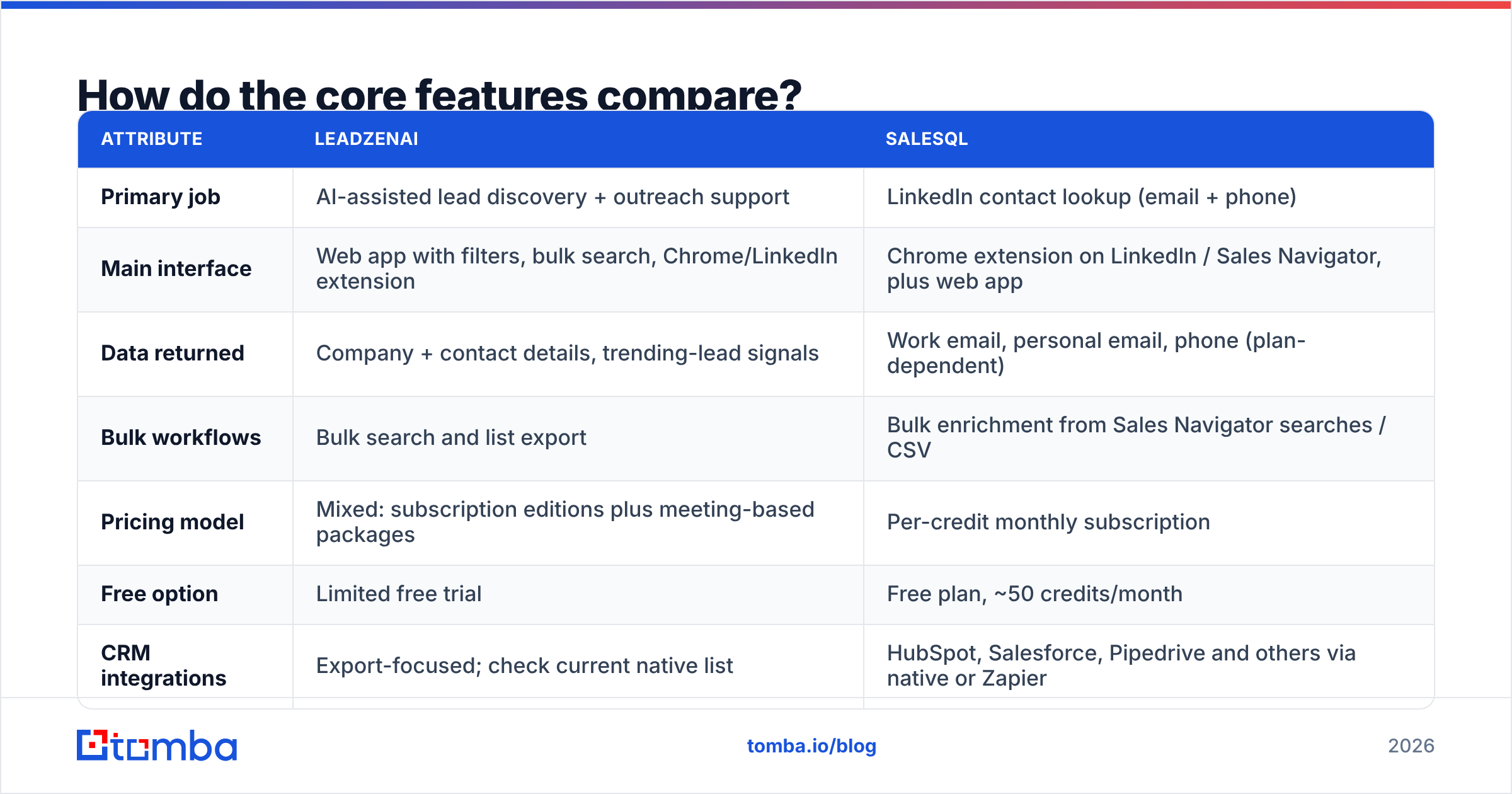
Here are the attributes that matter when you're choosing between them:
| Attribute | LeadzenAI | SalesQL |
|---|---|---|
| Primary job | AI-assisted lead discovery + outreach support | LinkedIn contact lookup (email + phone) |
| Main interface | Web app with filters, bulk search, Chrome/LinkedIn extension | Chrome extension on LinkedIn / Sales Navigator, plus web app |
| Data returned | Company + contact details, trending-lead signals | Work email, personal email, phone (plan-dependent) |
| Bulk workflows | Bulk search and list export | Bulk enrichment from Sales Navigator searches / CSV |
| Pricing model | Mixed: subscription editions plus meeting-based packages | Per-credit monthly subscription |
| Free option | Limited free trial | Free plan, ~50 credits/month |
| CRM integrations | Export-focused; check current native list | HubSpot, Salesforce, Pipedrive and others via native or Zapier |
| Best for | SMEs without a defined ICP list or SDR capacity | Teams that already prospect on LinkedIn daily |
Two points explain most of this table.
- Where the workflow starts. SalesQL assumes the prospect list already exists in LinkedIn. LeadzenAI assumes you still need to build the list.
- What you pay for. SalesQL charges per successful lookup. It deducts one credit per contact when it finds at least one email and nothing when it finds nothing, according to SalesQL's own pricing page and help docs. LeadzenAI's meeting-based packages charge for a result further down the funnel.

How accurate is the contact data from each tool?#
Accuracy is where comparisons get unreliable. Neither vendor publishes a third-party audited bounce rate, and results change a lot by region and seniority.
Here is what you can say with some confidence:
- SalesQL works best on LinkedIn profiles with a current, well-known employer. Its personal-email coverage is a known strength. Its hit rate falls on small companies with thin web footprints, which is true of every LinkedIn-based finder. Because you only pay for successful lookups, a low hit rate costs you time, not credits.
- LeadzenAI labels its data as verified. Database products, though, depend on how often the records are refreshed. Reviews on software directories are mixed on data freshness for non-Indian and non-US markets. The platform's reported origins and customer base lean toward South Asia and SMEs. Test it on your own territory before you commit.

The practical rule is the same for both: run every exported list through an independent email verifier before it reaches your sequencer. If you import 2,000 contacts at an 8% bounce rate, that is 160 hard bounces from one domain in one week. That's enough for mailbox providers to start throttling you. Verification costs a fraction of a cent per address. A burned domain costs weeks of warmup.
How to run a fair accuracy test yourself#
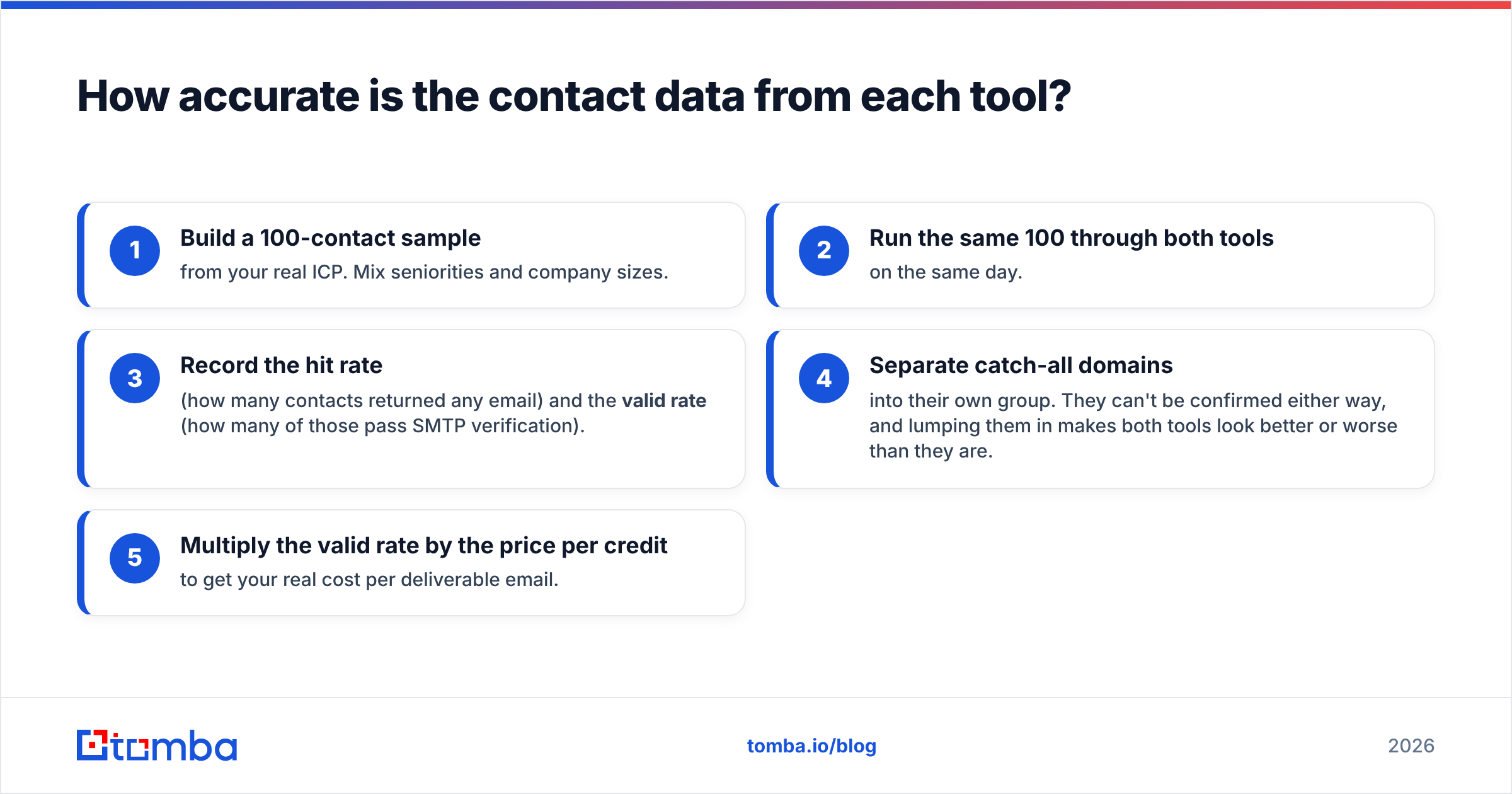
- Build a 100-contact sample from your real ICP. Mix seniorities and company sizes.
- Run the same 100 through both tools on the same day.
- Record the hit rate (how many contacts returned any email) and the valid rate (how many of those pass SMTP verification).
- Separate catch-all domains into their own group. They can't be confirmed either way, and lumping them in makes both tools look better or worse than they are.
- Multiply the valid rate by the price per credit to get your real cost per deliverable email.
That last number is the only one worth comparing. A tool that costs twice as much per credit but delivers twice as many valid emails costs the same in practice.
What does LeadzenAI vs SalesQL pricing actually look like?#
Pricing for both tools has changed over the past two years, and third-party listings disagree. Treat these figures as a starting point and confirm them on each vendor's site before you buy.
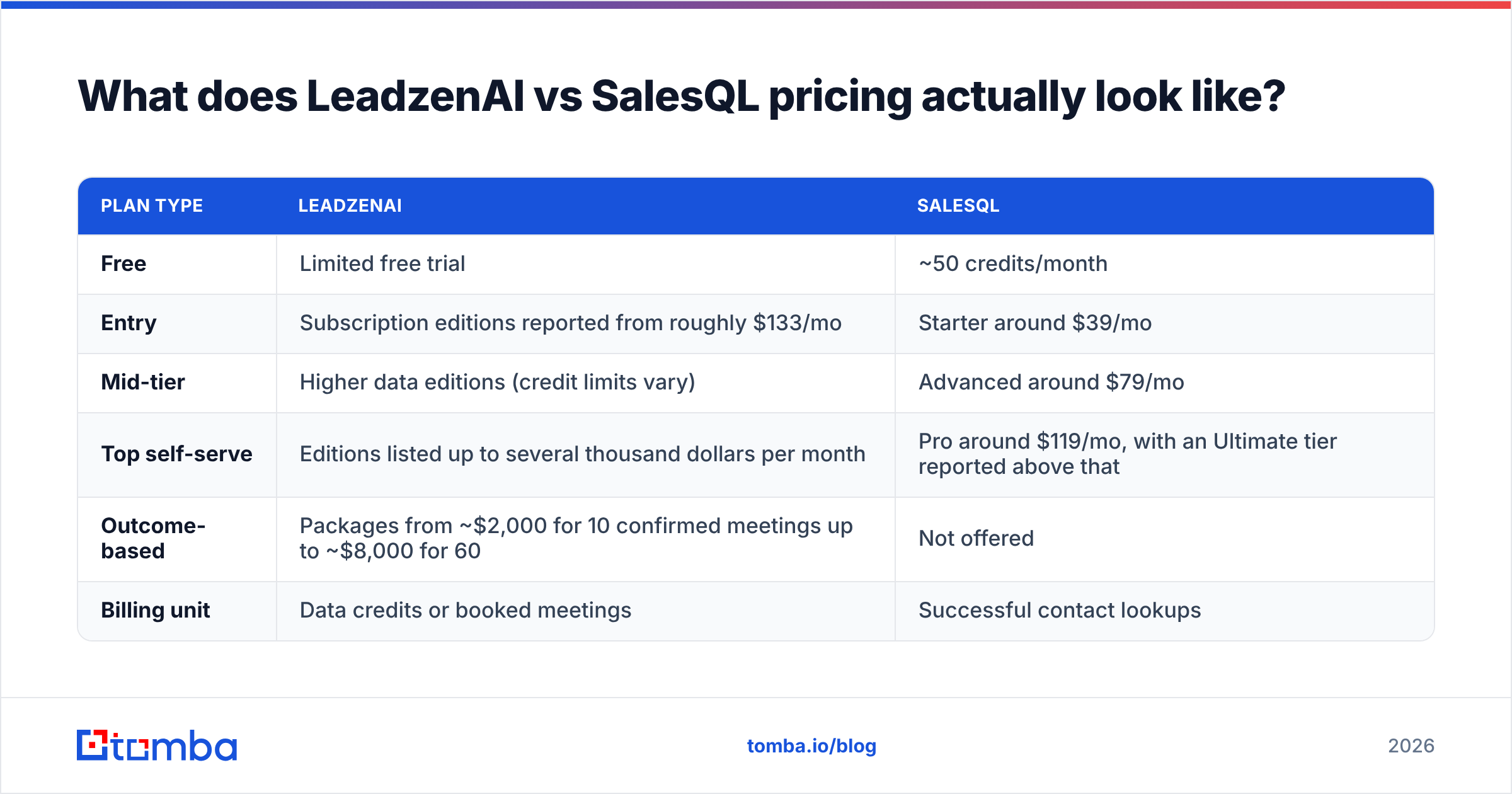
| Plan type | LeadzenAI | SalesQL |
|---|---|---|
| Free | Limited free trial | ~50 credits/month |
| Entry | Subscription editions reported from roughly $133/mo | Starter around $39/mo |
| Mid-tier | Higher data editions (credit limits vary) | Advanced around $79/mo |
| Top self-serve | Editions listed up to several thousand dollars per month | Pro around $119/mo, with an Ultimate tier reported above that |
| Outcome-based | Packages from ~$2,000 for 10 confirmed meetings up to ~$8,000 for 60 | Not offered |
| Billing unit | Data credits or booked meetings | Successful contact lookups |
Some reports say SalesQL's plans include thousands of credits a month, and others say hundreds. The difference may be email credits versus phone credits, or older versus newer plans. Check the credit split on SalesQL's pricing page before you model costs.
For LeadzenAI, the meeting-based packages mean you're no longer comparing two data tools. At about $200 per confirmed meeting, you're comparing SalesQL plus an SDR's time against a done-for-you pipeline service. That can be a good deal if your average contract value is high and you have no SDR capacity. If your team already books meetings, it's an expensive way to buy contact data.
Which workflow fits your team?#
Pricing matters less than fit. Four team types come up most often.
- The LinkedIn-native SDR team. Your reps spend their day in Sales Navigator, saving leads and sending InMails. SalesQL fits right in: open the profile, click once, push to CRM. LeadzenAI would add a second place to search that nobody uses.
- The founder-led startup with no ICP list. You know your buyer only roughly, for example "Series A fintechs in Europe." LeadzenAI's filters and funding signals help you build the first list. SalesQL can't help until that list exists.
- The agency running outbound for clients. You need volume, bulk enrichment and predictable cost per contact. SalesQL's credit model is easier to pass on to clients. LeadzenAI's meeting packages overlap with what you already sell.
- The RevOps team enriching an existing CRM. You have 20,000 accounts with missing or stale contacts. Neither tool is ideal. You want domain-level search and API enrichment, not per-profile lookups.
The last case is common and gets overlooked. SalesQL is profile-first and LeadzenAI is database-first, so neither is built to answer "give me every verified email at these 500 domains."
What are the pros and cons of each?#
LeadzenAI pros
- Helps with targeting, not just contact lookup
- Trending-lead signals (funding rounds, investors) are useful triggers for SME outbound
- Meeting-based packages suit teams with no SDR bandwidth
- Chrome and LinkedIn extensions for ad-hoc lookups
LeadzenAI cons
- Pricing is hard to follow, with public figures ranging from about $133/mo to several thousand
- Data depth outside its core markets is uneven, so test your geography first
- Meeting packages make it more of a service, which is harder to compare with self-serve tools
SalesQL pros
- Very quick LinkedIn workflow, about one click per profile
- Charges only for successful lookups
- Good personal-email coverage alongside work email
- Free tier is enough to test it properly
SalesQL cons
- Depends on LinkedIn; no help deciding whom to target
- Credit splits between email and phone differ across plans
- Weak for enriching by domain or company across whole accounts
- Relies on a LinkedIn workflow, which carries platform-policy risk if you automate heavily
Is there a middle option between LeadzenAI and SalesQL?#
Yes. It depends on which gap you're trying to fill.
If your problem is finding and verifying emails at scale, whether starting from a domain, a name, a company or a LinkedIn URL, a dedicated email finder is the simpler purchase. Tomba is one example. Its email finder works from a domain plus name. Domain search returns the known addresses at a company. A LinkedIn finder covers the SalesQL-style profile workflow. Verification is built into the same account.

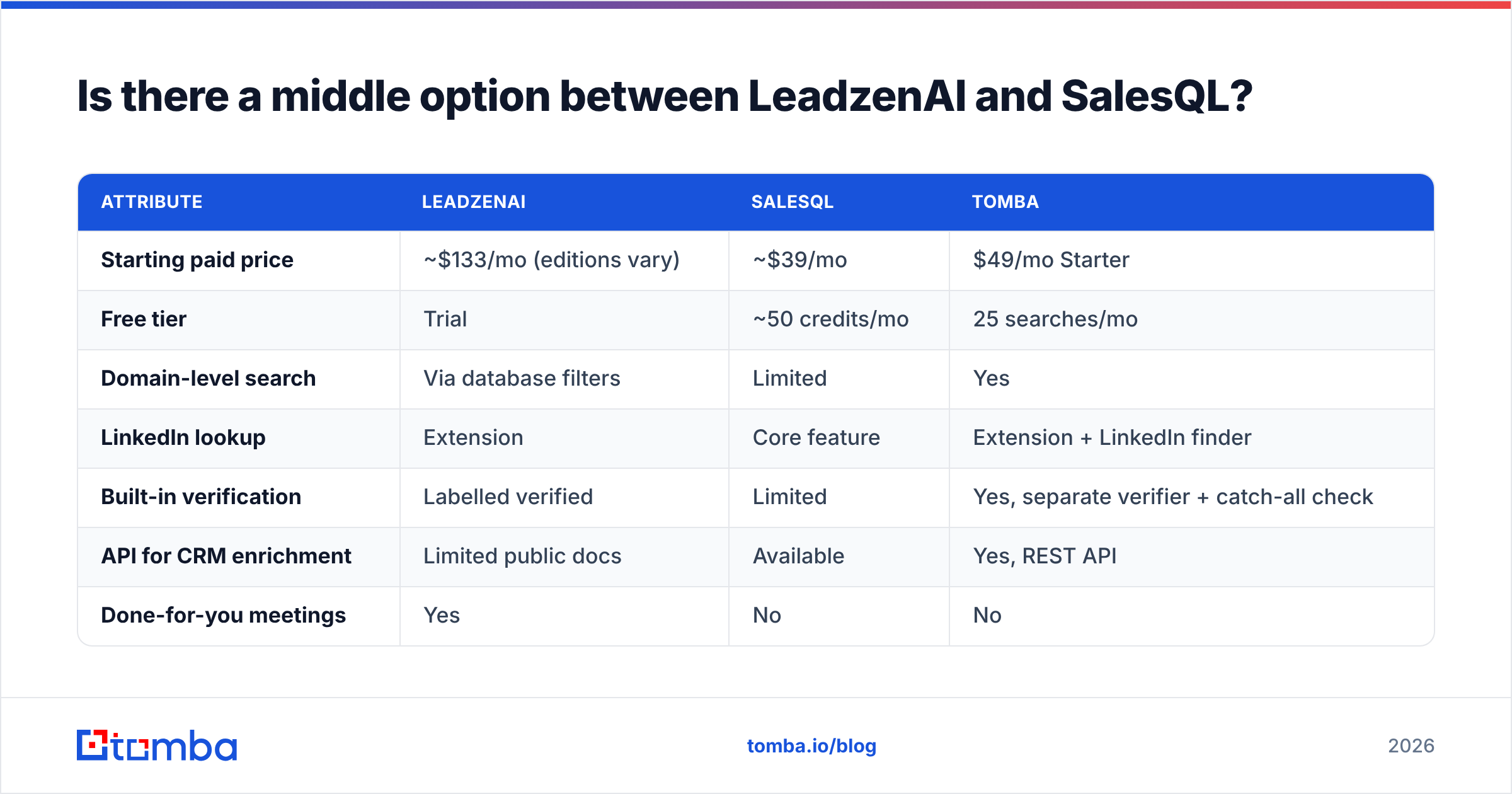
For completeness, here's how the three line up:
| Attribute | LeadzenAI | SalesQL | Tomba |
|---|---|---|---|
| Starting paid price | ~$133/mo (editions vary) | ~$39/mo | $49/mo Starter |
| Free tier | Trial | ~50 credits/mo | 25 searches/mo |
| Domain-level search | Via database filters | Limited | Yes |
| LinkedIn lookup | Extension | Core feature | Extension + LinkedIn finder |
| Built-in verification | Labelled verified | Limited | Yes, separate verifier + catch-all check |
| API for CRM enrichment | Limited public docs | Available | Yes, REST API |
| Done-for-you meetings | Yes | No | No |
Tomba doesn't replace LeadzenAI's targeting or its meeting service. If you need someone else to book meetings, Tomba won't do that. It also isn't as tightly built around Sales Navigator as SalesQL. What it does well is the middle step: turning a company or person into a verified email you can send to. Full tiers (Starter $49, Growth $99, Pro $249, Enterprise custom) are listed on the Tomba pricing page.
How should you decide in under five minutes?#
Ask one question: what is the bottleneck in your pipeline right now?
- "We don't know who to target." Start with LeadzenAI's database and signals, or with a proper ICP exercise before you buy any tool.
- "We know who, but can't reach them from LinkedIn." SalesQL is the fastest option. Start on the free plan.
- "We have no time to do outbound at all." LeadzenAI's meeting packages are worth a look. Compare the cost per meeting with an agency or a fractional SDR.
- "We have target accounts and need verified emails at scale." Use a domain-first email finder with built-in verification.
- "Bounces are hurting our deliverability." Fix verification first, whichever data source you keep.
Check recent user reviews on G2 for both vendors before you sign an annual contract. Data quality changes over time, and reviews from the last six months are more useful than a vendor's own claims.
Final verdict: LeadzenAI or SalesQL?#
SalesQL wins for LinkedIn-first prospecting teams. It's cheaper to start, quicker to use, and you only pay for results. If your reps live in Sales Navigator, pick it.
LeadzenAI wins for SMEs that need help with targeting or have no SDR capacity. The database, funding signals and meeting packages cover work SalesQL doesn't touch. Just budget for the higher and less transparent cost, and test data depth in your region first.
If what you actually need is to turn target accounts into verified inboxes, without per-meeting fees or a LinkedIn-only workflow, try the Tomba Email Finder. The free plan gives you 25 searches a month, enough to run the 100-contact accuracy test above against whichever tool you're considering. Paid plans start at $49/mo with verification included. You can compare the three on your own leads before you commit.
Related guides#
// get started
Find, verify and enrich your first contacts today
Start on the free plan with 25 searches a month, then scale when your team is ready.
Free plan · No credit card required · GDPR & CCPA
// about the author