LeanData Pricing Reviews Pros and Cons: 2026 Buyer's Guide
LeanData doesn't publish its prices. Here's how its quotes are usually built, what G2 reviewers praise and complain about, and when a lighter routing-plus-enrichment setup is the better buy.
Looking for LeanData pricing reviews pros and cons in one place? This guide covers how quotes get built, what reviewers say, and when a lighter stack is the better buy.
TL;DR
- LeanData doesn't publish prices. Every deal is a custom annual quote. The price depends on your modules (Routing, BookIt, Attribution, Buying Groups), your Salesforce user count and how complex your setup is.
- Reviewers usually say mid-market contracts land in the five figures per year. Enterprise deals with several modules can go well past that. Budget for implementation time on top of the license.
- Top strengths: strong lead-to-account matching, a visual flow builder and a close Salesforce fit. Top complaints: steep learning curve, cost, and the need for a dedicated Salesforce admin.
- LeanData routes data. It doesn't create it. If leads arrive with missing emails, domains or company fields, routing breaks. Fix enrichment first.
- Small teams may get most of the value from native Salesforce or HubSpot rules plus a low-cost enrichment tool.
What is LeanData, and what are you actually paying for?#
LeanData is a revenue orchestration platform built on Salesforce. It started with one problem. An inbound lead fills out a form, and nobody knows which account it belongs to. Nobody knows which rep owns that account, or if an open deal already exists. LeanData matches the lead to the right account and sends it to the right person, fast.
That core has grown into a suite. When you ask for a quote, you're buying some combination of the following:
- Lead-to-Account Matching and Routing. The main product. It uses fuzzy matching on domain, company name and other fields to attach leads to existing accounts. Then it routes leads, contacts, accounts, opportunities and cases through a drag-and-drop flow builder.
- BookIt. Scheduling that books a meeting with the correct routed rep from a form submission, a chat or an email handoff. It competes with Chili Piper.
- Multi-Touch Attribution. Assigns pipeline and revenue credit to campaigns, using the same account matching to tie touches to deals.
- Buying Groups and account-level views. Groups the contacts inside a target account so ABM and sales teams can work the whole buying committee.
- Integrations and orchestration actions. Slack alerts, sequence enrollment, round-robin, territory logic and SLA escalations, all triggered from the same flow graph.
To picture the value, think of LeanData as an air traffic controller for your CRM. It doesn't build planes (leads) and it doesn't fuel them (data). It makes sure each one lands on the right runway without two of them colliding. Technically, it runs as a managed package inside Salesforce and acts on records in real time as they're created or updated.
You can see the full module list on the official LeanData site.
How much does LeanData cost in 2026?#
LeanData uses quote-based pricing. There's no public price list, no self-serve checkout and no monthly plan. You talk to sales, go through a scoping call, and get an annual contract.
From public buyer reviews, procurement forums and reviewer comments, the pattern looks like this:
- Pricing scales with Salesforce users (or routed-to users) and with the modules you add.
- Routing alone is the entry point. Most mid-market buyers say the first-year contract is in the five figures.
- Adding BookIt and Attribution raises the total noticeably. Enterprise deals with several business units, complex territories and multiple modules are reported well into six figures.
- Multi-year commitments are the usual lever for a discount. Expect a push toward two- or three-year terms.
- Implementation is sometimes sold as a professional-services package. Even when it isn't, it takes time from your internal Salesforce admin.
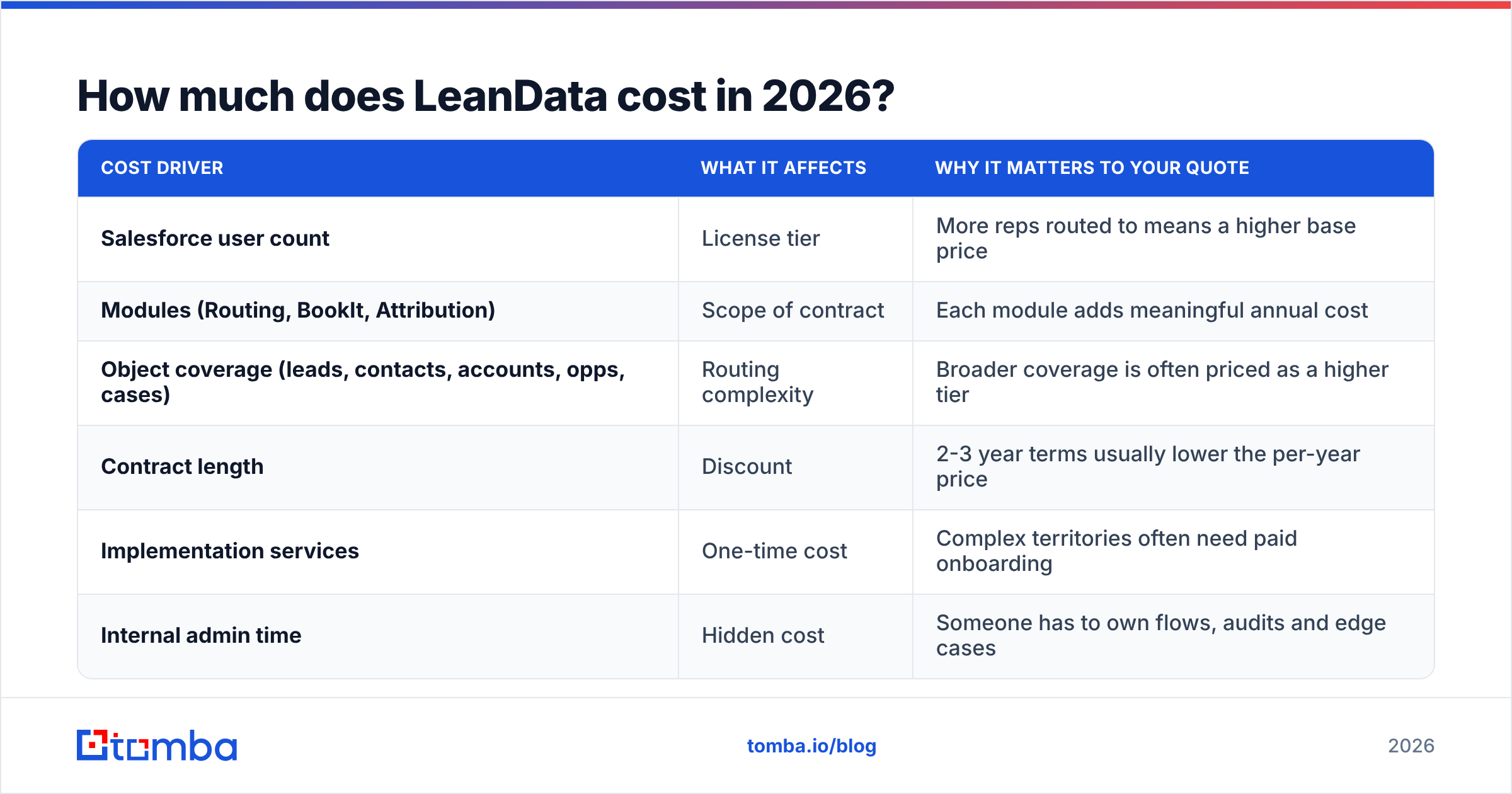
Treat these as directional, not quoted. LeanData doesn't publish figures, and your number depends on seat count, modules and negotiation. The table below shows how the main pricing variables work.
| Cost driver | What it affects | Why it matters to your quote |
|---|---|---|
| Salesforce user count | License tier | More reps routed to means a higher base price |
| Modules (Routing, BookIt, Attribution) | Scope of contract | Each module adds meaningful annual cost |
| Object coverage (leads, contacts, accounts, opps, cases) | Routing complexity | Broader coverage is often priced as a higher tier |
| Contract length | Discount | 2-3 year terms usually lower the per-year price |
| Implementation services | One-time cost | Complex territories often need paid onboarding |
| Internal admin time | Hidden cost | Someone has to own flows, audits and edge cases |
What are the hidden costs of LeanData?#
The license is only part of what you'll spend. Three more costs show up often:
- Admin headcount. LeanData is powerful because it's configurable, and someone has to do the configuring. Reviewers mention needing a dedicated RevOps or Salesforce admin to own the flow graphs.
- Data quality work. Matching only works when domains, company names and emails are filled in and clean. If 30% of your inbound leads use personal Gmail addresses or leave the company field empty, you'll pay for enrichment one way or another.
- Salesforce dependency. LeanData is built around Salesforce. If you're on HubSpot CRM, check with LeanData directly what's supported for your setup before you scope it.

What do LeanData reviews say?#
LeanData scores well on G2's LeanData review page, with most reviewers rating it in the mid-4s out of 5. The written reviews are more useful than the star average, and they're consistent.
What reviewers praise:
- Matching accuracy. Lead-to-account matching is the feature people mention most. Reviewers credit it with ending "who owns this lead?" fights between SDRs and AEs.
- Visual flow builder. RevOps teams like seeing routing logic as a graph instead of as dozens of stacked Salesforce assignment rules.
- Speed to lead. Routing happens in seconds. Teams that pair it with BookIt say inbound meetings get booked while the prospect is still on the page.
- Audit logs. You can see why a record went where it did, which makes debugging much easier.
- Customer support. Several reviewers mention responsive support and helpful customer success managers during onboarding.
What reviewers complain about:
- Learning curve. Complex flows get hard to follow. New admins often need weeks to get comfortable.
- Price. Smaller companies say the cost is hard to justify when they only have a handful of reps.
- Salesforce-only design. Some buyers want more flexibility outside the Salesforce ecosystem.
- Edge cases. Unusual territory rules or merged accounts can produce routing surprises that take effort to trace.
- UI performance. A few reviewers mention slow loading in large flow graphs.
For a broader view of how the category is scored, Gartner's revenue operations research is a good reference for how analysts define the orchestration layer.
What are the pros and cons of LeanData?#
| Pros | Cons |
|---|---|
| Best-in-class lead-to-account matching | No public pricing; quote-only, annual contracts |
| Visual, auditable routing flows | Steep learning curve for complex flows |
| Close fit with Salesforce | Built around Salesforce |
| BookIt ties routing to instant scheduling | Modules add up quickly |
| Covers leads, contacts, accounts, opps, cases | Needs a dedicated admin to maintain |
| Strong fit for ABM and multi-BU orgs | Overkill for teams with fewer than ~10 reps |
| Attribution uses the same matching logic | Only as accurate as your underlying data |
The last con matters most. LeanData can't match a lead to an account if the lead arrives with jdoe@gmail.com, no company name, and a job title of "n/a." The routing logic is fine. It just has nothing to work with.
Is LeanData worth it for your team?#
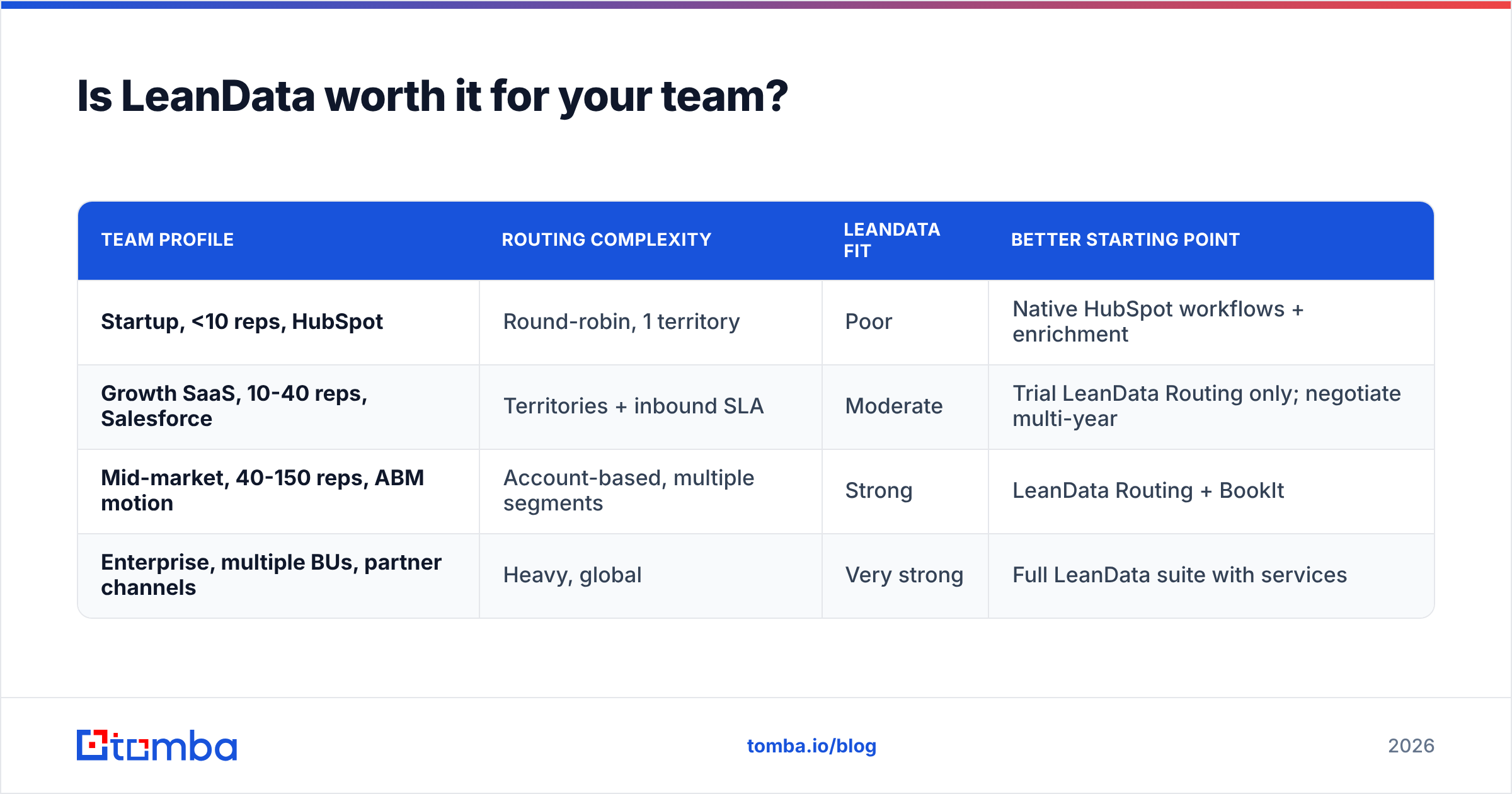
It depends on your team size and how complex your routing is. Here's a simple way to decide:
| Team profile | Routing complexity | LeanData fit | Better starting point |
|---|---|---|---|
| Startup, <10 reps, HubSpot | Round-robin, 1 territory | Poor | Native HubSpot workflows + enrichment |
| Growth SaaS, 10-40 reps, Salesforce | Territories + inbound SLA | Moderate | Trial LeanData Routing only; negotiate multi-year |
| Mid-market, 40-150 reps, ABM motion | Account-based, multiple segments | Strong | LeanData Routing + BookIt |
| Enterprise, multiple BUs, partner channels | Heavy, global | Very strong | Full LeanData suite with services |
LeanData is probably worth it if:
- You run Salesforce and have at least one person who can own the flows.
- Leads often go to the wrong rep, or reps double up on outreach because leads aren't matched to accounts.
- Your inbound volume is high enough that faster speed to lead turns into real pipeline.
- You're running ABM and need contacts grouped at the account level.
It's probably not worth it yet if:
- You have fewer than about 10 quota-carrying reps and simple round-robin logic.
- Your CRM data is messy enough that matching would fail anyway.
- You don't have admin capacity. An unmaintained LeanData instance can end up worse than well-kept native rules.
What are the best LeanData alternatives?#
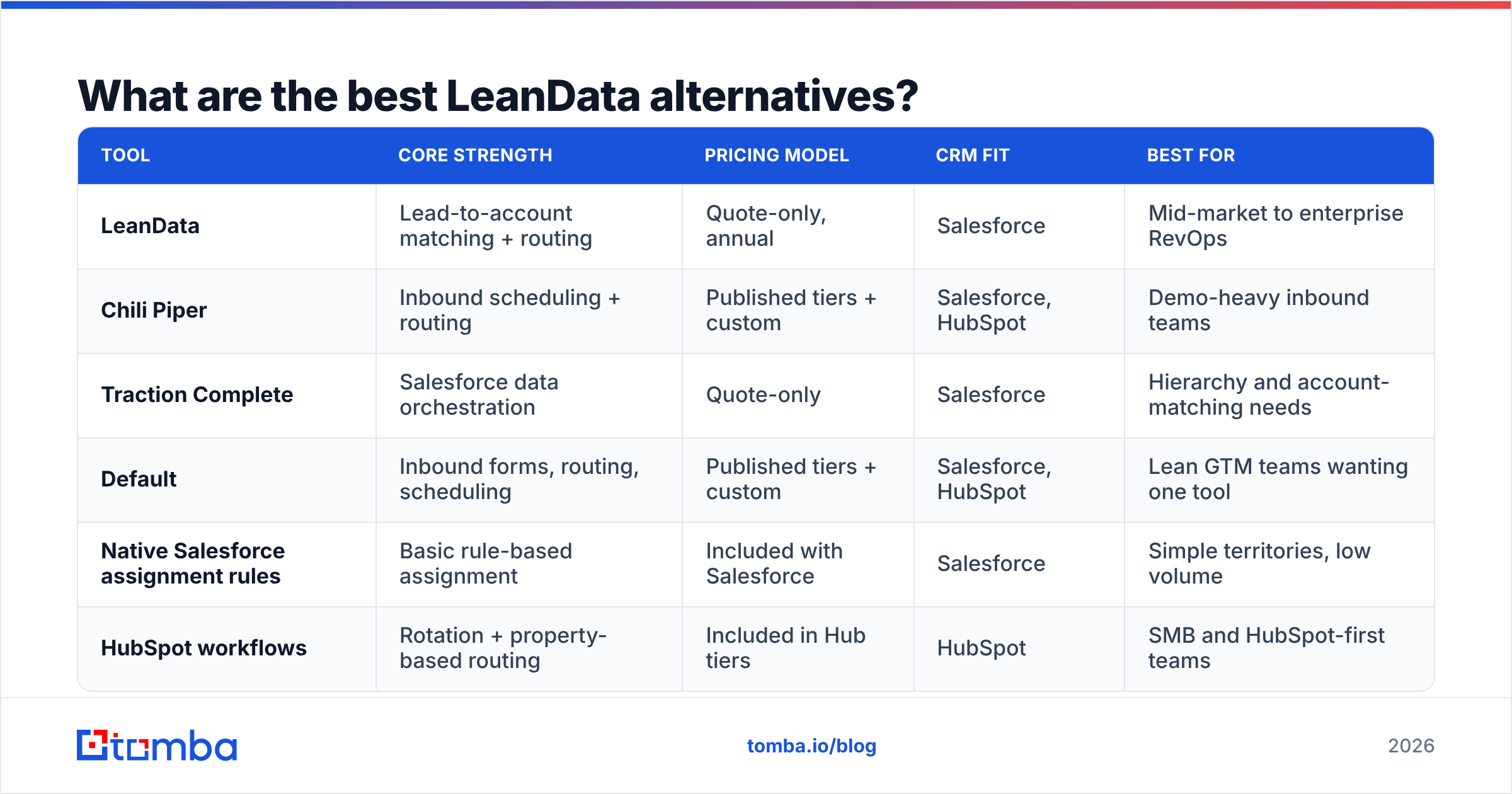
Most teams compare LeanData with a handful of routing and scheduling tools, plus the "do it natively" option.
| Tool | Core strength | Pricing model | CRM fit | Best for |
|---|---|---|---|---|
| LeanData | Lead-to-account matching + routing | Quote-only, annual | Salesforce | Mid-market to enterprise RevOps |
| Chili Piper | Inbound scheduling + routing | Published tiers + custom | Salesforce, HubSpot | Demo-heavy inbound teams |
| Traction Complete | Salesforce data orchestration | Quote-only | Salesforce | Hierarchy and account-matching needs |
| Default | Inbound forms, routing, scheduling | Published tiers + custom | Salesforce, HubSpot | Lean GTM teams wanting one tool |
| Native Salesforce assignment rules | Basic rule-based assignment | Included with Salesforce | Salesforce | Simple territories, low volume |
| HubSpot workflows | Rotation + property-based routing | Included in Hub tiers | HubSpot | SMB and HubSpot-first teams |
Two notes on reading this table:
- Scheduling-first tools like Chili Piper or Default often cost less when your main problem is "book the demo fast" rather than "match to the right account."
- Native rules have no extra cost, but you pay in upkeep once territories get complex. Salesforce's own documentation on assignment rules explains where the native limits are.
Why does data enrichment decide whether routing works?#
Every routing platform, LeanData included, depends on a few fields: the lead's email domain, company name, and sometimes job title and location. When those are missing, three things go wrong:
- Matching fails. The lead doesn't attach to its account, so it goes to a generic queue or round-robin and skips the owning AE.
- Territory logic fails. No country or company size means no territory, which means default assignment.
- Attribution fails. Touches can't be tied to accounts, so pipeline credit ends up in "unknown."
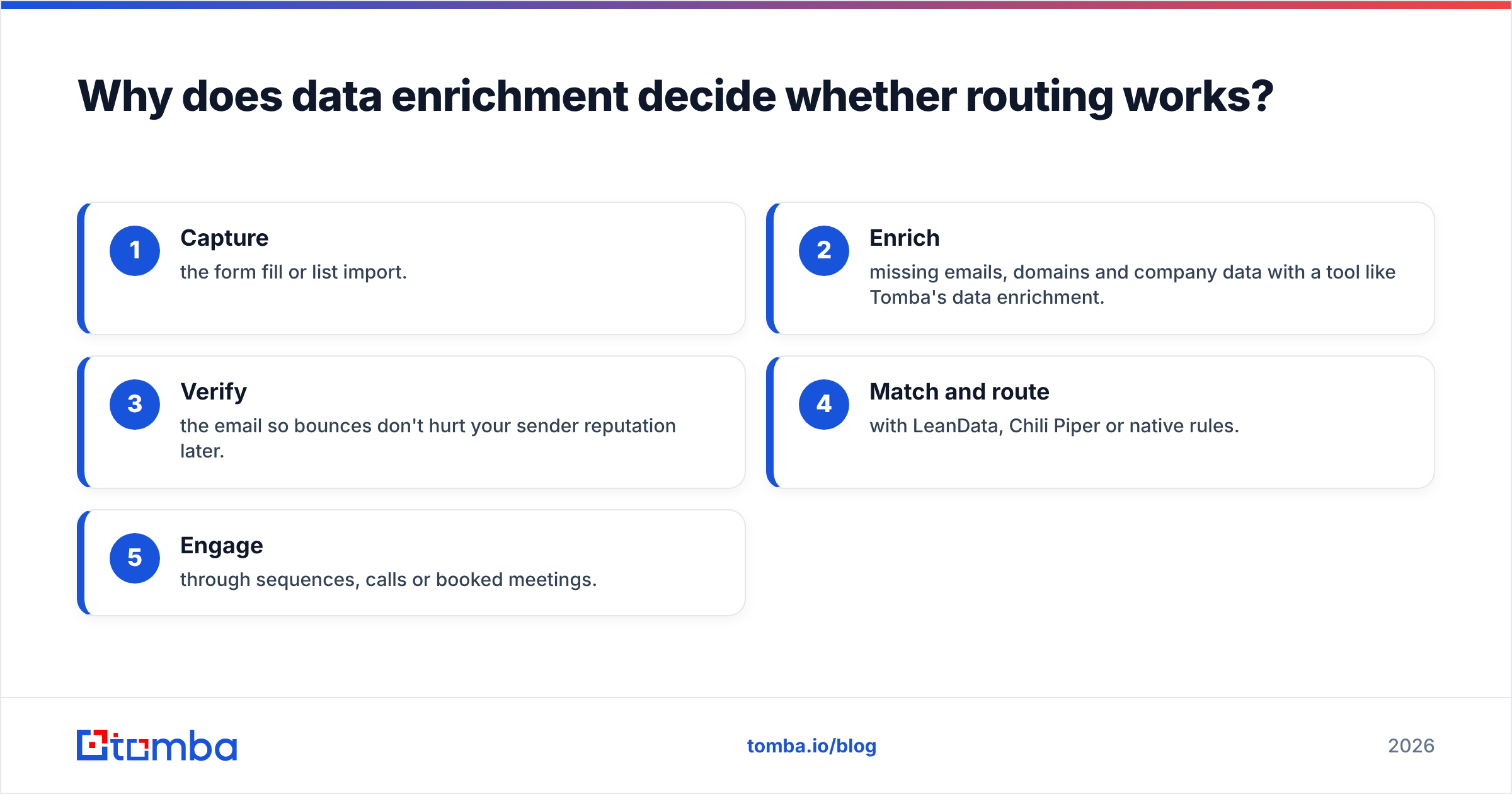
That's why good RevOps teams enrich before they route. The typical order looks like this:
- Capture the form fill or list import.
- Enrich missing emails, domains and company data with a tool like Tomba's data enrichment.
- Verify the email so bounces don't hurt your sender reputation later.
- Match and route with LeanData, Chili Piper or native rules.
- Engage through sequences, calls or booked meetings.
Need to fill gaps at the account level? Say you want to find who else works at a matched account for a buying-group play. Domain search returns the known work emails for a company domain in one lookup. For Salesforce teams, the Tomba Salesforce integration writes enriched fields back to records before your routing flows fire. That way LeanData gets clean data to match on.
The costs aren't in the same range. A routing platform is a five- or six-figure annual commitment. Enrichment can start at a few hundred dollars a year. Tomba's paid plans start at $49/mo (see Tomba pricing), and there's a free tier with 25 searches per month for testing. Enrichment doesn't replace LeanData. It's what lets you get the value you're paying LeanData for.
How should you negotiate a LeanData contract?#
If you've decided to buy, use these to get a better deal:
- Start with one module. Buy Routing first and add BookIt or Attribution at renewal, once you've shown ROI with your own data.
- Count seats accurately. Only include users who actually receive routed records. Ops, execs and read-only users often don't need to be counted.
- Trade term length for price. A two- or three-year commitment is the standard way to get a better per-year rate. Ask for renewal caps in writing.
- Scope implementation up front. Get a clear statement of work covering objects, flows and territories before you sign.
- Clean your data first. Enrich and dedupe your CRM before go-live. Then early routing results show how the tool performs, not how dirty your data is.
- Get peer references. Ask for references from companies with similar rep counts and CRM complexity, and check what they're paying against independent review sites.
Frequently asked questions#
Does LeanData have a free trial or free plan?#
No, there's no public free plan or self-serve trial. LeanData sells through demos and scoped proofs of concept, so ask your account executive about a pilot during evaluation.
Is LeanData only for Salesforce?#
LeanData is built for Salesforce, and that's where it's most mature. If your team is HubSpot-first, confirm the current integration scope with LeanData directly before starting procurement.
How long does LeanData take to implement?#
Simple routing can be running within a few weeks. Multi-object, multi-territory setups with BookIt and Attribution usually take longer. They also depend on how clean your CRM data is at the start.
What's the cheapest way to fix lead routing without LeanData?#
Tighten your native CRM assignment rules, enrich every inbound lead so domain and company fields are always filled in, and set up round-robin with SLA alerts. That handles most routing problems for teams under about 10 reps.
LeanData pricing reviews pros and cons: the bottom line#
Put the LeanData pricing reviews pros and cons side by side and the picture is clear. LeanData is a mature, well-reviewed orchestration platform. For Salesforce teams with real routing complexity, it's hard to beat at matching and routing. The trade-offs are quote-only pricing that grows fast as you add modules, a real admin commitment, and full reliance on the quality of your data. Buy it when your routing problems cost more than the contract. Either way, fix the data first.
If your leads keep showing up without emails, domains or company names, that's the problem to solve before you pay for any routing tool. Tomba Email Finder finds and verifies professional email addresses by name, domain or company, so every record that reaches your routing engine can be matched to an account. You can start free with 25 searches a month and see how many of your unroutable leads you can recover before you sign an annual orchestration contract.
Related guides#
// get started
Find, verify and enrich your first contacts today
Start on the free plan with 25 searches a month, then scale when your team is ready.
Free plan · No credit card required · GDPR & CCPA
// about the author