Leap AI Pricing, Reviews, Pros and Cons: An Honest 2026 Breakdown
Leap AI costs $9.99 to $31 a month, but older reviews quote $179 and $849. Here's what the plans cost now, what users say, and when the tool is worth paying for.
TL;DR
- The current Leap AI product at tryleap.ai is an AI text humanizer with a free AI detector. Paid plans run from $9.99/mo (Starter) through $19/mo (Pro) to $31/mo (Power), and each plan is capped by words per billing period.
- Many reviews online still quote $179/mo (Individual) and $849/mo (Team). Those prices belong to Leap's older no-code AI workflow product, so check which Leap a review covers before you trust its numbers.
- Pros: unlimited free detection, a low entry price, a simple paste-and-rewrite workflow, and discounts on annual billing.
- Cons: words are metered and the free humanizer allowance is lifetime (500 words), plan limits differ between sources, and humanizing text does nothing to fix bad targeting or weak offers.
- Verdict: Leap is worth it if you rewrite AI drafts every week and want a cheap, narrow tool. It won't help much if your outbound problem is reaching the wrong people.
What is Leap AI, and why do reviews contradict each other?#
Leap AI has changed products, and a lot of review content hasn't caught up. That's the main reason search results for "Leap AI pricing" disagree.
Three products share the name, and one of them has pivoted:
- Leap AI (tryleap.ai), current version. An AI detector and "humanizer" that rewrites AI-generated text so it reads as if a person wrote it. This is the product the rest of this post reviews.
- Leap AI (tryleap.ai), legacy version. It began as an image-generation API and later became a no-code AI workflow builder. Directories like Tools for Humans, Futurepedia and parts of G2 still describe this version, along with its $179 and $849 plans.
- Unrelated "Leap" products. Leap by leap.new is an AI app builder with its own credit system. LEAP by Liquid AI is an edge-AI model platform. Neither is related to tryleap.ai.
If a review mentions "tasks," "workflows," or "AI credits for image models," it's about the legacy product. If it mentions "humanization words" and "detection scores," it's about the current one. Keep that split in mind when you read anything below the first page of Google.
How much does Leap AI cost in 2026?#
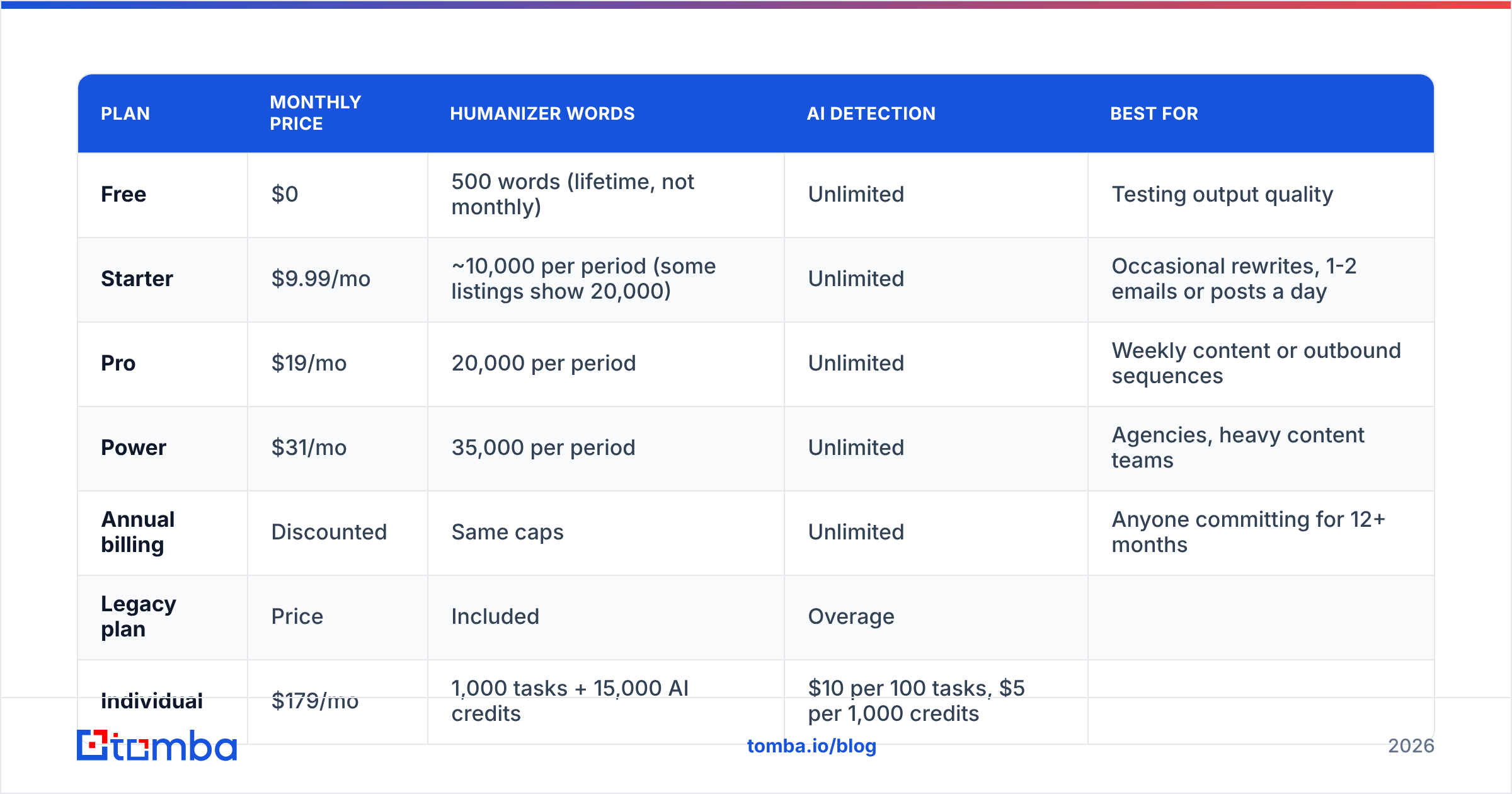
Leap's current pricing has a free tier and three paid tiers, all metered by humanization words per billing period. Detection is free and unlimited on every plan.
| Plan | Monthly price | Humanizer words | AI detection | Best for |
|---|---|---|---|---|
| Free | $0 | 500 words (lifetime, not monthly) | Unlimited | Testing output quality |
| Starter | $9.99/mo | ~10,000 per period (some listings show 20,000) | Unlimited | Occasional rewrites, 1-2 emails or posts a day |
| Pro | $19/mo | 20,000 per period | Unlimited | Weekly content or outbound sequences |
| Power | $31/mo | 35,000 per period | Unlimited | Agencies, heavy content teams |
| Annual billing | Discounted | Same caps | Unlimited | Anyone committing for 12+ months |
Sources: Leap AI's pricing page and third-party pricing trackers, checked in 2026. The Starter word cap is listed differently in different places (10,000 in some, 20,000 in others), so confirm on the live pricing page before you pay. Pricing pages for small SaaS tools change often.
What did the old Leap AI workflow plans cost?#
Old reviews still rank, so here's the legacy pricing to help you recognise it:
| Legacy plan | Price | Included | Overage |
|---|---|---|---|
| Individual | $179/mo | 1,000 tasks + 15,000 AI credits | $10 per 100 tasks, $5 per 1,000 credits |
| Team | $849/mo | 10,000 tasks + 75,000 AI credits | $8 per 100 tasks, $4 per 1,000 credits |
| Tool/workflow credits | $7-$249/mo | 5,000-125,000 credits | Tiered |
If a page tells you Leap AI "starts at $179," it's describing this workflow product, not the humanizer.
What is Leap AI's real cost per 1,000 words?#
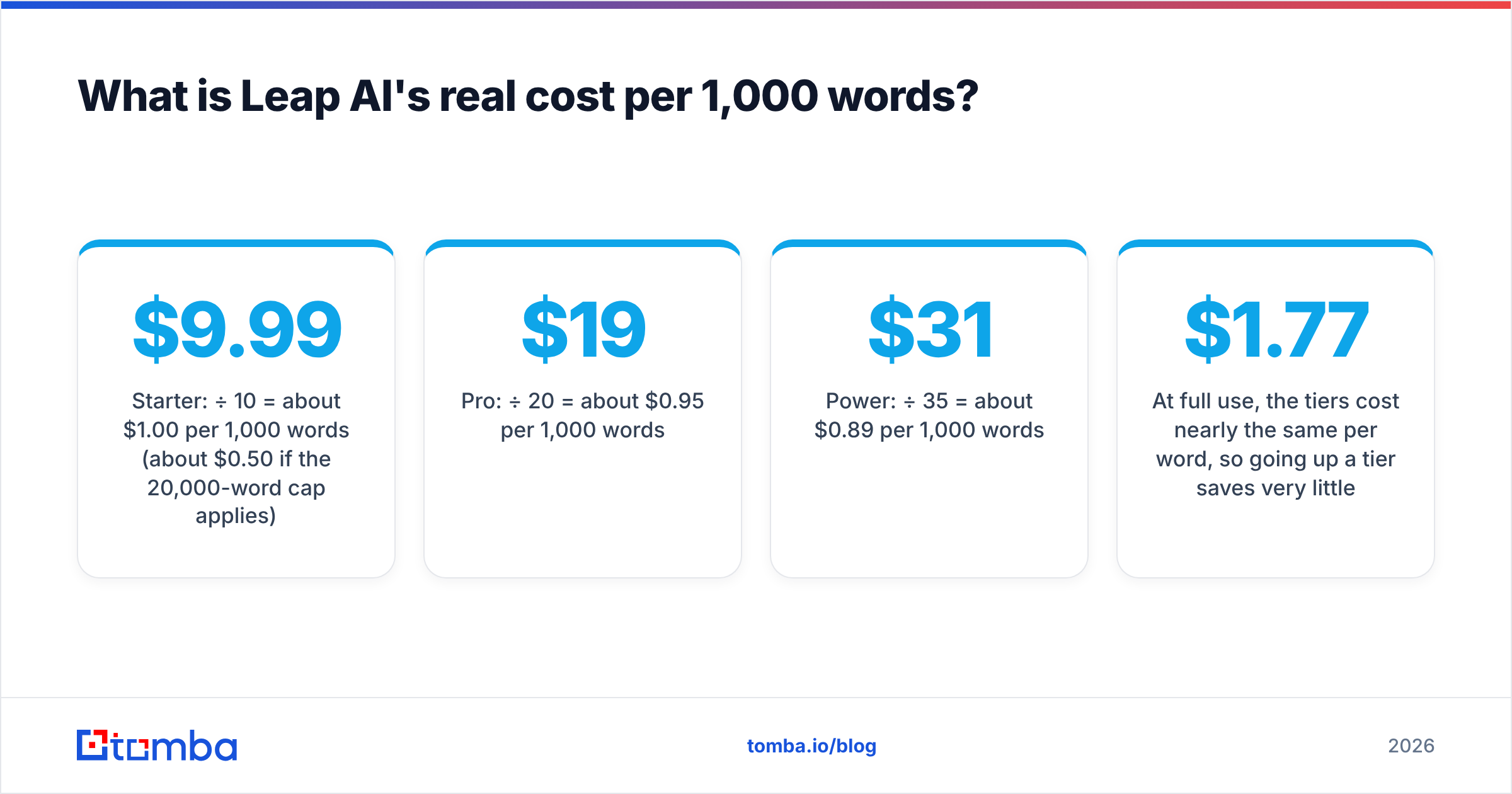
The headline price means less than the cost per word you actually use. Here's how the paid tiers compare at full use:
- Starter: $9.99 ÷ 10 = about $1.00 per 1,000 words (about $0.50 if the 20,000-word cap applies)
- Pro: $19 ÷ 20 = about $0.95 per 1,000 words
- Power: $31 ÷ 35 = about $0.89 per 1,000 words
At full use, the tiers cost nearly the same per word, so going up a tier saves very little per word. What you're really buying is headroom. If you only use half of a Power plan, you pay about $1.77 per 1,000 words, which is worse than a fully used Starter plan.
To put that in outbound terms, a 90-word cold email is about 11,000 words per 120 sends, or 110 prospects with one short follow-up each. If you humanize every first-touch email in a 500-contact campaign, you'll hit the Starter cap in the first week.
What do Leap AI reviews say? The pros#
Reviews of the current humanizer product, and the parts of legacy reviews that still apply (ease of use, onboarding), point to a consistent set of strengths:
- Detection is free and unlimited. Most competing detectors cap free scans or cut off long texts. Leap lets you score as much text as you like, which makes it useful as a quick check even if you never pay.
- Low entry price. At $9.99/mo, Starter costs less than many standalone humanizers and much less than full writing suites.
- The workflow is simple. You paste text, rewrite it and copy it out. There's no project setup, no prompt engineering and no workspace to configure. Reviewers keep calling it easy for non-technical users, a point G2 reviewers also made about the legacy builder.
- Annual discounts. If you know you'll use it every month, annual billing lowers the effective price.
- One tool does both checks. You don't need a separate detector and rewriter. You can score a draft, rewrite it and re-score it in one place.
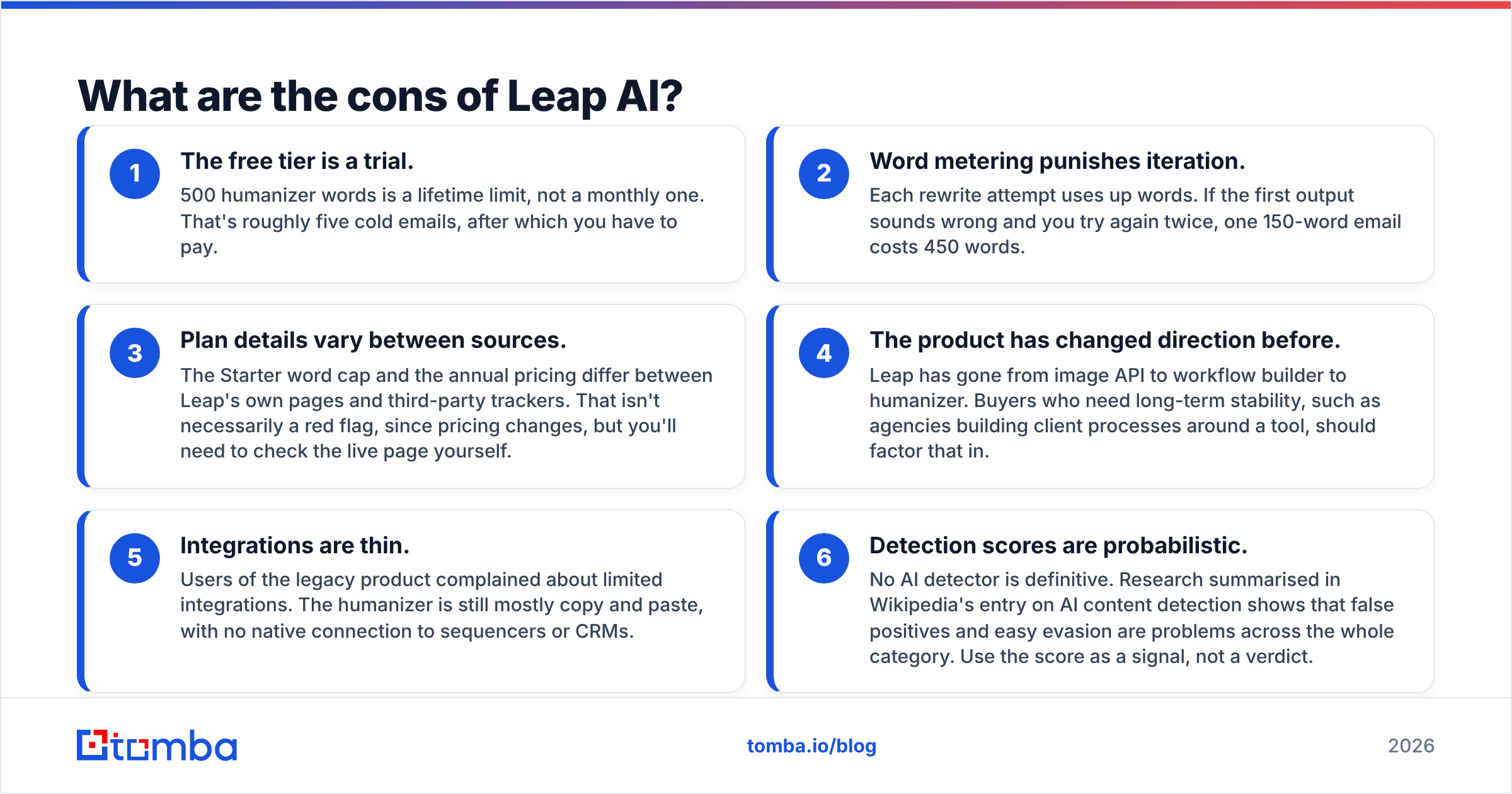
What are the cons of Leap AI?#
The complaints are just as consistent, and some of them matter a lot if you plan to use it for sales or marketing:
- The free tier is a trial. 500 humanizer words is a lifetime limit, not a monthly one. That's roughly five cold emails, after which you have to pay.
- Word metering punishes iteration. Each rewrite attempt uses up words. If the first output sounds wrong and you try again twice, one 150-word email costs 450 words.
- Plan details vary between sources. The Starter word cap and the annual pricing differ between Leap's own pages and third-party trackers. That isn't necessarily a red flag, since pricing changes, but you'll need to check the live page yourself.
- The product has changed direction before. Leap has gone from image API to workflow builder to humanizer. Buyers who need long-term stability, such as agencies building client processes around a tool, should factor that in.
- Integrations are thin. Users of the legacy product complained about limited integrations. The humanizer is still mostly copy and paste, with no native connection to sequencers or CRMs.
- Detection scores are probabilistic. No AI detector is definitive. Research summarised in Wikipedia's entry on AI content detection shows that false positives and easy evasion are problems across the whole category. Use the score as a signal, not a verdict.
Is Leap AI worth it for cold email and sales outreach?#
It depends on what's actually wrong with your outreach. A humanizer changes how an email sounds. It doesn't change who receives it, whether the address is real, or whether the offer is relevant.
Here's how that plays out in practice:
- When Leap helps: Your reps draft with ChatGPT or Claude, and the emails come out with obvious AI patterns ("I hope this finds you well," too many em dashes, stacks of three adjectives). Prospects notice those patterns and reply less. Running drafts through a humanizer or a careful manual edit can help your email response rate.
- When Leap doesn't help: Your bounce rate is 8%, a third of your list is catch-all domains, and your ICP filter is "any company with a website." A well-rewritten email to a dead inbox still bounces, and every bounce hurts your sender reputation more than any AI-sounding sentence.
Most outbound teams that ask whether they need a humanizer really need cleaner data first. Humanizing is the last step in the process, not the first.
How does Leap AI compare to other ways to make AI emails sound human?#
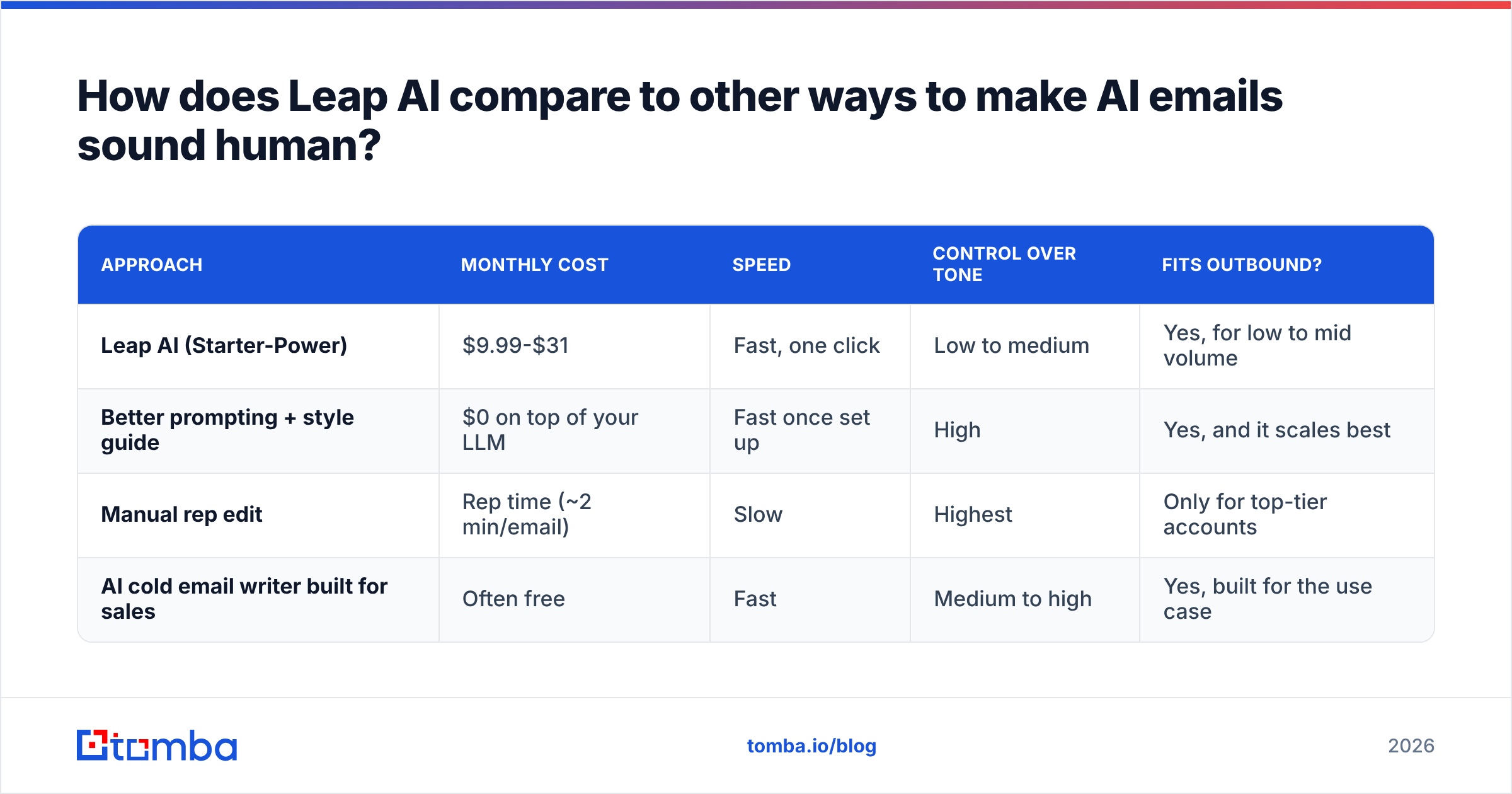
A humanizer is one of four ways to get the same result. Here's how they compare for a sales team:
| Approach | Monthly cost | Speed | Control over tone | Fits outbound? |
|---|---|---|---|---|
| Leap AI (Starter-Power) | $9.99-$31 | Fast, one click | Low to medium | Yes, for low to mid volume |
| Better prompting + style guide | $0 on top of your LLM | Fast once set up | High | Yes, and it scales best |
| Manual rep edit | Rep time (~2 min/email) | Slow | Highest | Only for top-tier accounts |
| AI cold email writer built for sales | Often free | Fast | Medium to high | Yes, built for the use case |
For many teams, the cheapest option is to fix the prompt, not the output. Give your LLM three real emails that got replies, ban specific phrases, and cap length at 90 words. If you want a tool made for sales copy instead of general text, a dedicated AI cold email writer produces outreach-style drafts from the start, so there's less to humanize afterwards.
Leap is most useful for text that wasn't written for sales, such as blog drafts, LinkedIn posts, and proposals written with AI help, where rewriting for voice matters more.
Who should pay for Leap AI, and who shouldn't?#
Your choice of tier should follow your volume and workflow, not the feature list.
- Freelance writers and solo marketers. The Starter plan fits. You rewrite a few thousand words a week, and unlimited detection lets you check client drafts for free.
- Content teams publishing 3+ posts a week. Pro or Power is fine, but work out the cost per used word before upgrading. The per-word saving at higher tiers is small.
- SDR and outbound teams. Be sceptical. Humanizing each email at volume adds cost and a copy-and-paste step between your LLM and your sequencer. Put the money into list quality and prompt design first.
- Agencies building client workflows. Leap has changed products before, so avoid making it load-bearing without a fallback option.
- Anyone who just wants detection. Don't pay. The free tier gives you unlimited detection.
What should you fix before buying a humanizer?#
If you're buying Leap AI to improve outbound results, check these first. They usually affect replies more than wording does:
- List accuracy. Find each address with a proper email finder instead of guessing patterns. Guessed addresses bounce, and bounces hurt your sending domain.
- Verification before every send. Run the list through an email verifier and remove invalid and risky contacts. Put catch-all domains in a separate, lower-volume segment.
- Deliverability basics. Make sure SPF, DKIM and DMARC are set up, the domain is warmed, and daily volume stays sensible. HubSpot's guide to email deliverability covers the fundamentals well.
- ICP relevance. One sentence about a specific trigger (a new hire, a funding round, a tech-stack change) does more than any rewrite.
- Then the voice. Once those four are in place, a humanizer or a better prompt can add the last bit of improvement.
This order matters because each step builds on the one before it. A perfectly human-sounding email that never reaches an inbox has no value.
So, is Leap AI worth it in 2026?#
For its current use case, yes, with some caveats. Leap AI is a cheap, simple humanizer with an unusually generous free detector. If you regularly turn AI drafts into readable content, the $9.99 Starter plan is easy to justify, and Pro at $19 covers most individual content workloads.
The caveats:
- Most of the "Leap AI pricing" information online describes an older product, so check the live page.
- Word metering makes rewrites and unused capacity expensive.
- For sales outreach, humanizing addresses a small problem, while bad data and poor targeting cause most of the damage.
If you're comparing Leap against other paid tools in your sales stack, look at it alongside your data costs. See Tomba pricing for a reference point on what accurate contact data costs per month.
What's the best next step if your real bottleneck is reaching the right inbox?#
If you came here because your AI-written emails aren't getting replies, start with the recipient before rewriting the message. Tomba Email Finder finds verified professional addresses by name, company or domain, so the emails you've carefully rewritten reach real people instead of bouncing. The free tier includes 25 searches a month, and paid plans start at $49/mo. Try Tomba Email Finder, build a clean list, and then decide whether your copy needs a humanizer.
Related guides#
// get started
Find, verify and enrich your first contacts today
Start on the free plan with 25 searches a month, then scale when your team is ready.
Free plan · No credit card required · GDPR & CCPA
// about the author