Less Annoying CRM Pricing, Reviews, Pros and Cons (2026 Guide)
Less Annoying CRM has one plan at one price per user. We look at what that $15 buys you, where reviewers say it falls short, and which small teams should pick something else.
TL;DR
- At the time of writing, Less Annoying CRM (LACRM) has one plan at $15 per user per month. There are no tiers, no feature gates and no contract, plus a 30-day free trial.
- Reviewers keep praising three things: it's simple, the support is free and run by real people, and the price stays flat. The complaints are also consistent: light automation, basic reporting, no built-in email marketing and no native mobile app.
- It fits best for solo operators and small teams (1–25 users) who manage relationships more than high-volume pipelines.
- It fits worst for outbound-heavy sales teams that need sequences, lead scoring or deep analytics. Those teams usually outgrow it within a year.
- A CRM stores data but doesn't supply it. Plan how you'll fill it with verified contacts before you pay for seats.
Less Annoying CRM is unusual in the CRM market because it refuses to play the tier game. Other vendors split their product into Starter, Professional and Enterprise plans. LACRM gives every customer the same software at the same price. That sounds simple, and mostly it is. But a flat price only helps if the product covers what you need. This guide breaks down what you pay, what reviewers say, and where the limits show up in practice.
What is Less Annoying CRM?#
Less Annoying CRM is a web-based customer relationship management tool for small businesses. It's built by a small, independent company in St. Louis, and the product philosophy is in the name: fewer features, less clutter, less training.
If you're new to the category, a CRM is the system of record for your contacts, companies, deals and follow-ups. Think of it as a shared address book with a memory. It remembers who you talked to, what you promised and when to call back.
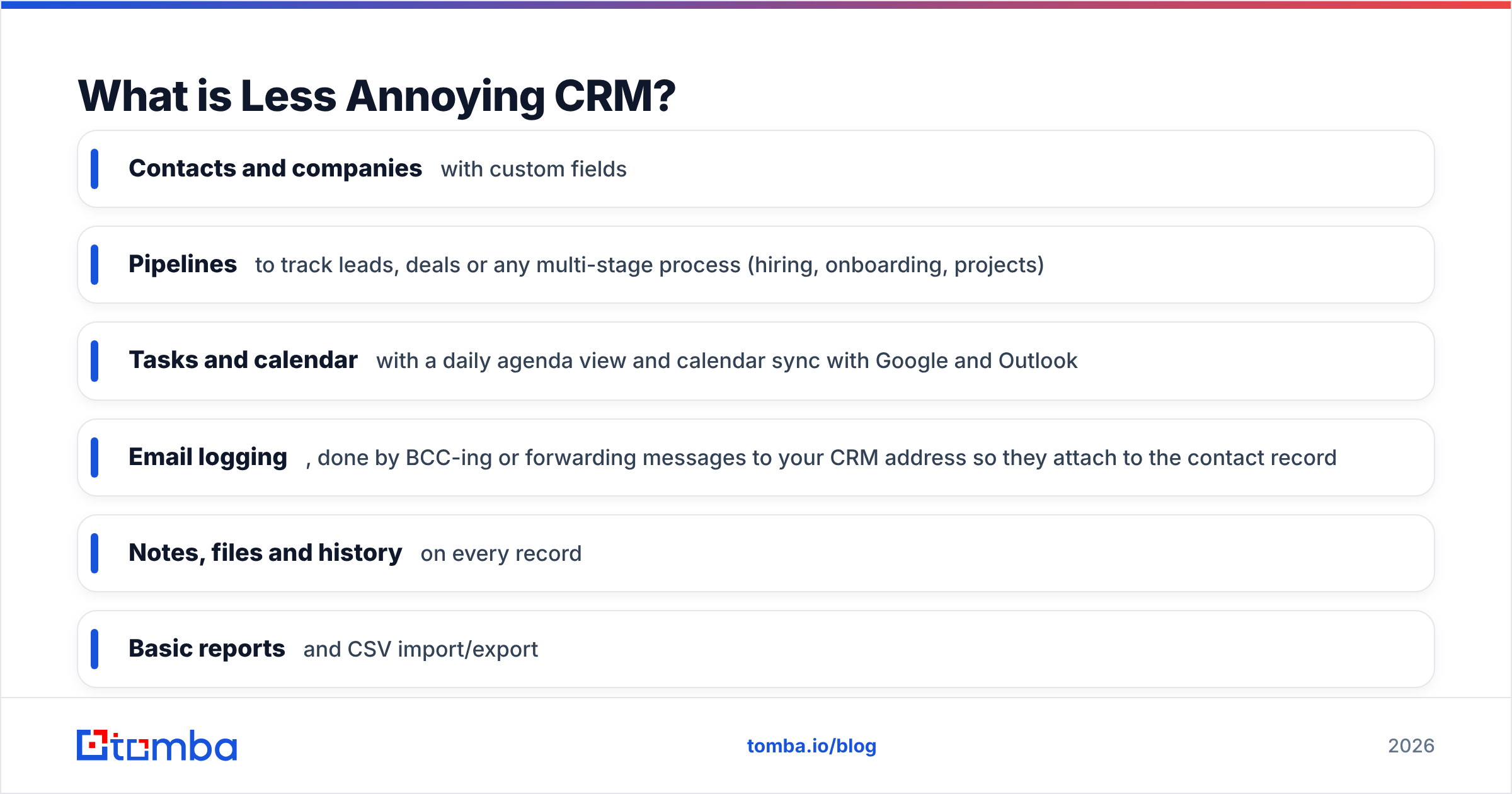
LACRM covers the core of that job:
- Contacts and companies with custom fields
- Pipelines to track leads, deals or any multi-stage process (hiring, onboarding, projects)
- Tasks and calendar with a daily agenda view and calendar sync with Google and Outlook
- Email logging, done by BCC-ing or forwarding messages to your CRM address so they attach to the contact record
- Notes, files and history on every record
- Basic reports and CSV import/export
- Integrations through Zapier and a handful of native connections
What it does not try to be is a marketing automation suite, a sales engagement platform or a BI tool. That's deliberate, and it's why most reviews either love it or leave it.
You can see the current feature list on the official Less Annoying CRM site.
How much does Less Annoying CRM cost in 2026?#
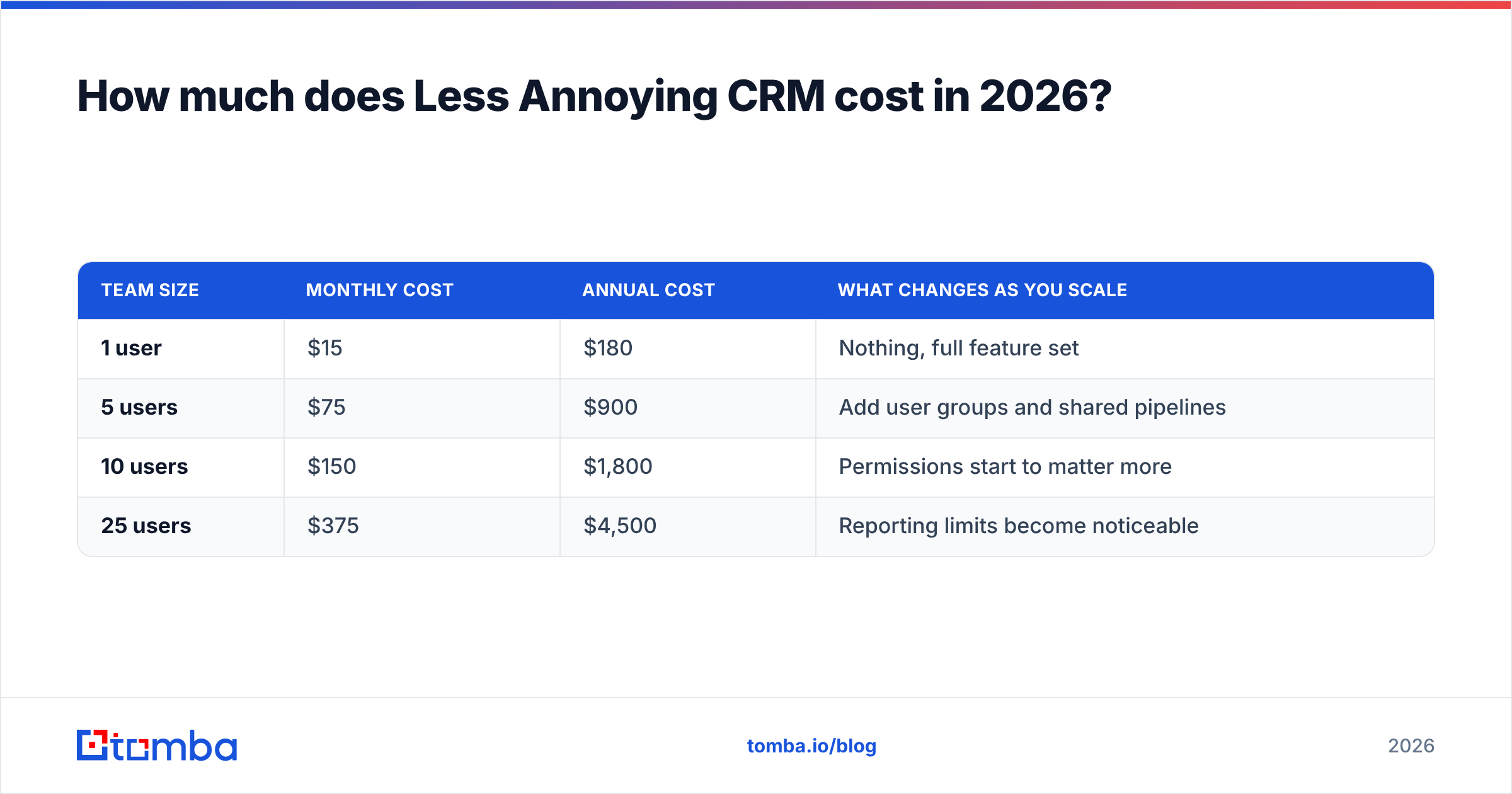
The model is one plan, charged per user per month. At the time of writing that's $15/user/month, with every feature included. Pricing is month-to-month with no long-term contract, and new accounts get a 30-day free trial without a credit card. Check the vendor's site before you budget, because any flat-price vendor can change its rate.
Here's what that looks like as your team grows:
| Team size | Monthly cost | Annual cost | What changes as you scale |
|---|---|---|---|
| 1 user | $15 | $180 | Nothing, full feature set |
| 5 users | $75 | $900 | Add user groups and shared pipelines |
| 10 users | $150 | $1,800 | Permissions start to matter more |
| 25 users | $375 | $4,500 | Reporting limits become noticeable |
Two things stand out.
First, there is no upsell ladder. With most CRMs, the price you see is the entry price. Automation, custom reporting or extra pipelines sit one or two tiers up, often at three to five times the per-seat cost. LACRM doesn't have that trap. What you trial is what you get.
Second, the per-seat cost is low but not free. HubSpot and Zoho both offer free CRM tiers. If your only need is a contact list with notes, $15 a seat can still be more than you need to spend.
Are there hidden costs?#
Not in the licence itself. The hidden costs are the ones every CRM has:
- Data. A CRM arrives empty. You have to source, clean and import contacts, and that work costs either time or money.
- Add-on tools. LACRM doesn't send marketing emails or run outbound sequences. If you need those, you'll pay for a separate tool (Mailchimp, a cold email platform, etc.) and connect it via Zapier.
- Zapier fees. Advanced automation through Zapier can cost more than the CRM itself once you pass the free task limits.
- Migration later. If you outgrow LACRM, moving data and history to a bigger platform takes real effort. Choosing it for a team that will triple in 18 months has a delayed cost.
What do Less Annoying CRM reviews actually say?#
On review sites like G2 and Capterra, LACRM scores consistently high for a product of its size. The feedback falls into clear patterns.
What reviewers praise#
- Support that answers. This is the most repeated theme. Every customer gets free phone and email support, plus help with data import, and reviewers describe the reps as knowledgeable and quick. Most CRMs at this price point offer only a help centre and chat bots.
- Short learning curve. Users often say they were productive in a day, and non-technical staff adopt it without formal training.
- Predictable pricing. Owners like knowing that growth won't trigger a tier jump. Several reviews mention leaving larger CRMs specifically because of renewal price increases.
- Flexible pipelines. Because pipelines are generic, people use them for recruiting, property management, nonprofit donor tracking and client onboarding, not just sales.
- No-pressure company culture. The vendor doesn't push annual contracts, doesn't hard-sell, and writes openly about its product decisions. Buyers notice that.
What reviewers criticise#
- Limited automation. There are no multi-step workflows on the level of HubSpot or Pipedrive, no lead scoring and no automated email sequences.
- Basic reporting. You can see pipeline status and activity, but custom dashboards and forecasting are thin. Managers with 10+ reps feel this first.
- No native mobile app. The mobile web experience works, but people in the field often say they want an offline-capable app.
- Email integration is manual-ish. Logging email by BCC or forwarding works, but it isn't the same as full two-way inbox sync with open tracking.
- Dated interface. Some reviewers find the UI plain. Others see that as a plus. It depends on taste.
The pattern is clear. People who picked LACRM because it's simple are very happy. People who needed a sales engine and chose it for the price are the ones leaving critical reviews.
Less Annoying CRM pros and cons at a glance#
| Pros | Cons |
|---|---|
| One flat price, all features included | No built-in email marketing or sequences |
| Free human support by phone and email | Light automation, no lead scoring |
| Free data import assistance | Basic reports and limited dashboards |
| No contracts, month-to-month billing | No native iOS/Android app |
| Very short onboarding time | Email logging relies on BCC/forwarding |
| Flexible pipelines for non-sales uses | Can be outgrown by scaling sales teams |
Is Less Annoying CRM better than HubSpot, Pipedrive or Zoho?#
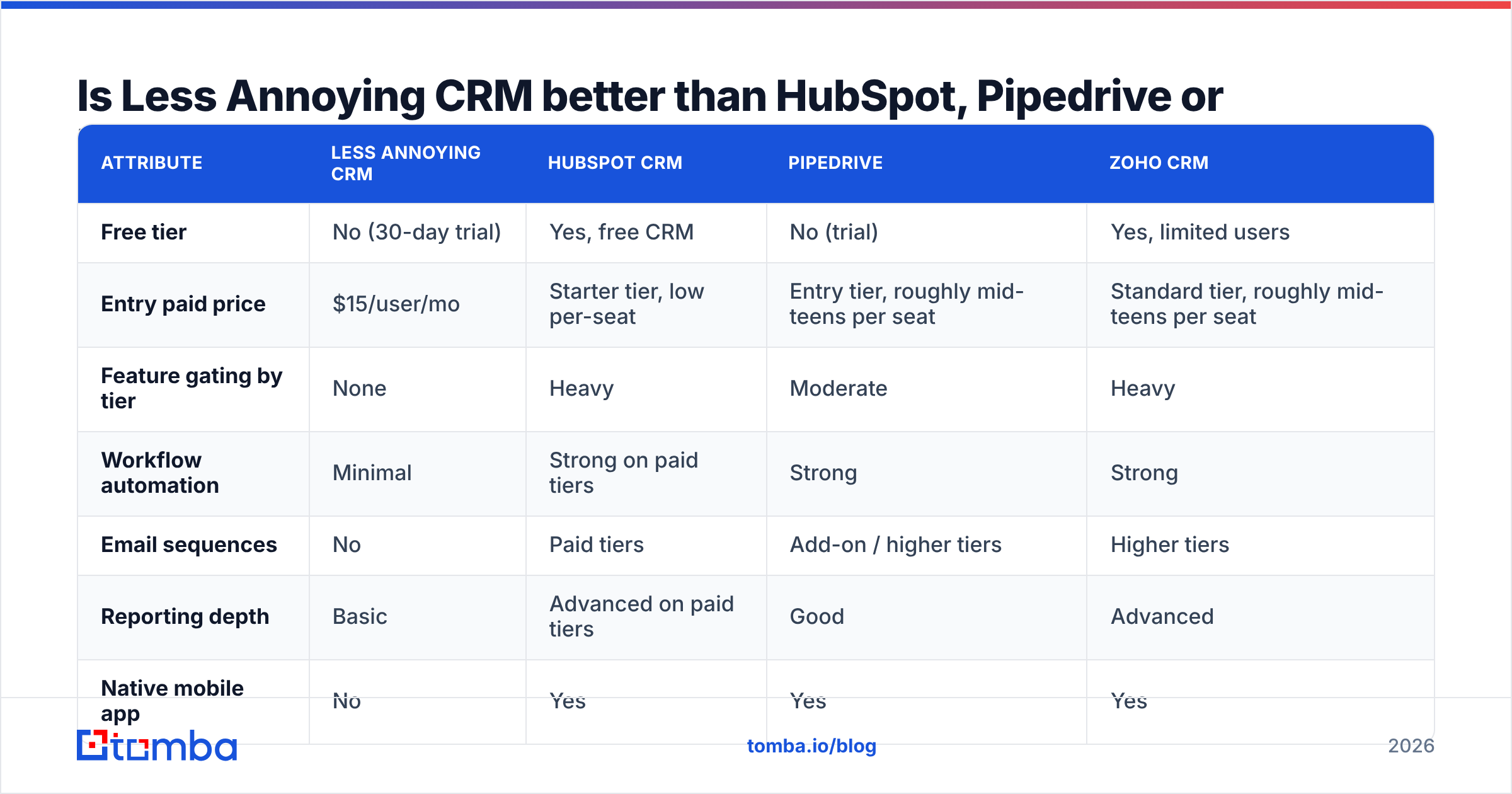
It depends on what "better" means for your team. If you mean simpler and more predictable, LACRM usually wins. If you mean more powerful, it usually doesn't. Here's how it compares with the three CRMs small businesses most often shortlist. Competitor prices change frequently and depend on billing cycle, so treat these as starting-point ranges and confirm on each vendor's page.
| Attribute | Less Annoying CRM | HubSpot CRM | Pipedrive | Zoho CRM |
|---|---|---|---|---|
| Free tier | No (30-day trial) | Yes, free CRM | No (trial) | Yes, limited users |
| Entry paid price | $15/user/mo | Starter tier, low per-seat | Entry tier, roughly mid-teens per seat | Standard tier, roughly mid-teens per seat |
| Feature gating by tier | None | Heavy | Moderate | Heavy |
| Workflow automation | Minimal | Strong on paid tiers | Strong | Strong |
| Email sequences | No | Paid tiers | Add-on / higher tiers | Higher tiers |
| Reporting depth | Basic | Advanced on paid tiers | Good | Advanced |
| Native mobile app | No | Yes | Yes | Yes |
| Human support included | Yes, phone + email | Limited on free/low tiers | Chat/email | Varies by tier |
| Best for | Relationship-driven small teams | Marketing + sales alignment | Pipeline-driven sales teams | Budget teams wanting depth |
A quick way to decide:
- Choose LACRM if you have fewer than roughly 25 users, your sales cycle runs on relationships and follow-ups, and your team resists complex software.
- Choose HubSpot if marketing and sales need to share one platform and you're willing to pay more as you grow. Its free CRM is a strong zero-cost starting point.
- Choose Pipedrive if your team lives in the deal pipeline and needs automation and a good mobile app.
- Choose Zoho if you want enterprise-style depth on a small budget and don't mind a steeper setup.
Who should skip Less Annoying CRM?#
LACRM is honest about who it serves, and you should be too. It's probably the wrong pick if:
- You run high-volume outbound. SDR teams sending hundreds of personalised emails a day need sequencing, reply detection and tracking. LACRM can store the results, but it won't run the outreach.
- You need forecasting. If leadership wants weighted pipeline forecasts and rep-level performance dashboards, you'll end up exporting to spreadsheets.
- You rely on lead scoring. There's no native scoring model, so marketing-to-sales handoffs based on behaviour aren't practical.
- Your field team works offline. Without a native app, spotty connectivity becomes a daily annoyance, ironic for this product.
- You expect to grow past 30–50 users soon. It can technically handle more, but permissions and reporting start to strain.
If none of those apply, the price-to-value ratio is hard to beat.
How do you fill Less Annoying CRM with good contact data?#
This is the part most reviews skip. A CRM is only as useful as the records inside it. LACRM doesn't include a prospect database, an email finder or enrichment, so you have to supply your own data. This is also where the "less annoying" promise tends to break down. The software is simple, but the spreadsheets you paste into it are messy.
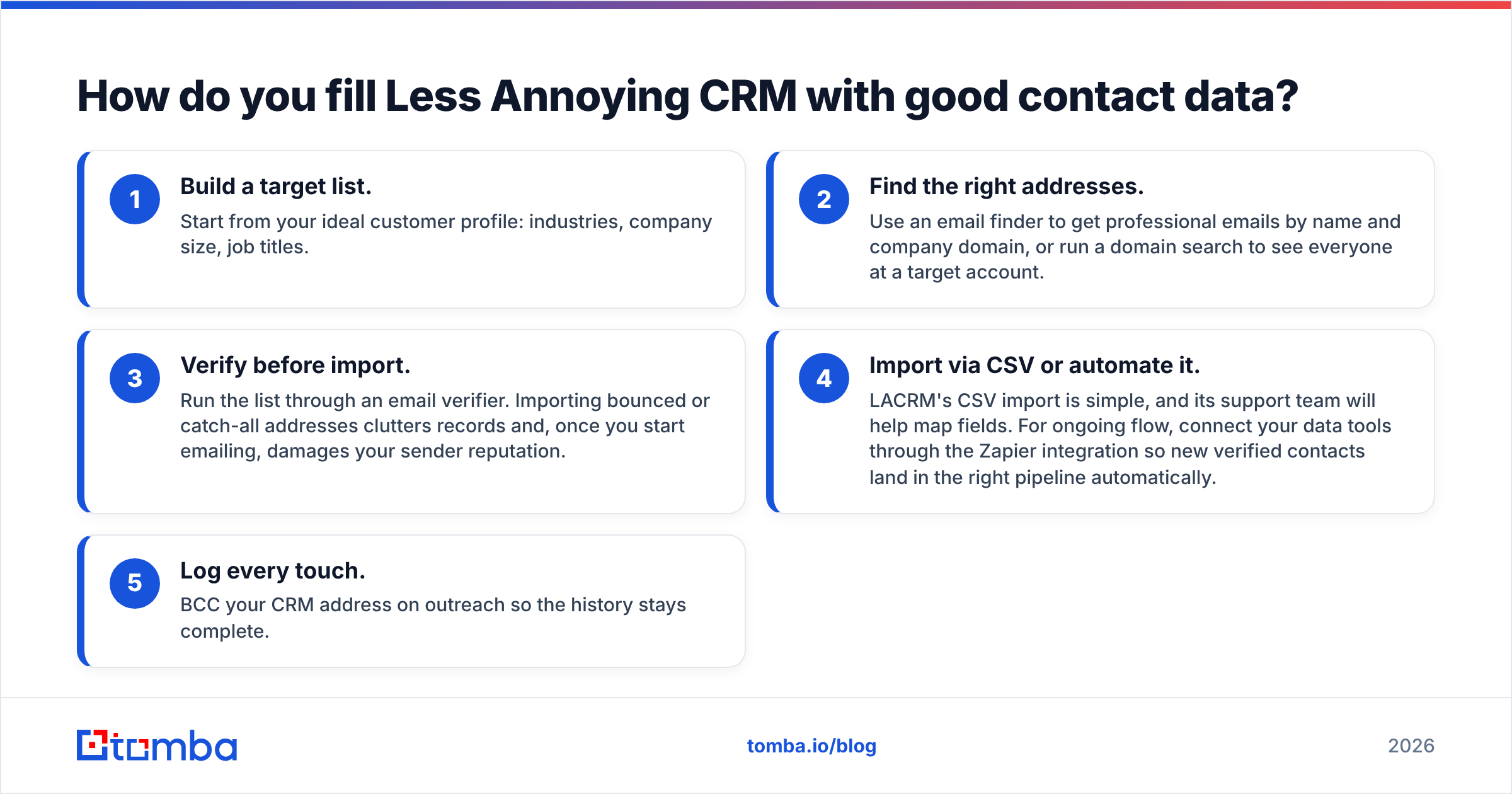
A practical workflow for small teams:
- Build a target list. Start from your ideal customer profile: industries, company size, job titles.
- Find the right addresses. Use an email finder to get professional emails by name and company domain, or run a domain search to see everyone at a target account.
- Verify before import. Run the list through an email verifier. Importing bounced or catch-all addresses clutters records and, once you start emailing, damages your sender reputation.
- Import via CSV or automate it. LACRM's CSV import is simple, and its support team will help map fields. For ongoing flow, connect your data tools through the Zapier integration so new verified contacts land in the right pipeline automatically.
- Log every touch. BCC your CRM address on outreach so the history stays complete.
This pairing makes sense because the two tools do different jobs. LACRM handles relationship management. A lightweight finder and verifier handles the data sourcing that LACRM doesn't touch.

Is Less Annoying CRM worth the price in 2026?#
For its target customer, yes. $15 per user for a complete, ungated CRM with real human support is one of the fairest deals in the category. You won't hit a surprise tier wall, get pressured into an annual contract, or need a consultant to set it up.
It stops being worth it when you need the CRM to do the selling: automation, sequences, scoring, forecasting. At that point, a "cheap" CRM plus four bolt-on tools and a Zapier bill can cost more than a platform that includes those features.
Run the 30-day trial with real data rather than demo records. If your team logs activity in it every day without being reminded, you've found your CRM. If they drift back to spreadsheets or ask for missing features by the second week, move on.
Frequently asked questions#
Does Less Annoying CRM have a free plan?#
No. It offers a 30-day free trial with full features and no credit card, then charges per user per month.
Can you get a discount for annual billing?#
LACRM's model is built around simple month-to-month pricing rather than annual lock-in discounts. Check the vendor's pricing page for any current offers.
Does Less Annoying CRM integrate with Gmail and Outlook?#
Yes, for calendar sync and email logging. Email is logged by BCC-ing or forwarding to your CRM address rather than through full inbox tracking.
Is Less Annoying CRM good for nonprofits or non-sales use?#
Yes. Its generic pipelines work well for donor management, recruiting, client onboarding and project tracking, which is one reason reviews come from such a wide range of industries.
Ready to give your CRM something worth managing?#
Whichever CRM you pick, including LACRM, the software is only half the system. The other half is accurate, verified contact data. Tomba Email Finder finds professional email addresses by name, company or domain, checks deliverability, and exports clean CSVs that drop straight into Less Annoying CRM, or syncs through Zapier. Start on the free tier with 25 searches a month, and check Tomba pricing when your pipeline needs more.
Related guides#
// get started
Find, verify and enrich your first contacts today
Start on the free plan with 25 searches a month, then scale when your team is ready.
Free plan · No credit card required · GDPR & CCPA
// about the author