LetsExtract vs UpLead (2026): Web Scraper or Verified B2B Database?
LetsExtract scrapes emails from the open web on your own machine. UpLead sells verified B2B contacts by the credit. This comparison covers the real costs, data quality, compliance risk, and which one fits your outbound motion.
This LetsExtract vs UpLead comparison covers price, data quality, compliance risk, and which tool fits your outbound.
TL;DR
- LetsExtract is Windows software that crawls websites, search engines, and files for email addresses. You pay once for a license. The data is only as good as the pages it crawls.
- UpLead is a cloud B2B contact database. You filter by role, company size, industry, and tech, then spend credits on contacts verified in real time. Pricing starts at $99/mo, or $74/mo billed annually.
- Need named decision-makers with job titles? Pick UpLead. Need bulk public addresses (info@, sales@, local businesses) on a tight budget? Pick LetsExtract.
- Scraped lists carry more deliverability and compliance risk. Verify everything before you send.
- If neither fits, a domain-based email finder like Tomba sits in the middle, with a free tier and paid plans from $49/mo.
What is the real difference between LetsExtract and UpLead?#
In LetsExtract vs UpLead, the two tools solve different problems. That matters more than any feature on either list.
LetsExtract is an extractor. You give it keywords, URLs, or files. It crawls pages or queries search engines and returns every email address, phone number, and social link it finds. It runs locally on Windows, and the current Email Studio bundle also includes a verifier and a bulk sender. Nothing it returns is curated. If a web page lists info@acme.com, that is what you get.
UpLead is a database. Someone has already collected, structured, and enriched the data. You search for "VP of Marketing, SaaS, 50–200 employees, uses HubSpot," get a list of real people with titles, and pay one credit per contact you unlock. UpLead verifies each email at the moment you reveal it and publishes a 95% accuracy guarantee on its official site.
Here's an analogy. LetsExtract is a metal detector: you sweep a beach and keep whatever turns up. UpLead is a jeweler's catalog: you pick the exact item you want and pay per piece.
How do LetsExtract and UpLead compare feature by feature?#
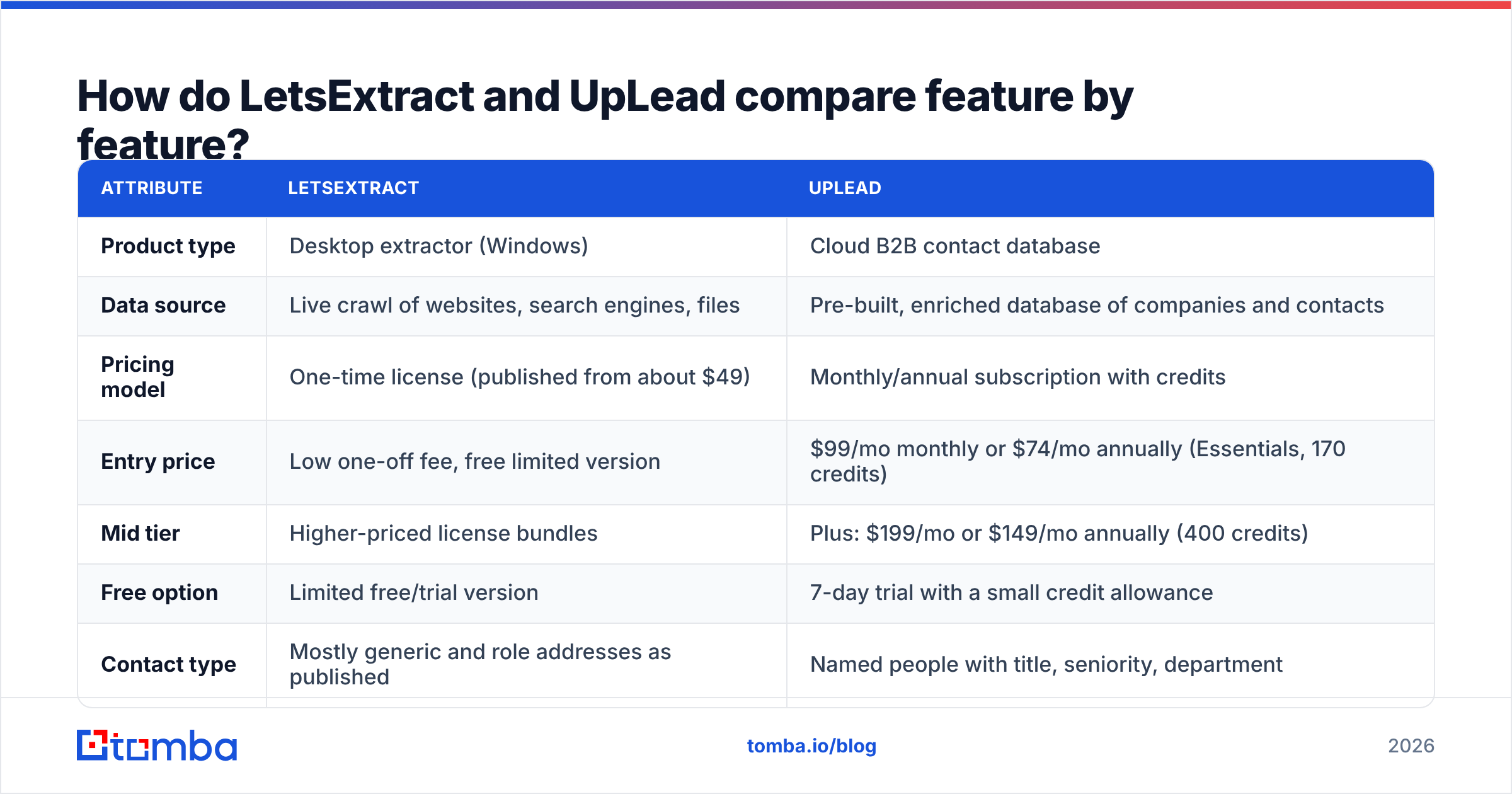
This LetsExtract vs UpLead table covers the attributes that actually affect your pipeline:
| Attribute | LetsExtract | UpLead |
|---|---|---|
| Product type | Desktop extractor (Windows) | Cloud B2B contact database |
| Data source | Live crawl of websites, search engines, files | Pre-built, enriched database of companies and contacts |
| Pricing model | One-time license (published from about $49) | Monthly/annual subscription with credits |
| Entry price | Low one-off fee, free limited version | $99/mo monthly or $74/mo annually (Essentials, 170 credits) |
| Mid tier | Higher-priced license bundles | Plus: $199/mo or $149/mo annually (400 credits) |
| Free option | Limited free/trial version | 7-day trial with a small credit allowance |
| Contact type | Mostly generic and role addresses as published | Named people with title, seniority, department |
| Firmographic filters | None (keyword and URL driven) | Industry, headcount, revenue, location, technographics |
| Email verification | Built-in SMTP checker in the suite | Real-time verification on every unlock |
| Phone numbers | Whatever is on the crawled page | Direct dials and mobiles on many contacts |
| CRM integrations | Export to CSV/Excel | Native CRM and sequencer integrations on higher tiers |
| Best for | Local business lists, public directories, budget harvesting | Targeted outbound to specific personas |
Check current pricing on the UpLead pricing page and LetsExtract's pricing page before you buy. Both vendors change bundles often.

How does each tool actually get its data?#
Where the data comes from decides whether your emails land or bounce. Check it before you compare prices.
How LetsExtract works:
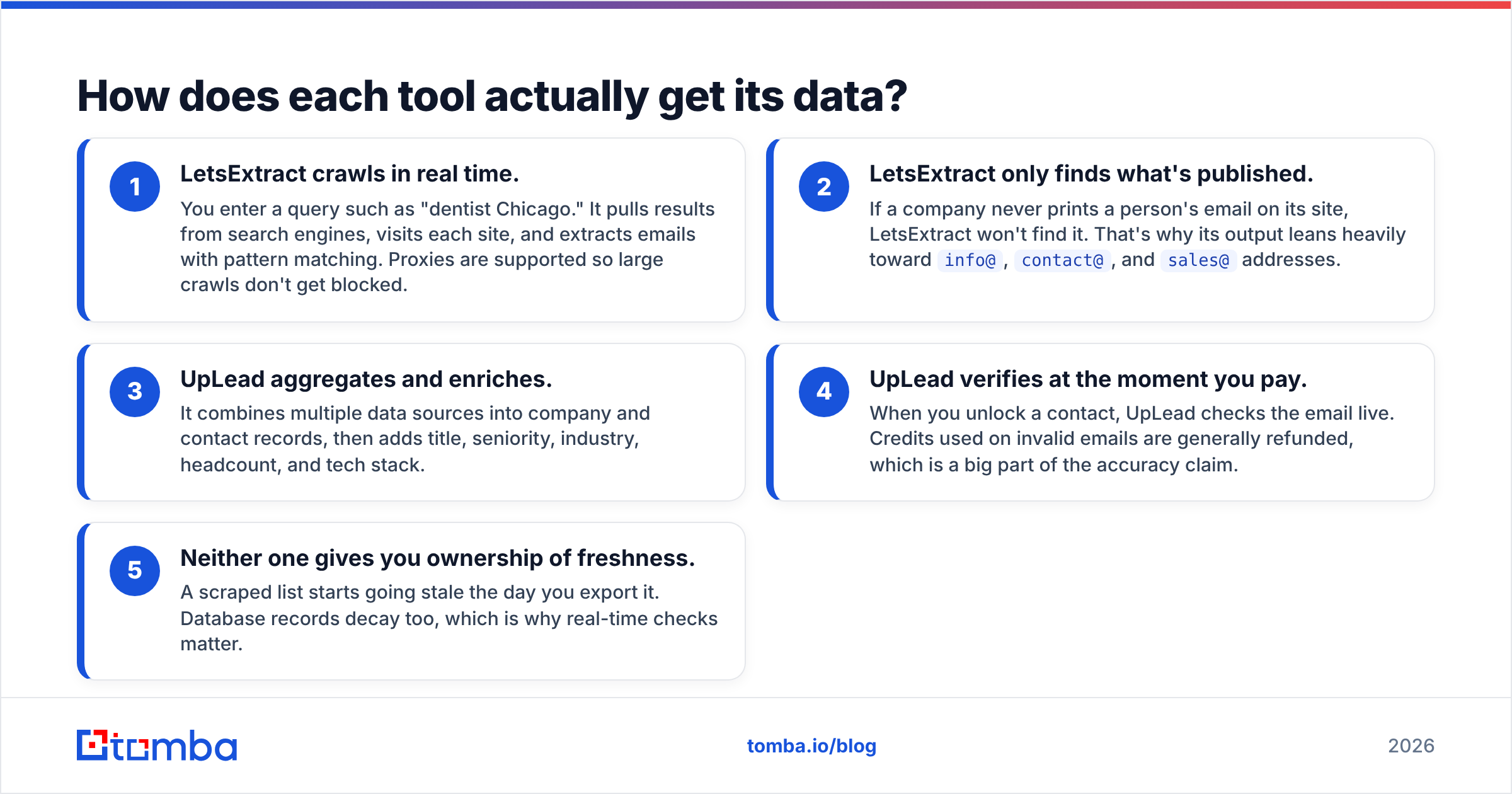
- It crawls in real time. You enter a query such as "dentist Chicago." It pulls search results, visits each site, and extracts emails with pattern matching. Proxies keep large crawls from getting blocked.
- It only finds what's published. If a company never prints a person's email on its site, LetsExtract won't find it. That's why its output leans toward
info@,contact@, andsales@addresses.
How UpLead works:
- It aggregates and enriches. It combines several data sources into company and contact records. Then it adds title, seniority, industry, headcount, and tech stack.
- It verifies when you pay. When you unlock a contact, UpLead checks the email live. Credits spent on invalid emails are generally refunded.
Neither one keeps data fresh forever. A scraped list starts going stale the day you export it. Database records decay too, which is why real-time checks matter.
The practical effect is simple. LetsExtract optimizes for volume per dollar. UpLead optimizes for accuracy per contact.

Which is more accurate: LetsExtract or UpLead?#
On accuracy, LetsExtract vs UpLead is not close. UpLead wins, and the reason is structural.
Every scraped email is a snapshot. The page could be three years old. The person may have left. The address might be a catch-all that never reaches a human. LetsExtract's built-in verifier helps weed out hard bounces. But SMTP checks can't reliably confirm catch-all domains. They also can't tell you whether info@ reaches a decision-maker or a shared inbox nobody reads.
UpLead verifies each contact when you reveal it and backs that with a published accuracy guarantee. You still see bounces, especially on fast-moving startups, but your baseline is much cleaner.

Whichever tool you pick, run the final list through a separate email verifier before it hits your sending domain. A bounce rate above roughly 2% can start damaging your sender reputation with Gmail and Microsoft. That damage takes weeks to repair, and no amount of cheap data makes up for it.
How much do LetsExtract and UpLead really cost?#
In LetsExtract vs UpLead pricing, sticker price and real cost per usable contact are very different numbers.
LetsExtract looks almost free. You pay a one-time license fee (published starting prices sit around $39–$79, depending on edition and source). There are no per-contact charges. The hidden costs are:
- Proxies for large crawls, often a separate monthly subscription
- Your time building keyword lists, cleaning duplicates, and filtering out junk
- Verification for anything beyond the built-in checker
- Low relevance. If 10,000 scraped emails give you 400 that match your ICP, your cost per useful contact goes up fast
UpLead is transparent but steep for small teams:
- Essentials: $99/mo monthly or $74/mo billed annually, 170 credits/month
- Plus: $199/mo monthly or $149/mo annually, 400 credits/month
- Professional: custom pricing
- Extra credits cost roughly $0.50–$0.60 each, depending on plan
At Essentials monthly pricing, you pay roughly $0.58 per contact. One credit typically unlocks the email and any available phone number. For a named, verified VP, that's reasonable value. For bulk top-of-funnel lists, it gets expensive quickly.
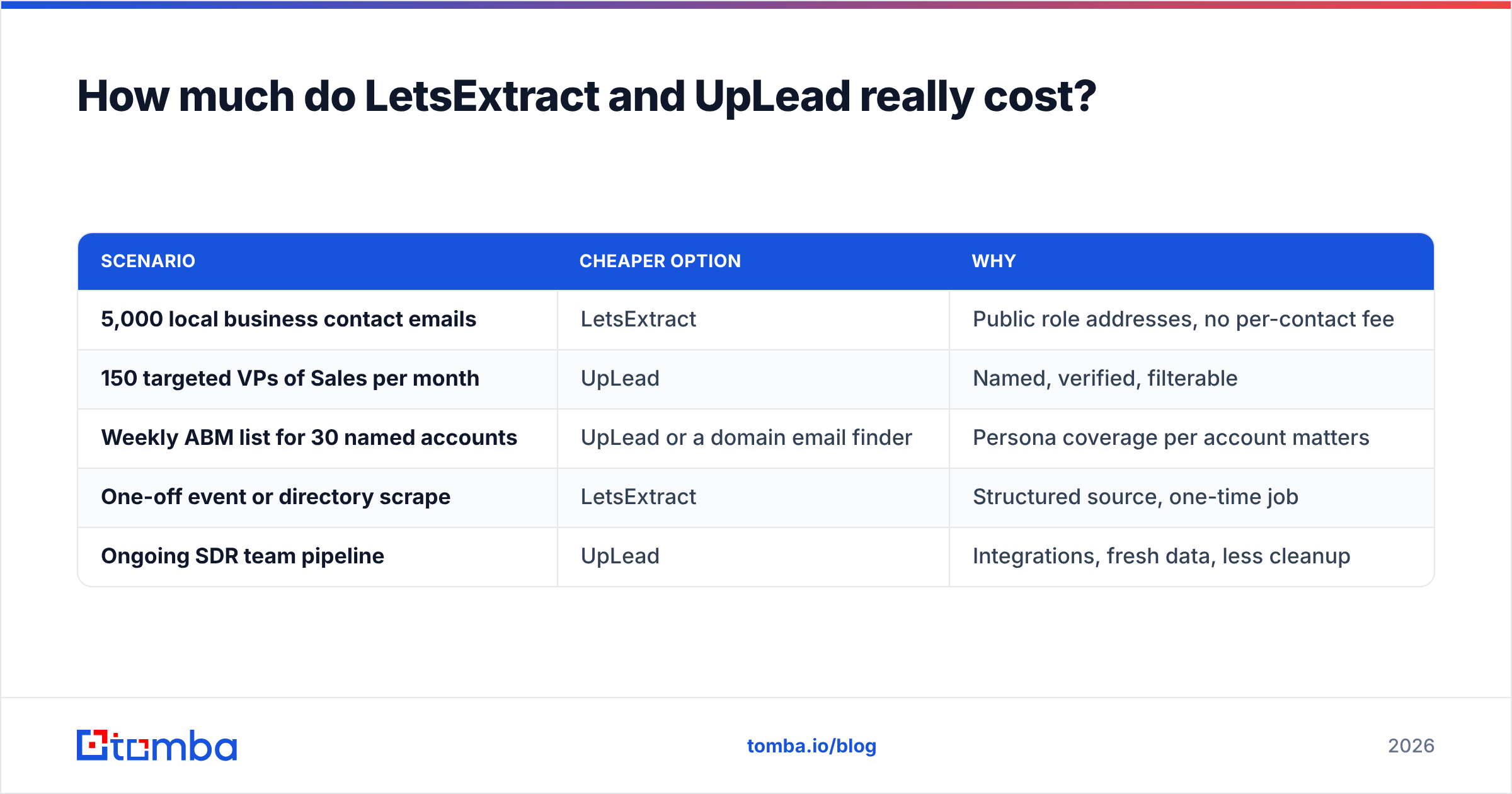
| Scenario | Cheaper option | Why |
|---|---|---|
| 5,000 local business contact emails | LetsExtract | Public role addresses, no per-contact fee |
| 150 targeted VPs of Sales per month | UpLead | Named, verified, filterable |
| Weekly ABM list for 30 named accounts | UpLead or a domain email finder | Persona coverage per account matters |
| One-off event or directory scrape | LetsExtract | Structured source, one-time job |
| Ongoing SDR team pipeline | UpLead | Integrations, fresh data, less cleanup |
Is scraping emails with LetsExtract legal and safe?#
It depends on where you are, who you're emailing, and how you process the data. It's not automatically illegal. But it's riskier than using a vendor that documents its data sources.
- Under the EU's GDPR, a business email tied to a named person is personal data. You need a lawful basis (usually legitimate interest). You also need a way to honor opt-outs and be open about where you got the data.
- Many websites' terms of service ban automated scraping, even when the data itself is public.
- Scraped lists often contain spam traps. These are old addresses that mailbox providers reuse to catch senders who don't clean their lists.
UpLead doesn't remove your compliance duties. But it gives you a vendor with a clear data trail. You can point to it if someone asks where you got their address. For regulated industries and EU outreach, that difference matters.
Which tool is easier to use day to day?#
Ease of use is another big LetsExtract vs UpLead split.
LetsExtract has a learning curve. It's a Windows app with project settings, crawl depth, proxy setup, and export options. Power users like the control. Mac users need a VM or a different tool. Sales reps who live in a browser tend to find it awkward.
UpLead feels like modern sales software. You get a web app with filters, saved searches, a Chrome extension for LinkedIn and company websites, and CSV or CRM export. A new SDR can build a list in 10 minutes.
If your team is RevOps-heavy and comfortable with desktop tools, LetsExtract is manageable. If reps are building their own lists, UpLead is the safer default.
Who should choose LetsExtract?#
Pick LetsExtract if most of these describe you:
- You sell to local or SMB businesses where the owner reads
info@orcontact@ - You need large volumes from directories, associations, or niche websites
- Your budget is one-time spend, not recurring
- You or someone on your team is comfortable configuring crawlers, proxies, and cleanup
- You'll put every list through independent verification before sending
It's a reasonable choice for agencies doing local lead gen, marketplace operators recruiting sellers, and researchers building directory datasets.
Who should choose UpLead?#
Pick UpLead if most of these describe you:
- You sell B2B to specific personas (by title, seniority, and department)
- You need firmographic and technographic filters to build your ICP
- Bounce rate and domain health matter more to you than raw volume
- You want CRM integration and a browser extension for reps
- You can justify $74–$199/mo against pipeline value
It suits SaaS, professional services, and mid-market outbound teams. They care about reaching the right person, not the most people.
Is there a middle ground between LetsExtract and UpLead?#
Yes. Many teams want person-level emails like UpLead. They just don't want a $99+/mo minimum or a 170-credit cap on exploring.
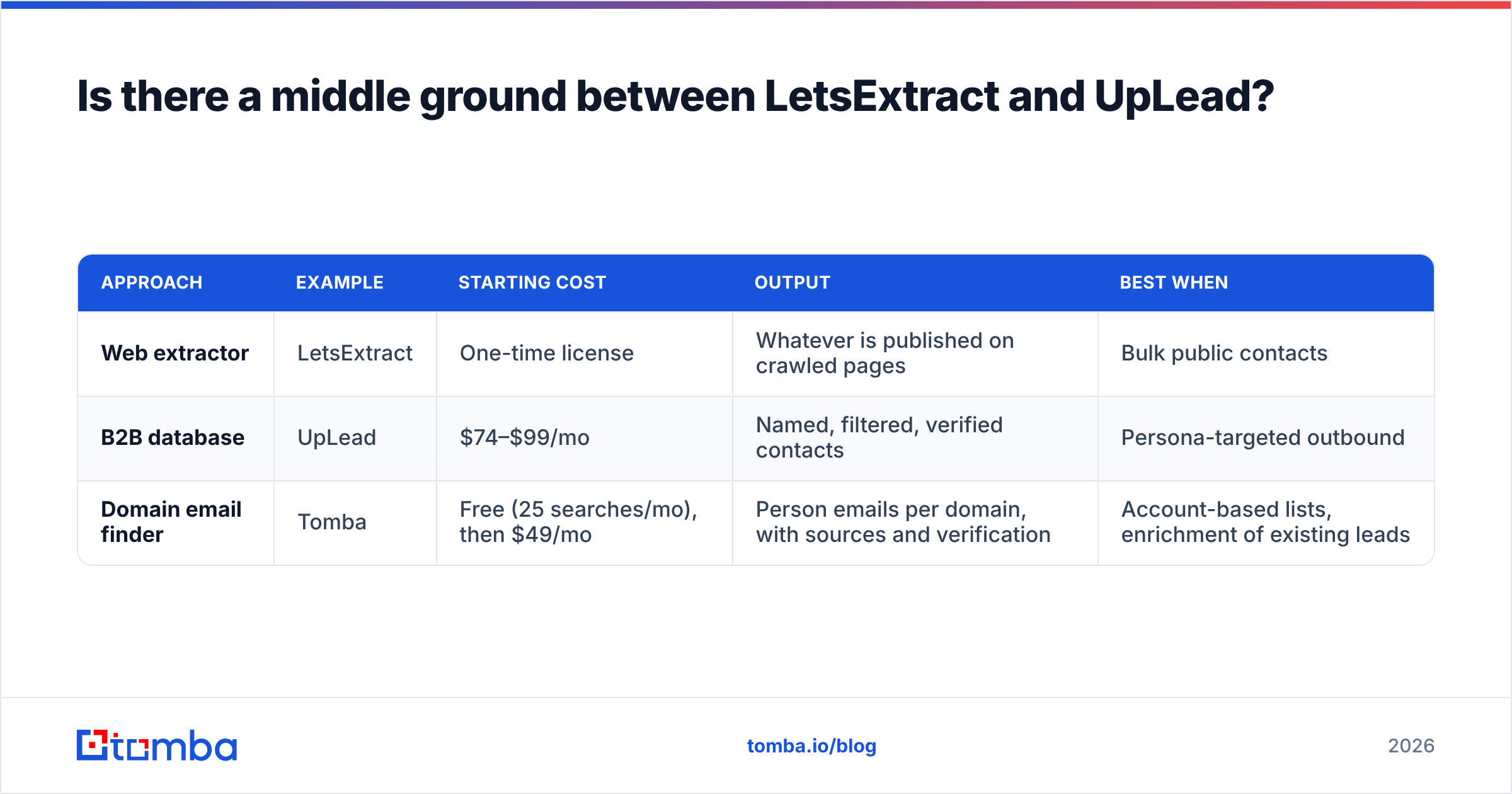
Domain-based email finders cover that gap. You start from a company domain, which you likely already have in your ICP list or CRM. You see which people and email patterns exist there, then verify the ones you need. Here's how the three approaches compare:
| Approach | Example | Starting cost | Output | Best when |
|---|---|---|---|---|
| Web extractor | LetsExtract | One-time license | Whatever is published on crawled pages | Bulk public contacts |
| B2B database | UpLead | $74–$99/mo | Named, filtered, verified contacts | Persona-targeted outbound |
| Domain email finder | Tomba | Free (25 searches/mo), then $49/mo | Person emails per domain, with sources and verification | Account-based lists, enrichment of existing leads |
With Tomba, you can use domain search to list every discoverable email at a target company. Or look up a single person by name and domain. Each result shows the public sources behind it, so you can see why an email is likely valid. Plans run from a free tier through Starter at $49/mo, Growth at $99/mo, and Pro at $249/mo. Full pricing details are public.
This isn't a replacement for UpLead's persona filtering across the whole market. It's a better fit when you already know which accounts you want and need the right people inside them.
What is the final verdict on LetsExtract vs UpLead?#
UpLead wins for most B2B outbound teams. It gives you named decision-makers, real-time verification, and filters that match your ICP. You pay more per contact. But you spend far less time cleaning data, and you protect your sending domain.
LetsExtract wins on cost for bulk public-address harvesting. If your buyers are local businesses or your source is a directory, a one-time license and a good proxy setup will out-produce any credit-based tool. Just budget for verification and be careful about compliance.
Before you settle LetsExtract vs UpLead, run a quick test. Pull 100 contacts from your real ICP with each tool and verify them independently. Then count how many are named people in your target roles with deliverable addresses. That number tells you more than any feature matrix.
Where does Tomba fit into your stack?#
If you want person-level accuracy without a database subscription, try the Tomba Email Finder. Enter a name and company domain, or a whole domain. You get verified professional emails with their public sources attached. Start on the free tier with 25 searches a month, then move to Starter at $49/mo as your outbound grows. It works alongside whichever list-building tool you choose, or as the lighter option when the LetsExtract vs UpLead choice doesn't quite fit.
Related guides#
// get started
Find, verify and enrich your first contacts today
Start on the free plan with 25 searches a month, then scale when your team is ready.
Free plan · No credit card required · GDPR & CCPA
// about the author