LetsExtract vs Wiza (2026): Web Scraper or LinkedIn Email Finder?
LetsExtract scrapes emails from websites for a one-time fee. Wiza pulls verified work emails from LinkedIn on a subscription. They collect different data, so here is which one fits your pipeline.
TL;DR
- LetsExtract is a desktop email extractor. It crawls websites, search results and social pages and pulls out any email address it finds. You pay once for a license, with tiers at roughly $39, $59 and $79.
- Wiza is a LinkedIn and Sales Navigator email finder. It takes a person or a list of people and returns their verified work email, plus phone numbers on some plans. It's a subscription: $49 to $199/mo billed monthly, or about $83 to $166/mo on annual plans.
- The two tools collect different data. LetsExtract mostly gives you generic company inboxes such as info@ and sales@. Wiza gives you named decision-makers.
- Pick LetsExtract if you're on a tight budget, prospecting local businesses or SMBs, and happy to do your own cleaning and verification.
- Pick Wiza if your ICP lives on LinkedIn, you sell to named buyers, and you want verified emails pushed into your CRM.
People search "LetsExtract vs Wiza" expecting two versions of the same product. They aren't. LetsExtract is a harvester: point it at the web and it collects every address it can see. Wiza is a resolver: give it a named person and it works out that person's work email. Choosing between them depends less on features and more on what your outbound motion needs.
This guide covers how each tool works, what you actually get, what it costs, where each one struggles, and when neither is the right answer.
What is LetsExtract?#
LetsExtract, from letsextract.com, is a desktop program (mainly Windows) for pulling email addresses out of web content in bulk. You give it keywords, a list of URLs or a set of search-engine queries. It crawls the matching pages and collects every email string it finds, often with phone numbers and social links too.
The product is sold as a small toolkit:
- Email extractor. Scrapes by keyword, from websites, and from some social and directory sources.
- Email verifier. Unlimited verification on the Pro tier and above.
- Email sender. A built-in bulk mailer on the Ultimate tier.
- Browser extension. Grabs contacts from the page you're viewing.
It runs on your machine, so there's no credit meter. Your throughput depends on your hardware, your proxies and how aggressively you crawl. That's the appeal: after one payment you can run as many extraction jobs as you like.
The catch is what the web actually publishes. Most company sites list role-based inboxes (info@, contact@, support@, hello@), not a VP of Sales' direct address. LetsExtract finds what's public, and what's public is mostly generic.
What is Wiza?#
Wiza, from wiza.co, is a cloud prospecting tool built around LinkedIn. You install the Chrome extension, open a LinkedIn profile or a Sales Navigator search, and Wiza returns each person's work email, and on some plans their phone number. You can also upload a CSV of names and companies, or use the API.
Here's what it does well:
- Person-level results. You get "Jane Doe, Head of RevOps, jane@company.com", not a contact form address.
- Verification built in. Wiza only charges credits for valid results, so you don't pay for misses.
- CRM sync. Native pushes to HubSpot, Salesforce, and other tools in the outbound stack.
- Sales Navigator list export. It turns a saved Sales Nav search into an enriched spreadsheet.
The trade-off is cost and dependency. Wiza is a subscription, overages cost about $0.15 per email and $0.35 per phone, and the workflow only works as well as your access to LinkedIn and Sales Navigator.

How do LetsExtract and Wiza differ at the core?#
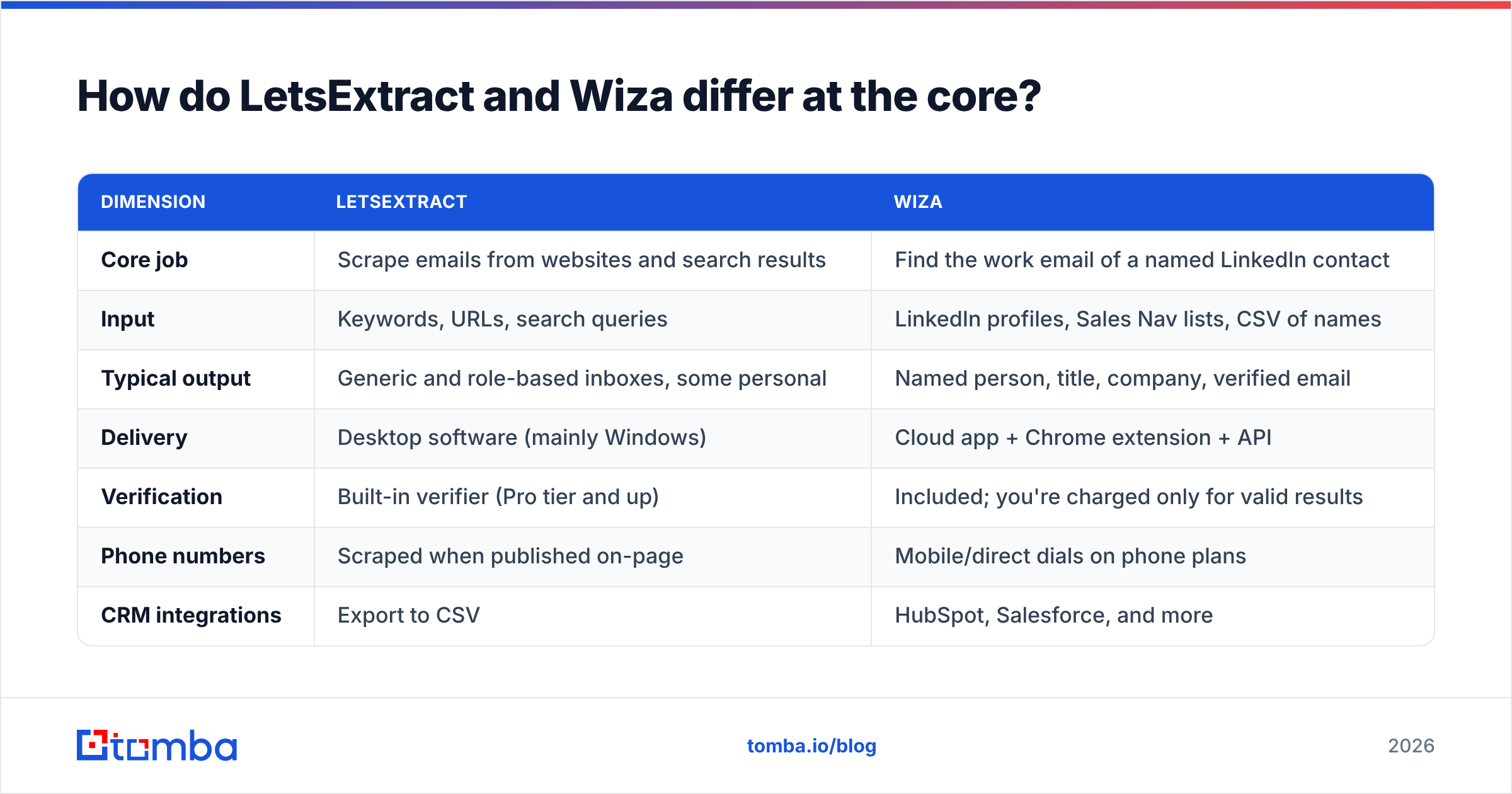
Think of LetsExtract as a fishing net and Wiza as a fishing rod. The net brings up everything in the water, including a lot you'll throw back. The rod catches one specific fish at a time, and each catch costs more.
| Dimension | LetsExtract | Wiza |
|---|---|---|
| Core job | Scrape emails from websites and search results | Find the work email of a named LinkedIn contact |
| Input | Keywords, URLs, search queries | LinkedIn profiles, Sales Nav lists, CSV of names |
| Typical output | Generic and role-based inboxes, some personal | Named person, title, company, verified email |
| Delivery | Desktop software (mainly Windows) | Cloud app + Chrome extension + API |
| Verification | Built-in verifier (Pro tier and up) | Included; you're charged only for valid results |
| Phone numbers | Scraped when published on-page | Mobile/direct dials on phone plans |
| CRM integrations | Export to CSV | HubSpot, Salesforce, and more |
| Pricing model | One-time license | Monthly or annual subscription |
This is the main point of the comparison. Every other difference follows from it: a scraper can only return what's published, and a resolver can return what isn't.
How accurate is each tool?#
Accuracy means something different for each tool.
LetsExtract accuracy is about extraction quality. If an address is on the page, LetsExtract will usually find it. The problem is that the address may be old (a footer nobody has updated since 2019), obfuscated, a spam trap, or a role inbox nobody reads. Scraped lists often have high bounce rates unless you verify them before sending, which is why the Pro tier's unlimited verifier matters. If you buy the $39 Basic tier and send without verifying, your sender reputation takes the hit.
Wiza accuracy is about match quality. Wiza verifies before it charges, so the addresses you pay for are generally deliverable. Independent reviews on G2 regularly praise its Sales Navigator workflow and data quality. The weak spots are small companies with thin LinkedIn footprints and catch-all domains, where no finder can be fully certain.

Whichever tool you choose, run a second verification before a large send. A dedicated email verifier that also handles catch-all domains will save you a lot of bounces, especially on scraped lists.
How does LetsExtract pricing compare to Wiza pricing?#
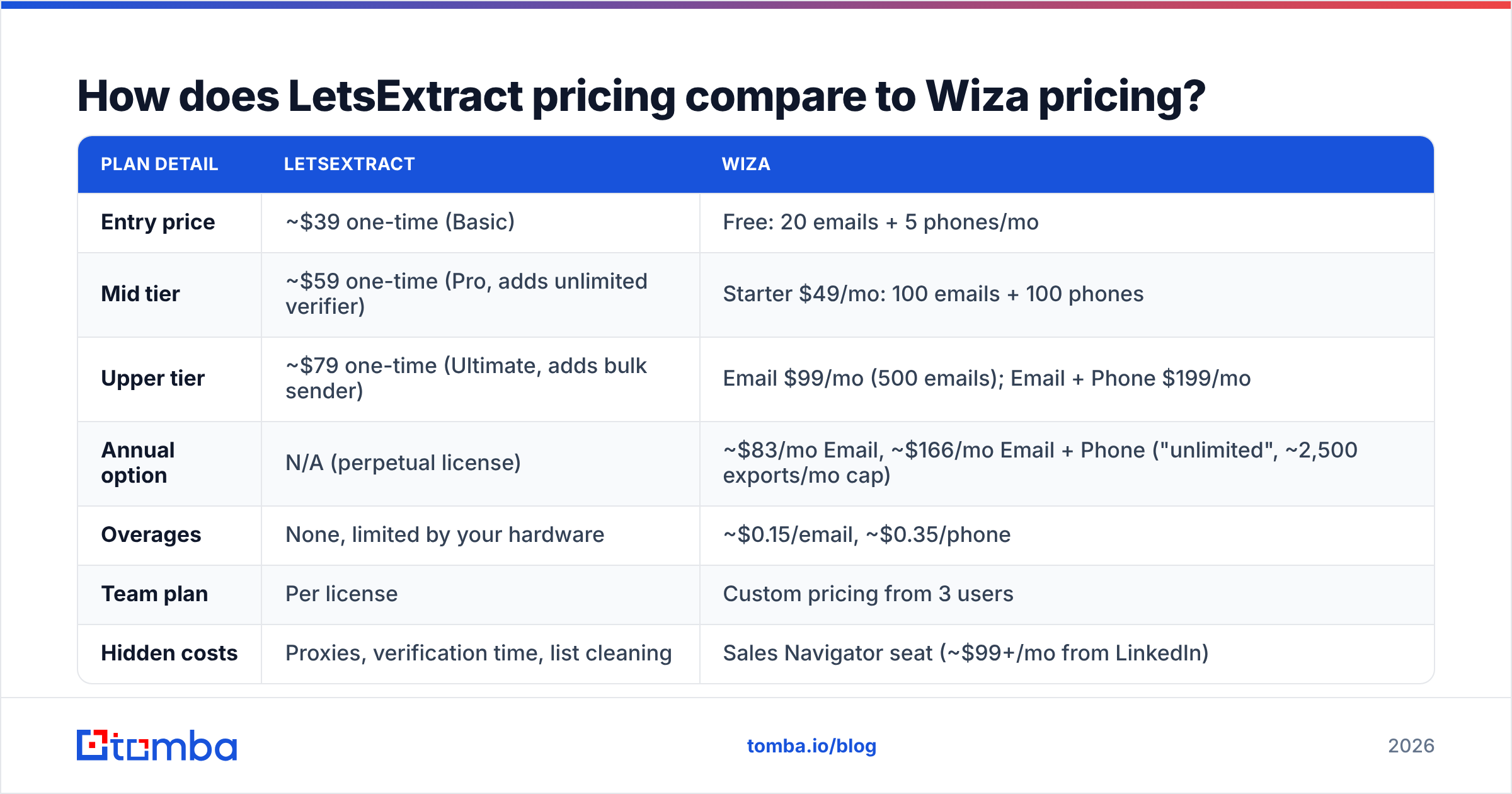
These are two different ways to pay, so compare them by cost per usable contact, not sticker price.
| Plan detail | LetsExtract | Wiza |
|---|---|---|
| Entry price | ~$39 one-time (Basic) | Free: 20 emails + 5 phones/mo |
| Mid tier | ~$59 one-time (Pro, adds unlimited verifier) | Starter $49/mo: 100 emails + 100 phones |
| Upper tier | ~$79 one-time (Ultimate, adds bulk sender) | Email $99/mo (500 emails); Email + Phone $199/mo |
| Annual option | N/A (perpetual license) | ~$83/mo Email, ~$166/mo Email + Phone ("unlimited", ~2,500 exports/mo cap) |
| Overages | None, limited by your hardware | ~$0.15/email, ~$0.35/phone |
| Team plan | Per license | Custom pricing from 3 users |
| Hidden costs | Proxies, verification time, list cleaning | Sales Navigator seat (~$99+/mo from LinkedIn) |
Prices reflect public listings at the time of writing. Confirm on each vendor's site before you buy.
On paper LetsExtract is much cheaper: $59 once versus $99 every month. Now count usable contacts. Say you scrape 10,000 addresses and 70% are role inboxes, duplicates or dead. You're left with a few thousand generic contacts, and most of them won't reach a buyer. With Wiza, 500 emails a month means 500 named, verified people who match your filters.
If you sell to local plumbers, dental practices or e-commerce stores where the owner reads info@, LetsExtract wins on cost. If you sell to mid-market or enterprise buying committees, Wiza's higher price usually works out cheaper per meeting booked.
Which tool is better for LinkedIn prospecting?#
Wiza, clearly. It was built for this. The Sales Navigator export is the reason most people buy it: build a search, click export, and get back a sheet of verified emails with titles and company data, ready for your sequencer.
LetsExtract can pick up emails that happen to appear on some social pages, but it doesn't resolve LinkedIn profiles to work emails. If your prospect list starts in LinkedIn, LetsExtract is the wrong tool.
One caveat: LinkedIn's terms of service limit automated data collection, and LinkedIn periodically restricts accounts that behave like bots. Wiza is designed to work within normal browsing patterns, but you should still keep your daily volumes reasonable. If you want a lighter option, a LinkedIn finder that works from a profile URL instead of a browser session avoids some of that exposure.
Which tool is better for local and SMB lead lists?#
LetsExtract has the edge here. Local and very small businesses often aren't on LinkedIn in any useful way, but they do publish a contact email on their website, Google Business listing or directory page. A keyword crawl like "roofing contractor Denver" or "yoga studio Austin" can build a list of thousands of real businesses cheaply.
For this segment, the generic inbox usually is the decision-maker's inbox, because a five-person business doesn't have a separate procurement team.
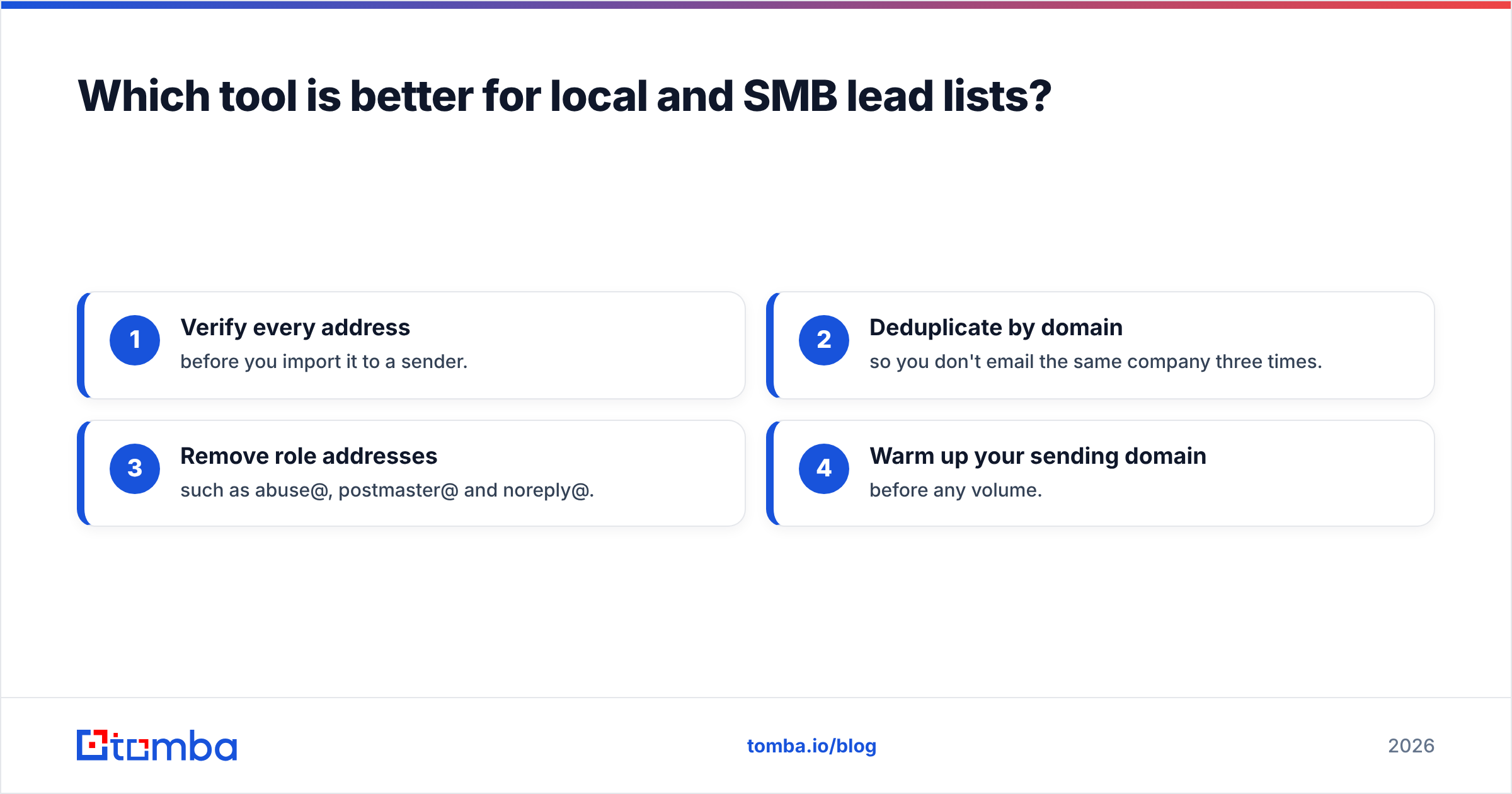
The discipline you need:
- Verify every address before you import it to a sender.
- Deduplicate by domain so you don't email the same company three times.
- Remove role addresses such as abuse@, postmaster@ and noreply@.
- Warm up your sending domain before any volume.

What about compliance and GDPR?#
This is the question most comparison posts skip, and it matters more for LetsExtract than for Wiza.
Under the EU's General Data Protection Regulation, email addresses tied to identifiable people are personal data, including work emails. Scraping them in bulk from the web and emailing them without a documented legitimate-interest assessment is legally risky in the EU and UK. Scraping tools leave the lawful-basis question entirely to you, the operator.
Wiza publishes compliance documentation and operates as a data processor with defined practices. You still carry responsibility for how you use the data, but the vendor has done part of the work for you.
In practice:
- Selling into the EU/UK? Use a vendor with clear data-sourcing documentation, keep suppression lists, and include an easy opt-out in every email.
- Selling US-only to SMBs? CAN-SPAM is more permissive, but it still requires accurate headers, a physical address and a working unsubscribe.
What are the pros and cons of each?#
LetsExtract pros
- One-time payment and no credit meter
- Good for local and SMB list building from websites and directories
- Verifier and bulk sender bundled on the higher tiers
- Runs offline on your own machine
LetsExtract cons
- Mostly generic role-based inboxes, not named buyers
- Windows-first desktop software with no native CRM sync
- High cleaning and verification overhead
- You carry the full compliance burden for scraped data
Wiza pros
- Named, verified work emails from LinkedIn and Sales Navigator
- You pay only for valid results
- Native HubSpot and Salesforce integrations, plus an API
- Phone numbers available on higher plans
Wiza cons
- Recurring cost that adds up quickly for teams
- Works best with a paid Sales Navigator seat
- Thinner coverage for micro-businesses without LinkedIn profiles
- Overage pricing can surprise high-volume users
Is there a better option than LetsExtract or Wiza?#
Sometimes. If you need named contacts but don't want to depend on LinkedIn, or you need company-wide email discovery without running a scraper, a domain-based email finder sits between the two approaches.

Tomba is one example. You give it a domain and get the known professional emails at that company, with names, titles and sources. You can also give it a first name, last name and domain to resolve one person. It includes verification, catch-all checks, a Chrome extension, Sheets and Excel add-ins, and an API. Pricing starts with a free tier (25 searches/mo), then Starter at $49/mo, Growth at $99/mo and Pro at $249/mo. See the full Tomba pricing for credit breakdowns. If you're already weighing options, our Wiza alternative page compares the two directly.
Other tools are worth a look too. Apollo, Hunter and Findymail all overlap with part of this workflow, and the right choice depends on whether you care most about LinkedIn coverage, database size, or verification strictness.
Which should you choose: LetsExtract or Wiza?#
Here's a simple way to decide:
| If you... | Choose |
|---|---|
| Sell to local businesses, freelancers or micro-SMBs | LetsExtract |
| Have a budget under $100 total and time to clean lists | LetsExtract |
| Build prospect lists in LinkedIn Sales Navigator | Wiza |
| Need named buyers at mid-market or enterprise accounts | Wiza |
| Need CRM sync and team workflows | Wiza |
| Start from company domains, not LinkedIn profiles | A domain-based email finder |
Most mature outbound teams end up using a mix: a resolver for named buyers, a domain search for account mapping, and a verifier before every send. Neither LetsExtract nor Wiza covers all three on its own.
Ready to find the right emails, not just more of them?#
If your list starts from company websites or target accounts rather than LinkedIn profiles, try the Tomba Email Finder. Enter a domain or a name plus company and get verified professional emails with titles and sources, without scraping pages or paying for a Sales Navigator seat. The free tier gives you 25 searches a month to test it on your own ICP before you commit.
Related guides#
// get started
Find, verify and enrich your first contacts today
Start on the free plan with 25 searches a month, then scale when your team is ready.
Free plan · No credit card required · GDPR & CCPA
// about the author