LFBBD Lead For Business vs Salesbot: Which B2B Lead Source Wins?
LFBBD sells ready-made lead lists. Salesbot gives you an AI prospecting platform with outreach built in. Here is how the two compare on data, pricing, and workflow fit, and which one to choose in 2026.
TL;DR
- LFBBD (Lead For Business) is a list vendor. You say who you want to reach (B2B decision-makers, eCommerce brands, Amazon sellers) and it delivers a file of contacts. Pricing is set per order, not through a public self-serve plan.
- Salesbot is a self-serve AI prospecting platform. You get a searchable contact database, credit-based email and mobile reveals, and automated outreach, starting at $49/month.
- Pick LFBBD if you want a one-off list in a niche like Amazon sellers or Shopify brands and don't want to learn new software.
- Pick Salesbot if you run outbound every week and want search, reveals, and sequences in one tool.
- With either one, verify every address before you send. That applies to vendor lists more than anything. A dedicated finder and verifier is the cheapest way to protect your domain.
What is the real difference between LFBBD and Salesbot?#
These two tools look like direct competitors, but they sell different things.
LFBBD works like a data agency. It says it has 500M+ B2B contacts, 5M+ eCommerce brands, 3M+ verified work emails, and 1M+ mobile numbers. It also says its B2B lists are about 95–97% accurate and get refreshed every 15–30 days. You usually don't log in and search. You describe your target and receive a list. Its focus on eCommerce and Amazon seller data is less common among data vendors.
Salesbot is software you run yourself. Per its Capterra listing and third-party directories, it offers a database of roughly 650M–695M profiles, AI search driven by your ideal customer profile (ICP), email and mobile credits, and built-in outreach with automated follow-ups and inbox health monitoring.
An analogy helps here. LFBBD is a caterer: you order a meal and it arrives ready. Salesbot is a commercial kitchen with a stocked pantry: you do the cooking, but you can make something different every day.
Before you compare features, decide which model suits the way your team works:
- Delivery model. LFBBD sends you a finished list. With Salesbot, you search, filter, and export yourself.
- Cost model. LFBBD charges per order or quote. Salesbot is a monthly subscription with an annual credit allowance.
- Freshness model. An LFBBD list is a snapshot from the day it was pulled. In Salesbot you query the database live and reveal contacts on demand.
- Workflow model. LFBBD stops at the data, so you bring your own sending tool. Salesbot includes outreach and follow-ups.
- Niche coverage. LFBBD focuses on eCommerce, Amazon sellers, SaaS, and local businesses. Salesbot is a general B2B database built around ICP search.
How do LFBBD and Salesbot compare side by side?#
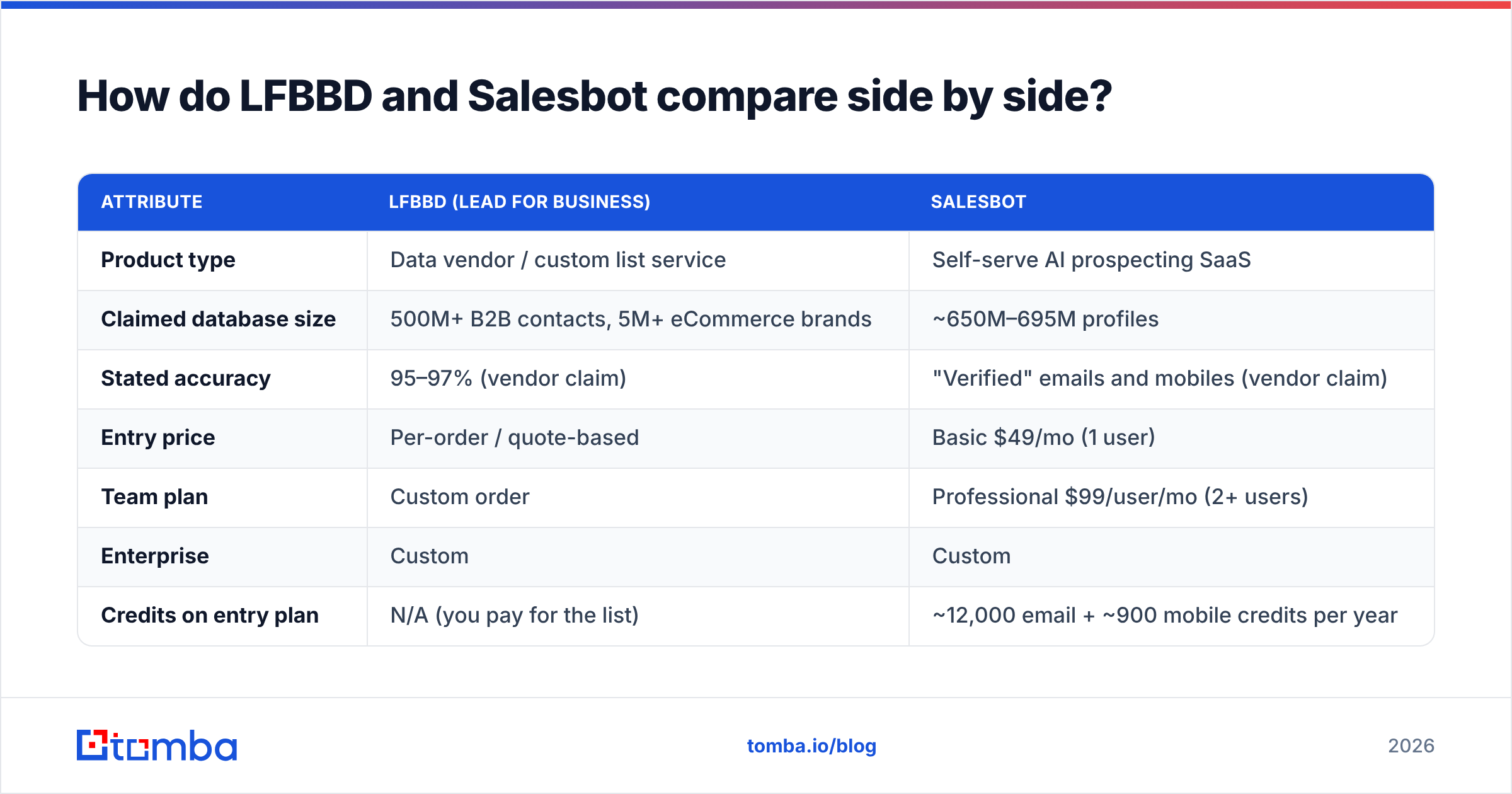
This table uses vendor-published information and third-party listings as of 2026. Vendors change plans often, so check current terms before you buy.
| Attribute | LFBBD (Lead For Business) | Salesbot |
|---|---|---|
| Product type | Data vendor / custom list service | Self-serve AI prospecting SaaS |
| Claimed database size | 500M+ B2B contacts, 5M+ eCommerce brands | ~650M–695M profiles |
| Stated accuracy | 95–97% (vendor claim) | "Verified" emails and mobiles (vendor claim) |
| Entry price | Per-order / quote-based | Basic $49/mo (1 user) |
| Team plan | Custom order | Professional $99/user/mo (2+ users) |
| Enterprise | Custom | Custom |
| Credits on entry plan | N/A (you pay for the list) | ~12,000 email + ~900 mobile credits per year |
| Search interface | No self-serve search | AI search, 25+ filters on Professional |
| Outreach built in | No | Yes, including sequences and auto follow-ups |
| Niche strength | eCommerce, Amazon sellers, Shopify, local business | General B2B ICP targeting |
| Best for | One-off campaigns, niche verticals, non-technical buyers | Ongoing outbound, SDR teams, agencies |
The table highlights one point: you are not comparing two databases. You are choosing between a service and a platform. Which one is "better" depends on how often you prospect and who on your team does the work.
Is LFBBD Lead For Business worth it?#
LFBBD makes the most sense when the list is the whole job.
Where it does well:
- Niche verticals. Most B2B platforms are built around job titles at mid-market and enterprise companies. If you sell to Shopify store owners, Amazon FBA sellers, or small eCommerce brands, LFBBD's specialist datasets can reach people that generic ICP filters don't cover well.
- No learning curve. You send a brief and get a file back. Founders and marketers who don't want to set up another tool will like this.
- Service reviews. Its Trustpilot page has reviewers praising fast delivery, professionalism, and fair prices for list quality.
Where to be careful:
- Snapshot decay. A list starts losing accuracy from the day it's delivered. People change jobs, domains change, and mailboxes get shut down. A 15–30 day refresh on the vendor's side doesn't help once the file is sitting in your drive.
- Accuracy claims are claims. Take 95–97% as the vendor's number, not a guarantee. Run a sample of 200–500 contacts through an independent email verifier before you pay for the full order, or at least before you send to it.
- No outreach layer. You still need a sequencer, warmup, and a way to track replies. Include those costs in your comparison.
- Pricing transparency. No public self-serve tiers means you can't compare cost-per-contact until you ask for a quote.
Is Salesbot worth it?#
Salesbot makes the most sense when prospecting is a daily habit and you don't want to switch between tools.
Where it does well:
- ICP-driven search. You describe your ideal buyer and the AI suggests matching leads, so reps spend less time on manual research.
- Credits bundled with outreach. On the Basic plan, a solo founder gets search, about 12,000 verified email credits and about 900 mobile credits per year, unlimited sends, and sequences for $49/month. That's a strong bundle for the price.
- Deliverability guardrails. Inbox health monitoring and send limits help keep new users from damaging their domain in the first week.
- Team features on Professional. Exporting 1,000 leads at once, CSV list matching and suppression, and company-domain exclusion all matter for agencies running campaigns for several clients.
Where to be careful:
- Credits run out. About 12,000 email credits a year works out to roughly 1,000 a month. An active SDR can use that in a week or two. Estimate your real volume before you choose a tier.
- Mobile credits are limited. About 900 per year on Basic is enough for spot-checking. It won't support a phone-heavy strategy.
- Breadth over depth. Third-party reviewers note that Salesbot does few things outside prospecting. If you need deep enrichment, intent data, or CRM hygiene, you'll add another tool anyway.
- All-in-one lock-in. If you already use a sequencer you like, you'll pay for Salesbot's outreach features and not use them.
Which is more accurate: LFBBD or Salesbot?#
Neither vendor publishes an independent third-party accuracy audit. What you can control is how you validate the data. The data model affects this more than most buyers realize:
- A static list (LFBBD) is at its most accurate on delivery day and gets worse after that. B2B contact data decays significantly each year, so a list you sit on for a quarter is noticeably worse than the day you received it.
- An on-demand reveal (Salesbot) checks data when you request it, so each contact tends to be fresher when you send. It's still only as good as the provider's verification step.
For either tool, the process is the same:
- Sample first. Take 200–500 contacts before you commit to a large order or a full campaign.
- Verify independently. Run the sample through a verifier that reports valid, invalid, catch-all, and unknown separately. Don't rely only on the vendor's "verified" label.
- Handle catch-alls separately. Catch-all domains accept mail for any address, so they can't be confirmed over SMTP alone. Send to them in smaller, separate batches.
- Measure bounce rate on the first send. If hard bounces go above about 2–3%, stop and re-verify before you continue.
- Re-verify before every reuse. A list from three months ago needs checking again.
This isn't specific to these two vendors. It applies to every data source, including the ones you build yourself.
How do the costs really compare?#
Sticker prices mislead in both directions. Here's a better way to calculate cost:
True cost per usable contact = (data cost + verification cost + outreach tooling) ÷ contacts that didn't bounce
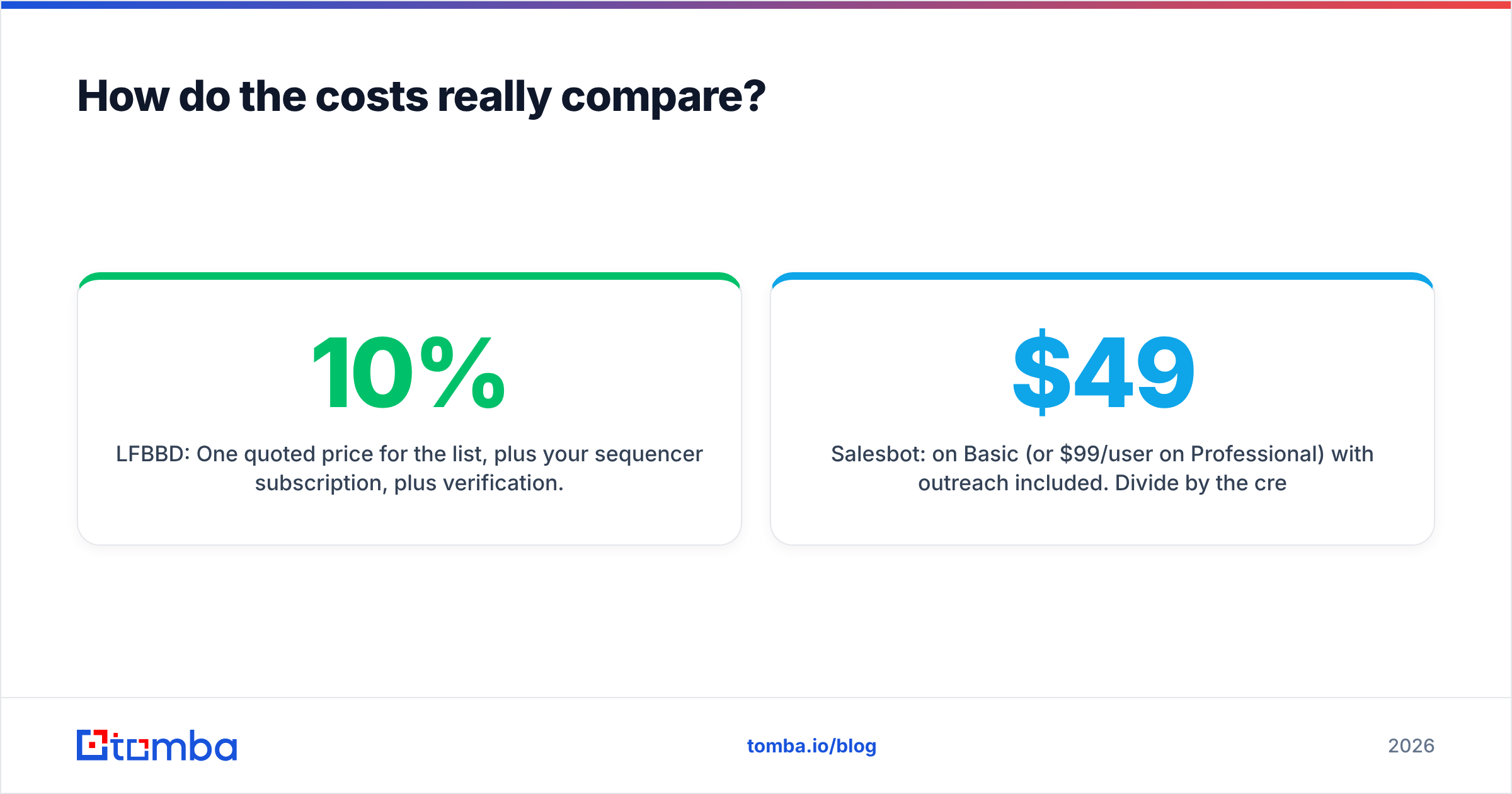
- LFBBD: One quoted price for the list, plus your sequencer subscription, plus verification. If 10% of the list bounces, your real cost per contact rises by about the same share.
- Salesbot: $49/month on Basic (or $99/user/month on Professional) with outreach included. Divide by the credits you actually use. If you only use half your credits, your effective cost per contact doubles.
For a solo founder sending 500–1,000 emails a month, Salesbot's Basic plan is usually the simpler and more predictable buy. For a one-time campaign aimed at, say, 3,000 Amazon sellers, a single LFBBD order can cost less than several months of any subscription, as long as you verify the file before sending.
Where does a dedicated email finder fit in?#
There's a third option many teams overlook: build the list from your own target accounts, then find and verify contacts one at a time or in bulk.
This works well when:
- You already have a named account list, from your CRM, event attendees, or a tech-stack filter.
- You need the right person at specific companies, not a large number of contacts.
- You want full control of freshness, because every lookup happens when you need it.
A dedicated email finder takes a name and domain (or just a domain) and returns the most likely address with a confidence score. When you combine it with data enrichment for firmographics and job titles, you get a list you built and can trust. It doesn't replace LFBBD's niche datasets or Salesbot's outreach, but it works well alongside either one. Many teams use a vendor list or database for discovery and a separate finder and verifier to check the data before anything is sent.
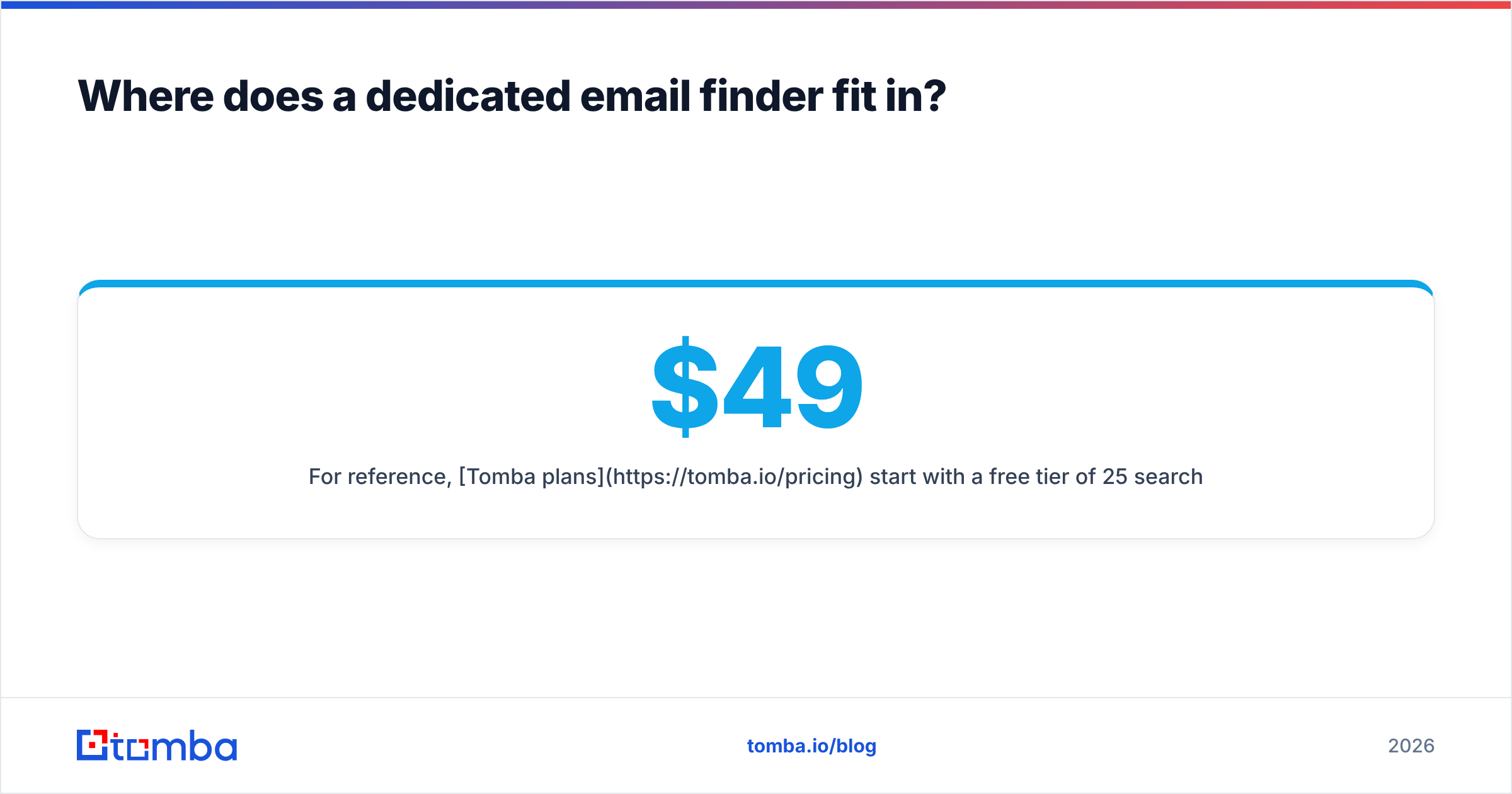
For reference, Tomba plans start with a free tier of 25 searches/month, then Starter at $49/mo, Growth at $99/mo, Pro at $249/mo, and Enterprise on custom terms. That's in the same range as Salesbot's entry plan, but aimed at finding and verifying contacts rather than sending.

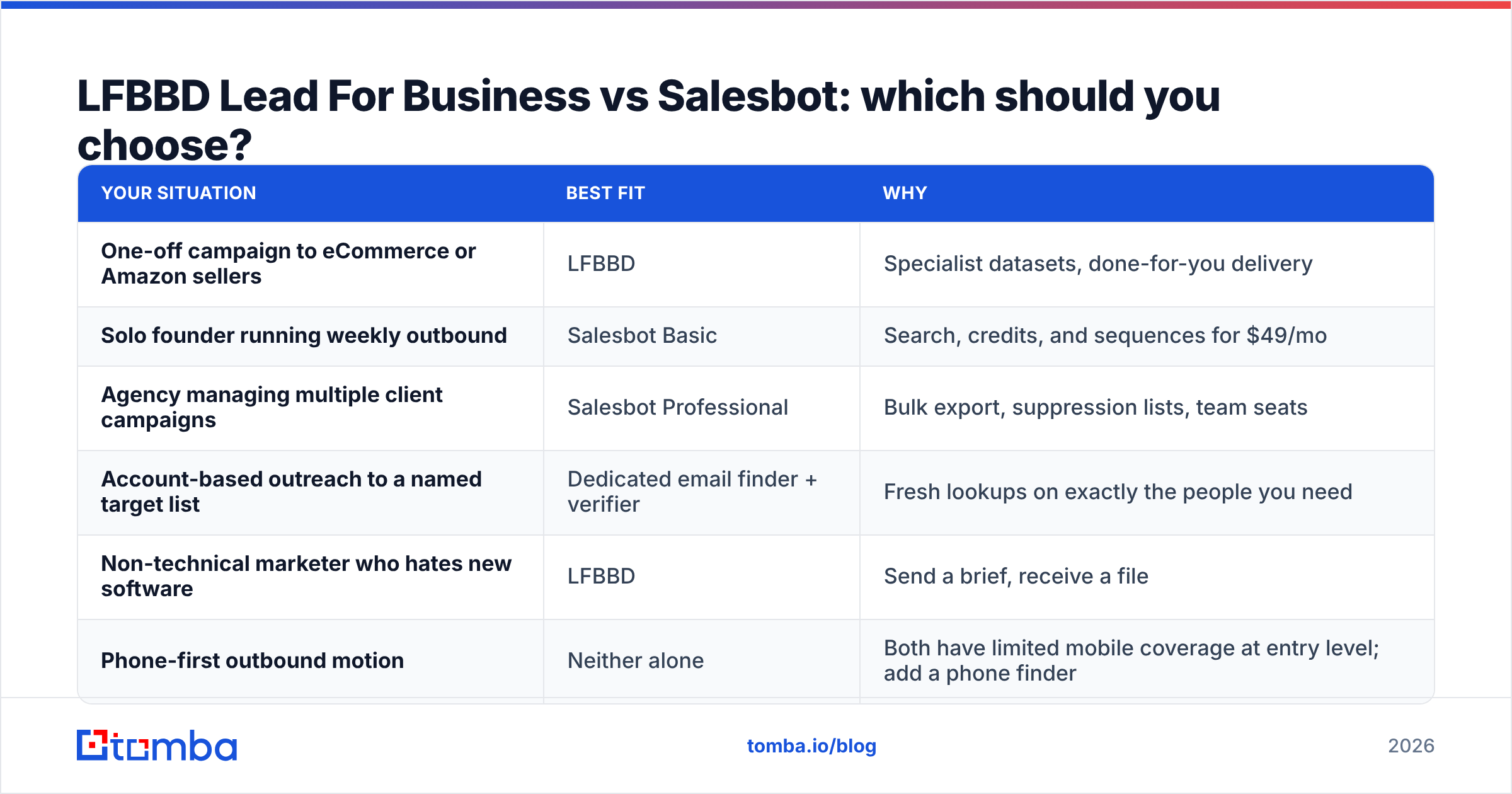
LFBBD Lead For Business vs Salesbot: which should you choose?#
Match the tool to how you prospect:
| Your situation | Best fit | Why |
|---|---|---|
| One-off campaign to eCommerce or Amazon sellers | LFBBD | Specialist datasets, done-for-you delivery |
| Solo founder running weekly outbound | Salesbot Basic | Search, credits, and sequences for $49/mo |
| Agency managing multiple client campaigns | Salesbot Professional | Bulk export, suppression lists, team seats |
| Account-based outreach to a named target list | Dedicated email finder + verifier | Fresh lookups on exactly the people you need |
| Non-technical marketer who hates new software | LFBBD | Send a brief, receive a file |
| Phone-first outbound motion | Neither alone | Both have limited mobile coverage at entry level; add a phone finder |
Our verdict: For most B2B teams that prospect continuously, Salesbot is the more practical daily tool, because search, reveals, and outreach live in one place and cost the same each month. LFBBD wins for niche, one-time list buys, especially in eCommerce verticals that general B2B databases cover poorly. Neither is a substitute for independent verification, and neither is the best choice when you already know exactly which accounts you want to reach.
What are the most common mistakes when buying lead data?#
A few errors cause most of the wasted money in this category:
- Buying volume over fit. 50,000 loosely matched contacts will do worse than 2,000 well-matched ones, and they can burn your sending domain on the way.
- Trusting "verified" labels without checking. Vendors verify at a single point in time. You're sending at a different time.
- Ignoring catch-all domains. They inflate "valid" counts and then produce bounces or silent drops.
- Skipping suppression. Upload your existing customers and past unsubscribes before every campaign. Salesbot's Professional tier supports this. With LFBBD lists you have to do it yourself.
- No bounce threshold. Choose a stop rule (for example, more than 3% hard bounces) before you press send.
The bottom line#
In the LFBBD Lead For Business vs Salesbot comparison, you're really deciding whether you want a service or a platform. Choose LFBBD when you need a one-time niche list delivered with no effort on your side. Choose Salesbot when outbound is an ongoing process and you want search and sequencing together. Whichever you choose, treat the data as a starting point and not as ready to send.
If you'd rather build your prospect list from the accounts you actually want to win, try Tomba Email Finder. Enter a name and company domain and get the professional email address with a confidence score, then verify it in the same workflow before it goes near your sending domain. The free tier includes 25 searches a month, so you can test it against your LFBBD or Salesbot sample before you commit to anything.
Related guides#
// get started
Find, verify and enrich your first contacts today
Start on the free plan with 25 searches a month, then scale when your team is ready.
Free plan · No credit card required · GDPR & CCPA
// about the author