LFBBD Lead for Business vs SMARTe: B2B Contact Data Compared
LFBBD sells ready-made B2B, eCommerce and Amazon seller lead lists. SMARTe is a self-serve contact data platform built around direct dials. Here's how to tell which one fits your outbound motion before you commit budget.
This LFBBD Lead for Business vs SMARTe comparison looks at coverage, phone data, pricing and workflow fit. Use it to pick the right B2B data source before you commit budget.
TL;DR
LFBBD (Lead for Business) is a UK-based lead vendor. It sells B2B, eCommerce and Amazon seller contact data, and says it covers 250M+ business contacts with emails and direct dials. It works best when you want a finished list in a niche vertical.
SMARTe is a self-serve B2B data platform with firmographics, technographics, verified work emails, direct dials and mobile numbers. It has a Chrome extension and CRM integrations, and third-party reviews put the database at about 180M contacts and 20M companies.
Neither vendor publishes full pricing. SMARTe has a free plan with 10 credits a month and quotes paid plans on request. LFBBD prices each list or dataset by quote.
Choose LFBBD if you need eCommerce or marketplace-seller data delivered in bulk. Choose SMARTe if your reps prospect every day and need phone numbers inside the CRM.
Whichever you pick, verify emails before you send. Every purchased dataset decays, and your bounce rate is what protects your domain.
What is LFBBD (Lead for Business)?#
LFBBD is the domain and short name of Lead for Business Ltd, a lead generation company registered in London. Its core product is contact data. That means B2B decision-makers, eCommerce store owners and Amazon sellers, each with an email address and, where available, a direct dial or mobile number. The company says it holds more than 250 million business contacts. It also offers company-level details such as revenue, funding, employee count, industry and competitors.
LFBBD works like a data supplier more than a prospecting app. You describe your ideal customer profile (industry, geography, company size, job titles, or a marketplace such as Amazon or Shopify), and you receive a dataset. Its listings on marketplaces such as Datarade point the same way: it sells data products, not seats in a daily-use tool.
The eCommerce and Amazon seller focus is what sets it apart. Most B2B data platforms are built around LinkedIn-style company records such as SaaS, manufacturing and professional services. They cover the long tail of online merchants poorly. Say you sell repricing tools, 3PL, PPC services or product photography to marketplace sellers. A vendor that tracks that segment on purpose can save you weeks of scraping.
You can see its current offering on the Lead for Business website.
What is SMARTe?#
SMARTe (smarte.pro) is a B2B contact and company data platform aimed at sales and marketing teams that prospect every day. It sells on three things:
- Phone data. Direct dials and mobile numbers, which SMARTe markets as a core strength, especially for international coverage.
- Verified work emails alongside firmographic and technographic fields.
- Workflow tooling. A Chrome extension, a prospect search UI with advanced filters, target lists, job-change updates, and CRM enrichment.
Third-party reviews describe a database of roughly 180 million contacts and 20 million organizations, refreshed about every 90 days. SMARTe uses consumption-based pricing rather than classic per-seat licensing. There's a free plan with 10 credits a month, and paid plans are quoted on request. Details are on the official SMARTe site, and user reviews are on G2's SMARTe comparison pages.
In short, SMARTe is a tool your SDRs log into. LFBBD is a vendor your ops team orders from.
LFBBD Lead for Business vs SMARTe: how do they compare side by side?#
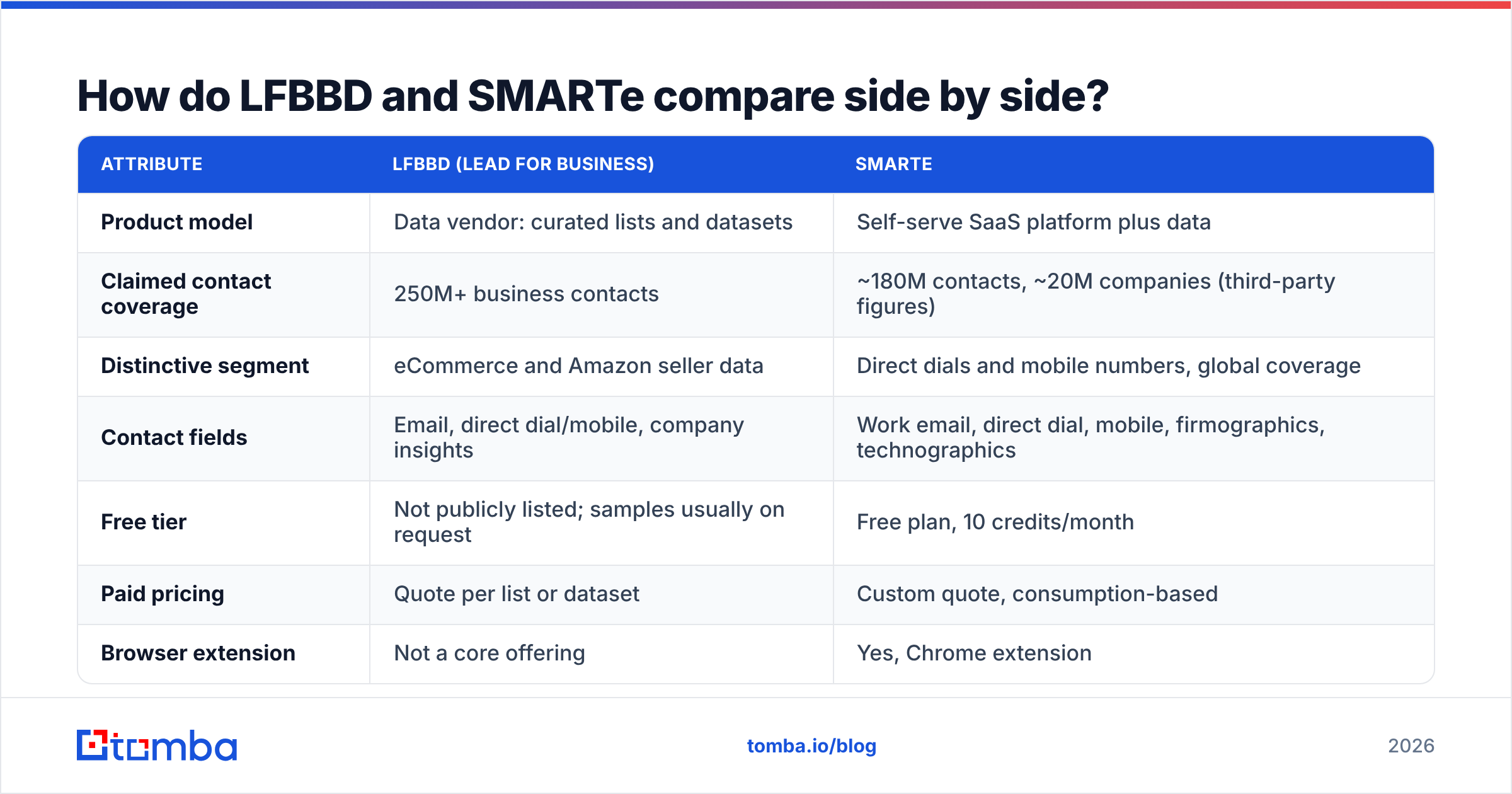
The table uses what each vendor publishes plus third-party reviews. Where pricing isn't public, it says so rather than guessing.
| Attribute | LFBBD (Lead for Business) | SMARTe |
|---|---|---|
| Product model | Data vendor: curated lists and datasets | Self-serve SaaS platform plus data |
| Claimed contact coverage | 250M+ business contacts | ~180M contacts, ~20M companies (third-party figures) |
| Distinctive segment | eCommerce and Amazon seller data | Direct dials and mobile numbers, global coverage |
| Contact fields | Email, direct dial/mobile, company insights | Work email, direct dial, mobile, firmographics, technographics |
| Free tier | Not publicly listed; samples usually on request | Free plan, 10 credits/month |
| Paid pricing | Quote per list or dataset | Custom quote, consumption-based |
| Browser extension | Not a core offering | Yes, Chrome extension |
| CRM workflow | Export files (CSV/XLSX) you import | Enrichment and prospecting inside CRM workflows |
| Data refresh | Varies by dataset; ask for the collection date | ~90-day refresh cycle (reported) |
| Best for | Bulk campaigns into niche or eCommerce verticals | SDR teams dialing and emailing every day |
| Main risk | List decay between delivery and send | Credit burn and paid-tier cost opacity |
Two things in this table matter more than the headline database sizes.
First, "250M" and "180M" measure different things. Vendors count records in different ways. Some count every historical contact, some only currently verified ones, some include personal emails. Don't use database size to decide. Take a sample of 200 contacts from your own ICP and check how many are real, current and reachable.
Second, the delivery model shapes your whole workflow. A list vendor gives you a snapshot. A platform gives you on-demand lookups. Neither is better in the abstract. Which one fits depends on how often you prospect and how narrow your target market is.

How should you evaluate the two before buying?#
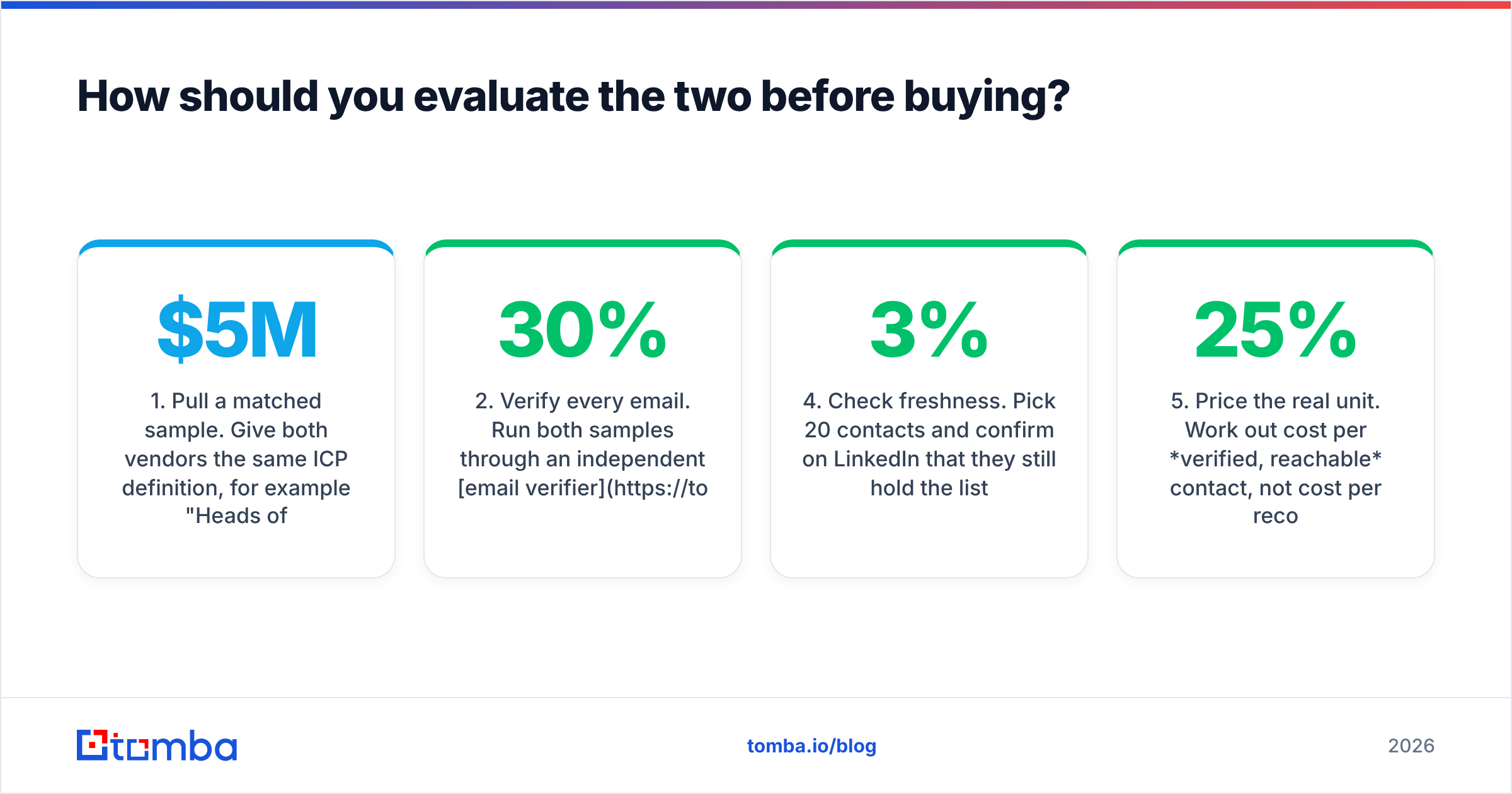
Run both vendors through the same five-step test before you sign a contract. Here is what to check and why each step matters:
Pull a matched sample. Give both vendors the same ICP definition, for example "Heads of eCommerce at DTC brands in the UK doing $5M–$50M." Ask each for 100–200 records. Compare how many records overlap and how many are unique to each vendor.
Verify every email. Run both samples through an independent email verifier. Track the valid, invalid, catch-all and unknown rates separately. A list with 30% catch-all addresses is a very different buy from one with 5%.
Dial-test the phone numbers. Have a rep call 30 numbers from each sample. Log connects, wrong numbers and switchboards. Phone accuracy is where SMARTe puts most of its marketing, so hold it to that claim.
Check freshness. Pick 20 contacts and confirm on LinkedIn that they still hold the listed title at the listed company. B2B data decays by roughly 2–3% a month through job changes, so a six-month-old snapshot can already be 15% stale.
Price the real unit. Work out cost per verified, reachable contact, not cost per record. A cheap list with a 25% bounce rate costs more once you add the damage to your sender reputation.
This takes about a day and tells you more than any sales demo.
Which is better for eCommerce and Amazon seller prospecting?#
LFBBD has the edge here, mostly because it targets this segment on purpose.
Traditional B2B databases identify people through company websites and professional profiles. Many Amazon sellers and Shopify store owners have no LinkedIn company page. Their storefront name often differs from their legal entity, and they list only a generic support inbox. General-purpose platforms, SMARTe included, are built mainly around corporate org charts, so they tend to thin out in this segment.
If your ICP is "private-label Amazon sellers doing $1M+ in the US," a vendor that already tracks marketplace sellers can give you a usable list quickly. Ask LFBBD these questions before you pay:
- How is seller revenue estimated, and how old are those estimates?
- What share of records has a named owner email rather than a generic inbox such as
info@orsupport@? - When was each record last collected or verified?
Which is better for daily SDR prospecting and cold calling?#
SMARTe has the edge for teams whose reps prospect every day.
Picture a rep who finds a contact on LinkedIn, reveals a mobile number, pushes it to the CRM and dials within five minutes. That rep needs a live tool, not a quarterly CSV. SMARTe's Chrome extension, target lists and job-change updates fit that workflow. The consumption-based model means you pay for reveals, not for records you never use.
The phone angle matters most. Email-first tools often have weak mobile coverage outside North America. SMARTe markets itself on direct dials and mobiles, so if cold calling is a big part of your pipeline, especially across EMEA or APAC, test it seriously. Pair it with a separate phone finder for records where SMARTe comes back empty, and compare connect rates.
The weak spot is cost predictability. With no public paid tiers, you negotiate. Ask for the credit cost per field type (email versus mobile), what happens to unused credits, and whether re-revealing a contact after it's refreshed costs a second credit.
What are the pros and cons of each?#
LFBBD (Lead for Business)
Pros:
- Specialist coverage of eCommerce and Amazon sellers that most platforms lack
- Suits large one-off campaigns where you want the full list at once
- Company insights (revenue, funding, size, competitors) bundled with contacts
- No need to train reps on a new tool
Cons:
- Snapshot delivery means the data starts decaying on the day you receive it
- No public pricing, so budgeting requires a quote cycle
- Less suited to ad-hoc, one-contact-at-a-time lookups
- Verification standards vary by dataset, so you need to check them yourself
SMARTe
Pros:
- Strong emphasis on direct dials and mobile numbers
- Chrome extension and CRM enrichment fit daily SDR workflows
- Firmographic and technographic filters for account-based targeting
- Free plan (10 credits a month) lets you test before you negotiate
Cons:
- Paid pricing is custom and not transparent
- The free tier is too small to judge coverage in your ICP properly
- A reported 90-day refresh cycle can lag fast-moving roles
- Weaker fit for marketplace sellers and very small businesses

Does either replace email verification?#
No. Both vendors say their emails are verified, and that is probably true when the check was run. But verification is a point-in-time check. People change jobs, domains become catch-all, and mailboxes get deleted. A list verified 60 days ago is not a list verified today.
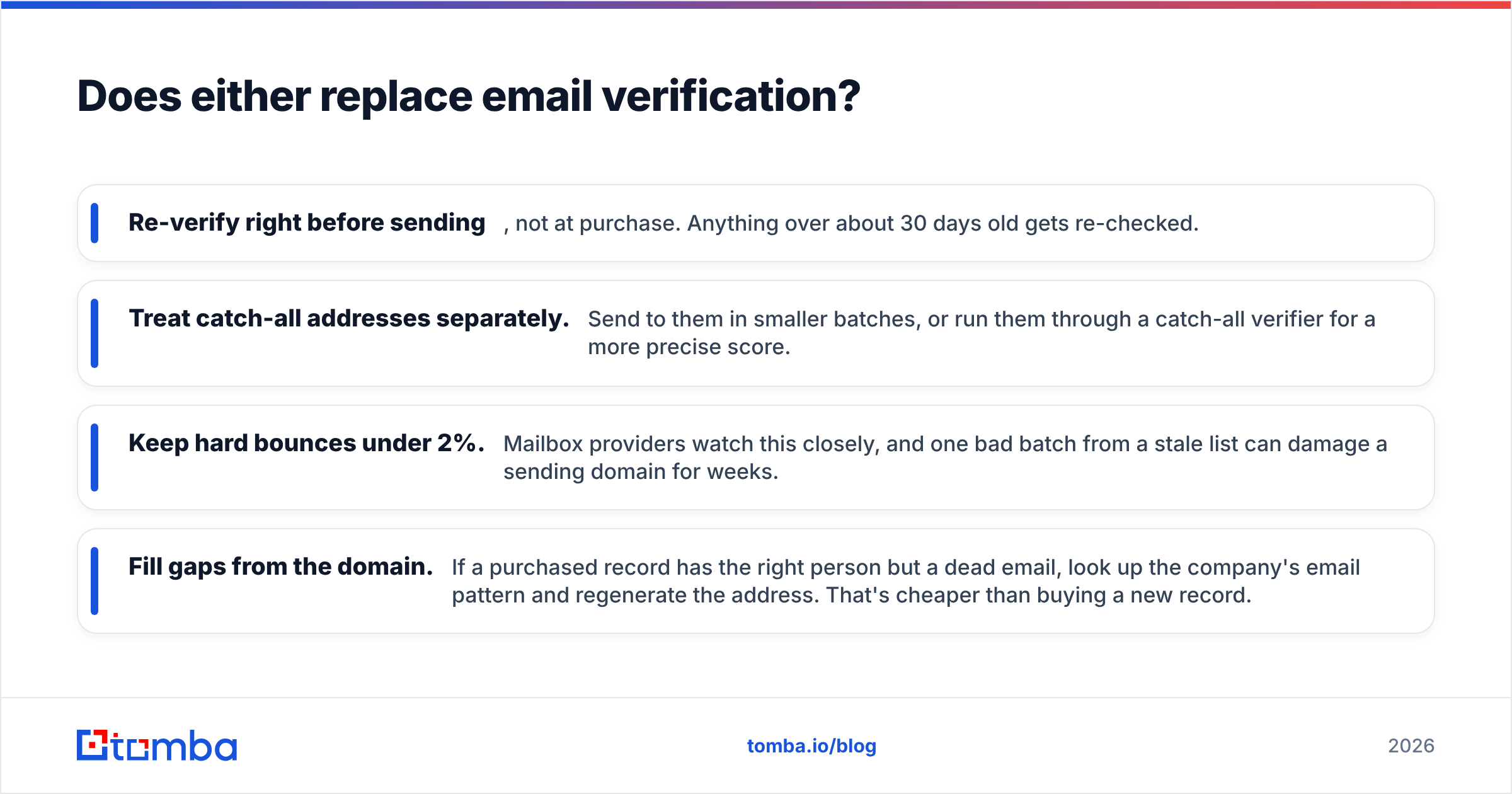
The safe workflow is the same whatever you buy:
- Re-verify right before sending, not at purchase. Anything over about 30 days old gets re-checked.
- Treat catch-all addresses separately. Send to them in smaller batches, or run them through a catch-all verifier for a more precise score.
- Keep hard bounces under 2%. Mailbox providers watch this closely, and one bad batch from a stale list can damage a sending domain for weeks.
- Fill gaps from the domain. If a purchased record has the right person but a dead email, look up the company's email pattern and regenerate the address. That's cheaper than buying a new record.
That last point is where a lookup-based tool like Tomba fits next to either vendor. You don't have to replace your list source to rescue the 10–20% of records that fail verification.
How do pricing models affect total cost?#
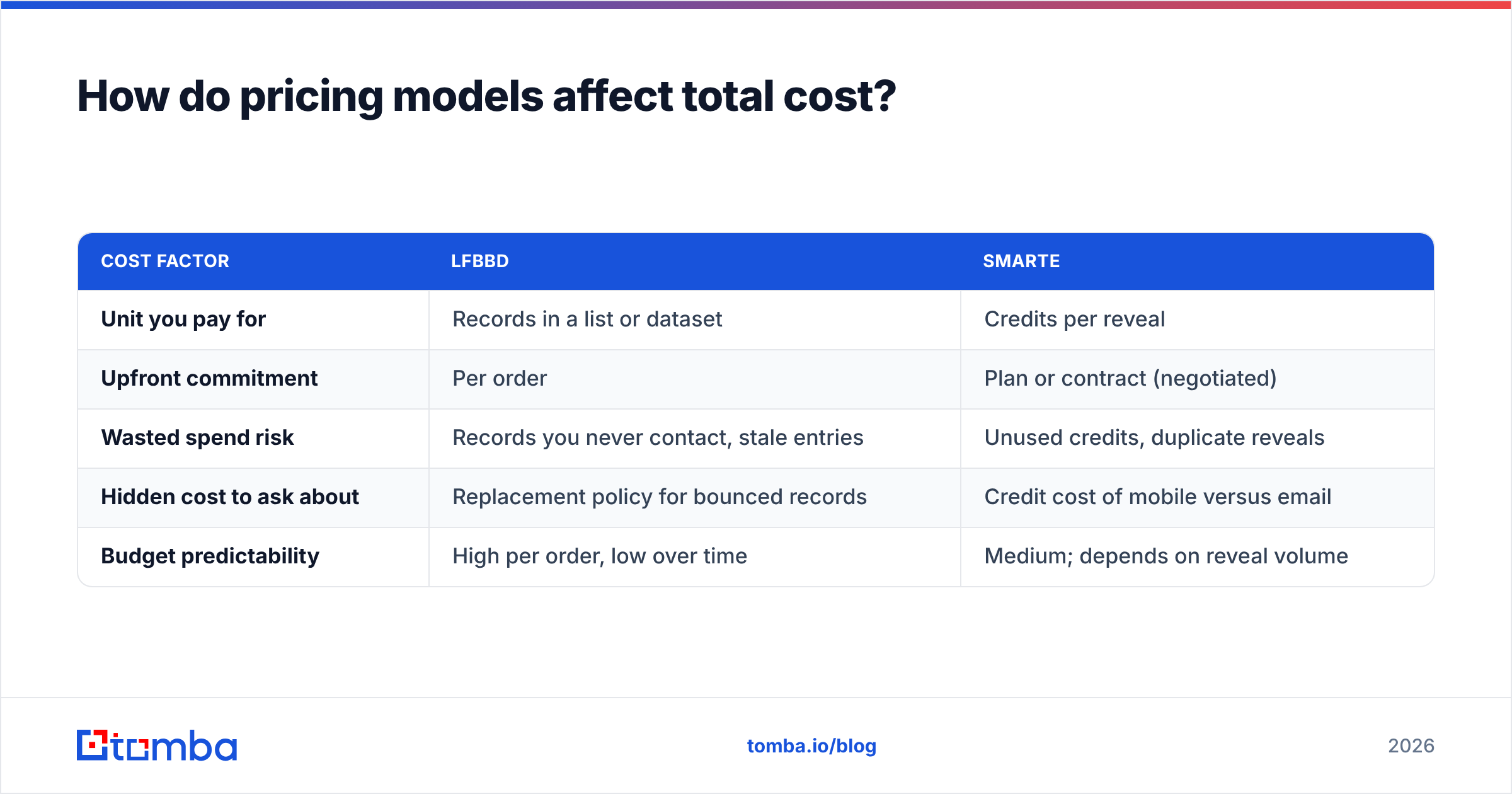
Since neither vendor publishes paid prices, compare structure, not sticker price.
| Cost factor | LFBBD | SMARTe |
|---|---|---|
| Unit you pay for | Records in a list or dataset | Credits per reveal |
| Upfront commitment | Per order | Plan or contract (negotiated) |
| Wasted spend risk | Records you never contact, stale entries | Unused credits, duplicate reveals |
| Hidden cost to ask about | Replacement policy for bounced records | Credit cost of mobile versus email |
| Budget predictability | High per order, low over time | Medium; depends on reveal volume |
Ask LFBBD for a bounce replacement guarantee in writing. Many list vendors will replace records that hard-bounce within a set window, and that changes the maths a lot. Ask SMARTe for a pilot at your real volume rather than judging it on 10 free credits.
For comparison, transparent-pricing tools give you a baseline. Tomba pricing starts with a free tier of 25 searches a month, then Starter at $49/mo, Growth at $99/mo and Pro at $249/mo, with Enterprise quoted separately. It isn't a like-for-like replacement for a phone-heavy platform or a niche eCommerce list, but it's a useful reference when a quote comes in.
Which should you choose?#
In the LFBBD Lead for Business vs SMARTe decision, base your choice on how you prospect, not on database size:
- Pick LFBBD if you run campaign-style outbound into eCommerce, Amazon sellers or other niche verticals, want a full list at once, and have an ops person who can clean and verify it before launch.
- Pick SMARTe if your team runs continuous SDR outreach, cold calling is a major channel, and reps need contact data inside LinkedIn and the CRM without leaving their workflow.
- Use both if you have a marketplace-seller segment and a mid-market corporate segment. It's a sensible split, as long as a single verification layer sits in front of your sending infrastructure.
Whichever way you go, run the five-step sample test first. A day of testing is cheap compared with a year-long contract on data that doesn't cover your market.
Where does Tomba fit?#
A purchased list or a platform subscription gives you a starting point. Keeping that data usable is a separate job. Records go invalid, contacts change jobs, and sometimes you have a name and a company but no address. You need a fast way to find the right email without buying another dataset. The Tomba Email Finder looks up professional addresses by name, domain or company and checks them as it goes. It works alongside whatever list source you already use, so it complements either side of LFBBD Lead for Business vs SMARTe. Start on the free tier, run your sample through it, and see how many dead records you can recover before your next campaign goes out.
Related guides#
// get started
Find, verify and enrich your first contacts today
Start on the free plan with 25 searches a month, then scale when your team is ready.
Free plan · No credit card required · GDPR & CCPA
// about the author