LFBBD Lead For Business vs Wiza: Which B2B Data Source Wins?
One sells you a finished list, the other turns Sales Navigator into verified emails. Here is how LFBBD and Wiza compare on pricing, accuracy and fit.
TL;DR
- LFBBD (Lead For Business) is a data-list vendor. You describe your ideal customer, and it delivers a finished file of contacts with emails and direct dials. It also sells niche eCommerce and Amazon-seller datasets. Pricing is by quote.
- Wiza is a self-serve LinkedIn and Sales Navigator exporter. You build the search yourself, and Wiza turns the results into verified emails and phone numbers. Monthly plans start at $49.
- Pick LFBBD if you want one large, segmented list delivered to you, especially of eCommerce or Amazon sellers. Pick Wiza if your reps already prospect in Sales Navigator and want contact data as they go.
- Neither tool removes the need to verify before you send. Bought lists age, and so do LinkedIn exports.
- If you want pay-as-you-go lookups by domain or name without a LinkedIn seat or a bulk list purchase, a dedicated email finder covers that gap.
What is LFBBD (Lead For Business)?#
Lead For Business Ltd trades as LFBBD from lfbbd.com. It's a UK-registered lead generation and data company. You don't log into a search tool and run your own queries the way you do with most prospecting software. LFBBD works more like a data supplier: you give it your targeting criteria (industry, geography, job titles, company size, tech stack), and it sends you a built list.
On its site, LFBBD says it has around 500M B2B contacts, 30M companies with 20+ data points, 50M+ direct dials and 130M+ verified business emails across 200+ countries. Its B2B data page lists emails, phone numbers, job titles, revenue and LinkedIn profiles as standard fields.
Its most distinctive offer is eCommerce and marketplace data. LFBBD sells datasets of online stores (it cites 5M+ eCommerce brands) and 300K+ Amazon seller leads. Few tools in the LinkedIn-exporter category offer that. If you sell to Shopify merchants, 3PL buyers or Amazon brands, that coverage is hard to rebuild from LinkedIn, because many small store owners barely keep a profile up to date.
What you get with LFBBD:
- A delivered file (CSV or Excel) built to your spec
- Emails plus direct dial or mobile numbers where available
- Firmographics such as revenue and employee count
- A service relationship: you talk to people, not a credits dashboard
What you don't get: a self-serve search interface priced per seat, a Chrome extension you use while browsing LinkedIn, or a public price list.
What is Wiza?#
Wiza comes at the problem from the opposite side. It's a Chrome extension and web app that sits on top of LinkedIn and Sales Navigator. You run a search in Sales Navigator, click Wiza, and it exports that list with work emails, phone numbers and company data added. It can also enrich a single profile while you view it.
Wiza's value is that the targeting happens in LinkedIn, which is still the most current public record of who holds which job. You pay Wiza for the contact layer, not the segmentation layer.
What you get with Wiza:
- One-click export of Sales Navigator lead lists
- Real-time email verification during export
- Phone numbers on higher tiers
- CRM syncs (HubSpot, Salesforce and others) and CSV export
- Published, self-serve monthly pricing with a free tier
What you don't get: segments that don't exist on LinkedIn (for example, Amazon sellers by category or storefront revenue), or a done-for-you list. You still need someone to build the searches.
How do LFBBD and Wiza differ at the core?#
Think of the choice as buying a catered meal versus buying a good knife. LFBBD hands you the finished dish. Wiza gives you a tool that works well if you already know how to cook in Sales Navigator. Five structural differences follow:
- Delivery model. LFBBD is a managed data purchase, delivered as a file. Wiza is self-serve software you run yourself, contact by contact or list by list.
- Source of targeting. LFBBD targets from its own database and filters. Wiza inherits LinkedIn's targeting, so segment quality depends on your Sales Navigator skills and LinkedIn's data.
- Freshness timing. An LFBBD list is a snapshot. It's accurate on delivery day and decays after that. Wiza pulls contacts when you export, so each export is as fresh as the underlying lookup.
- Niche coverage. LFBBD covers eCommerce and Amazon-seller segments that LinkedIn indexes poorly. Wiza is strongest wherever buyers are active on LinkedIn: SaaS, tech, professional services and mid-market or enterprise roles.
- Buying experience. LFBBD pricing is quote-based and negotiated. Wiza publishes its tiers and bills monthly or annually by card.
LFBBD vs Wiza: how do they compare feature by feature?#
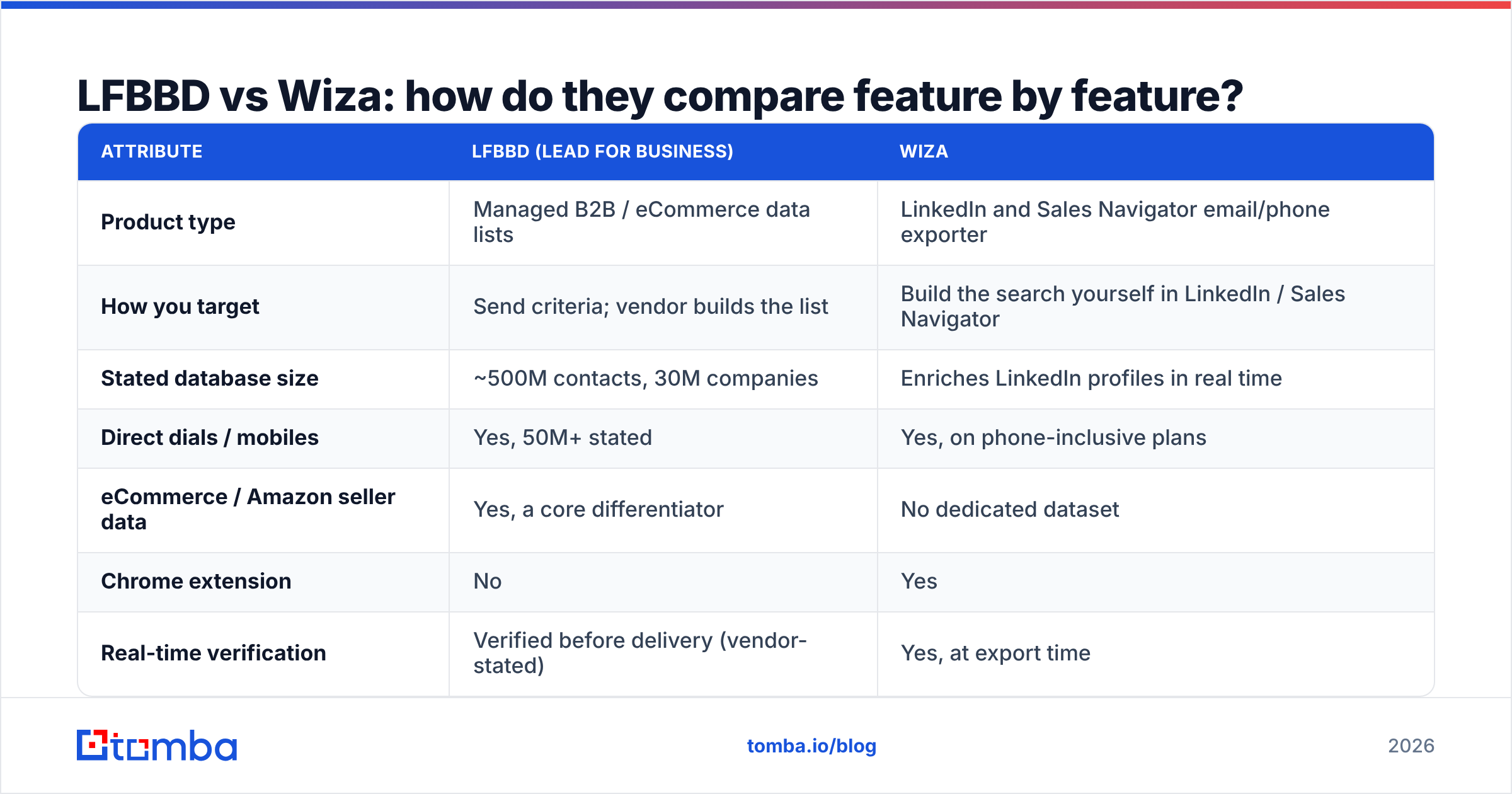
| Attribute | LFBBD (Lead For Business) | Wiza |
|---|---|---|
| Product type | Managed B2B / eCommerce data lists | LinkedIn and Sales Navigator email/phone exporter |
| How you target | Send criteria; vendor builds the list | Build the search yourself in LinkedIn / Sales Navigator |
| Stated database size | ~500M contacts, 30M companies | Enriches LinkedIn profiles in real time |
| Direct dials / mobiles | Yes, 50M+ stated | Yes, on phone-inclusive plans |
| eCommerce / Amazon seller data | Yes, a core differentiator | No dedicated dataset |
| Chrome extension | No | Yes |
| Real-time verification | Verified before delivery (vendor-stated) | Yes, at export time |
| CRM integrations | File delivery; you import | Native syncs plus CSV |
| Pricing transparency | Custom quote | Public monthly and annual tiers |
| Free option | Sample data on request | Free plan (20 emails, 5 phones) |
| Requires LinkedIn Sales Navigator | No | Strongly recommended for list exports |
| Best for | One-off or quarterly bulk campaigns, eCommerce targeting | Continuous rep-led prospecting on LinkedIn |
How much do LFBBD and Wiza cost?#
This is where the two differ most, and where budget owners often get caught out.
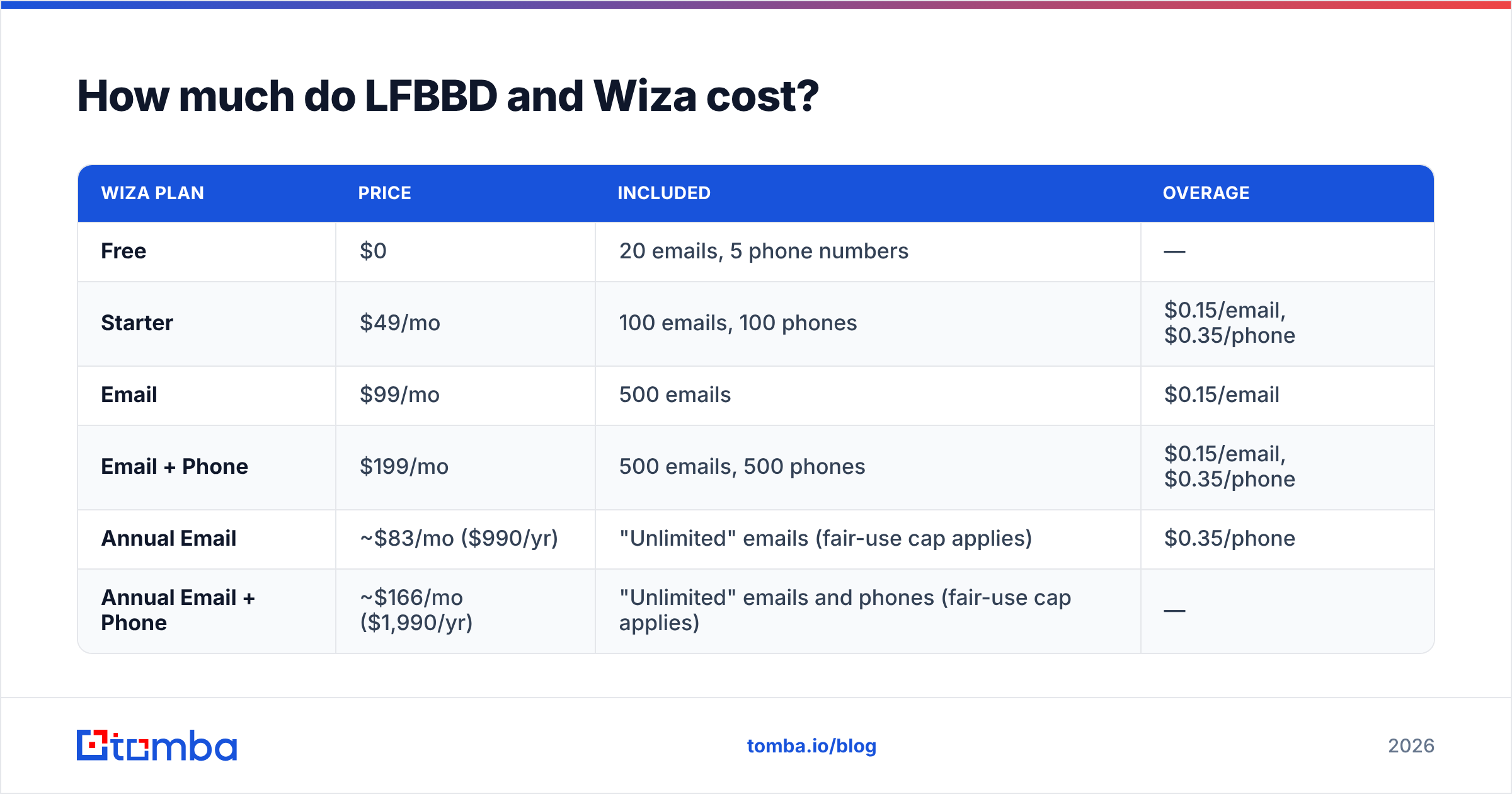
Wiza publishes its prices. At the time of writing, the monthly grid looks like this:
| Wiza plan | Price | Included | Overage |
|---|---|---|---|
| Free | $0 | 20 emails, 5 phone numbers | — |
| Starter | $49/mo | 100 emails, 100 phones | $0.15/email, $0.35/phone |
| $99/mo | 500 emails | $0.15/email | |
| Email + Phone | $199/mo | 500 emails, 500 phones | $0.15/email, $0.35/phone |
| Annual Email | ~$83/mo ($990/yr) | "Unlimited" emails (fair-use cap applies) | $0.35/phone |
| Annual Email + Phone | ~$166/mo ($1,990/yr) | "Unlimited" emails and phones (fair-use cap applies) | — |
The "unlimited" annual plans have a practical monthly export ceiling, which third-party breakdowns put at roughly 2,500 exports per month. Teams of three or more move to a custom plan with pooled credits and API access. Remember to add the cost of a Sales Navigator seat. Wiza's list export depends on it, and it often costs more than Wiza itself.
LFBBD doesn't publish list prices. You request a quote, and the cost depends on record count, the fields you need (email-only vs. email + direct dial), geography and how niche the segment is. Its site describes pricing as "flexible, fair, and ROI-focused." In practice, compare LFBBD by cost per usable contact after your own verification, not by the headline quote.
A simple way to compare the two budgets:
- Wiza cost per contact = (plan price + overages + Sales Navigator seat) / verified contacts exported
- LFBBD cost per contact = quote / (records delivered × your verified-deliverable rate)
Run both numbers on the same target segment. The result is often closer than the pricing models suggest.
Which is more accurate, LFBBD or Wiza?#
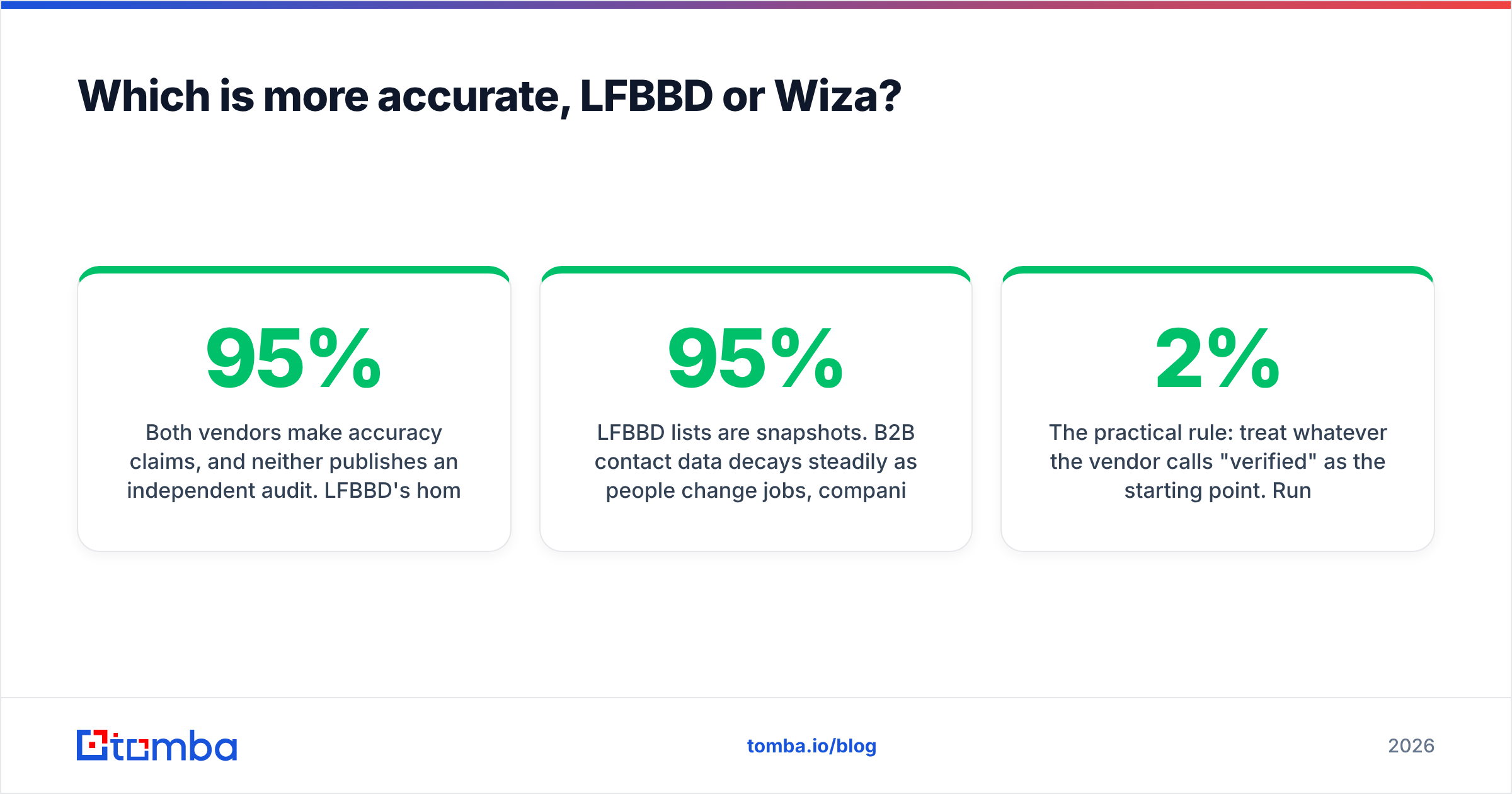
Both vendors make accuracy claims, and neither publishes an independent audit. LFBBD's homepage headline promises "up to 95% data accuracy guaranteed," and its B2B data page cites 97%. Wiza says it verifies emails in real time during export and doesn't charge for invalid results on many plans.
Accuracy in practice comes down to timing:
- LFBBD lists are snapshots. B2B contact data decays steadily as people change jobs, companies rebrand and domains move. A list that's 95% accurate on delivery day won't stay that way if it sits in a folder for a quarter. Send soon after delivery, and verify again before any later sends.
- Wiza exports are point-in-time too, just more recent. Because you pull contacts when you need them, the gap between lookup and send is usually short. The weak spot is LinkedIn itself: stale profiles and people who never update their job title.
- Catch-all domains hurt both. Many mid-market companies accept all mail at the server level. Neither a bought list nor a LinkedIn export can confirm a mailbox on those domains with SMTP checks alone. For that, you need a dedicated email verifier with catch-all handling.
The practical rule: treat whatever the vendor calls "verified" as the starting point. Run the file through your own verification before it reaches your sending tool. Bounce rates above roughly 2% hurt sender reputation no matter whose data caused them.
When should you choose LFBBD?#
LFBBD fits when the work is list-shaped, not rep-shaped:
- You sell to eCommerce brands or Amazon sellers. This is LFBBD's clearest advantage. Segmenting by storefront platform, marketplace or product category is hard to do through LinkedIn.
- You run campaign bursts. For example, a quarterly outbound push, an event invite or a market-entry test where you want 10,000–50,000 records at once.
- You don't have Sales Navigator skills in-house. If nobody on your team builds Boolean searches, outsourcing the targeting saves time.
- You want phone-heavy lists. For cold-calling teams, the direct-dial volume LFBBD advertises matters more than LinkedIn coverage.
- You'd rather have a vendor relationship than a SaaS login. Some teams prefer to scope, negotiate and receive a file than manage credits.
Watch-outs: ask for a sample from your exact segment before you pay. Ask how the data was sourced and how compliant it is for your region (GDPR if you send to the EU or UK). Agree in writing on what the accuracy guarantee covers, such as replacement records or refunds on bounces.
When should you choose Wiza?#
Wiza fits when the work is rep-shaped and continuous:
- Your team already lives in Sales Navigator. Wiza adds contact data to the searches your reps already run.
- You target roles LinkedIn covers well: software buyers, RevOps, marketing leaders, IT, finance and professional services.
- You want predictable monthly spend. Published plans and card billing make budgeting easy for small teams.
- You need CRM hygiene. Native syncs keep exported contacts flowing into HubSpot or Salesforce without CSV cleanup.
- You prospect in small, high-intent batches. Ten accounts a day, researched properly, often beat 10,000 cold records.
Watch-outs: add the Sales Navigator seat to the total cost. Know that LinkedIn's terms on automation keep changing. And remember that Wiza's coverage is only as good as LinkedIn's for your market. If your buyers aren't on LinkedIn, Wiza has little to work with.

Is there a middle option between a bought list and a LinkedIn exporter?#
Yes. Many teams end up using neither pattern exclusively. They build target account lists from their CRM, event attendees, website visitors or partner referrals, then need contact data for those specific companies and people. For that job, you don't need a delivered database or a Sales Navigator seat. You need a lookup tool you can point at a domain or a name.
This is where email finders such as Tomba fit:
- Domain-based lookups. Put in
acme.comand get the known addresses and email pattern for that company. No LinkedIn required. - Name + company lookups for a specific contact you've already identified.
- Bulk runs. A bulk email finder enriches a CSV of names and domains in one pass. That's useful for re-verifying an older LFBBD list or filling gaps in a Wiza export.
- LinkedIn when you want it. A LinkedIn finder covers profile-based lookups without making LinkedIn your only source.
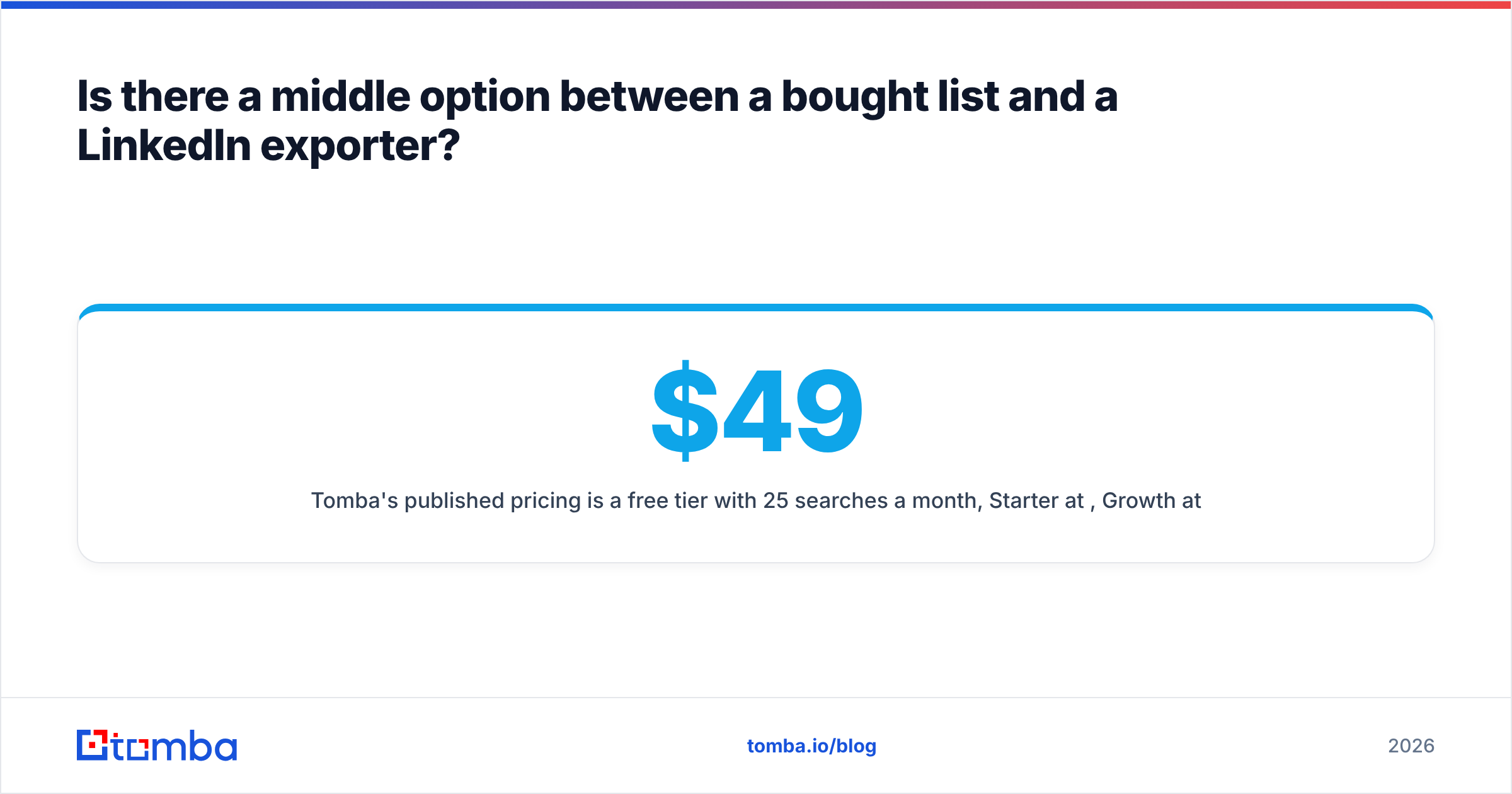
Tomba's published pricing is a free tier with 25 searches a month, Starter at $49/mo, Growth at $99/mo and Pro at $249/mo, with Enterprise on request. See Tomba pricing. It doesn't replace LFBBD's eCommerce datasets or Wiza's inline Sales Navigator workflow. It's a complementary layer that many teams add for verification and one-off lookups. If you're specifically weighing Wiza, there's also a dedicated Wiza alternative breakdown.
How should you run the evaluation yourself?#
Don't pick either vendor from a feature list, this one included. Run a small, controlled test:
- Define one segment. For example, "Heads of Operations at US eCommerce brands with $5–50M revenue" or "VP Sales at 200–1,000 employee SaaS companies in DACH."
- Get 200 records from each source. Request a sample from LFBBD. Export the same segment from Sales Navigator through Wiza's free or Starter plan.
- Verify both files the same way with an independent verifier, and record valid, invalid, catch-all and unknown rates.
- Check role accuracy by hand on a 25-record sample. Is the person still in that job at that company?
- Calculate cost per usable contact with the formulas above, including Sales Navigator for Wiza.
- Send a small test sequence and compare bounce rate and response rate after two weeks.
You'll have a data-backed answer within a month, for far less than a year-long contract with the wrong vendor.
Which should you pick: LFBBD or Wiza?#
Choose LFBBD (Lead For Business) if you want a large, segmented list delivered to you. That's especially true if you target eCommerce brands or Amazon sellers, run outbound in campaign bursts, or depend on direct dials for calling. Negotiate on cost per verified contact, and ask for a sample first.
Choose Wiza if your reps prospect in LinkedIn Sales Navigator every day and you want verified emails and phones added to those searches, with transparent monthly pricing and CRM sync.
Use both if you run a mixed motion: LFBBD for niche segment bursts, Wiza for daily rep prospecting. Put an independent verification step in front of your sending tool either way.
And if what you actually need is to look up a contact at a company you've already chosen, from a domain, a name or a spreadsheet, without buying a list or a LinkedIn seat, try Tomba Email Finder. Start on the free tier with 25 searches a month, test it on the same 200-record segment you used above, and upgrade only if its hit rate and cost per contact beat what you have now.
Related guides#
// get started
Find, verify and enrich your first contacts today
Start on the free plan with 25 searches a month, then scale when your team is ready.
Free plan · No credit card required · GDPR & CCPA
// about the author