LimeLeads vs SafetyMails (2026): Lead Database or Verifier?
LimeLeads sells you US B2B contacts. SafetyMails tells you which emails will bounce. Here is how they compare on pricing, data, and accuracy, and which one your outbound stack is actually missing.
TL;DR
- LimeLeads and SafetyMails don't do the same job. LimeLeads is a US-focused B2B contact database: you filter, unlock contacts, and export. SafetyMails is an email verification service that checks addresses you already have.
- Pricing models differ. LimeLeads runs monthly plans from about $99/mo (Pro) up to about $400/mo (Enterprise), with roughly 35% off annual billing. SafetyMails sells verification credits one-time or by subscription, starting at a few dollars for small packs.
- Pick LimeLeads if you have no leads. Pick SafetyMails if you have a list and your bounce rate is climbing.
- Plenty of teams end up paying for both, a lead source plus a separate verifier. One tool that both finds and verifies can remove the second subscription.
- Our pick: LimeLeads for US list building from scratch, SafetyMails for list hygiene and web form protection. If you want both in one tool, look at a combined finder and verifier.
What is the real difference between LimeLeads and SafetyMails?#
People search "LimeLeads vs SafetyMails" because both tools show up when you research "verified B2B emails." They sit at different stages of your outbound pipeline, though.
Think of a restaurant. LimeLeads is the supplier that delivers the ingredients. SafetyMails is the health inspector who checks those ingredients before they reach a plate. Comparing them on "which is better" is like asking whether you need the supplier or the inspector. The honest answer depends on what's already in your kitchen.
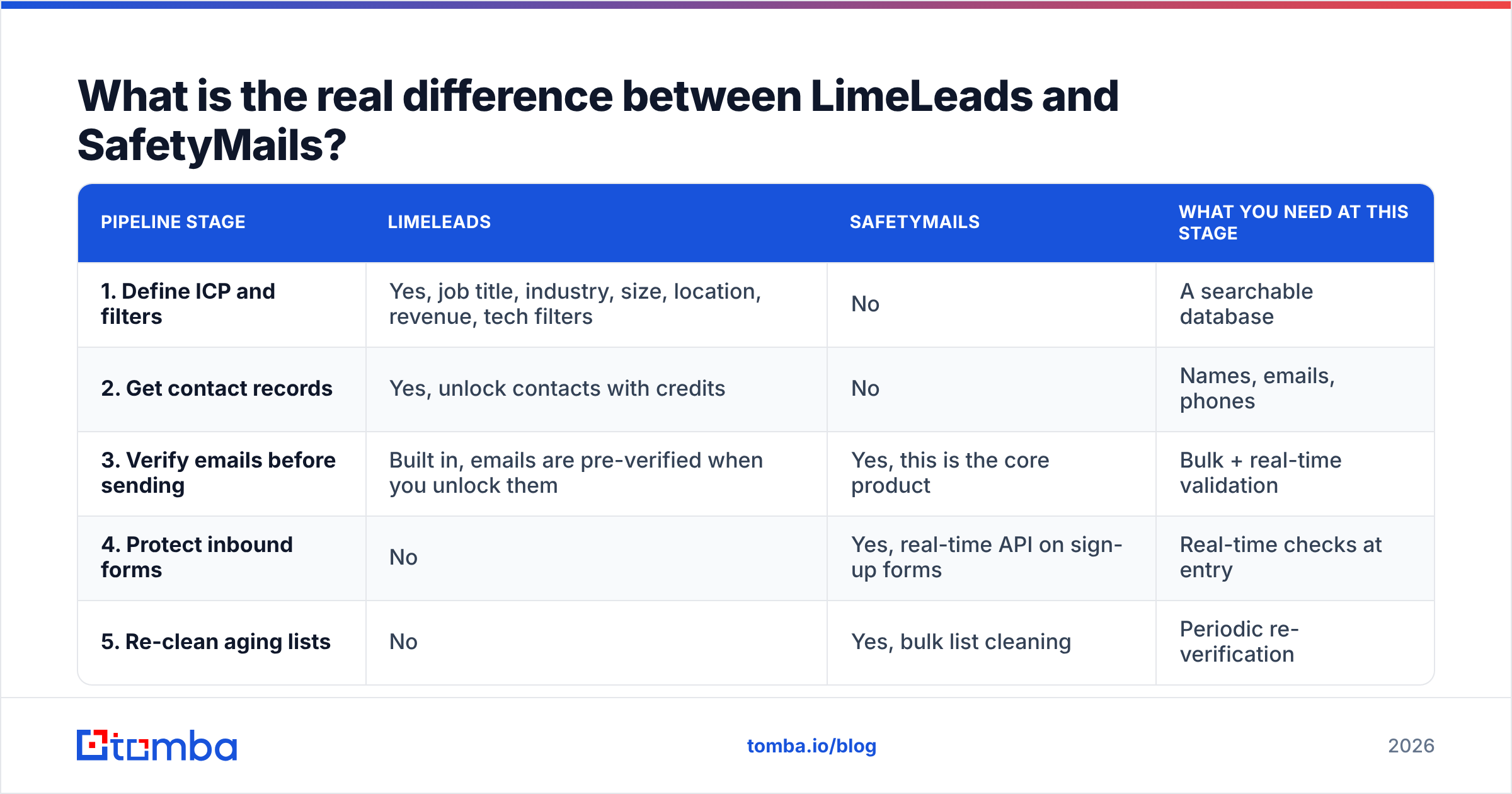
Here's where each tool fits:
| Pipeline stage | LimeLeads | SafetyMails | What you need at this stage |
|---|---|---|---|
| 1. Define ICP and filters | Yes, job title, industry, size, location, revenue, tech filters | No | A searchable database |
| 2. Get contact records | Yes, unlock contacts with credits | No | Names, emails, phones |
| 3. Verify emails before sending | Built in, emails are pre-verified when you unlock them | Yes, this is the core product | Bulk + real-time validation |
| 4. Protect inbound forms | No | Yes, real-time API on sign-up forms | Real-time checks at entry |
| 5. Re-clean aging lists | No | Yes, bulk list cleaning | Periodic re-verification |
LimeLeads covers stages 1 to 3. SafetyMails covers stages 3 to 5. They only overlap at verification. Even there, LimeLeads verifies its own data, while SafetyMails verifies any list you upload, wherever it came from.
What is LimeLeads?#
LimeLeads is a sales prospecting database built around US business contacts. You set filters (job title, company size, industry, location, revenue, technologies used), preview matching records, and spend credits to unlock the full contact: work email, and phone numbers where available. Then you export to CSV or Excel and load the list into your CRM or sequencer.
According to its Capterra listing and third-party reviews, the main selling points are:
- Emails checked in real time. Contacts are validated when you unlock them, so you aren't exporting months-old addresses.
- Credits roll over. Unused credits don't expire, which matters if your prospecting comes in bursts.
- Simple UX. It's a filter-and-export workflow with no big platform to learn.
- Regular refreshes. The database is reported to refresh on a roughly quarterly cycle.
The main limitation is geography. LimeLeads is built for the US market. If your ICP includes EMEA or APAC accounts, coverage gets thin fast. It also isn't a sequencer or a CRM. You still need other tools to actually send and track outreach.
What is SafetyMails?#
SafetyMails is an email verification service founded in 2015 in Rio de Janeiro, Brazil. You bring the emails, and it tells you which ones are valid, invalid, risky, disposable, role-based, catch-all, or likely spam traps.
Its feature set follows the standard verifier playbook:
- Bulk list cleaning. Upload a CSV and get back a segmented file.
- Single-email checks for spot verification.
- Real-time API. It validates emails at the moment someone types them into a sign-up or lead form.
- Detection layers: syntax, domain/MX, disposable, role-based, catch-all, and spam-trap signals.
- ESP/CRM integrations so you can clean lists where they live.
SafetyMails gets strong user ratings on review sites. G2's SafetyMails pricing page and Capterra both list it at around 4.8 to 4.9 out of 5, though the review count is small.
One detail catches people out. According to SafetyMails' own documentation, the real-time API only works with an active monthly subscription. Leftover one-time credits aren't enough. If you plan to protect a web form, budget for the subscription and not just a credit pack.

How do LimeLeads and SafetyMails compare on pricing?#
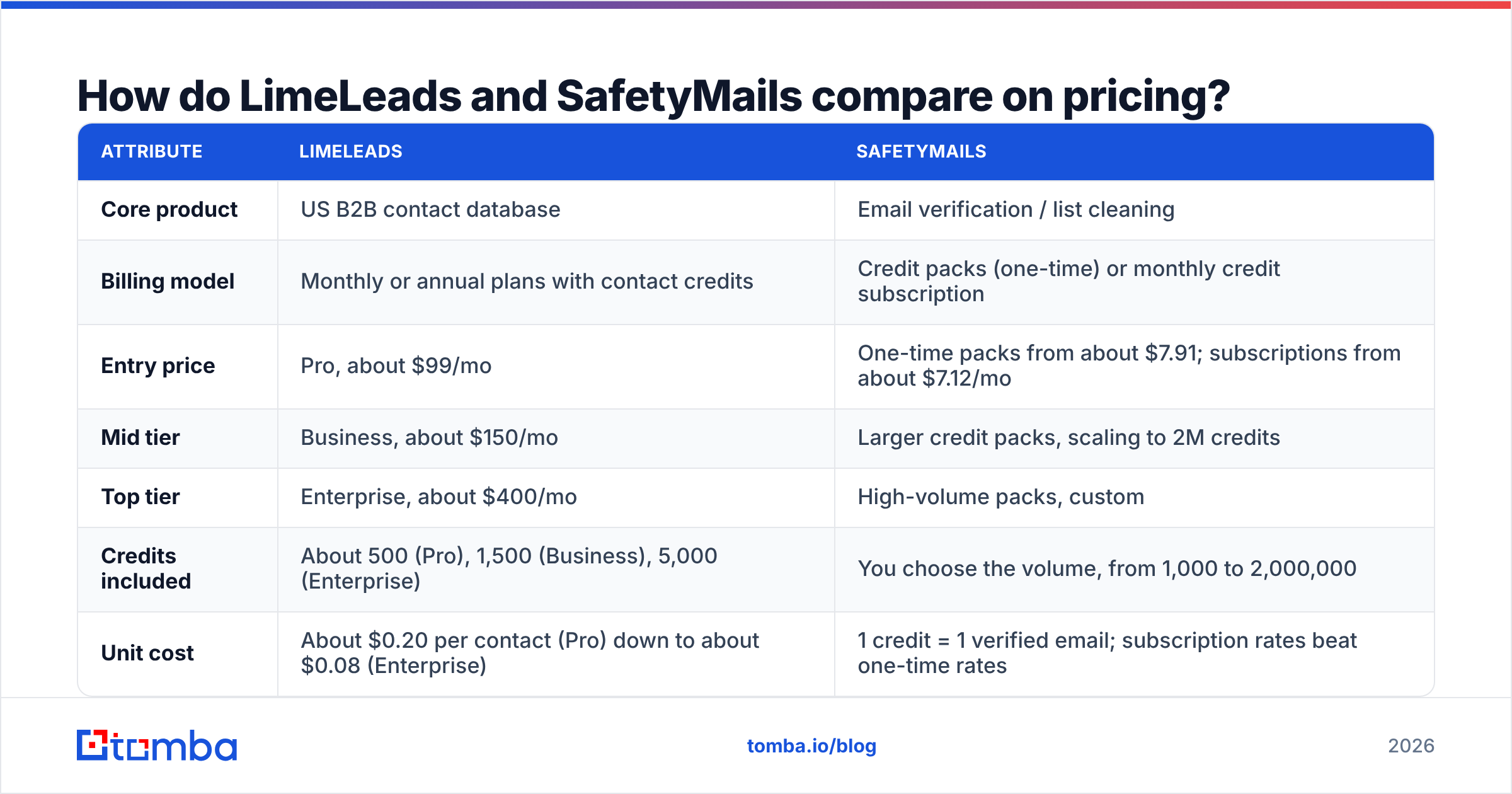
The two use different billing models, so you can't compare them line for line. Here are current published numbers at the time of writing. Always confirm on each vendor's site before you buy.
| Attribute | LimeLeads | SafetyMails |
|---|---|---|
| Core product | US B2B contact database | Email verification / list cleaning |
| Billing model | Monthly or annual plans with contact credits | Credit packs (one-time) or monthly credit subscription |
| Entry price | Pro, about $99/mo | One-time packs from about $7.91; subscriptions from about $7.12/mo |
| Mid tier | Business, about $150/mo | Larger credit packs, scaling to 2M credits |
| Top tier | Enterprise, about $400/mo | High-volume packs, custom |
| Credits included | About 500 (Pro), 1,500 (Business), 5,000 (Enterprise) | You choose the volume, from 1,000 to 2,000,000 |
| Unit cost | About $0.20 per contact (Pro) down to about $0.08 (Enterprise) | 1 credit = 1 verified email; subscription rates beat one-time rates |
| Annual discount | About 35% | Lower rates on subscription vs one-time |
| Credit expiry | Credits roll over | Credits don't expire |
| Real-time API | Not the core use case | Yes, but needs an active monthly subscription |
| Free option | Free trial available | Free trial available |
How to read this table:
- Cost per contact vs cost per check. A LimeLeads credit buys you a new contact record, so you pay for discovery. A SafetyMails credit buys a verdict on an email you already own. A $0.10 contact and a fraction-of-a-cent verification aren't the same purchase.
- Where the money goes at scale. LimeLeads costs grow with how many new prospects you need each month. SafetyMails costs grow with how many emails pass through your system, including inbound sign-ups, re-verification of old lists, and imports from events or partners.
Is LimeLeads more accurate than SafetyMails?#
Accuracy means something different for each tool, so the question needs splitting.
For LimeLeads, accuracy means: is this contact still at this company, and is the email deliverable? LimeLeads says its email data is about 99% accurate and verifies addresses at unlock. That covers deliverability. It doesn't guarantee the person still holds the title in your filter. Job changes are the biggest source of decay in any B2B database, and a quarterly refresh cycle leaves time for contacts to go stale.
For SafetyMails, accuracy means: is the verdict right? A verifier can be wrong in two ways. It can mark a good email as invalid, which costs you a lead. Or it can mark a bad email as valid, which costs you a bounce. Catch-all domains are the hardest case for every verifier, because the mail server accepts everything during the SMTP check. SafetyMails flags catch-alls, but "flagged" isn't the same as "resolved." You still have to decide whether to send.
In practice:
- If your problem is bounces from lists you already own, a verifier like SafetyMails fixes it directly.
- If your problem is not enough of the right people to email, no verifier helps. You need a data source.
- If you use LimeLeads alone, re-verify any export older than a few weeks before sending. Pre-verification at unlock doesn't mean the address stays valid forever.
For catch-all-heavy markets (lots of mid-market companies run catch-all mail servers), you can use a dedicated catch-all verifier that goes past a plain "accept-all" flag.
Which should you choose, LimeLeads or SafetyMails?#
Use this decision list. Pick the line that describes your situation today, not the one you hope to be in next quarter.
- You have an empty pipeline and sell into the US. Start with LimeLeads. It's a quick way to build a filtered US list without learning a full sales-intelligence platform.
- You have a CRM full of old contacts and your bounce rate is creeping above 2%. Start with SafetyMails. Clean the list before you damage your sender reputation any further.
- You run inbound forms (trials, demos, gated content) and see fake or disposable sign-ups. SafetyMails' real-time API is built for this, as long as you keep the monthly subscription active.
- Your ICP is international. Neither is a perfect fit. LimeLeads' US focus is a hard limit, and SafetyMails only verifies emails, it doesn't find them. You'll need a source with broader coverage.
- You want one tool that finds and verifies. You'd need both of these, or a platform that combines an email finder with an email verifier behind one credit balance.
Both are well-reviewed tools, and neither is a bad choice. Most mistakes come from buying the wrong type of tool, not the wrong vendor.
What does a combined workflow look like?#
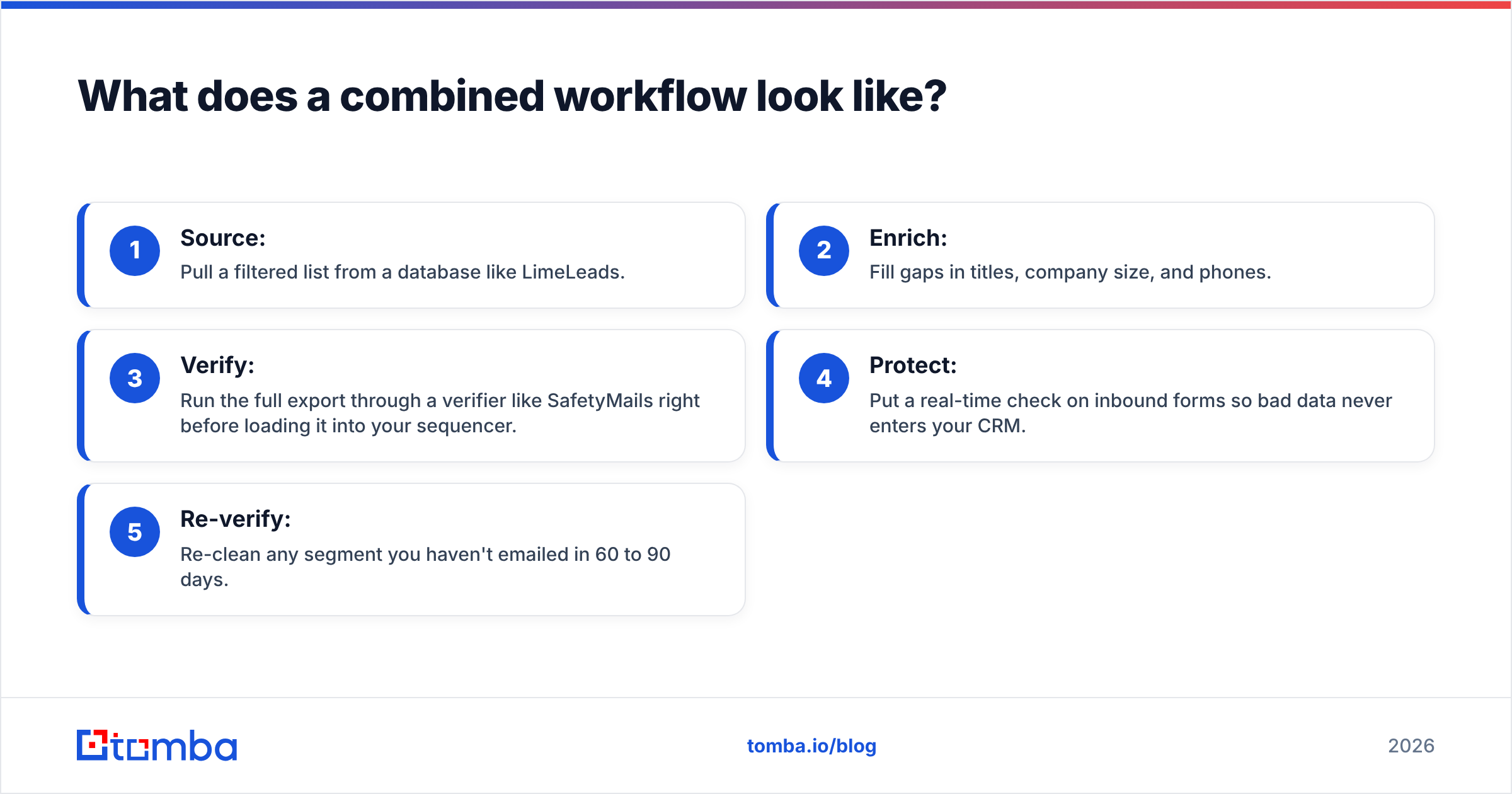
Many outbound teams end up running something like this:
- Source: Pull a filtered list from a database like LimeLeads.
- Enrich: Fill gaps in titles, company size, and phones.
- Verify: Run the full export through a verifier like SafetyMails right before loading it into your sequencer.
- Protect: Put a real-time check on inbound forms so bad data never enters your CRM.
- Re-verify: Re-clean any segment you haven't emailed in 60 to 90 days.
It works, but it has costs. You're paying two vendors, managing two credit balances, and moving CSVs between them. Each hand-off is another chance for a column mismatch or a stale file to reach your sequencer.

If you work at small-team volume (a few hundred to a few thousand contacts a month), consolidating often saves more time than it saves money. A single tool that can find email addresses by name and domain and verify them in the same step removes stage 3 as a separate job. For larger lists, a bulk email finder handles the same flow on CSV uploads.
What do users say about each tool?#
Review volume is modest for both, so treat ratings as directional.
LimeLeads: what users like
- Fast, uncluttered filter-and-export flow
- Credits that roll over month to month
- Emails verified at the moment of unlock
LimeLeads: common complaints
- US-centric coverage
- Per-contact cost on the Pro plan is high compared with bigger databases
- Title and role data can lag behind real job changes
SafetyMails: what users like
- Clear results broken out by category (valid, invalid, risky, disposable, role, catch-all)
- Flexible credit volumes, from small one-off packs to millions
- Credits that don't expire
- Responsive support, often mentioned in reviews
SafetyMails: common complaints
- Real-time API tied to an active subscription
- Pricing and docs lean toward BRL and the Brazilian market, so international buyers may need to do currency math
- Verification only, with no prospecting or contact discovery
How does this compare with an all-in-one option?#
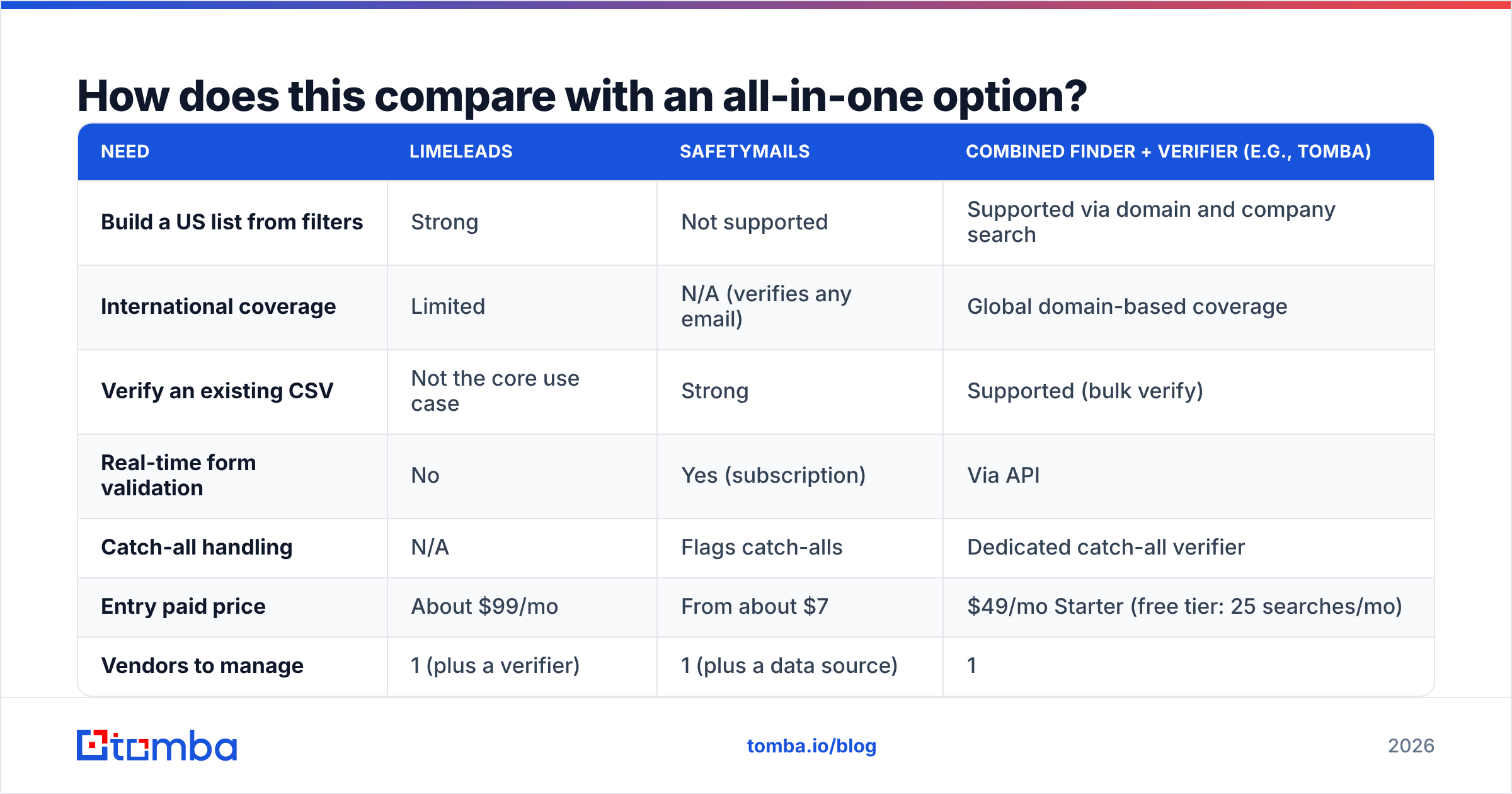
For completeness, here's how the two stack up against a combined finder-plus-verifier approach, using Tomba as the reference point since that's the tool we know best. The goal isn't to replace either vendor in every case. It's to show what you give up or gain by consolidating.
| Need | LimeLeads | SafetyMails | Combined finder + verifier (e.g., Tomba) |
|---|---|---|---|
| Build a US list from filters | Strong | Not supported | Supported via domain and company search |
| International coverage | Limited | N/A (verifies any email) | Global domain-based coverage |
| Verify an existing CSV | Not the core use case | Strong | Supported (bulk verify) |
| Real-time form validation | No | Yes (subscription) | Via API |
| Catch-all handling | N/A | Flags catch-alls | Dedicated catch-all verifier |
| Entry paid price | About $99/mo | From about $7 | $49/mo Starter (free tier: 25 searches/mo) |
| Vendors to manage | 1 (plus a verifier) | 1 (plus a data source) | 1 |
See Tomba pricing for the full plan breakdown: Free, Starter at $49/mo, Growth at $99/mo, Pro at $249/mo, and custom Enterprise.
Keep one caveat in mind. If your whole motion is US-only, filter-heavy list building (for example, "every VP of Operations at 50 to 200 person logistics companies in Texas"), a dedicated database like LimeLeads is built exactly for that query. Domain-first tools do better when you already know which accounts you're targeting and need the right people and verified emails inside them.
What is the bottom line on LimeLeads vs SafetyMails?#
- Choose LimeLeads if you need new US B2B contacts, fast, with verification included at unlock.
- Choose SafetyMails if you already have contacts and need to keep them clean, especially if you also want to block bad emails at your web forms.
- Choose both if you run a high-volume outbound program and want best-in-class tools at each stage. Just plan for the extra hand-offs.
- Choose a combined tool if you'd rather have one credit balance and one workflow for finding and verifying.
Don't expect either tool to replace the other. They're complements, not competitors.
If you want discovery and verification in one place, try the Tomba Email Finder. Enter a name and company domain, get a professional email address, and have it verified in the same lookup, with no CSV hand-off to a second vendor. The free tier includes 25 searches a month, so you can test it on your own target accounts before you commit to a paid plan.
Related guides#
// get started
Find, verify and enrich your first contacts today
Start on the free plan with 25 searches a month, then scale when your team is ready.
Free plan · No credit card required · GDPR & CCPA
// about the author