Limeleads vs Techsalerator (2026): Which B2B Data Source Wins?
Limeleads sells self-serve, verified US contacts for SDR teams. Techsalerator sells bulk global datasets to data buyers. We compare pricing, coverage, freshness and workflow fit so you can pick the right one.
TL;DR
- Limeleads is a self-serve B2B lead database built for SDRs and founders. You search, filter, and export verified contacts, and you only pay credits for records that pass verification. It leans heavily toward the US.
- Techsalerator is a data vendor, not really a prospecting app. It sells bulk company and contact datasets, company hierarchy and linkage files, and API feeds across a very wide set of countries. Much of it is sold through quotes and data marketplaces such as AWS.
- Pick Limeleads if a small outbound team needs a few hundred to a few thousand contacts a month and wants them this afternoon.
- Pick Techsalerator if you're a data, RevOps, or analytics team buying international firmographic data in bulk to feed a warehouse or CRM.
- Either way, check every email before you send. Bulk datasets go stale quickly, and verifying at send time is cheap compared with fixing a burned domain.
What is the real difference between Limeleads and Techsalerator?#
People compare the two because both sell "B2B data," but they don't compete for the same buyer.
Limeleads works like a vending machine. You pick filters (location, industry, company size, job title), look at the matching contacts, and spend credits to unlock the ones you want. Each export gets verified, and records that fail don't cost you anything. A sales rep can sign up and start pulling a list the same day without talking to anyone.
Techsalerator works more like a wholesale supplier. You tell them the dataset you need, for example every manufacturing company in Southeast Asia with parent-subsidiary linkage, and they deliver it as a file, a scheduled feed, or an API subscription. Many of its products are listed on the AWS Data Exchange marketplace, where you can get free samples and then contact the company for full pricing.
So the useful question is whether you're buying leads to email this week or data to own and model. Once you know that, the choice is usually clear.
How do Limeleads and Techsalerator compare feature by feature?#
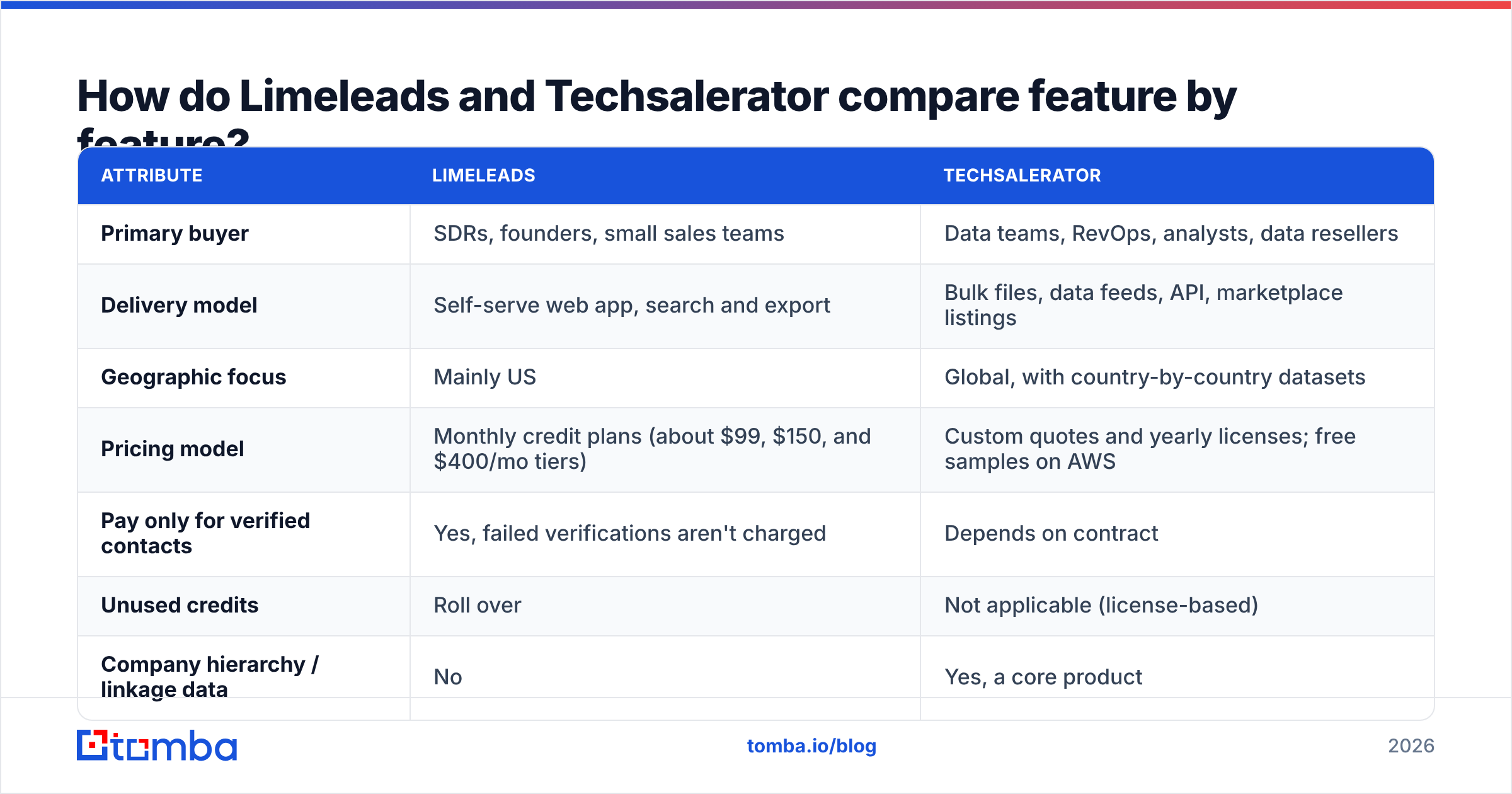
Here's the side-by-side, based on public information at the time of writing. Both vendors change their plans, so confirm the current terms on limeleads.com and techsalerator.com before you sign.
| Attribute | Limeleads | Techsalerator |
|---|---|---|
| Primary buyer | SDRs, founders, small sales teams | Data teams, RevOps, analysts, data resellers |
| Delivery model | Self-serve web app, search and export | Bulk files, data feeds, API, marketplace listings |
| Geographic focus | Mainly US | Global, with country-by-country datasets |
| Pricing model | Monthly credit plans (about $99, $150, and $400/mo tiers) | Custom quotes and yearly licenses; free samples on AWS |
| Pay only for verified contacts | Yes, failed verifications aren't charged | Depends on contract |
| Unused credits | Roll over | Not applicable (license-based) |
| Company hierarchy / linkage data | No | Yes, a core product |
| Time to first list | Minutes | Days to weeks (scoping, sampling, contract) |
| Best for | Filling a sequencer quickly | Enriching a warehouse or CRM at scale |

How does Limeleads pricing work in 2026?#
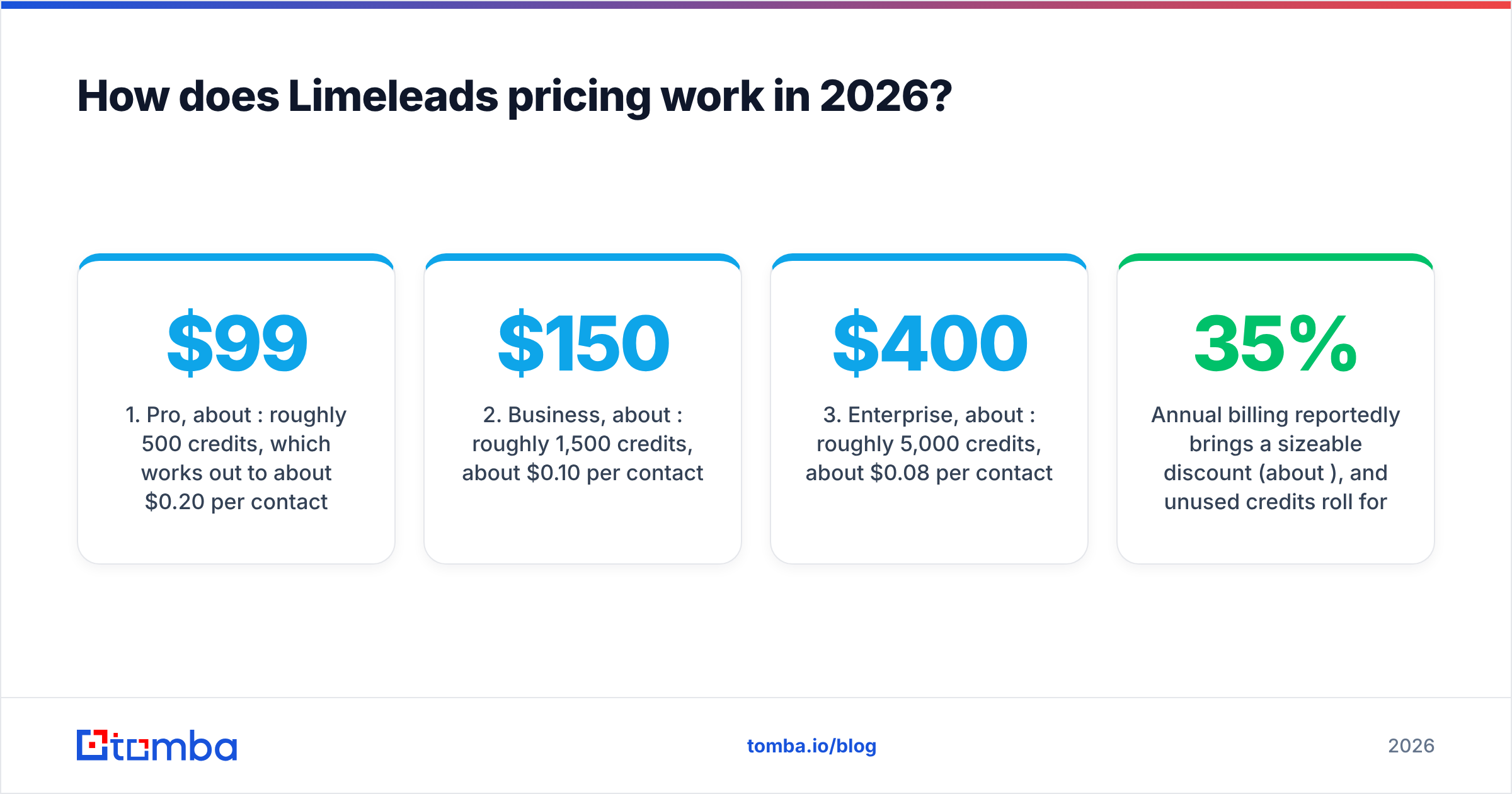
Limeleads uses a simple credit model: one credit unlocks one contact. Current public plans come in three tiers:
- Pro, about $99/mo: roughly 500 credits, which works out to about $0.20 per contact.
- Business, about $150/mo: roughly 1,500 credits, about $0.10 per contact.
- Enterprise, about $400/mo: roughly 5,000 credits, about $0.08 per contact.
Annual billing reportedly brings a sizeable discount (about 35%), and unused credits roll forward instead of expiring. That matters more than it sounds. If you prospect in bursts, such as quarter-end pushes or event follow-ups, rollover means you aren't paying for credits you never use.
The verified-only charging is Limeleads' best feature. Most lead databases charge for every record you reveal, whether it's good or not. Limeleads verifies at export and only bills for contacts that pass, so a bad data month costs you less than it would elsewhere.
What to watch for:
- The per-contact price falls steeply by tier. At the Pro tier you pay about 2.5x more per contact than at Enterprise. Work out your real monthly volume before you choose.
- US-centric coverage. If half your ICP is in the DACH region or APAC, you'll see much thinner results outside North America.
- Exports are snapshots. A record verified in March could bounce in September. Verification at export doesn't mean it stays valid.
How does Techsalerator pricing work?#
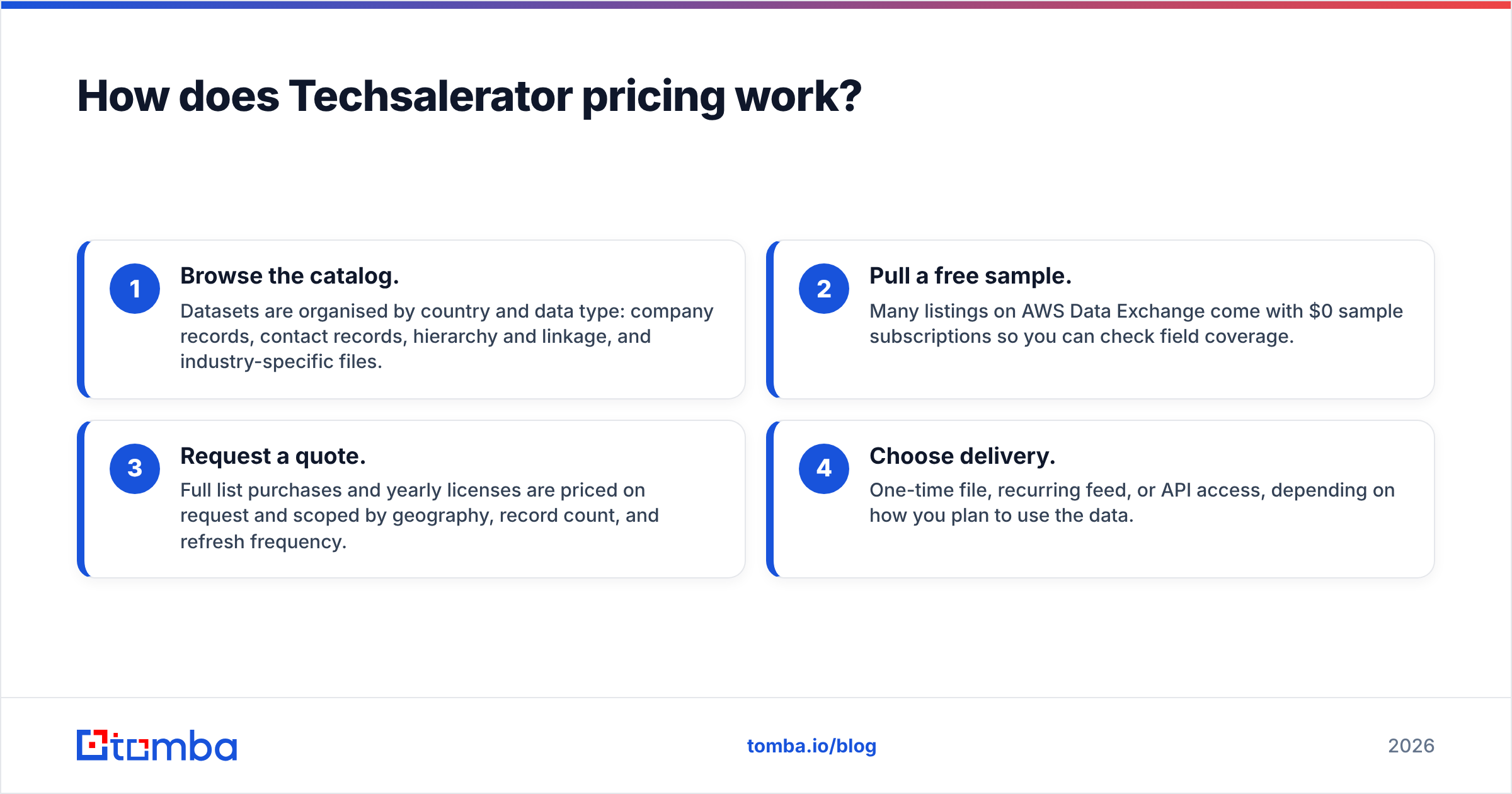
Techsalerator doesn't publish a standard per-seat price list the way SaaS prospecting tools do. The typical process looks like this:
- Browse the catalog. Datasets are organised by country and data type: company records, contact records, hierarchy and linkage, and industry-specific files.
- Pull a free sample. Many listings on AWS Data Exchange come with $0 sample subscriptions so you can check field coverage.
- Request a quote. Full list purchases and yearly licenses are priced on request and scoped by geography, record count, and refresh frequency.
- Choose delivery. One-time file, recurring feed, or API access, depending on how you plan to use the data.
This suits companies that treat data as infrastructure. If you're building a market-sizing model for 40 countries, running entity resolution across subsidiaries, or supplying an internal data product, a license with defined refresh terms is much more practical than a sales rep clicking "export" 3,000 times.
For a two-person outbound team it's slow and overbuilt. You'll spend a week scoping a contract when what you actually need is 200 VP-level emails at US fintech companies.
Which has better data coverage and accuracy?#
Neither vendor publishes an independent, audited accuracy rate, so be wary of anyone who gives you a single "accuracy %" for either tool. What you can reason about is structure.
Where Limeleads is stronger:
- Verification is part of the workflow. Every export is checked, and failures aren't billed. That's a structural incentive to hand you working emails.
- Contacts include email and direct dial, which suits multichannel SDR sequences.
- The data is tuned for outbound. The fields map closely to what a sequencer needs: name, title, company, email, phone.
Where Techsalerator is stronger:
- Breadth across countries. Its catalog covers dozens of markets across the Americas, Europe, Asia, and the Middle East, including regions most US-first tools barely touch.
- Firmographic depth. Company hierarchy and linkage data (which subsidiary rolls up to which parent) is hard to find in self-serve prospecting tools and very useful for ABM account mapping.
- Contractual refresh. With a license you can negotiate how often the data is updated rather than hoping a database was refreshed recently.
Where both can fall short: any list you bought, whether yesterday or last quarter, starts decaying straight away. People change jobs, domains get switched to catch-all, and mailboxes get deactivated. That's why most serious outbound teams run a separate email verifier right before sending, whichever data vendor they use. HubSpot's own guidance on email bounce rates explains why bounces above a few percent damage sender reputation.
Which one fits your team? A decision framework#
Answer these five questions honestly. They matter more than any feature list.
- Who will use it every day? If the answer is SDRs or a founder, choose Limeleads. If it's a data engineer or RevOps analyst, choose Techsalerator.
- Where are your buyers? Mostly US points to Limeleads. Multi-country, especially outside North America, points to Techsalerator.
- How many records a month? Hundreds to low thousands suits Limeleads' credit tiers. Hundreds of thousands to millions is the case for a Techsalerator license.
- What happens to the data after export? If it goes into a sequencer, use Limeleads. If it goes into a warehouse, BI model, or CRM enrichment job, use Techsalerator.
- How fast do you need it? Today means Limeleads. If you can wait for scoping and a sample review, Techsalerator is an option.
If your answers split, for example US-focused but at warehouse scale, you're probably looking at a hybrid stack. You'd use a bulk data source for account-level firmographics and a lookup-based tool for contact-level emails on demand.
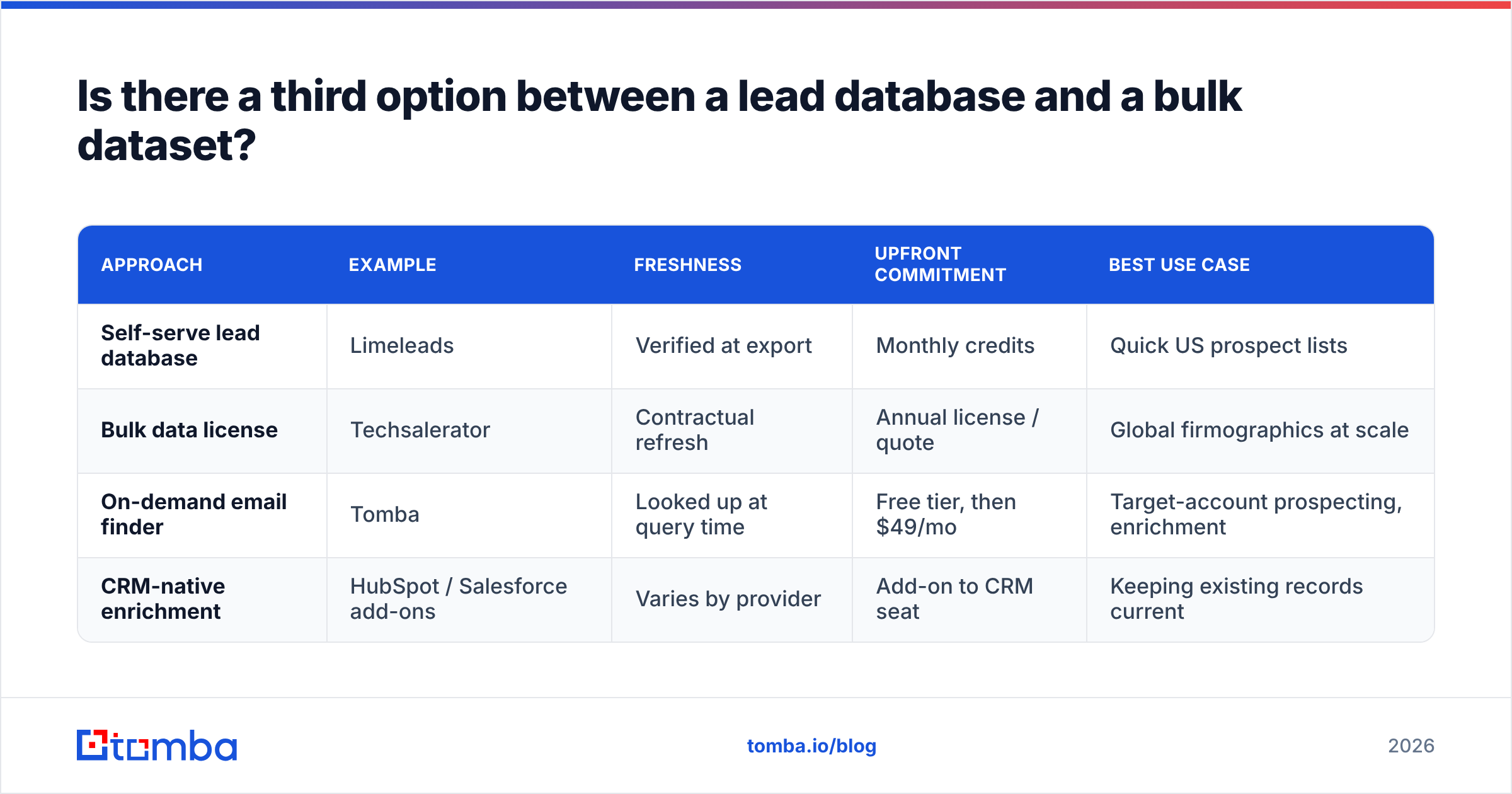
Is there a third option between a lead database and a bulk dataset?#
Yes, and many teams end up there after trying both. The alternative is on-demand lookup: you don't buy a static list, you find and verify emails for the specific accounts you've already chosen, at the moment you need them.
The trade-offs are worth spelling out:
| Approach | Example | Freshness | Upfront commitment | Best use case |
|---|---|---|---|---|
| Self-serve lead database | Limeleads | Verified at export | Monthly credits | Quick US prospect lists |
| Bulk data license | Techsalerator | Contractual refresh | Annual license / quote | Global firmographics at scale |
| On-demand email finder | Tomba | Looked up at query time | Free tier, then $49/mo | Target-account prospecting, enrichment |
| CRM-native enrichment | HubSpot / Salesforce add-ons | Varies by provider | Add-on to CRM seat | Keeping existing records current |
On-demand tools fit teams running account-based outbound. You already know the 150 accounts you want, so you don't need a database of 20 million contacts. You need the right three people at each of those 150 companies, with emails that won't bounce. A domain search that returns every public professional email at a company, plus a pattern-based finder for specific names, covers that workflow without a large list purchase.
It also works alongside either vendor in this comparison. Use Techsalerator for the global account universe, or Limeleads for a fast first list, then run contact enrichment and verification on the records you actually plan to email.

What are the pros and cons of each?#
Limeleads — pros
- Self-serve, so you can go from signup to first list in minutes
- You only pay for contacts that pass verification
- Credits roll over month to month
- Email plus direct dial per contact
- The cost per contact drops a lot at higher tiers
Limeleads — cons
- Coverage is mainly US
- Entry tier is about $99/mo, which is costly per contact at low volume
- Static exports decay like any list
- Limited firmographic depth for account mapping
Techsalerator — pros
- Broad international coverage, organised by country
- Company hierarchy and linkage data for ABM and entity resolution
- Several delivery formats: files, feeds, API, AWS marketplace
- Free samples, so you can check field quality before you buy
Techsalerator — cons
- No simple public price list; you have to go through a quote
- Slower to get started because of scoping and contracting
- Overbuilt for small outbound teams
- Needs in-house skills to load, clean, and dedupe bulk data
So, Limeleads vs Techsalerator: which one wins?#
It depends on the job, and the split is sharper than with most tool comparisons.
- Limeleads wins for outbound execution. If you're a US-focused SDR team, an agency, or a founder doing your own prospecting, its verified-only billing and self-serve workflow make it the more practical choice. You get usable contacts the same day and don't pay for duds.
- Techsalerator wins for data infrastructure. If you're building a global account universe, mapping corporate hierarchies, or feeding a warehouse, it's the right kind of vendor. Limeleads isn't designed for that work.
What both approaches lack is freshness at send time. A list is a snapshot, and your emails go out weeks after the snapshot was taken. Whichever you choose, budget for a verification step and keep an on-demand lookup tool for the accounts the list misses.
Where does Tomba fit in your stack?#
If you mostly need "the right emails at the accounts I've already chosen" rather than a full database, you may not need either contract. Tomba Email Finder finds professional email addresses by domain, name, or company at the moment you look them up. It's backed by a built-in verifier, so you aren't relying on a months-old export. You can try it on the free tier (25 searches a month) and move up to the Starter plan at $49/mo when volume grows. That's a cheaper way to test on-demand prospecting than a $99 credit plan or an annual data license. Compare Tomba plans and run a search on your next target account.
Related guides#
// get started
Find, verify and enrich your first contacts today
Start on the free plan with 25 searches a month, then scale when your team is ready.
Free plan · No credit card required · GDPR & CCPA
// about the author