Limeleads vs Uplead: Pricing, Data Quality and Our 2026 Verdict
LimeLeads is priced for volume. UpLead is priced for verified data and mobile numbers. We compare cost per contact, credits, filters and data quality so you can pick the right B2B database for your team.
TL;DR
- LimeLeads is the budget volume pick. Plans start at $99/mo for 500 credits, unused credits roll over, and the cost per contact falls to roughly $0.08 on the top tier.
- UpLead is the pick for data quality and phone numbers. It costs more per contact (about $0.37 to $0.58), but one credit unlocks a verified email and a mobile number, and filters include technographics and intent.
- Your list size should decide it. If you need thousands of SMB contacts a month, LimeLeads usually costs less. If you send fewer, higher-value emails to mid-market accounts, UpLead's price is easier to justify.
- Always verify before you send. Neither database replaces a separate verification step on catch-all domains or older records.
- If your main need is finding the email for a person you already know, a dedicated email finder is often a better fit than either database.
What are LimeLeads and UpLead?#
LimeLeads and UpLead are both B2B contact databases. You filter by industry, company size, location and job title, get back a list of people, and spend credits to reveal their contact details. Both are aimed at sales and marketing teams that build outbound lists and would rather not scrape LinkedIn by hand.
They are priced very differently, though.
LimeLeads positions itself as a simple, low-cost database. The interface is basic, the filters cover what most SMB prospecting needs, and the pricing favors buying a lot of contacts. It is especially popular with agencies and founders doing their own outbound.
UpLead positions itself as a premium data provider. It emphasizes real-time email verification when you unlock a contact, promotes a 95% data accuracy guarantee, and includes mobile numbers, technographics and (on higher tiers) intent data. The platform looks more like a lightweight sales-intelligence suite than a list tool.
Think of the difference like buying groceries at a warehouse club versus a specialty grocer. The warehouse club gets you more per dollar. The specialty grocer gets you fewer items with more checks on each one. Neither is wrong. It depends on what you're cooking.
How do LimeLeads and UpLead compare side by side?#
Here's the head-to-head on the attributes that affect your cost and results. Pricing reflects publicly listed plans as of 2026 (via vendor pages and trackers such as Capterra's LimeLeads listing). Vendors change plans often, so check current pricing before you buy.
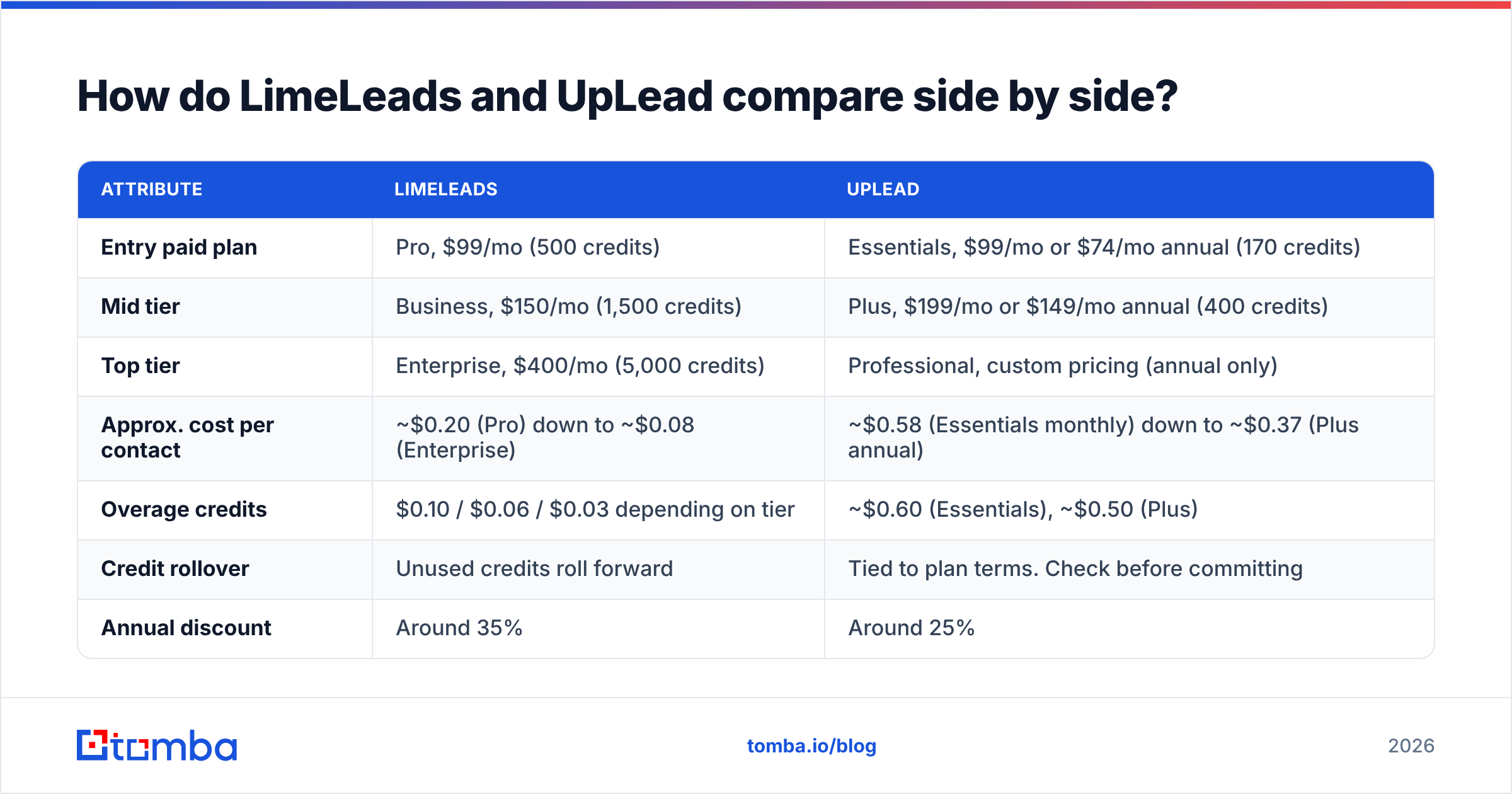
| Attribute | LimeLeads | UpLead |
|---|---|---|
| Entry paid plan | Pro, $99/mo (500 credits) | Essentials, $99/mo or $74/mo annual (170 credits) |
| Mid tier | Business, $150/mo (1,500 credits) | Plus, $199/mo or $149/mo annual (400 credits) |
| Top tier | Enterprise, $400/mo (5,000 credits) | Professional, custom pricing (annual only) |
| Approx. cost per contact | ~$0.20 (Pro) down to ~$0.08 (Enterprise) | ~$0.58 (Essentials monthly) down to ~$0.37 (Plus annual) |
| Overage credits | $0.10 / $0.06 / $0.03 depending on tier | ~$0.60 (Essentials), ~$0.50 (Plus) |
| Credit rollover | Unused credits roll forward | Tied to plan terms. Check before committing |
| Annual discount | Around 35% | Around 25% |
| Free option | Limited trial allowance | 7-day free trial |
| Seats | 1 / 2 / 5 by tier | Varies by plan |
| Mobile numbers | Limited | Included with the same credit |
| Technographics / intent | No | Technographics yes. Intent on higher tiers |
| Best for | High-volume SMB lists, agencies, tight budgets | Mid-market prospecting, phone plus email outreach, quality-first teams |
The pricing gap is bigger than the $99 starting prices suggest. At the same $99/mo, LimeLeads gives you about three times as many contacts as UpLead Essentials. UpLead's answer is that each contact is verified at unlock and includes a phone number, which LimeLeads mostly doesn't offer.
Which one is cheaper per contact?#
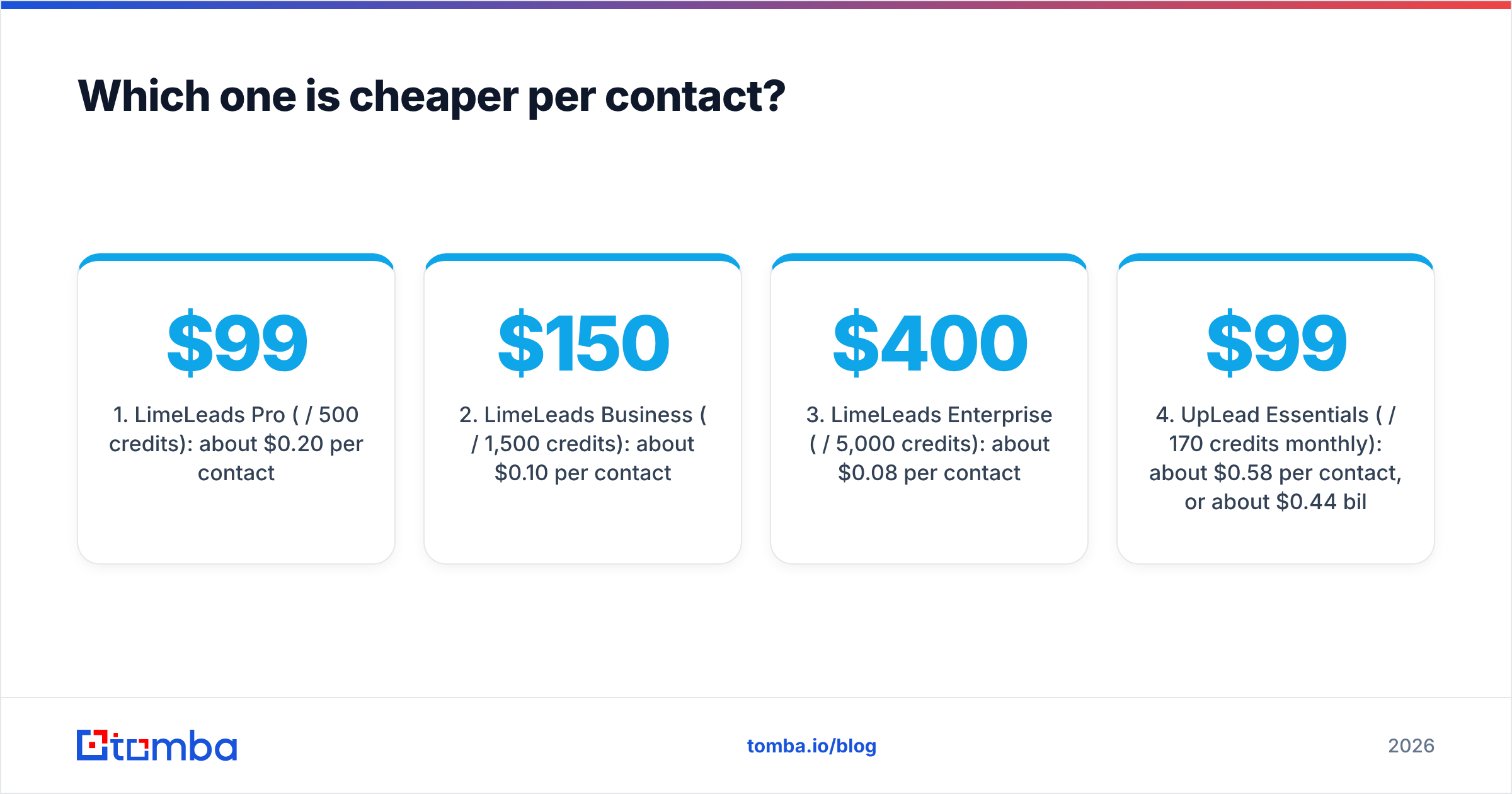
LimeLeads is cheaper at every tier, often by 3x to 7x. Here's what the per-contact math looks like:
- LimeLeads Pro ($99 / 500 credits): about $0.20 per contact.
- LimeLeads Business ($150 / 1,500 credits): about $0.10 per contact.
- LimeLeads Enterprise ($400 / 5,000 credits): about $0.08 per contact.
- UpLead Essentials ($99 / 170 credits monthly): about $0.58 per contact, or about $0.44 billed annually.
- UpLead Plus ($199 / 400 credits monthly): about $0.50 per contact, or about $0.37 billed annually.
Two details change the picture.
Credit rollover. LimeLeads carries unused credits forward, so a slow month doesn't waste your money. For teams whose outbound comes in bursts, like campaign launches or quarterly pushes, that matters more than the sticker price.
What a credit buys. On UpLead, one credit reveals the email and the mobile number. If you actually call prospects, compare UpLead's cost per contact with LimeLeads' cost for an email plus a separate phone data tool, not with LimeLeads alone.

The real metric isn't cost per contact. It's cost per delivered email that gets a reply. A contact at $0.08 that bounces costs more than a contact at $0.50 that lands in the inbox, because bounces damage your sender reputation and push down deliverability for the whole campaign.
Is UpLead's data more accurate than LimeLeads'?#
UpLead makes stronger accuracy claims and does more verification at unlock. LimeLeads is simpler and relies more on periodic list hygiene. Neither vendor publishes an independent, reproducible audit, so treat both sets of marketing numbers as claims rather than guarantees.
What we can say with confidence:
- UpLead verifies emails in real time when you unlock them. Invalid addresses are flagged before you spend the credit, and the 95% accuracy guarantee is part of its pitch. G2 reviews generally praise UpLead's email quality and complain about price, which is a fair summary of the trade-off.
- LimeLeads verifies too, but it's a leaner operation. User reviews on Capterra often mention good value and occasional stale records, like people who have changed jobs or companies that have been acquired. That's typical for any budget database and matters more in fast-churn segments like startups and tech SMBs.
- Both struggle with catch-all domains. When a company's mail server accepts every address, no database can confirm a specific mailbox through SMTP alone. These contacts usually come back as "accept-all" or "risky," and you should decide deliberately whether to send to them.
Whichever you choose, run exported lists through an independent email verifier before they go into a sequencer. That matters most for LimeLeads exports older than a few weeks and for any contact on a catch-all domain. It's a cheap step, and it protects the domain you actually send from.
How do the search filters and workflows differ?#
UpLead has more filters and more integrations. LimeLeads is faster to learn.
LimeLeads covers the basics well: industry, company size, headcount, location, job title, seniority and department. The UI is plain and quick. You can build and export a list in minutes without training. For agencies building lots of similar lists for clients, that simplicity is a real advantage.
UpLead adds layers you'd normally expect from a pricier sales-intelligence platform:
- Technographics: filter companies by the software they use, such as "uses HubSpot" or "runs on Shopify."
- Intent data (higher tiers): surface accounts researching topics relevant to you.
- Revenue and funding filters for tighter ICP targeting.
- Chrome extension to pull contacts while browsing LinkedIn or company websites.
- CRM integrations with Salesforce, HubSpot, Pipedrive and others, so unlocked contacts sync directly.
If your team runs account-based outbound, where the account list is set and you need the right three people at each company, UpLead's technographic and intent filters will save research time. If you run volume outbound to a broad segment, those filters matter less than cost per contact.
Who should choose LimeLeads?#
LimeLeads is the better fit if most of these describe you:
- You send high-volume cold email to SMBs and need thousands of contacts a month.
- Budget is the main constraint. You're a founder, a small agency, or an SDR team without a big data budget.
- Your outreach is email-first. Phone numbers are nice to have, not essential.
- Your volume is uneven. Credit rollover means quiet months don't waste money.
- You already have a verification step in your stack to clean exports before sending.
The trade-off: plan on spending some time cleaning lists, and expect a higher share of stale records than you'd get from a premium provider.
Who should choose UpLead?#
UpLead is the better fit if most of these describe you:
- You sell into mid-market or enterprise accounts where each contact is worth more than a few cents.
- You run multichannel outreach. Email plus phone, with mobile numbers included in the same credit.
- You target by tech stack or buying signals and want technographic or intent filters built in.
- Protecting your sender reputation matters more to you than raw list size.
- You want native CRM sync so reps don't have to shuffle CSV files around.
The trade-off: you'll pay more per contact, and Essentials' 170 credits a month will feel tight for anyone doing volume outbound.
Are there cases where neither is the right tool?#
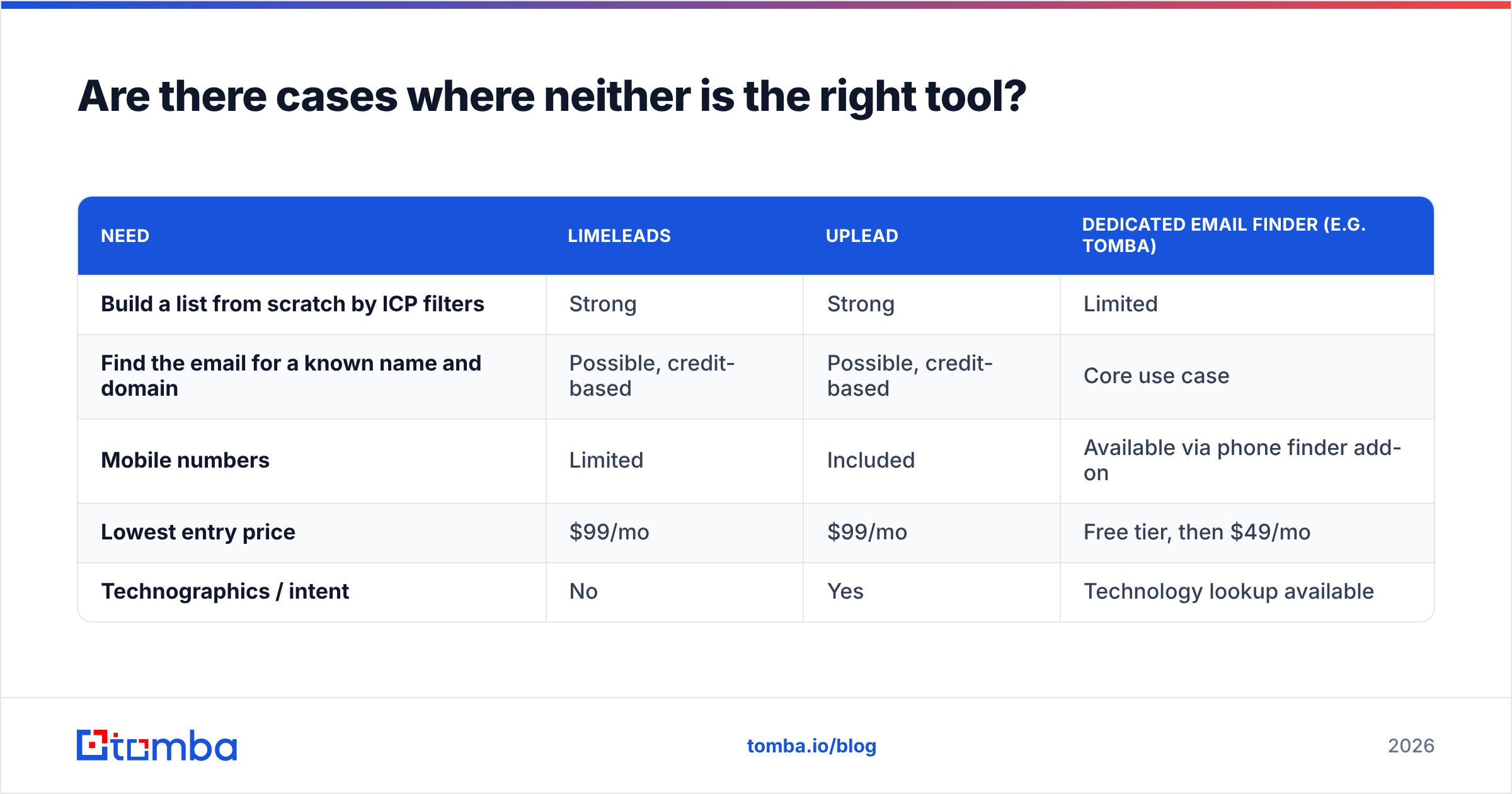
Yes. If your ICP list already exists, you don't need a database. You need an email finder.
Databases like LimeLeads and UpLead work best when you're discovering who to contact. Many teams already know the targets from sources like event attendee lists, website visitors, CRM accounts, LinkedIn searches or partner referrals, and only need the right address for each person.
In that situation, paying for a database seat means paying for search features you won't use. A dedicated email finder that takes a name plus a company domain and returns a verified address is usually the more efficient tool. It often costs less too: Tomba pricing starts with a free tier of 25 searches a month, with paid plans from $49/mo (Starter), $99/mo (Growth) and $249/mo (Pro).
A domain-first workflow also helps with account-based selling. A domain search shows every publicly known address at a target company, so you can map the buying committee without buying access to an entire database.
Here's how the three approaches compare:
| Need | LimeLeads | UpLead | Dedicated email finder (e.g. Tomba) |
|---|---|---|---|
| Build a list from scratch by ICP filters | Strong | Strong | Limited |
| Find the email for a known name and domain | Possible, credit-based | Possible, credit-based | Core use case |
| Mobile numbers | Limited | Included | Available via phone finder add-on |
| Lowest entry price | $99/mo | $99/mo | Free tier, then $49/mo |
| Technographics / intent | No | Yes | Technology lookup available |
Many mature outbound teams combine them: a database for discovery, then a finder and verifier to fill gaps and re-check records before sending.
How should you run a fair trial of both?#
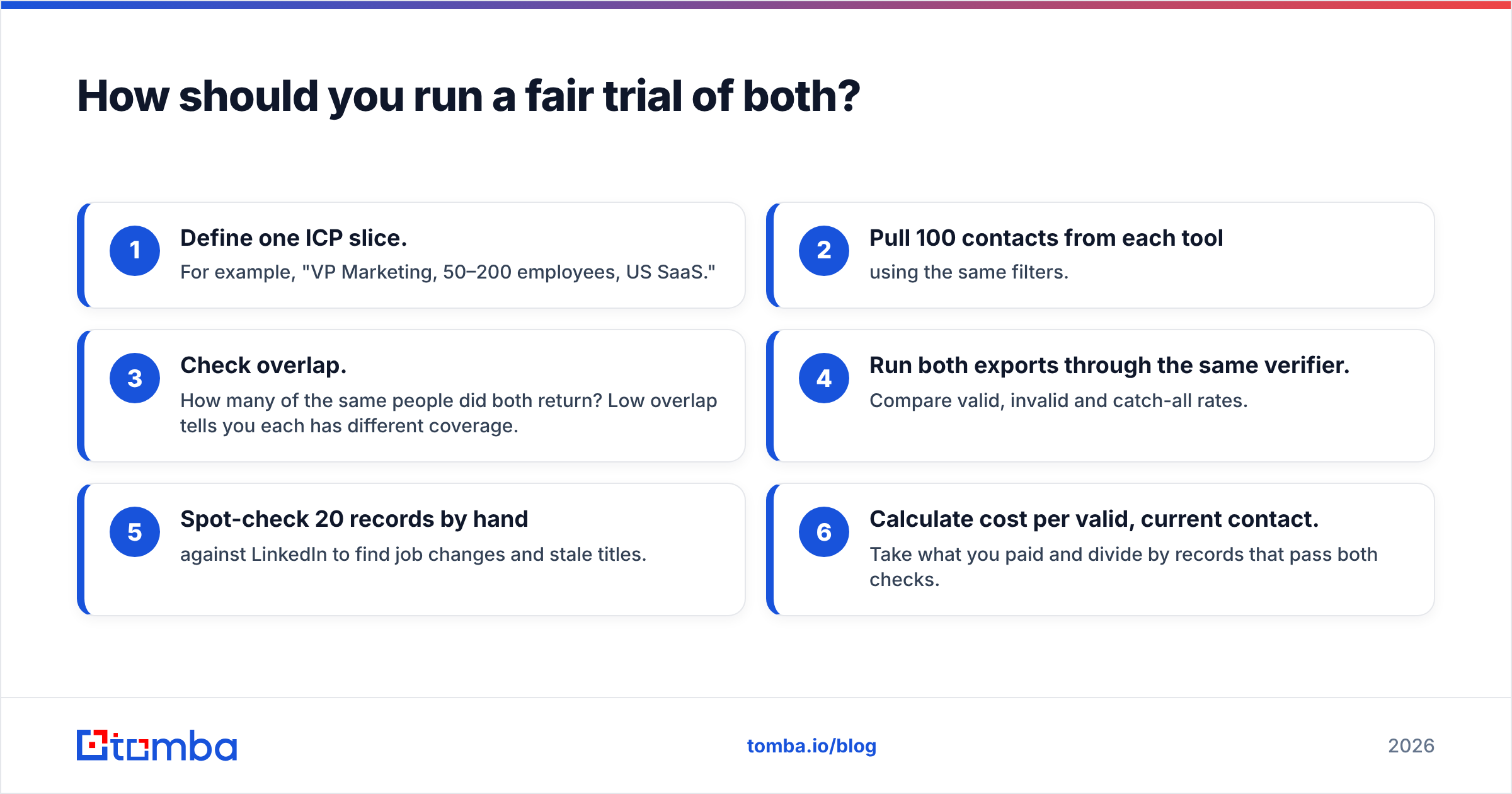
Don't pick based on marketing pages. Run a controlled 100-contact test:
- Define one ICP slice. For example, "VP Marketing, 50–200 employees, US SaaS."
- Pull 100 contacts from each tool using the same filters.
- Check overlap. How many of the same people did both return? Low overlap tells you each has different coverage.
- Run both exports through the same verifier. Compare valid, invalid and catch-all rates.
- Spot-check 20 records by hand against LinkedIn to find job changes and stale titles.
- Calculate cost per valid, current contact. Take what you paid and divide by records that pass both checks.
This takes an afternoon and gives you a number specific to your market, which is more useful than any vendor's accuracy claim. Segments vary widely. A tool that's excellent for US healthcare may be weak for European SaaS.
So, LimeLeads vs UpLead: which should you pick?#
Pick LimeLeads if cost per contact and volume matter most. Pick UpLead if data depth, phone numbers and targeting precision matter most.
- LimeLeads wins on price: about $0.08 to $0.20 per contact, credits that roll over, and a simple workflow. It's best for agencies, founders and high-volume SMB outbound, provided you verify before you send.
- UpLead wins on depth: real-time verification at unlock, mobile numbers in the same credit, technographics and intent. It's best for mid-market teams running multichannel, quality-first outreach, and the higher price reflects that.
- Neither is essential if you already know who you're targeting. In that case a finder-plus-verifier workflow is usually cheaper and more precise.
Whichever database you choose, your outreach will only be as good as the addresses you send to. If you already know your target accounts and need accurate, verified addresses without paying for a full database seat, try the Tomba Email Finder. Enter a name and company domain, get a verified professional email, and start on the free tier before moving up to a paid plan when your volume grows.
Related guides#
// get started
Find, verify and enrich your first contacts today
Start on the free plan with 25 searches a month, then scale when your team is ready.
Free plan · No credit card required · GDPR & CCPA
// about the author