Limeleads vs Warpleads (2026): Which B2B Lead Database Wins?
Limeleads charges per verified contact. Warpleads charges a flat fee for exports with no cap on the top plan. We compare pricing, data quality, verification and fit so you can pick the right lead database for your outbound in 2026.
TL;DR
- Limeleads is a B2B contact database focused on the US. It charges per credit (about $99/mo for 500 verified contacts on the Pro plan), checks emails when you export them, and suits teams that care more about accuracy than volume.
- Warpleads sells volume at a flat price: a free plan with 30 contacts, Essentials at $59/mo for 4,000 exports, and Unlimited at $99/mo. You should verify every export before you send to it.
- With Limeleads you pay more for each contact and spend less time cleaning lists. With Warpleads you pay far less for each contact and do the cleaning yourself.
- Our pick: Warpleads if you run high-volume cold email and already have a verification step. Limeleads if you're a small team selling into the US and every bounce hurts.
- Whichever you choose, run the list through an email verifier before it reaches your sending domain.
What are Limeleads and Warpleads?#
Both tools are self-serve B2B lead databases. You filter by job title, industry, company size and location, build a list, and export it to CSV or your CRM. They look alike from the outside, but they're built on opposite ideas about what a lead should cost.
Limeleads positions itself as a verified-first prospecting database. It focuses on US business contacts, and it says emails and phone numbers are checked in real time when you export them. It advertises roughly 99% email accuracy. Pricing is credit-based, and unused credits roll over.
Warpleads goes after volume. It's connected to the Salesforge outbound ecosystem and offers a database of around 100 million records. It removes the lookup counter: you pay a flat monthly fee and export until you hit your plan's cap, or with no cap at all on the Unlimited tier. Warpleads' own positioning and third-party reviews agree that you should run exported emails through a separate verifier.
An analogy helps. Limeleads is a grocery delivery service that checks each item before it leaves the warehouse. Warpleads is a warehouse club: you get a lot for the money, but checking what's inside is your job.
How do Limeleads and Warpleads compare on pricing and features?#
Pricing is where the two tools differ most, so start there. The figures below are list prices at the time of writing. Check each vendor's pricing page before you buy, because B2B data vendors change their tiers often.
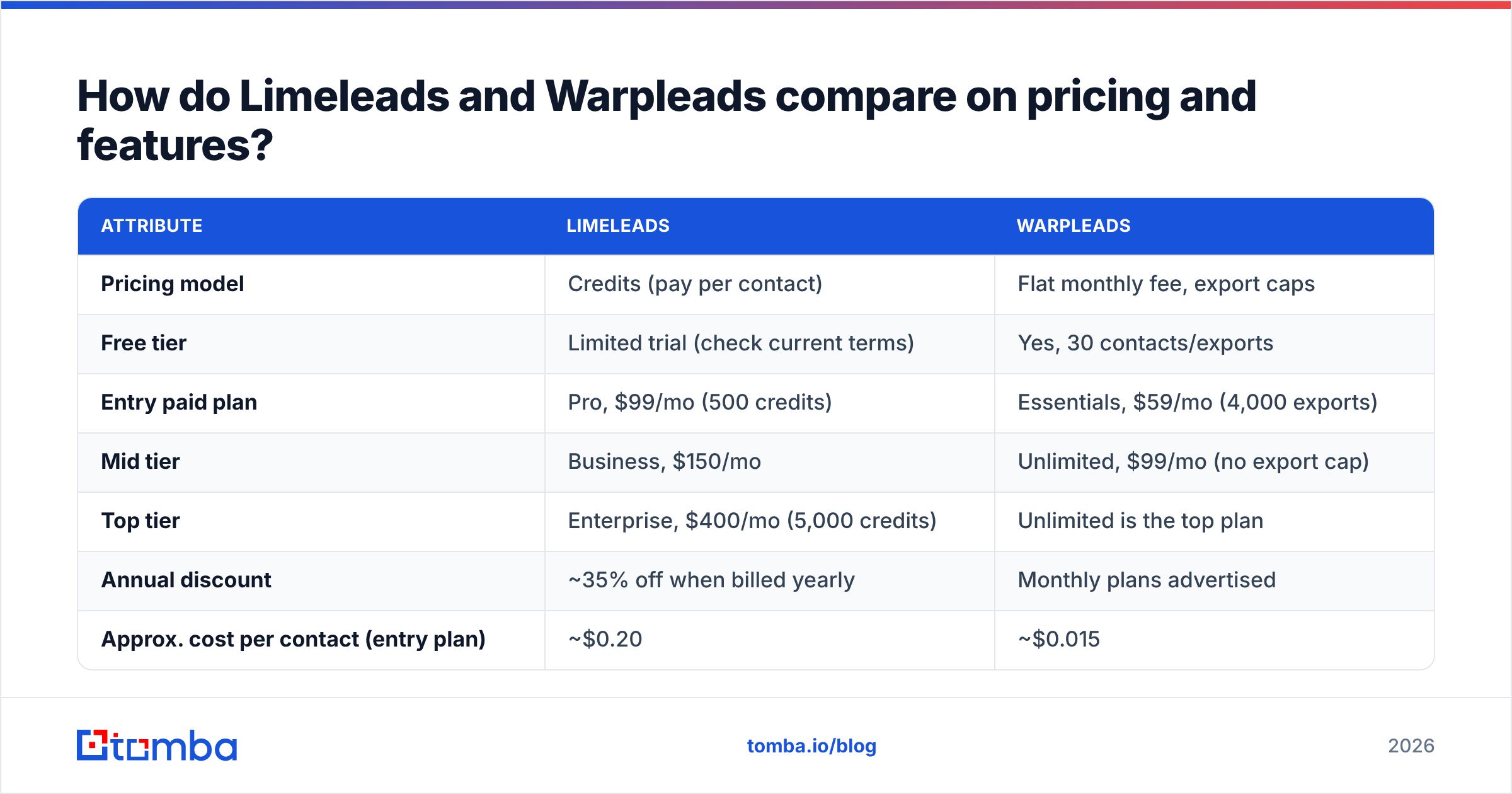
| Attribute | Limeleads | Warpleads |
|---|---|---|
| Pricing model | Credits (pay per contact) | Flat monthly fee, export caps |
| Free tier | Limited trial (check current terms) | Yes, 30 contacts/exports |
| Entry paid plan | Pro, $99/mo (500 credits) | Essentials, $59/mo (4,000 exports) |
| Mid tier | Business, $150/mo | Unlimited, $99/mo (no export cap) |
| Top tier | Enterprise, $400/mo (5,000 credits) | Unlimited is the top plan |
| Annual discount | ~35% off when billed yearly | Monthly plans advertised |
| Approx. cost per contact (entry plan) | ~$0.20 | ~$0.015 |
| Database size | Millions of US contacts | ~100M records |
| Geography | Primarily US | Broader, global mix |
| Verification at export | Yes, real-time email check | No, verify separately |
| Phone numbers | Yes, credits cover mobiles | Limited; emails are the focus |
| Credit rollover | Yes | Not applicable (flat fee) |
| Users and lists | Plan-dependent | Unlimited users and lists on all plans |
| Best fit | Small US-focused teams, accuracy-first | High-volume outbound agencies |
The cost-per-contact row sums up the comparison. On the entry plans, a Warpleads contact costs roughly one-thirteenth of a Limeleads contact. At that gap, Warpleads is cheaper even after you add a verification step, unless its bounce rate is very high.
How does data quality differ between Limeleads and Warpleads?#
Cost per contact is easy to compare. What matters more is cost per contact you can actually email. Here's how the two tools differ on the dimensions that decide that number:
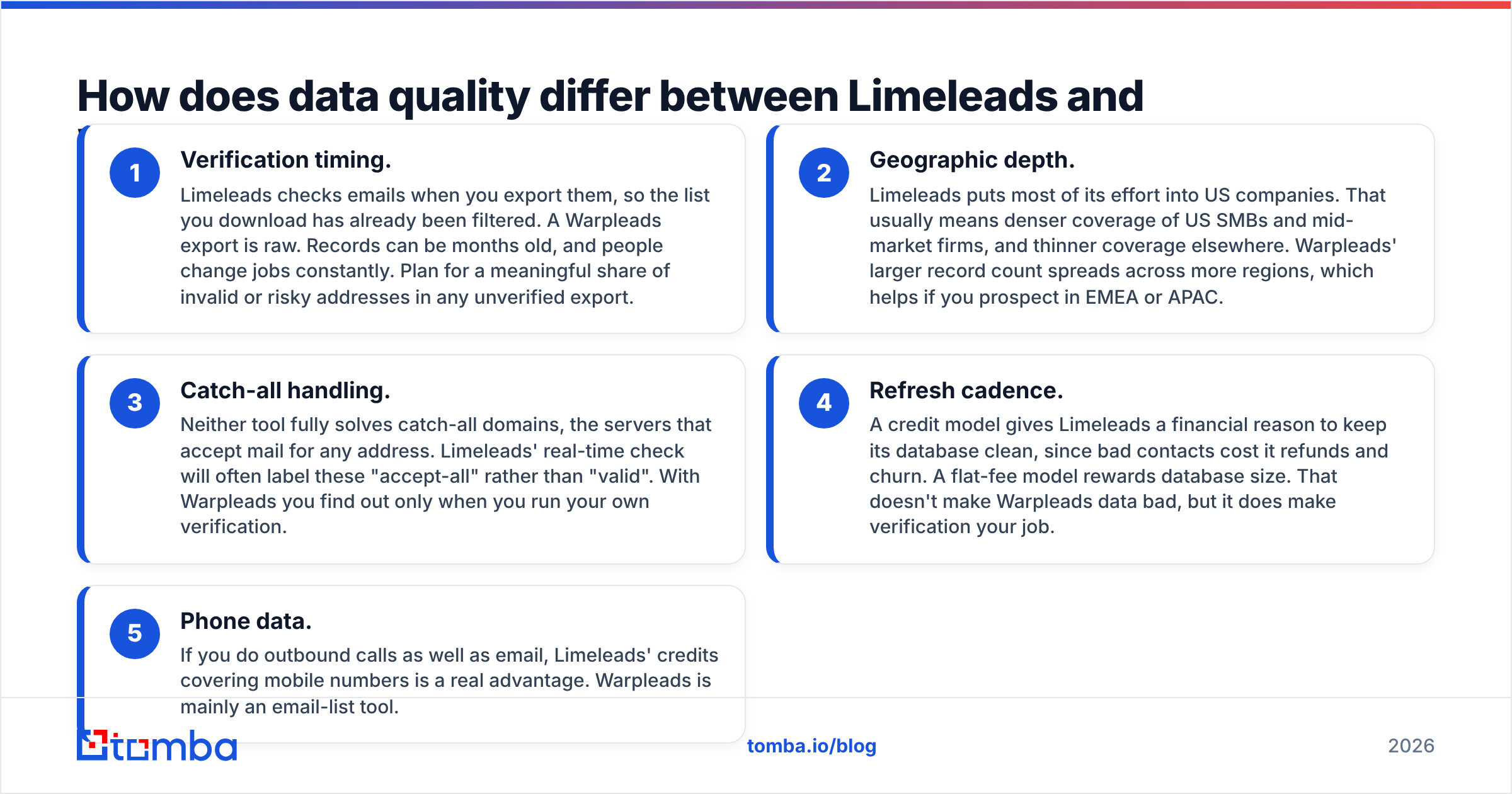
- Verification timing. Limeleads checks emails when you export them, so the list you download has already been filtered. A Warpleads export is raw. Records can be months old, and people change jobs constantly. Plan for a meaningful share of invalid or risky addresses in any unverified export.
- Geographic depth. Limeleads puts most of its effort into US companies. That usually means denser coverage of US SMBs and mid-market firms, and thinner coverage elsewhere. Warpleads' larger record count spreads across more regions, which helps if you prospect in EMEA or APAC.
- Catch-all handling. Neither tool fully solves catch-all domains, the servers that accept mail for any address. Limeleads' real-time check will often label these "accept-all" rather than "valid". With Warpleads you find out only when you run your own verification.
- Refresh cadence. A credit model gives Limeleads a financial reason to keep its database clean, since bad contacts cost it refunds and churn. A flat-fee model rewards database size. That doesn't make Warpleads data bad, but it does make verification your job.
- Phone data. If you do outbound calls as well as email, Limeleads' credits covering mobile numbers is a real advantage. Warpleads is mainly an email-list tool.

The practical takeaway: plan to verify any list before it touches your sending infrastructure. Even Limeleads' check happens at export time, and an address that was valid on Monday can bounce a month later. A bulk email verifier pass right before you load a campaign is cheap protection.
Is Warpleads cheaper than Limeleads once you factor in verification?#
Usually, yes. The margin is smaller than the headline price suggests, though. Let's model a realistic month for a two-person outbound team that needs about 4,000 new contacts.
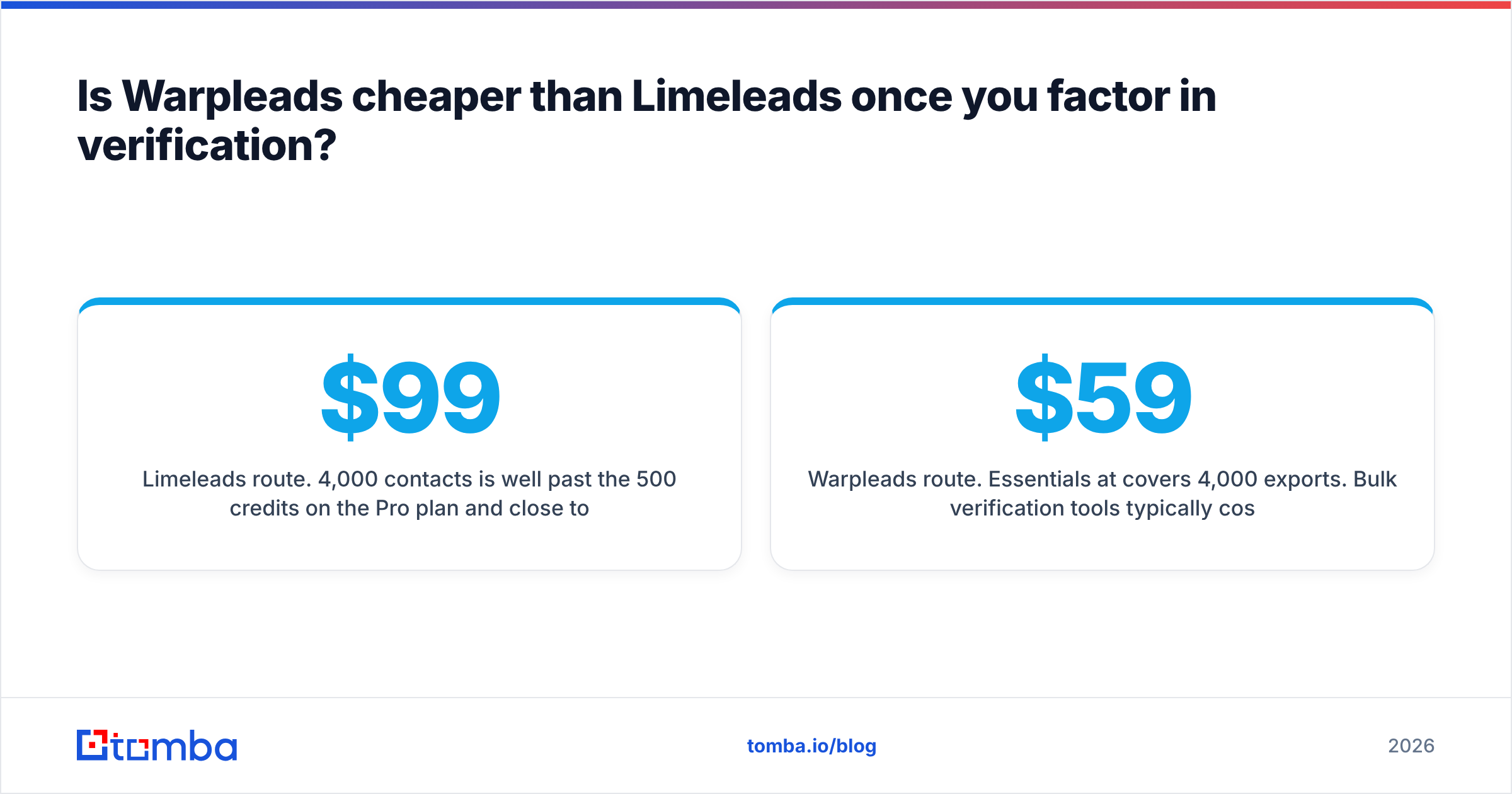
Limeleads route. 4,000 contacts is well past the 500 credits on the $99 Pro plan and close to the Enterprise tier (5,000 credits at $400/mo, or about $260/mo billed annually with the discount). That works out to $0.07–$0.10 per verified contact, and there's little cleanup to do.
Warpleads route. Essentials at $59/mo covers 4,000 exports. Bulk verification tools typically cost somewhere around $0.002–$0.008 per email at that volume, so add roughly $10–$30. Now suppose a meaningful share of addresses comes back invalid or unknown and you drop them. Your cost per usable contact is still well under $0.05.
So Warpleads wins on raw economics even after verification. The hidden costs are elsewhere:
- Time. Someone has to export, upload to a verifier, download, dedupe and re-import. That adds 30–60 minutes per list if it isn't automated.
- Risk. If a rep skips verification once, a few hundred hard bounces can damage your sender reputation for weeks. Google's and Yahoo's bulk-sender rules have made that penalty harsher since 2024.
- Targeting precision. Cheap data tempts teams to email everyone who matches a loose filter. Bigger lists don't fix weak ICP definition. They just burn domains faster.
If you already run a verification step (many agencies do, often built into their sequencer), Warpleads' model is hard to beat. If you don't, and you won't set one up, Limeleads' built-in check is worth the premium.
Which tool is better for cold email agencies?#
Warpleads, fairly clearly. Agencies run many clients, many domains and high weekly volumes. They almost always verify separately anyway. What they need most is predictable cost as volume grows. The Unlimited plan at $99/mo with no export cap, plus unlimited users and lists, fits a multi-client workflow better than a credit meter does.
Warpleads' link to Salesforge also helps if you already send through that stack. You can move from list-building to sequencing with fewer handoffs. If you're comparing sequencers at the same time, it's worth checking how Instantly, Smartlead and Salesforge each handle list imports and built-in verification.
The caveat for agencies: the "unlimited" plan is subject to fair-use terms. If you plan to pull hundreds of thousands of records a month, read the terms first.
Which tool is better for small in-house sales teams?#
Limeleads, in most cases. A founder-led team or a two-to-five-person SDR team selling into US SMBs has different limits:
- You probably send hundreds of emails a week, not tens of thousands, so cost per contact matters less than a clean domain.
- You may not have a RevOps person maintaining a verification pipeline.
- You want phone numbers alongside emails for multi-channel sequences.
- Credit rollover means a slow month doesn't waste your budget.
The 500-credit Pro plan works out to about 25 new verified contacts per working day. For a focused account-based motion, that's often enough.
What do users say about Limeleads and Warpleads?#
Review volume for both tools is modest compared with giants like Apollo or ZoomInfo, so read any aggregate score with care. On review sites such as G2, the common themes look like this:
Limeleads: Users praise the simple interface, the export-time verification and the credit rollover. Common complaints are thin coverage outside the US, and a per-contact price that looks steep next to flat-fee rivals.
Warpleads: Users praise the price-to-volume ratio and how quickly large lists can be exported. Common complaints are bounce rates on unverified exports and some stale job titles. Both are typical of large aggregated databases.
Neither tool has a reputation for bad data in absolute terms. The complaints mostly show whether the buyer's workflow matched the tool's design.
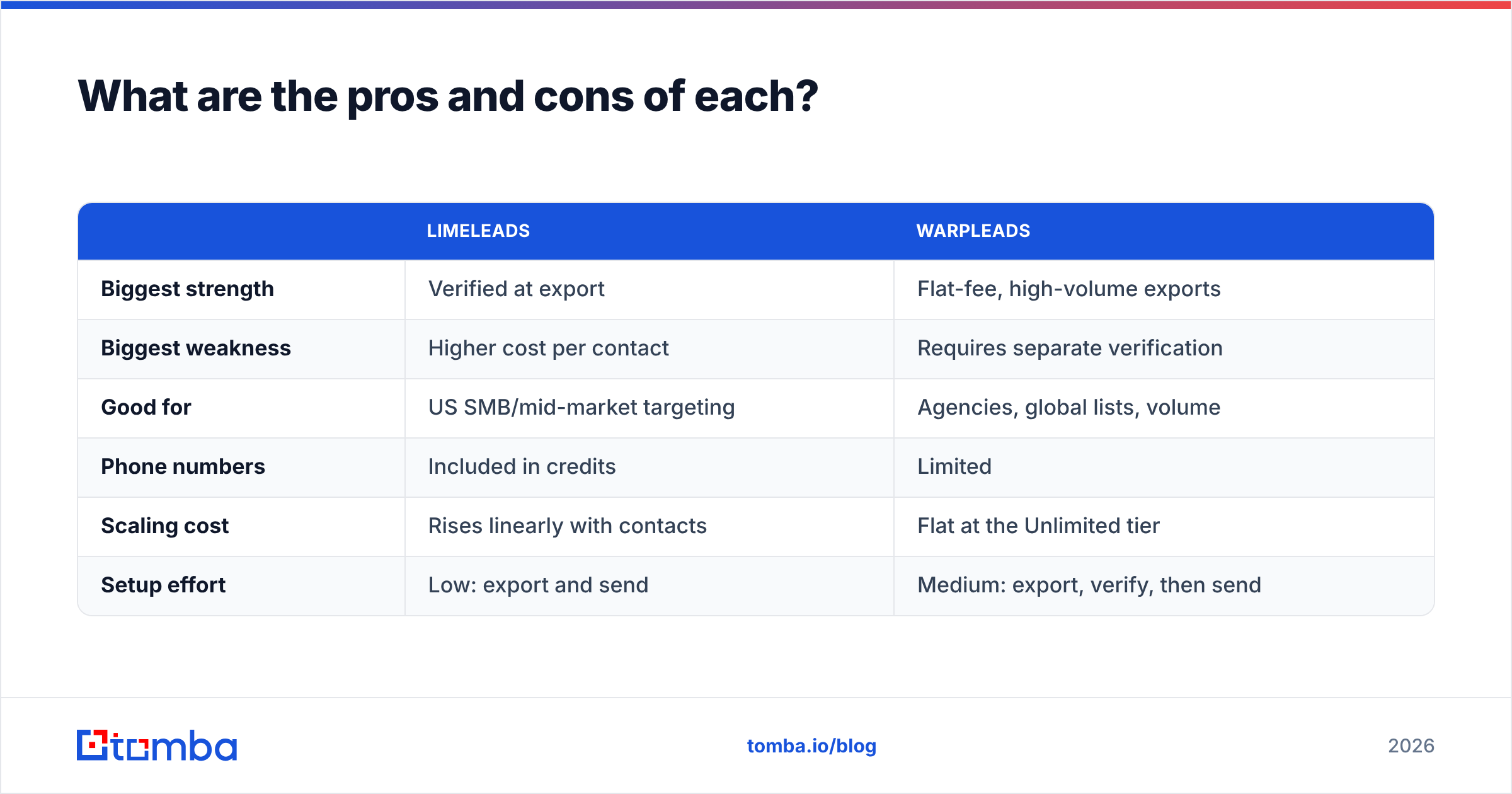
What are the pros and cons of each?#
| Limeleads | Warpleads | |
|---|---|---|
| Biggest strength | Verified at export | Flat-fee, high-volume exports |
| Biggest weakness | Higher cost per contact | Requires separate verification |
| Good for | US SMB/mid-market targeting | Agencies, global lists, volume |
| Phone numbers | Included in credits | Limited |
| Scaling cost | Rises linearly with contacts | Flat at the Unlimited tier |
| Setup effort | Low: export and send | Medium: export, verify, then send |

What should you use alongside either database?#
A static database gives you a starting list, not a finished one. Three gaps show up no matter which tool you pick:
- Contacts that aren't in the database. A named target account may be missing, or the person you need may have just joined. A live lookup by name and domain fills that gap better than another filter pass. Tomba's domain search surfaces every public address on a company domain, and its email finder resolves a specific person's address from their name.
- Verification right before you send. Covered above, and worth repeating. Verify within a few days of sending, not only when you export.
- Enrichment for personalization. Job title and company size are enough for filters, but not for a first line anyone will read. Tech stack, recent funding and social profiles make outreach feel relevant.
Stacking tools like this is normal. Many teams use a bulk database for coverage and an on-demand finder plus verifier for accuracy. HubSpot's sales prospecting guidance makes the same point: tool fit depends on where your pipeline actually breaks.
Limeleads vs Warpleads: which should you choose?#
Choose based on the constraint that hurts you most:
- Budget is tight and volume is high → Warpleads Essentials or Unlimited, plus a bulk verifier.
- Deliverability is fragile, the team is small, and you sell into the US → Limeleads Pro or Business.
- You need phone numbers as well as emails → Limeleads.
- You run outbound for multiple clients → Warpleads Unlimited.
- You prospect mainly outside the US → Warpleads, but test a sample first.
Before you commit to either, run a small test. Export 200 contacts that match your ICP, verify them independently, and count how many are valid and still at the right company. That one number tells you more than any review, this one included.
Where does Tomba fit in?#
Tomba isn't a flat-fee bulk database like Warpleads or a credit-metered list builder like Limeleads. It fills the gaps both leave. When a database doesn't have the decision-maker you need, Tomba Email Finder finds their professional address from a name and company domain, then checks it on the spot so you don't import a bounce. It starts with a free tier of 25 searches a month, and paid plans run from $49/mo Starter to $249/mo Pro (see Tomba pricing). Pair it with whichever database wins your test, and your team only emails people who can actually receive the message.
Related guides#
// get started
Find, verify and enrich your first contacts today
Start on the free plan with 25 searches a month, then scale when your team is ready.
Free plan · No credit card required · GDPR & CCPA
// about the author