LimePhone Pricing, Reviews, Pros and Cons: 2026 Buyer's Guide
LimePhone starts at $9/month, but the plan price is only part of what you'll pay. Here's how the tiers compare, what reviews actually say (spoiler: there aren't many), and when a different phone tool makes more sense.
TL;DR
- LimePhone is a budget virtual business phone app. Public listings show three plans: Personal ($9/mo), Teams ($18/mo) and Business ($45/mo). Annual billing brings Personal down to about $7.50/mo.
- The price is a flat fee per plan, and each plan covers a set number of users. That makes it cheap for solo operators and very small teams. Overages and international calling are billed on top.
- Every plan comes with a business number, two-way SMS, voicemail, call recording, forwarding, business hours, and web and mobile apps.
- The weak spot is how little anyone has reviewed it. G2 doesn't list enough reviews to give buying insight, so run your own trial before you port a number you depend on.
- LimePhone makes sense if you need a cheap second business line. It doesn't make sense if you run a high-volume outbound calling team that needs a power dialer, deep CRM sync and proven uptime.
What is LimePhone?#
LimePhone is a cloud phone service. It gives you a business number (local, national, toll-free or mobile) that runs on your existing smartphone and in a browser. You don't need a desk phone, a PBX or an IT person. You sign up, choose a number, install the app, and you can call and text from a line that's separate from your personal cell.
It's the same category as OpenPhone (now Quo), Grasshopper and KrispCall. It's lighter than contact-center platforms like Aircall, JustCall or Dialpad. Its pitch is simple: calling and texting for small businesses without buying a phone system.
Because it's VoIP, call quality depends on your internet connection. Emergency calling also works differently than on a carrier line, which matters for anyone who works from a fixed location and assumes 911 behaves like it does on a landline.
How much does LimePhone cost in 2026?#
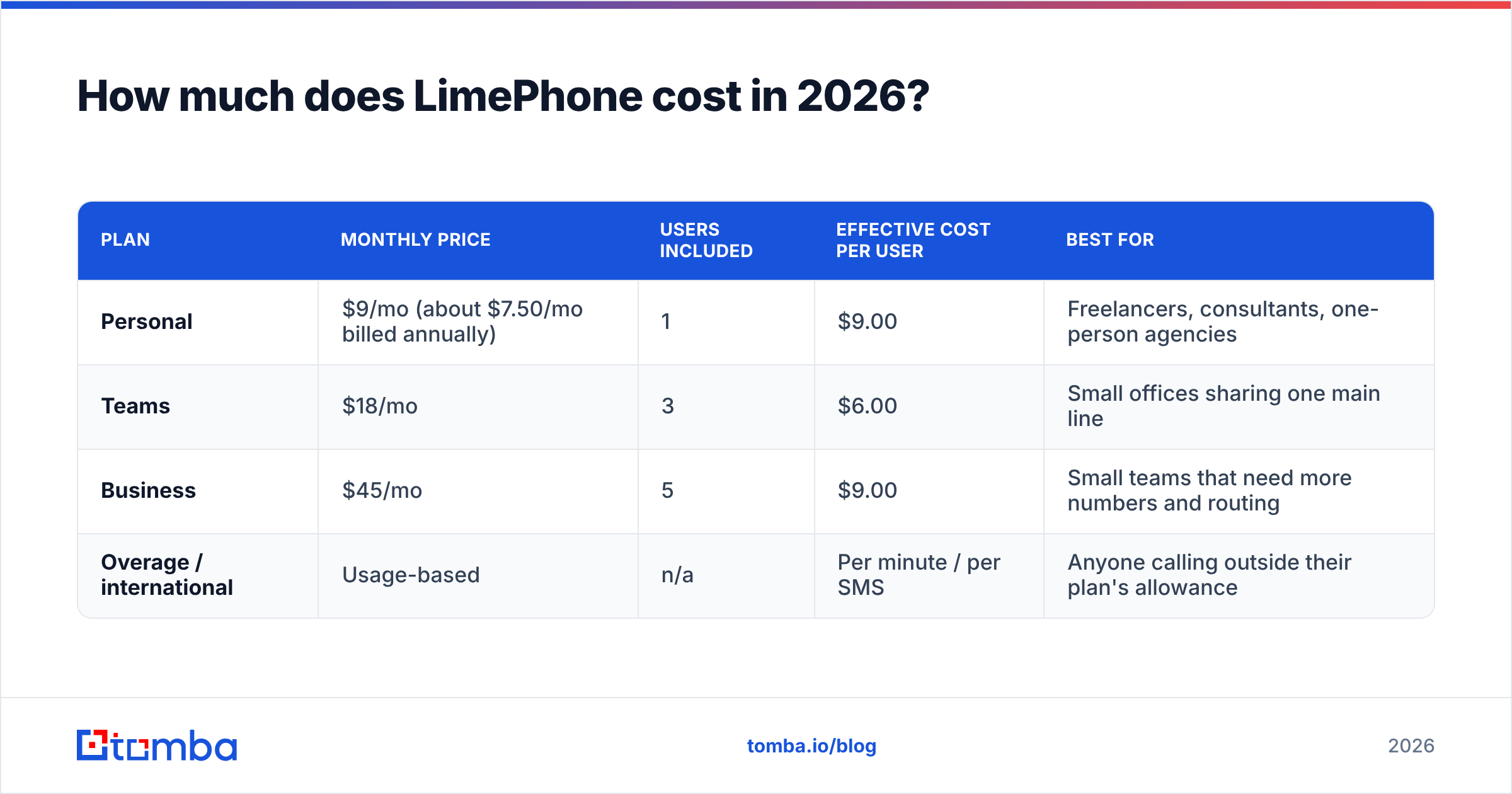
LimePhone's official pricing page advertises plans "from $9". Third-party directories currently list this structure:
| Plan | Monthly price | Users included | Effective cost per user | Best for |
|---|---|---|---|---|
| Personal | $9/mo (about $7.50/mo billed annually) | 1 | $9.00 | Freelancers, consultants, one-person agencies |
| Teams | $18/mo | 3 | $6.00 | Small offices sharing one main line |
| Business | $45/mo | 5 | $9.00 | Small teams that need more numbers and routing |
| Overage / international | Usage-based | n/a | Per minute / per SMS | Anyone calling outside their plan's allowance |
According to LimePhone's listings, every plan includes:
- A professional business number
- Inbound calling
- Two-way SMS
- Voicemail
- Call recording
- Call forwarding
- Business-hours routing
- Web and mobile apps
The Teams page adds shared numbers and auto-attendant functionality.
One caveat: some directories show older figures, such as a $55 Business plan or different seat counts. SaaS phone pricing changes often. Treat the table as a snapshot and check the vendor's page on the day you buy.
Where do the hidden costs come from?#
The advertised price is the floor. For a small business line, these are the extra costs worth planning for:
- Overages. LimePhone's FAQ says usage beyond your plan's minutes or SMS allowance is billed per minute or per message. A heavy texting month can cost noticeably more than the sticker price.
- International rates. Outbound calls and texts outside your plan's covered countries are charged from a published rates table. If your customers are spread across several countries, this is usually the biggest variable cost.
- Extra numbers. A toll-free number or a second local number on top of your included line usually costs extra with virtual phone providers.
- US business texting registration. Every US provider that supports business SMS has to register senders with the carriers (A2P 10DLC). Carrier fees are passed through, so expect a one-time setup charge plus a small monthly campaign fee whichever vendor you use.
- Number porting. LimePhone says porting is free for eligible US numbers. Other countries and number types vary.
What do LimePhone reviews actually say?#
There's very little verified review data. As of this writing, LimePhone's G2 listing doesn't have enough reviews for G2 to show buying insight. Capterra results mostly surface LimeCall, which is a separate lead-conversion product with a similar name. Don't mix up the two when you read star ratings.
That doesn't mean LimePhone is bad. It means you can't rely on crowd data the way you can with RingCentral, Aircall or Quo, which have thousands of reviews. You're making a decision with less evidence, so the trial matters more.
The positives that recur in product listings and alternative-software directories:
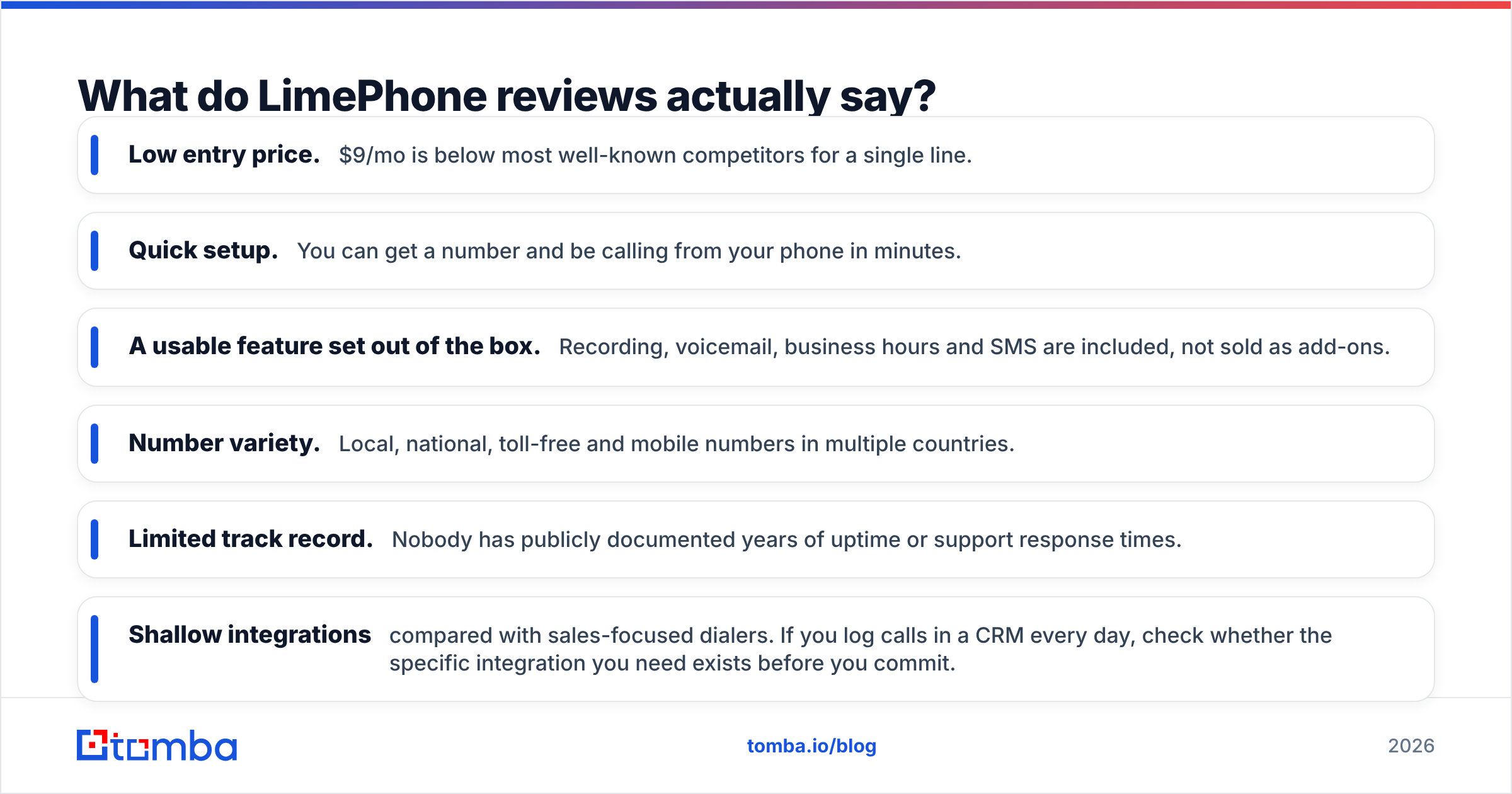
- Low entry price. $9/mo is below most well-known competitors for a single line.
- Quick setup. You can get a number and be calling from your phone in minutes.
- A usable feature set out of the box. Recording, voicemail, business hours and SMS are included, not sold as add-ons.
- Number variety. Local, national, toll-free and mobile numbers in multiple countries.
The concerns that come up (or that you should test for, since reviews are thin):
- Limited track record. Nobody has publicly documented years of uptime or support response times.
- Shallow integrations compared with sales-focused dialers. If you log calls in a CRM every day, check whether the specific integration you need exists before you commit.
- No power dialer or sales analytics. It's a phone line, not an outbound calling platform.
- Usage-based billing makes costs less predictable for teams that call or text a lot.
What are the pros and cons of LimePhone?#
| Pros | Cons |
|---|---|
| Cheap entry point ($9/mo, about $7.50 annual) | Very few verified third-party reviews |
| Flat plan pricing with multiple users bundled | Overage and international charges add up |
| Call recording, voicemail, forwarding included on every plan | No power dialer, sequences or call analytics |
| Two-way SMS and shared team numbers | Fewer integrations than Quo, Aircall or JustCall |
| Free porting for eligible US numbers | Name confusion with LimeCall muddies research |
| Web and mobile apps, no hardware needed | VoIP limitations for emergency calling |
Is LimePhone cheaper than the alternatives?#
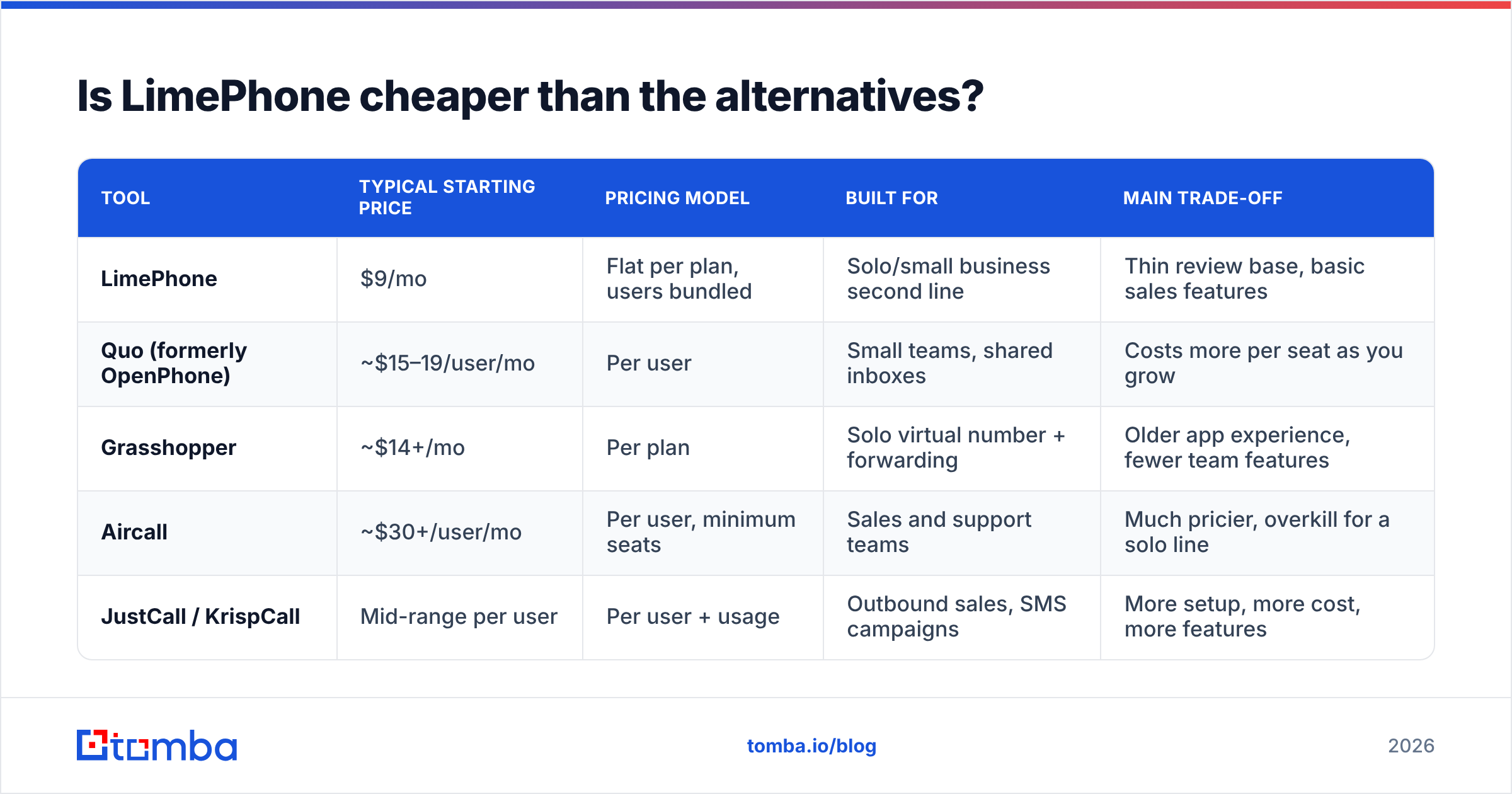
For one or two users, yes, usually. For a sales team that calls all day, the comparison gets closer, because you're comparing different kinds of tools. Here's how LimePhone compares with the tools buyers usually shortlist next to it:
| Tool | Typical starting price | Pricing model | Built for | Main trade-off |
|---|---|---|---|---|
| LimePhone | $9/mo | Flat per plan, users bundled | Solo/small business second line | Thin review base, basic sales features |
| Quo (formerly OpenPhone) | ~$15–19/user/mo | Per user | Small teams, shared inboxes | Costs more per seat as you grow |
| Grasshopper | ~$14+/mo | Per plan | Solo virtual number + forwarding | Older app experience, fewer team features |
| Aircall | ~$30+/user/mo | Per user, minimum seats | Sales and support teams | Much pricier, overkill for a solo line |
| JustCall / KrispCall | Mid-range per user | Per user + usage | Outbound sales, SMS campaigns | More setup, more cost, more features |
Prices change often. Check each vendor's page before you decide.
The pattern: LimePhone competes on price and simplicity, not depth. If you're a founder who wants your business number kept separate from your personal cell, it's hard to beat at $9. If you manage an SDR team measured on dials, connects and response rate, you'll run into its limits quickly. You'd end up paying more for a dialer anyway.
Who should (and shouldn't) buy LimePhone?#
Good fit:
- Freelancers and consultants who want a professional number on their existing phone for under $10/mo.
- Micro-businesses (2–5 people) sharing one main line with business-hours routing and voicemail.
- Remote founders who need a local presence number in the US or UK without a physical office.
- Side projects and test markets where you want a cheap, disposable line for a new brand.
Poor fit:
- Outbound sales teams that need a power or parallel dialer, local-presence rotation, call coaching and automatic CRM logging.
- Support teams with SLAs, queues and reporting requirements.
- Regulated industries that need documented compliance guarantees and long-term vendor stability.
- Heavy international callers, where per-minute rates will cost more than the plan itself.
How should you evaluate LimePhone before committing?#
Since public reviews are thin, your trial is the review. Use it to collect data, not just to click around.
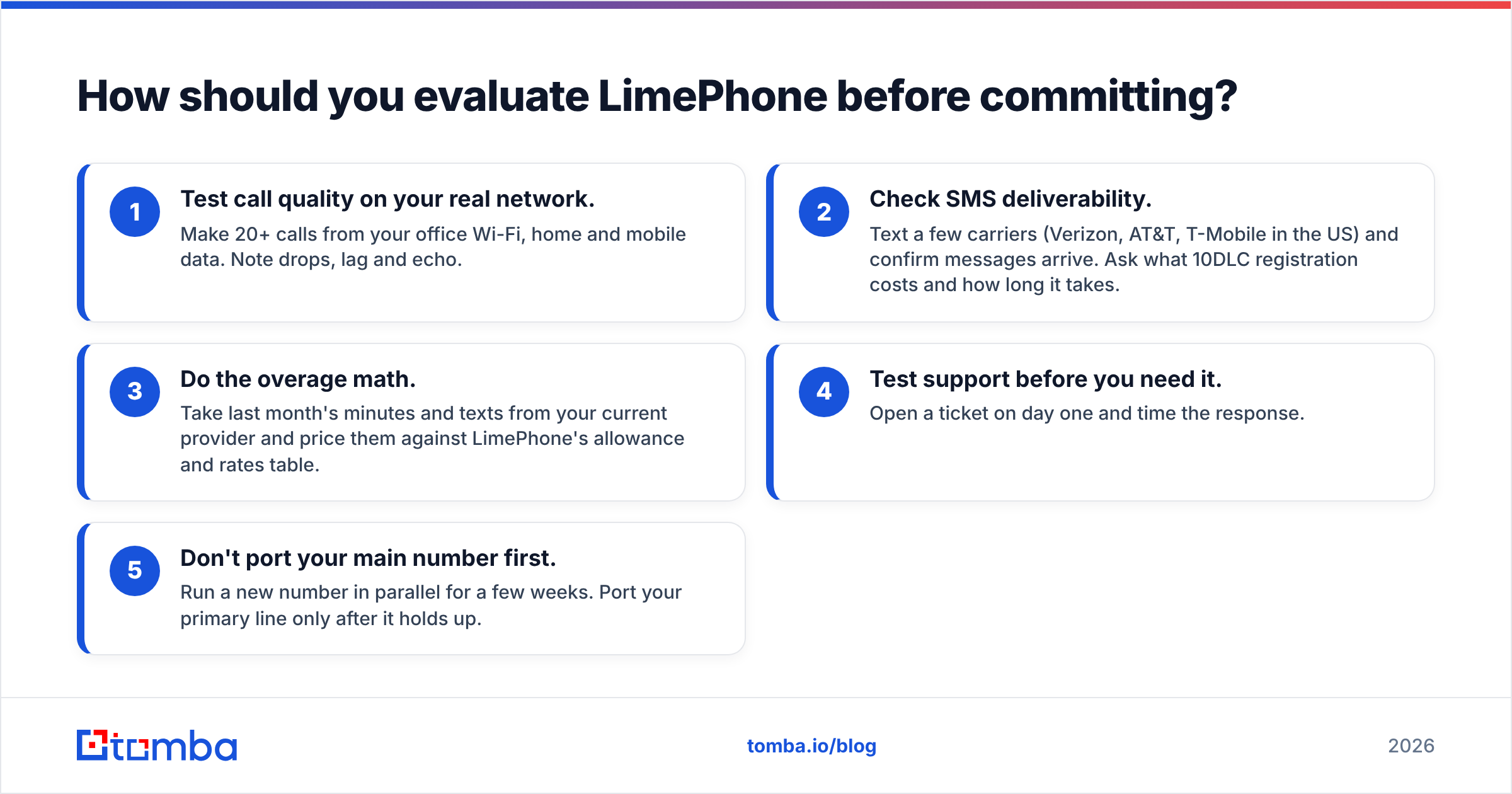
- Test call quality on your real network. Make 20+ calls from your office Wi-Fi, home and mobile data. Note drops, lag and echo.
- Check SMS deliverability. Text a few carriers (Verizon, AT&T, T-Mobile in the US) and confirm messages arrive. Ask what 10DLC registration costs and how long it takes.
- Do the overage math. Take last month's minutes and texts from your current provider and price them against LimePhone's allowance and rates table.
- Test support before you need it. Open a ticket on day one and time the response.
- Don't port your main number first. Run a new number in parallel for a few weeks. Port your primary line only after it holds up.
Does a cheap phone line fix your outbound results?#
No. A phone system only moves your conversations. It doesn't decide who you talk to. Most small teams that are unhappy with calling results don't have a phone-app problem. They have a data problem: wrong numbers, stale contacts, gatekeepers, and dials to people who left the company last year.
Before you pay more for any calling tool, clean up what goes into it:
- Use a phone finder to get direct numbers for the specific decision-makers you're targeting, instead of calling the main switchboard.
- Run lists through a phone validator so reps don't waste dials on disconnected or mistyped numbers.
- Add emails so every call can be followed by a written touch. That's where most multi-channel sequences get their replies.
That combination (cheap line, clean data, call then email) is how many small teams get reasonable connect rates without paying $30+ per seat for enterprise dialers.
So, is LimePhone worth it?#
For a solo operator or a team of up to five that needs a professional line, yes. It's one of the cheapest credible options, and the bundled features cover most small-business basics. The annual Personal plan at about $7.50/mo is especially easy to justify.
For a sales team where the phone drives revenue, probably not on its own. The missing dialer features, limited integrations and lack of verified reviews are real risks when your pipeline depends on the line working. Start with a parallel trial, keep your main number where it is until LimePhone proves itself, and put the savings into better contact data.
Whichever phone tool you pick, your outreach only works if you're reaching the right people. Tomba Email Finder finds verified professional email addresses by name, domain or company, so every call has a follow-up email to the right inbox. Start on the free tier with 25 searches a month, then see the Tomba pricing page when you're ready to scale (Starter is $49/mo).
Related guides#
// get started
Find, verify and enrich your first contacts today
Start on the free plan with 25 searches a month, then scale when your team is ready.
Free plan · No credit card required · GDPR & CCPA
// about the author