Listclean vs Salesbot: Email Verifier or AI Sales Automation?
Listclean cleans email lists for pennies. Salesbot automates AI-driven outreach from $49/mo. They solve different problems, so here's how to tell which one your pipeline needs first, and when you need both.
TL;DR
- Listclean and Salesbot aren't really rivals. Listclean is a pay-as-you-go email verification service. Salesbot is an AI sales automation platform for prospecting, outreach, and lead management.
- Listclean costs much less per unit. Public listings put it at about $5 for 10,000 verifications and $145 for 1 million, and credits don't expire. Salesbot starts at about $49/month and offers a free trial.
- Salesbot doesn't come with a contact database (per its Capterra listing). You still need a way to find and verify contacts before it can do anything useful.
- Most outbound teams end up needing both jobs done: a clean, verified contact source and an engine that sends the messages. Which one you buy first depends on where your pipeline is leaking.
- If you're missing the contacts themselves, neither tool fixes that. You need an email finder upstream of both.
What is the real difference between Listclean and Salesbot?#
People search "Listclean vs Salesbot" because both show up in B2B tool roundups and both claim to improve outbound results. They sit at opposite ends of the pipeline, though.
Listclean is an email verification service. You upload a list or call the API, and it tells you which addresses are deliverable, invalid, risky, or catch-all. It doesn't find new contacts or send email. It keeps you from sending to addresses that will bounce.
Salesbot is an AI sales automation tool. Capterra describes it as cloud-based software covering lead generation workflows, outreach automation, AI-personalized messaging, and sales analytics, with contact management and data import/export built in. The same Salesbot Capterra listing notes that it does not include a contact database. You bring the leads and Salesbot works them.
Think of a restaurant. Listclean is the prep cook who throws out spoiled ingredients before they reach a plate. Salesbot is the line cook who plates and serves dishes quickly. Neither one buys the groceries, and that part (sourcing contacts) is where most outbound programs actually fall apart.
Where does each tool sit in an outbound pipeline?#
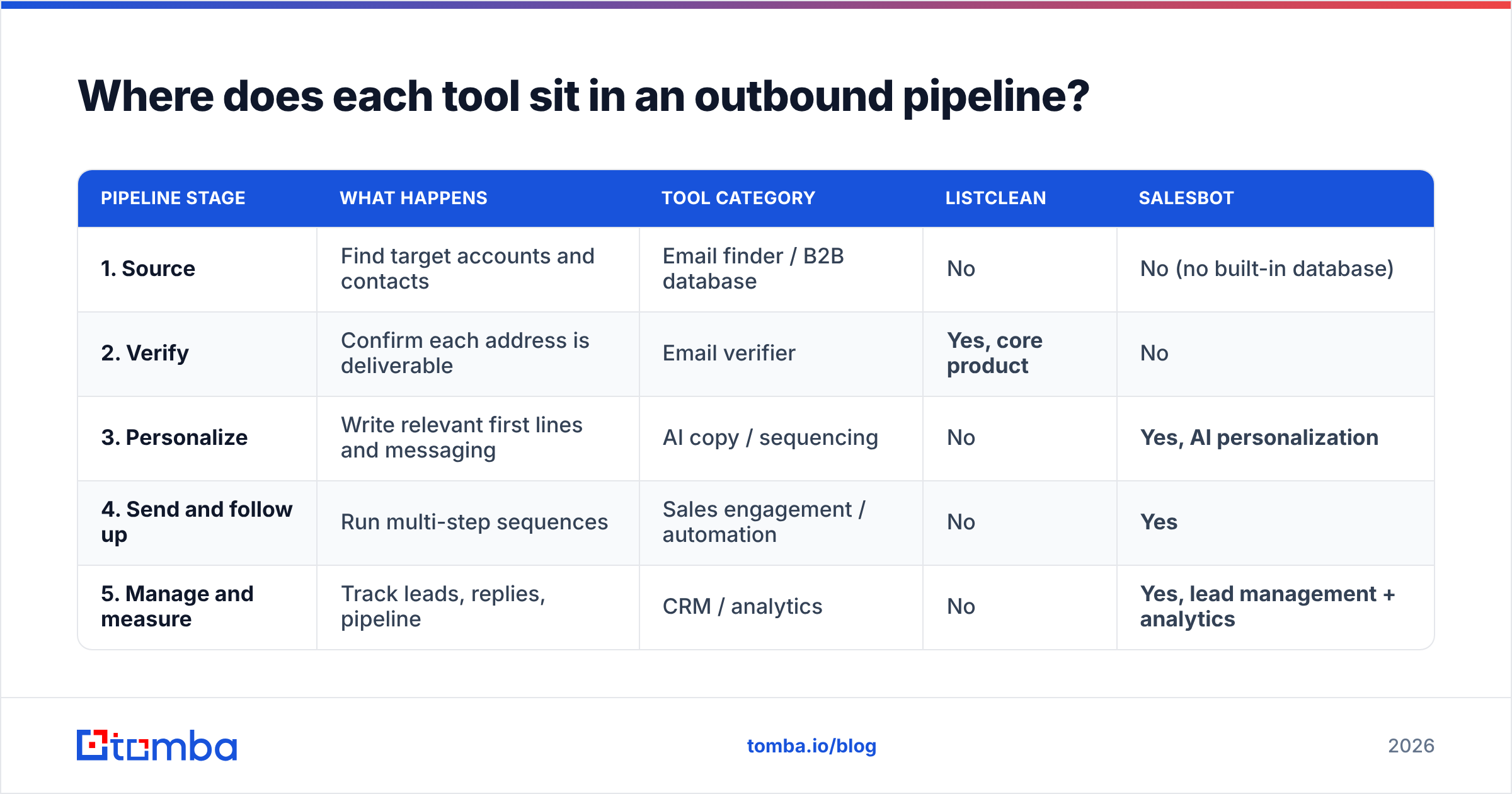
Before you compare features, place each tool in the workflow. A typical B2B outbound pipeline has five stages, and each one fails in its own way:
| Pipeline stage | What happens | Tool category | Listclean | Salesbot |
|---|---|---|---|---|
| 1. Source | Find target accounts and contacts | Email finder / B2B database | No | No (no built-in database) |
| 2. Verify | Confirm each address is deliverable | Email verifier | Yes, core product | No |
| 3. Personalize | Write relevant first lines and messaging | AI copy / sequencing | No | Yes, AI personalization |
| 4. Send and follow up | Run multi-step sequences | Sales engagement / automation | No | Yes |
| 5. Manage and measure | Track leads, replies, pipeline | CRM / analytics | No | Yes, lead management + analytics |
Look at the table this way: Listclean covers one stage completely, and Salesbot covers three stages broadly. Neither covers stage 1, and a weak stage 1 hurts everything after it. If your contacts are wrong, verification only confirms they're wrong, and AI personalization makes a polished pitch to the wrong person.
How does Listclean work, and who is it for?#
Listclean is built for one job: keeping bounce rates low so your sending domain stays healthy.
What you get:
- Bulk list verification. Upload a CSV and get each address labeled with a status (valid, invalid, risky/unknown, catch-all).
- API access for verifying addresses in real time, for example at signup forms or before a CRM import.
- Pay-as-you-go credits with no expiration. Reviewers on G2's Listclean pricing page and other directories keep pointing to this as the main reason they chose it.
- A small free allowance. The first 100 verifications are free, so you can test it on a sample list.
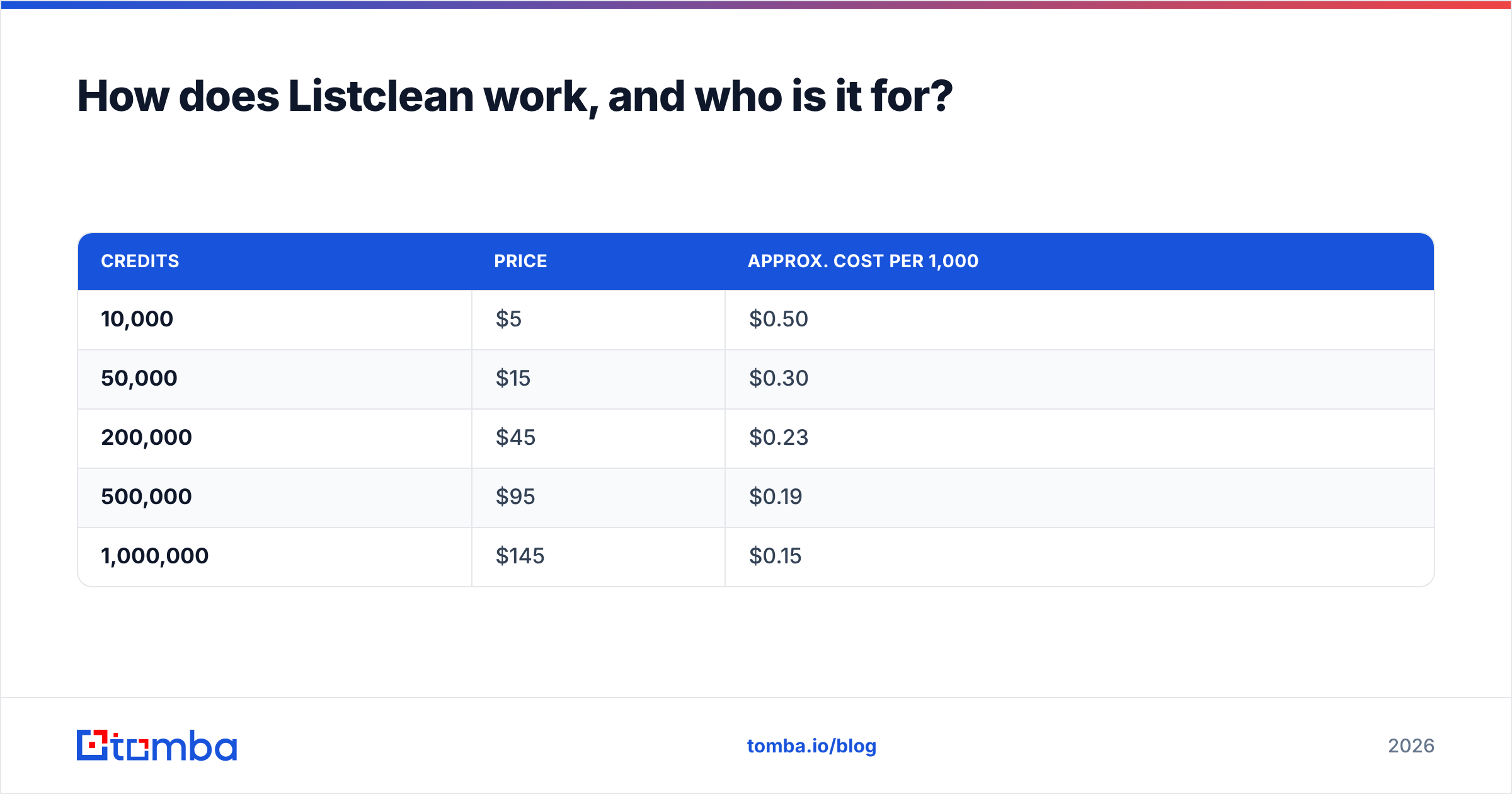
Published pricing (pay-as-you-go, per third-party listings):
| Credits | Price | Approx. cost per 1,000 |
|---|---|---|
| 10,000 | $5 | $0.50 |
| 50,000 | $15 | $0.30 |
| 200,000 | $45 | $0.23 |
| 500,000 | $95 | $0.19 |
| 1,000,000 | $145 | $0.15 |
Those prices are low for the verification market. If you already have large lists, such as old CRM exports, webinar signups, or event badge scans, Listclean is a cheap way to clean them before a campaign.
Where it falls short:
- It doesn't generate leads, so it's useless if you have no list to start with.
- It gives you no outreach, sequencing, or CRM features.
- Catch-all domains stay a gray area. Every verifier struggles to confirm individual addresses on domains that accept all mail. Listclean will flag them, but "catch-all" isn't a green light.
Best fit: marketers and SDR teams that already have contact data and need to protect email deliverability cheaply at volume.
How does Salesbot work, and who is it for?#
Salesbot sells process automation, not data hygiene. The pitch is to hand repetitive SDR work to AI: personalized messaging, outreach cadences, lead tracking, and reporting.
What you get (based on its public listing):
- AI-personalized outreach. Messaging is tailored to each prospect instead of one template blasted to everyone.
- Outreach automation that replaces manual follow-ups with scheduled sequences.
- Contact and lead management, including data import and export, so prospects live somewhere structured.
- Analytics on what's working, meant to guide sales decisions.
- CRM-style features. Capterra reviewers rate its CRM and prospecting capabilities as the main strengths.
Pricing: listed as starting at about $49/month, with a free trial. Higher tiers and seat-based pricing aren't consistently published, so confirm current limits (seats, sends, AI credits) on a demo call before you commit.
Where it falls short:
- No contact database. This is the big one. Salesbot needs leads from somewhere else, so you're paying for an engine without fuel.
- No native verification layer as a standalone product. If you import unverified data, the automation sends to bad addresses efficiently, and that hurts your sender reputation.
- It's a younger, smaller product than established platforms like Outreach or Salesloft, with fewer public reviews to judge by. Weigh that against its lower entry price.
Best fit: small sales teams and founders who already have a lead source and want AI to handle personalization and follow-up without paying enterprise engagement-platform prices.
Listclean vs Salesbot: how do they compare head-to-head?#
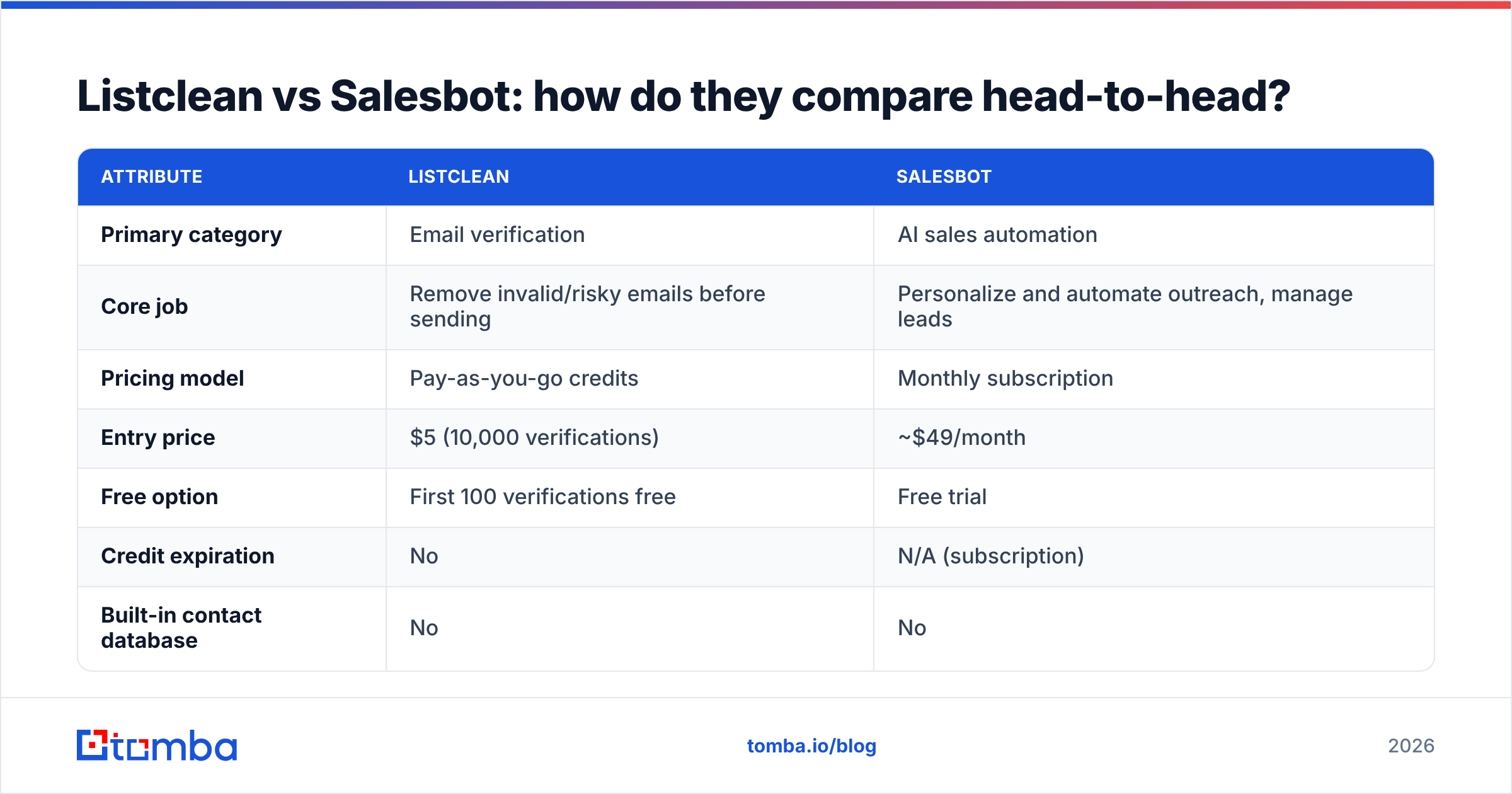
The table below compares the two directly. Remember you're comparing a scalpel with a Swiss Army knife.
| Attribute | Listclean | Salesbot |
|---|---|---|
| Primary category | Email verification | AI sales automation |
| Core job | Remove invalid/risky emails before sending | Personalize and automate outreach, manage leads |
| Pricing model | Pay-as-you-go credits | Monthly subscription |
| Entry price | $5 (10,000 verifications) | ~$49/month |
| Free option | First 100 verifications free | Free trial |
| Credit expiration | No | N/A (subscription) |
| Built-in contact database | No | No |
| Finds new email addresses | No | No |
| Sends emails / sequences | No | Yes |
| AI personalization | No | Yes |
| CRM / lead management | No | Yes |
| API | Yes | Check with vendor |
| Main risk if used alone | Nothing to verify without a lead source | Automates sends to unverified or wrong contacts |
| Best for | High-volume list hygiene on a budget | Small teams automating SDR workflows |
Verdict: if the question is "which is cheaper," Listclean wins easily. At $0.15–$0.50 per thousand checks, it's a rounding error in most budgets. If the question is "which one will book meetings," only Salesbot does outreach, but it can't book anything without good contacts to work with.
The honest answer for most teams: Listclean and Salesbot complement each other rather than compete. The more useful question is what sits upstream of both.
What happens if you skip verification before automated outreach?#
This is where you pay for buying Salesbot before you've sorted out data quality.
AI automation raises the volume you send. That's the point. It also means any problem in your list gets multiplied. Suppose you import 5,000 contacts scraped or bought a year ago. B2B data decays quickly as people change jobs, companies rebrand, and domains lapse. Bounce rates in the high teens or low twenties on unverified legacy lists are common.
Mailbox providers watch bounces closely. Google's sender guidelines and Microsoft's filtering both treat high bounce rates as a sign you're a careless or spammy sender. A few campaigns with double-digit bounces can push you into spam folders, and after that the AI-written first line doesn't matter because nobody sees it.

Here's the order that avoids this:
- Source contacts from a data provider that verifies at the point of discovery. That's cheaper than cleaning up later.
- Re-verify anything older than about 90 days before it goes into a sequence. This is Listclean's niche.
- Treat catch-all addresses separately. Send to them in smaller batches, or use a dedicated catch-all check before they enter a high-volume cadence.
- Only then turn on automation. Salesbot or any engagement tool performs as well as the list you feed it.
- Watch bounce and reply metrics per sequence and pause anything that bounces above roughly 2–3%.
Which should you buy first: Listclean or Salesbot?#
Buy for your bottleneck, not for the tool with the better demo.
Buy Listclean first if:
- You already have large contact lists (CRM, events, inbound, past campaigns).
- Your bounce rate is above 3%, or you're seeing deliverability warnings.
- You send through an existing tool (HubSpot, Instantly, Lemlist, etc.) and just need hygiene.
- Budget is tight. You can clean 50,000 addresses for less than a lunch.
Buy Salesbot first if:
- You have a reliable, verified lead source already.
- Your reps spend hours on manual follow-up and copy-pasted personalization.
- You don't have a sales engagement platform and don't want to pay for Outreach or Salesloft.
- You want lead tracking and analytics in the same place as outreach.
Buy neither (yet) if:
- You don't have contacts in the first place. Verification needs input and automation needs targets. Fix sourcing first, then add the other two layers.
What fills the gap neither tool covers?#
Both tools assume the contact data already exists, so stage 1 (sourcing) needs its own tool.
This is where an email finder comes in. You give it a company domain, or a person's name plus company, and it returns professional email addresses with a confidence score and the public sources where each address appeared. Good finders also verify as part of the lookup, which cuts down how much downstream cleaning you need.
Tomba is one option here, so this is a disclosure as much as a recommendation. It combines the email finder with a built-in email verifier, domain search, catch-all checks, and enrichment. The practical effect for this comparison:
- Paired with Salesbot: Tomba provides the verified contacts Salesbot doesn't have, and you export or sync them into your sequences.
- Paired with Listclean: Tomba finds new contacts, and Listclean stays your low-cost bulk re-verification layer for older lists you already own.
- On its own: for small teams, finding and verifying in one place may be enough upstream, with any sender handling outreach.
For reference, Tomba pricing starts with a free tier (25 searches/month), then Starter at $49/month, Growth at $99/month, Pro at $249/month, and custom Enterprise plans. That puts Starter at the same entry price as Salesbot, so budgeting both takes one line item each.
Other finders are worth evaluating too. Apollo, Hunter, and Snov.io all cover stage 1 with different tradeoffs in database size, accuracy, and price. Whichever you pick, G2's email finder category is a reasonable place to cross-check recent user reviews.
What does a sensible stack look like for different team sizes?#
| Team profile | Sourcing | Verification | Outreach / automation | Approx. monthly cost |
|---|---|---|---|---|
| Solo founder, <500 prospects/mo | Email finder (free or starter tier) | Built into finder | Gmail + manual or light sequencer | $0–$49 |
| Small SDR team, 1–3 reps | Email finder starter/growth plan | Finder's verifier + Listclean for legacy lists | Salesbot | ~$100–$200 |
| Mid-size team, heavy legacy CRM | Email finder growth/pro plan | Listclean for bulk re-verification | Salesbot or established engagement platform | ~$150–$400 |
| Agency running many client lists | Email finder with API | Listclean pay-as-you-go (credits don't expire) | Client's sender of choice | Variable, usage-driven |
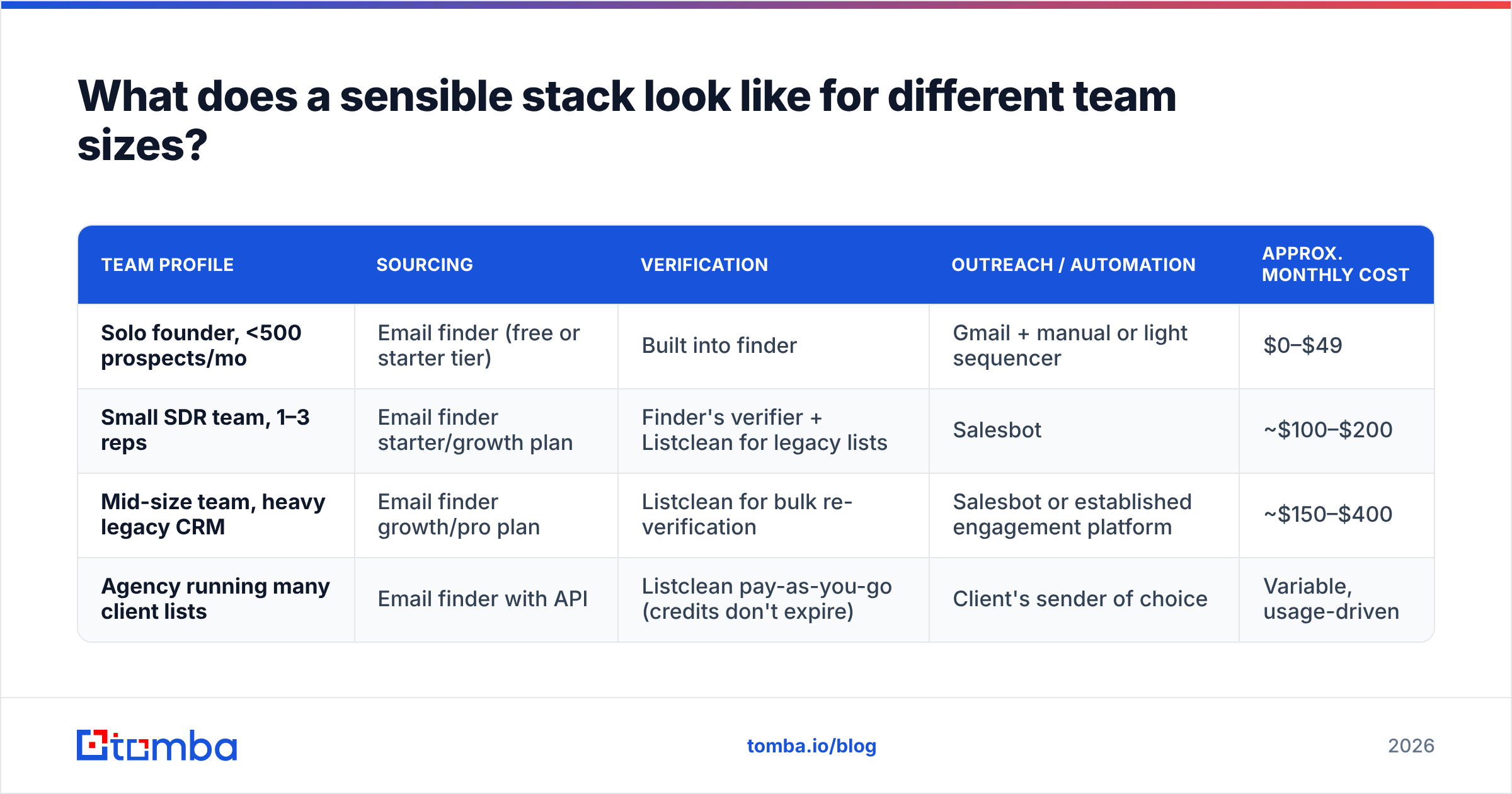
The pattern is the same in every row: sourcing, then verification, then automation. Skip a layer and the ones after it do worse.
Frequently asked questions#
Is Listclean a Salesbot alternative? No. Listclean verifies emails and Salesbot automates outreach. Replacing one with the other would leave a gap in your pipeline.
Does Salesbot verify email addresses? Its public listing focuses on AI personalization, outreach automation, and lead management, not standalone verification. Verify contacts before you import them.
Is Listclean accurate on catch-all domains? No verifier can fully confirm individual mailboxes on catch-all domains, because the server accepts everything. Listclean flags them, and you should handle them as a separate, lower-volume segment.
Can I use Listclean and Salesbot together? Yes, and it's a sensible pairing. Verify (and ideally source) contacts first, then load only the clean records into Salesbot sequences.
Which is better value? Per unit, Listclean is one of the cheapest verifiers available. Salesbot's value depends on how many rep hours its automation saves you, which you can test during the free trial.
Ready to fix the stage both tools skip?#
Listclean keeps your lists clean and Salesbot keeps your outreach moving, but neither finds the people you need to reach. If you're about to load prospects into an automation tool, or you're tired of cleaning up lists you bought, start at the source. Tomba Email Finder finds professional email addresses by domain, name, or company and verifies them as it goes, so whatever you send with starts from contacts that actually exist. Try it on the free tier with 25 searches a month and compare the bounce rate on your next sequence.
Related guides#
// get started
Find, verify and enrich your first contacts today
Start on the free plan with 25 searches a month, then scale when your team is ready.
Free plan · No credit card required · GDPR & CCPA
// about the author