Listclean vs Tomba: Email Verifier or Finder? 2026 Comparison
Listclean cleans existing lists for a fraction of a cent per address. Tomba finds new contacts and verifies them in one place. Here's how to tell which one your workflow needs, or whether you need both.
TL;DR
- Listclean is a pure email verifier. You upload a list you already have, and it tells you which addresses are safe to send to. It's very cheap per address, it bills pay-as-you-go, and its credits don't expire.
- Tomba is mainly an email finder. It finds professional addresses by name, domain, or company, then verifies them. It also includes domain search, phone finder, enrichment, and a catch-all verifier.
- The two tools solve different problems. If you already have 200,000 addresses from old campaigns, Listclean is built for cleaning them. If you need fresh contacts at specific accounts, Listclean can't create them. Tomba can.
- Many teams run both. They use Tomba to find and verify new prospects, then a bulk verifier like Listclean for cheap re-checks of large legacy lists.
- Pricing models differ. Listclean charges per verification in credit packs. Tomba runs on monthly plans: a free tier with 25 searches, then $49, $99, and $249 per month.
What is the real difference between Listclean and Tomba?#
Picture a library. Listclean is the librarian who checks every book already on your shelves and pulls the damaged ones. Tomba is the buyer who finds the books you don't own yet and checks each one before it goes on the shelf.
So "Listclean vs Tomba" isn't a comparison of two versions of the same product. Listclean is an email validation platform. Its public listings on G2 and Capterra describe syntax checks, domain and MX checks, SMTP-level recipient validation, catch-all detection, disposable-address detection, and spam-trap and abuse filtering. It's sold through a web app for bulk uploads and an API for real-time checks.
Tomba is an email discovery platform with verification built in. Its core job is to turn "Jane Doe, Head of RevOps at acme.com" into a deliverable address. The email finder does that, domain search lists the public addresses at a company, and the email verifier checks the result before you send.
Here is the one-line decision rule:
- You have the emails and they might be stale: use a verifier (Listclean, or Tomba's verifier).
- You don't have the emails yet: use a finder (Tomba). A verifier can't help until the address exists.
How do Listclean and Tomba compare feature by feature?#
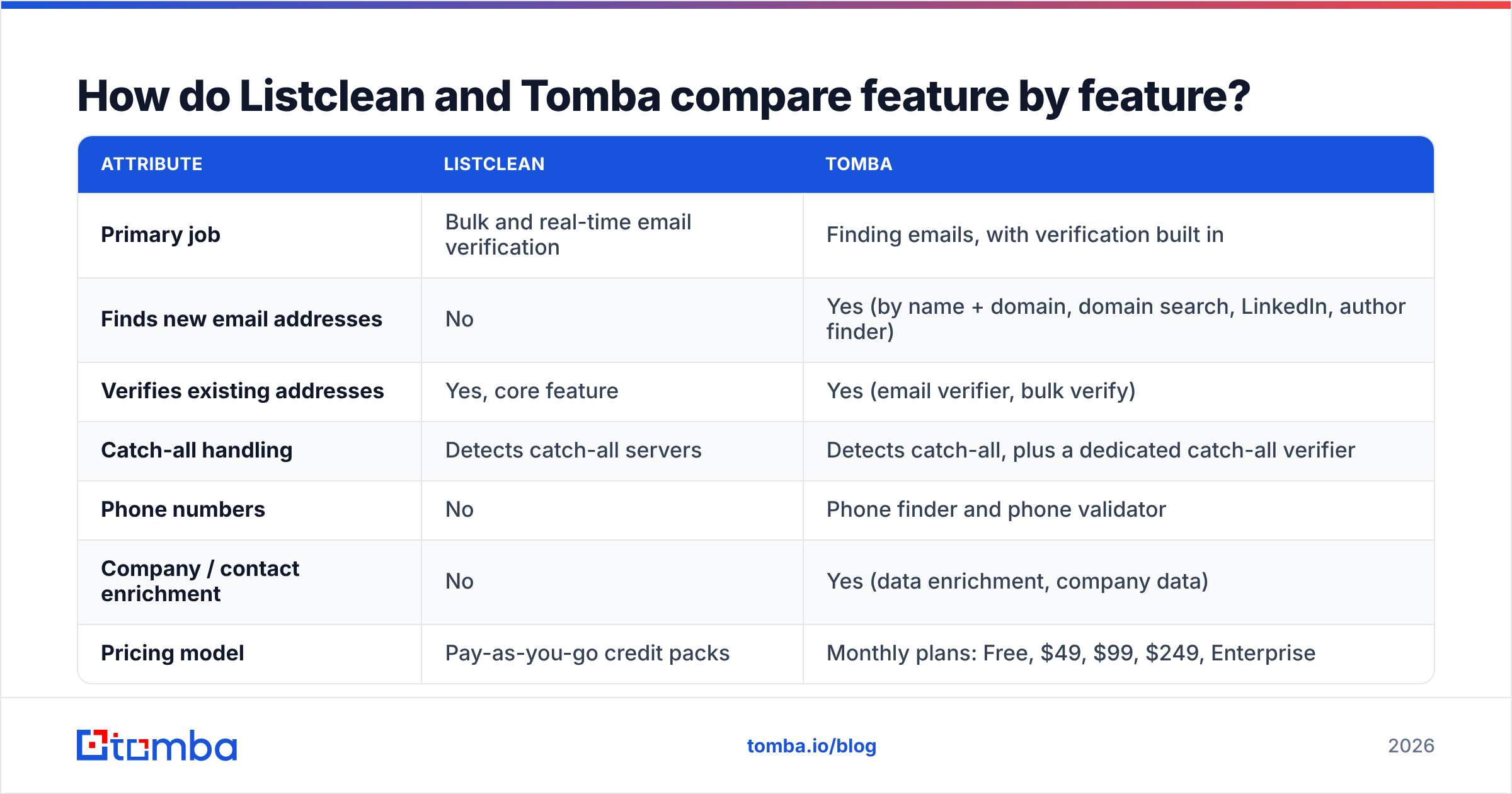
This table covers the attributes that matter most for a buying decision. Listclean details come from its public G2 and Capterra listings at the time of writing. Check them against the vendor site before you buy.
| Attribute | Listclean | Tomba |
|---|---|---|
| Primary job | Bulk and real-time email verification | Finding emails, with verification built in |
| Finds new email addresses | No | Yes (by name + domain, domain search, LinkedIn, author finder) |
| Verifies existing addresses | Yes, core feature | Yes (email verifier, bulk verify) |
| Catch-all handling | Detects catch-all servers | Detects catch-all, plus a dedicated catch-all verifier |
| Phone numbers | No | Phone finder and phone validator |
| Company / contact enrichment | No | Yes (data enrichment, company data) |
| Pricing model | Pay-as-you-go credit packs | Monthly plans: Free, $49, $99, $249, Enterprise |
| Free usage | First 100 verifications free | 25 searches/month on the free tier |
| Credit expiry | Credits never expire | Monthly plan allowance |
| API | Yes, email verification API | Yes, full finder + verifier + enrichment API |
| Integrations | API-driven | Chrome extension, Google Sheets, Excel, HubSpot, Salesforce, Zapier, Make, MCP |
| Best for | Cleaning large, existing lists cheaply | Building new prospect lists that are verified before sending |
The key rows are the first two. Everything else follows from the fact that Listclean doesn't generate contacts.
How much does Listclean cost compared with Tomba?#
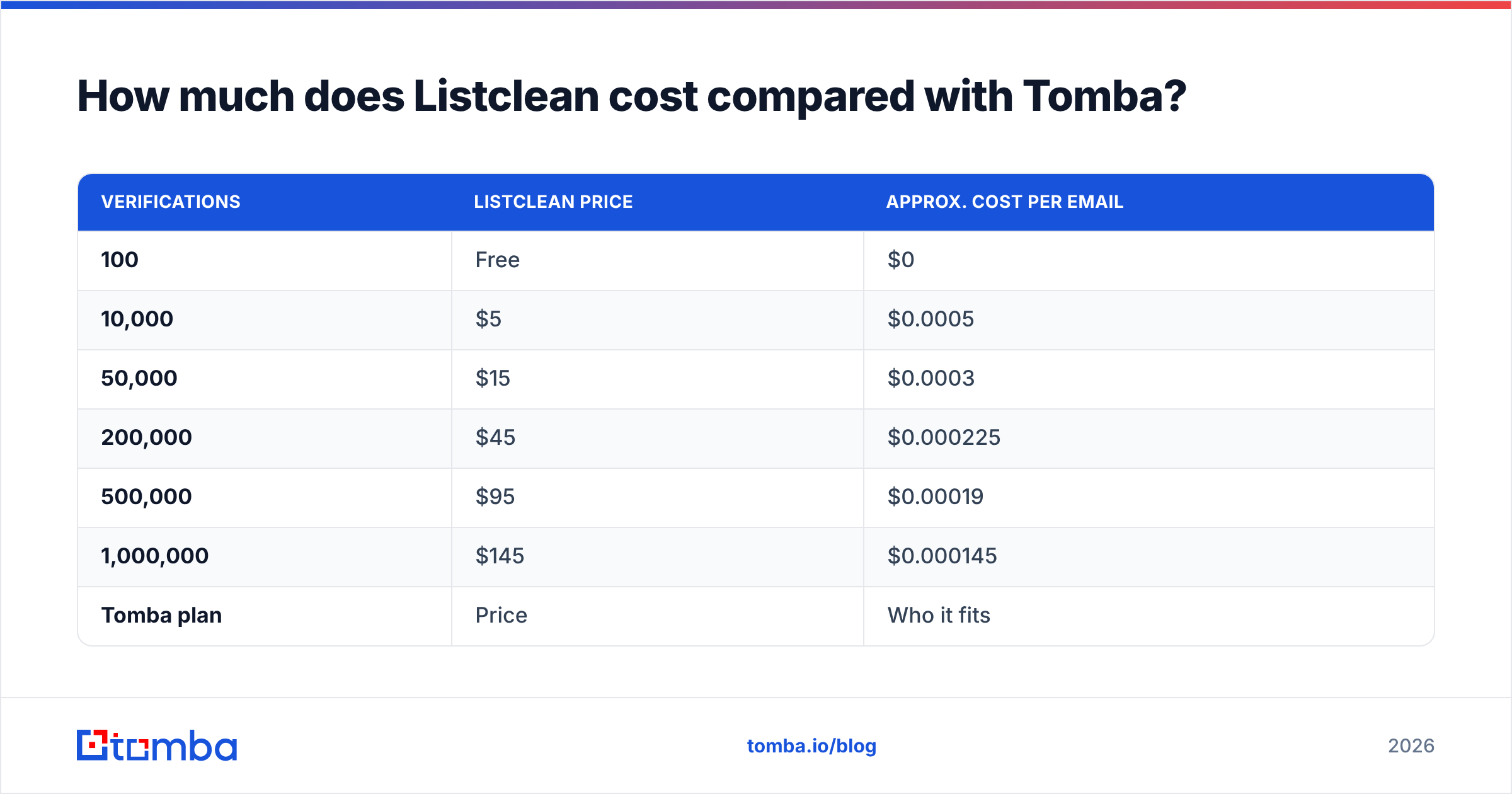
Listclean is one of the cheapest verifiers on the market. According to its G2 pricing listing, the credit packs look like this:
| Verifications | Listclean price | Approx. cost per email |
|---|---|---|
| 100 | Free | $0 |
| 10,000 | $5 | $0.0005 |
| 50,000 | $15 | $0.0003 |
| 200,000 | $45 | $0.000225 |
| 500,000 | $95 | $0.00019 |
| 1,000,000 | $145 | $0.000145 |
The listing also says Listclean doesn't charge for "unknown" results or duplicate addresses, and credits never expire. For a marketing team cleaning a 300,000-address newsletter list once a quarter, that's hard to beat.
Tomba uses subscription tiers, which you can compare on the Tomba pricing page:
| Tomba plan | Price | Who it fits |
|---|---|---|
| Free | $0 (25 searches/mo) | Testing the finder and extension |
| Starter | $49/mo | Solo SDRs and founders doing targeted outbound |
| Growth | $99/mo | Small sales teams running weekly campaigns |
| Pro | $249/mo | Agencies and larger teams with API or bulk needs |
| Enterprise | Custom | High-volume data and API contracts |
A per-email price comparison between the two is misleading. With Listclean, $5 buys you a verdict on 10,000 addresses you already own. With Tomba, your plan pays for finding addresses you don't have, verifying them, and the enrichment around them. They're priced differently because they deliver different things.
The honest takeaway: if your only job is bulk hygiene on millions of legacy addresses, Listclean is cheaper per check. If your bottleneck is getting new, reachable contacts at target accounts, a verifier's price per check doesn't matter, because it can't do that job at any price.
Which tool is more accurate?#
For verification, both tools use the same basic checks: syntax, domain and MX lookup, and an SMTP handshake with the receiving server to see whether the mailbox accepts mail. Neither can be 100% accurate, for three reasons:
- Catch-all domains accept every address at the SMTP stage. A generic verifier has to return "accept-all" or "risky" instead of a clear yes or no. Listclean flags these, and so does Tomba. Tomba also offers a catch-all verifier that uses extra signals to try to resolve some of those risky results.
- Greylisting and rate limits at the receiving server can produce "unknown" results. Listclean doesn't bill for unknowns, which is a fair policy.
- Mailboxes change over time. An address that's valid today can bounce in six months when the person leaves the company. A verifier's result is only good at the moment you run it.
Finding works differently. When Tomba returns an address, it attaches a confidence score and, where available, the public sources where the address appeared. That source trail is something a pure verifier can't give you, because it never looked for the address in the first place. It only tested whether the mailbox responds.
For outbound, you need both steps. An address that passes verification but belongs to the wrong person is still a wasted send, and a correctly identified address that bounces still hurts your sender reputation.
When should you choose Listclean?#
Choose Listclean when these statements describe your situation:
- You already have a large list. Examples include newsletter subscribers, event sign-ups, an old CRM export, or a purchased dataset. You need it cleaned before a send.
- Volume is high and budget is tight. Paying about $145 to check a million addresses is excellent value.
- Your sending is irregular. Credits that never expire suit teams that clean a list once or twice a year.
- You only need verification. You don't need enrichment, phone numbers, or prospecting, just valid, invalid, or risky results for each row.
- You're comfortable wiring an API. For signup-form validation or real-time checks inside your own app, Listclean's API is simple.
Reviewers on G2 and Capterra praise its affordability and ease of use. A few mention occasional processing delays on big files and say support is email-only. That's reasonable at this price, but plan around it if you're cleaning a list the night before a launch.
When should you choose Tomba?#
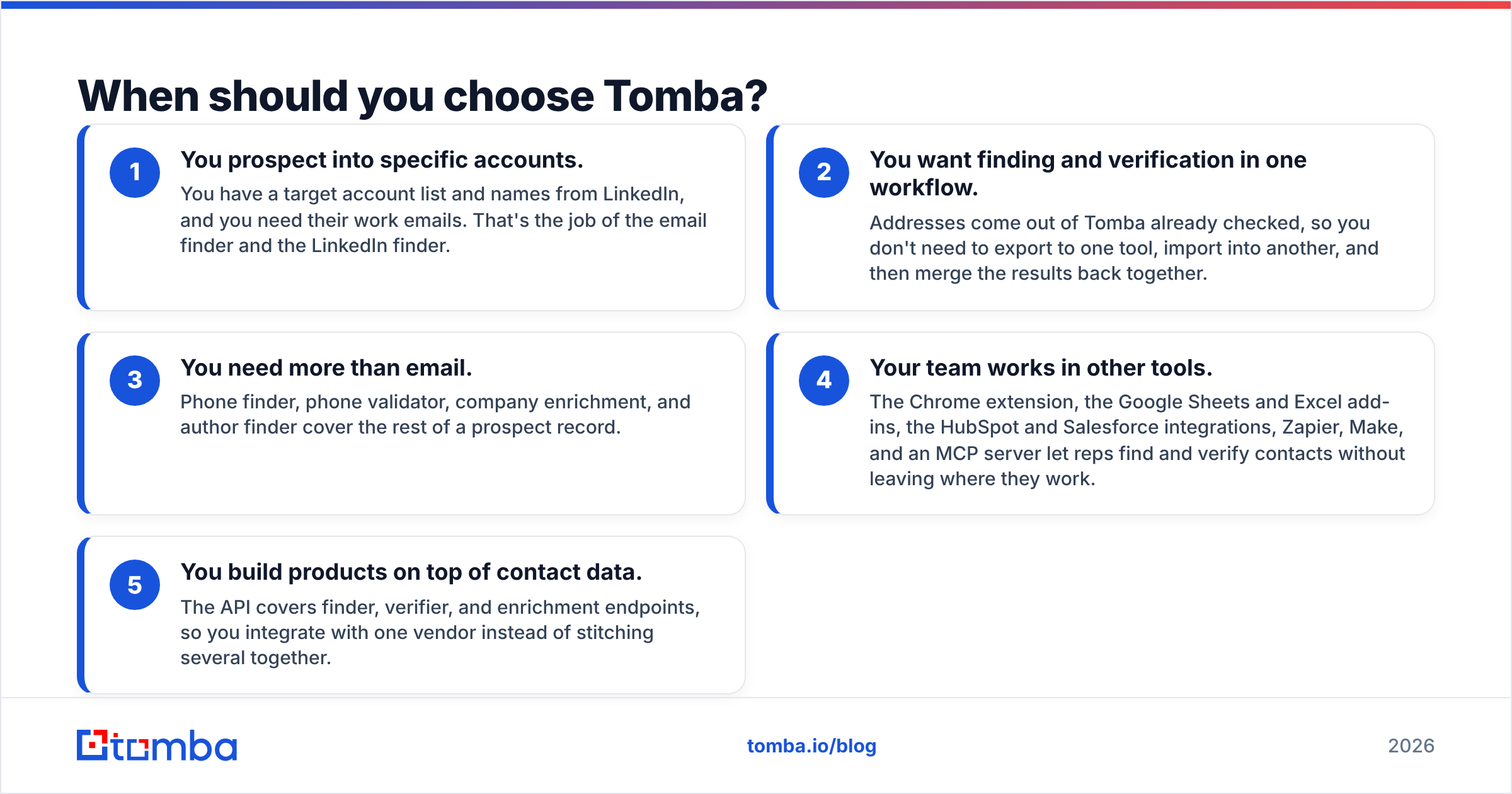
Choose Tomba when your problem is who to email rather than whether an address works:
- You prospect into specific accounts. You have a target account list and names from LinkedIn, and you need their work emails. That's the job of the email finder and the LinkedIn finder.
- You want finding and verification in one workflow. Addresses come out of Tomba already checked, so you don't need to export to one tool, import into another, and then merge the results back together.
- You need more than email. Phone finder, phone validator, company enrichment, and author finder cover the rest of a prospect record.
- Your team works in other tools. The Chrome extension, the Google Sheets and Excel add-ins, the HubSpot and Salesforce integrations, Zapier, Make, and an MCP server let reps find and verify contacts without leaving where they work.
- You build products on top of contact data. The API covers finder, verifier, and enrichment endpoints, so you integrate with one vendor instead of stitching several together.
The trade-off is that Tomba's per-check cost is higher than a budget verifier's if all you ever do is re-verify huge old lists.

Can you use Listclean and Tomba together?#
Yes. For many teams, running both is the cheapest setup that holds up in practice. A common stack looks like this:
- Find new prospects: use Tomba's finder, domain search, or LinkedIn finder to build new target lists. The contacts come out verified.
- Enrich before sequencing: add company size, role, and phone number with Tomba enrichment so your personalization and routing are based on real data.
- Re-check large lists: once a quarter, run your full CRM or newsletter export through a bulk verifier. Listclean's pricing suits this well.
- Re-verify before sends: for anything older than about 90 days, verify again right before a campaign goes out. Bounce rates rise quietly as people change jobs.
With this split, each tool does the job it's designed for: Tomba builds the list and Listclean keeps the rest of your database clean. It also keeps your bounce rate low, which protects email deliverability across your sending domains.
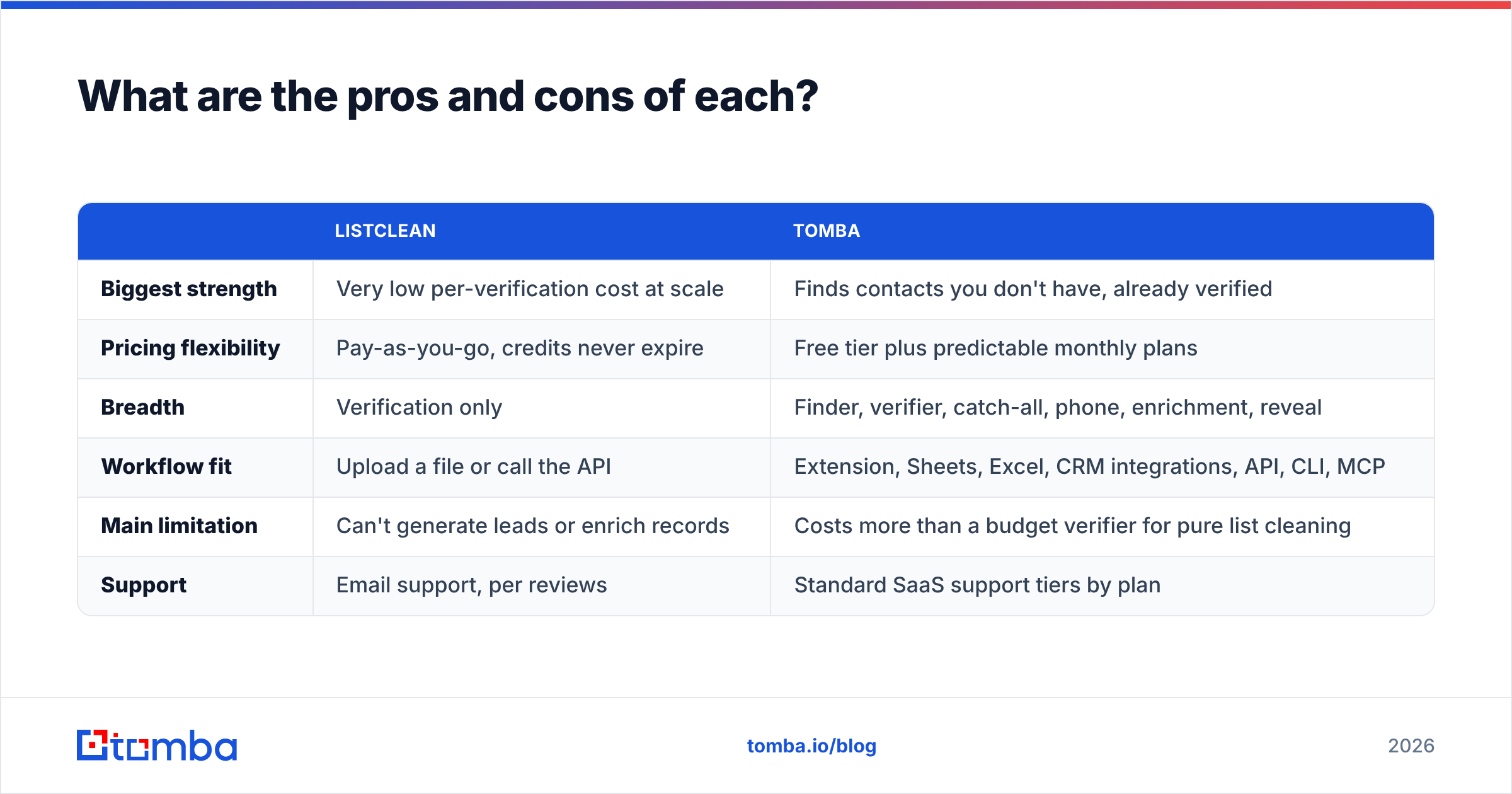
What are the pros and cons of each?#
| Listclean | Tomba | |
|---|---|---|
| Biggest strength | Very low per-verification cost at scale | Finds contacts you don't have, already verified |
| Pricing flexibility | Pay-as-you-go, credits never expire | Free tier plus predictable monthly plans |
| Breadth | Verification only | Finder, verifier, catch-all, phone, enrichment, reveal |
| Workflow fit | Upload a file or call the API | Extension, Sheets, Excel, CRM integrations, API, CLI, MCP |
| Main limitation | Can't generate leads or enrich records | Costs more than a budget verifier for pure list cleaning |
| Support | Email support, per reviews | Standard SaaS support tiers by plan |
Which should you pick in 2026?#
Ask yourself one question: does my pipeline problem start before or after I have the email address?
- After you have it: you have plenty of addresses and are worried about bounces. Listclean is a strong, very affordable verifier, and you probably don't need anything more for that job.
- Before you have it: you know which companies and roles you want, but you don't have reachable contacts. A verifier can't help you there. You need a finder, and Tomba is designed for exactly that.
- Both: you're running outbound at scale and also keeping a large database. Use Tomba to acquire and enrich contacts, and a bulk verifier like Listclean for periodic hygiene.
For most B2B sales teams comparing these two, the bottleneck is finding contacts, not cleaning them. Lists go stale much faster than most teams can refill them, and a verifier can only remove bad addresses, not add new ones.
If you need new, verified contacts at your target accounts, start with the Tomba Email Finder. Enter a name and company domain, and you get an address with a confidence score, its public sources, and a built-in verification result. The free tier's 25 searches a month are enough to test it on your own target accounts before choosing a plan.
Related guides#
// get started
Find, verify and enrich your first contacts today
Start on the free plan with 25 searches a month, then scale when your team is ready.
Free plan · No credit card required · GDPR & CCPA
// about the author