ListKit vs FindEmails.com Toofr: Which Email Tool Wins in 2026?
ListKit sells verified lead lists by the thousand, and FindEmails.com (formerly Toofr) sells cheap one-off email lookups. Here's how they compare on price, data depth, and accuracy, and which one fits your outbound motion.
This ListKit vs FindEmails.com Toofr comparison covers pricing, accuracy and daily workflow, so you can pick the right tool before you pay.
TL;DR
- ListKit is a lead-list builder for cold emailers. You filter a B2B database, export contacts with "triple-verified" emails, and pay with credits. Plans start at $97/mo billed monthly, or $83/mo billed yearly with 24,000 credits a year.
- FindEmails.com is the product that used to be called Toofr, which launched in 2011. It's a budget tool for finding and verifying emails: you give it a name and domain, it returns a guessed email with a confidence score. Plans run $29, $49 and $99 per month.
- If you need to build lists from scratch with titles, industries and headcount filters, ListKit is clearly the better tool. FindEmails.com has no prospecting database worth the name.
- If you already have names and domains and just need emails, FindEmails.com is cheap. It relies on pattern guessing, though, returns no phone numbers, and development has been slow for years.
- If you want both (a lookup engine, bulk finding, verification and an API) on one mid-priced plan, look at a dedicated email finder like Tomba before you commit.
What are ListKit and FindEmails.com (Toofr)?#
These two tools get compared because both put an email address in your hands. They get there in very different ways, and they're built for different jobs.
ListKit (listkit.io) is a prospecting database built for outbound agencies and cold email teams. You open the search, filter by job title, seniority, industry, location and company size, then export the matching contacts. Each export uses credits. ListKit's main pitch is that every email is "triple-verified" before you get it, which matters if you're sending thousands of cold emails a week and your domain reputation is at stake. It's a list-building tool first, and email finding is part of that.
FindEmails.com (findemails.com) is the current name for Toofr, one of the oldest email-guessing tools on the market. You type in a person's name and a company domain, or a company and a role, and it returns the most likely email address with a confidence score. It also includes a basic verifier that runs mail-server checks. It's a lookup tool: it's built to answer "what is this one person's email?", not "who should I be emailing?"
That split drives almost every other difference in this comparison. A forward lookup means you already know who you want to reach. Database prospecting means you're finding out who to reach. ListKit is built for the second job and FindEmails.com for the first.
ListKit vs FindEmails.com Toofr: how do they compare side by side?#
Here's the head-to-head on the attributes that actually change your cost and results.
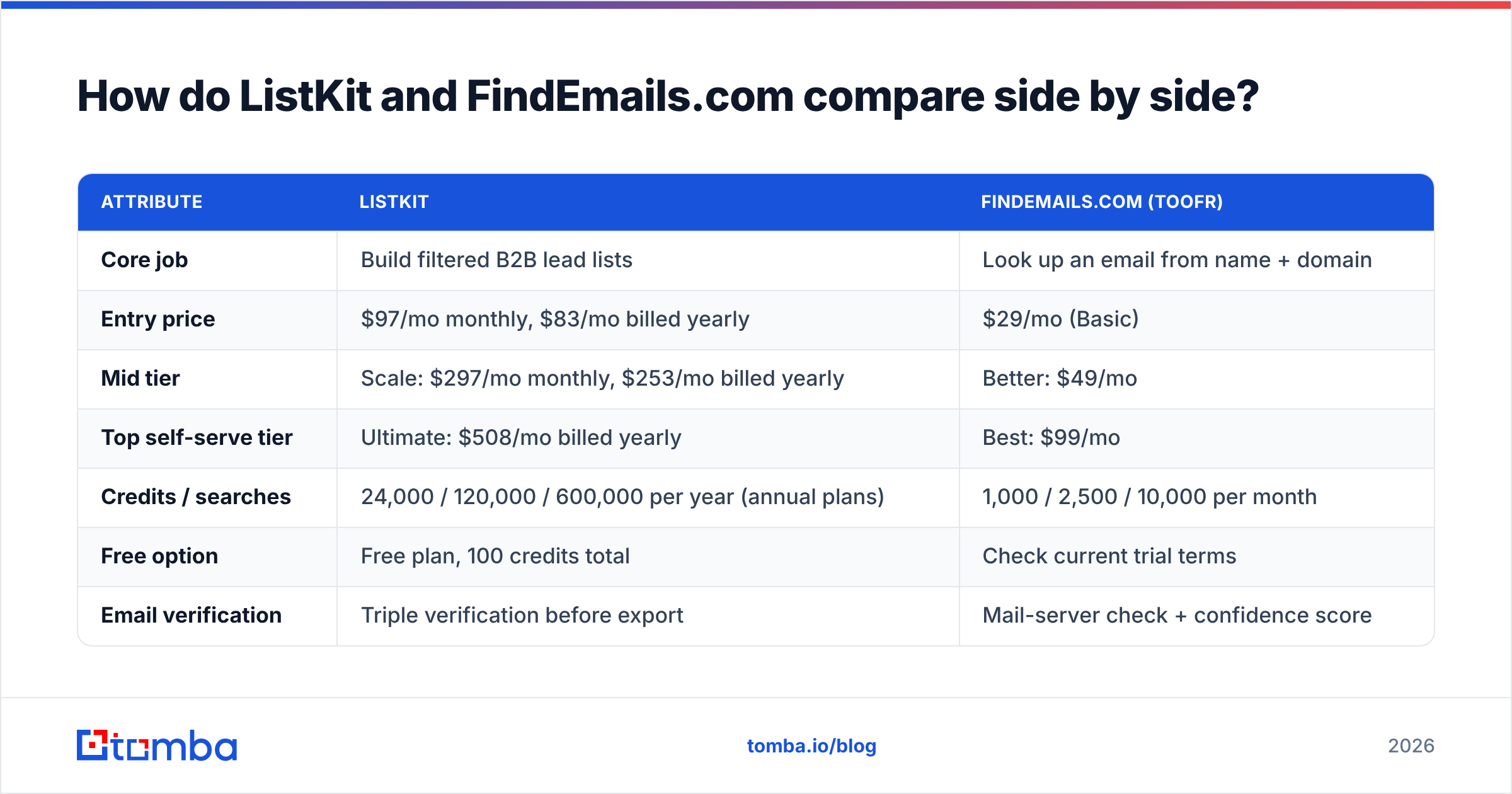
| Attribute | ListKit | FindEmails.com (Toofr) |
|---|---|---|
| Core job | Build filtered B2B lead lists | Look up an email from name + domain |
| Entry price | $97/mo monthly, $83/mo billed yearly | $29/mo (Basic) |
| Mid tier | Scale: $297/mo monthly, $253/mo billed yearly | Better: $49/mo |
| Top self-serve tier | Ultimate: $508/mo billed yearly | Best: $99/mo |
| Credits / searches | 24,000 / 120,000 / 600,000 per year (annual plans) | 1,000 / 2,500 / 10,000 per month |
| Free option | Free plan, 100 credits total | Check current trial terms |
| Email verification | Triple verification before export | Mail-server check + confidence score |
| Phone numbers | Yes, 3 credits per number found | No |
| Prospecting filters | Title, industry, location, headcount and more | Minimal: role-at-company lookups |
| Top-up credits | Plan-based | About $0.02 per extra credit |
| Best for | Agencies and SDR teams sending at volume | Solo users enriching a known list cheaply |
Pricing for both tools is taken from public pricing pages and third-party pricing breakdowns as of 2026. Both vendors change plans without much notice, so check before you buy.
Which tool gives you more accurate emails?#
For cold outreach, accuracy is the only number that really matters. A cheap email that bounces costs you more than an expensive one that gets delivered. Every bounce chips away at your sender reputation.

ListKit's approach: emails go through multiple verification passes before you can export them. You pay for the verification up front, as part of the credit. In practice, that means fewer surprises when you load the list into your sending tool. The weak spot for any database product is freshness. A contact verified three months ago may have changed jobs since, so check the verification date on older segments.
FindEmails.com's approach: it builds likely addresses from the company's email pattern (for example first.last@ or flast@), tests them against the mail server, and returns a confidence score. The vendor claims about 98% accuracy. We couldn't find an independent benchmark that backs that up. Pattern guessing works well on domains that answer SMTP checks honestly. It struggles on:
- Catch-all domains. The server accepts every address, so a "valid" result tells you almost nothing.
- Companies with mixed patterns. Older staff might be on
jsmith@while newer hires are onjohn.smith@. - Aggressive mail gateways. Some block or rate-limit verification probes.
- Recent job changers. The pattern is correct, but the person has left.
Many mid-market companies run catch-all domains. If a big share of your targets do, you'll want a dedicated catch-all verifier with either tool.

How much does each tool actually cost per email?#
Sticker prices are misleading here because the two tools meter different things. ListKit credits buy exported, verified contacts. FindEmails.com credits buy searches, and not every search returns a usable address.
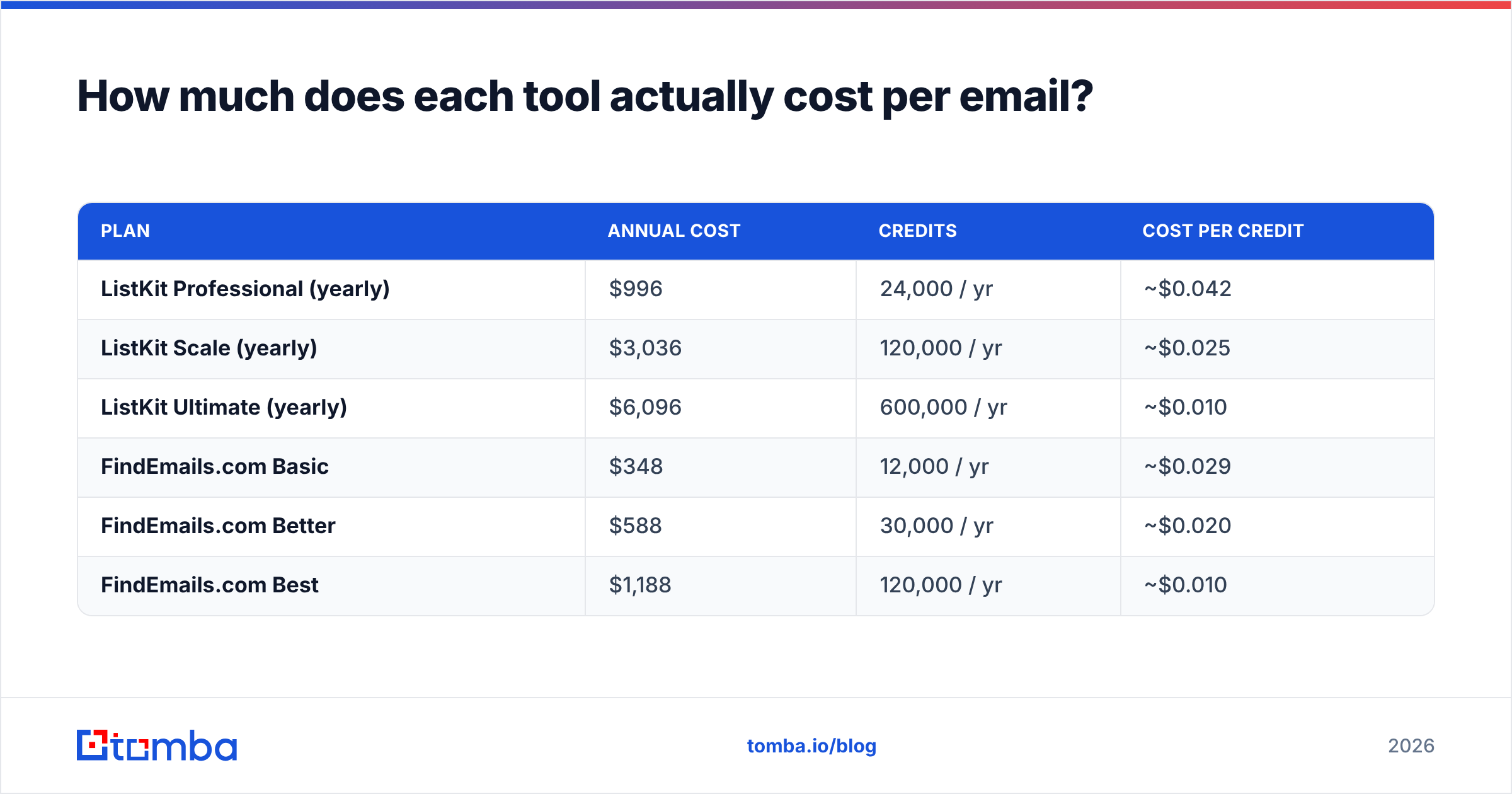
Cost per credit at list price:
| Plan | Annual cost | Credits | Cost per credit |
|---|---|---|---|
| ListKit Professional (yearly) | $996 | 24,000 / yr | ~$0.042 |
| ListKit Scale (yearly) | $3,036 | 120,000 / yr | ~$0.025 |
| ListKit Ultimate (yearly) | $6,096 | 600,000 / yr | ~$0.010 |
| FindEmails.com Basic | $348 | 12,000 / yr | ~$0.029 |
| FindEmails.com Better | $588 | 30,000 / yr | ~$0.020 |
| FindEmails.com Best | $1,188 | 120,000 / yr | ~$0.010 |
At first glance FindEmails.com looks cheaper per credit on the lower tiers. That changes once you account for three things:
- Hit rate. If 70% of FindEmails.com searches return a confident address, your real cost per usable email on the Basic plan is closer to $0.041. That's about the same as ListKit Professional, and you still had to source the names yourself.
- Monthly vs yearly billing on ListKit. ListKit's yearly plans come with far more credits than its monthly ones. On monthly billing, ListKit is noticeably more expensive per contact. If you won't commit to a year, run the numbers again.
- Sourcing time. ListKit gives you the names, titles and companies along with the email. With FindEmails.com, you (or an SDR, or a scraping tool) spend hours building the input list. That labour cost rarely shows up in pricing comparisons, but it's real.
Phone numbers only matter if you call. ListKit charges 3 credits per phone number, and only when one is found. FindEmails.com doesn't offer phone data at all, so a multichannel team would need a second tool anyway.

Is ListKit better than FindEmails.com for cold email agencies?#
Yes, for most agencies. Agencies need a steady supply of fresh, filterable, verified contacts for many clients at once. ListKit is built for that workflow:
- Filter-first search. You can run "VP Sales, 50–200 employees, SaaS, US" and export in one step.
- Verification included. You don't need a separate clean-up pass before loading contacts into your sequencer.
- Volume pricing. The Scale and Ultimate plans bring per-contact cost down to one to three cents.
- Training and community. Higher tiers include cold email training material, which agencies building new SDR teams tend to value.
Where ListKit is weaker: it's a database, so you're limited to what's in it. For niche verticals, small local businesses or very new companies, coverage can be thin. You'll then need a lookup tool to fill the gaps with contacts you found elsewhere, such as LinkedIn, conference lists or a partner's CRM.
FindEmails.com rarely suits agencies as their main data source. It lacks bulk prospecting, team features and multichannel data, and signs of slow development (documentation that dates back years, a small team) make it risky to build a client-facing operation on it.
Is FindEmails.com (Toofr) still worth using in 2026?#
For a narrow use case, yes. FindEmails.com makes sense when:
- You already have a list of names and domains, perhaps from a webinar signup, an event attendee export or a LinkedIn search, and you just need emails attached.
- Your volume is low, a few hundred to a couple of thousand lookups a month.
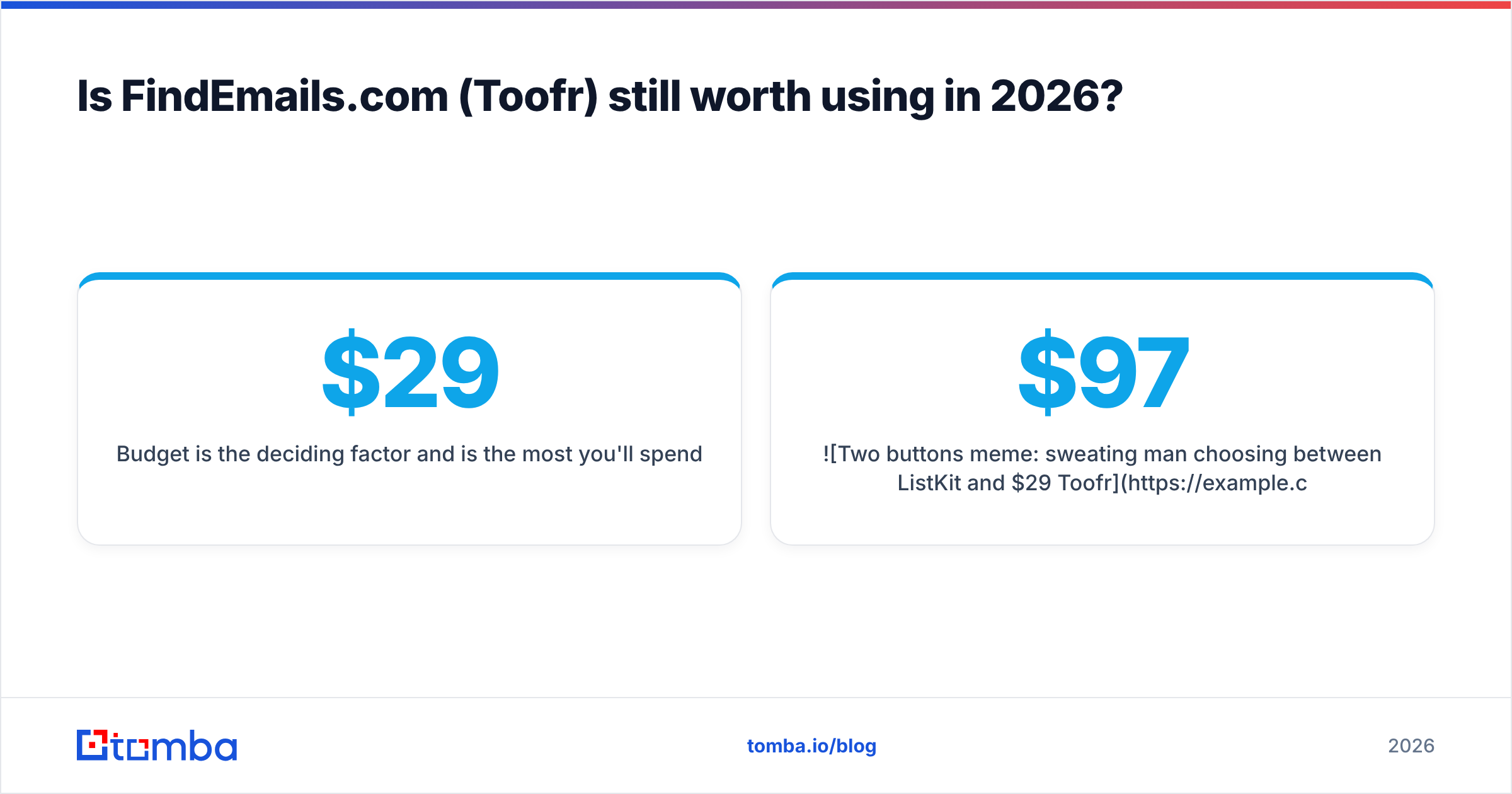
- Budget is the deciding factor and $29/mo is the most you'll spend.
It makes less sense when:
- You need phone numbers, company firmographics or technographics.
- You're sending at volume and one bad batch could burn a domain.
- You need a well-maintained API with current documentation and active support.
G2 reviews for FindEmails.com are few and mostly old. That fits the picture of a stable but mostly unchanged product. It isn't automatically a problem, since some tools do one thing and stay the same. But email infrastructure keeps changing. Google and Yahoo's sender rules, more catch-all setups and anti-probing gateways all affect how reliable pattern guessing is.

How do the workflows differ day to day?#
Here's how a typical week looks with each tool.
With ListKit:
- Define your ICP filters: title, seniority, industry, geography, headcount.
- Preview and refine the results until the count and quality look right.
- Export verified contacts straight into your sending tool or CSV.
- Add phone numbers only for the tier-one accounts you'll actually call.
- Re-run the saved search next month to pick up new matches.
With FindEmails.com:
- Build your target list somewhere else: LinkedIn, Crunchbase, a scraper or your CRM.
- Upload names and domains, or search them one at a time.
- Review confidence scores and drop low-confidence results.
- Verify separately, or accept the risk on catch-all domains.
- Load contacts into your sequencer and watch bounce rates closely.
The ListKit workflow puts most of the effort into choosing filters. The FindEmails.com workflow puts most of it into sourcing. Which one suits you depends on whether your bottleneck is who to contact or how to reach them.
What are the pros and cons of each?#
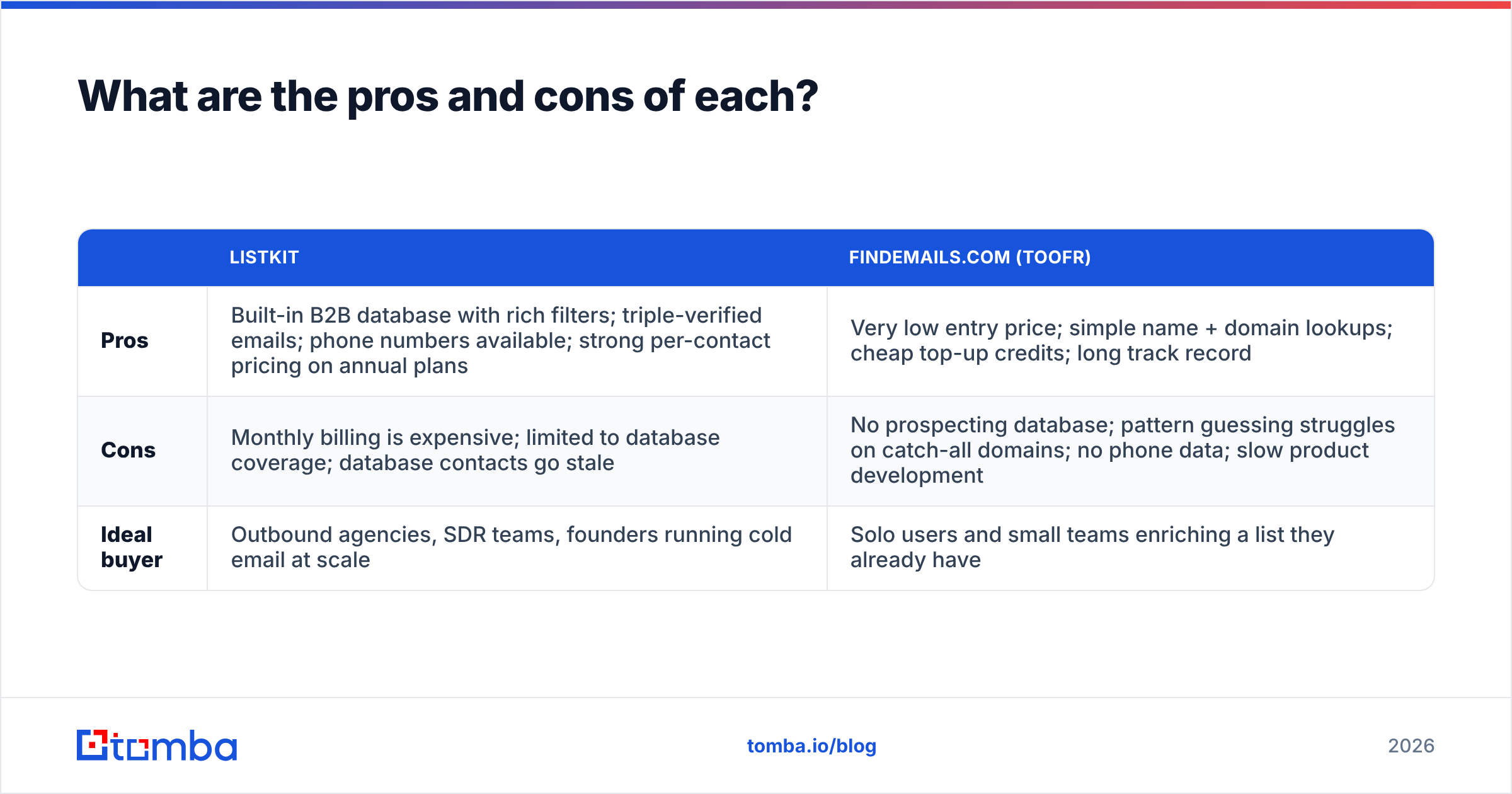
| ListKit | FindEmails.com (Toofr) | |
|---|---|---|
| Pros | Built-in B2B database with rich filters; triple-verified emails; phone numbers available; strong per-contact pricing on annual plans | Very low entry price; simple name + domain lookups; cheap top-up credits; long track record |
| Cons | Monthly billing is expensive; limited to database coverage; database contacts go stale | No prospecting database; pattern guessing struggles on catch-all domains; no phone data; slow product development |
| Ideal buyer | Outbound agencies, SDR teams, founders running cold email at scale | Solo users and small teams enriching a list they already have |
Are there alternatives that cover both jobs?#
Many teams need both a database to discover prospects and a lookup engine for contacts they found on their own. Paying for ListKit plus a separate finder plus a separate verifier adds up quickly.
A dedicated email finder like Tomba covers name + domain lookups (the FindEmails.com job), domain-wide searches and bulk finding. It also adds an email verifier and catch-all handling on the same plan. It's not a full replacement for ListKit's filter-heavy list building. But if you mostly attach verified emails to people you already know, it closes most of the gap in the ListKit vs FindEmails.com Toofr choice.
Tomba's plans start with a free tier of 25 searches a month, then Starter at $49/mo, Growth at $99/mo and Pro at $249/mo. You can compare them on the Tomba pricing page.
For a broader look at what to check in any B2B data vendor (coverage, verification method, data freshness, compliance), Gartner's sales-technology research is a solid, vendor-neutral starting point.
So which should you choose: ListKit or FindEmails.com?#
The ListKit vs FindEmails.com Toofr decision comes down to one question: do you need a database or a lookup tool?
Choose ListKit if:
- You're building outbound lists from scratch every month.
- You send at volume and need verification done before export.
- You can commit to annual billing and get the lower per-contact price.
- Phone numbers for top accounts would help.
Choose FindEmails.com if:
- You already have names and domains and just need emails.
- You do fewer than a few thousand lookups a month.
- Price matters more than data depth or product roadmap.
Choose neither on its own if: you mostly look up known contacts but also need bulk processing, catch-all verification, an API and integrations with your CRM. That combination is exactly what a dedicated finder-plus-verifier platform is built for.
Ready to find emails without guessing?#
If your bottleneck is getting a verified email for a specific person rather than discovering who to contact, try the Tomba Email Finder. Enter a name and company domain and you'll get the address, a confidence score and its public sources, with verification and catch-all checks on the same account. The free plan includes 25 searches a month, so you can test it against your own target accounts before paying. Paid plans start at $49/mo when you're ready to scale.
Related guides#
// get started
Find, verify and enrich your first contacts today
Start on the free plan with 25 searches a month, then scale when your team is ready.
Free plan · No credit card required · GDPR & CCPA
// about the author