ListKit vs Mailfloss: Lead Database or List Cleaner in 2026?
ListKit builds prospect lists. Mailfloss cleans the lists you already have. Here's how to tell which one your workflow needs, what each costs, and when you need both.
TL;DR
- ListKit and Mailfloss don't compete head-to-head. ListKit is a B2B lead database that gives you verified contacts to prospect. Mailfloss is an automated verification service that cleans lists already sitting in your email platform.
- Pick ListKit if your problem is "I don't have enough people to email." Paid plans start around $83/mo on annual billing, and every plan has the same features. You only pay more for more credits.
- Pick Mailfloss if your problem is "my existing list bounces too much." Plans start at $17/mo, and it plugs into Mailchimp, Klaviyo, HubSpot and 35+ other platforms to clean your list every day on autopilot.
- Outbound teams often end up paying for both: one tool to source contacts, another to keep them clean. A combined email finder and verifier can cover both jobs with one bill.
- Prices below were checked in September 2026. Confirm on each vendor's pricing page before you buy, because credit bundles change often.
What is the real difference between ListKit and Mailfloss?#
People search "ListKit vs Mailfloss" because both mention verified emails. That's where the overlap ends.
ListKit is a list-building platform. You filter a B2B contact database by job title, industry, company size, location and similar criteria, then export leads with business emails (and phone numbers if you want them) for cold outreach. The emails are verified before you get them. The product is the data.
Mailfloss is a list-hygiene platform. It has no database and never gives you a new contact. You connect it to your email service provider (ESP), and it scans your subscribers every day. It removes or tags invalid, disposable and risky addresses, and it fixes common typos such as gmial.com. The product is the cleaning.
So the comparison comes down to this: do you need more contacts, or cleaner contacts?
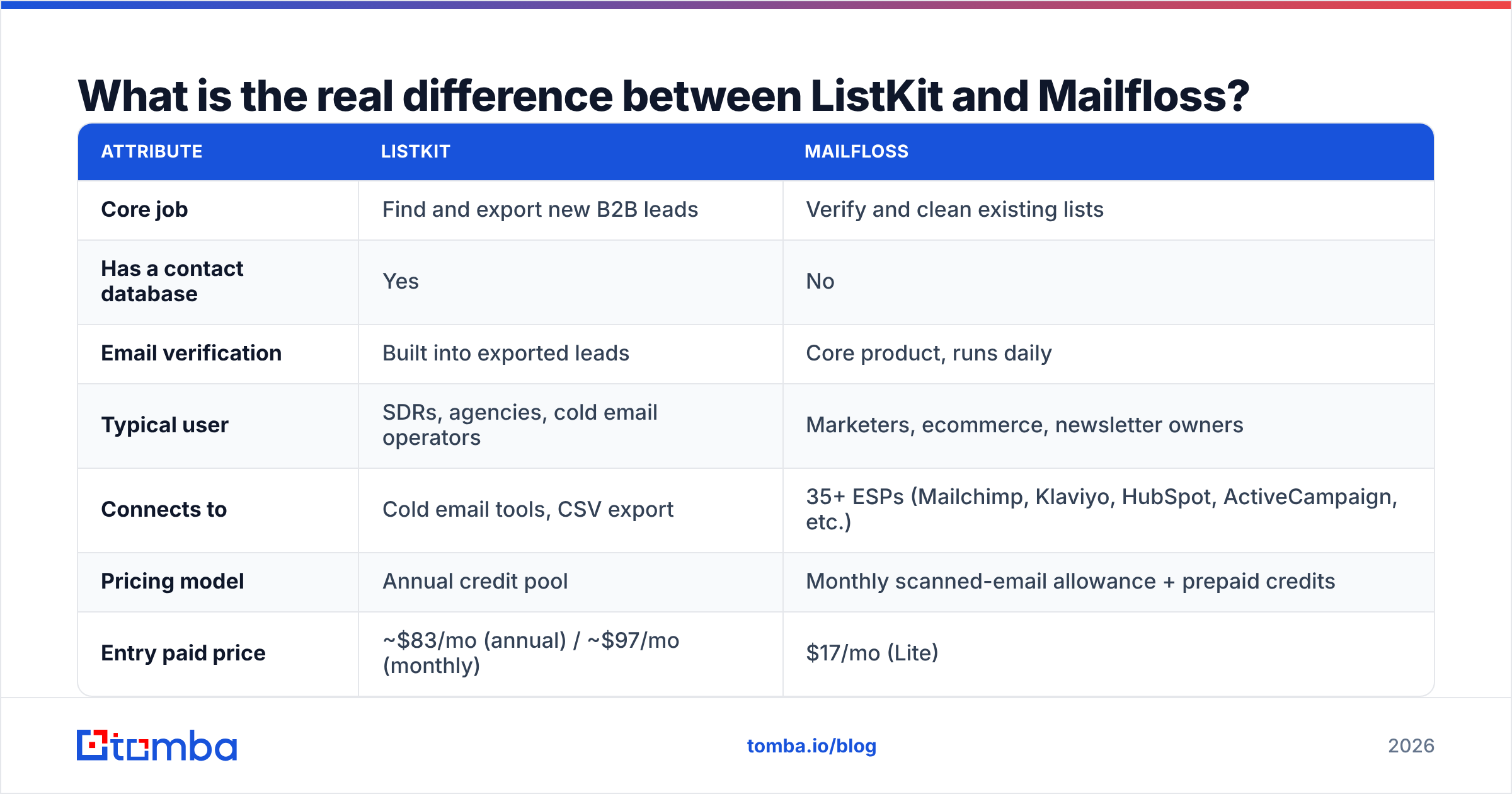
| Attribute | ListKit | Mailfloss |
|---|---|---|
| Core job | Find and export new B2B leads | Verify and clean existing lists |
| Has a contact database | Yes | No |
| Email verification | Built into exported leads | Core product, runs daily |
| Typical user | SDRs, agencies, cold email operators | Marketers, ecommerce, newsletter owners |
| Connects to | Cold email tools, CSV export | 35+ ESPs (Mailchimp, Klaviyo, HubSpot, ActiveCampaign, etc.) |
| Pricing model | Annual credit pool | Monthly scanned-email allowance + prepaid credits |
| Entry paid price | ~$83/mo (annual) / ~$97/mo (monthly) | $17/mo (Lite) |
| Free option | 100 credits | 7-day free trial on subscriptions |
How does ListKit work?#
Think of ListKit as a vending machine for prospect lists. You choose filters, pay in credits, and get a CSV of contacts.
A few mechanics matter for budgeting:
- Credits, not feature tiers. Every ListKit plan has the same features. Higher plans just include more credits, so you don't have to upgrade to unlock a feature.
- Emails are cheap, phones are not. A business email costs 1 credit. Phone numbers cost several credits each, and you're only charged when a number is found. If you run email-only outbound, your credits go much further.
- Annual credit pools. Professional gives roughly 24,000 credits per year, Scale about 120,000 and Ultimate about 600,000. That works well for steady monthly volume. It works less well if you prospect in bursts and let credits sit unused.
- Verification is upstream. ListKit says it verifies emails before export, so the file you download is meant to be ready to send. You don't have to run a separate verification pass on day one.
- Extras cost credits too. Add-ons like the AI script writer draw from the same credit pool, which can quietly reduce the number of contacts you get.
Where ListKit fits best: agencies and small outbound teams who send cold email at volume and want one place to build lists without stitching together a scraper, a finder and a verifier.
Where it's weaker: ListKit gives you no help once those contacts are in your CRM or ESP and start going stale. People change jobs, companies rebrand domains, and inboxes get shut down. B2B data decays fast. HubSpot's research on database decay is a useful reminder that a list verified today won't stay clean all year.

How does Mailfloss work?#
If ListKit is the vending machine, Mailfloss is the cleaning crew that comes back every night.
You connect your ESP once. From then on, Mailfloss:
- Scans new and existing subscribers daily and flags hard-invalid, disposable and role-based addresses.
- Acts on your behalf. Depending on your settings it can unsubscribe, delete or tag bad contacts directly in your ESP, so you don't have to export and re-import files.
- Fixes typos in common domains, which saves real signups that would otherwise bounce.
- Offers one-off verification through prepaid credits if you only need to clean a single file.
Pricing (September 2026, per Mailfloss and Capterra's Mailfloss listing):
| Plan | Price | Emails scanned / month | Notable extras |
|---|---|---|---|
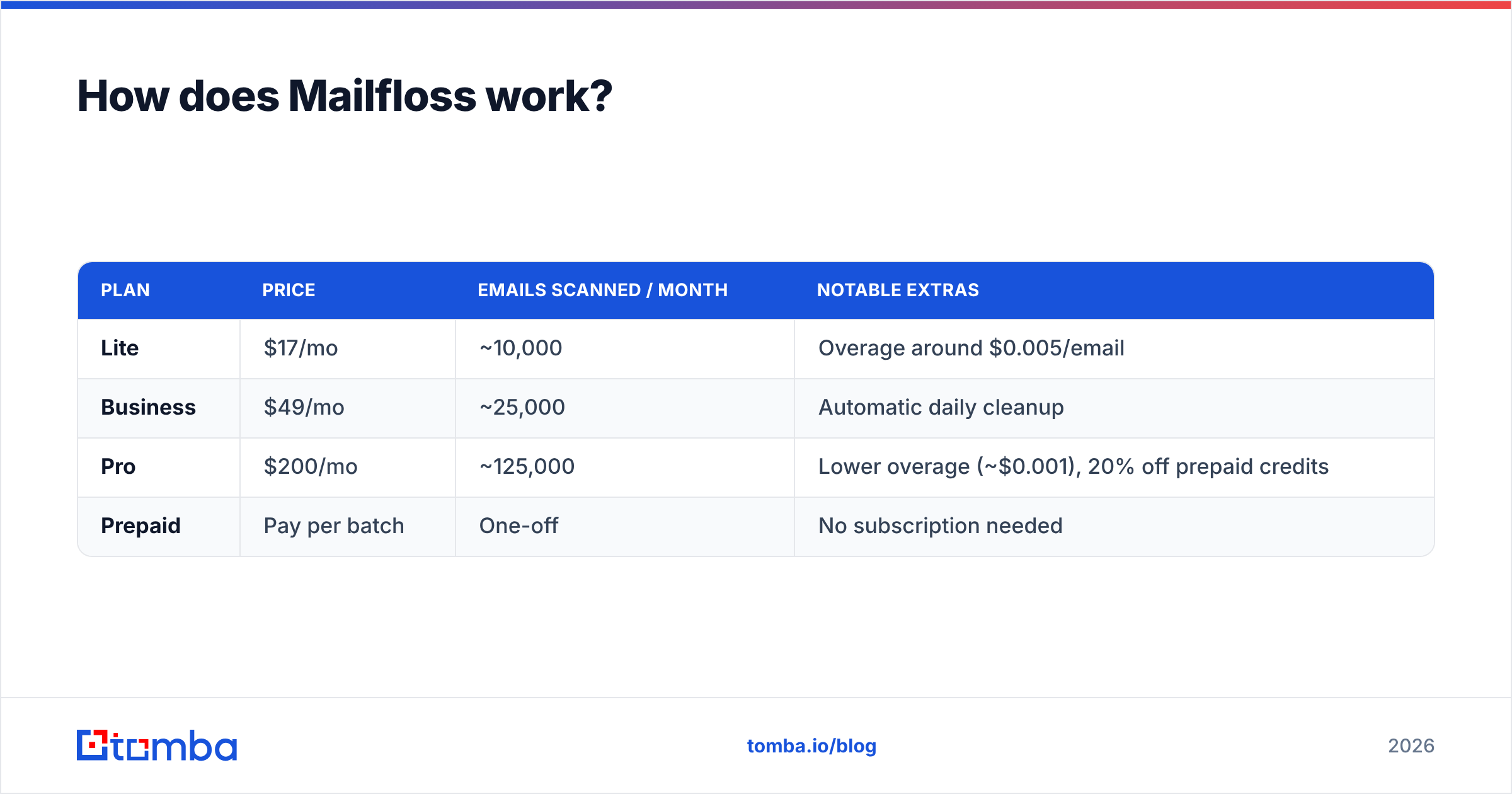
| Lite | $17/mo | ~10,000 | Overage around $0.005/email |
| Business | $49/mo | ~25,000 | Automatic daily cleanup |
| Pro | $200/mo | ~125,000 | Lower overage (~$0.001), 20% off prepaid credits |
| Prepaid | Pay per batch | One-off | No subscription needed |
Where Mailfloss fits best: ecommerce brands, SaaS companies and creators with inbound or opt-in lists in Mailchimp, Klaviyo or ConvertKit who want bounces handled without anyone thinking about them.
Where it's weaker: it's built around marketing ESPs, not cold outbound. If your sends go through a cold email sequencer and your leads come from a database, you'll mostly use Mailfloss's one-off verification, not the autopilot feature that sets it apart.
Is ListKit better than Mailfloss?#
Neither is better overall. Each one wins at a different job. Here's the head-to-head on the attributes buyers actually weigh.
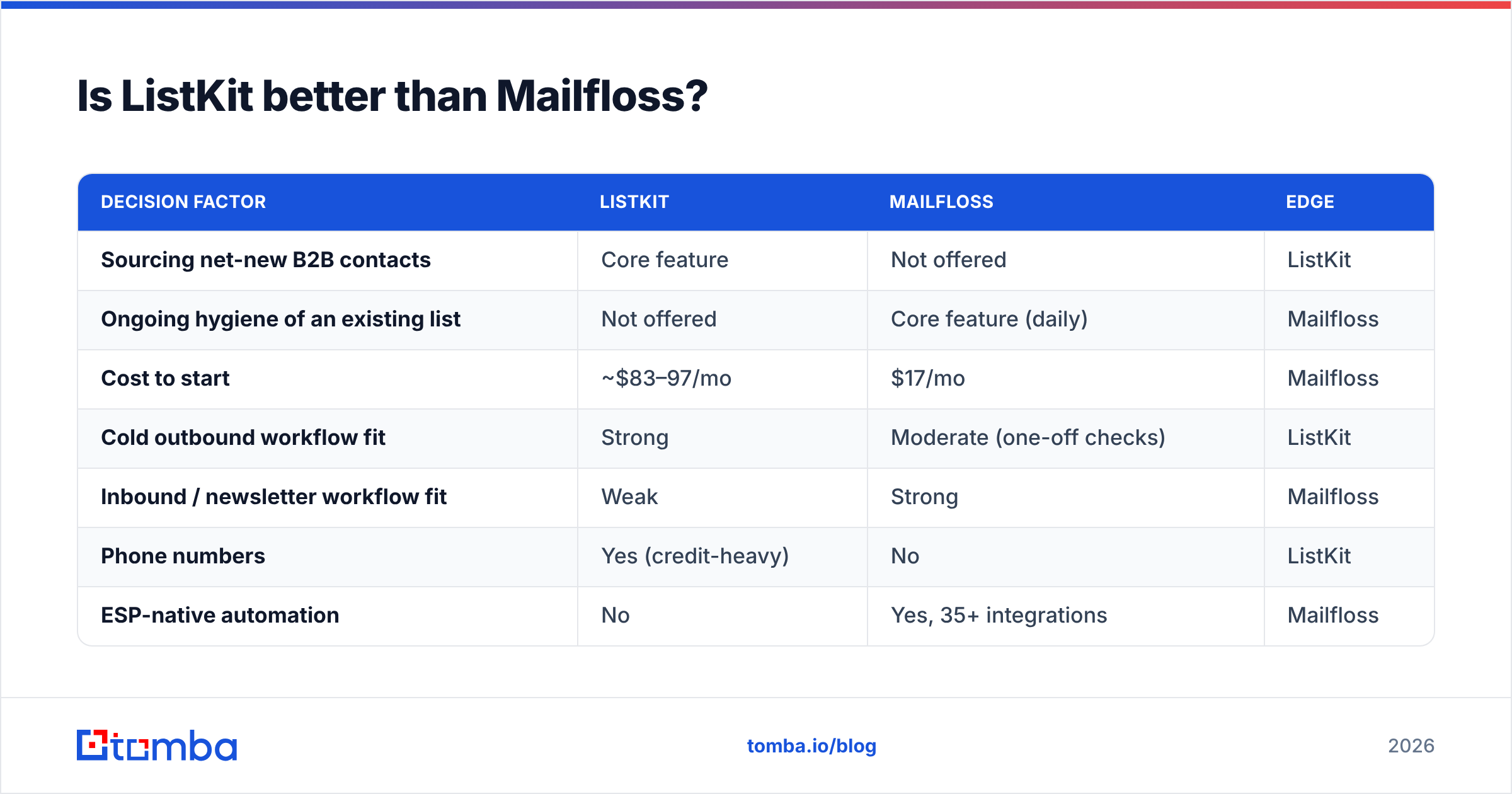
| Decision factor | ListKit | Mailfloss | Edge |
|---|---|---|---|
| Sourcing net-new B2B contacts | Core feature | Not offered | ListKit |
| Ongoing hygiene of an existing list | Not offered | Core feature (daily) | Mailfloss |
| Cost to start | ~$83–97/mo | $17/mo | Mailfloss |
| Cold outbound workflow fit | Strong | Moderate (one-off checks) | ListKit |
| Inbound / newsletter workflow fit | Weak | Strong | Mailfloss |
| Phone numbers | Yes (credit-heavy) | No | ListKit |
| ESP-native automation | No | Yes, 35+ integrations | Mailfloss |
| Setup effort | Filter, export, upload | Connect ESP once | Mailfloss |
The pattern is simple. ListKit wins every row about getting contacts, and Mailfloss wins every row about keeping them clean.
Which should you choose for your workflow?#
Work through this quickly:
- You run cold outbound and have no list yet. Start with ListKit or another B2B data source. Mailfloss can't help until you have contacts.
- You have a 50,000-subscriber newsletter that bounces 4%. Choose Mailfloss. A lead database won't fix a hygiene problem, and ESPs like Mailchimp may suspend accounts with bounce rates that high.
- You run outbound and keep contacts for 6+ months. You need sourcing now and re-verification later. That means either ListKit plus a verifier, or a single tool that does both.
- You're an agency with many client lists in different ESPs. Mailfloss's autopilot is valuable here, and you'll pair it with whatever data source each client uses.
- You're cost-sensitive and send under 10,000 emails a month. Mailfloss Lite at $17 is the cheapest line item on this page. But if you also need to find contacts, add the cost of a data tool before you compare.
Bounce rate is the metric both tools affect. Mailbox providers treat a high bounce rate as a spam signal, and that hurts your sender reputation and pushes future sends to spam. Whichever tool you pick, aim to keep hard bounces under about 2%.
Do you actually need two tools?#
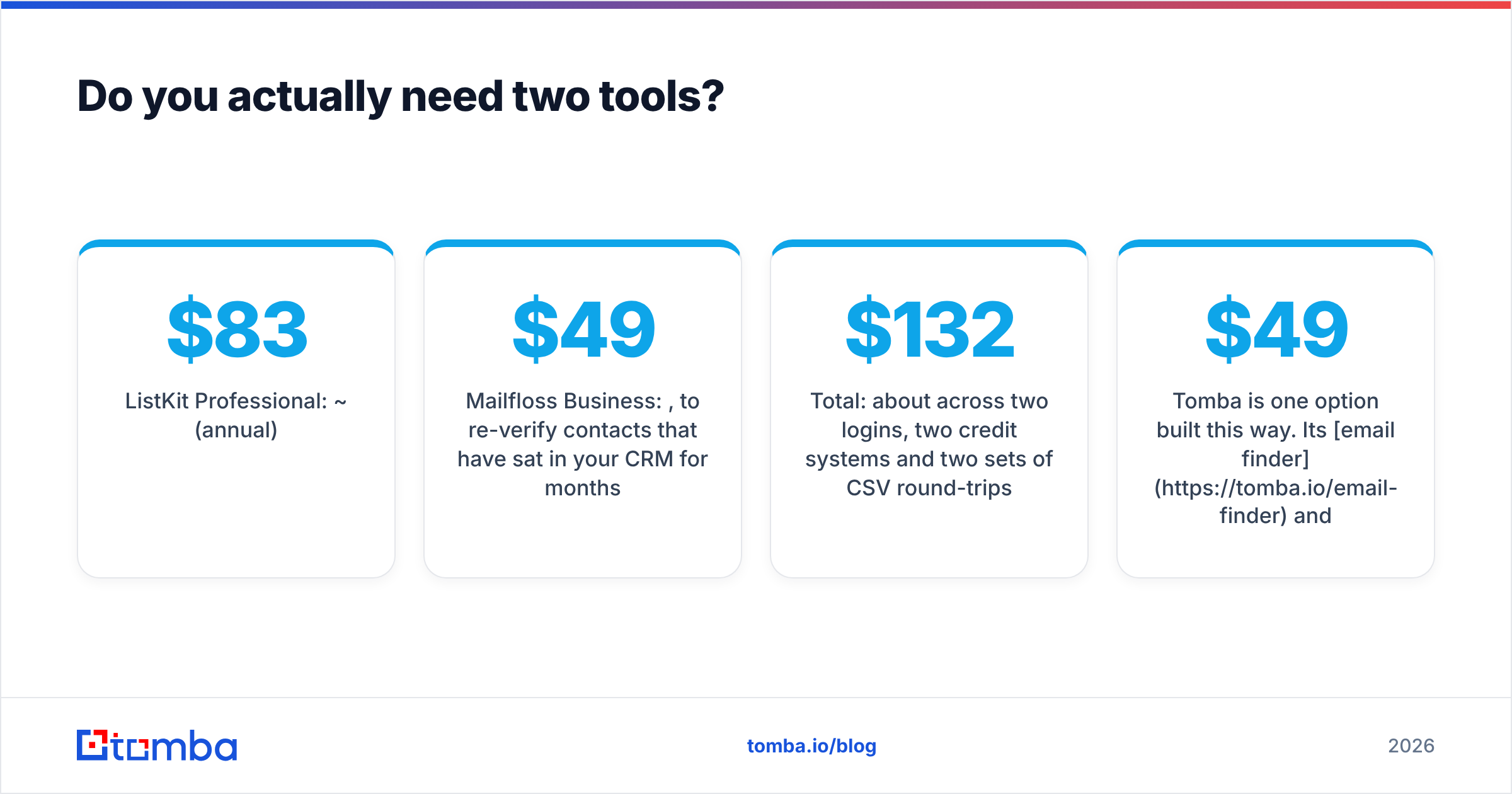
This is the question most comparisons skip. Price out the typical outbound stack:
- ListKit Professional: ~$83/mo (annual)
- Mailfloss Business: $49/mo, to re-verify contacts that have sat in your CRM for months
- Total: about $132/mo across two logins, two credit systems and two sets of CSV round-trips
For some teams that's the right setup. ListKit's filters are strong for high-volume list building, and Mailfloss's ESP automation has no real equivalent among outbound data tools. If you run both inbound newsletters and cold outbound, the pair makes sense.
For a lean outbound team, though, a single platform that finds emails by name or domain and re-verifies them on demand covers most of that ground. The questions to ask any all-in-one:
- Can it find an email from a name plus company, not just from a prebuilt database?
- Does it handle catch-all domains, or just mark them "unknown"?
- Can you bulk-verify an old CSV before a new campaign?
- Does it plug into your CRM or sheets so re-verification isn't a manual export?
Tomba is one option built this way. Its email finder and email verifier share one credit account, with catch-all handling and bulk jobs included. Plans run from a free tier (25 searches/mo) through Starter at $49/mo, Growth at $99/mo and Pro at $249/mo. See the pricing details. It doesn't replace Mailfloss's daily ESP autopilot. For outbound teams that mainly need "find, then verify before sending," it can remove one line item.
What are the pros and cons of each?#
ListKit pros
- Builds targeted B2B lists fast from one interface
- Emails arrive pre-verified
- Every plan has the same features, so you only scale credits
- Phone numbers available when you need them
ListKit cons
- Higher entry price than a verifier alone
- Annual credit pools don't suit bursty usage
- Phone lookups and AI extras use up credits quickly
- No ongoing hygiene once data leaves the platform
Mailfloss pros
- Very low starting price ($17/mo)
- Set-and-forget daily cleaning inside your ESP
- Typo correction recovers real signups
- 35+ native ESP integrations
Mailfloss cons
- No contact data at all, so it can't help you prospect
- Autopilot is built for marketing ESPs, not cold email sequencers
- Overage pricing matters if your list grows fast
For independent user sentiment on both, check the reviews on G2 and Capterra before you commit. Pay particular attention to reviews from people with the same ESP or sequencer you use.
How do you keep a list clean regardless of the tool?#
Tool choice matters less than process. Build these habits:
- Verify at the point of entry. Check every new lead or signup before it reaches a sequence.
- Re-verify before each campaign if the contact is more than 90 days old.
- Segment catch-all addresses. Send to them in smaller batches, or run a dedicated catch-all check first.
- Suppress hard bounces immediately and never retry them.
- Watch your bounce and complaint rates in your ESP or Google Postmaster Tools after every send.
Final verdict: ListKit or Mailfloss?#
- Choose ListKit if you need to build B2B prospect lists for cold outbound and want the emails verified before export.
- Choose Mailfloss if you already have a list in Mailchimp, Klaviyo or a similar ESP and want it cleaned automatically every day for less than $50/mo.
- Use both if you run serious outbound and a large inbound list.
- Consider one combined finder and verifier if you're an outbound team that mainly needs to find contacts and re-check them before sending, and you'd rather not pay two vendors.
If that last profile fits you, try Tomba Email Finder. You can find professional email addresses by name, domain or company, run them through Tomba's verifier on the same account, and start on the free tier before you commit to a $49/mo plan.
Related guides#
// get started
Find, verify and enrich your first contacts today
Start on the free plan with 25 searches a month, then scale when your team is ready.
Free plan · No credit card required · GDPR & CCPA
// about the author