ListKit vs Mattermark: Lead Lists or Company Intelligence in 2026?
ListKit sells verified contact lists for outbound. Mattermark sells company growth signals for deal sourcing. Here's which one fits your workflow, what each costs, and where the gaps are.
TL;DR
- ListKit is a contact data tool built for outbound. You filter a B2B database, export leads with verified emails (and phone numbers if you want them), and send cold email. Pricing is credit-based, and yearly plans start around $83/mo.
- Mattermark is a company intelligence platform. It tracks funding, hiring, web traffic and its own "Mattermark Score" for growth. Investors, corp dev teams and account-based sellers use it to decide which companies to go after.
- They solve different problems. ListKit tells you who to email. Mattermark tells you which companies are worth your time.
- If outbound volume is the main goal, ListKit is the better fit. If you need deal sourcing or growth signals, Mattermark is. Many teams end up pairing a signal source with a separate email finder and verifier.
- Prices change often. Check both vendors' pricing pages before you buy. The figures below were accurate at the time of writing.
What is the real difference between ListKit and Mattermark?#
People search "ListKit vs Mattermark" as if the two tools compete directly. For the most part they don't.
Think about planning a fishing trip. Mattermark is the sonar: it shows where the fish are gathering, which lakes are stocked and which ones are drying up. ListKit is the tackle box: bait, hooks and line so you can actually catch something. You can fish without sonar, and sonar alone won't put fish in the boat.
In practice:
- ListKit is a B2B lead database for cold outreach. You filter by job title, industry, headcount, location and technology, then export contacts with triple-verified business emails. The whole product is built around getting a clean list into your sequencer as fast as possible.
- Mattermark is a company-level intelligence platform. It covers millions of companies with fields such as funding rounds, investors, headcount growth, web traffic trends and a proprietary growth score. It started as a startup-tracking tool for VCs. After a rocky 2017 sale to FullContact, it relaunched as an independent company and has moved further into dealmaking and sales prospecting.
So the real question is whether your bottleneck is finding people to contact or deciding which companies deserve attention.
How do ListKit and Mattermark compare feature by feature?#
Here is the side-by-side, based on each vendor's published information and third-party reviews at the time of writing.
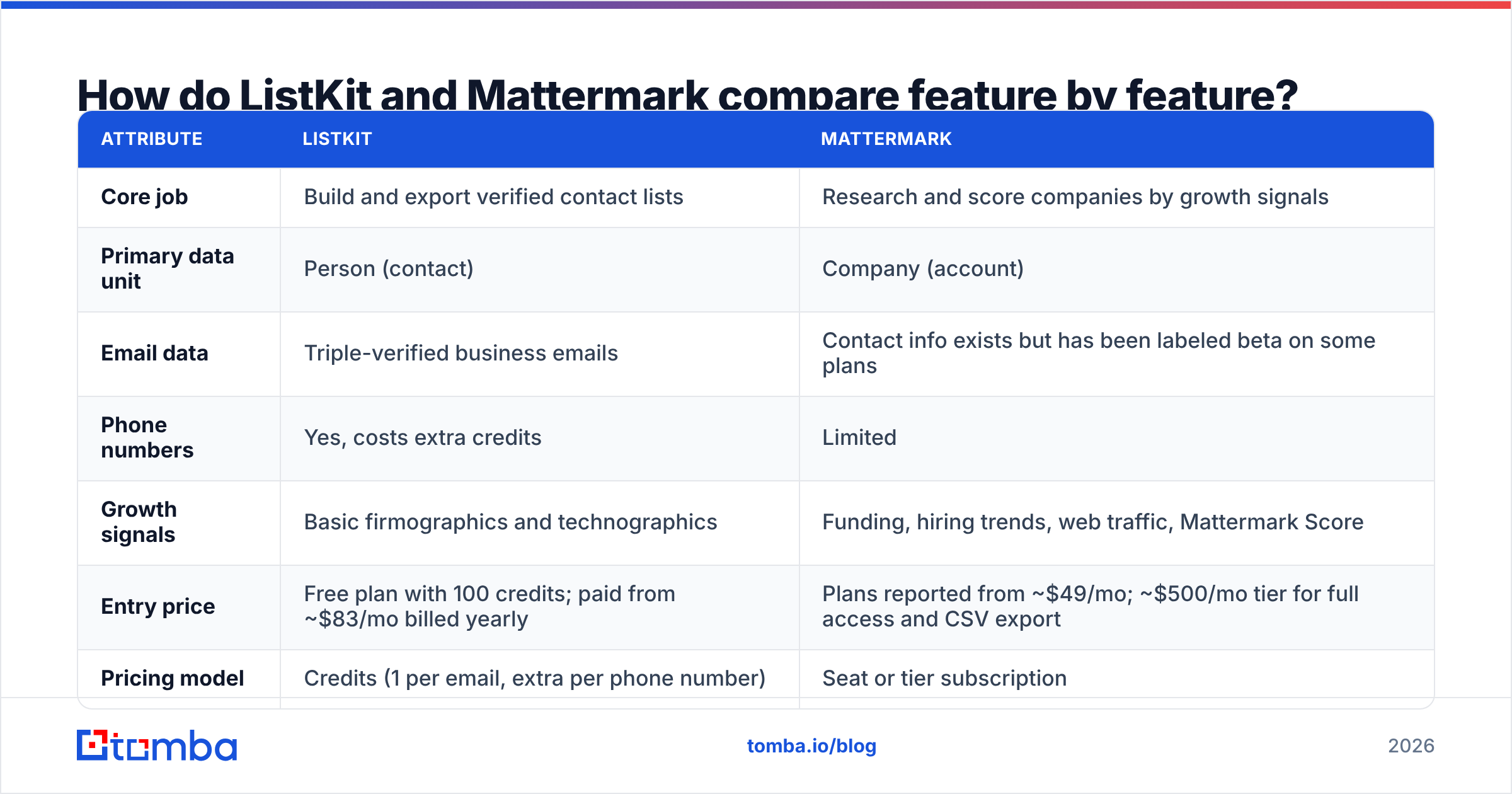
| Attribute | ListKit | Mattermark |
|---|---|---|
| Core job | Build and export verified contact lists | Research and score companies by growth signals |
| Primary data unit | Person (contact) | Company (account) |
| Email data | Triple-verified business emails | Contact info exists but has been labeled beta on some plans |
| Phone numbers | Yes, costs extra credits | Limited |
| Growth signals | Basic firmographics and technographics | Funding, hiring trends, web traffic, Mattermark Score |
| Entry price | Free plan with 100 credits; paid from ~$83/mo billed yearly | Plans reported from ~$49/mo; ~$500/mo tier for full access and CSV export |
| Pricing model | Credits (1 per email, extra per phone number) | Seat or tier subscription |
| Best-fit buyer | SDRs, agencies, cold email operators | VCs, corp dev, ABM and strategic sales teams |
| Export focus | CSV and sequencer-ready lists | Research views, alerts, CRM sync, API |
Where each tool wins:
- Contact depth goes to ListKit. It exists to hand you a named person with a verified inbox. Mattermark's contact layer has always been secondary to its company data.
- Signal depth goes to Mattermark. Growth scores, funding history and hiring velocity are its strengths. ListKit's filters are good enough for targeting, but it doesn't try to predict momentum.
- Cost per usable lead goes to ListKit. When the output is "emails I can send to this week," a credit model priced per contact is hard to beat.
- Account prioritization goes to Mattermark. If you work a small set of high-value accounts, knowing which ones just raised money or doubled engineering headcount is worth more than 10,000 extra rows.
- Ease of use goes to ListKit. Filter, preview, export. Mattermark rewards analysts who like working in dashboards.
How much does ListKit cost compared to Mattermark?#
ListKit charges by credits, and the yearly plans are where the value is. Third-party breakdowns currently list:
- Free: 100 credits total, all features
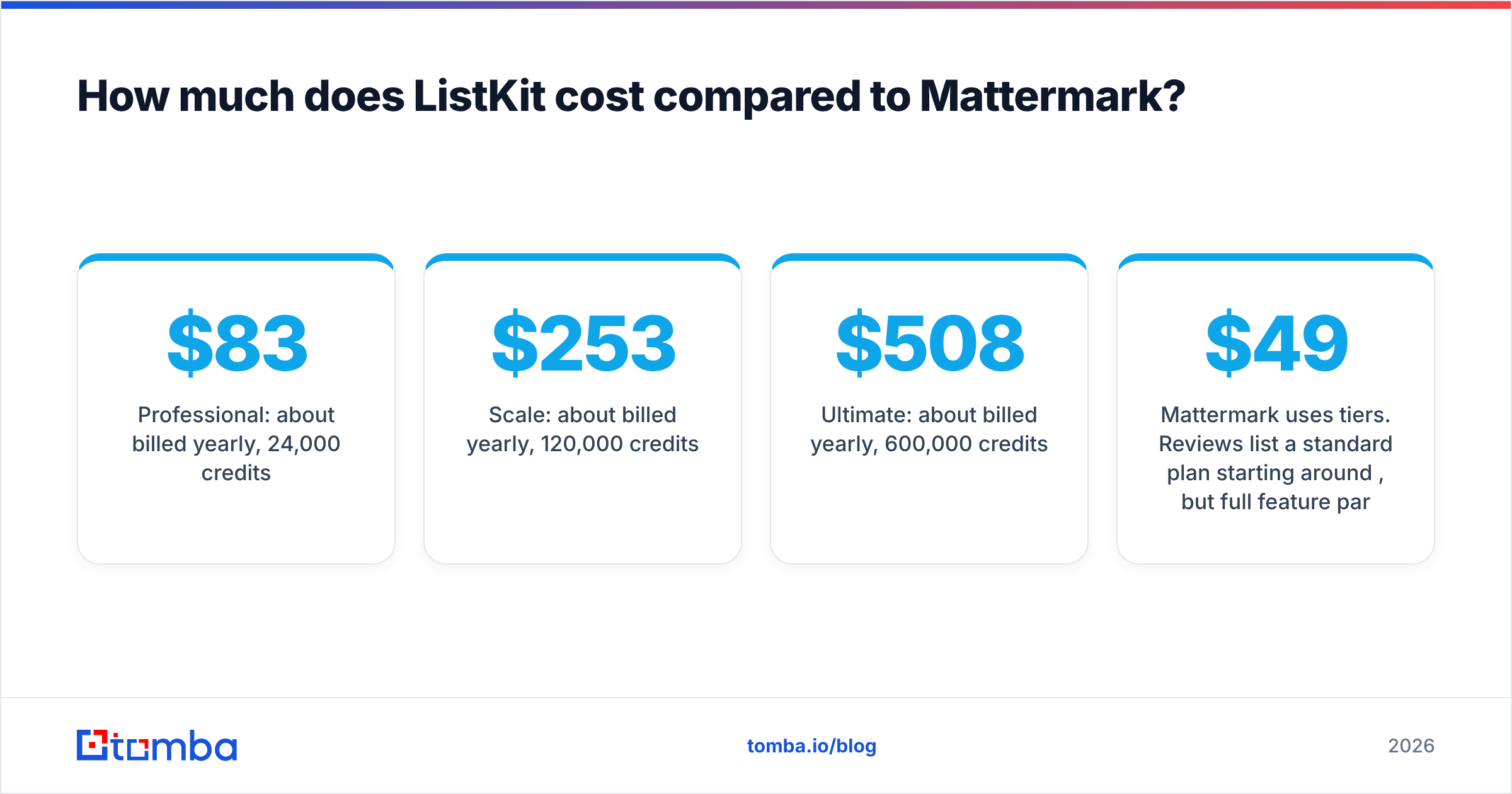
- Professional: about $83/mo billed yearly, 24,000 credits/year
- Scale: about $253/mo billed yearly, 120,000 credits/year
- Ultimate: about $508/mo billed yearly, 600,000 credits/year
One verified email costs one credit. Phone numbers cost more, and you're only charged when a number is found. Monthly billing costs more and includes far fewer credits, so ListKit is really designed for annual buyers. ListKit's credit documentation explains the mechanics.
Mattermark uses tiers. Reviews list a standard plan starting around $49/mo, but full feature parity (CSV export and contact information) sits on a self-service plan of roughly $500/mo. Mattermark positioned that tier against its earlier ~$6K/year contracts. If you just want to browse company profiles, the entry tier may be enough. If you need to pull data into your CRM or a spreadsheet, plan on the higher tier.
What this means for your budget:
- Outbound team sending 5,000 emails/month: ListKit Professional or Scale covers the list-building. Mattermark would be an extra cost on top, not a replacement.
- Investor or ABM team working 200 target accounts: Mattermark's signals earn their price. ListKit's volume credits would mostly sit unused.
- Small team on a tight budget: Neither tool is a must-have. Many teams build accounts from free sources such as Crunchbase news, LinkedIn and job boards, then use a pay-as-you-go email finder for the contacts.
Which tool has better data quality?#
"Quality" means different things for each tool.
For ListKit, quality means deliverability. Its main promise is triple verification: every exported email passes several checks before it reaches you. That matters because bounce rates above roughly 2–3% start to hurt your sender reputation. Keep in mind that verification at export only reflects the moment of export. People change jobs, and B2B contact data decays by a meaningful percentage every year. A list you exported in January and sent to in June needs checking again. Running an independent email verifier before each campaign is cheap insurance, whichever source you use.
For Mattermark, quality means freshness and coverage of signals. Funding events and hiring spikes are only useful if they arrive quickly. Mattermark pulls from sources such as news, SEC filings, web traffic and job data. Coverage is strongest for venture-backed tech companies, which makes sense given its origins. If your ICP is mid-market manufacturing or regional services firms, expect thinner profiles.
Neither vendor publishes an independent accuracy audit, so check user reviews on G2 and run your own test:
- Pull 100 records from each tool that match your ICP.
- For ListKit, send a small warm-up batch and measure hard bounces.
- For Mattermark, spot-check 20 companies against their press releases and LinkedIn headcount.
- Compare the cost per usable record, not the cost per record.
Who should choose ListKit?#
Pick ListKit if most of these describe you:
- You run cold email at volume. Hundreds or thousands of new contacts a month, across several inboxes.
- You're an agency building lists for clients and need predictable per-lead costs.
- Your ICP is defined by role and firmographics, for example "VP Marketing at 50–500 person SaaS companies in North America," rather than by timing signals.
- You want one step from filter to sequence. ListKit's exports are made to drop straight into Instantly, Smartlead or similar tools.
Where ListKit falls short: you get very little "why now" context. You know the person matches your filters, but not whether their company just raised a round or froze hiring. Your copy has to supply that relevance.
Who should choose Mattermark?#
Pick Mattermark if most of these describe you:
- You source deals. VC associates, PE analysts and corp dev teams screening startups by momentum.
- You sell to fast-growing tech companies and your win rate goes up when you catch them right after a raise.
- You run account-based motions with a short list of high-value targets, where research depth matters more than volume.
- You need growth scoring to rank a long list of companies without reading every profile.
Where Mattermark falls short: it hasn't been a strong contact-data tool. Even on the higher tier, you'll probably still need a dedicated way to find email addresses for the people at the accounts it surfaces. The ~$500/mo jump to unlock exports is also steep for small teams.
Can you use ListKit and Mattermark together?#
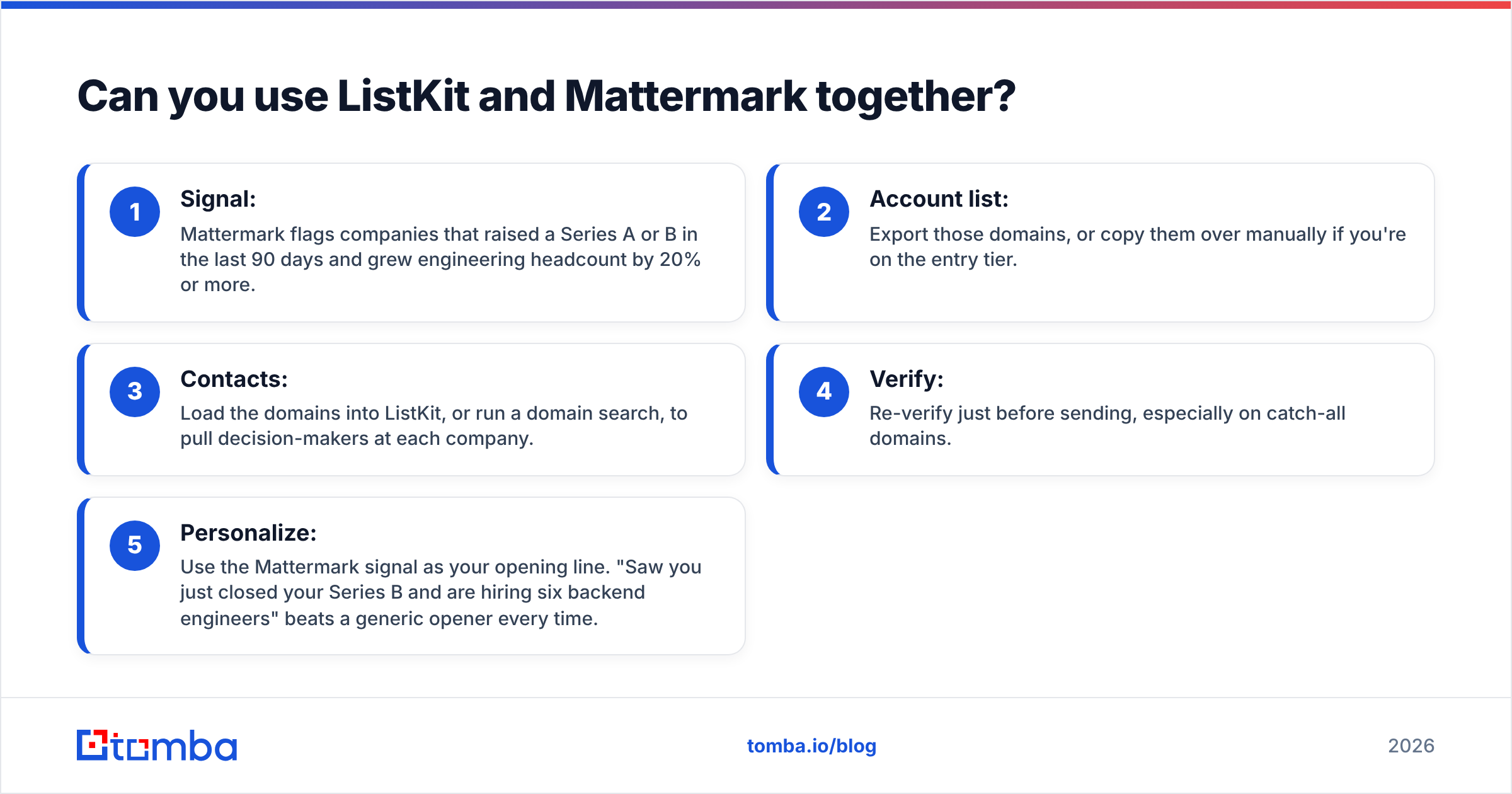
Yes, and for account-based outbound this is often the best setup. The workflow looks like this:
- Signal: Mattermark flags companies that raised a Series A or B in the last 90 days and grew engineering headcount by 20% or more.
- Account list: Export those domains, or copy them over manually if you're on the entry tier.
- Contacts: Load the domains into ListKit, or run a domain search, to pull decision-makers at each company.
- Verify: Re-verify just before sending, especially on catch-all domains.
- Personalize: Use the Mattermark signal as your opening line. "Saw you just closed your Series B and are hiring six backend engineers" beats a generic opener every time.
The downside is cost and overhead. Two subscriptions, two data models and a manual handoff in between. If the handoff is where things break down, look for tools that take a list of domains and return verified contacts in one pass, or use data enrichment to fill in the fields your signal source doesn't have.
What are the best alternatives to ListKit and Mattermark?#
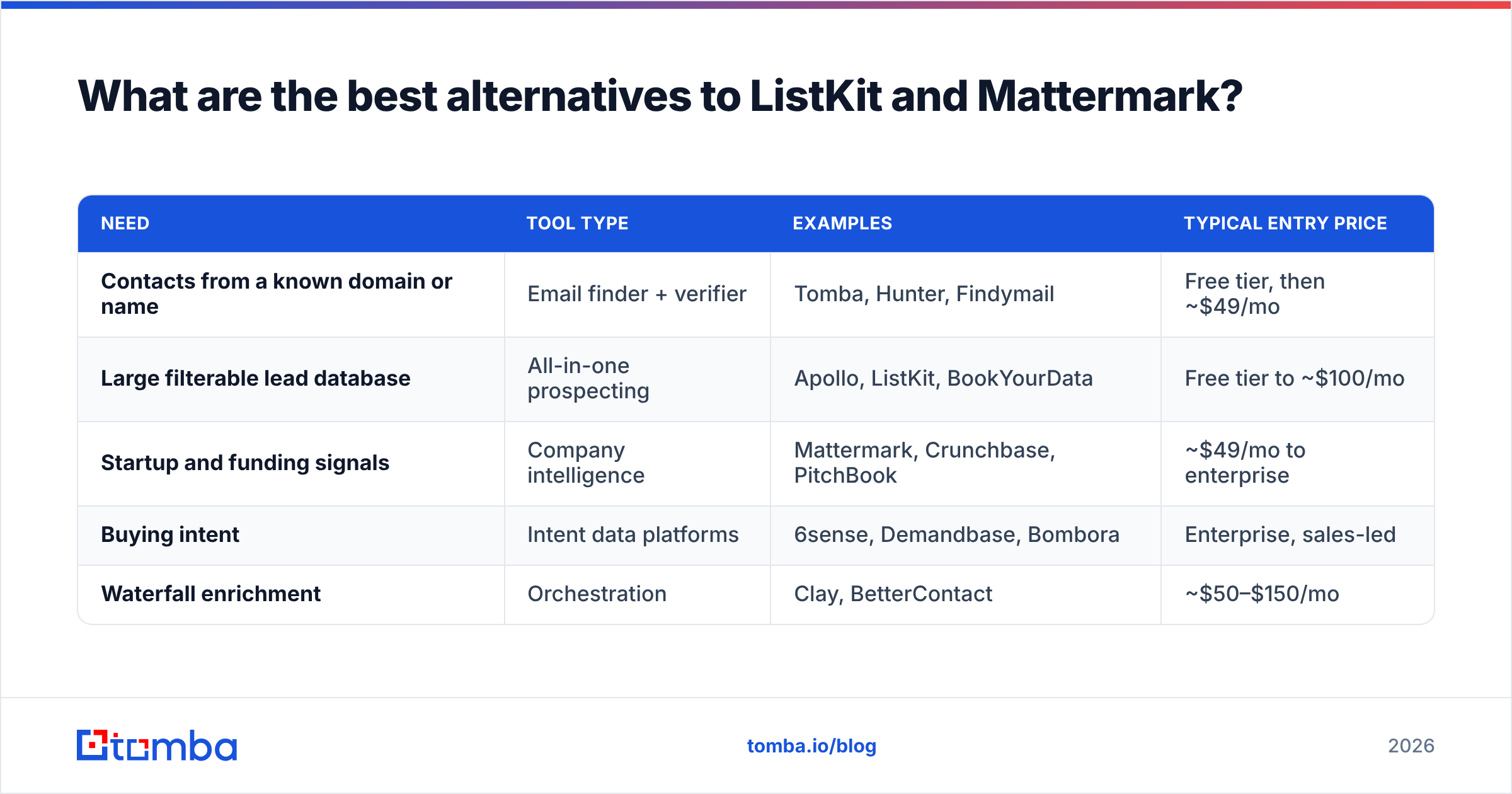
If neither tool fits, here is how the wider market splits up:
| Need | Tool type | Examples | Typical entry price |
|---|---|---|---|
| Contacts from a known domain or name | Email finder + verifier | Tomba, Hunter, Findymail | Free tier, then ~$49/mo |
| Large filterable lead database | All-in-one prospecting | Apollo, ListKit, BookYourData | Free tier to ~$100/mo |
| Startup and funding signals | Company intelligence | Mattermark, Crunchbase, PitchBook | ~$49/mo to enterprise |
| Buying intent | Intent data platforms | 6sense, Demandbase, Bombora | Enterprise, sales-led |
| Waterfall enrichment | Orchestration | Clay, BetterContact | ~$50–$150/mo |
A few practical notes:
- BookYourData is a solid peer to ListKit for pay-per-lead list buying, with a well-established verified-email model. It's worth a trial if you prefer buying lists without an annual commitment.
- Crunchbase is the closest like-for-like swap for Mattermark's funding data. Its free tier covers light research.
- Email finder tools such as Tomba fit a different step: once you already know the company or the person, you pay per lookup instead of licensing a database. Tomba's free tier includes 25 searches a month, and paid plans start at $49/mo (see Tomba pricing).
So, ListKit vs Mattermark: which one should you buy?#
Decide based on the job you need done, not the feature list.
- Choose ListKit if your pipeline depends on cold email volume and your ICP is defined by title, industry and company size. It's cheaper per usable contact, faster to run, and built for sequencers.
- Choose Mattermark if you win by timing: catching companies right after funding, hiring spikes or traffic growth. It's a research tool first and a contact tool a distant second.
- Choose both, or a signal source plus an email finder, if you run account-based outbound where both relevance and reach count.
Whichever you choose, don't rely on one vendor's verification stamp for months. Re-check emails before every send, keep bounces under 2%, and track what each list actually produces in replies, not how many rows it contains.
If you already know which companies you want to reach, from Mattermark, Crunchbase or your own research, and just need the right person's inbox, try the Tomba Email Finder. Enter a domain or a name plus a company and you get verified professional emails with source attribution. You can start on 25 free searches a month without an annual contract, so it covers the contact step without paying for a database you don't need.
Related guides#
// get started
Find, verify and enrich your first contacts today
Start on the free plan with 25 searches a month, then scale when your team is ready.
Free plan · No credit card required · GDPR & CCPA
// about the author