Listkit vs Noparam: Lead Database or Email Validation API?
Listkit sells you leads. Noparam checks whether an email is real before it gets into your system. Here is how they differ, what each costs, and when you need one, both, or neither.
TL;DR
- Listkit and Noparam are not direct rivals. Listkit is a B2B lead database for building prospect lists. Noparam is a real-time email validation API that checks addresses as they are submitted.
- Pick Listkit if your problem is "I don't have enough contacts to email." Its plans are sold on credits, with a free tier and paid tiers from about $83/mo on annual billing.
- Pick Noparam if your problem is "fake, mistyped, or disposable emails keep getting into my forms and CRM." It is privacy-first, built for developers, and has a free tier of about 100 validations per month.
- Most outbound teams need both jobs done: finding emails and verifying them. You can pair two tools, or use a platform that does finding and verification with one set of credits.
- Check pricing before you buy. Both vendors change their tiers often, so confirm current numbers on their own pricing pages.
People search "Listkit vs Noparam" because both names come up in cold email stacks and both say something about "verified emails." That shared word hides a real difference. One tool gives you contacts. The other decides whether a contact you already have should be trusted. If you mix them up, you pay for the wrong thing.
This guide explains what each tool does, where they overlap, what they cost, and which one fits your workflow.
What is Listkit?#
Listkit is a B2B contact database aimed at outbound teams, agencies, and cold emailers. You search by company and contact filters (industry, headcount, job title, location, technology, intent signals), then export lists of people with work emails and, sometimes, phone numbers.
Here is what matters in practice:
- Database size: Listkit says it has a database of 700M+ B2B contacts. Third-party reviews in 2026 cite about 731M.
- Verification: Its main pitch is "triple-verified" emails. Contacts run through several verification passes before export, which should lower bounce rates compared with raw scraped data.
- Credit model: Every plan has the same features. The only difference between tiers is credit volume. Pricing breakdowns from third parties say a business email costs 1 credit, a phone number costs more (commonly reported as 5), and fully enriched contacts can cost up to 10. Your real cost per lead depends on what you pull.
- Team access: Unlimited users on every plan, plus AI company search, intent data, enrichment, and CRM integrations.
Listkit solves the top of the funnel. It starts with an empty spreadsheet and fills it.
What is Noparam?#
Noparam is a real-time email validation API. It does not sell contacts. It tells you whether an email address you already have is worth keeping.
According to its documentation, each request checks:
- Syntax: is the address formatted correctly?
- Domain and MX records: can the domain actually receive mail?
- Mailbox validity: does the address look deliverable?
- Disposable and temporary emails: throwaway inbox providers get flagged.
- Role-based addresses: info@, sales@, support@ are identified.
- Typo correction: it suggests fixes for common mistakes, such as "gmal.com" to "gmail.com."
Noparam says responses come back in under 300ms and that it does not store the email addresses it processes. It also claims GDPR and CCPA compliance. It has an official WordPress plugin that validates emails on form submission, which shows the core use case: stopping bad data at the point of entry.
Think of it this way. Listkit is the wholesaler that delivers inventory. Noparam is the inspector at the loading dock who rejects damaged boxes before they reach the shelf.
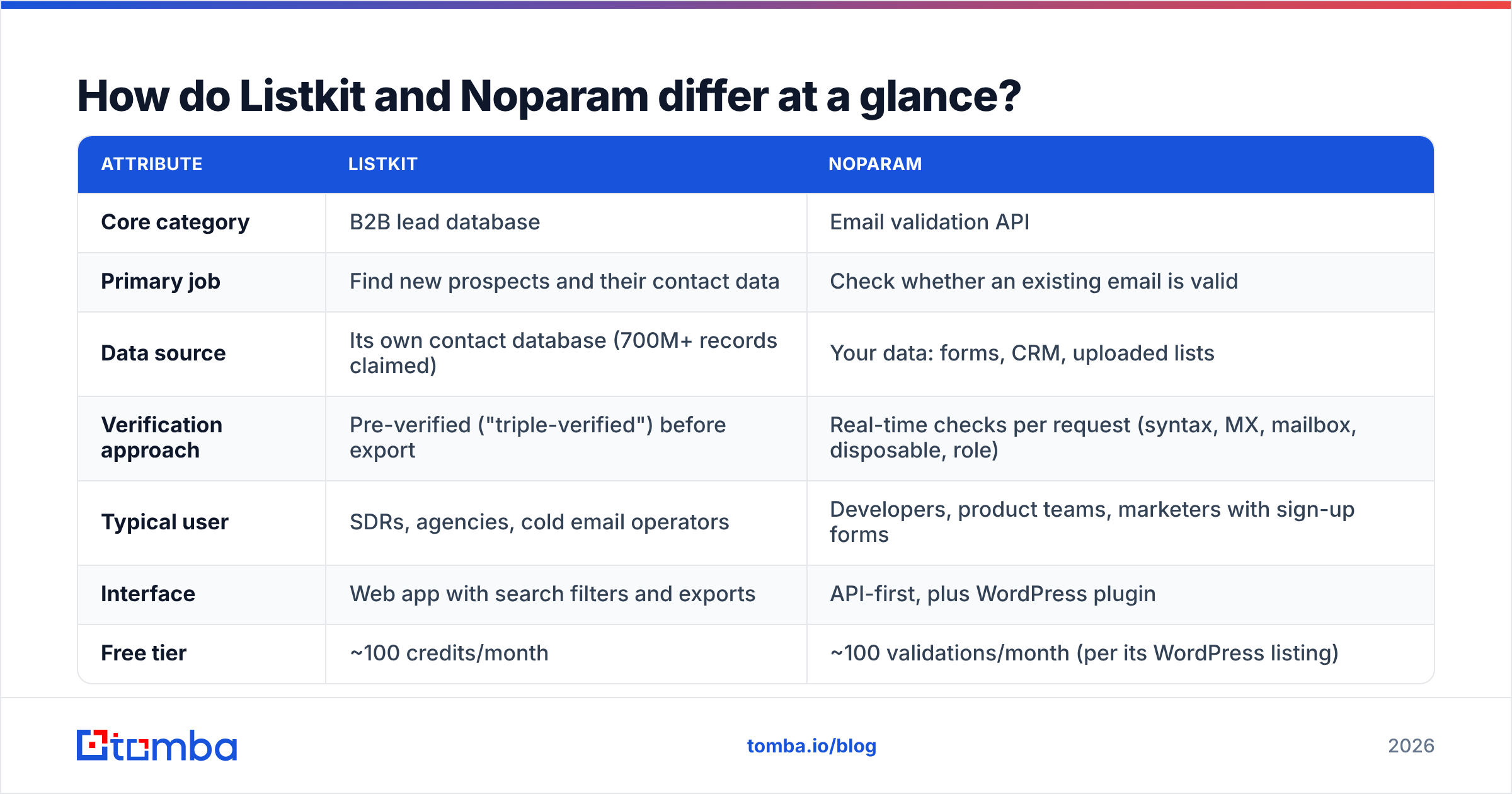
How do Listkit and Noparam differ at a glance?#
| Attribute | Listkit | Noparam |
|---|---|---|
| Core category | B2B lead database | Email validation API |
| Primary job | Find new prospects and their contact data | Check whether an existing email is valid |
| Data source | Its own contact database (700M+ records claimed) | Your data: forms, CRM, uploaded lists |
| Verification approach | Pre-verified ("triple-verified") before export | Real-time checks per request (syntax, MX, mailbox, disposable, role) |
| Typical user | SDRs, agencies, cold email operators | Developers, product teams, marketers with sign-up forms |
| Interface | Web app with search filters and exports | API-first, plus WordPress plugin |
| Free tier | ~100 credits/month | ~100 validations/month (per its WordPress listing) |
| Paid entry point | ~$83/mo (annual billing) | Volume-based tiers, Enterprise custom |
| Phone numbers | Yes, at higher credit cost | No |
| Privacy stance | Standard B2B data vendor | Says it does not store processed emails |
The table shows the main point: these tools sit at opposite ends of the data pipeline.
Which workflow stage does each tool cover?#
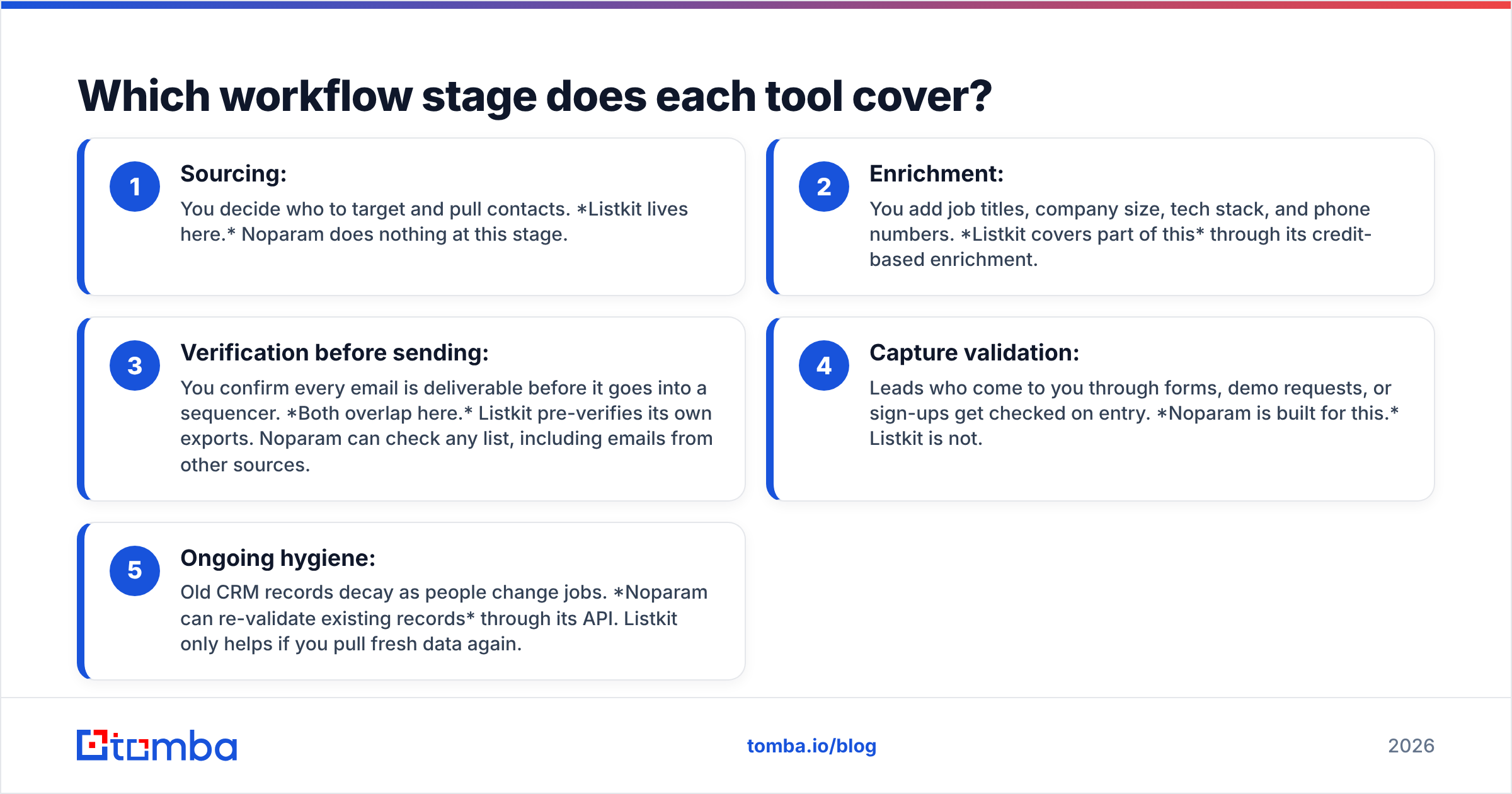
A clean outbound data flow usually has five stages. Here is where each tool fits:
- Sourcing: You decide who to target and pull contacts. Listkit lives here. Noparam does nothing at this stage.
- Enrichment: You add job titles, company size, tech stack, and phone numbers. Listkit covers part of this through its credit-based enrichment.
- Verification before sending: You confirm every email is deliverable before it goes into a sequencer. Both overlap here. Listkit pre-verifies its own exports. Noparam can check any list, including emails from other sources.
- Capture validation: Leads who come to you through forms, demo requests, or sign-ups get checked on entry. Noparam is built for this. Listkit is not.
- Ongoing hygiene: Old CRM records decay as people change jobs. Noparam can re-validate existing records through its API. Listkit only helps if you pull fresh data again.
If your pipeline is purely outbound (you source, you send), Listkit covers stages 1 to 3. If you also collect inbound leads or run a product with sign-ups, you need something like Noparam for stages 4 and 5.
Is Listkit better than Noparam for cold email?#
For cold email specifically, Listkit is the more relevant tool, because cold email starts with contacts you don't have yet. Noparam can't create a prospect list.
There is a catch. Pre-verified database exports are only as fresh as the last verification pass. B2B contact data decays quickly as people change roles, companies rebrand, and domains switch mail providers. An email verified three months ago may bounce today. That's why experienced cold emailers run a second verification right before loading a list into their sending tool, whatever the source.
Noparam could do that second check. So could any dedicated email verifier. What matters is having a final gate between the data and your sending domain, because bounce rate feeds directly into sender reputation.
One thing to confirm with any verifier is how it treats catch-all domains. These servers accept mail for any address, so a basic SMTP check can't tell a real inbox from a made-up one. Verifiers handle this differently: some mark catch-alls as "risky," some score them, and some run extra checks. Noparam's public materials focus on syntax, MX, disposable, and typo detection, so check its docs for catch-all behaviour before using it as your only pre-send gate. If your market has a lot of catch-all domains (common in enterprise and some European mid-market companies), a dedicated catch-all verifier is worth considering.
Is Noparam better than Listkit for data quality?#
For keeping data you already own clean, yes. Noparam is designed to run at the edges of your system: sign-up forms, lead magnets, checkout flows, CRM imports. It stops bad addresses before they cost you anything.
Its strengths:
- Fast. Sub-300ms responses mean you can validate inline without users noticing a delay.
- Privacy-first. Not storing processed emails matters if your legal team reviews every vendor that touches personal data.
- Developer-friendly. A clean API and a WordPress plugin let you deploy quickly, even without a big engineering team.
- Typo suggestions. Catching "gmial.com" at sign-up recovers leads you would otherwise lose.
Its limits:
- No contact discovery. It can't tell you who works at a company or how to reach them.
- No enrichment. You get a validity verdict, not job titles, firmographics, or phone numbers.
- Smaller ecosystem. It is a newer, focused product. Expect fewer native CRM integrations than the large B2B data platforms offer.
How does pricing compare?#
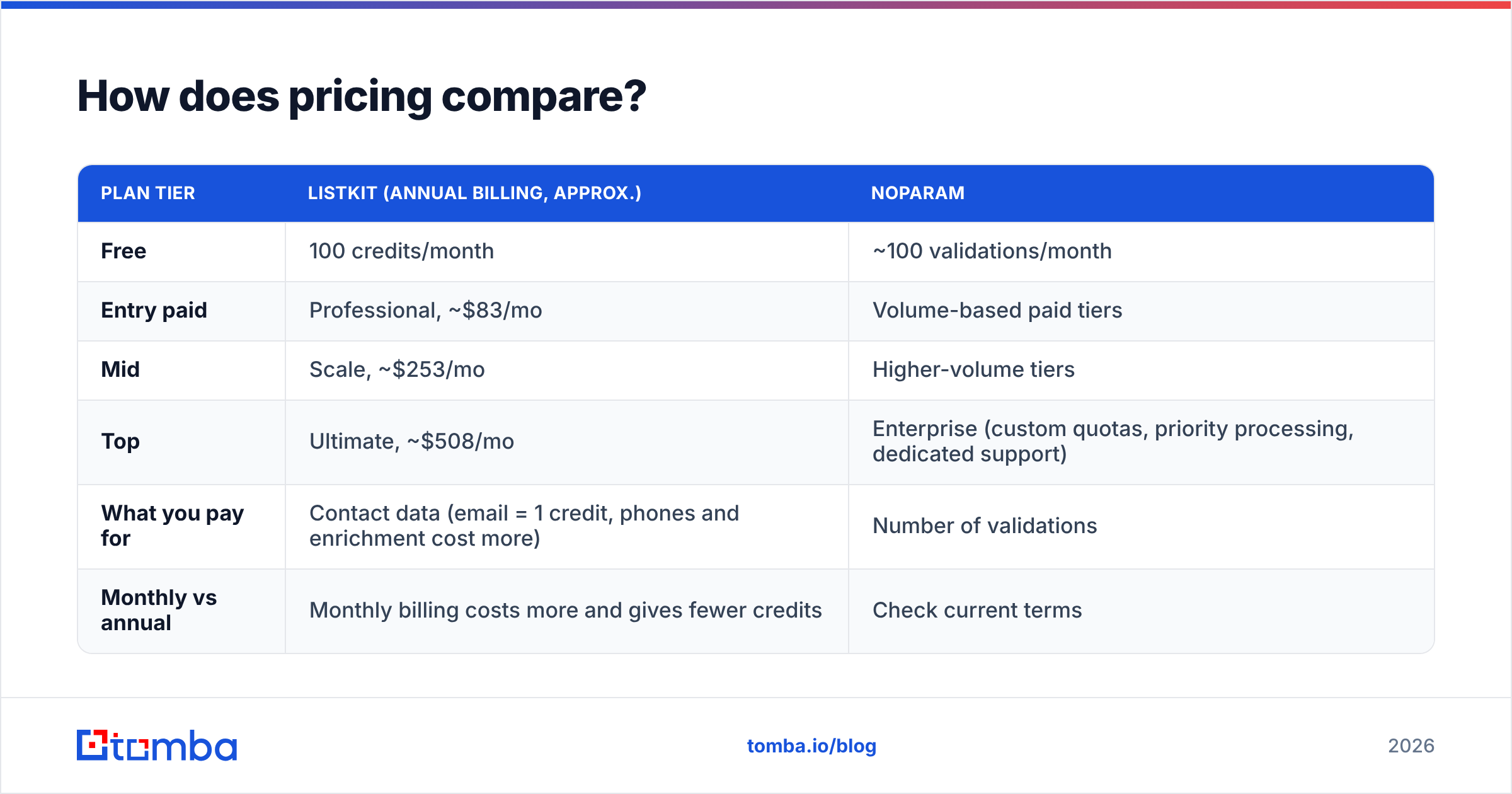
Pricing models differ as much as the products.
| Plan tier | Listkit (annual billing, approx.) | Noparam |
|---|---|---|
| Free | 100 credits/month | ~100 validations/month |
| Entry paid | Professional, ~$83/mo | Volume-based paid tiers |
| Mid | Scale, ~$253/mo | Higher-volume tiers |
| Top | Ultimate, ~$508/mo | Enterprise (custom quotas, priority processing, dedicated support) |
| What you pay for | Contact data (email = 1 credit, phones and enrichment cost more) | Number of validations |
| Monthly vs annual | Monthly billing costs more and gives fewer credits | Check current terms |
Listkit figures come from 2026 third-party pricing breakdowns. Noparam's free-tier figure comes from its WordPress plugin listing. Both vendors update their pricing, so check the official pages before you buy.
Two points on value:
- Listkit's headline price hides the per-lead cost. If you only pull emails, credits go far. If you want phones and full enrichment, the same plan covers far fewer contacts. Work out your cost per usable lead, not per credit.
- Validation is usually the cheaper line item. Checking an email almost always costs less than sourcing one. That's another reason a separate verification step is worth it: it protects the more expensive data you already paid for.
Can you use Listkit and Noparam together?#
Yes. They fit together because they barely overlap. A reasonable setup:
- Listkit builds your outbound target lists.
- Noparam validates every inbound form submission and re-checks older CRM records on a schedule.
- Optionally, Noparam (or another verifier) also re-checks Listkit exports right before sending.
The downside is overhead: two vendors, two billing cycles, two sets of credentials, and two places to debug when something breaks. For small teams that is real friction. You also have to connect them yourself through the API, Zapier, or CSV round trips, since there is no native link between the two.
That's why many teams choose a platform that combines finding and verifying. You get one credit pool, one API, and one dashboard for lookups and checks. Whether that makes sense depends on your volume and on how much you value specialisation versus simplicity.

How do they compare with all-in-one email finders?#
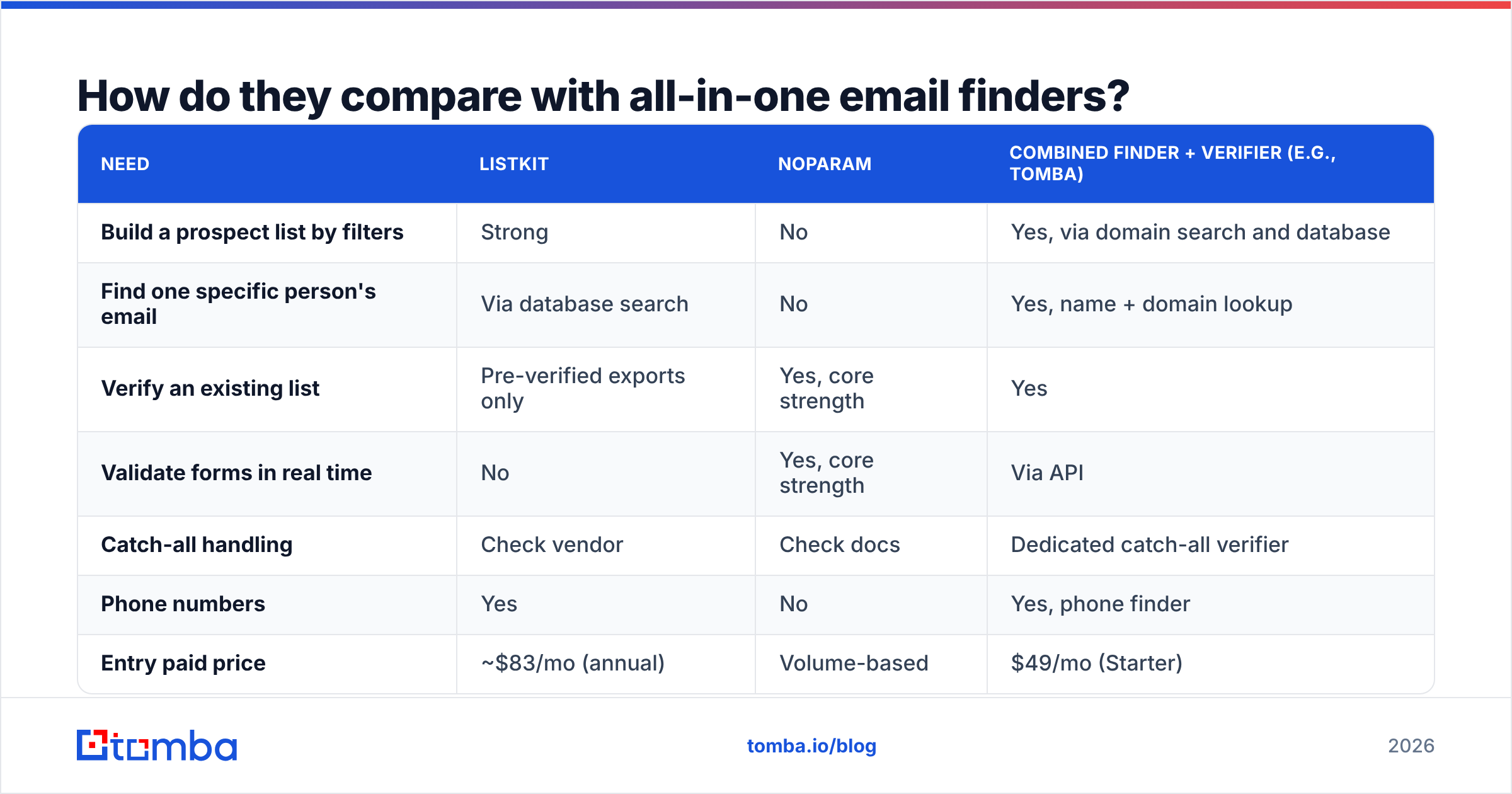
It helps to see both tools next to the usual alternative: a combined email finder and verifier.
| Need | Listkit | Noparam | Combined finder + verifier (e.g., Tomba) |
|---|---|---|---|
| Build a prospect list by filters | Strong | No | Yes, via domain search and database |
| Find one specific person's email | Via database search | No | Yes, name + domain lookup |
| Verify an existing list | Pre-verified exports only | Yes, core strength | Yes |
| Validate forms in real time | No | Yes, core strength | Via API |
| Catch-all handling | Check vendor | Check docs | Dedicated catch-all verifier |
| Phone numbers | Yes | No | Yes, phone finder |
| Entry paid price | ~$83/mo (annual) | Volume-based | $49/mo (Starter) |
Combined platforms are not automatically better. Listkit's filter-based list building is a real strength for high-volume outbound, and Noparam's privacy-first, form-level validation is a clean fit for product teams. Still, if your main need is "find this person's email and confirm it's real," a combined tool usually costs less and involves fewer moving parts. You can compare tiers on the Tomba pricing page.
For more on how verification affects outcomes, HubSpot's guide to email bounce rates is a good plain-language overview of why hard bounces damage deliverability.
Which should you choose?#
Base the decision on the problem you have right now:
- "I need more people to email." Choose Listkit. It is built for list building, has a large database, and credits scale with volume. Budget for a pre-send verification step anyway.
- "Junk emails are polluting my forms and CRM." Choose Noparam. It is fast, privacy-conscious, easy to deploy, and focused on doing one job well.
- "I run outbound and collect inbound leads." Use both, or look at a single platform that handles finding and verification together.
- "I mostly need to find specific people's emails and confirm them." Neither tool is the best fit alone. A dedicated email finder with built-in verification is the better match.
Final verdict: Listkit vs Noparam#
Listkit vs Noparam is mostly a category question, not a quality contest. Listkit is a strong choice for sourcing B2B contacts at volume. Noparam is a lean, developer-first validation API for keeping bad addresses out of your systems. Each is good at its own job, and neither replaces the other.
If you want finding and verifying in one place, try the Tomba Email Finder. Look up professional emails by name, domain, or company, verify them in the same workflow, and start on the free tier with 25 searches a month before moving to Starter at $49/mo. It's a simple way to fix both halves of the data problem without managing two vendors.
Related guides#
// get started
Find, verify and enrich your first contacts today
Start on the free plan with 25 searches a month, then scale when your team is ready.
Free plan · No credit card required · GDPR & CCPA
// about the author